Introduction:
You've built your Instagram presence, your audience is growing — and now you need automation that keeps up. ManyChat has been the go-to tool for years, but in 2026, creators, e-commerce brands, and agencies are looking for smarter, cheaper, and more flexible options.
Whether ManyChat's pricing feels too steep, its contact limits are holding you back, or you simply want a platform designed specifically for Instagram DM automation — you're in the right place.
In this guide, we break down the 15 best ManyChat alternatives for Instagram automation in 2026. We cover their key features, pricing, API compliance, pros and cons, and who each tool is best suited for. By the end, you'll know exactly which platform fits your workflow, your budget, and your growth goals.
On This Page
What Is ManyChat and Why Are People Looking for Alternatives in 2026?
How Instagram DM Automation Works in 2026
Top 15 ManyChat Alternatives: Full Comparison Table
ManyChat Pricing vs Alternatives: What You Actually Pay in 2026
Deep-Dive: Each ManyChat Alternative Reviewed
Best Practices for Instagram Automation in 2026
Common Mistakes to Avoid with Instagram DM Tools
Real Results: What Instagram Automation Delivers
Related Content & Next Steps
Frequently Asked Questions
What Is ManyChat and Why Are People Looking for Alternatives in 2026?
ManyChat launched as a Facebook Messenger chatbot and gradually expanded into Instagram automation. By 2026, it remains one of the most recognized names in the space — but it's no longer the only serious player, and for many users, it's no longer the best fit.
ManyChat's Strengths
ManyChat pioneered comment-to-DM automation on Instagram and built a solid reputation for being Meta-approved. Its visual flow builder is beginner-friendly, and its integrations with Shopify, Klaviyo, and Google Sheets appeal to e-commerce brands. For teams that are already inside its ecosystem, the platform delivers solid results.
Why Creators and Brands Are Moving On
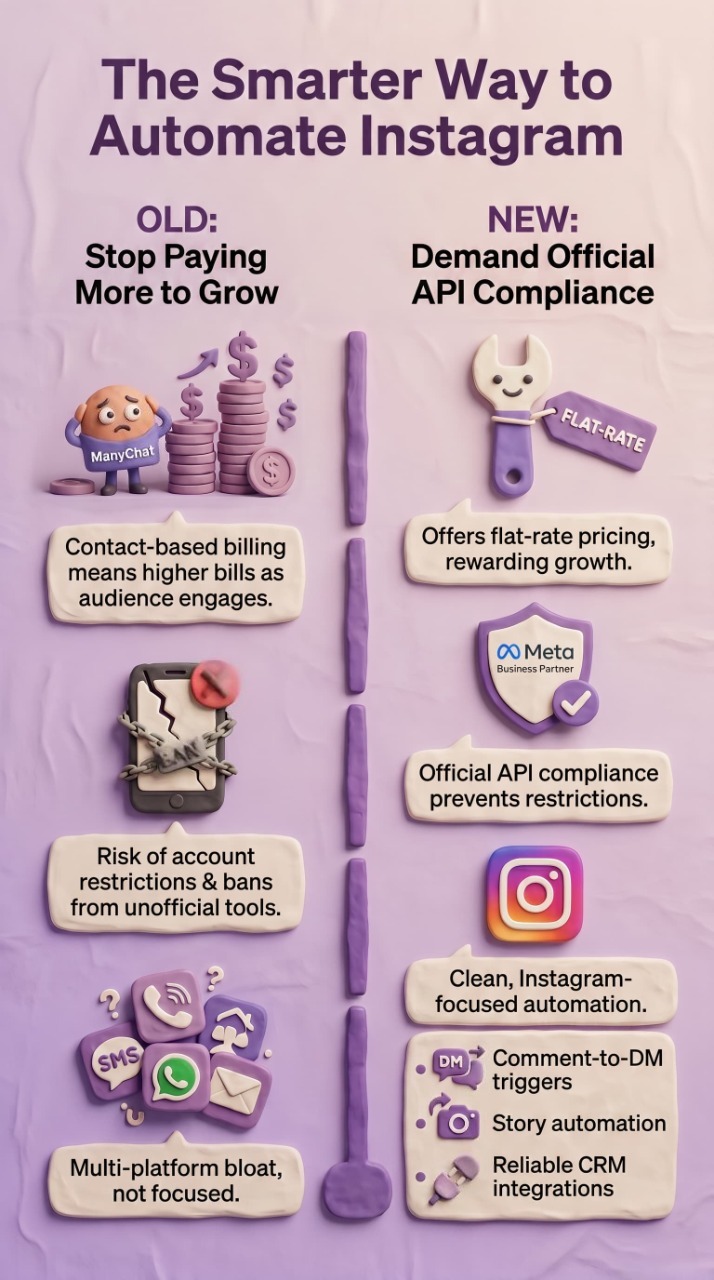
The frustrations are real and consistent. ManyChat charges per contact — which means the more your audience grows, the more you pay. A creator with 10,000 engaged followers can hit monthly bills that rival small business software subscriptions. Contact-based billing punishes growth, which is the opposite of what a marketing tool should do.
Beyond pricing, ManyChat is not built exclusively for Instagram. It tries to serve Facebook, WhatsApp, SMS, and email simultaneously, which leads to an interface that feels bloated for creators who just want clean, focused Instagram DM automation.
The biggest complaint is ManyChat pricing. In 2026, ManyChat charges based on "active contacts" — meaning the more your audience engages, the more you pay. A creator with 10,000 active contacts can easily spend $65 to $145 per month, and that cost scales aggressively as you grow. This is why so many creators are searching for free ManyChat alternatives or tools with flat rate pricing that does not punish you for having an engaged audience.
What to Look for in a ManyChat Alternative
- Official Meta Business Partner status (ensures API compliance and zero ban risk)
- Flat-rate or unlimited-contact pricing
- Comment-to-DM automation and story reply triggers
- Lead capture and CRM integrations
- Simple, Instagram-focused interface
- Reliable uptime and responsive support
How Instagram DM Automation Works in 2026
Before diving into alternatives, it helps to understand how Instagram automation actually functions — especially given Meta's evolving API rules as of 2026.
The Role of the Instagram Messaging API
Meta's official Instagram Messaging API is what separates compliant tools from risky third-party scrapers. Any tool that accesses Instagram DMs through the official API is granted permission by Meta to send and receive messages on behalf of connected accounts. Tools that bypass this API — using browser automation, unofficial endpoints, or fake app sessions — put your account at risk of temporary restriction or permanent suspension.
As of 2026, Meta has tightened enforcement significantly. Accounts using non-compliant tools have seen a sharp increase in restrictions. This is why API compliance is the most critical factor when evaluating any ManyChat alternative.
Comment-to-DM Automation

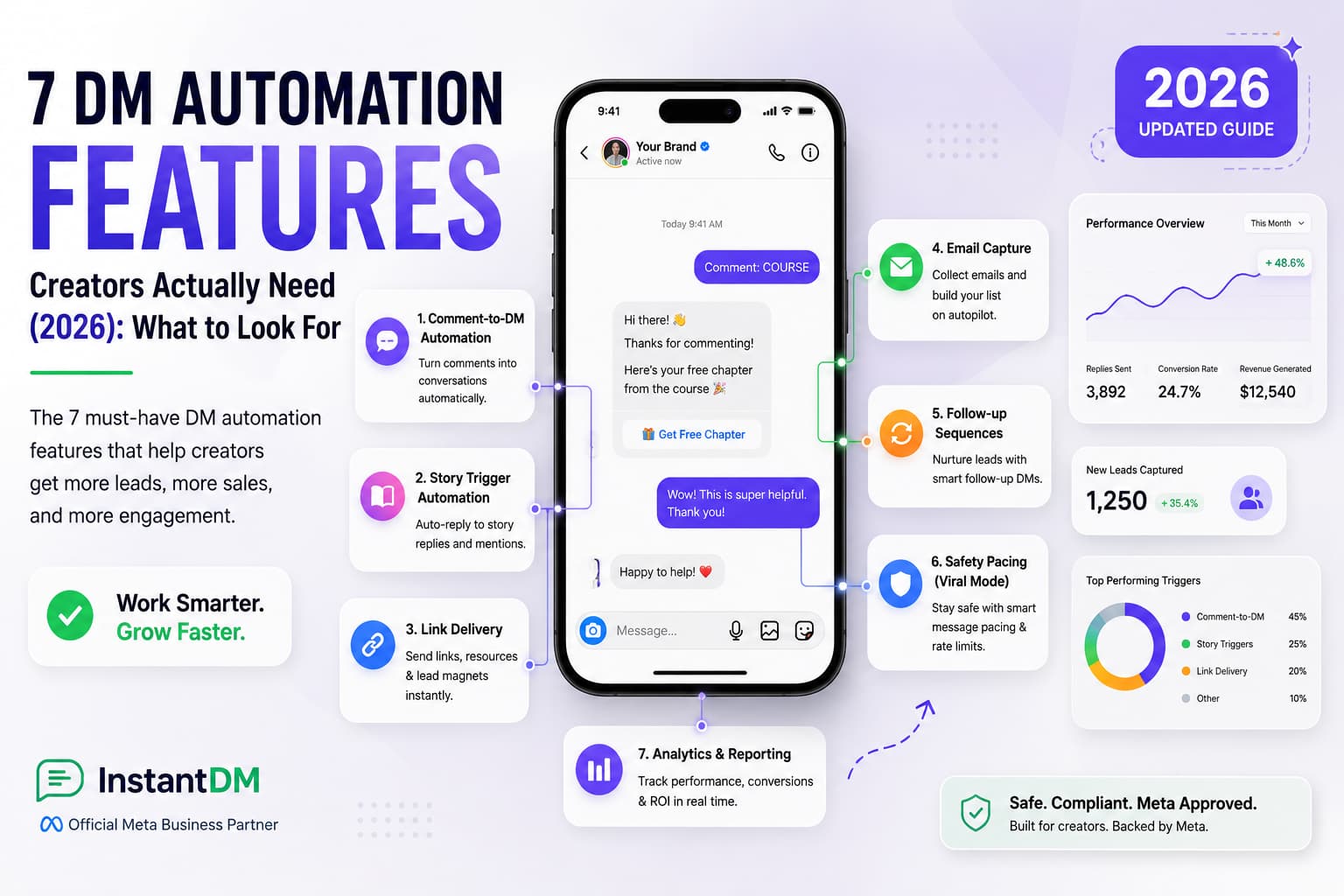
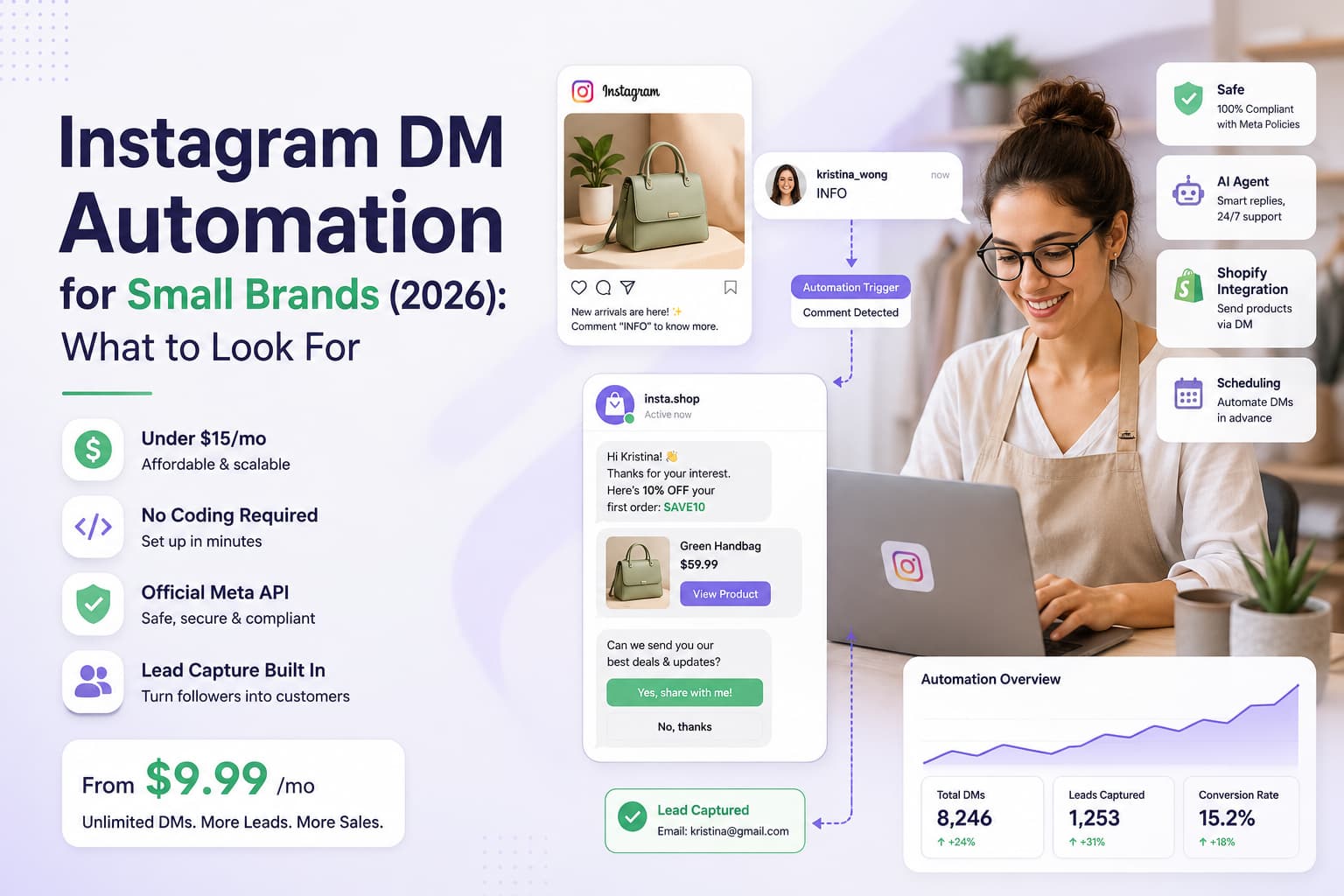
This is the core feature that drives most Instagram automation workflows in 2026. When a follower comments a specific keyword on your post, the tool automatically sends them a DM. This is effective for giveaways, lead generation, product launches, and content delivery (like sending a PDF or a link). Done right, it feels personal. Done wrong, it feels spammy.
Story Reply Automation
When someone replies to your Instagram Story, a compliant automation tool can trigger an instant DM response. This is powerful for engagement loops — you post a story with a question, someone replies, and they immediately receive a personalized follow-up. Story reply triggers are a 2026 growth hack that most creators are underutilizing.
Lead Capture and CRM Sync
The best Instagram automation tools don't just send DMs — they capture contact information (name, email, phone), tag leads by interest, and push that data into your CRM or email platform. This transforms Instagram from a vanity metric platform into a genuine revenue channel.
Try InstantDM free
Want to try this yourself? InstantDM handles comment-to-DM, story replies, and lead capture — all API-compliant, starting at $9.99/mo for unlimited contacts.
Start your free trial at instantdm.com →
Where ManyChat genuinely wins (and where it doesn't)
Before listing the alternatives, here's the honest read: ManyChat is the right choice for a meaningful set of buyers. Pretending otherwise just wastes your time.
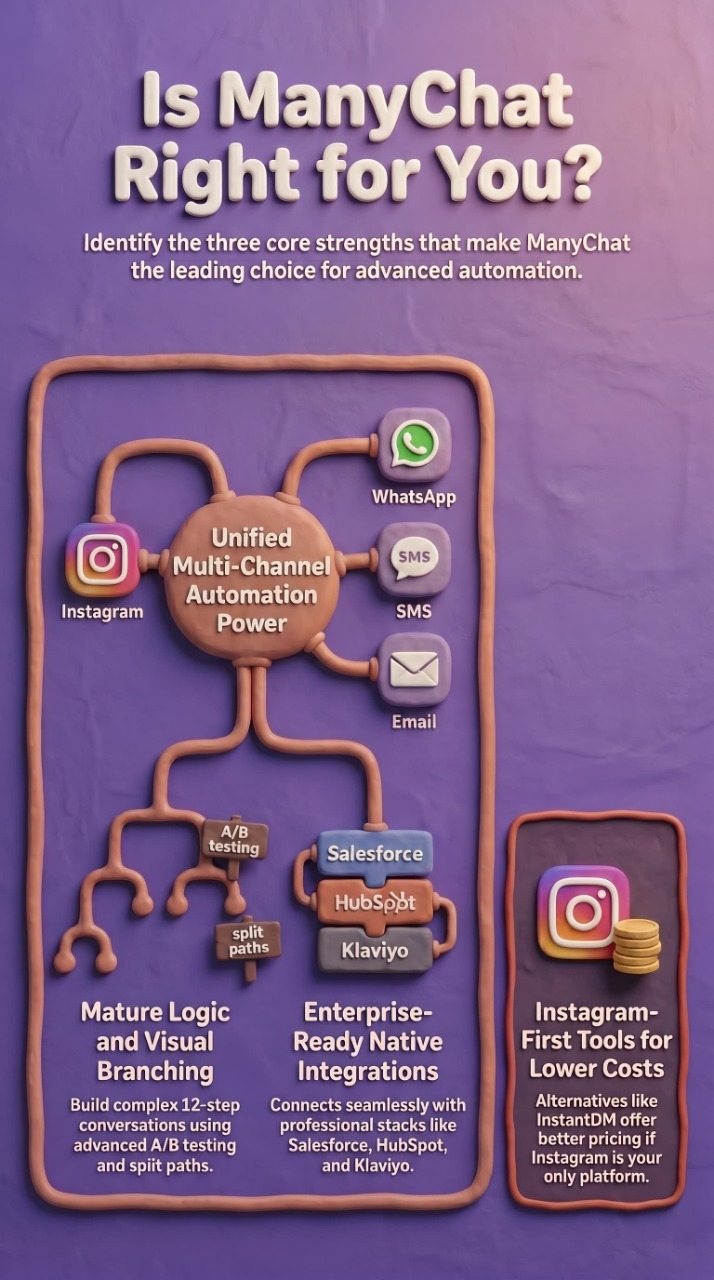
Winner: ManyChat — for multi-channel automation. If your business runs DMs across Instagram, WhatsApp, SMS, and email from a single dashboard, ManyChat's multi-channel architecture beats every Instagram-first tool listed below. InstantDM, Chatfuel, and most others on this list focus on Instagram only.
Winner: ManyChat — for advanced flow logic. ManyChat's visual flow builder with branching conditions, A/B testing, and split paths is more mature than most Instagram-focused tools. If you need a 12-step conversation that adapts to user replies, ManyChat handles it more elegantly.
Winner: ManyChat — for enterprise integrations. Native connectors to Salesforce, HubSpot, and Klaviyo plus 1,000+ Zapier integrations make it the safer bet for agencies and enterprise teams with existing martech stacks.
So the question isn't whether ManyChat is "bad." It isn't. The question is whether you're paying for the multi-channel breadth you actually use, or whether an Instagram-focused, flat-rate alternative would give you the features you need at a fraction of the cost.
When you compare alternatives to ManyChat side by side, the differences become clear. ManyChat wins on template variety and its Facebook Messenger integration. But for Instagram specific automation — comment to DM triggers, Story reply automation, and keyword based DM flows — tools like InstantDM, Chatfuel, and MobileMonkey offer deeper functionality at a lower price point. If Instagram is your primary platform, there are better manychat alternatives for instagram that were built specifically for the Meta API.
Top 15 ManyChat Alternatives: Full Comparison Table (2026)
Use this table to quickly compare the 15 best ManyChat alternatives across pricing, API compliance, Instagram DM capability, comment automation, and contact limits. Pricing accurate as of May 2026 — verify on each tool's pricing page before deciding.
Tool | Starting Price | Free Plan | API Compliant | Instagram DMs | Comment Automation | Unlimited Contacts |
InstantDM | $9.99/mo | Yes | ✅ Yes | ✅ Yes | ✅ Yes | ✅ Yes |
ManyChat | $15/mo | Limited | ✅ Yes | ✅ Yes | ✅ Yes | ❌ No |
MobileMonkey | $19/mo | No | ✅ Yes | ✅ Yes | Partial | ❌ No |
Chatfuel | $15/mo | Limited | ✅ Yes | ✅ Yes | ✅ Yes | ❌ No |
Tidio | $29/mo | Yes | Partial | Limited | ❌ No | ❌ No |
ManyReply | $12/mo | Yes | ✅ Yes | ✅ Yes | ✅ Yes | ❌ No |
NapoleonCat | $27/mo | No | ✅ Yes | Limited | ❌ No | ❌ No |
Inflact | $45/mo | No | ❌ No | ✅ Yes | ✅ Yes | ❌ No |
Jarvee | $29.95/mo | No | ❌ No | ✅ Yes | ✅ Yes | ❌ No |
Postly | $18/mo | Yes | ✅ Yes | Limited | Partial | ❌ No |
Trengo | $19/mo | No | ✅ Yes | ✅ Yes | ❌ No | ❌ No |
Sendible | $29/mo | No | ✅ Yes | Limited | ❌ No | ❌ No |
Iconosquare | $49/mo | No | ✅ Yes | ❌ No | ❌ No | ❌ No |
Publer | $12/mo | Yes | ✅ Yes | Limited | ❌ No | ❌ No |
Pallyy | $18/mo | Limited | ✅ Yes | Limited | ❌ No | ❌ No |
SocialBee | $29/mo | No | ✅ Yes | ❌ No | ❌ No | ❌ No |
ManyChat Pricing vs Alternatives: What You Actually Pay in 2026
One of the top reasons creators look for manychat alternatives is pricing. ManyChat uses a sliding scale based on active contacts, which means your costs grow as your audience engages more. Here is what you actually pay at different audience sizes:
Tool | 1,000 Contacts | 10,000 Contacts | 50,000 Contacts | Free Plan? |
ManyChat | $15/mo | $65/mo | $145/mo | Yes (limited) |
InstantDM | $9.99/mo | $9.99/mo | $9.99/mo | Yes (forever free) |
Chatfuel | $19.99/mo | $49.99/mo | $99.99/mo | Yes (limited) |
MobileMonkey | $19/mo | $49/mo | $99/mo | Yes (limited) |
Tidio | $29/mo | $59/mo | Custom | Yes (limited) |
The key difference: ManyChat charges you more as you grow. InstantDM offers flat rate pricing at $9.99 per month regardless of how many contacts you have. For creators who are scaling, this makes InstantDM one of the most affordable free manychat alternatives available in 2026.
If you are currently on ManyChat and paying more than $50 per month, switching to an alternative could save you $500 to $1,000 per year without losing any features. The migration process takes less than 15 minutes (we cover this in detail below). -- the tabular column data is there, give that in tabular data , it is not properly aligned
Deep-Dive: Each ManyChat Alternative Reviewed
Let's go beyond the table. Here's what you actually need to know about each tool before committing.
1. InstantDM — Best Overall ManyChat Alternative for Instagram
InstantDM is purpose-built for Instagram automation, and it shows. As an Official Meta Business Partner, it uses the Instagram Messaging API exclusively — meaning your account is always protected. At $9.99/month for unlimited contacts, it's the most cost-effective fully compliant option in 2026.
Key features include comment-to-DM automation, story reply triggers, welcome DM sequences, lead capture flows, keyword routing, and native integrations with tools like Zapier, Klaviyo, and Google Sheets. The interface is clean and focused — no Facebook Messenger clutter, no WhatsApp tabs to ignore.
- Best for: Creators, coaches, e-commerce brands, and agencies
- 2026 Pricing: Starts at $9.99/mo — unlimited contacts
- API Compliant: Yes — Official Meta Business Partner
- Free Trial: Available
- G2 Rating: 4.8/5 | Capterra Rating: 4.7/5 | Meta Verified: Yes
- InstantDM is consistently rated as the top manychat alternative for instagram by independent reviewers on G2 and Capterra. Users highlight the flat rate pricing, the speed of comment to DM triggers (sub second response times), and the fact that it was built specifically for Instagram rather than being a Facebook first tool that added Instagram later.
2. MobileMonkey — Solid Multichannel Option
MobileMonkey (now rebranded as Customers.ai in some markets) offers Instagram DM automation alongside Facebook and SMS. It's a strong choice for teams already running multichannel campaigns who want a unified inbox. The downside is pricing — it's higher than most alternatives, and contact limits apply on lower tiers.
- Best for: Agencies managing multiple channels
- 2026 Pricing: From $19/mo
- API Compliant: Yes
3. Chatfuel — Best for E-Commerce Brands
Chatfuel has built deep integrations with Shopify and WooCommerce, making it an excellent choice for e-commerce brands that want to automate Instagram DMs tied to product catalog updates, abandoned cart reminders, and order confirmations. It's Meta-certified and well-supported, but pricing scales with contacts.
- Best for: E-commerce brands on Shopify/WooCommerce
- 2026 Pricing: From $15/mo
- API Compliant: Yes
4. Tidio — Best for Brands with a Web Chat + Instagram Combo
Tidio is primarily a live chat and customer support platform that added Instagram DM integration. If you need a single tool to handle both your website chat widget and Instagram messages, Tidio is worth considering. However, its Instagram automation features are limited compared to purpose-built tools — it lacks comment-to-DM triggers and deep story reply automation.
- Best for: Small businesses needing website + Instagram support
- 2026 Pricing: From $29/mo
- API Compliant: Partial
5. ManyReply — Affordable Entry-Level Alternative
ManyReply is a lean, focused Instagram DM automation tool that's growing quickly in 2026. It offers comment-to-DM, keyword-based DM routing, and basic lead capture at a lower price point than most competitors. It's not as feature-rich as InstantDM or Chatfuel, but for creators just starting out with automation, it's a sensible entry point.
- Best for: Creators starting with automation on a budget
- 2026 Pricing: From $12/mo
- API Compliant: Yes
6. NapoleonCat — Best for Social Media Managers
NapoleonCat is built for social media management teams, not chatbot builders. It excels at Instagram inbox management, comment moderation, and scheduling — but its DM automation is limited to auto-replies rather than full flow-based messaging. It's a good fit for brands that prioritize moderation and team collaboration over conversion automation.
- Best for: Social media agencies and in-house teams
- 2026 Pricing: From $27/mo
- API Compliant: Yes
7. Inflact — Feature-Rich but High-Risk
Inflact offers a compelling feature set including DM automation, hashtag research, and scheduling — but it does not use Meta's official API. This means it operates via unofficial methods that violate Instagram's Terms of Service. In 2026, using Inflact puts your account at genuine risk of restriction. We include it here for awareness, but do not recommend it for accounts you care about.
- Best for: Only for those who accept account risk
- 2026 Pricing: From $45/mo
- API Compliant: No — HIGH RISK
8. Jarvee — Legacy Automation Tool (Not Recommended in 2026)
Jarvee was a popular Instagram automation tool in the 2017-2020 era. In 2026, it remains operational but relies entirely on non-API methods. Instagram has become significantly more effective at detecting and restricting accounts using tools like Jarvee. Unless you're running throwaway accounts for testing, avoid it.
- Best for: Not recommended in 2026
- 2026 Pricing: From $29.95/mo
- API Compliant: No — HIGH RISK
9. Postly — Good Scheduling, Limited DM Automation
Postly is a social media scheduling tool with basic Instagram DM support. It's best suited for teams focused on content planning and publishing rather than conversation automation. Its DM features are rudimentary compared to dedicated tools, but if scheduling is your primary need with some DM capability, it's a budget-friendly option.
- Best for: Content teams focused on scheduling
- 2026 Pricing: From $18/mo
- API Compliant: Yes
10. Trengo — Best for Customer Support Teams
Trengo is a customer communication platform that routes Instagram DMs into a shared team inbox. It's excellent for brands with customer support teams who need to collaborate on Instagram conversations. It's not a chatbot or automation-first tool — but its team assignment, SLA tracking, and internal notes make it valuable for service-heavy businesses.
- Best for: Customer support teams on Instagram
- 2026 Pricing: From $19/mo
- API Compliant: Yes
11. Sendible — Best for Agencies Managing Multiple Clients
Sendible is a well-established social media management platform used by agencies. It supports Instagram DMs through a unified inbox but lacks true chatbot or automation capabilities. Where it excels is in client reporting, approval workflows, and multi-account management. If you're an agency that needs Instagram DM visibility without deep automation, Sendible is a strong choice.
- Best for: Marketing agencies with multiple Instagram clients
- 2026 Pricing: From $29/mo
- API Compliant: Yes
12. Iconosquare — Best for Analytics-Focused Teams
Iconosquare is primarily an Instagram analytics and scheduling platform. It does not offer DM automation features. We include it because many teams confuse analytics tools with automation tools — Iconosquare is powerful for understanding your Instagram performance, but it won't send a single automated DM. Pair it with InstantDM for the full analytics-plus-automation stack.
- Best for: Analytics and reporting focused teams
- 2026 Pricing: From $49/mo
- API Compliant: Yes — for publishing features
13. Publer — Scheduling with Basic Automation
Publer has added comment auto-reply features in 2026, making it slightly more relevant to automation discussions. It's primarily a scheduling tool with solid Instagram support, but its automation features are surface-level. Best used as a scheduling layer on top of a dedicated DM automation tool.
- Best for: Scheduling-first teams with minor automation needs
- 2026 Pricing: From $12/mo
- API Compliant: Yes
14. Pallyy — Best Budget Scheduling Tool
Pallyy targets individual creators and small teams with a budget-friendly pricing structure. It offers a visual content calendar, basic Instagram inbox management, and limited DM reply capabilities. It's not a replacement for a true automation platform but works well for creators managing their own accounts who need scheduling plus basic message management.
- Best for: Individual creators on tight budgets
- 2026 Pricing: From $18/mo
- API Compliant: Yes
15. SocialBee — Best for Content Repurposing + Scheduling
SocialBee is known for its content category system and AI-powered content recycling. Like Iconosquare, it does not offer Instagram DM automation — but it's an excellent tool for maintaining a consistent posting schedule. Creators who want to automate their content calendar while using InstantDM for conversation automation get the best of both worlds.
- Best for: Content-heavy creators who need smart scheduling
- 2026 Pricing: From $29/mo
- API Compliant: Yes — for publishing
Best Practices for Instagram Automation in 2026

Switching tools is only half the equation. To get maximum ROI from any ManyChat alternative, follow these proven best practices.
Always Use API-Compliant Tools
This cannot be overstated in 2026. Instagram has invested heavily in detecting and restricting accounts using unauthorized automation. Every major update to Meta's enforcement system targets non-API tools specifically. The short-term savings of a cheaper, non-compliant tool are never worth the risk of losing an account you've spent years building.
Stick to Official Meta Business Partners. InstantDM, ManyChat, Chatfuel, and a handful of others hold this certification. It's your guarantee that the tool has been reviewed and approved by Meta itself.
Design Automation Flows That Feel Human
The goal of Instagram DM automation is not to sound like a robot — it's to scale conversations that feel personal. Use the recipient's first name wherever possible. Keep your DMs short and conversational. Ask a follow-up question rather than dumping all your information in one message. A two-message flow that feels like a real conversation outperforms a five-message sequence that reads like a press release.
Keyword triggers are particularly powerful when you choose words that your audience would naturally use. 'INFO', 'LINK', 'PRICE', and 'DETAILS' are consistently high-performing trigger words across niches in 2026.
Once your Instagram DM automated lead generation system is up and running, these connected resources will help you get the most out of it and grow your results:
- The Complete Guide to Instagram Comment-to-DM Automation (2026)
- How to Set Up Auto DM on Instagram: A Step-by-Step Guide for 2026
- A Comparison of the Best Instagram DM Automation Tools (2026)
- How to Use Claude AI to Automate Your Instagram DMs
Beyond Instagram: The Power of DM Automation in Marketing
Use Comment-to-DM for Lead Generation, Not Just Engagement
Most creators use comment-to-DM automation to deliver freebies or links. That's great — but the real opportunity is in lead capture. When someone comments a keyword, your automation flow can ask for their email address, add them to your list, and send them a personalized sequence. This turns a passive Instagram interaction into a qualified lead in your CRM — all without any manual effort.
Set up your automation with an opt-in message first, then deliver the promised value after they confirm. This double-opt-in approach keeps your list clean and your open rates high.
Test, Measure, and Iterate
The best automation flows are rarely the first ones you build. Test different trigger keywords, different message lengths, and different CTAs. Most tools offer basic analytics — use them. Monitor your DM open rate, response rate, and link click rate. Even small changes (like adjusting the timing of a follow-up message from 5 minutes to 30 minutes) can have a significant impact on conversion.
Common Mistakes to Avoid with Instagram DM Tools
Even with the right tool, it's easy to make mistakes that hurt your results or put your account at risk. Here are the most common ones we see in 2026.
Mistake 1: Using Non-Compliant Automation Tools
We've covered this, but it bears repeating: using tools like Inflact or Jarvee that bypass Meta's official API is the fastest way to lose your Instagram account in 2026. Meta's detection systems have become significantly more sophisticated. What worked in 2020 is a ban risk in 2026. Always verify that your tool is an Official Meta Business Partner before connecting your account.
Mistake 2: Over-Automating Without a Human Touch
Automation should handle the repetitive, predictable parts of your Instagram DM strategy — delivering links, capturing leads, sending welcome messages. It should not replace every human interaction. When someone asks a nuanced question, has a complaint, or wants to have a real conversation, your automation should route them to a human. Tools that let you set up human handoff triggers are worth the investment. Accounts that automate 100% of their DMs without any human oversight tend to see engagement drop over time.
Mistake 3: Ignoring Instagram's Messaging Policies
Meta's messaging policies for Instagram restrict certain types of promotional messaging, particularly to cold audiences. You cannot send unprompted DMs to users who haven't interacted with your content. Automation only works legally (and effectively) when triggered by a user action — a comment, a story reply, a keyword, or an existing conversation. Always design your flows around user-initiated triggers to stay on the right side of Instagram's policies as of 2026.
Real Results: What Instagram Automation Delivers in 2026

Numbers tell the real story. Here's what consistent, compliant Instagram DM automation actually delivers for creators and brands in 2026.
Real Example: E-Commerce Brand Using Comment-to-DM
A DTC skincare brand running a product launch on Instagram set up a comment-to-DM flow using InstantDM. They promoted a single post with the caption 'Comment GLOW for our new product details.' Within 48 hours of the post going live, the automation had sent 1,847 DMs to commenters, captured 412 email addresses through an in-DM lead form, and generated $14,200 in direct sales attributed to the DM sequence. The entire flow took 25 minutes to set up.
Key Statistics for Instagram DM Automation in 2026
Instagram DMs see open rates between 70-90%, compared to email's average of 20-25%. Response rates on comment-triggered DMs are 3-5x higher than cold outreach. Brands using compliant comment-to-DM automation report an average 40% increase in lead capture from Instagram within the first 90 days. These numbers explain why the shift from manual DM management to automated flows is one of the most high-ROI moves an Instagram marketer can make in 2026.
The ManyChat "Success Tax": Why Scaling Actually Hurts
Let's address the elephant in the room and the primary reason you are probably reading this guide. ManyChat is a fantastic piece of software, but its pricing model actively punishes you for going viral.
We call this the "Success Tax." ManyChat bills you based on your total number of contacts. If you launch a brilliant Instagram Reel, drive 5,000 new comments, and capture those users in your DM flows, your monthly software bill instantly skyrockets. You are essentially paying a premium just for executing a good marketing strategy. For creators and lean e-commerce brands, paying $65, $95, or even $200+ a month just to maintain a subscriber list completely destroys your profit margins.
This is exactly why the 2026 market is aggressively shifting toward flat-rate platforms like InstantDM. When your software costs are capped at a predictable $8 or $10 a month regardless of whether you have 500 contacts or 50,000, you can finally run massive, high-volume lead generation campaigns without staring nervously at your billing dashboard.
How to Migrate from ManyChat Without Losing a Single Lead
A massive hurdle keeping brands stuck on expensive platforms is the fear of migration. You’ve built out complex flows, and the thought of breaking them terrifies you. Here is the reality: migrating your Instagram automation is actually incredibly straightforward if you follow a clean, three-step phase-out.
Step 1: The Keyword Audit Don't just blindly copy everything over. Take an hour to audit your active ManyChat flows. Identify the top 20% of keywords that are actually driving 80% of your revenue. Document those specific triggers and the exact copy you use.
Step 2: Build and Test in Parallel Don’t disconnect ManyChat yet. Open your new platform (e.g., InstantDM) and re-build your best performing flows. Set them up with new, temporary trigger words (ex. if your old word was “GUIDE”, set the new one to “GUIDE2”). Run tests from a dummy Instagram account to make sure the branching logic, delays and links work perfectly.
Step 3: The Hard Switch Test your new flows and connect your CRM webhooks and make the hard switch. Disable the active flows in ManyChat. Log into your new tool now and change your temporary trigger words back to your main keywords. Finally, make sure to remove ManyChat’s access from your Meta Business settings to avoid any API conflicts. The whole swap takes less than ten minutes of actual downtime.
The most common concern when switching from ManyChat is losing your existing automation flows. Here is the truth: most alternatives to ManyChat support importing your flows directly. InstantDM, for example, has a one click ManyChat import tool that copies your keyword triggers, DM sequences, and contact tags in under 5 minutes. Your followers will not notice any difference — the only change is that your responses are now faster and your bill is lower.
The Final Verdict: Which Tool Wins Your Specific Category?
If you are overwhelmed by the 15 options listed above, let’s simplify your decision. Stop over-engineering your tech stack and choose the tool that actually aligns with your immediate business model:
- If you want the absolute best value and unlimited Instagram scaling: InstantDM is the undisputed winner. The flat-rate pricing, native safety queues, and pure focus on the IG ecosystem make it a no-brainer for creators and brands tired of subscriber limits.
- If you run a massive, multi-channel marketing agency: Stick with ManyChat or MobileMonkey. You will pay a heavy premium, but if you absolutely must manage WhatsApp, SMS, and Facebook Messenger under one single corporate dashboard, they have the legacy infrastructure to handle it.
- If your entire business relies on deep Shopify catalog integration: Chatfuel remains a top-tier choice. While their pricing also scales with usage, their native e-commerce checkout flows are highly robust for pure retail plays.
If you just need a basic, entry-level link sender:
LinkDM
is incredibly simple. You sacrifice advanced CRM routing and AI integrations, but it works perfectly if you just want a stripped-down, no-frills UI.
How to Replicate These Results
- Choose an API-compliant tool (InstantDM is our top recommendation at $9.99/mo)
- Create a post specifically designed to drive comments using a keyword trigger
- Build a short 2-3 message DM flow that delivers value and captures an email
- Promote the post to your existing audience first (organic reach before paid)
- Monitor results over 48-72 hours and iterate based on open and response rates
Disclaimer
Pricing and feature data accurate as of May 2026. Tools change frequently — verify current details on each tool's pricing page before deciding. InstantDM is not affiliated with, endorsed by, or sponsored by ManyChat, Chatfuel, MobileMonkey, or other tools listed. All trademarks are property of their respective owners.
Related guides
- Comment-to-DM Automation: The Complete 2026 Guide — running high-converting comment-triggered DM campaigns
- Instagram Story Reply Automation — turn story views into sales
- Instagram Lead Generation via DMs: 2026 Playbook
- Free Instagram DM Funnel Templates — proven flows for coaches, ecommerce, creators, agencies
- Is Instagram Automation Safe in 2026? — what Meta actually allows
- Instagram Automation Compliance Guide 2026
- LinkDM Alternatives That Do More for Less in 2026
- Affordable Instagram DM Automation in 2026: Costs and Features
- How to Set Up Auto DM on Instagram — Step-by-Step 2026 Guide
- The 2026 Guide: Using Instagram Auto DMs Without Getting Banned
- Data Encryption at Rest: Why Your DMs are Safer with InstantDM