
Introduction:
If you’re trying to figure out how to reply to a DM on Instagram, you’re probably in one of two boats. Either you’re a casual scroller who just wants to reply to friends or potential followers without overthinking it, or you’re a creator/brand juggling dozens (maybe even hundreds) of messages daily and trying not to drown in the chaos.
Think of Instagram DMs as the modern-day front lobby of your business or personal brand. It’s where first impressions are formed, questions are answered, and often, deals get closed. So let’s break this down.
The Basics:
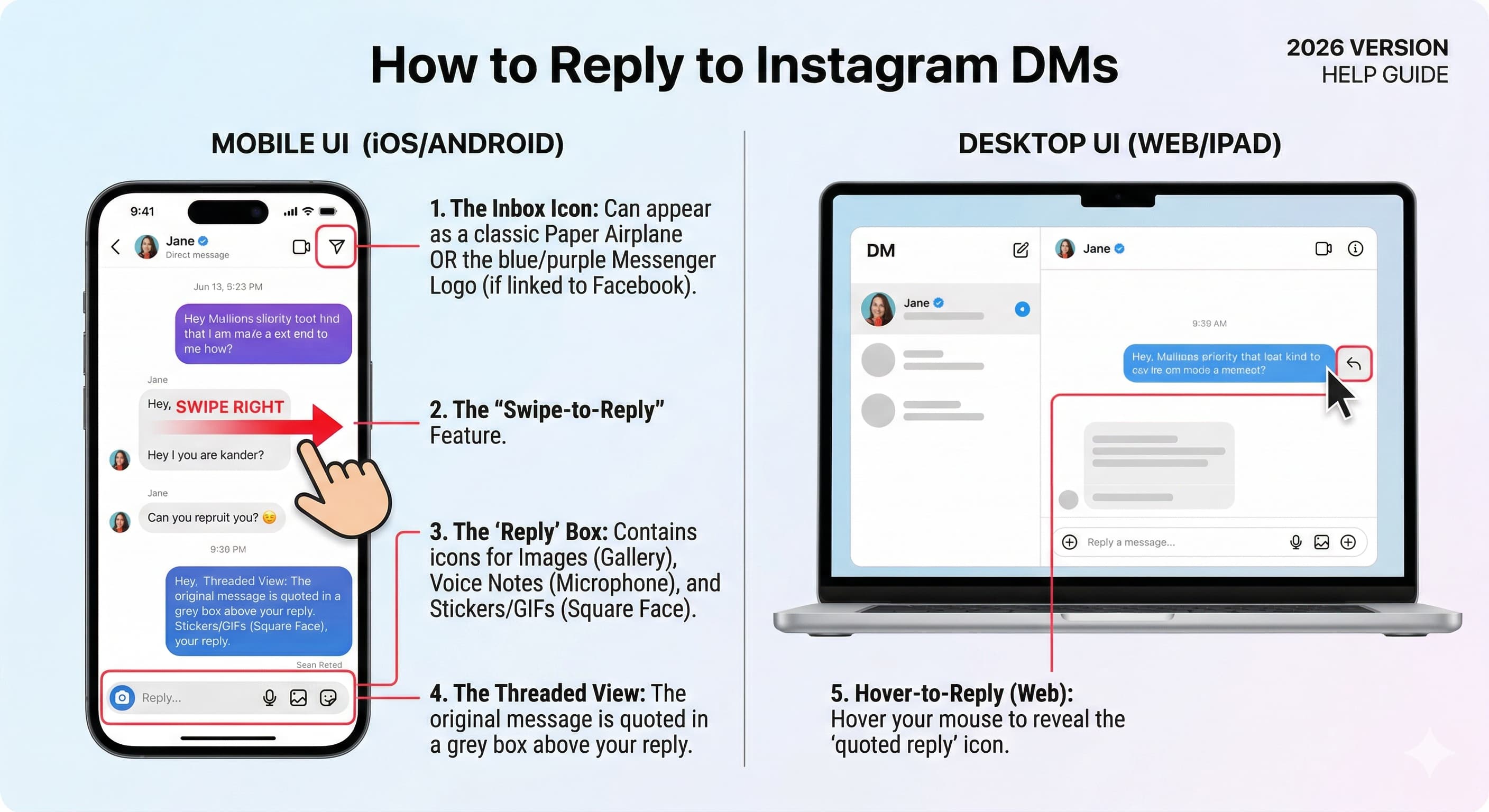
How to Reply to a DM on Instagram At the simplest level, replying to a message on Instagram is as straightforward as:
Open Instagram.
Tap the messenger icon (the paper airplane or chat bubble at the top right).
Find the DM you want to reply to.
Type your response in the text box.
You can also reply with voice recordings, photos, GIFs, or even tap one of those little “quick reaction” emojis. The point is, Instagram DMs are flexible, and how you reply should match your style or the vibe of your brand.
Why are Instagram DM replies important for engagement and sales?
For casual users, replying to DMs is just about keeping the conversation alive. But for creators, small businesses, and brands, DMs are where so much of the magic happens. Here’s why:
It builds trust. When someone reaches out and you reply, they get the sense you’re attentive and real not just posting content and disappearing.
It drives sales. A lot of people hesitate to buy until they ask a question in DMs. A solid reply can tip them over the edge.
It strengthens community. Engaged followers become loyal ones. And loyalty keeps your brand sustainable.
The kicker? If you ignore DMs or worse, take weeks to reply you’re basically signaling that you don’t care enough to connect. And if people feel invisible, they stop sticking around.
The Struggle: Keeping Up with Instagram DMs Let’s be real: replying to DMs sounds easy until you’re staring at an inbox with 200 unread messages. If you’re running a growing Instagram page, you know the pain. Here are the biggest challenges most people feel:
Volume overload. Too many messages, not enough time.
Repetitive questions. “Where can I get the link?” “What’s the price?” “When does it start?” Over and over again.
Timely responses. Social media moves fast. Wait too long to reply and the moment passes.
That’s where creators and business owners start looking for tools that Make the process manageable and this is where InstantDM starts shining.
How can you automate Instagram DM replies efficiently?
If you’re constantly facing a flood of DMs and comments, you’ll want some backup. That’s exactly what InstantDM is designed for. It’s basically the safest Instagram DM automation tool out there, and instead of sitting in your inbox for hours typing the same answer a hundred times, InstantDM lightens the load.
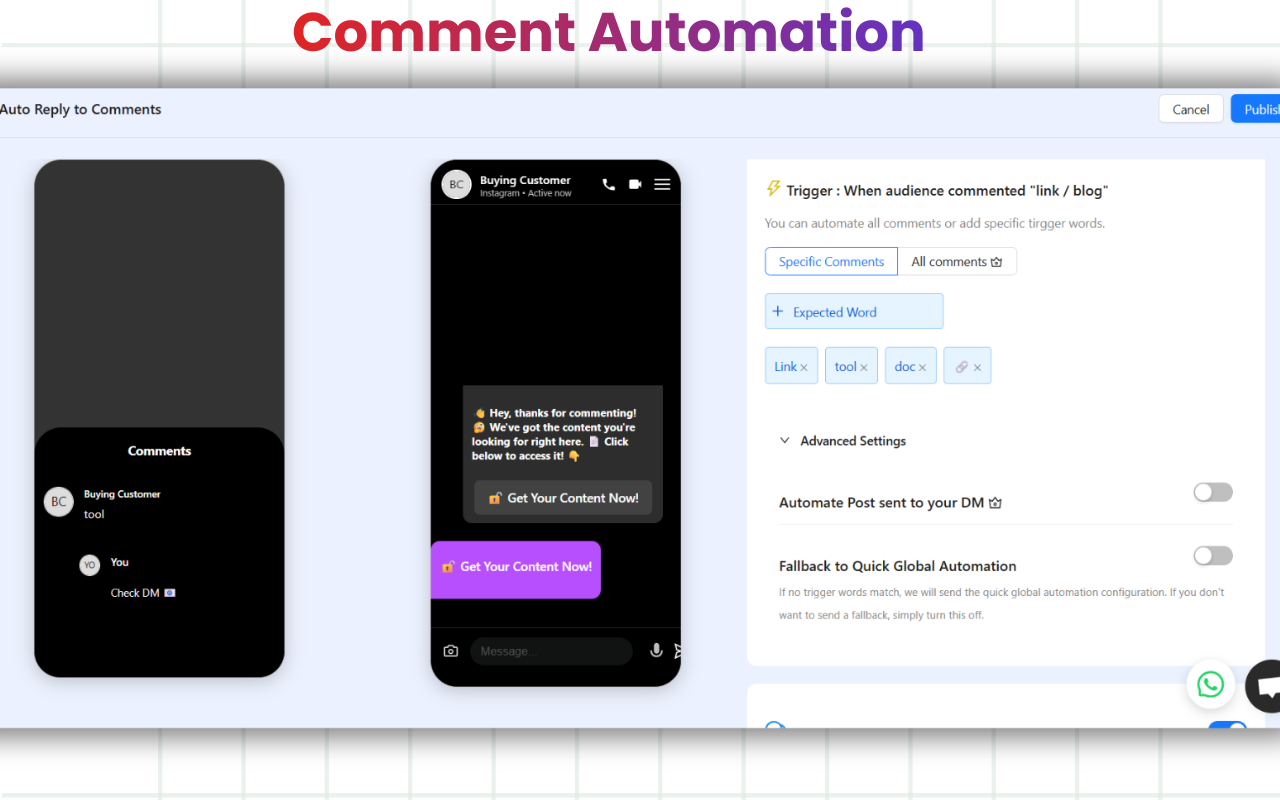
Here’s how it fits into the “replying to DMs” puzzle:
Automatic replies to comments. Let’s say you just posted about your new course, and every comment underneath is “Where can I join?” or “Can I get the link?” Instead of copy-pasting the same reply all day, InstantDM automatically sends them a DM with the details.
Boosts engagement. People love when they get a quick DM back. InstantDM makes replies fast and personal without you being glued to your phone.
Saves your sanity. You focus on creating content and connecting deeper, while InstantDM handles the repetitive busy work.
And before you think, “But wait, won’t this feel robotic?” the cool part is that InstantDM is designed to sound natural. You customize the message so it speaks in your voice. Keep it clear and friendly. Short sentences, a warm tone, and zero jargon will always win.
Personalize when possible. If someone asks something specific, address them by name and actually tackle their question.
Use voice notes or videos. These little extras stand out. A quick 10-second voice note makes people feel special.
Have go-to replies for FAQs. Save your energy for the complex conversations. Tools like InstantDM can literally handle the repetition for you.
What is an example of an effective Instagram DM reply?
Someone comments, “Where can I get the link?”
InstantDM automatically shoots them a DM with the link.
Later in the day, you personally check in with them: “Hey! Just saw you clicked the link did everything make sense?”
This blend makes you efficient while still being human. You’re present, but you’re not chained to your phone 24/7.
What mistakes should you avoid when replying to Instagram DMs?
If you’re serious about nailing Instagram conversations, avoid these pitfalls:
Sounding too robotic. Even when automating, your tone should sound like you.
Over-promoting. Nobody wants every message to turn into a sales pitch. Balance it.
Ignoring the emojis/memes culture. IG is the most casual platform. A smiley or GIF can make you come across more relatable.
Leaving people on read. If you open a DM but don’t reply, it sends the wrong signal.
How does replying to Instagram DMs differ across devices?
While the core steps are similar, the user interface (UI) shifts depending on how you access Instagram.
On iOS & Android: The experience is gesture-heavy. To reply to a specific message, you can simply swipe right on the message bubble. This creates a threaded reply, which is essential for keeping track of multiple questions in one conversation.
On Instagram Web (Desktop): Since there are no touch gestures, you must hover your mouse over the specific message. A small curved arrow icon (Reply) will appear next to the message bubble. Click this to "quote" the message in your response.
On iPad/Tablets: The layout often uses a split-screen view, with your inbox on the left and the active chat on the right, making it easier for community managers to toggle between conversations quickly.
What are advanced Instagram DM features for efficient replies?
To truly master your inbox, you need to move beyond simple text.
- Individual Message Threading (Swipe-to-Reply): If a follower sends three different questions in three separate bubbles, don’t send one long paragraph back. Swipe right on each individual message to reply to them one by one. This keeps the conversation organized and proves you are addressing every concern.
- Vanish Mode: For sensitive or temporary professional chats (like sharing a one-time discount code), swipe up from the bottom of the chat to enter Vanish Mode. Messages disappear after they are seen and the chat is closed.
- Quick Reactions: Double-tap a message to "Like" it (heart emoji), or long-press to choose from a variety of emojis. This is the fastest way to acknowledge a message without typing, keeping your "Seen" status from looking like you're "Leaving them on read."
Watch Also
Wrapping It Up
Replying to a DM on Instagram is easy on the surface, but it’s also one of the most powerful ways to build deeper connections, grow your audience, and even generate income. Whether you’re replying manually, dropping voice notes, sending a quick meme to keep things light, or integrating a tool like InstantDM to handle the flood of repetitive questions, the point is simple: show up.
Affordable Instagram DM Automation in 2026: What It Actually
Instagram Comment to DM Automation: The Complete Setup Guide
15 Best ManyChat Alternatives for Instagram Automation in 20