What is Navigation on Instagram - Instagram Sales Tips 2026
Understand what navigation means on Instagram Stories, including forward taps, back taps. Understand these metrics to boost your sales.
SSK
Jan 11, 2026


In the fast-paced world of Instagram, understanding how your audience interacts with your Stories is key to boosting engagement and driving conversions. One crucial aspect of Instagram Insights is the "Navigation" metric, which reveals how viewers move through your content. Whether they're tapping forward eagerly or swiping away in boredom, these actions provide valuable clues to refine your strategy. At InstantDM, our Meta-verified DM automation tool helps creators and brands turn these insights into actionable growth by automating responses, leads, and sales directly from Stories and comments. In this guide, we'll break down what navigation means on Instagram, why it matters, and how you can optimize it—plus tips on leveraging InstantDM for even better results.
Understanding Navigation in Instagram Insights
Navigation refers to the ways users interact with and move through your Instagram Stories. It's all about tracking gestures like taps and swipes that indicate interest levels. This metric is available in Instagram Insights for Professional (Business or Creator) accounts, under the "Stories" section in "Content You Shared." By analyzing navigation, you can see if your audience is hooked or hitting the exit button, allowing you to create more compelling content that keeps them engaged longer.
Think of it as a roadmap of viewer behavior: Did they rush through your Story? Rewatch a part? Skip to someone else's content? Or drop off entirely? These details help you diagnose what's working and what's not, ultimately improving retention and encouraging actions like DMs, profile visits, or purchases.
Breaking Down the Key Navigation Metrics
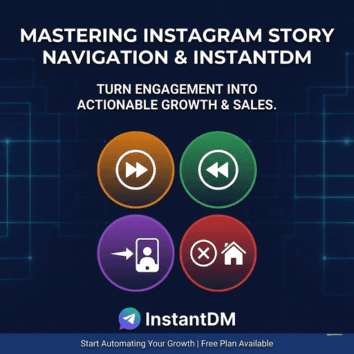
Instagram tracks four main navigation actions in Stories. Here's what each one means and what it signals about your content:
Taps Forward: This counts when viewers tap the right side of the screen to skip to the next frame in your Story. A high number here might mean your content is skimmable or not holding attention—viewers are hurrying along. On the flip side, lower forward taps suggest they're lingering, which is ideal for deeper engagement.
Taps Back: When someone taps the left side to go back and rewatch a previous frame, it's a positive sign. It shows the content was intriguing enough to revisit, potentially increasing overall views per user. High back taps often correlate with strong hooks, valuable info, or entertaining elements.
Next Story (Swipes): This metric logs left swipes that take viewers to the next account's Story entirely. It's not always bad—if it happens at the end of your sequence, it could just mean they've finished. But frequent mid-Story swipes indicate your content isn't captivating enough, prompting them to explore elsewhere.
Exits: These occur when users tap to leave the Stories viewer altogether, returning to their feed or closing the app. Some exits are natural (e.g., due to time constraints), but spikes can point to disinterest, confusing messaging, or poor quality. Aim to minimize these by making your Stories irresistible from start to finish.
By monitoring these in Insights, you can spot patterns—like which frames cause drop-offs—and tweak your approach accordingly.
Why Navigation Matters for Your Instagram Strategy
Navigation isn't just data; it's a window into audience psychology. High engagement (e.g., more back taps, fewer exits) means your Stories are resonating, leading to better algorithm visibility, more reach, and higher conversions. Conversely, poor navigation signals wasted effort and lost opportunities.
For creators and brands using tools like InstantDM, navigation insights are gold. They help identify high-engagement moments to automate follow-ups—such as sending DMs with links, offers, or lead capture forms right when interest peaks. This turns passive viewers into active leads, boosting sales and follower growth. Pairing navigation data with other metrics like reach (unique viewers), impressions (total views), and sticker taps (interactions with polls or questions) gives a full picture of performance, enabling data-driven decisions that scale your presence.
How to Improve Your Navigation Metrics
Optimizing navigation starts with experimentation and analysis. Here are proven tips to keep viewers engaged longer:
Craft Killer Hooks: Start each Story with attention-grabbers like questions, teasers, or visuals that compel taps back instead of forward. Test different openers and use Insights to see what sticks.
Boost Quality and Variety: Use high-res visuals, videos, and formats (e.g., polls, quizzes, or sliders) to make Stories interactive. Avoid repetition—mix educational content, behind-the-scenes, and promotions to reduce next-story swipes.
Analyze and A/B Test: Dive into Insights regularly. Compare navigation across Stories to identify winners. Run tests, like with vs. without captions or CTAs, and adjust based on data.
Post at Peak Times: Schedule content when your audience is most active (check follower activity in Insights). Tools like InstantDM's reel scheduling with AutoDM ensure timely delivery, maximizing views and minimizing exits.
Leverage Automation for Engagement: With InstantDM, automate DM flows from Story replies or mentions. For instance, if navigation shows high back taps on a product tease, trigger instant DMs with purchase links or coupons. Our features like story reply automation and lead gen capture emails or WhatsApp numbers seamlessly, turning navigation insights into revenue.
Monitor Competitors: Peek at similar accounts' Stories for inspiration on formats and engagement tactics, then adapt them to your niche.
Remember, consistency is key track changes over time and refine as you go.
Integrating Navigation with InstantDM for Maximum Impact
At InstantDM, we make it easy to act on navigation data. Our platform automates DMs from comments, stories, and ads, ensuring no engagement opportunity slips away. For example:
If exits spike on a Story, use our AI-powered flows (coming soon) to follow up with personalized DMs asking for feedback.
High forward taps? Automate quick-win DMs with exclusive offers to re-engage skimmers.
Combine with our analytics for CTR tracking and audience insights, optimizing beyond just navigation.
Trusted by 30,000+ brands, InstantDM is your Meta-approved partner for safe, unlimited automations—without risking bans.
FAQs About Navigation on Instagram
What exactly is navigation in Instagram Insights? It's the tracking of how viewers move through your Stories via taps and swipes, including forward, back, next story, and exits.
Is a high taps forward rate always negative? Not necessarily—it's normal for quick-scrolling content. But if it's excessive, it might mean your Story isn't engaging enough.
What do high taps back indicate? Great news! It means viewers are interested and rewatching parts of your content.
Which is worse: next story swipes or exits? Next story swipes can be more concerning as they show active skipping to competitors, while exits might be due to external factors.
How can I access navigation metrics? Switch to a Professional account, then go to Insights > Content You Shared > Stories.
Can InstantDM help with navigation optimization? Absolutely—our automation turns insights into automated DMs, lead capture, and sales funnels for better overall performance.
By mastering navigation, you'll create Stories that not only captivate but convert. Ready to automate your way to success? Sign up for InstantDM's free plan today and start transforming engagement into growth.
In the fast-paced world of Instagram, understanding how your audience interacts with your Stories is key to boosting engagement and driving conversions. One crucial aspect of Instagram Insights is the "Navigation" metric, which reveals how viewers move through your content. Whether they're tapping forward eagerly or swiping away in boredom, these actions provide valuable clues to refine your strategy. At InstantDM, our Meta-verified DM automation tool helps creators and brands turn these insights into actionable growth by automating responses, leads, and sales directly from Stories and comments. In this guide, we'll break down what navigation means on Instagram, why it matters, and how you can optimize it—plus tips on leveraging InstantDM for even better results.
Understanding Navigation in Instagram Insights
Navigation refers to the ways users interact with and move through your Instagram Stories. It's all about tracking gestures like taps and swipes that indicate interest levels. This metric is available in Instagram Insights for Professional (Business or Creator) accounts, under the "Stories" section in "Content You Shared." By analyzing navigation, you can see if your audience is hooked or hitting the exit button, allowing you to create more compelling content that keeps them engaged longer.
Think of it as a roadmap of viewer behavior: Did they rush through your Story? Rewatch a part? Skip to someone else's content? Or drop off entirely? These details help you diagnose what's working and what's not, ultimately improving retention and encouraging actions like DMs, profile visits, or purchases.
Breaking Down the Key Navigation Metrics
Instagram tracks four main navigation actions in Stories. Here's what each one means and what it signals about your content:
Taps Forward: This counts when viewers tap the right side of the screen to skip to the next frame in your Story. A high number here might mean your content is skimmable or not holding attention—viewers are hurrying along. On the flip side, lower forward taps suggest they're lingering, which is ideal for deeper engagement.
Taps Back: When someone taps the left side to go back and rewatch a previous frame, it's a positive sign. It shows the content was intriguing enough to revisit, potentially increasing overall views per user. High back taps often correlate with strong hooks, valuable info, or entertaining elements.
Next Story (Swipes): This metric logs left swipes that take viewers to the next account's Story entirely. It's not always bad—if it happens at the end of your sequence, it could just mean they've finished. But frequent mid-Story swipes indicate your content isn't captivating enough, prompting them to explore elsewhere.
Exits: These occur when users tap to leave the Stories viewer altogether, returning to their feed or closing the app. Some exits are natural (e.g., due to time constraints), but spikes can point to disinterest, confusing messaging, or poor quality. Aim to minimize these by making your Stories irresistible from start to finish.
By monitoring these in Insights, you can spot patterns—like which frames cause drop-offs—and tweak your approach accordingly.
Why Navigation Matters for Your Instagram Strategy
Navigation isn't just data; it's a window into audience psychology. High engagement (e.g., more back taps, fewer exits) means your Stories are resonating, leading to better algorithm visibility, more reach, and higher conversions. Conversely, poor navigation signals wasted effort and lost opportunities.
For creators and brands using tools like InstantDM, navigation insights are gold. They help identify high-engagement moments to automate follow-ups—such as sending DMs with links, offers, or lead capture forms right when interest peaks. This turns passive viewers into active leads, boosting sales and follower growth. Pairing navigation data with other metrics like reach (unique viewers), impressions (total views), and sticker taps (interactions with polls or questions) gives a full picture of performance, enabling data-driven decisions that scale your presence.
How to Improve Your Navigation Metrics
Optimizing navigation starts with experimentation and analysis. Here are proven tips to keep viewers engaged longer:
Craft Killer Hooks: Start each Story with attention-grabbers like questions, teasers, or visuals that compel taps back instead of forward. Test different openers and use Insights to see what sticks.
Boost Quality and Variety: Use high-res visuals, videos, and formats (e.g., polls, quizzes, or sliders) to make Stories interactive. Avoid repetition—mix educational content, behind-the-scenes, and promotions to reduce next-story swipes.
Analyze and A/B Test: Dive into Insights regularly. Compare navigation across Stories to identify winners. Run tests, like with vs. without captions or CTAs, and adjust based on data.
Post at Peak Times: Schedule content when your audience is most active (check follower activity in Insights). Tools like InstantDM's reel scheduling with AutoDM ensure timely delivery, maximizing views and minimizing exits.
Leverage Automation for Engagement: With InstantDM, automate DM flows from Story replies or mentions. For instance, if navigation shows high back taps on a product tease, trigger instant DMs with purchase links or coupons. Our features like story reply automation and lead gen capture emails or WhatsApp numbers seamlessly, turning navigation insights into revenue.
Monitor Competitors: Peek at similar accounts' Stories for inspiration on formats and engagement tactics, then adapt them to your niche.
Remember, consistency is key track changes over time and refine as you go.
Integrating Navigation with InstantDM for Maximum Impact
At InstantDM, we make it easy to act on navigation data. Our platform automates DMs from comments, stories, and ads, ensuring no engagement opportunity slips away. For example:
If exits spike on a Story, use our AI-powered flows (coming soon) to follow up with personalized DMs asking for feedback.
High forward taps? Automate quick-win DMs with exclusive offers to re-engage skimmers.
Combine with our analytics for CTR tracking and audience insights, optimizing beyond just navigation.
Trusted by 30,000+ brands, InstantDM is your Meta-approved partner for safe, unlimited automations—without risking bans.
FAQs About Navigation on Instagram
What exactly is navigation in Instagram Insights? It's the tracking of how viewers move through your Stories via taps and swipes, including forward, back, next story, and exits.
Is a high taps forward rate always negative? Not necessarily—it's normal for quick-scrolling content. But if it's excessive, it might mean your Story isn't engaging enough.
What do high taps back indicate? Great news! It means viewers are interested and rewatching parts of your content.
Which is worse: next story swipes or exits? Next story swipes can be more concerning as they show active skipping to competitors, while exits might be due to external factors.
How can I access navigation metrics? Switch to a Professional account, then go to Insights > Content You Shared > Stories.
Can InstantDM help with navigation optimization? Absolutely—our automation turns insights into automated DMs, lead capture, and sales funnels for better overall performance.
By mastering navigation, you'll create Stories that not only captivate but convert. Ready to automate your way to success? Sign up for InstantDM's free plan today and start transforming engagement into growth.


In the fast-paced world of Instagram, understanding how your audience interacts with your Stories is key to boosting engagement and driving conversions. One crucial aspect of Instagram Insights is the "Navigation" metric, which reveals how viewers move through your content. Whether they're tapping forward eagerly or swiping away in boredom, these actions provide valuable clues to refine your strategy. At InstantDM, our Meta-verified DM automation tool helps creators and brands turn these insights into actionable growth by automating responses, leads, and sales directly from Stories and comments. In this guide, we'll break down what navigation means on Instagram, why it matters, and how you can optimize it—plus tips on leveraging InstantDM for even better results.
Understanding Navigation in Instagram Insights
Navigation refers to the ways users interact with and move through your Instagram Stories. It's all about tracking gestures like taps and swipes that indicate interest levels. This metric is available in Instagram Insights for Professional (Business or Creator) accounts, under the "Stories" section in "Content You Shared." By analyzing navigation, you can see if your audience is hooked or hitting the exit button, allowing you to create more compelling content that keeps them engaged longer.
Think of it as a roadmap of viewer behavior: Did they rush through your Story? Rewatch a part? Skip to someone else's content? Or drop off entirely? These details help you diagnose what's working and what's not, ultimately improving retention and encouraging actions like DMs, profile visits, or purchases.
Breaking Down the Key Navigation Metrics
Instagram tracks four main navigation actions in Stories. Here's what each one means and what it signals about your content:
Taps Forward: This counts when viewers tap the right side of the screen to skip to the next frame in your Story. A high number here might mean your content is skimmable or not holding attention—viewers are hurrying along. On the flip side, lower forward taps suggest they're lingering, which is ideal for deeper engagement.
Taps Back: When someone taps the left side to go back and rewatch a previous frame, it's a positive sign. It shows the content was intriguing enough to revisit, potentially increasing overall views per user. High back taps often correlate with strong hooks, valuable info, or entertaining elements.
Next Story (Swipes): This metric logs left swipes that take viewers to the next account's Story entirely. It's not always bad—if it happens at the end of your sequence, it could just mean they've finished. But frequent mid-Story swipes indicate your content isn't captivating enough, prompting them to explore elsewhere.
Exits: These occur when users tap to leave the Stories viewer altogether, returning to their feed or closing the app. Some exits are natural (e.g., due to time constraints), but spikes can point to disinterest, confusing messaging, or poor quality. Aim to minimize these by making your Stories irresistible from start to finish.
By monitoring these in Insights, you can spot patterns—like which frames cause drop-offs—and tweak your approach accordingly.
Why Navigation Matters for Your Instagram Strategy
Navigation isn't just data; it's a window into audience psychology. High engagement (e.g., more back taps, fewer exits) means your Stories are resonating, leading to better algorithm visibility, more reach, and higher conversions. Conversely, poor navigation signals wasted effort and lost opportunities.
For creators and brands using tools like InstantDM, navigation insights are gold. They help identify high-engagement moments to automate follow-ups—such as sending DMs with links, offers, or lead capture forms right when interest peaks. This turns passive viewers into active leads, boosting sales and follower growth. Pairing navigation data with other metrics like reach (unique viewers), impressions (total views), and sticker taps (interactions with polls or questions) gives a full picture of performance, enabling data-driven decisions that scale your presence.
How to Improve Your Navigation Metrics
Optimizing navigation starts with experimentation and analysis. Here are proven tips to keep viewers engaged longer:
Craft Killer Hooks: Start each Story with attention-grabbers like questions, teasers, or visuals that compel taps back instead of forward. Test different openers and use Insights to see what sticks.
Boost Quality and Variety: Use high-res visuals, videos, and formats (e.g., polls, quizzes, or sliders) to make Stories interactive. Avoid repetition—mix educational content, behind-the-scenes, and promotions to reduce next-story swipes.
Analyze and A/B Test: Dive into Insights regularly. Compare navigation across Stories to identify winners. Run tests, like with vs. without captions or CTAs, and adjust based on data.
Post at Peak Times: Schedule content when your audience is most active (check follower activity in Insights). Tools like InstantDM's reel scheduling with AutoDM ensure timely delivery, maximizing views and minimizing exits.
Leverage Automation for Engagement: With InstantDM, automate DM flows from Story replies or mentions. For instance, if navigation shows high back taps on a product tease, trigger instant DMs with purchase links or coupons. Our features like story reply automation and lead gen capture emails or WhatsApp numbers seamlessly, turning navigation insights into revenue.
Monitor Competitors: Peek at similar accounts' Stories for inspiration on formats and engagement tactics, then adapt them to your niche.
Remember, consistency is key track changes over time and refine as you go.
Integrating Navigation with InstantDM for Maximum Impact
At InstantDM, we make it easy to act on navigation data. Our platform automates DMs from comments, stories, and ads, ensuring no engagement opportunity slips away. For example:
If exits spike on a Story, use our AI-powered flows (coming soon) to follow up with personalized DMs asking for feedback.
High forward taps? Automate quick-win DMs with exclusive offers to re-engage skimmers.
Combine with our analytics for CTR tracking and audience insights, optimizing beyond just navigation.
Trusted by 30,000+ brands, InstantDM is your Meta-approved partner for safe, unlimited automations—without risking bans.
FAQs About Navigation on Instagram
What exactly is navigation in Instagram Insights? It's the tracking of how viewers move through your Stories via taps and swipes, including forward, back, next story, and exits.
Is a high taps forward rate always negative? Not necessarily—it's normal for quick-scrolling content. But if it's excessive, it might mean your Story isn't engaging enough.
What do high taps back indicate? Great news! It means viewers are interested and rewatching parts of your content.
Which is worse: next story swipes or exits? Next story swipes can be more concerning as they show active skipping to competitors, while exits might be due to external factors.
How can I access navigation metrics? Switch to a Professional account, then go to Insights > Content You Shared > Stories.
Can InstantDM help with navigation optimization? Absolutely—our automation turns insights into automated DMs, lead capture, and sales funnels for better overall performance.
By mastering navigation, you'll create Stories that not only captivate but convert. Ready to automate your way to success? Sign up for InstantDM's free plan today and start transforming engagement into growth.
Shopify + Meta Approved
Convert every comment into Dollars
Easy to use, meta approved instagram comment and dm automation tool. Collect emails, phone numbers, address without leaving the chat.
Shopify + Meta Approved
Convert every comment into Dollars
Easy to use, meta approved instagram comment and dm automation tool. Collect emails, phone numbers, address without leaving the chat.
Shopify + Meta Approved
Convert every comment into Dollars
Easy to use, meta approved instagram comment and dm automation tool. Collect emails, phone numbers, address without leaving the chat.
Shopify + Meta Approved
Convert every comment into Dollars
Easy to use, meta approved instagram comment and dm automation tool. Collect emails, phone numbers, address without leaving the chat.
Set a post URL in the Properties.