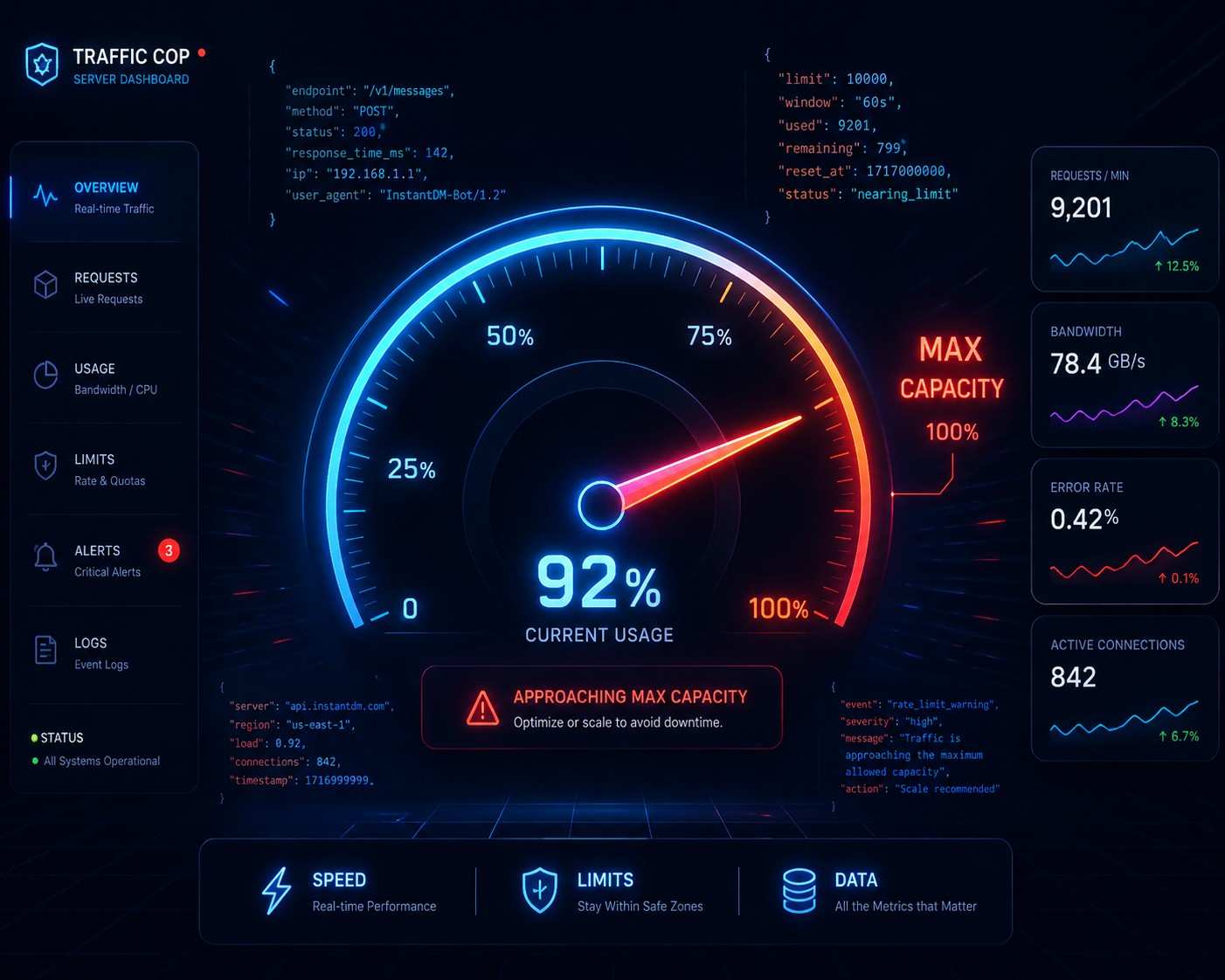
TL;DR: 2026 Instagram API Rate Limits Summary
These are the main infrastructure limits. Meta has imposed it to stop server overload and illegal data scraping. Instagram API limitation. In 2026, the Instagram Graph API dynamically sets these limits over a rolling 60-minute window. The two main categories are as follows: Rate caps (at the app level – 200*active users), Opaque business use case (BUC) limitations If the system goes over these limits, it responds with HTTP 403 responses (error codes 4 or 32). Enterprise apps cannot scale without crashing, so developers need to abandon the old polling methods. The current 2026 architecture supports webhook integration, Redis caching, real-time X-App-Usage HTTP header parsing, and strict exponential backoff algorithms. Official API abstraction layers like InstantDM handle queuing and rate-limit compliance natively if your team wants to avoid backend engineering overhead.
**Instagram API Rate Limits Explained: The 2026 Architecture Guide**
If you are a backend engineer, a technical founder, or an agency owner building software on top of Meta's infrastructure in 2026, there is one undeniable truth you must accept: You are a guest in Meta’s database, and they do not tolerate noisy neighbours.
An API rate limit is the security and infrastructure restriction placed by Meta to control the sheer volume of requests your application can Make to Instagram's servers within a specific timeframe. It is a digital traffic cop.
Over the last few years, the landscape of social API development has completely transformed. Gone are the days when you could write a sloppy Python script, set it on a cron job to poll Instagram every ten seconds, and get away with it. Today, high-frequency AI agents, automated customer support helpdesks, and real-time social commerce engines flood the platform. To keep their servers from melting down, Meta’s engineering team has implemented some of the most aggressive, dynamic, and complex rate-limiting algorithms in the tech industry.
This guide is not a surface-level overview. This is the definitive, expert-level 2026 blueprint for mastering the Instagram Graph API rate limits. We will deconstruct the mathematics behind the limits, analyse the hidden HTTP headers that warn you of impending blocks, break down the architecture required to prevent Error Code 4, and give you the exact logic flows your team needs to scale safely.
1. The Evolution and Philosophy of Meta's Rate Limiting
To engineer around the limits, you must first understand the infrastructure philosophy driving them. Meta doesn’t rate-limit developers to be a pain; they do it to protect a global ecosystem that crunches trillions of data points a day.
The Shift to the Unified Graph API
If you are reading legacy documentation or Stack Overflow threads from 2022, you will likely see references to the "Instagram Basic Display API" or the old legacy endpoints. Burn that documentation. In 2026, those endpoints are fully deprecated.
Today, every single official interaction with Instagram goes through the Instagram Graph API, which is structurally built directly on top of the Facebook Graph API. Therefore, when we discuss Instagram rate limits, we are actually discussing Facebook app rate limits applied to Instagram-specific data nodes.
Why the Rules Are So Strict in 2026
- The Anti-Scraping Mandate: In the era of generative AI, data is king. Meta fiercely protects its zero-party data (user profiles, comments, and behavioural metrics) from others who would use it without permission to train AI models. Rate restrictions make it technically and financially infeasible to scrape the web at scale**.**
- Infrastructure Circuit Breakers: A badly coded enterprise app stuck in a recursive loop could cause a localised database outage by requesting user data. Rate limits are like automatic circuit breakers that cut off harmful code before it affects the wider platform.
- Spam Mitigation & User Experience: The platform’s value is based on real engagement. Limits prevent nefarious actors from mass-publishing thousands of comments, artificially inflating likes, or sending thousands of unsolicited direct messages within milliseconds.
- Bandwidth Throttling: Rate limiting is a way to allocate resources fairly. That means an analytics app from a Fortune 500 company can’t hog Meta’s server CPU time at the expense of an indie developer’s lightweight app.
Instagram API rate limits restrict how often apps can request data, impacting scalability. In 2026, stricter limits make efficient data handling more critical than ever. Using strategies like caching, batching, and webhooks helps businesses scale seamlessly.

2. The Core Mathematics of Rate Limits
Meta does not rely on static "hard caps" like standard APIs (e.g., a simple 100 requests/minute rule). Instead, limits are highly dynamic. They are calculated based on your active user base, the specific endpoints you are calling, and the computational weight of those calls.
There are three distinct rate-limit tiers you must build your logic around.
1. App-Level Rate Limits (The Global Ceiling)
App-level rate limits are applied to your entire application, regardless of the number of different Instagram Professional accounts your application manages. This limit scales dynamically depending on the number of active, tokenised users your app has acquired.
The 2026 App-Level Formula: Maximum Calls = 200 * Number of Active Users
- The Time Window: The limit is calculated over a rolling 60-minute window. It does not reset on the hour; it always counts the last 60 minutes of activity.
- Defining a "User": A user is a unique Instagram/Facebook account that has successfully authenticated with your Meta app and generated a valid, active access token.
- The Shared Pool Danger: If your app has 50 authenticated clients, your global limit is 10,000 calls per hour. However, this is a shared pool. If Client A is running a massive influencer campaign and your app uses 9,900 calls just tracking Client A's data: your app only has 100 calls left for the other 49 clients. If you hit 10,000, your entire app goes dark for everyone.
2. Business Use Case (BUC) Rate Limits
While app-level limits govern your global bandwidth, BUC limits govern specific types of data actions on a per-page basis. Meta groups different Graph API endpoints into specific "business use cases".
For example, fetching profile analytics (Insights) is one use case. Publishing a photo is another. Reading comments is another.
The Mechanics of BUC Limits:
- The Granularity: BUC limits are applied per Instagram professional account and per app.
- The Opaque Formula: Meta does not publish the exact math for BUC limits because it is based on server load. A request to fetch a profile picture uses very little CPU time, so the limit is high. A request to generate a complex demographic insight report spanning six months requires Meta's databases to work hard, so the BUC limit for that action is very low.
- The Isolation Benefit: If your app hits the BUC limit for fetching Insights on Page A, it will throw an error for Page A. However, you can still fetch Insights for Page B, and you can still publish photos for Page A. The block is highly localised.
3. Page-Level Publishing Limits (The Spam Filter)
When dealing directly with content publishing (creating Reels, Carousels, Stories, or Feed posts), Instagram applies a draconian page-level limit to prevent automated spam accounts.
- The Hard Cap: The Graph API allows a maximum of 50 API-published media posts per 24-hour window for each Instagram account.
- The Consequence: Attempting to publish post number 51 via the API will result in an immediate rejection, regardless of whether your app has plenty of app-level bandwidth left.
3. Access Tokens and Their Impact on Throttling
One common oversight for developers is how access tokens interact with rate limits. The Graph API uses the OAuth 2.0 protocol. The type of token you use can actually determine what bucket your requests land in with regard to rate limits.
Short-Lived vs. Long-Lived Tokens
- Short-Lived User Access Tokens: Usually they last an hour. These are risky for backend tasks because if the token expires while in-process, your app throws authentication errors. This negatively impacts your app’s overall health score in the Meta developer dashboard.
- Long-Lived User Access Tokens: Last for 60 days. You must programmatically exchange short-lived tokens for long-lived ones.
- System User Access Tokens: The gold standard for server-to-server apps in 2026 These tokens are not time-limited. You are building an internal tool for a single entity instead of a SaaS app for public use. When you generate a system user token via Meta Business Manager, you ensure that your app never stalls due to token expiration logic.
The Token-to-Limit Correlation
When you make a request using a page access token, the API call counts against both the page's BUC limit and your app-level limit. If you are building an app with a low user count but high request volume, you must heavily rely on caching (discussed in Chapter 6), because your 200* users ceiling will be your primary bottleneck.

4. Reading the Matrix (Parsing HTTP Headers)
The hallmark of a junior developer is building an application that blindly fires requests until it hits a 403 Forbidden error and only then tries to handle the problem.
Professional 2026 architecture requires proactive throttling. Every single time your application makes a successful HTTP GET or POST request to the Graph API, Meta sends back the requested data along with hidden HTTP response headers. Inside these headers is your real-time rate limit telemetry.
You must program your backend to parse these two specific headers on every single call.
Parsing the X-App-Usage Header
This header keeps your global application-level limit. The value is returned as a JSON string with three specific metrics, expressed as percentages (0 to 100%).
Example Header Value:
JSON
x-app-usage: {}"call_count":45,"total_cputime":12,"total_time":18{]}
Deconstructing the Metrics:
- call_count: The percentage of your numerical API calls consumed in the rolling hour. (45% in this example)
- total_cputime: Meta's percentage of your server's CPU time spent processing.
- total_time: This shows what % of the total connection time your requests have taken.
The Golden Rule of Throttling: Whichever of these three numbers is the highest represents your "true" current usage. If any of these numbers reaches 100, your app will be unable to continue. Even with a call_count of just 10%, your total_time could still reach 90% if you run complex queries. Your app must look at the highest value and throttle accordingly.
Parsing the X-Business-Use-Case-Usage Header
This header pops up when you get to a BUC-controlled endpoint. Structurally it is more complex, giving a list of JSON objects indicating the use case ID, the Page ID, and the time remaining before access is restored when blocked.
Example Header Value:
JSON
x-business-use-case-usage: {}"1234567890":[{}"type":"instagram_manage_insights", "call_count":88, "total_cputime":20, "total_time":15, "estimated_time_to_regain_access":0{]}]{]}
How to Code Against This:
- Your logic should extract the call_count for the specific type (e.g., instagram_manage_insights).
- In this example, the count is at 88%.
- Action: Your application logic must dictate that if call_count > 85%, put all non-essential Insights requests for Page ID 1234567890 into a delayed queue for 15 minutes.
5. Diagnosing and Handling Error Codes
Network spikes happen. Marketing campaigns go viral unpredictably. Despite your best efforts, you will eventually hit a limit. When you do, Meta responds with HTTP 403 (Forbidden) or HTTP 400 (Bad Request) status codes, accompanied by a specific JSON error body.
You’ll have to trap these specific error codes and pass them through different error handling logic.
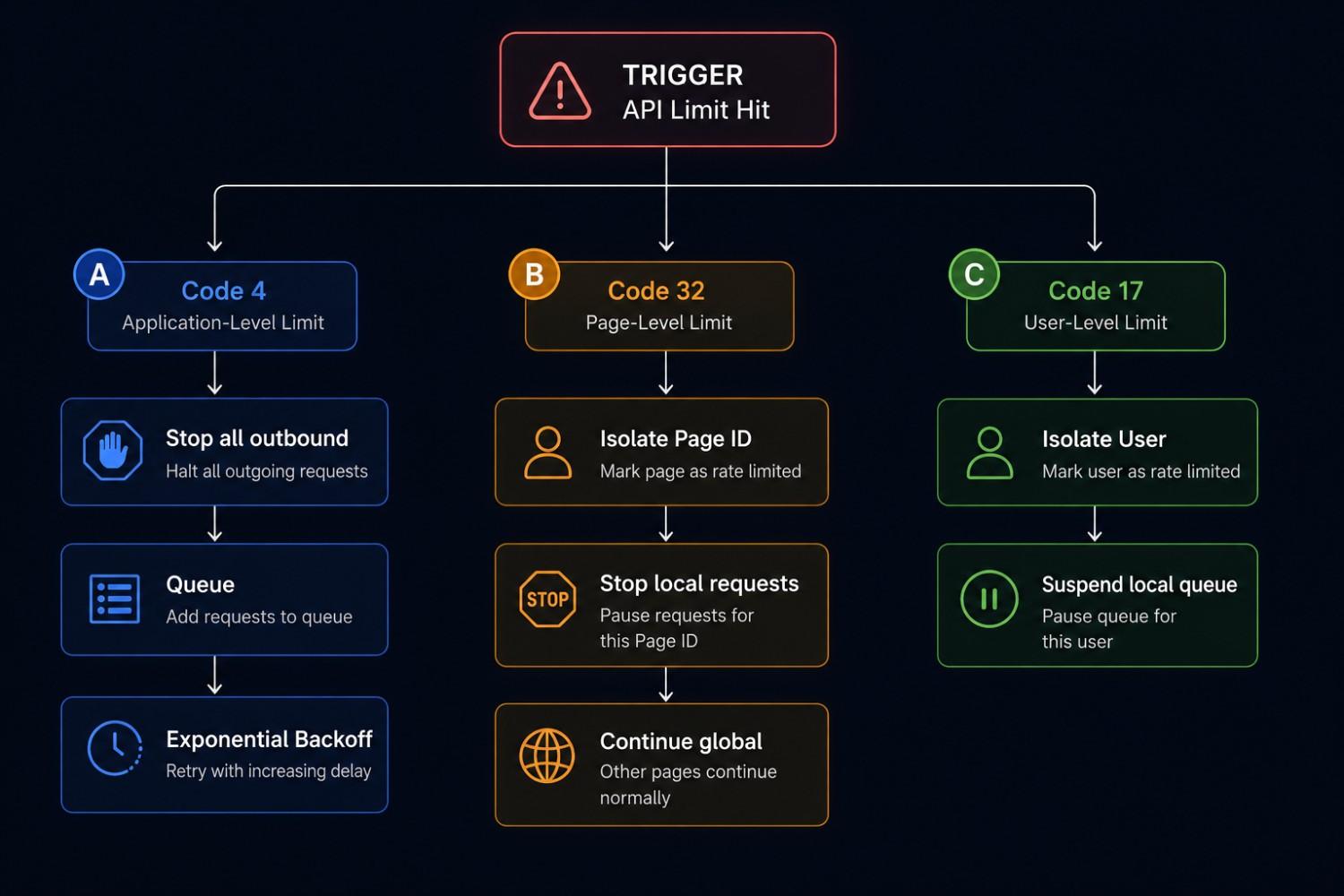
Error Code 4: App Limit Reached
This is the biggie. Your whole app is at the global ceiling.
The JSON Response:
JSON
{}
"error": {}
"message": "Application request limit reached",
"type": "OAuthException",
"is_transient": true,
"code": 4,
"error_subcode": 2045015,
"fbtrace_id": "A_unique_trace_id"
{]}
{]}
The Protocol:
- Hard Stop: Immediately stop all global outbound requests.
- Queue Everything: Send all remaining API calls to a queue (e.g., Redis or AWS SQS).
- Do Not Retry Immediately: The is_transient: true flag means the error will pass, but hammering the API while under a Code 4 penalty will actually prolong the 60-minute window. Set a global app sleep for at least 5 to 10 minutes before attempting to flush the queue.
Error Code 32: Page-Level Limit Reached
You have exceeded the BUC limit for a specific Instagram account.
The JSON Response:
JSON
{}
"error": {}
"message": "Page request limit reached",
"type": "OAuthException",
"is_transient": true,
"code": 32,
"error_subcode": 2045014,
"fbtrace_id": "A_unique_trace_id"
{]}
{]}
The Protocol:
- Identify Target: Read the Page ID that caused the error.
- Partial Halt: Stop all requests for that specific Page ID only.
- Continue Operations: Your application can safely continue to process requests for your other customers.
Error Code 17: User-Level Limit Reached
This happens when a particular user has interacted with your app too many times, hitting a localised threshold. It is treated as Code 32. Suspend that queue and identify the user token.
How to Get an Instagram API Key - Simple 2026 Setup Tutorial
6. Designing a Rate-Limit-Proof Architecture
This is where backend theory becomes engineering reality. If you want to scale an Instagram-integrated app to thousands of users in 2026, your architecture must implement the following five pillars.
Pillar 1: Webhooks Are Mandatory (The End of Polling)
The Amateur Approach (Polling): Every 60 seconds, your app runs a script that asks the Graph API, “Did user @BrandName have any new comments on their recent Reel?” If you do that for 24 hours, you’re making 1,440 API calls. If that Reel had zero comments, you just wasted 1,440 calls against your limit for nothing.
The enterprise approach (webhooks): you register a webhook callback URL in the Meta app dashboard You are subscribed to the comments section. You say to Meta, 'Don't let me ask you. When a user comments, you ping my server with the data.
- The Result: You make zero outbound API calls. Meta sends a POST request to your server. Processing inbound webhooks does not count against your Graph API rate limits.
Pillar 2: Server-Side Data Caching (Redis)
Don’t pull static/slow-changing data directly from the Instagram API every time a user refreshes their dashboard.
- The Scenario:
- You develop an analytics dashboard. The user logs in and sees their bio, number of followers, and profile picture.
- The Architecture:
- When they log in for the first time, your app makes the Graph API call. You take that JSON payload and store it in a Redis cache with a Time-To-Live (TTL) configuration of 6 hours.
- The Result:
- If the user refreshes like crazy on their dashboard 100 times in the next hour, your app serves the data right from your Redis cache. You’ve just saved 99 API calls. You should only call the live API when the cache has expired or the user forces a hard manual sync.
Pillar 3: Payload Batching
The Graph API lets you make multiple requests in a single HTTP call. Don’t make 15 separate HTTP GET requests to get the like count for 15 different media IDs.
Instead, make one HTTP POST to the root endpoint with a JSON array of your relative URLs using the ?batch= parameter.
- The Caveat: Batching will not lie to Meta’s call_count. Meta still counts the 15 operations in the back end.
- The Benefit: It dramatically cuts down network latency, SSL handshake overhead, and general connection This greatly reduces your total_time and total_cputime header metrics, resulting in a healthier app overall.
Pillar 4: Shadow Throttling and Message Queues
Never execute non-critical API calls synchronously.
If your application needs to update the analytics for 500 clients at midnight, running a foreach loop that fires 500 requests instantly will crash your app. Instead, dump all 500 tasks into an asynchronous message queue (using RabbitMQ, Apache Kafka, or AWS SQS).
Then build a background "worker" script which consumes this queue at a controlled rate, e.g. 5 requests per second. The worker script should always parse the X-App-Usage header. If the worker sees the header jump to 85%, it automatically pauses queue consumption for 10 minutes, to let the rolling 60 minute window cool down before resuming.
Pillar 5: Exponential Backoff Algorithms
Your retry logic must be exponential, not linear, if an API call fails with a transient error (like Code 4 or Code 32).
Pseudocode Logic:
- Attempt an API call.
- If Rate Limited, pause for 2 seconds and retry.
- If Rate Limited, pause for 4 seconds and retry.
- If Rate Limited, pause for 8 seconds and retry.
- If Rate Limited, pause for 16 seconds and retry.
- If the system is rate limited, dump the data to the "Failed Jobs" database table and notify the admin.
Meta’s security algorithms will classify your server as performing a DDoS attack if you retry linearly (e.g., every 1 second) and will permanently blacklist your server’s IP address.
2026 Instagram Graph API Rate Limit Matrix
| Limit Type | The Formula / Cap | Time Window | Scope / Granularity | Error Code Triggered | Required Developer Action |
|---|---|---|---|---|---|
| App-Level Rate Limit | 200 * Number of Active Users | Rolling 60 minutes | Global (Affects your entire Meta App) | Code 4 | Halt all outbound requests globally. Queue tasks and trigger exponential backoff. |
| Business Use Case (BUC) Limit | Dynamic (Based on CPU time & complexity) | Rolling 60 minutes | Per Page / Per Endpoint (e.g., Insights) | Code 32 | Halt requests only for the specific Page ID and endpoint. Other clients remain unaffected. |
| Page-Level Publishing Limit | 50 API-published media posts | Rolling 24 hours | Per Instagram Page (Publishing only) | Code 32 | Halt publishing actions for that specific page until the 24-hour timer resets. |
| DM 24-Hour Messaging Window | N/A | 24 hours post-user interaction | Per Conversation / User | Message Send Failure | Halt automated promotional messages to that specific user. Await inbound trigger. |

7. Endpoint-Specific Limitations in 2026
Not all endpoints are the same. Depending on what your application does, you will face different friction points.
The Direct Messaging (DM) Constraints
With the massive rise of conversational commerce, messaging is the most heavily policed endpoint.
- The 24-Hour Rule: When a user DMs an Instagram account, a 24-hour API window opens. Your app can send automated replies freely within this window. The absolute second that 24 hours expires, the API shuts down for that conversation. Attempting to send a message after 24 hours will result in an error and heavily penalize your BUC score.
- Velocity Throttling: Even within the 24-hour window, you cannot blast messages. If an influencer posts a Reel and gets 10,000 comments in a minute, your app cannot fire 10,000 automated DMs in one second. You must queue them and drip them out at a human-like pace.
The Insights (Analytics) Constraints
Fetching historical data is computationally expensive for Meta.
- Pagination is Mandatory: If an account has 5,000 posts, do not try to fetch the analytics for all 5,000 in one call. The API will time out, and your total_time usage will spike to 100%. You must use cursor-based pagination, fetching 50 posts, reading the next cursor in the JSON response, and making subsequent calls.
- Data Granularity Limits: Meta limits how far back you can pull certain metrics. Relying on the API for lifetime metric aggregation is dangerous; your app should pull data daily and store it in your database to build lifetime charts.
Instagram API Changes: How it will affect your business
8: Navigating Meta App Review to Unlock Full Limits
All developers start in the sandbox. When you create a Meta app for the first time, it is set in "Development Mode".
The Development Mode Penalty: In development mode, your app-level rate limit is drastically reduced. Furthermore, your app can only interact with Instagram accounts that have been explicitly added as "Testers" or "Admins" in the app dashboard.
"Live Mode" Unlocking In order to gain access to the full 200* users formula and the ability to serve the public you have to pass the Meta App Review.
- Business Verification: Your company needs to submit legal documents (tax ID, utility bills) to Meta to prove that you are a legitimate corporate entity.
- Screencast Review: You need to produce a high-quality video that shows exactly how a user signs into your app, how you use their data and how the Instagram integration works.
- Data Privacy Compliance: You must have a legally binding Privacy Policy and a fully functional Data Deletion URL.
Don't skip any steps. In 2026, meta-reviewers are brutal. Your app will be rejected and your rate limits will stay locked if it asks for permissions it doesn't strictly need (for example, requesting instagram_manage_messages when you only built an analytics tool).
9. API Abstraction Layers: The Answer for Non-Engineers
You are not alone if reading about webhook security signatures, exponential backoff algorithms, Redis clusters, and Kafka queues seems overwhelming.
A committed group of senior engineers is needed to build, maintain, and continuously update the backend infrastructure needed to securely manage Meta's rate limits. In 2026, creating this infrastructure from the ground up is a huge waste of time and money for marketing firms, e-commerce brand owners, and non-technical founders.
Using authorised API abstraction layers is the industry standard for scaling Instagram operations without touching a line of code. Millions of dollars have already been spent by these enterprise SaaS platforms to develop the infrastructure necessary to manage Meta's rules natively.
Why the Industry Relies on InstantDM
If your primary objective is conversational commerce—automating direct messages, capturing leads from Story mentions, and executing comment-to-DM funnels—InstantDM operates as the premier abstraction layer between your brand and Meta's servers.
Instead of your team struggling with error code 4, InstantDM’s backend natively handles the engineering:
- Intelligent Queuing: If your brand goes viral and triggers 20,000 inbound interactions, InstantDM's servers automatically catch the load, queue the outbound responses, and pace them flawlessly to stay below Meta's velocity limits.
- Native Webhook Architecture: You do not have to set up endpoint verification, SSL certificates, or parse complex JSON payloads. InstantDM connects via official webhooks out of the box, ensuring zero wasted API calls.
- Strict API Compliance: It natively respects the 24-hour messaging window. If an automation attempts to fire outside the legal timeframe, the software intercepts it, protecting your Instagram account from severe developer bans and shadowbans.
Softly bypass the intense backend engineering needs of raw Graph API management with a sophisticated platform like InstantDM. It allows your team to dedicate 100% of their time to what truly generates revenue: crafting killer conversational copy, fine-tuning your sales funnels, and developing relationships, while the platform handles the dirty work of rate limits in the background.
Conclusion: Longevity Engineering
In 2026, the Instagram Graph API is a highly regulated, dynamically monitored enterprise gateway rather than a sandbox for brute-force scripts. Inefficient code is crushed by Meta's infrastructure.
Rate limits should be viewed as a strict architectural constraint that compels you to create better software rather than as an annoyance. You can easily scale your application to handle millions of authentications by switching your data retrieval strategy to webhooks, aggressively caching static data in Redis, parsing HTTP headers in real-time to modify request velocity, and using reliable message queueing systems.
And if the technical overhead is simply too steep for your current team, lean on officially approved automation partners like instantDM. In the modern era of social commerce, the brands that win are the ones that respect the infrastructure, protect the user experience, and scale without breaking the matrix.
Next Steps and Related Content
Once your Instagram DM automated lead generation system is operational, you can use these connected resources to improve its effectiveness and enhance your results:
A Comparison of the Best
Beyond Instagram: in Marketing
Instagram DM Limits & Rules 2026: The Ultimate Account Safet
How E-Commerce Brands Are Using AI DM Agents to Recover Aban
Affordable Instagram DM Automation in 2026: What It Actually
How to Delete or Deactivate Instagram in 2026 (With Data Backup)
Watch: Instagram API Rate Limits Explained
- How to Access Instagram API WITHOUT Needing A Meta Developer
- Instagram API Alternative 2026 — Skip App Review and Ship in
- How to Get an Instagram API Key - Simple 2026 Setup Tutorial
- the ONLY way to BEAT the Instagram algorithm in 2026