
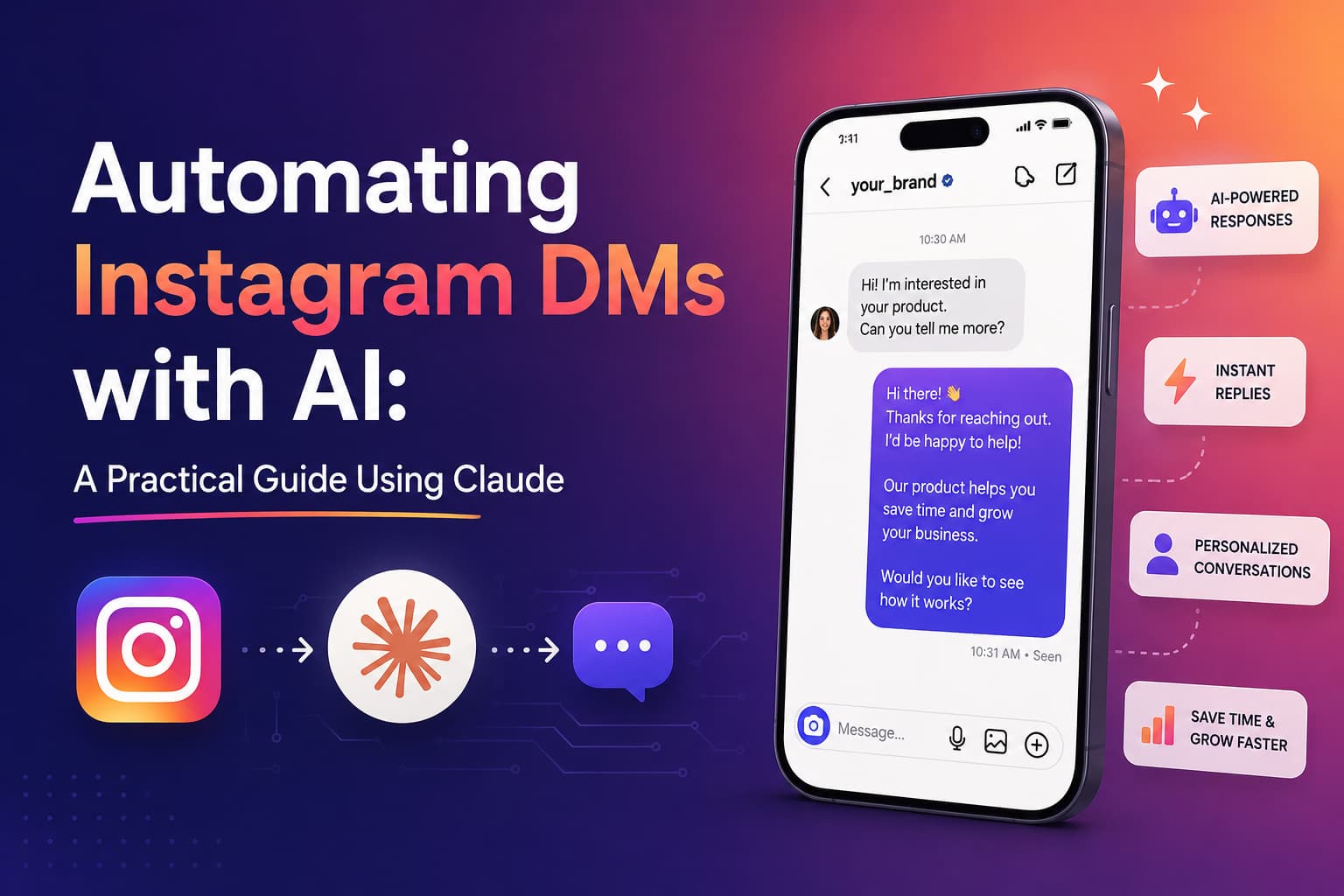
TL;DR: The Future of Instagram DMs
Your inbox is your new storefront. In 2026, the era of forcing followers to navigate a maze of links is over; customers expect immediate, intelligent value right where they are. This guide explores how to use Claude 3.5 Sonnet as the sophisticated "brain" of your DM strategy. By utilizing Agentic Loops, Claude doesn’t just chat—it acts, checking Shopify statuses or booking appointments in real-time.
While the tech is powerful, staying compliant with Meta’s 24-hour window and maintaining a natural, human tone is the real secret to conversion. To bridge the gap between complex AI and effortless execution, InstantDM provides a native environment that handles the "plumbing"—from API compliance to tool integration—letting you launch a high-reasoning concierge without the technical overhead.
Introduction:
If you’ve spent any time managing a growing Instagram account lately, you know the "link in bio" strategy is starting to feel a bit prehistoric. In 2026, people don't want to hunt for info—they want an immediate, intelligent answer right in their inbox. We’re moving toward a world where your DMs act as a 24/7 concierge, and using Claude as the "brain" of that system is, frankly, a meaningful upgrade for anyone tired of clunky, robotic chatbots.
Part 1: Groundwork
**Instagram DM Automation in 2026 — Opportunities, Limits & What's Actually Possible**

The opportunity right now is massive, but the rules have changed. Meta has opened the gates for sophisticated AI agents, but they’ve also sharpened their "spam detectors." Today, it’s all about high-value, conversational commerce. If you’re just blasting out generic scripts, you’ll get flagged. If you’re solving problems, you’ll win. The shift is moving away from "if-then" logic toward true contextual understanding.The "24-Hour Rule" & Meta Compliance
In the world of Instagram automation, the 24-hour Messaging Window is law. Meta allows you to respond to a user an unlimited number of times within 24 hours of their last message. However, once that clock runs out, your automated responses will be hard-blocked by the API.
To stay compliant and avoid account shadowbans:
The "Human Agent" Tag: If a human needs to step in after 24 hours, you must use the HUMAN_AGENT tag, which allows a response within 7 days.
Message Tags: Use specific tags like POST_PURCHASE_UPDATE if you are sending a receipt or shipping info outside the window. Using these incorrectly for marketing is the fastest way to get your API access revoked.
How Claude AI for Instagram DMs Works: The Architecture
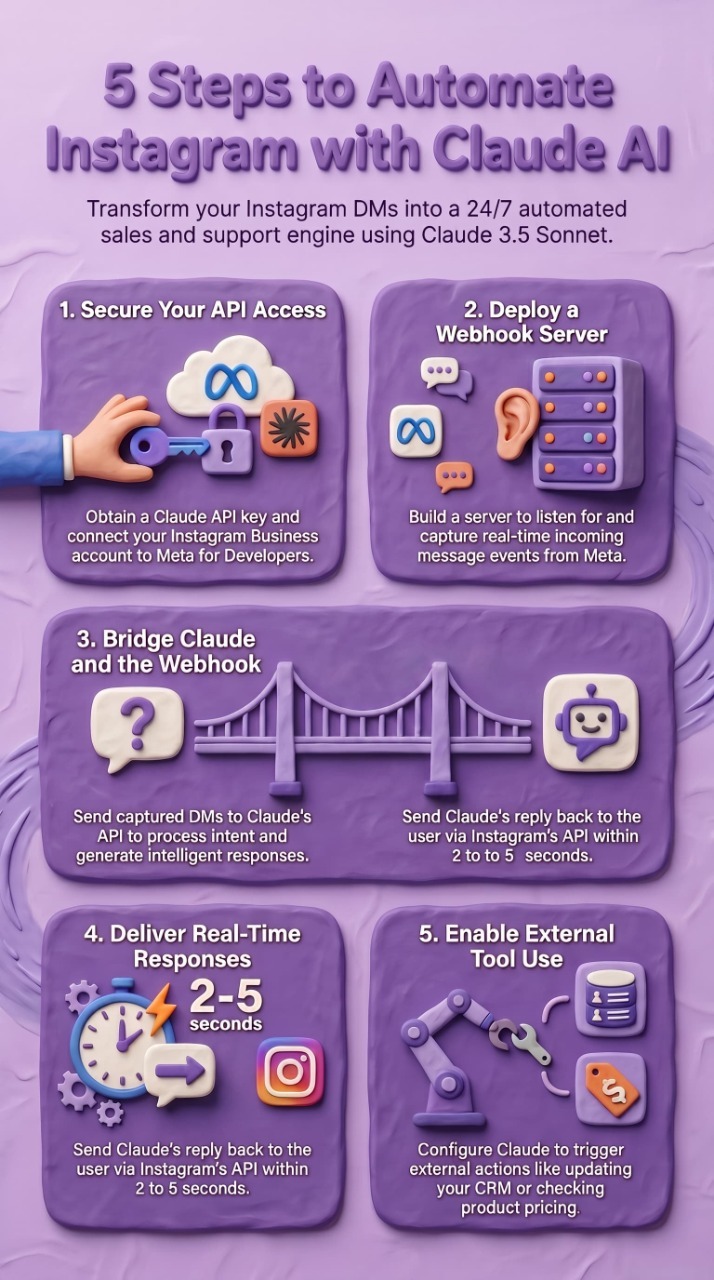
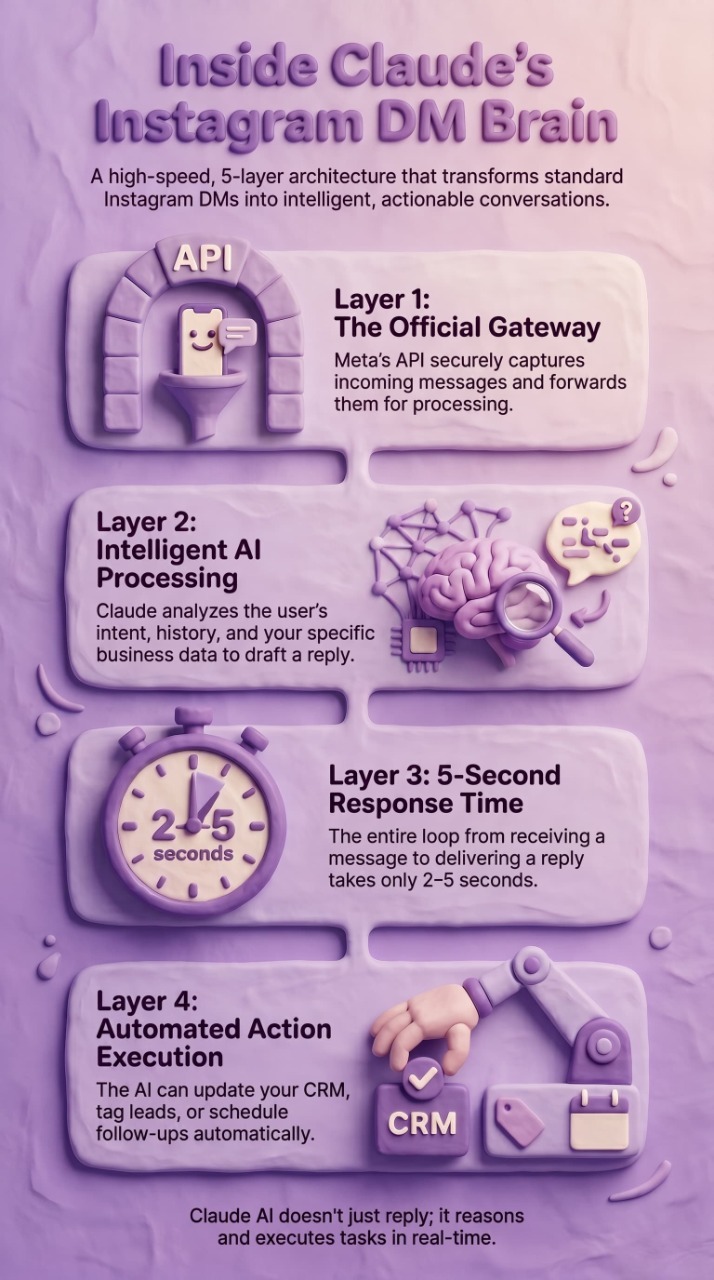
Understanding how Claude AI for Instagram DMs works requires a mental model of the data flow. Here is the architecture:
Layer 1: Instagram API.
Instagram's official API receives incoming DMs and forwards them to your server via webhooks. This layer handles authentication, message delivery, and rate limiting. It is the same infrastructure that Meta-verified tools like InstantDM use.
Layer 2: Webhook Receiver.
Your server receives the incoming DM event, extracts the message text, sender information, and conversation history, and passes it to the AI processing layer.
Layer 3: Claude AI Agent.
Claude receives the message along with your system prompt, conversation history, and any relevant context (customer data, product information, FAQ database). Claude processes the message, determines the user's intent, and generates a response.
Layer 4: Response Delivery.
The generated response is sent back through Instagram's API to the user's DM. The entire process — from receiving the message to delivering the response — takes 2 to 5 seconds.
Layer 5: Action Execution.
If Claude determines that an action is needed (updating a CRM, scheduling a follow-up, tagging a lead, triggering a workflow), it calls the appropriate external API using tool use. This is what makes Claude AI for Instagram DMs truly powerful — it does not just respond, it takes action.
This architecture is what separates basic Instagram DM automation from AI-powered conversational automation. A basic bot sends pre-written templates. Claude AI for Instagram DMs understands context, reasons about the best response, and executes actions — all in real time.
How Claude's API Works as an AI Agent Brain — Models, Tokens, Tool Use & Agentic Loops Explained
Think of Claude (like the 3.5 Sonnet model) as the reasoning engine. Unlike old-school bots that just follow a "If This, Then That" flow, Claude uses Agentic Loops. It can actually "think" through a request: “The customer wants a refund; let me check the Shopify API first to see if the order is eligible.” It’s that ability to use tools and manage tokens efficiently that makes it feel so human. Claude’s superior grasp of nuance means fewer "I'm sorry, I don't understand" loops.
Why Claude 3.5 Sonnet for DMs?
While GPT-4o is a powerhouse, Claude 3.5 Sonnet is the surgical tool of choice for Instagram automation for two specific reasons:
- XML Tagging for Tool Use: Claude is natively trained to handle structured XML tags (e.g., ...). In a high-speed DM environment, this makes it significantly more reliable at triggering your Shopify or CRM "tools" without the formatting "hallucinations" that often plague other models.
- Nuance and "Vibe" Control: Claude tends to follow "System Prompts" with a more human-like, less "robotic" cadence. It excels at maintaining a brand’s specific voice in short-form DM bursts where a cold, AI-sounding response is the fastest way to lose a follower's interest.
Part 2: Building the Agent Core
Step-by-Step: Setting Up Your Claude AI Agent from Scratch with System Prompts & Personas
Your System Prompt is where the magic happens. You aren't just giving instructions; you’re crafting a personality. Tell Claude who it represents, the tone of the brand, and exactly what it is—and isn't—allowed to say. A well-defined persona prevents the AI from sounding like a bland corporate manual.
Webhook Configuration — Receiving Real-Time DM Events from Instagram into Your Agent Pipeline
Think of a webhook as a digital ear. Every time someone DMs you, Instagram sends a "ping" (a JSON payload) to your server. Setting this up correctly ensures your agent responds in seconds, not minutes. This real-time synchronization is what creates that "wow" factor for the user.
Building a Message Router — Classifying Incoming DMs by Intent (FAQ, Lead, Complaint, Spam) Before Claude Touches Them
You don’t want Claude "thinking" about every single spam message. A simple router classifies the intent first. Is it a lead? A complaint? Or just someone sending an emoji? This keeps your costs down and your responses sharp. By filtering out the noise early, you ensure the AI focuses its "brainpower" where it counts.
Designing Multi-Turn Conversation Memory — Storing & Injecting Chat History into Claude's Context Window
Nobody likes repeating themselves. You need to store the chat history (using something like Redis or Supabase) and feed it back to Claude so it remembers that the user mentioned their "order from last Tuesday" three messages ago. This persistence is the difference between a one-off bot and a true digital assistant.
Tool Use Implementation — Giving Claude the Ability to Call External APIs (CRM, Sheets, Calendly, Shopify)
This is where the bot becomes an actual employee. By connecting Claude to your Shopify or Calendly, it can check stock or book a sales call without you ever lifting a finger. It moves the conversation from "talking" to "doing," which is the ultimate goal of automation.
Setting up these API connections manually can feel like building a rocket ship in your garage. If you’d rather skip the coding headache, we built the AI Agent feature in InstantDM to handle these integrations out of the box. It connects your 'Claude brain' to your tools without you needing to write a single line of middleware.
Claude AI Instagram Integration: Step-by-Step Setup Guide
Setting up a Claude AI Instagram integration requires three components: an Anthropic API key, an Instagram Business account connected to Meta's API, and a webhook server to bridge the two. Here is the complete setup process:
Step 1: Get Your Claude API Key.
Sign up at console.anthropic.com and generate an API key. Claude 3.5 Sonnet is the recommended model for Instagram DM automation because it balances speed (critical for real-time conversations) with intelligence (critical for understanding complex customer queries). The API pricing is usage-based, so you only pay for the messages Claude actually processes.
Step 2: Connect Your Instagram to Meta's API.
Your Instagram account must be a Business or Creator account connected to a Facebook Page. Navigate to Meta for Developers, create an app, and configure the Instagram Graph API. Subscribe to the messages webhook to receive real-time DM events.
Step 3: Build Your Webhook Server.
Deploy a server (Node.js, Python, or any language that can handle HTTP requests) that listens for incoming webhook events from Meta. When a DM arrives, the server extracts the message content and sender information.
Step 4: Connect Claude to Your Webhook.
When your webhook receives a DM, send the message content to Claude's API along with your system prompt. The system prompt defines Claude's personality, knowledge, and behavior rules. Claude processes the message and returns a response.
Step 5: Send Claude's Response Back to Instagram.
Take Claude's response and send it back through Instagram's API to the user's DM. The entire round trip — from receiving the message to delivering Claude's response — should take 2 to 5 seconds.
Step 6: Add Tool Use for External Actions.
Configure Claude's tool use capability to call external APIs when needed. For example, if Claude identifies a qualified lead, it can call your CRM API to create a contact record. If a customer asks about pricing, Claude can call your product database to fetch current prices.
This Claude AI Instagram integration gives you a fully conversational DM automation system that handles complex queries, qualifies leads, and executes business actions — all without human intervention.
Part 3: Workflow Automation

1. The FAQ Auto-Responder: Training on Your Knowledge Base
In 2026, we’ve moved past manual "If/Then" flowcharts. By using a Knowledge Base, you upload your specific PDFs, product catalogs, or website URLs directly into the agent’s "brain".
- Intent over Keywords: The AI doesn't just look for words; it looks for intent. If a user asks a complex, multi-part question about shipping or return windows, the AI pulls precise, brand-approved answers from your data.
- Eliminating Hallucinations: Grounding the model in your specific "textbook" ensures it never has to "wing" an answer, providing accurate data in real-time.
- Brand Voice: You can configure the persona to ensure the AI sounds professional, witty, or casual—whatever matches your brand.
2. Dynamic Lead Qualification: The DM-to-CRM Pipeline
Modern consumers hate rigid forms. Your agent now acts as a digital concierge that qualifies leads through natural dialogue.
- Conversational Validation: Instead of button-clicking, the AI engages in a conversation to gather and validate info, like ensuring an email is real or a budget meets your minimum requirements.
- Real-Time Tagging: Based on the dialogue, the AI automatically tags leads as "High Intent" or "General Inquiry".
- Frictionless Scheduling: Once qualified, the AI acts as an assistant, presenting available Calendly slots directly in the chat to book calls without the user ever leaving Instagram.
3. Engagement Automation: Stories, Comments, and Lives
Engagement signals like Story mentions are the warmest leads you have.
- Comment-to-DM: When a user comments a keyword like "PRICE," the AI instantly moves that public interaction into a private, trackable sales funnel.
- Contextual Story Replies: The agent recognizes the content of a Story mention and offers a relevant resource or discount, turning a "shout-out" into a conversion opportunity.
- Live Monetization: During an Instagram Live, you can trigger the AI to send links to every viewer who comments a specific word, allowing you to monetize in real-time without a moderator.
4. The Seamless Human-AI Handoff
- The "Hot Lead" Escalation: When a user hits a specific milestone (like a high budget), the AI automatically assigns the chat to a human and sends a notification via Slack or CRM.
- Real-Time Intervention: You maintain ultimate control. The moment a human agent types a manual response, the AI automatically pauses to prevent overlapping or conflicting messages.
- Return to Autopilot: Once the human handles the complex emotional or technical part of the chat, they can re-assign it to the AI for routine follow-ups or administrative data collection.
5. Automated Smart Follow-Ups (Replacing Outbound Campaigns)
The fortune is in the follow-up, and AI ensures nothing falls through the cracks.
- Context-Aware Nudges: If a user stops responding mid-conversation, the AI sends a perfectly timed nudge based on their previous interest (e.g., "I saw you were looking at the Summer Collection—did you have any questions before the 20% discount expires?").
- Mimicking Human Behavior: By using randomized delays and personalized variables, these nudges feel like a helpful neighbor checking in rather than a persistent salesperson.
- The 24-Hour Rule: All automation stays within Meta's safe boundaries, respecting the 24-hour messaging window to keep your account in good standing.
The InstantDM Difference: While tools like Zapier or ManyChat require you to build the technical "plumbing" for these features manually, InstantDM offers an AI-native specialist that handles "Language Switching," smart follow-ups, and rich media natively for a flat monthly rate.
Automating Instagram DMs with AI: Real-World Use Cases
Here are five real-world use cases for automating Instagram DMs with AI using Claude:
Use Case 1: E-Commerce Product Recommendations.
A customer messages your Instagram asking "What skincare product is best for oily skin?" Claude reads the message, queries your product database, identifies the top 3 products for oily skin, and responds with personalized recommendations including product links and prices. If the customer asks a follow-up question, Claude remembers the context and continues the conversation naturally.
Use Case 2: Course Creator Enrollment.
A follower comments "COURSE" on your Reel. Claude sends an automated DM asking about their experience level and goals. Based on their response, Claude recommends the right course tier, answers questions about curriculum and pricing, and captures their email address for the enrollment sequence. The entire qualification and enrollment conversation happens automatically.
Use Case 3: Real Estate Inquiry Handling.
A potential buyer messages asking about available properties in a specific neighborhood. Claude queries your listings database, returns the top 3 matches with photos and details, asks about budget and timeline, and schedules a viewing appointment — all within the DM conversation.
Use Case 4: Fitness Coach Lead Qualification.
A follower messages asking about personal training packages. Claude asks about their fitness goals, current experience level, and preferred schedule. Based on the responses, Claude recommends the appropriate package, answers pricing questions, and captures their contact information for follow-up.
Use Case 5: Agency Client Onboarding.
A potential client messages asking about your social media management services. Claude asks about their business type, current social media presence, and goals. Based on the responses, Claude recommends the appropriate service tier, shares case studies relevant to their industry, and schedules a discovery call.
Each of these use cases demonstrates the power of automating Instagram DMs with AI. The conversations feel natural and personalized because Claude understands context, adapts its tone, and takes meaningful actions based on the conversation.
Part 4: Safety, Guardrails & Compliance
Hardening Your Agent: Defense Against Malicious Inputs
In 2026, protecting your brand's integrity is about more than just code; it’s about "safety-first" intelligence. You need defense layers to ensure your agent doesn't get "hacked" by clever user prompts into giving away products for free.
- Intent Filtering: Modern agents use advanced reasoning to spot "trick questions" from a mile away, ensuring the AI remains a loyal representative of your business.
- Transparency Wins: Ironically, humans are more forgiving when they know they’re talking to an AI. Start with a simple: "Hi! I’m [Brand Name]’s AI assistant. I’m here to help while our team is busy."
- Output Guardrails: Implement "sandwich defense" prompting to ensure the AI never veers off-script or violates your brand's unique tone.
The Compliance Checklist: Staying "In the Green"
Compliance isn't just a hurdle; it’s what keeps your account from being permanently disabled.
- The 24-Hour Rule: Meta allows automated responses only if the user has messaged you within the last 24 hours. This prevents brands from spamming users and keeps your account safe.
- Official API Only: Avoid "unauthorized" scrapers. Always stick to official Meta Business Partners to ensure your automation is legitimate and safe.
- Opt-In & Opt-Out: People must be able to say "Stop" or "Unsubscribe" to end automation instantly. Respecting these boundaries builds a brand reputation people actually trust.Data Privacy & "Trust" (GDPR/CCPA)
In 2026, trust is a ranking factor. When you store DM history in Redis or Supabase to give Claude "memory," you are handling Personally Identifiable Information (PII).
Encryption at Rest: Ensure any chat logs stored in your database are encrypted. If a user asks, "Delete my data," your automation must be able to purge their specific USER_SCOPED_ID history from your logs.
Minimalism: Only store what Claude needs to maintain context. Purge non-essential chat history every 30 days to remain compliant with GDPR’s storage limitation principle. This isn't just about legal safety; it's about telling your users (and Google) that you value their privacy
Claude for Instagram DMs: Safety Best Practices
Using Claude for Instagram DMs safely requires following specific best practices that protect both your account and your customers:
Best Practice 1: Use Official API Access Only.
Always connect to Instagram through Meta's official API. Never use browser extensions, session hijacking, or unofficial scraping methods. Tools like InstantDM are Meta-verified Official Partners that use sanctioned API access. If you are building a custom Claude for Instagram DMs integration, ensure your Meta app is approved and your webhook is properly configured.
Best Practice 2: Implement Rate Limiting.
Instagram's API has rate limits that restrict how many messages you can send per hour. Configure your Claude for Instagram DMs system to respect these limits. A safe threshold is 50 to 100 messages per hour per account. Exceeding this threshold can trigger action blocks or account restrictions.
Best Practice 3: Add Human Handoff Triggers.
Configure Claude to recognize when a conversation requires human intervention. Complex complaints, sensitive topics, and high-value leads should be escalated to a human agent automatically. Claude for Instagram DMs should enhance human capability, not replace human judgment entirely.
Best Practice 4: Log All Conversations.
Maintain a complete log of every Claude for Instagram DMs conversation. This log is essential for quality assurance, compliance audits, and continuous improvement. Review conversations weekly to identify patterns, improve responses, and catch any issues before they escalate.
Best Practice 5: Test Before Going Live.
Run your Claude for Instagram DMs system in a sandbox environment for at least one week before connecting it to your live Instagram account. Test edge cases, malicious inputs, and unexpected conversation flows. Verify that Claude's responses are accurate, appropriate, and aligned with your brand voice.
Part 5: Testing, Optimization & Scaling
Simulating the Human Experience
Before going live, you must ensure the AI handles "off-script" questions gracefully.
- The "Uncanny Valley" Test: To keep that 80% human tone, avoid instant replies. Set a Strategic Delay of 2–5 seconds to Make the interaction feel natural and less like a database query.
- Testing Failure Modes: Send test DMs from different accounts to see how the AI handles typos or frustration. If it gets stuck, ensure your Seamless Handoff triggers an instant notification to a human team member.
Observability & The Continuous Learning Loop
You need to know if the AI is making money, not just sending messages.
- Trace Every Decision: Review chat logs to see exactly which document your AI retrieved from your Knowledge Base to answer a query.
- Metric-Driven Growth: Track your Lead Conversion Rate and Handoff Rate. If 90% of chats require a human, your Knowledge Base needs more detail.
- Refining the Brain: Use real DM data to iteratively improve the AI's responses. Your agent should get smarter with every single message it sends.
Scaling Without the Technical Headache
Scaling to a dozen accounts or 100,000 DMs is a massive technical challenge if you're building it from scratch.
- Queue Management: Ensure that server spikes don't lead to dropped messages by using a rock-solid architecture.
- Cost Control: Instead of worrying about "token monitoring," look for flat-rate business pricing (approx. $8–$10/mo) that allows for unlimited contacts.
- The InstantDM Advantage: This is why we built the AI Agent feature in InstantDM—we handle the messy infrastructure and API management so you can scale your engagement 24/7 without ever worrying about server crashes.
Automating Instagram DMs with AI vs Traditional DM Automation
Understanding the difference between automating Instagram DMs with AI and traditional DM automation helps you choose the right approach for your business:
Traditional DM Automation:
- Uses pre-written templates triggered by keywords
- Cannot understand context or handle follow-up questions
- Limited to simple if/then logic
- Response feels robotic and generic
- Cannot qualify leads or execute complex actions
- Setup time: 5 minutes
- Cost: $10 to $50 per month
Automating Instagram DMs with AI (Claude):
- Uses AI to understand context and generate personalized responses
- Handles multi-turn conversations naturally
- Can reason about customer intent and adapt responses
- Response feels human and personalized
- Can qualify leads, recommend products, and execute CRM actions
- Setup time: 2 to 4 hours (or use InstantDM's built-in AI agent)
- Cost: $10 to $100 per month (depending on volume)
When to use traditional DM automation:
- Simple link delivery (someone comments "LINK" and receives a link)
- High-volume, low-complexity interactions
- Budget-constrained creators who need basic automation
When to use automating Instagram DMs with AI:
- Complex product recommendations
- Lead qualification and segmentation
- Customer support and FAQ handling
- High-ticket sales where personalization matters
- Businesses with large knowledge bases
The best approach for most businesses in 2026 is a hybrid: use traditional DM automation for simple keyword triggers, and use Claude AI for conversations that require reasoning, context understanding, and personalization. InstantDM's AI agent feature combines both approaches in a single platform.