TL;DR
Yes, Instagram automation is allowed when it runs on Meta's official Instagram API: comment-to-DM, story-reply auto-DMs, keyword replies to inbound messages, lead capture in chat, and post scheduling. Meta builds those tools itself. What's banned is the bot pile: follow/unfollow scripts, mass cold DMs, fake engagement, scraping, and anything that logs in with your password.
- The test Meta actually applies: did the person act first? Replying to a comment, a story reply, or an inbound DM is allowed. Messaging strangers at scale is not.
- Meta ships its own comment-to-message automation inside Meta Business Suite. The pattern is not a loophole.
- Platform limits still apply: the 24-hour messaging window, API rate caps, and comment keyword filtering. Those are Instagram's rules, not tool bugs.
- No tool can promise you will never be restricted. When accounts do get flagged, velocity and spammy copy are usually the reason.
- Legit tools connect through Instagram or Facebook login (OAuth). A tool that asks for your Instagram password is on the wrong side of the line.
Full disclosure: this is InstantDM's blog. Meta Business Partner is a partnership-program status. It does not mean Meta endorses this article or any tactic in it.
Policies change. Everything below is accurate as of August 2026.
Is Instagram automation against Instagram's terms?
No, not when it runs through Instagram's official API. Meta built that API so businesses could answer messages, reply to comments privately, capture leads in chat, and publish posts on a schedule. Using it as designed is the opposite of a violation.
Automation is against the terms when the tool fakes engagement, contacts strangers at scale, or touches Instagram in ways Meta never authorized. Instagram's Terms of Use bar accessing or collecting information in unauthorized ways, which is the legal language for scrapers and password bots. The Community Guidelines ban artificially collecting likes, followers, or shares, which is the follow/unfollow and engagement-pod category.
The confusion exists because "Instagram automation" is one phrase covering opposite products. A tool that DMs a link to someone who commented LINK and a script that follows 800 strangers an hour both get called automation. Meta permits one and bans the other. The full map of what the phrase covers sits in our Instagram automation overview.
What Instagram automation is officially allowed?
Everything that responds to a person who acted first, sent through the official API. As of August 2026 that list is stable:
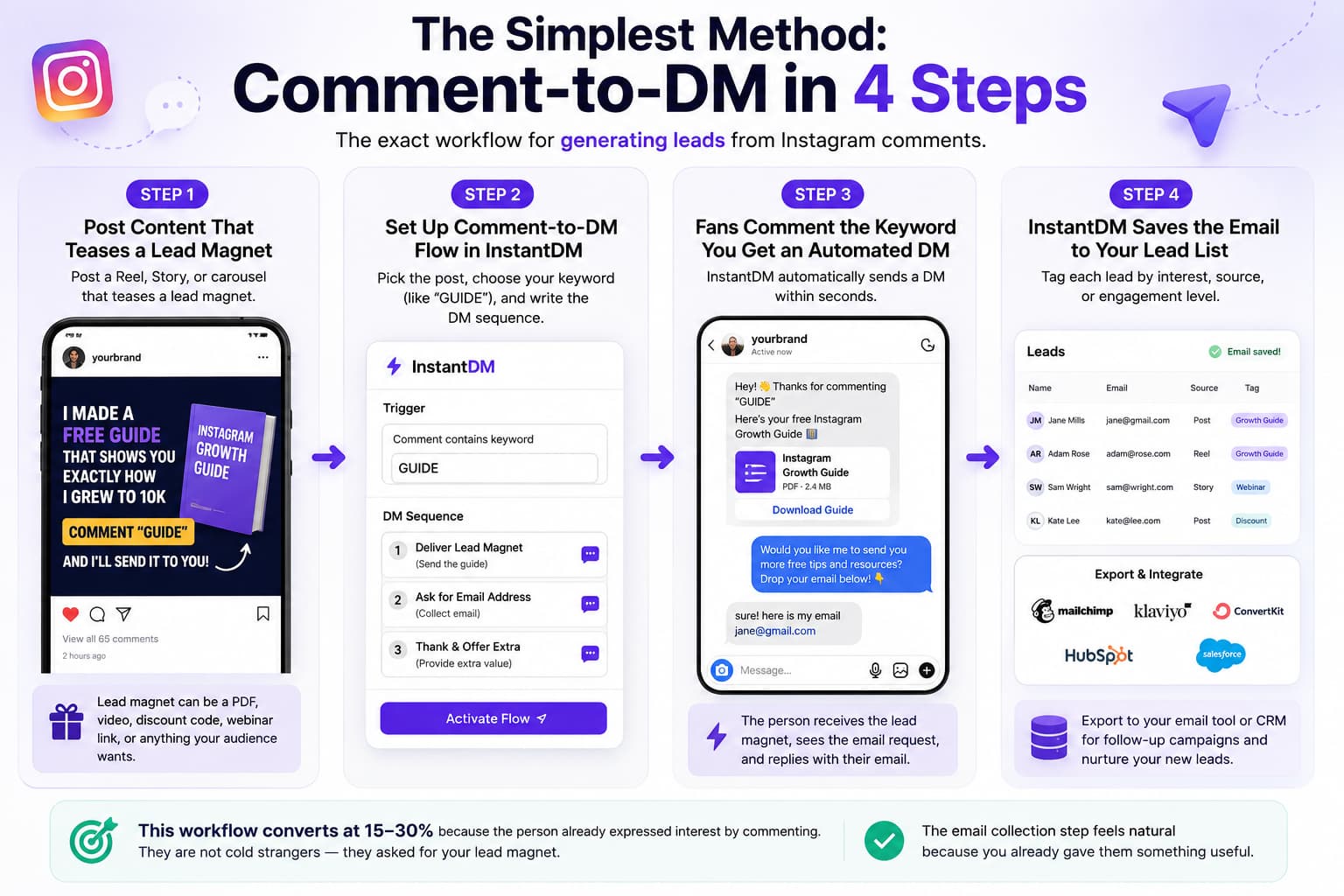
- Comment-to-DM: someone comments a keyword on your post or Reel, they get a private message with the link.
- Story-reply auto-DMs: someone replies to your story, an automated response starts the conversation.
- Keyword replies to inbound DMs: "PRICE" gets the price, "GUIDE" gets the guide, at 2 a.m. without you.
- Lead capture in chat: asking for an email or phone number inside a conversation the person started.
- Post scheduling: publishing posts, Reels, and carousels through the API's content tools.
None of this is tolerated-but-frowned-upon. Meta documents these capabilities in its Instagram Platform docs and runs a partner program around them. It also ships its own comment-to-message automation inside Meta Business Suite. When the platform owner builds the feature into its own free dashboard, the argument about whether the pattern is allowed is over.
The dividing line under all five: user-initiated versus unsolicited. Allowed automation answers a comment, a story reply, or a message. It never starts a conversation with someone who has no idea who you are. If you want the mechanics, the walkthrough is in how to set up auto DM on Instagram.
What automation does Meta itself ship?
More than most people realize, and this is the strongest evidence in the whole debate. Meta Business Suite, the free dashboard attached to every professional account, includes Meta's own comment-to-message automation: someone comments on your post, Meta sends them your prewritten private message. The Instagram inbox adds saved replies, canned answers you insert with a shortcut, and an FAQ feature that shows tappable questions the moment someone opens a chat with you. Meta has started adding AI to the inbox too; we covered its AI reply suggestions in DMs when they appeared.
Read that list again. Automatic DMs triggered by comments, automatic answers to common questions, prewritten responses. If automated messaging broke Instagram's rules, Meta would be breaking them inside its own product. The native versions are deliberately basic, which is the honest reason partner tools exist: branching flows, follow-gates, integrations with your store or email list, and a queue built for viral days. The pattern itself, though, is Meta's. Our Meta Business Suite guide walks through the native tools and where they run out.
What Instagram automation is banned?
The banned side is anything that manufactures engagement or bypasses Meta's systems. Five categories cover almost all of it:
- Follow/unfollow bots. Mass-following strangers so some follow back, then dumping them. Artificial engagement by definition.
- Mass cold DMs. Blasting scraped lists of usernames. There is no official API for messaging people who never engaged with you, and there never has been.
- Engagement pods and fake likes. Bought or traded engagement is exactly what the Community Guidelines mean by artificial activity.
- Scraping. Harvesting profiles, followers, or emails with unauthorized tooling breaks the Terms of Use directly.
- Password tools. Anything that logs in as you, from browser extensions to cloud "growth services." You handed a stranger your account, and Meta can see the login pattern.
We are not going to explain how to run any of these. They fail on rules, and they fail on results: the accounts they inflate are the ones that get wiped in enforcement sweeps.
| Automation type | Status (Aug 2026) | Why |
|---|---|---|
| Comment-to-DM keyword replies | Allowed | Official API feature; the person commented first |
| Story-reply auto-DM | Allowed | Official API feature; the person replied first |
| Keyword replies to inbound DMs | Allowed | They messaged you; the API exists for this |
| Post / Reel scheduling | Allowed | API content publishing, plus Meta's own scheduler |
| Follow/unfollow bots | Banned | Artificial engagement under the Community Guidelines |
| Mass cold DMs to strangers | Banned | No official API for it; classic spam signal |
| Engagement pods, bought likes | Banned | Artificially collecting likes and follows |
| Scrapers and password tools | Banned | Unauthorized access under the Terms of Use |
What's the verdict on each automation job?
The table gives the ruling. Here's the reasoning per job, because knowing why the line sits where it does helps when a new tool shows up.
Comment-to-DM: allowed
The person asked in public; you answered in private. Private replies are a documented API feature, Meta ships the same pattern in Business Suite, and the commenter got exactly what they requested. Hard to build a spam complaint out of that. Comment-to-DM is the clearest allowed pattern we cover — the walkthrough is in Instagram comment-to-DM automation.
Story-reply auto-DM: allowed
A story reply lands in your inbox as a message, and answering messages is what the messaging API is for. It's also the warmest trigger available: the person typed something to you seconds ago.
Keyword replies to inbound DMs: allowed
Someone sends "GUIDE" and the guide arrives instantly instead of two days later. Meta wants business inboxes answered; a fast, accurate reply improves the exact experience the rules protect.
In-DM lead capture: allowed
Asking for an email or phone number inside a conversation the person opened is a supported flow. They can ignore the question or leave the chat. The banned cousin is harvesting contact details nobody handed you, which is scraping.
Scheduling through the API: allowed
Content publishing is a documented API capability and Meta runs its own scheduler. No inbox is involved, so there's no spam angle at all. You can even schedule a post with the auto-DM attached so both go live together.
Follow/unfollow: banned
A follow is supposed to mean a human chose your content. Mass-following strangers to fish for follow-backs fakes that signal, which is what the Community Guidelines mean by artificial activity, and the strangers never asked to be bait.
Mass cold DMs: banned
No API exists for messaging people who never engaged with you, so every cold-blast tool is off the official rails before it sends a single message. The recipient didn't opt in, and their spam report outweighs anything the message could earn.
Engagement pods and bought followers: banned
Purchased or traded engagement is fake demand, and Instagram's ranking runs on demand signals. Meta calls it artificial activity, and bought followers are mostly bots that vanish in the next purge anyway.
Scraping: banned
Collecting profiles, followers, or emails outside the API is the unauthorized access the Terms of Use name directly. Nobody on a scraped list agreed to hear from you, which is why scraping and cold DMs are usually the same business.
Password-based tools: banned
A tool that logs in with your credentials is impersonating you, and Meta treats that as unauthorized access regardless of what the tool does next. You've also handed your account to a stranger.
Notice the pattern. Every allowed job starts with a person acting first and ends with that person better off. Every banned job manufactures a signal or contacts someone who never opted in. Meta's objection was never to automation as a concept. The objection is to automation that makes Instagram worse for people who didn't ask for it, and that line hasn't moved in years.
Hasn't Instagram cracked down on automation before?
Yes, and the pattern of the crackdowns tells you which pile gets enforced. The famous one came in 2017, when Instagress, the best-known follow/unfollow service of its day, announced it was shutting down at Instagram's request. Several lookalike services closed within months, and an entire industry that sold "growth" through mass-following disappeared almost overnight.
Meta has kept at it since. It has taken companies to court for selling fake likes and followers and for scraping user data, and it runs periodic purges that strip bought followers from the accounts that paid for them.
Now look at the other side of the ledger. The official API has run for years, through all of those crackdowns, with the same partner tools operating in the open. The graveyard is entirely on the banned side. If Instagram considered comment-to-DM tools a problem, they'd have joined Instagress long ago; instead Meta built the same feature into Business Suite.
How do you tell an allowed tool from a banned one?
Two checks settle it in under a minute.
First, the login. Tools on the official API connect through Instagram or Facebook login, the OAuth screen where Meta itself asks which permissions you grant. They never see your password. A tool with a username-and-password form of its own is logging in as you, which is the banned mechanic no matter how polished the dashboard looks.
Second, the trigger. Ask what makes a message send. If the answer is "someone commented, replied, or messaged you," it is the allowed pattern. If the answer is "a list you upload" or "accounts matching your target audience," it is cold outreach wearing a UI.
Partner status is the supporting signal. InstantDM is an official Meta Business Partner; ManyChat is a Meta partner too. That status means Meta reviewed the integration and the tool sends through the API, not that Meta endorses anyone's marketing. Plenty of fine tools exist, but the partner program is the list Meta itself maintains, so it is the sensible place to start.
Want to verify a partner claim instead of taking a vendor's word for it? Meta maintains a public partner directory you can search. Keep the wording straight while you're there: official Meta Business Partner is a partnership-program status confirming the integration went through Meta's review, nothing more.
The password check matters beyond policy, too. Type your Instagram password into a third-party site and your credentials now live on a server you don't control. If that vendor gets breached, or was a phishing operation dressed as a growth tool, you did the attacker's work for them, and clawing an account back after a takeover is slow and uncertain.
Marketing copy is the third tell. "Unlimited DMs" and "undetectable" are promises about evading a platform, not integrating with one. A tool on the official API has rate limits it can't lift and nothing to hide from, so vendors on the right side of the line have no reason to talk like that.
Will Instagram ban you for auto DMs?
Not for auto DMs sent through the official API to people who engaged first. That traffic looks to Instagram like what it is: a business answering people who asked.
Accounts do get restricted, and it is worth being precise about why. The recurring causes are behavioral:
- Velocity. A dead account that suddenly fires hundreds of messages an hour trips spam systems regardless of which tool sent them.
- Spammy copy. Identical link-heavy blasts that recipients report. Reports weigh more than any other signal you control.
- Off-API tools. Password bots and scrapers leave login fingerprints Meta can detect, and enforcement lands on the account, not the vendor.
- Cold outreach. Messaging strangers puts you in the request-folder roulette where a handful of spam reports can freeze an account.
This is also the honest answer to "ManyChat got my account restricted." ManyChat sends through the same Graph API everyone else uses. When an account gets restricted after a viral spike, the cause is almost always velocity and copy, not the vendor's name on the invoice. Swapping tools without changing behavior changes nothing.
And no tool, ours included, can promise zero restrictions. Anyone selling certainty is selling something else. If your reach already looks throttled, run the checks in is your Instagram shadowbanned, and if you want the prevention playbook, read how to protect your account from sudden disabling.

What happens if Instagram flags your account?
Usually something smaller than a ban, at least the first time. Enforcement mostly arrives as a ladder, and the bottom rungs are common enough that you've probably met one:
- Action blocks. The "We limit how often you can do certain things" popup. One action, commenting, following, or sometimes messaging, gets blocked for a few hours to a few days.
- Feature restrictions. A single feature stays limited for longer, often with a notice in your account status screen.
- Messaging restrictions. Business messaging gets capped or paused while the rest of the account works normally. This is the rung automation-heavy accounts tend to see.
- Temporary account restriction. The whole account is limited pending review, sometimes with an identity check.
- Disable. The account is gone unless an appeal succeeds.
Two honest caveats. Meta doesn't publish the ladder or the thresholds between rungs, so any chart promising "X actions per hour triggers a block" is guesswork dressed as data. And the rungs aren't strictly sequential; a burst of spam reports can skip you past several. What moves you up is behavior Meta's systems can see: sudden velocity, the same message repeated at scale, and reports from the people you contacted.
Treat a first action block as a smoke alarm rather than an obstacle. The wrong response is forcing the same behavior through a different tool. The right response is to slow the queue, rewrite the message, and let the account cool off. If you're already higher up the ladder, how to get back a suspended or disabled Instagram account covers the appeal process, and the account protection guide covers staying off it entirely.
Is comment-to-DM automation safe?
Yes. Private replies to comments are a documented API feature, Meta Business Suite ships its own version, and the person always acts first by commenting. Of all the automation patterns, this one has the strongest paper trail.
The things that trip people up are Instagram's own rules:
- Keyword filtering. Meta's comment filters can hide or remove comments containing flagged words, sometimes ordinary-looking ones. If the comment is hidden before your automation sees it, no DM fires. Pick clean, boring keywords: LINK, GUIDE, PRICE.
- Follow-gates. Some setups only DM commenters who follow you. A viral Reel full of non-follower comments will then look like the automation "broke." It did not; that is the gate doing its job.
- The messaging window. The private reply starts a timed conversation. When the window closes, the thread goes quiet until the person engages again.
Every one of these is enforced by Instagram, and every compliant tool inherits them equally. A vendor that claims to have removed them is describing a tool that is not on the official API.
What about the 24-hour window?
The 24-hour window is Meta's core anti-spam rule for messaging, and it applies to every business on the platform. When a person DMs you, replies to your story, or triggers a private reply from a comment, a window opens. Inside it, automated messages flow freely: the link, the follow-up question, the lead-capture ask. Once 24 hours pass without the person engaging again, the window closes and automated promotional messages stop until they come back.
Meta documents the standard messaging window in its Messenger Platform policy. The goal: your inbox stays useful because businesses cannot camp in it forever.
This is why compliant tools go quiet on old conversations. Nothing broke; the window closed. It is also why cold DM blasting has no official path at all: with no engagement from the recipient, no window ever opens.
Does Instagram automation work on a personal account?
No. The official API only connects to professional accounts, meaning business or creator, so a compliant tool can't automate a personal profile at all. More setups stall on this than on any policy question.
The fix takes about two minutes: switch to a professional account in Instagram's settings, free of charge. Creator fits individuals and business fits brands, and for automation the difference barely matters since both unlock the API. The trade-offs are in creator vs business account if you're unsure which way to go.
One warning falls out of this: a tool claiming it can automate a personal account has just told you it doesn't use the API.
Why can't any tool send unlimited DMs?
Because Instagram's API applies rate caps on the platform side, and no vendor can lift them. A tool advertising unlimited DMs is either quietly queueing your messages, or it is off the API entirely, which is worse.
The caps are why serious tools pace their sending. When a Reel lands 5,000 keyword comments in an afternoon, the right behavior is a queue that works through them at a rate Instagram accepts, over hours if needed. The wrong behavior is firing everything in ninety seconds and finding out what an action block feels like. Treat any hourly volume that a human team could plausibly produce as the ceiling, even when the tool would let you go faster.
How do you keep Instagram automation on the safe side?
Most of it comes down to four habits:
- Official API only. Connect through Instagram or Facebook login. Never type your Instagram password into a third-party tool.
- Reply to engagement only. Comments, story replies, inbound DMs. Never an uploaded list, never a stranger.
- Keep a human handoff. A "talk to a person" path in every flow. Automation answers "where's the link"; people handle complaints and deals.
- Keep volume sane. Pace the queue instead of blasting, vary the copy, and keep artificial urgency out of the first message.
Volume is the habit that saves accounts, so it deserves the extra sentences. Spread sends across hours rather than minutes; a queue that trickles through a viral afternoon finishes the job, where a blast earns an action block halfway through. Identical messages at scale are the exact pattern spam systems watch for, so a first name plus small wording changes make the same traffic read as conversation. And when a block does land, take the hint: slow down and answer by hand for a day. The platform's actual limits are collected in the Instagram DM limits and rules guide.
InstantDM runs the allowed patterns on the official API with a paced queue built in, which is one way to get these defaults without configuring them yourself. For the longer operational checklist, the deeper reads are the Instagram automation compliance guide and using Instagram auto DMs without getting banned.
Final thoughts
The question "is Instagram automation allowed" has a cleaner answer than most policy questions: yes for tools that answer people through the official API, no for bots that fake engagement or message strangers. Meta drew the line years ago and publishes it in its terms. It even builds the allowed side into its own products. The accounts that get in trouble are almost never running keyword replies to their own commenters. They are running the other pile.
Asking the same question about the other short-video platform? The rules rhyme but differ in the details: is TikTok automation allowed covers them.
Start with automation Meta actually allows
If the plan is comment-to-DM, story replies, and keyword responses, you can run all of it on the official Instagram API today. InstantDM is an official Meta Business Partner: you connect through Instagram or Facebook login, never a password, and every message goes through Meta's own pipes with a queue that respects the platform's limits.
The free plan covers 500 automations a month, and Legend Pro is $9.99/month flat with unlimited contacts, as of August 2026. Start free on InstantDM and keep your automation on the side of the line Meta built.
Instagram, Meta, and ManyChat are trademarks of their owners. InstantDM is not affiliated with those companies beyond the named partner program.