
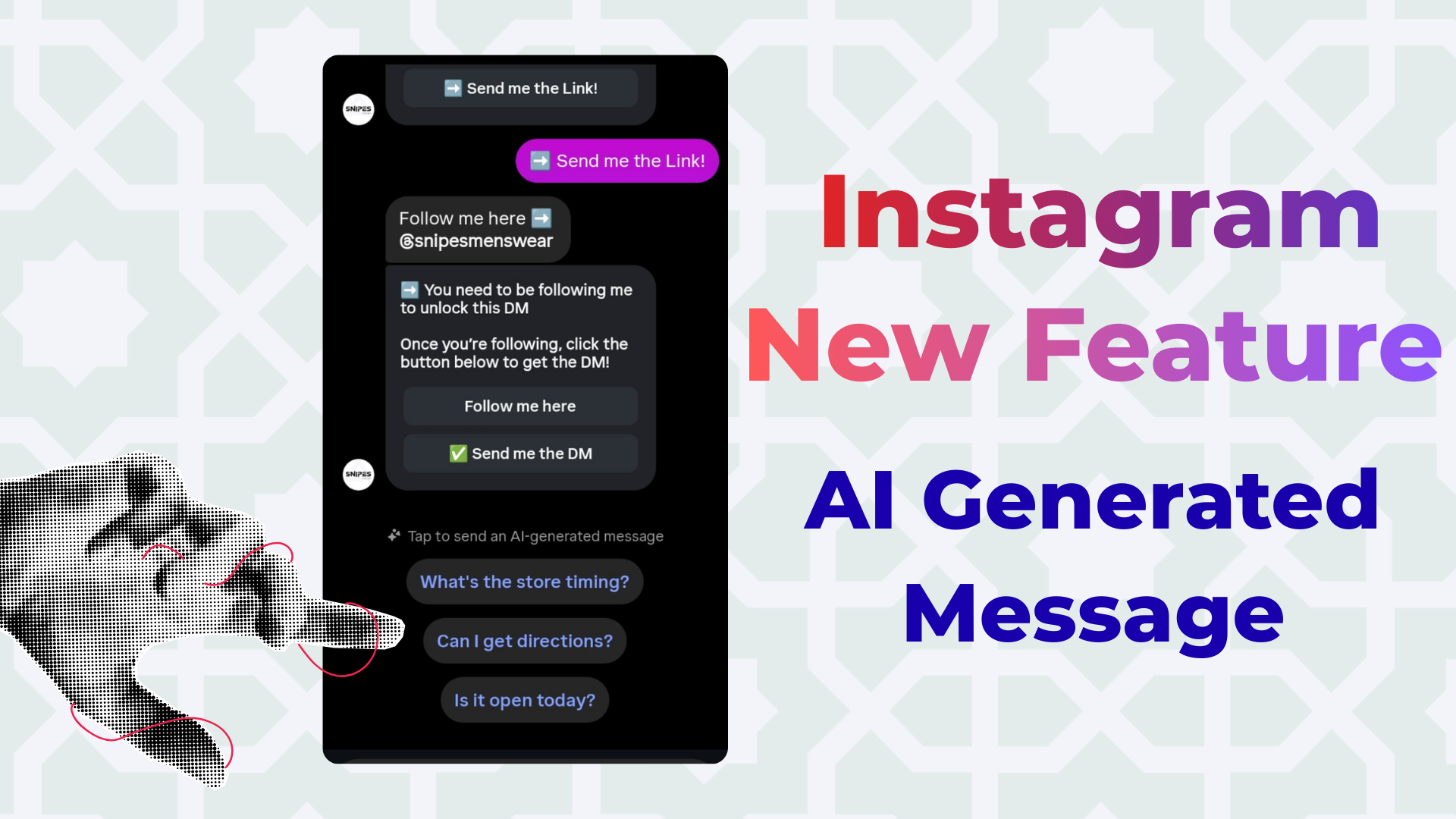
Something new just appeared inside your Instagram DMs — and if you’ve spotted those small suggestion bubbles sitting above your message box, you’ve already encountered Instagram’s latest AI-powered feature.
Instagram has quietly rolled out AI-generated reply suggestions — contextual, one-tap message prompts that appear automatically when you’re chatting with a brand, business, or creator. They look something like this:
“What is the price?”
“Is this still available?”
“Can I get more information?”
“What are the store timings?”
One tap. Message sent. No typing required.
For everyday users, this feels like a convenience upgrade — and in many ways, it is. But like most AI features baked into a social platform, there's more going on beneath the surface than the interface lets on. This guide covers everything: what the feature is, how it works, why Instagram built it, what it means for your experience as a user, and — critically — how it's already reshaping the way brands and businesses operate inside DMs.
If you are new to managing Instagram DMs, see our guide on how to check your Instagram messages including the hidden requests folder.
What Are Instagram AI Reply Suggestions?
Instagram’s AI reply suggestions are auto-generated message bubbles powered by machine learning. They sit just above the text input field in your DM window and update dynamically based on the content of the conversation.
The feature is part of Meta’s broader AI rollout across its platforms — the same initiative that brought Meta AI into WhatsApp, Messenger, and Facebook. On Instagram specifically, it complements other recently launched AI tools including AI-generated comments, image editing suggestions, and smart search.
Here’s exactly how it works from a user’s point of view:
- You land in a DM conversation — typically after clicking a brand’s ad, responding to a Story, or commenting on a Reel
- Instagram’s AI reads the conversation context in real time
- Two to four suggestion bubbles appear above your keyboard
- Tapping any suggestion sends it as a message instantly — no typing needed
- Suggestions refresh as the conversation evolves
The AI is particularly active in business-to-user conversations — when you’re messaging a brand, a creator selling products, or a service provider. That’s where the suggestions are most contextually relevant, and most frequently appearing.
Why Did Instagram Build This?
The short answer: friction reduction and commerce acceleration.
Instagram has been aggressively expanding as a shopping and commerce platform. Features like Instagram Shopping, product tags in posts, and Click-to-DM ads are all designed to shorten the path from discovery to purchase. But there’s long been a gap in that journey: the moment a curious user lands in a DM and has to actually compose a message.
Typing is effort. Effort creates hesitation. Hesitation kills conversions.
AI reply suggestions solve that. By surfacing the most likely questions a user wants to ask — before they’ve even touched the keyboard — Instagram removes that moment of hesitation entirely. The user gets what they want faster. The brand gets a more engaged lead. Instagram’s platform looks more valuable to advertisers.
It’s also part of a competitive response to WhatsApp Business, which has had similar quick-reply features for years. By bringing that functionality to Instagram DMs, Meta is aligning its platforms and reinforcing Instagram as the go-to channel for conversational commerce.
What This Feels Like as a User
In day-to-day use, the feature is genuinely seamless for casual interactions. You see a product you like in your feed, click the brand’s ad, land in their DMs, and — before you’ve figured out what to ask — Instagram has already guessed it for you. One tap and the question is sent.
Users familiar with smart replies in Gmail, Outlook, or iMessage will feel immediately at home. The experience is fluid, modern, and faster than typing.
However, there are a few user experience nuances worth being aware of:
The suggestions aren’t always the right question
AI suggestions are contextual, but they’re not telepathic. If your actual question is specific — “Do you ship to Chennai?” or “Is the black variant in stock?” — you’ll still need to type it. The suggestions work best for broad, common inquiries.
Tapping a suggestion isn’t always the fastest path forward
This is the part most users don’t realize. Many brands use structured automation buttons inside their DM messages — buttons like “View Prices” or “Get the Offer.” Tapping one of those buttons moves you instantly to the information or product you want. Tapping an AI suggestion instead sends a free-text message, which may trigger a slower, less direct response path. More on this shortly.
You can ignore the suggestions entirely
The suggestions are optional. They don’t block the text field, and you can scroll past them or simply ignore them. For users who prefer to write their own messages, they’re unobtrusive.
The Hidden Friction: What Happens When You Tap a Suggestion
Here’s where the user experience gets a little more complicated — and where it’s worth paying attention.
The majority of businesses running Instagram ads or promotions use DM automation tools — platforms like ManyChat or InstantDM that send structured, interactive messages with clickable buttons. When you click a brand’s ad, you don’t just enter a regular chat. You enter an automated funnel.
A typical automated flow looks like this:
- You click the ad and land in the brand’s DM
- The automation sends a welcome message with buttons (e.g., “View Prices,” “Get the Offer,” “Send Me the Link”)
- You click the button you want
- The automation delivers exactly what was promised — the price list, the discount code, the product link
Now here’s the problem:
Instagram’s AI suggestions appear alongside those automation buttons. They look similar. They feel like the natural thing to tap. But they’re fundamentally different:
- The automation button triggers the next step in the brand’s flow — it sends you exactly to the product, link, or offer
- The AI suggestion sends a free-text message that the automation may not recognize — and the flow stalls
If you’ve ever clicked through a brand’s ad, sent a message in the chat, and then heard... nothing — this is likely why. You may have tapped an AI suggestion instead of the brand’s automation button, and the bot didn’t know how to respond.
💡 User Tip: When chatting with a brand after clicking an ad, look for the button inside the brand’s message — not just the AI bubbles above the text box. The button is what moves things forward and gets you what you actually want.
How This Feature Is Affecting Brands and Businesses
From a brand perspective, Instagram’s AI reply suggestions have introduced a significant, often invisible challenge: funnel leakage.
Every business running Instagram DM automation has built their funnel around a specific logic: the user clicks a button, the automation responds, the conversation progresses toward a sale. That logic assumes the user’s action will be a button click — a predictable, structured input.
AI suggestions introduced an entirely new category of user behavior that most existing funnels were never designed to handle: unstructured free-text inputs that look like intentional engagement but don’t trigger any automation step.
The scale of impact has been significant. Marketers running high-volume Click-to-DM ad campaigns have reported 20–30% drops in funnel completion rates since AI suggestions became widespread. For a brand spending $3,000 a month on Instagram ads, that can translate to nearly $750 per month in wasted spend — on leads who expressed genuine interest but never made it through the funnel.
The Three Funnels Hit Hardest
- Click-to-DM Ads: Users click through a paid ad, land in DMs, and tap an AI suggestion instead of the automation button. The flow breaks at the very first step — maximising cost-per-lead while minimising return.
- Reel Comment Automation: A user comments a keyword, triggering an automatic DM. They then tap an AI suggestion instead of the button in that DM. The organic lead is lost despite the user showing clear intent.
- Product and Offer Funnels: Funnels built to deliver discount codes, product catalogs, or checkout links depend on a single decisive click. AI suggestion interference at any step breaks the entire chain.
How Smart Brands Are Adapting
Forward-thinking businesses aren’t waiting for Instagram to solve this. They’re engineering their automation to be AI-resilient — built to expect AI suggestion interference and handle it gracefully. The core strategies include:
- Smart Fallback Responses — automated messages that fire when an unexpected free-text input is received, gently redirecting the user back to the automation button
- Ghost Follow-Up Reminders — timed follow-ups that trigger if the primary button hasn’t been clicked within 30–60 seconds
- Visual Priming in Ad Copy — explicit instructions in the ad creative telling users to “tap the button in the chat” before they even enter the DM
- Clarity-First Button Labels — action-specific, benefit-led button copy that makes the automation button feel more compelling than any AI suggestion
For a complete deep-dive into how brands can protect their DM funnels from AI suggestion interference — including step-by-step implementation guides for each of these strategies — read our full brand guide: Instagram’s AI Suggestions Are Breaking Your DM Automation — Here’s How to Fix It.
The Bigger Picture: Instagram’s AI Roadmap
AI reply suggestions aren’t an isolated feature — they’re one visible piece of a much larger strategic direction Meta has been executing across all its platforms.
Since Meta AI’s rollout in April 2024, the company has been systematically embedding AI into every layer of Instagram’s interface: content recommendations, search, comment suggestions, image editing, and now conversations. The DM inbox — once a purely human-to-human space — is becoming an AI-mediated environment.
What does that mean for users going forward? A few things:
Conversations will get faster
AI suggestions are just the beginning. As the models improve, expect more sophisticated features: AI-written draft responses, smart follow-up reminders on your behalf, and predictive message suggestions that go beyond simple questions to full conversational flows.
Commerce will move deeper into DMs
Instagram’s endgame isn’t just faster conversations — it’s frictionless transactions. AI suggestions are a stepping stone toward a DM experience where users can browse products, ask questions, and complete purchases without ever leaving the chat window. Meta has been building toward this vision for years, and AI is what makes it viable at scale.
Privacy questions will follow
For the AI to generate contextually relevant suggestions, it needs to process your conversation content in real time. That raises legitimate questions about what data is being read, stored, and used. Meta has not provided granular transparency about this aspect of the feature — something worth watching as the rollout expands.
How to Get the Most Out of This Feature (As a User)
Now that you understand the full picture, here’s how to use Instagram’s AI reply suggestions to your advantage — without getting caught in the friction they can create:
- Use suggestions for casual questions, not commercial ones. If you’re just saying hi or making small talk, AI suggestions are great. If you’re trying to get a discount code or product link, look for the brand’s automation button instead.
- Look inside the message, not just above the text box. When a brand’s automation sends you a message, the important action is usually a button embedded in that message — not the AI bubbles floating above your keyboard.
- If a conversation goes quiet, try the button. If you sent an AI suggestion and the chat went silent, scroll up to the brand’s last message and tap the button inside it. That usually restarts the flow.
- Type your actual question if the suggestions aren’t right. The feature is a shortcut, not a replacement for real communication. If you want to ask something specific, type it out.
Quick Recap: Everything You Need to Know
- Instagram has rolled out AI-generated reply suggestions inside DMs, appearing as quick-tap bubbles above the message input field
- The feature is part of Meta’s broader AI rollout across Instagram, WhatsApp, Facebook, and Messenger
- For users, it reduces friction in casual business conversations — but it can stall automated funnels if you tap a suggestion instead of the brand’s button
- For brands, it represents a new layer of funnel risk — with 20–30% drops in completion rates reported by high-volume advertisers
- Smart brands are adapting with AI-resilient funnels: Smart Fallbacks, Ghost Follow-Ups, visual priming, and clearer button design
- This is the beginning of a deeper AI integration into Instagram DMs — expect faster commerce experiences, more sophisticated automation tools, and evolving privacy considerations ahead
Are you a brand or marketer running Instagram DM funnels using Manychat or InstantDM?
Learn exactly how to protect your automation from AI suggestion interference — with step-by-step strategies and platform-specific fixes.
→ Read:Instagram’s AI Suggestions Are Breaking Your DM Automation — Here’s How to Fix It
Mastering Instagram Insights 2026: The Ultimate AI Strategy
The Best AI-Generated Images & Stock Photos for Your Brand
Affordable Instagram DM Automation in 2026: What It Actually
Watch: Instagram AI Reply Suggestions in DMs
- How to Create an Auto Reply on Instagram?
- How To Set up AUTO REPLIES on Instagram
- How To Automate Your Instagram Messaging
- How to Auto-Reply to Instagram Comments with DMs (3-Step Gui