
What Happens When Instagram Suspends Your Account?
A few weeks ago, several people had their Instagram accounts suspended or disabled. Some lost years of content. Others lost business leads overnight. The panic is real because for most creators, their account is not just a profile. It is a livelihood.
When your account gets suspended, Instagram gives you a limited window to appeal. Miss that window and the account moves toward permanent deletion. You have 30 days to submit your first appeal and 180 days before the account is gone forever.
The good news is that most accounts are recoverable if you act fast and follow the right process. The bad news is that most creators panic, make things worse, and lose their accounts because they did not know what to do.
This guide walks you through 3 proven methods that actually work. No false promises. No "hack" shortcuts. Just real steps with honest timelines.

What Should You Do First When Your Account Gets Suspended?
Do not panic. Do not create a new account. Do not log out of the suspended account. Do not appeal through multiple methods at once.
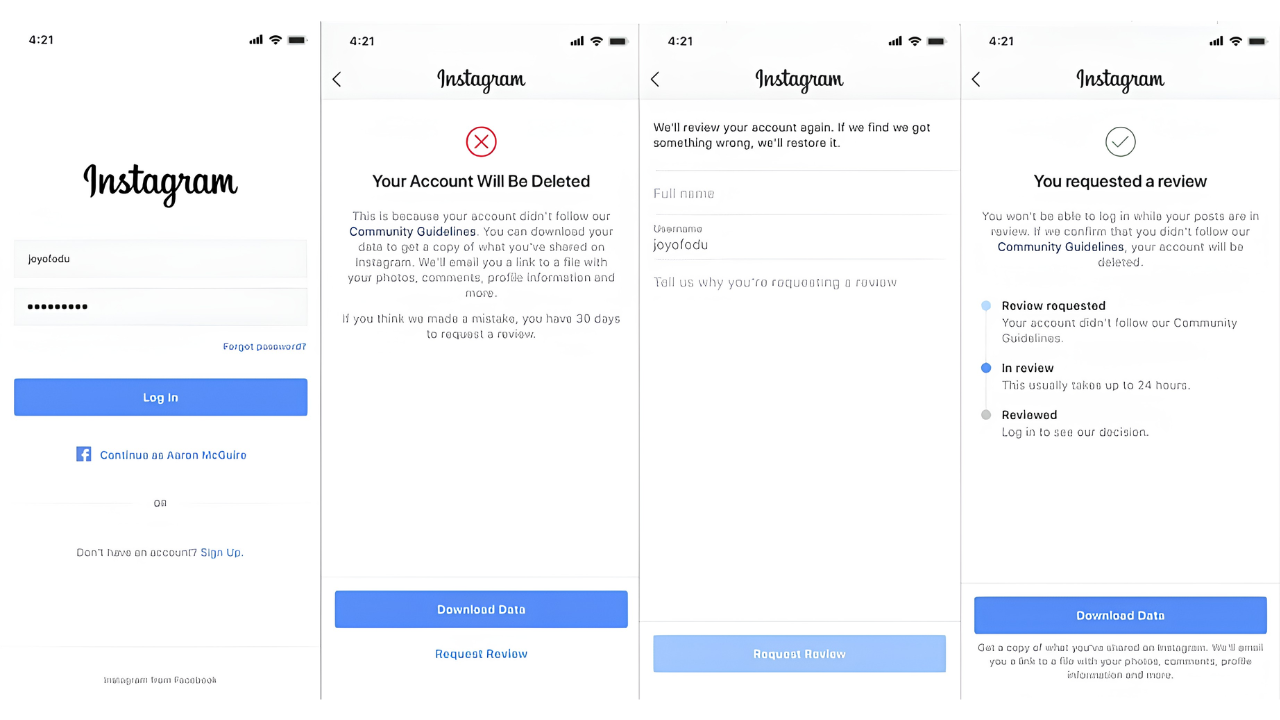
The first thing you need to do is check if Instagram has given you an appeal option. When your account gets suspended or disabled, Instagram typically shows an in app prompt asking you to verify your identity. This is Method 1, and it is always your first step.
If you do not see an appeal option, it means your account was disabled under a different category. Move to Method 2.
Method 1: How Do You Submit an Instagram Appeal?
The appeal is your fastest path to recovery. Here is exactly what to do:
Step 1: Open Instagram. You should see a message saying your account has been suspended. Tap the "Appeal" or "Request Review" button.
Step 2: Have these ready before you start:
- Government issued ID (passport, driver's license, or national ID)
- A selfie photo or selfie video (Instagram may ask for both)
Step 3: Submit everything they ask for clearly and honestly. Do not use edited photos. Do not crop your ID. The verification team checks for authenticity.
Step 4: Wait a minimum of 5 days. The review process needs time. Do not submit multiple appeals. Do not try different methods simultaneously. Each new appeal resets your position in the queue.
What to expect: Meta's AI says "just over a day" but the reality is 24 hours to 2 weeks for most cases. Be patient.
If you want to understand why accounts get flagged in the first place, check our guide on is your Instagram shadowbanned.
Method 2: How Do You Use the Instagram Help Center?
If one week passes and your first appeal gets no reply, it is time to escalate through the Help Center.
Step 1: Go to Google and search "Help Instagram Center." Click the first link.
Step 2: Find the section called "About disabling accounts."
Step 3: Scroll to the bottom where it says "Was this helpful?" Click "No" then "Other."
Step 4: Write a clear, honest message with your specific details. Here is a template:
"My creator account [@youraccount] was suspended/disabled on [date]. I submitted an appeal but have received no update. I kindly request a manual review of my account. I believe this was a mistake. I have not intentionally violated any Community Guidelines. If I did anything against them, it was out of unawareness of updated guidelines. Please help me recover my account."
Keep it honest. Keep it respectful. Keep it simple. Do not write an emotional essay. Do not threaten legal action. The person reading your message is a human being responding to hundreds of similar requests.
Step 5: Wait again. The Help Center route typically takes 3 to 7 days for a response.
Method 3: How Does Meta Verified Support Help Recover Accounts?
If both appeals get rejected, Meta Verified support is your last and most direct option.
Step 1: Create a new Instagram account.
Step 2: Subscribe to Meta Verified. This costs money but gives you access to real human support, not automated responses.
Step 3: Once verified, go to the support chat.
Step 4: Explain your situation clearly. Include:
- Your suspended account handle
- The date it was suspended
- That you have already appealed and received no resolution
- A request to manually escalate and review your account
A real person reviewing your case changes everything. Automated systems make mistakes. Human reviewers can see context that algorithms miss. This is the most direct path to getting a human decision.
For creators who rely on DM automation, our guide on using Instagram auto DMs without getting banned explains how to stay compliant.
What Are the Most Common Reasons Accounts Get Suspended?
Understanding why accounts get suspended helps you avoid it in the future:
- Mass DMs, follows, or likes that look like bot behavior
- Third party apps including unverified auto DM tools and growth apps
- Community guideline violations including nudity, harassment, misinformation
- Copyright strikes from using content you do not own
- Using the same phone or email across multiple accounts
- Sometimes, no clear reason at all because Instagram's AI makes mistakes too
The line between automation and spam is thin. If you use any automation tools, make sure they are Instagram approved and used within safe limits. Our guide on avoiding Instagram bans covers this in detail.
What Should You Do While Waiting for Your Appeal?
While your appeal is being reviewed, keep these things in mind:
Check your email daily. Instagram may ask for more information. Missing that email delays everything.
Do not create replacement accounts. If Instagram detects you creating new accounts while your appeal is pending, it can flag your device and make recovery harder.
Do not log out of the suspended account. Stay logged in. Some recovery flows only work when you are still authenticated.
Document everything. Screenshot the suspension notice, your appeal submission, and any emails from Instagram. If you need to escalate later, this documentation is critical.
Understand the timeline. You have 30 days to submit your first appeal and 180 days before permanent deletion. Most recoveries happen within the first 2 weeks.
What Questions Still Need Answers?
Even after going through all of this, there are questions nobody has properly answered yet:
- How many accounts is it safe to run on one device?
- Which third party tools are actually allowed?
- Does posting about government topics trigger a community standard flag?
- What is the real difference between suspended and disabled?
- Why is there is no warning before action is taken?
These questions matter because the rules are not always clear. Instagram's policies change frequently, and what was safe last month might trigger a flag this month.
The best defense is awareness. Know the rules. Stay updated on policy changes. And if your account does get suspended, come back to this guide and follow the 3 methods in order.
Your Account Is Worth Protecting
Your account is not just an account. It is something you built with real effort and real love. The late nights. The content that took hours. The followers you built one connection at a time.
So take care of it. Know the rules. Stay safe on the platform. And if it ever happens to you, you now have the playbook.
You are not alone. And it is not over.
Keep creating. Keep going.
Source: https://www.instagram.com/p/DYztZ1lE7Qm/