Quick Summary
-
Inbox as Headquarters: In 2026, the Instagram inbox is the primary hub for closing brand deals and driving "dark social" revenue.
-
Operational Sorting: Creators must use a "Hybrid" approach, utilizing Primary tabs for VIPs and the General tab for bulk fan messages.
-
Boundary Setting: Managing fan expectations through "DM Office Hours" and FAQ Highlights is essential to prevent creator burnout.
-
Smart Automation: Implementing official API tools like InstantDM handles repetitive link sharing and FAQs instantly and safely.
-
Algorithm Growth: Maintaining a fast response time via automation protects your story reach and boosts overall engagement metrics.
The Business of Connection: Why DM Management is the New Creator Frontier
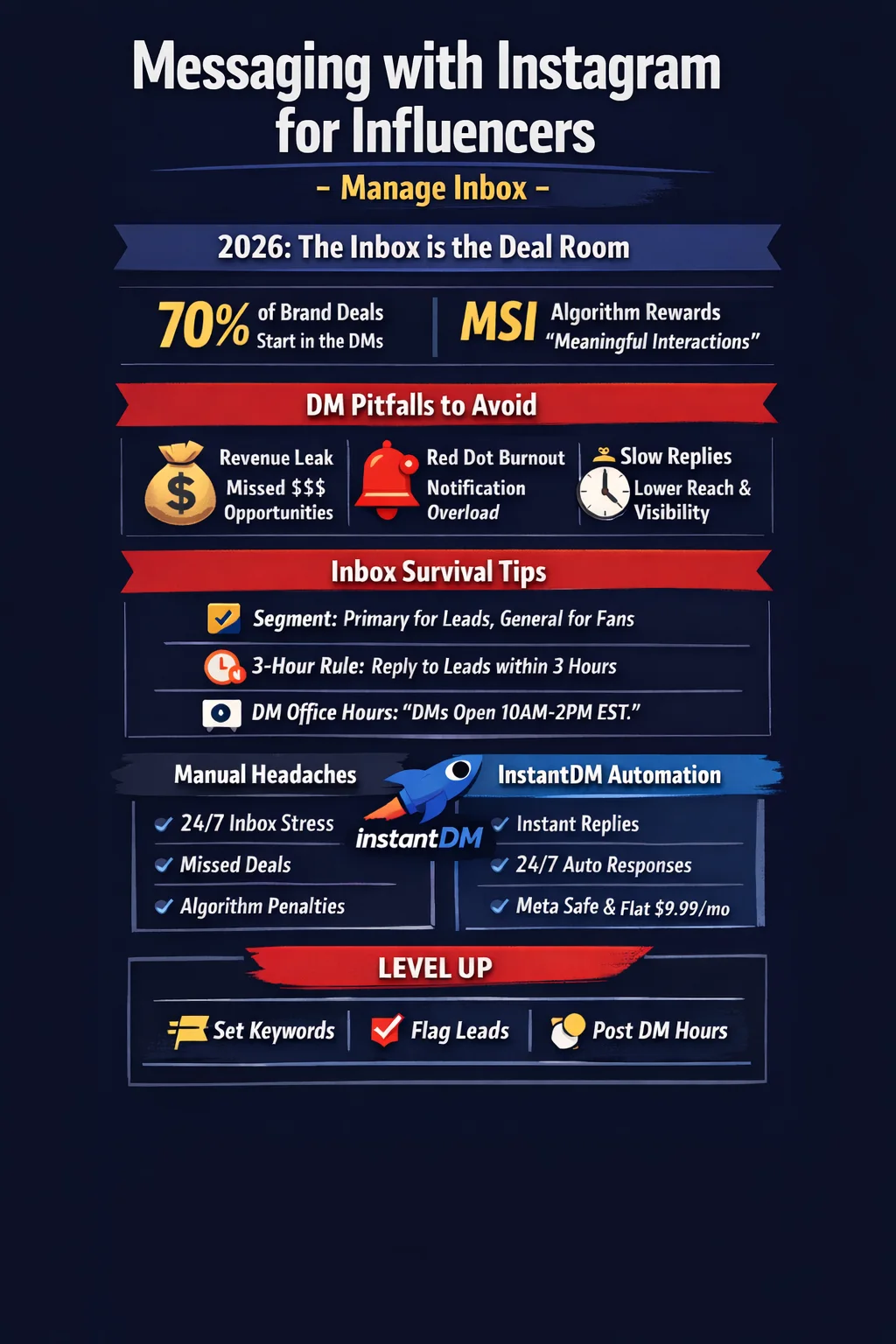
In 2026, the "Creator Economy" has officially moved behind closed doors. While your feed attracts the eyes, your inbox closes the deals. Recent data shows that over 70% of brand partnerships now originate or are finalized within Instagram DMs, and "dark social" (private sharing) drives more traffic than public stories.
But here is the catch: success creates a "DM tax." As you scale from 50k to 500k followers, your inbox shifts from a place of connection to a high-stakes business headquarters. Without a professional system for Instagram DM management for influencers, you face three major risks:
-
Revenue Leak: Missed messages from high-ticket brands.
-
Algorithm Penalties: Instagram’s 2026 algorithm rewards "Meaningful Social Interactions" (MSI).
-
Burnout: The mental load of a never-ending notification red dot.
TL;DR: The 2-Minute Inbox Strategy
-
Segment Your Tiers: Use the Primary Tab for revenue leads and General for bulk fan engagement.
-
The 3-Hour Benchmark: Aim to respond to "Primary" leads within 3 hours. Use InstantDM for 24/7 automation.
-
Set Hard Boundaries: Publish "DM Office Hours" in your Bio to protect your mental health.
Why Instagram DMs Matter for Influencer Growth (The 2026 Shift)
In the current landscape, Instagram is a social search engine and commerce hub. When a follower DMs you, they are at their highest point of "purchase intent."
What is influencer inbox fatigue?
It is the operational paralysis that occurs when a creator’s incoming message volume exceeds their manual capacity. This results in "ghosting" high-value followers, which effectively caps your growth potential.
Common Instagram Inbox Problems Influencers Face
1. The "Red Dot" Burnout
Receiving 100+ notifications an hour creates "micro-stress," leading creators to avoid their inbox entirely.
2. Missed Brand Deals (The "Hidden Request" Trap)
High-paying brand managers often land in your "Requests" folder. If you aren't filtering these, thousands of dollars in revenue can sit unread.
3. Response Time & Reach Risks
Slow replies signal to the platform that your community is passive, which can lead to lower visibility on your Reels and Posts.
Manual Instagram DM Organization (Built-In Tools)
Primary vs. General Tabs
Move all active brand collaborations and inner-circle creators to Primary. Move general inquiries to General.
Flagging Leads
Use the "Flag" icon as a "To-Do" list. Only unflag once the task like a contract review is complete.
Saved Replies
Go to Settings > Business > Saved Replies. Create shortcuts like:
-
!link for product queries.
-
!collab for brand inquiries.
Setting Boundaries Without Losing Followers
DM Office Hours
Add your active hours to your bio (e.g., "Checking DMs 10am-2pm EST").
Using InstantDM to Scale DM Management
Keyword Triggers
Tell followers to "Comment 'LINK'," and InstantDM sends that specific link instantly, increasing your engagement rate for influencers.
Safe & Compliant
InstantDM uses official Instagram API channels, meaning your account stays safe from shadowbans.
Manual vs. Automated: Which Do You Need?
Feature | Manual Management | InstantDM Automation |
Effort Level | High (Hours per day) | Low (Set and forget) |
Response Time | 2–24+ Hours | Instant (Under 2 seconds) |
Scalability | Hard to maintain | Unlimited |
Feature | InstantDM | ManyChat | LinkDM / Inro |
Pricing Model | Growth-Friendly: Flat $9.99/mo regardless of how big you grow. | The "Success Tax": Prices jump every time you get more followers or contacts. | The "Fragmented Fee": Expensive monthly subs for very limited features. |
DM Limits | Unlimited: Send 100 or 100,000 dms without extra charges. | Tier-restricted. Hit your limit and your automation stops working. | Usually limited or requires high-tier upgrades for high volume. |
Account Safety | Meta Verified: Uses 100% official APIs to keep your account safe. | Meta Verified | Meta Verified |
Scheduling | Built-in: Schedule instagram carousels and posts in the same hub. | Non-existent or extremely basic; requires another $30/mo tool. | Fragmented: Does not handle posts/carousels; forces tab-jumping. |
Setup Time | 5 Minutes: Built for humans, not coders. Set it and forget it. | Hours/Days. Requires a "developer mindset" to build flows. | Complex, requires connecting multiple third-party tools. |
Hidden Costs | Zero: What you see is what you get. No surprises. | Heavy: Expect to pay for "pro" add-ons and contact list bloat. | Annoying: Locked-out features and limits on "older" content. |
Mobile Application | Both Android iOS Available (User Friendly) | Yes - but Complex | No App Available |
Conclusion
Your inbox is the heartbeat of your business. By mastering manual organization and leveraging InstantDM for the heavy lifting, you can reclaim your time to focus on creating content.
Key Takeaways for Creator Success
-
Segment Now: Move your first 10 brand DMs to the Primary tab.
-
Automate: Set up your first keyword trigger in InstantDM.
-
Communicate: Update your Bio with your DM Office Hours today.