

TL;DR:
- You need before you start: a Business or Creator Instagram account
- Connect with a meta-approved partner tool
- Pick a post - Set up a trigger word – paste the link and hit 'publish'.
- Test it by commenting the trigger word
Prerequisites: Three Things You Need Before You Start
Comment-to-DM automation runs on Meta's official Instagram Graph API, which has hard requirements that cannot be skipped. If any of these are missing, the connection will fail at Step 1.
- Business or Creator Instagram account. As per meta policy personal accounts cannot connect to any Graph API tool. Switch by opening Instagram → menu → Settings → Account → "Switch to Professional Account" → Business or Creator. It's free and takes 2 minutes.
- An automation tool like Instantdm, ManyChat or Linkdm
- A Post needs to be published to test comment automation
The Complete 8-Step Setup Walkthrough
Step 1: Create Your InstantDM Account and Connect Your Instagram
- Go to InstantDM.com or Manychat.com and sign up for a free account.
- Connect Instagram via the Instagram login screen – the meta-approved way. Don't share your password with any tool.
- Once logged in and connected your Instagram you can see your instagram details with username and followers count
Step 2: Navigate to the Comment to DM Automation Section
- Click on the Instagram comment to dm automation section in the dashboard
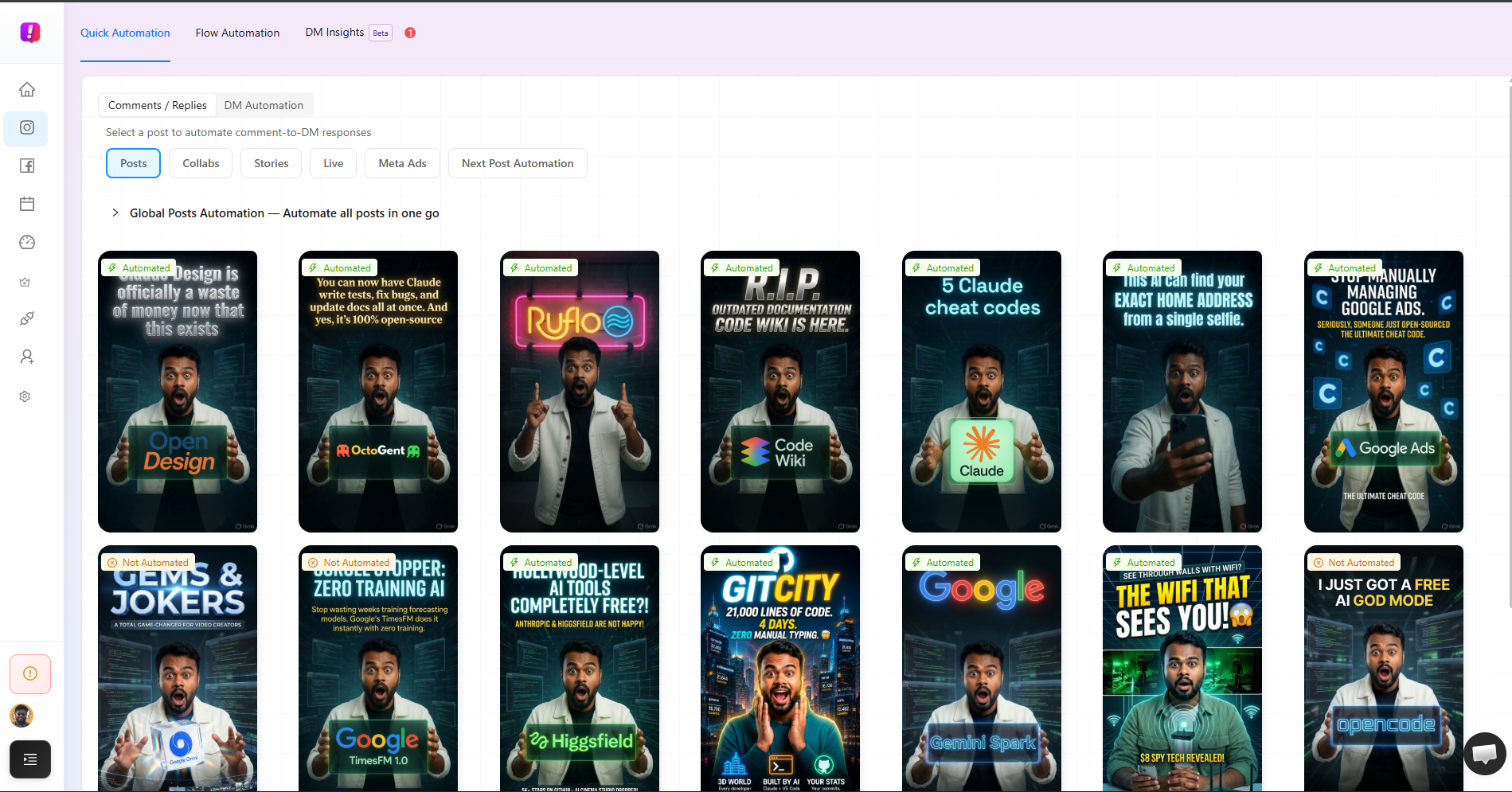
- Now you can find list of posts, stories, lives which you posted on Instagram
Step 3: Choose Your Target Post or Set a Universal Trigger
- You will be asked to choose where this automation should run. You have two options:
- Specific Post Trigger: Choose one post or Reel from your feed. The automation only fires when someone comments on that specific piece of content. Best for campaigns tied to a single Reel or product launch because it keeps your data clean and your reporting accurate.
- Universal Trigger: The automation applies to every post on your account, past and future. Best for evergreen content where the same keyword always delivers the same resource — for example, anyone who comments "FREEBIE" on any of your posts ever gets your lead magnet.
- For your first automation, choose Specific Post and pick a Reel you are currently promoting. Once you understand how the system behaves, you can expand to a universal trigger.
Step 4: Define Your Keyword Trigger
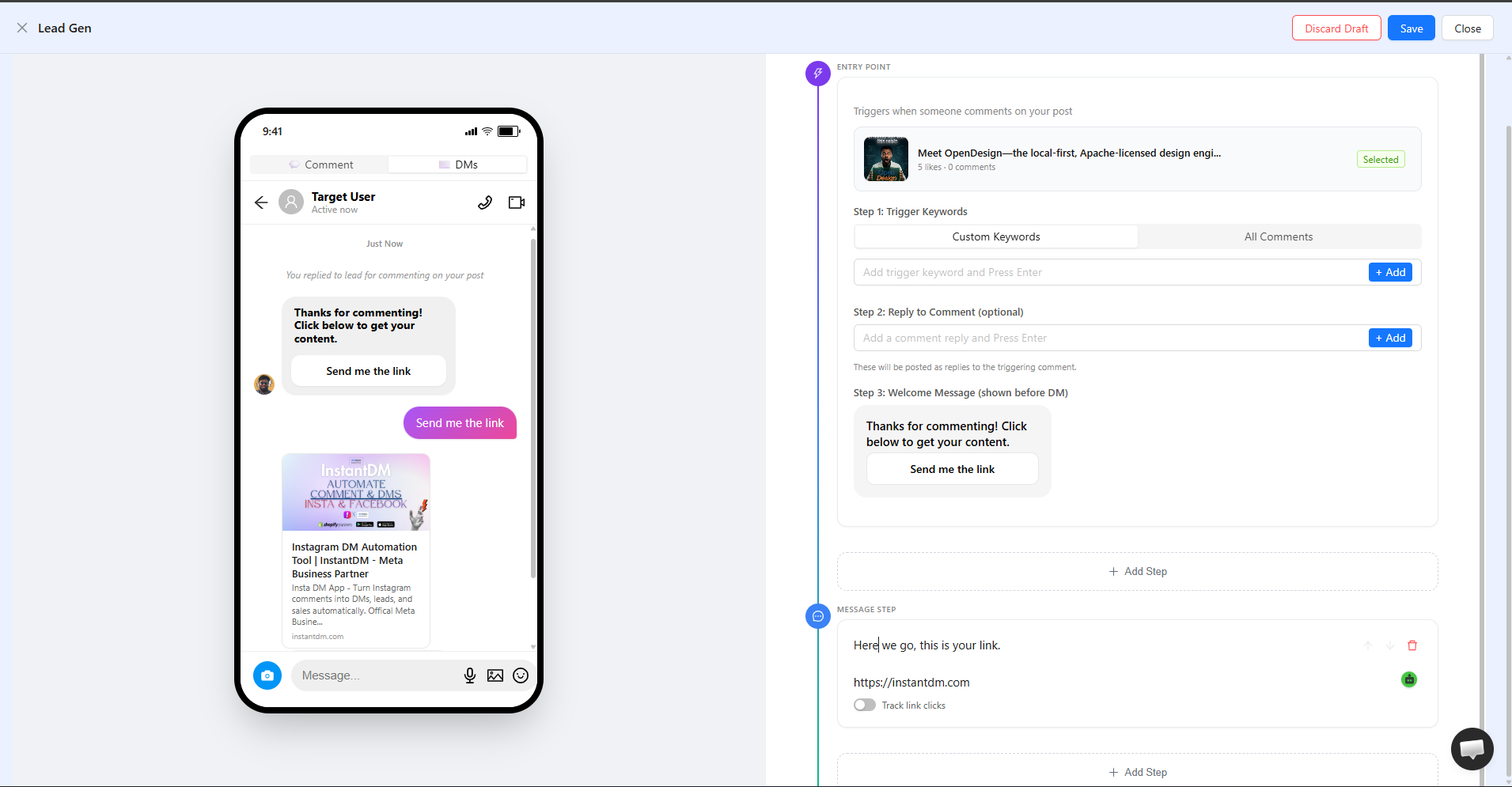
This is the word or phrase that activates the automation. Type it into the "Keyword" field.
Choosing the right keyword matters more than most people realise. Here are the principles that work:
- Keep it short and unambiguous. Single words outperform phrases. "GUIDE" beats "send me the guide please." People type quickly in comments and will not always spell out a long phrase correctly.
- Make it specific to your CTA. If your Reel says "Comment the word BLUEPRINT," use BLUEPRINT. The keyword must match what you say in the video exactly, or you confuse your audience.
- Avoid common conversational words. Using "great" or "love" or "wow" as your trigger fires the automation on general compliments, which feels spammy to people who did not ask for anything.
- Capitalisation settings: Most tools let you choose case sensitivity. Set to case-insensitive so "guide", "Guide", and "GUIDE" all trigger the same automation. Recommended.
- Multiple keywords for one DM: You can usually add several keyword variations that lead to the same message. "LINK", "SEND", and "INFO" can all trigger the same DM about your product. This catches people who do not follow the exact CTA but clearly have the same intent.
Step 5: Write Your Automated DM
The message your audience receives is the most important creative element in this entire system. It is your first private touchpoint with a warm lead. Write it accordingly.
Structure that converts:
Open with acknowledgement: "Hey! Thanks for commenting on my post." Makes it feel personal even though it is automated.
Deliver the value immediately: "Here is the free guide I mentioned: [link]." Do not make them click through two more steps to get what they asked for.
Add a soft CTA: "Let me know if you have any questions — I read every reply." Opens the door to a real conversation without being pushy.
Length guidance: Keep your first DM under 300 characters if possible. In 2026, DMs that arrive looking like a newsletter get ignored. DMs that arrive looking like a text from a friend get opened. The link is the value the text around it should be minimal.
Example DM that converts well:
Hey! Here's the client acquisition blueprint you asked for: [link]. Let me know if you have any Qs.
That is 90 characters. Friendly, immediate, actionable. Compare that to a 400-word DM that reads like a sales email — the short version wins on open rates and click-throughs every time.
Step 6: Enable the Public Comment Auto-Reply (Do Not Skip This)
Most creators skip this step, and it is a huge mistake.
In addition to the DM, most tools let you automatically post a public reply to the user's comment. Enable this. Set it to something short and friendly: "Sent it to your DMs! 📥 Check them now." or "On its way to your inbox ✅"
This matters for three reasons:
- It confirms the system worked. Tells the commenter where to look. Cuts the "did it send?" follow-up confusion.
- It boosts your public comment count. More comments → better algorithm signal → wider distribution.
- It functions as social proof. Other readers see 30 "Sent to your DMs!" replies stacked under your post and know exactly what to do to get the same.
If your tool supports it, configure 3 to 5 randomised public reply variants so the thread does not look identical 50 times in a row. ("Sent! 📥", "Just hit your inbox ✅", "Check your DMs!", etc.)
Step 7: Test It Before Going Live
This step is not optional. Test the automation yourself before you publish your CTA to your audience.
Create a secondary Instagram account (or have a friend or team member do it) and comment your keyword on the target post. Watch for two things:
- The public auto-reply appearing under your test comment.
- The DM landing in the test account's inbox.
Time it. Both should happen within 5 to 10 seconds. Open the DM. Is the link working? Does the message read naturally? Anything missing?
Only after a successful test should you go live with your CTA to your audience.
Total setup time: under 10 minutes. Once live, it runs 24/7 with zero manual effort
The above video explains end-to-end comment-to-DM automation and how we set up, preview and test the automation.
Common Issues and How to Fix Them
Here are the four issues that account for almost every failed setup:
- "Account not eligible" at Instagram connect: Your account is still on Personal. Switch to Business or Creator in Instagram settings, then reconnect.
- OAuth succeeded but no posts appear in the picker: Your Instagram is not properly linked to a Facebook Page, or you are not the page admin. Re-check the link inside Instagram settings → Account → Linked Accounts.
- Test comment fires no DM: Trigger is case-sensitive but you commented in different case; automation is paused; the wrong post is selected; or Meta permissions are missing "Send messages." Fix in that order.
- DM sends but public reply does not: The "Public auto-reply" toggle is off. Re-open the automation, enable it, save. Past comments do not get retroactive replies — only future ones.
What to Do After Your First Automation Is Live
Setup is the easy part. The leverage comes from running multiple high-ROI campaigns in parallel. The most common patterns are:
- Lead magnet delivery — comment "GUIDE" → DM with PDF link
- Giveaway entries — comment "WIN" → DM confirming entry
- Product launches — comment "EARLY" → DM with waitlist link
- Customer support routing — comment "SHIPPING" → DM with shipping policy
- Direct sales — comment "BUY" → DM with product page link
- Content drops — comment "NEW" → DM with Spotify/YouTube link
For the full breakdown of each campaign type with example CTAs and conversion benchmarks, plus the side-by-side comparison of every major tool, read the Instagram Comment-to-DM Automation: Complete 2026 Guide.
Conclusion: You Are Now Running 24/7
The setup you just completed runs in the background forever. Every comment that mentions your keyword – at 3 AM, on a holiday, while you are on a flight – triggers an instant DM. No manual effort, no missed leads, no late replies.
The single biggest mistake creators make after this point is leaving the system at a single automation when they could be running five. Once you have proven the mechanic works on one post, scale horizontally different keywords for different audiences, different campaigns for different content pillars, different DMs for different intents.
If you have not signed up yet, InstantDM's free plan covers everything in this guide with no credit card required. You can have your first automation live in under 10 minutes from now.
Related Guides
- Instagram Comment-to-DM Automation: The Complete 2026 Guide — what it is, why it works, and the 6 best tools compared.
- Best Insta DM App & Instagram DM Automation Tools (2026)
- Mastering IG DM Funnels: Guide to Auto DM Sales
- Connect Facebook to Instagram in 2 Minutes (Required for DM Automation)
- The 2026 Guide: Using Instagram Auto DMs Without Getting Banned
- Instagram DM Rate Limits 2026: 5,000 DMs/Hour Explained