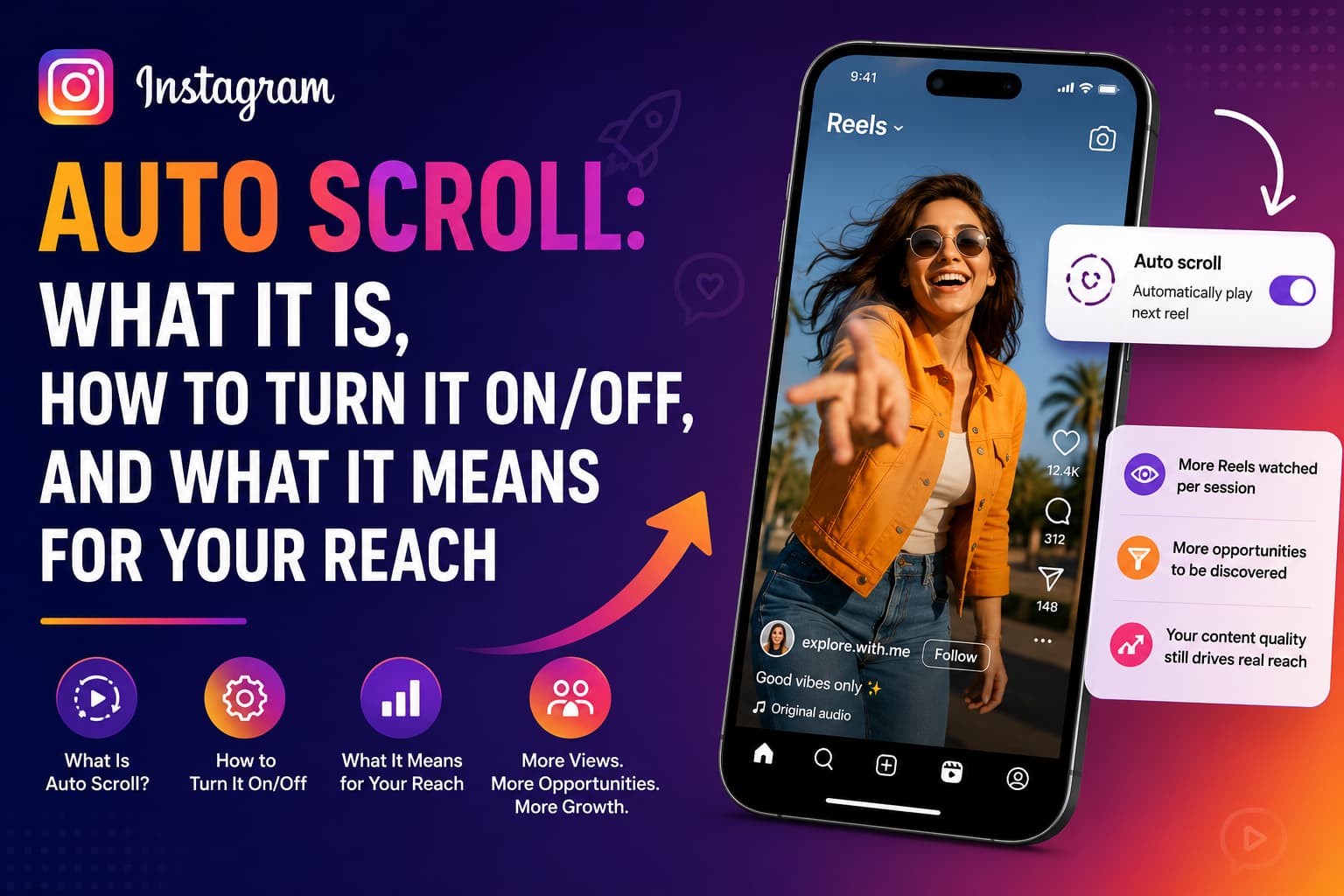
Instagram auto scroll is the feature that automatically advances you to the next Reel once the current one ends, so you can watch hands-free instead of swiping up every few seconds. It lives inside the three-dot menu on any Reel and can be switched on or off at any time.
That one-line answer covers the basics. But if you're a creator, brand, or social media manager, the real question isn't just "how do I turn it on" — it's "what does this actually do to my reach, my watch time, and the people who see my content but never click anything?" That's what this guide breaks down in full, question by question.
Quick Answer
Auto scroll is a native Instagram setting (not a third-party tool) that auto-advances Reels when one finishes. Turn it on or off from the "…" menu while watching any Reel. It's still rolling out region by region, can reset after about a month of inactivity, and changes how creators should design hooks and calls-to-action — because more views now come from passive viewers who never made a deliberate choice to watch your content.
What Is Instagram Auto Scroll?
Instagram auto scroll is a built-in setting that removes the need to manually swipe between Reels. When it's enabled, the app automatically jumps to the next Reel the instant the current one finishes playing, creating a continuous, hands-free viewing loop similar to what you'd get from a TV channel or a TikTok-style infinite feed.
Before this became an official Instagram feature, people achieved the same effect using browser extensions and third-party auto-scrolling apps. Instagram has since built the behavior natively into the app, which means you no longer need an external tool to binge Reels without lifting a finger.
It's worth being precise about the name, because people search for this in a few different ways: "Instagram auto scroll," "Reels auto scroll," "Instagram auto swipe," and "Instagram auto play" all generally refer to the same underlying feature — the app deciding when you move to the next piece of content instead of you deciding.
How Does Instagram Auto Scroll Work?
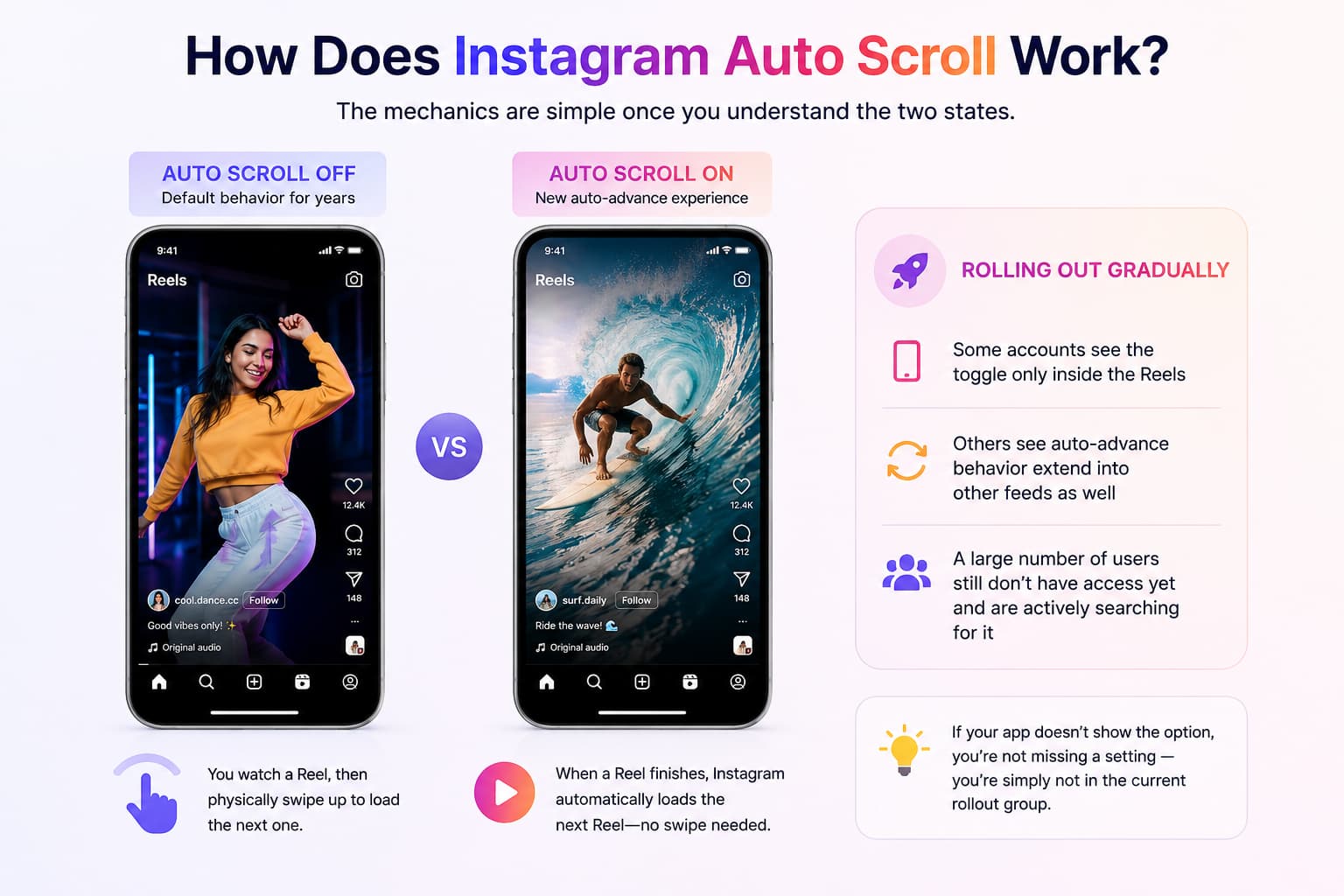
The mechanics are simple once you understand the two states:
- Auto scroll off (default behavior for years): You watch a Reel, then physically swipe up to load the next one. Every transition is a deliberate action.
- Auto scroll on: Instagram detects when a Reel finishes and automatically loads the next Reel in your feed, with no swipe You can still swipe manually if you want to skip ahead faster, but you don't have to.
The feature is rolling out gradually rather than appearing for everyone at once. That means:
- Some accounts see the toggle only inside the Reels
- Others see auto-advance behavior extend into other feeds as
- A large number of users still don't have access yet and are actively searching for it, which is part of why this stays a high-interest topic.
If your app doesn't show the option, you're not missing a setting — you're simply not in the current rollout group.
How Do I Turn On Auto Scroll on Instagram?
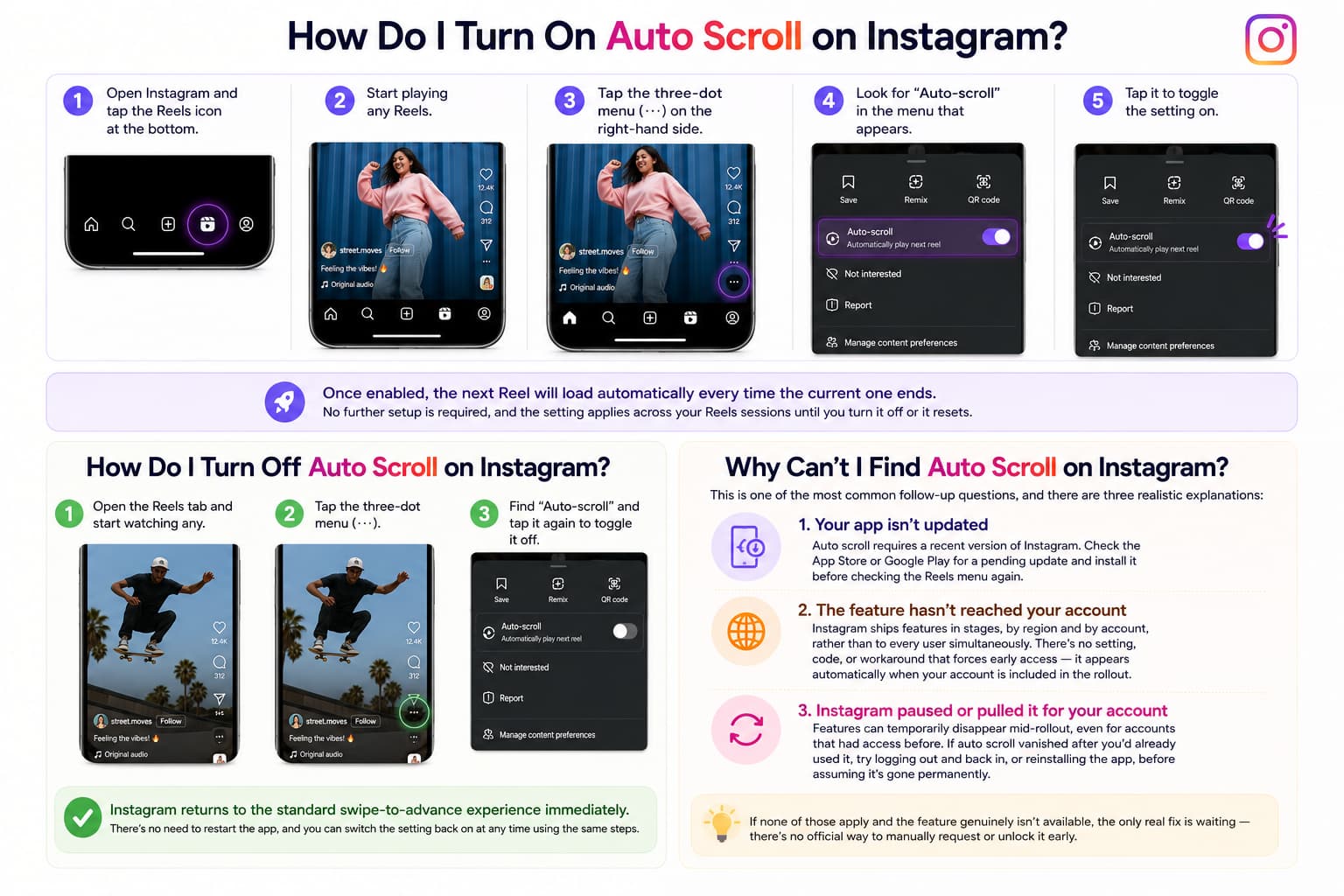
- Open Instagram and tap the Reels icon at the bottom
- Start playing any reels
- Tap the three-dot menu (⋯) on the right-hand side of the screen, near the like and share
- Look for "Auto-scroll" in the menu that
- Tap it to toggle the setting on.
Once enabled, the next Reel will load automatically every time the current one ends. No further setup is required, and the setting applies across your Reels sessions until you turn it off or it resets.
How Do I Turn Off Auto Scroll on Instagram?
- Open the Reels tab and start watching any
- Tap the three-dot menu (⋯).
- Find "Auto-scroll" and tap it again to toggle it off.
Instagram returns to the standard swipe-to-advance experience immediately. There's no need to restart the app, and you can switch the setting back on at any time using the same steps.
Why Can't I Find Auto Scroll on Instagram?
This is one of the most common follow-up questions, and there are three realistic explanations:
- Your app isn't Auto scroll requires a recent version of Instagram. Check the App Store or Google Play for a pending update and install it before checking the Reels menu again.
- **The feature hasn't reached your account **Instagram ships features in stages, by region and by account, rather than to every user simultaneously. There's no setting, code, or workaround that forces early access — it appears automatically when your account is included in the rollout.
- Instagram paused or pulled it for your Features can temporarily disappear mid-rollout, even for accounts that had access before. If auto scroll vanished after you'd already used it, try logging out and back in, or reinstalling the app, before assuming it's gone permanently.
If none of those apply and the feature genuinely isn't available, the only real fix is waiting — there's no official way to manually request or unlock it early.
Does Auto Scroll Work on Desktop, or Only on Mobile?
Auto scroll is currently a mobile-only feature inside the native Instagram app. If you watch Reels through a web browser on desktop, you won't see the same auto-advance behavior — you'll still need to click or scroll manually to move between videos. This is consistent with how Instagram has historically rolled out Reels-specific features, prioritizing the mobile app before (or instead of) the desktop experience.
Does Instagram Auto Scroll Reset on Its Own?
Yes. Based on how the setting behaves for most users, auto scroll can reset to "off" after roughly 30 days. If you've enabled it and notice it's stopped working after a few weeks, that's the most likely explanation — not a bug. You'll simply need to re-toggle it from the three-dot menu, the same way you turned it on the first time.
Is Native Auto Scroll the Same as Third-Party Auto Scroll Tools?
Not exactly, and the distinction matters. Browser extensions and third-party apps that auto-scroll Reels have existed for years, built by outside developers to simulate the same hands-free experience Instagram now offers natively.
The differences:
- Native auto scroll is built and maintained by Instagram, works inside the official app, and doesn't require installing anything outside the App Store or Google Play.
- Third-party auto scroll tools run as browser extensions or external apps, often request broad permissions, and can interact with Instagram in ways that fall outside its official terms of service.
Now that Instagram offers this natively, there's little reason to rely on an outside extension for the same effect — and doing so carries more risk than benefit for most users.
Does Auto Scroll Affect the Instagram Algorithm or Your Reach?
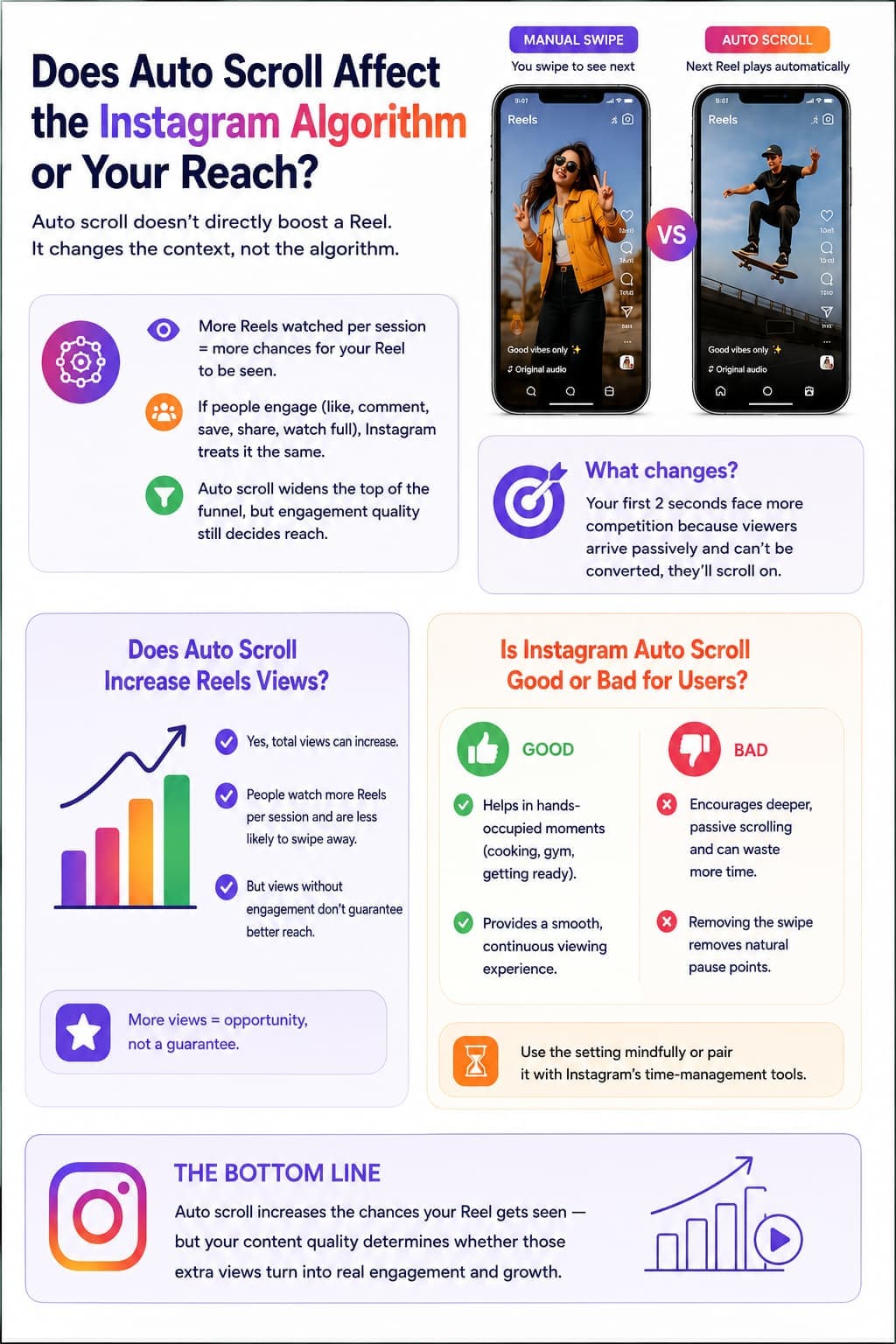
This is the question that matters most if you create content, and the honest answer is more nuanced than "yes" or "no."
Auto scroll itself doesn't directly boost a Reel in the algorithm. Instagram isn't rewarding a video simply because someone watched it via auto-advance instead of a manual swipe. What changes is the context surrounding the view, not the ranking logic behind it.
Here's the mechanism:
- With auto scroll on, people watch more Reels per session, because there's no friction stopping them between videos.
- More Reels watched per session means more total opportunities for any individual Reel — including yours — to appear in front of someone, even a person who's never followed or interacted with your account.
- If your Reel plays during one of those sessions and earns a like, comment, save, share, or full watch-through, the algorithm treats that engagement exactly like it would in a manual-swipe session.
So auto scroll widens the funnel at the top — more impressions, more passive exposure — but it doesn't change what determines whether those impressions convert into real reach. Engagement quality is still the deciding factor.
What auto scroll genuinely does change is the **competitive pressure on your first two seconds**. In a manual-swipe world, the viewer made a small, deliberate choice to land on your Reel. In an auto scroll world, they arrived there passively, mid-zone-out, with their thumb nowhere near the screen. That means your hook has to do more work to convert a distracted arrival into an active watcher — because if it doesn't, the video simply finishes in the background while attention has already drifted elsewhere.
Does Auto Scroll Increase Reels Views?
It can, but the increase doesn't automatically translate into better outcomes. Total view counts tend to rise because viewers watch more videos per session and are less likely to swipe away before a Reel finishes — auto scroll removes the "decision" to bail early. But Instagram's ranking still leans on engagement signals: likes, comments, saves, shares, and completion rate. A spike in passive views without a matching spike in engagement is a sign the content is being served, not necessarily resonating. More views from auto scroll is an opportunity, not a guarantee — the hook and the payoff still decide whether that opportunity turns into anything measurable.
Is Instagram Auto Scroll Good or Bad for Users?
Reactions to the feature are genuinely mixed, and both sides have a point.
The case for it: It's useful in hands-occupied moments — cooking, exercising, getting ready — where someone wants Reels playing but can't physically swipe. It also reduces a small but real point of friction for anyone who just wants a continuous viewing experience.
The case against it: Critics argue it nudges people deeper into passive, low-intent scrolling — exactly the kind of frictionless, decision-free consumption that makes it easier to lose track of time on the app. Removing the swipe removes a natural pause point, and pause points are often the only thing standing between "five more minutes" and an hour of scrolling.
If managing your own screen time is a priority, it's worth knowing that auto scroll works against that goal by design — fewer manual actions usually means longer, less intentional sessions.
Turning the setting off, or pairing it with Instagram's built-in time-management tools, is a reasonable way to keep the convenience without the drift.
How Should Creators and Brands Adapt Their Reels Strategy to Auto Scroll?
Auto scroll doesn't require a complete strategy overhaul, but it does sharpen the parts of Reels strategy that already mattered.
1. Win the first one to two seconds, every time
Auto scroll viewers didn't choose to land on your Reel — they arrived passively. That means you can no longer count on someone reading a caption or making a deliberate decision to keep watching. Open with a visual or text-based hook that makes sense instantly, even with the sound off.
2. Make the Reel work without sound and without reading
Burned-in captions and on-screen text carry more weight in an auto scroll world, because viewers are touching the screen less and processing passively. If the value of your Reel depends on someone actively reading a long caption underneath the video, you'll lose a larger share of auto scroll viewers than you used to.
3. Put your call-to-action where it can't be missed
A CTA that requires someone to exit the Reel, visit your profile, and dig for a link is asking too much of a passive viewer. Simple, single-action CTAs work far better in this environment — phrases like "Comment 'GUIDE' and I'll send it to you" or "Reply 'PRICE' for the full breakdown" let someone convert without leaving the Reel or making a decision tree out of it.
4. Plan for a larger share of low-effort engagement
More passive views generally means a larger pool of people who'll drop a quick comment, a one-word reply, or a DM — but won't click through a bio link or browse your profile. That shift changes where the real opportunity sits: not in profile visits, but in conversations that start with a comment or a message.
What Happens to Auto Scroll Viewers Who Don't Click Anything?
This is the part most "how to turn on auto scroll" articles skip entirely, and it's the part that actually affects revenue.
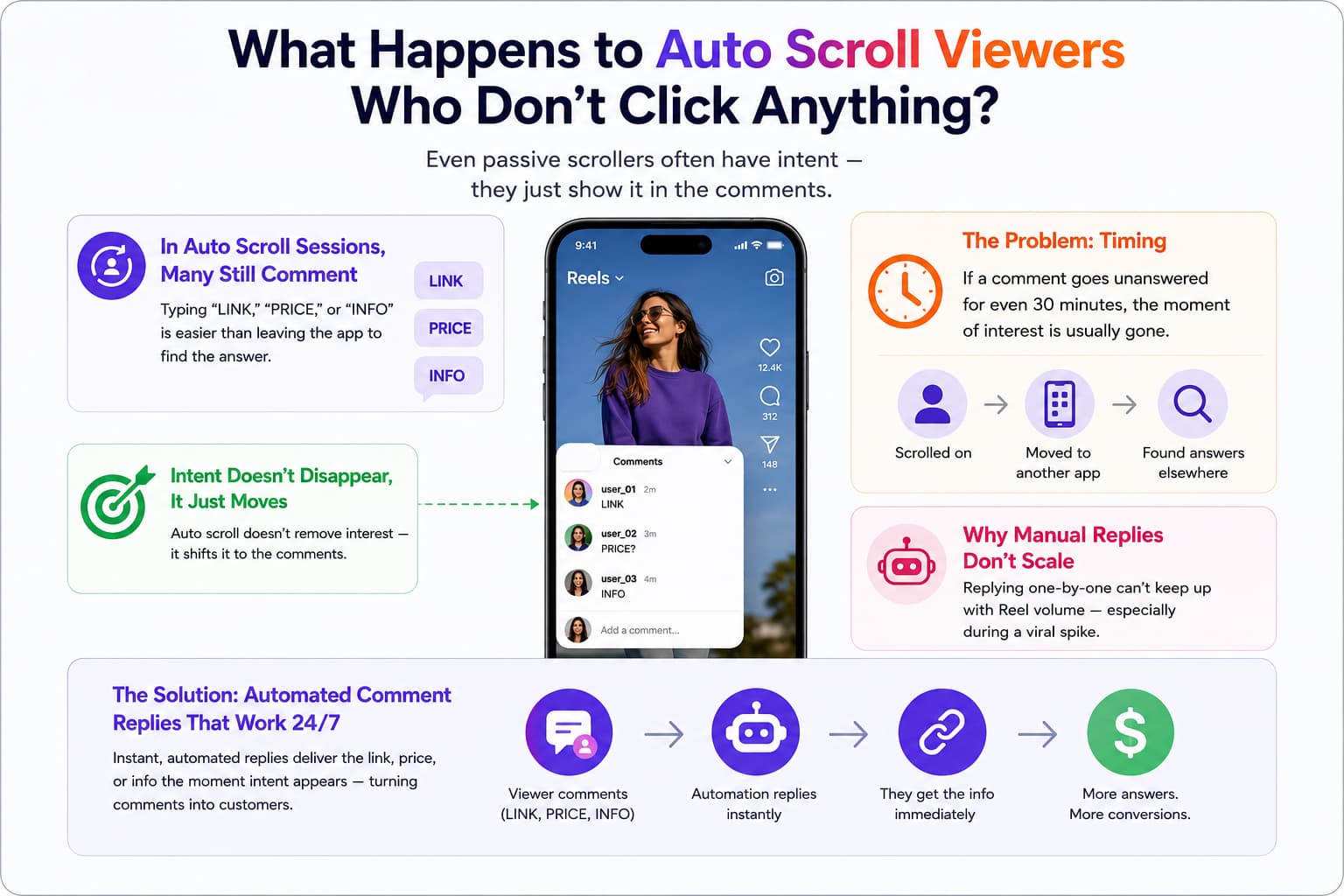
Even in a fully auto scroll-driven session, a meaningful slice of viewers still take one specific action: they comment. Not because they're highly engaged in the traditional sense, but because typing a quick word — "LINK," "PRICE," "INFO" — takes less effort than tapping through to a profile, finding a bio link, and navigating a website. Auto scroll doesn't eliminate intent; it just
relocates where that intent shows up.
The problem is timing. If a comment sits unanswered for even thirty minutes, the moment of interest has usually already passed — the person has scrolled on, moved to another app, or found what they needed somewhere else. Manually replying to every comment, one at a time, doesn't scale once a Reel starts pulling real volume, and it definitely doesn't scale during a viral spike.
How Do You Turn Passive Auto Scroll Viewers Into Leads and Sales?
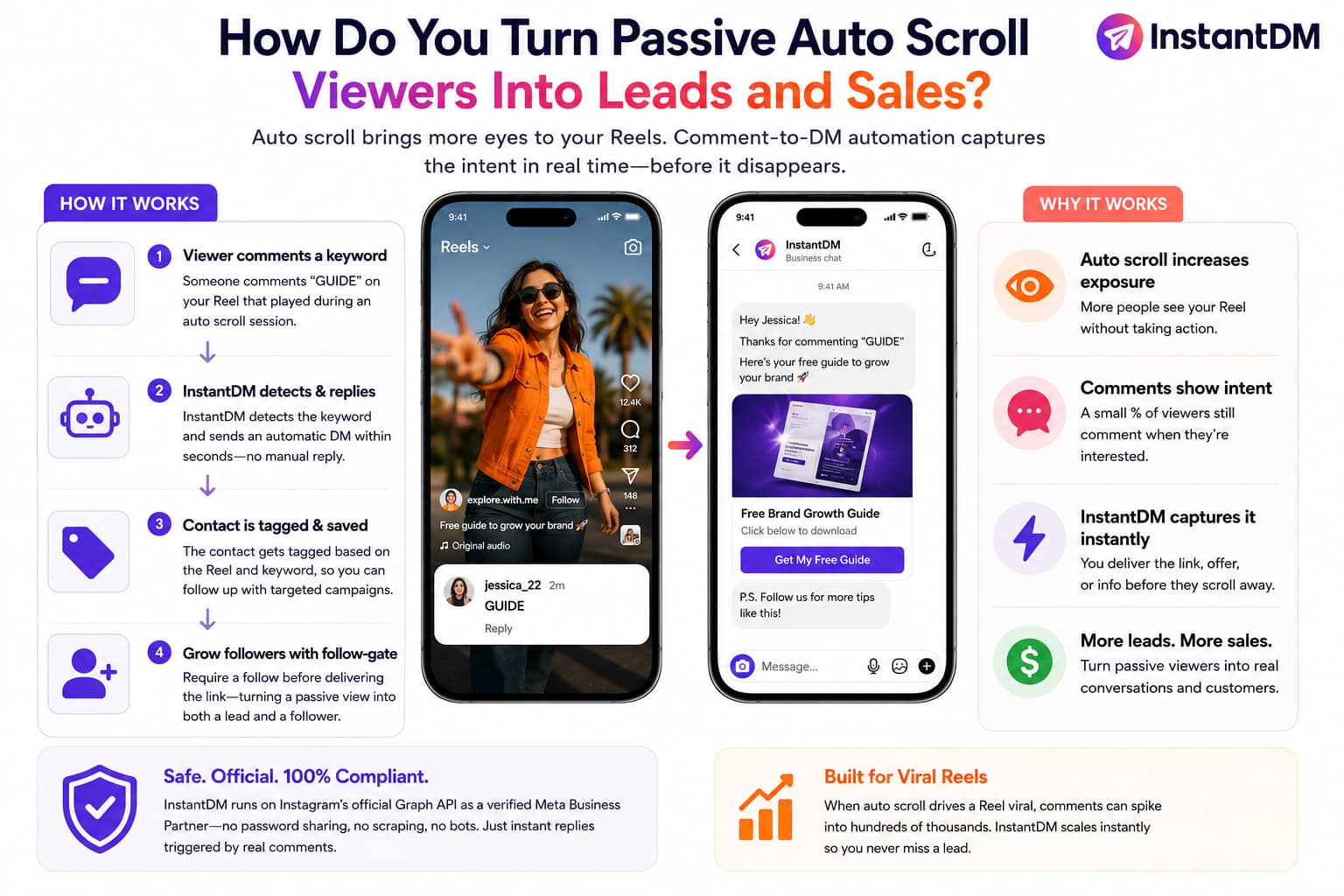
This is where comment-to-DM automation closes the gap that auto scroll opens up. InstantDM is built specifically for this moment: the second someone comments a keyword on your Reel — even one that picked up extra reach because of auto scroll — they get an instant, automatic DM with the link, guide, price list, or offer you've set up in advance.
Practically, that looks like:
- Someone comments "GUIDE" on a Reel that played during another user's auto scroll
- InstantDM detects the keyword and sends them a DM within seconds, no manual reply
- The contact gets tagged automatically based on which Reel and keyword triggered the message, so you can follow up later with a targeted DM campaign instead of treating them as a one-off comment.
- If you want to grow your following at the same time, a follow-gate can require a follow before the link is delivered — turning a passive auto scroll view into both a lead and a follower in one interaction.
The mechanism matters here: auto scroll increases the raw number of people who see your Reel without making a deliberate choice to. Comment-to-DM automation is what captures the small percentage of those passive viewers who do show intent — before that intent disappears into the next auto-advancing video. Since InstantDM runs entirely on Instagram's official Graph API as a verified Meta Business Partner, there's no password sharing, scraping, or bot-style behavior involved — just instant, compliant replies triggered by real comments.
For Reels that go viral specifically because of increased auto scroll exposure, volume can spike fast
— sometimes into hundreds of thousands of comments within days. That's a scenario built-in tools and manual replying simply can't keep up with, and it's exactly the gap automation is designed to close.
Instagram Auto Scroll vs. Manual Swiping: Quick Comparison
Auto Scroll On | Auto Scroll Off (Manual) | |
How you move between Reels | Automatic, when current Reel ends | Manual swipe required |
Viewer effort per Reel | Minimal — fully passive | One deliberate action per Reel |
Typical Reels watched per | Higher | Lower |
Auto Scroll On | Auto Scroll Off (Manual) | |
session | ||
Importance of first 1–2 seconds | Critical | High, but slightly more forgiving |
Algorithm boost from the setting itself | None directly | None directly |
What still drives reach | Likes, comments, saves, shares, completion | Same engagement signals |
Available on desktop | No | N/A (manual is default) |
Resets automatically | Yes, roughly every 30 days | N/A |
Bottom Line
Instagram auto scroll is a small toggle with an outsized effect on how content gets consumed: more passive viewing, more Reels per session, and a shorter window to earn genuine attention. It doesn't change what Instagram's algorithm rewards — engagement still wins — but it does change who's arriving at your content and how much work your hook has to do to keep them there.
The creators who benefit most won't just turn the setting on or off and move on. They'll tighten their hooks for a more distracted viewer, simplify their CTAs to a single comment or word, and put a system in place — like InstantDM's comment-to-DM automation — to catch the intent that auto scroll viewers do show, before it scrolls away with them.
instagram-auto-scroll-2026
Step-by-step infographic showing how to turn Instagram Auto Scroll on and off. The guide walks users through opening Reels, accessing the three-dot menu, and enabling or disabling the Auto Scroll toggle. It also explains why the feature may be unavailable, including outdated app versions, phased feature rollouts, or temporary removal du