Most creators spend all their time on the post itself and nothing on what happens before and after. That's backwards.
The hours immediately surrounding your post — what you do in the 30 minutes before hitting publish and the engagement you drive in the first hour after — have an outsized effect on how Instagram's algorithm treats your content. The algorithm measures early signals aggressively. A post that generates immediate engagement gets seeded to a wider audience. A post that goes quiet gets buried before it finds its feet.
This checklist covers exactly what to do before and after every post.
Why the First 30 Minutes Matter More Than You Think
Instagram's algorithm doesn't wait to evaluate your post. It starts testing immediately.
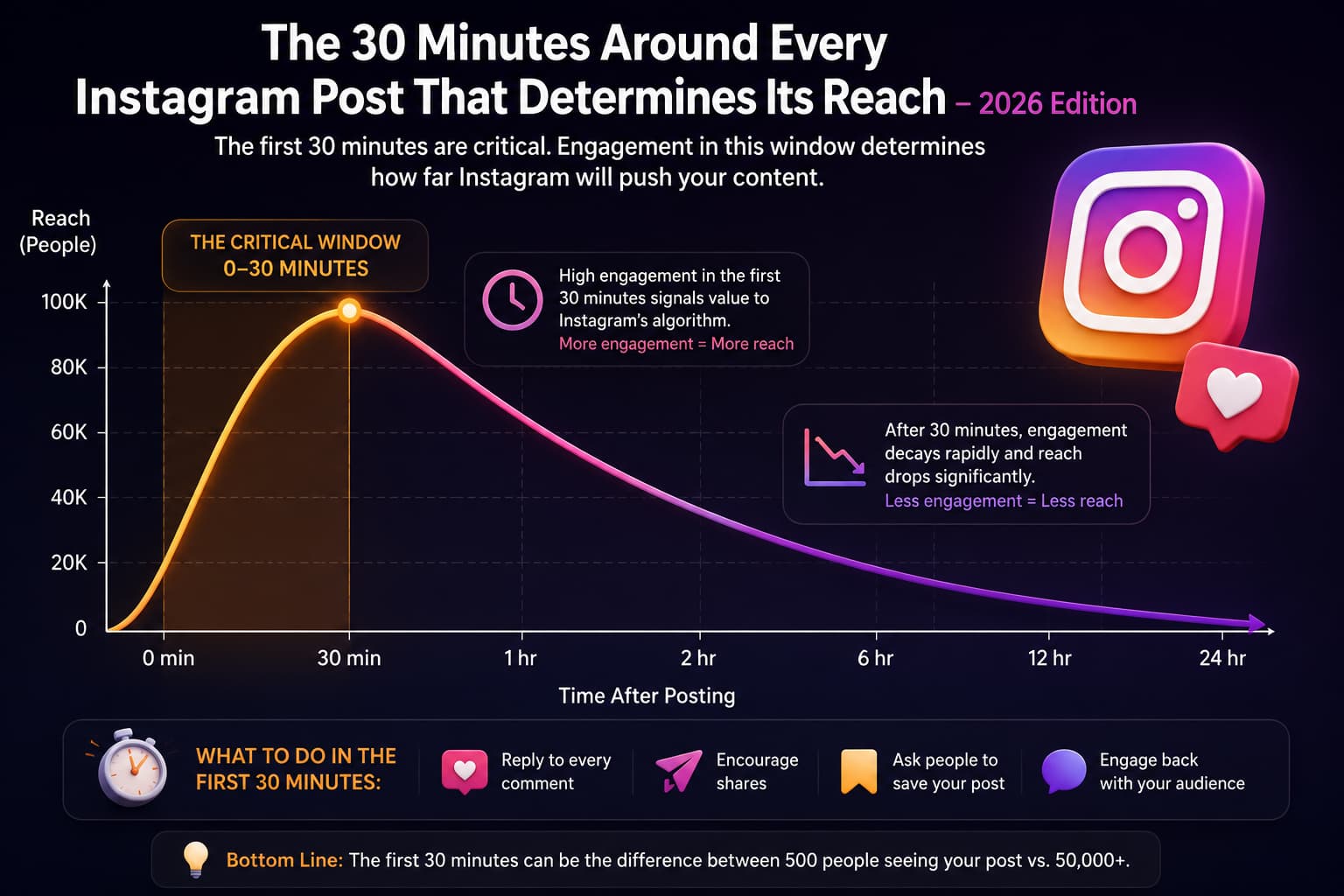
Within the first 30 minutes of publishing, Instagram shows your content to a small subset of your followers — usually 5% to 10%. The engagement rate from that test group determines whether your post gets seeded to a wider audience or gets buried in the feed.
This is why two posts with identical content can perform wildly differently.
- The one that generates early engagement signals — comments, shares, saves — gets pushed to the Explore page.
- The one that goes quiet in the first 30 minutes gets stuck with minimal reach.
The algorithm treats early engagement as a quality signal. If people are commenting and sharing within minutes of posting, Instagram interprets that as high-value content worth distributing more broadly. If your post sits untouched for an hour, the algorithm assumes it's not worth showing to more people.
Understanding how the Instagram algorithm works in the first hour is the difference between a post that reaches 500 people and one that reaches 50,000.
The content quality matters, but the engagement velocity in the first 30 minutes matters just as much.
This is not speculation. Instagram's own engineering team has confirmed that early engagement signals are a primary ranking factor. Adam Mosseri, Instagram's head, has publicly stated that the algorithm weights initial reactions heavily when deciding how far to distribute a post.
The good news? You can engineer better early engagement.
It's not about luck or timing alone — it's about having a system for what you do before and after every post. That's exactly what this checklist covers.
Content Analysis: This 4-slide carousel is from @digital.dalvinder (a Canva Community Canvassador 2025). It provides a practical before-and-after posting checklist with specific, actionable steps. The strength of this content is its immediacy — every item is something a creator can implement today without additional tools or resources. Additional insights by Sanjay, Founder of InstantDM.
Before You Post
Everything you do before publishing sets the conditions for how the algorithm receives your content. This phase is about priming your audience and verifying your content is ready.
Comment on 10 Bigger Accounts in Your Niche
Leave real, helpful comments before you post. This serves two purposes: it puts you in front of engaged followers of established accounts in your space, and it signals to Instagram that you're an active participant in the community, not just a broadcaster.
The key word is helpful — generic "great post!" comments don't stand out and don't drive profile visits. A comment that adds genuine value or asks a thoughtful question gets clicked through to your profile and creates a pathway for new discovery.
Post a Story with a Poll Related to Your Next Post
Ask a question that connects to your upcoming content. This accomplishes three things: it signals to Instagram that you're actively engaging (which improves your account's algorithmic standing), it creates early story engagement that carries over to your post, and it tests the resonance of your content topic before you publish.
If your poll gets strong engagement, your subsequent post is arriving at an audience already primed on the topic.
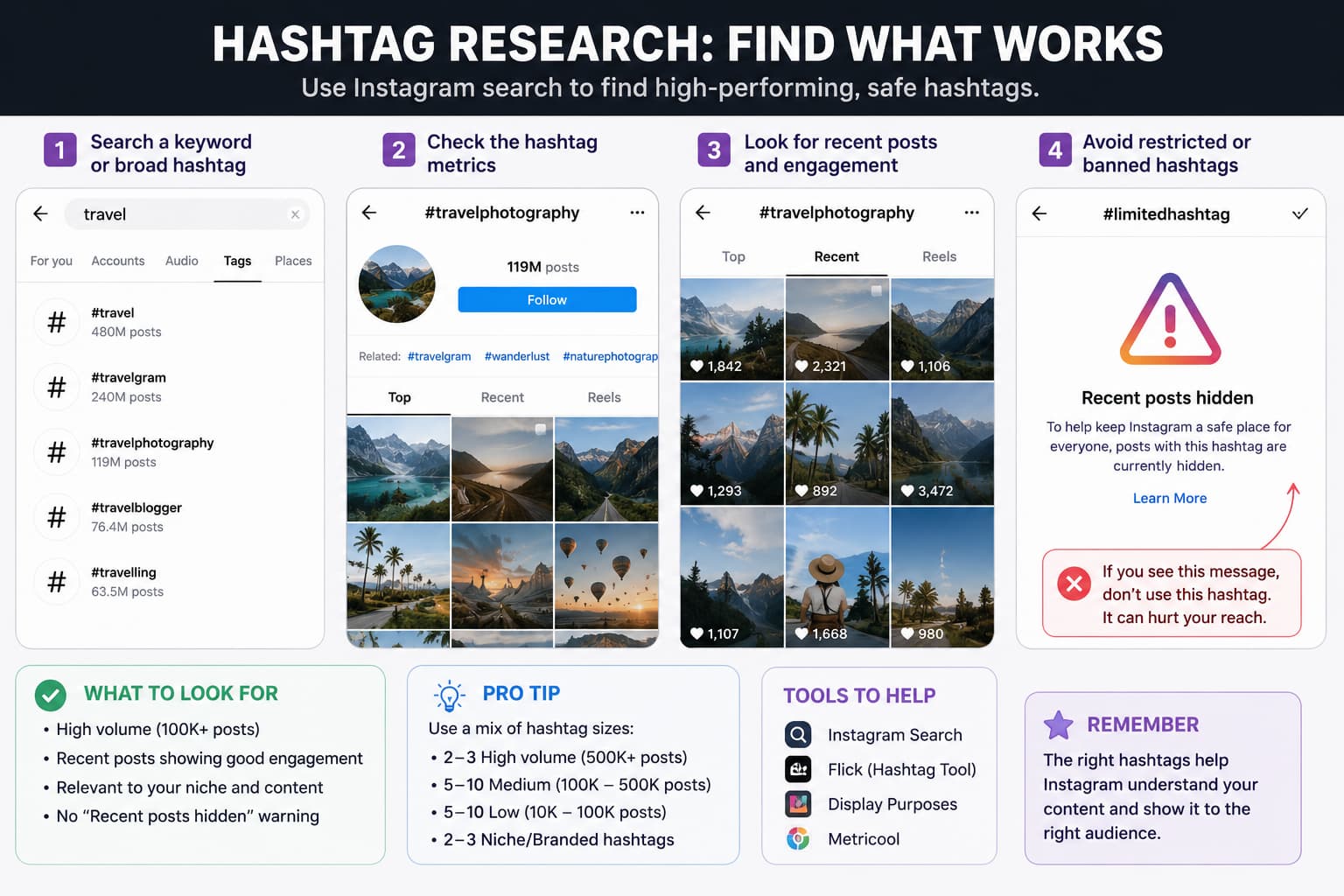
Use the Right Hashtag Mix
Pick a mix of small, medium, and large hashtags in your niche.
- Large hashtags (1M+ posts) — drive broad discovery but face heavy competition
- Medium hashtags (100K-1M posts) — the sweet spot for most creators
- Small/niche hashtags (under 100K) — highly targeted, lower volume but better conversion
The optimal approach is one large, two medium, and one small hashtag that directly describes your content. Avoid hashtag dumping — Instagram can penalize posts with hashtag sets that look like spam or aren't relevant to the content.
Find Trending Audio Under 10K Uses with Viral Potential
Look for sounds under 10K total uses that have at least one viral reel using them (1M+ views). This is a specific, repeatable strategy: audio with very few posts but at least one breakout indicates latent viral potential that hasn't been saturated yet.
Using such audio on your reel gives you a distribution shortcut — Instagram has already confirmed the audio can go viral, and using it correctly positions your content in that audio's discovery pool.
Check When Your Audience Is Most Active
Go to Settings navigate to Insights then go to Followers, scroll down to see your audience's active times. Post when your specific audience is online, not when generic advice says to post.
Your audience's real behavior overrides all general timing recommendations. If your followers are primarily active at 9 PM on weekdays, that's your optimal posting window — not the 6 AM that productivity influencers recommend.
Audit Your Post Before Publishing
Check three things before you hit publish:
- Is your image or video high quality and eye-catching? Does it stop the scroll?
- Are your keywords included? Does your caption contain the terms people would search to find content like yours?
- Does it have a strong hook? The first line of your caption determines whether people keep reading or scroll past.
A clean, easy-to-read layout matters. Cluttered carousels with tiny text, inconsistent styling, or walls of text get scrolled past. If your content requires effort to read, most people won't Make that effort.
Common Pre-Posting Mistakes That Kill Reach
Before publishing your Instagram content, take a moment to review your post and avoid these common mistakes that can limit reach and engagement.
Not Checking When Your Audience Is Active
Generic recommendations about the "best time to post" may not apply to your audience. Use Instagram Insights to identify when your followers are most active and schedule your content accordingly.
Using Restricted or Problematic Hashtags
Some hashtags are limited or restricted by Instagram. Using them can reduce the visibility of your content. Before adding a hashtag, search for it on Instagram. If you see a message indicating that recent posts are hidden, avoid using that hashtag.
Ignoring Keywords in Your Caption
Instagram uses caption text to understand your content and determine who may be interested in seeing it. Captions that contain only emojis or short promotional phrases provide little context for the algorithm.
Include relevant keywords naturally within your caption to improve discoverability.
Forgetting a Call to Action
Every post should encourage users to take a specific action. Whether you want people to comment, save, share, visit your profile, or follow your account, make the next step clear.
A strong call to action can significantly improve engagement rates.
Posting at Random Times
Publishing content when your audience is inactive can reduce early engagement, which is an important signal for Instagram's algorithm.
Plan your posts around your audience's peak activity periods to maximize visibility during the critical first hour after publishing.
Using a Weak Hook
The opening line of your caption plays a major role in capturing attention. If the first sentence fails to spark curiosity or communicate value, users may continue scrolling without engaging.
Focus on creating strong, compelling hooks that encourage readers to continue.
Publishing Low-Quality Visuals
Visual quality remains one of the most important factors in content performance. Blurry photos, poorly edited videos, cluttered designs, or difficult-to-read carousels can reduce engagement.
Use clear, professional visuals that immediately capture attention and encourage users to stop scrolling.
After You Post
The first 60 minutes after publishing are the most algorithmically important. What you do in this window directly determines whether your post gets seeded to 500 people or 50,000.
Comment on Your Own New Post
Ask a question or add a bonus tip to boost the comment count. This seems counterintuitive but it works: posts with early comments signal to the algorithm that the post is generating conversation. A well-crafted first comment that asks a relevant question gives people a template for how to engage.
Don't just say "thanks for all the love!" — write something that invites a response. "Which of these would you start with first? Drop your pick below" drives more engagement than generic gratitude.
Comment on Bigger Accounts — Again
Find accounts with 50K+ followers in your niche and leave a smart or helpful comment. This drives profile visits from their followers who see your comment in the activity feeds. Combined with your pre-post engagement, this creates a compounding discovery effect.
Share to Stories
Post your new content to your stories with a fun preview or sticker. This gives your existing followers a secondary touchpoint with the content and signals to Instagram's story algorithm that you're actively distributing your work.
Engage with 15-20 People in Your Niche
Leave real, helpful comments on posts from others in your niche. This drives reciprocal engagement — people who receive a thoughtful comment often check your profile and engage with your recent posts. It also keeps your account active in the engagement graphs Instagram uses for content distribution.
Reply to Old Comments on Your Previous Posts
Go back and respond to comments on older posts. This bumps those posts back into recent activity, which can give them a secondary distribution boost. It also signals to the algorithm that you're running an active community, not just broadcasting.
Reply to Your New Post's Comments
Respond to people who comment on your new post. Every reply you make is another engagement signal on the post, extending its active window. Instagram's algorithm interprets rapid back-and-forth as a sign that the content is generating genuine conversation — which triggers wider distribution.
What Not to Do After Posting on Instagram
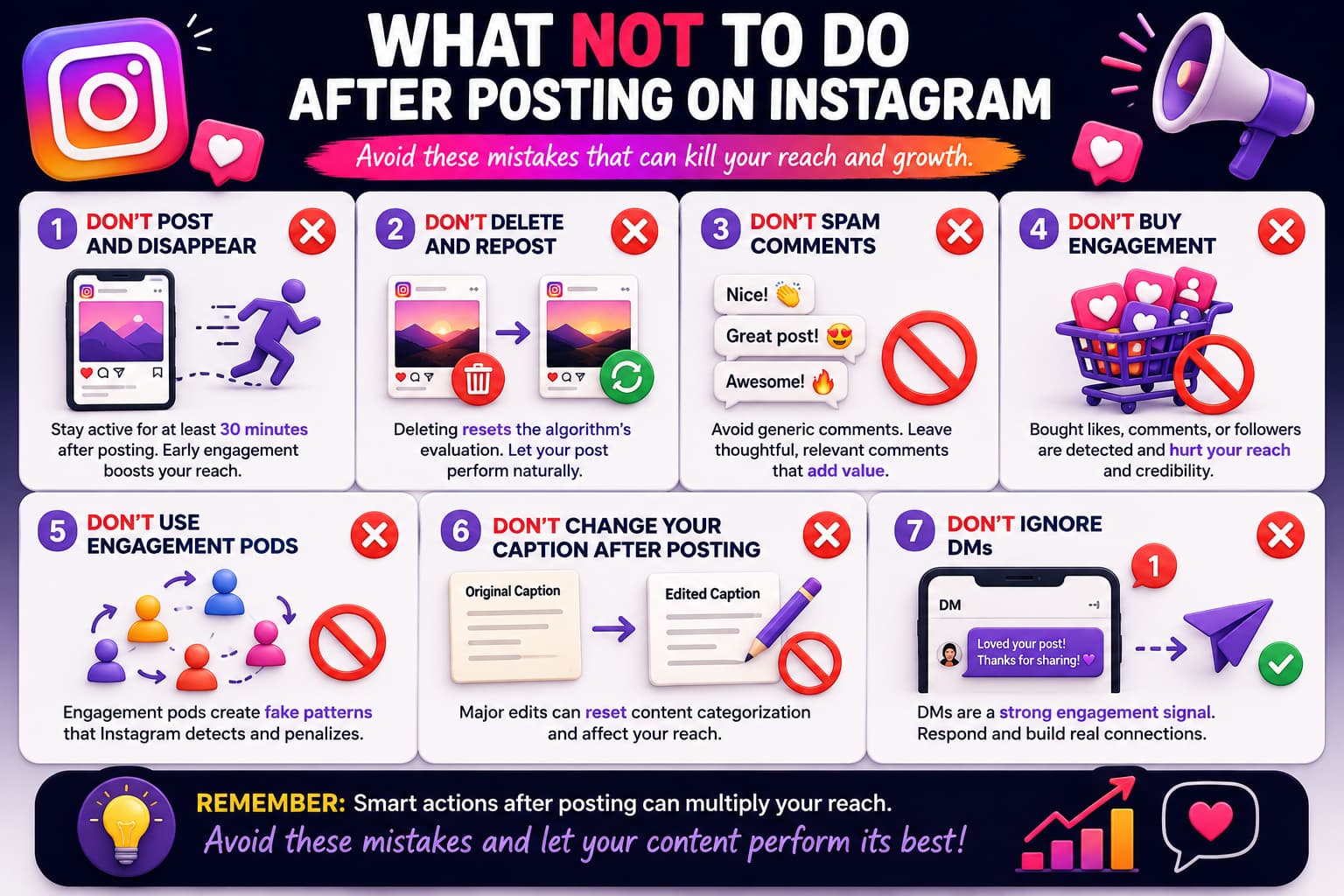
Knowing what to avoid after publishing is just as important as knowing what actions to take. The mistakes below can reduce engagement, limit reach, and negatively impact your content's performance.
Don't Publish and Leave Immediately
The first 30 minutes after posting are critical for generating engagement signals. Instead of publishing and moving on, spend some time responding to comments, engaging with your audience, and monitoring the post's initial performance.
Don't Delete and Repost Underperforming Content
If a post doesn't perform well immediately, avoid deleting and reposting it. Instagram has already started evaluating and distributing the content. Removing it resets that process and eliminates any engagement data the algorithm has collected.
Don't Leave Generic Comments on Other Accounts
Comments such as "Nice post" or "Great content" rarely create meaningful engagement and may appear spammy.
Instead, leave thoughtful comments that:
- Contribute to the conversation
- Share insights or experiences
- Ask relevant questions
- Provide value to the audience
Meaningful interactions are more likely to attract profile visits and build relationships.
Don't Buy Engagement
Purchasing likes, comments, shares, or followers may seem like a shortcut, but it often creates artificial engagement patterns that can harm long-term growth.
Fake engagement can:
- Lower content quality signals
- Distort analytics
- Reduce audience trust
- Negatively impact future reach
Focus on building authentic engagement instead.
Don't Participate in Engagement Pods
Engagement pods are groups where members agree to like and comment on each other's content.
While they may create temporary activity, they often generate unnatural engagement patterns that do not reflect genuine audience interest. Long-term growth is more sustainable when engagement comes from real followers and potential customers.
Don't Make Major Caption Changes After Publishing
Minor edits, such as fixing spelling mistakes or correcting formatting, are generally fine.
However, making significant changes to your caption after publishing can alter the context Instagram initially used to categorize your content. Review your caption carefully before posting to minimize the need for major edits later.
Don't Ignore Direct Messages
Direct messages are one of the strongest engagement signals on Instagram. When users share your content or start conversations through DMs, it often indicates a high level of interest and trust.
Make it a habit to:
- Respond to messages promptly
- Continue meaningful conversations
- Thank users who share your content
- Answer questions whenever possible
Active communication helps strengthen relationships and encourages future engagement.
What NOT to Do After Posting
Just as important as knowing what to do is knowing what to avoid:
- Don't post and disappear. If you publish and walk away, you're leaving the first 30 minutes of engagement to chance. Stay active for at least 30 minutes after posting.
- Don't delete and repost. If your post isn't getting traction, resist the urge to delete and repost. Instagram has already started testing it — deleting resets the algorithm's evaluation entirely.
- Don't spam comments on other accounts. Generic comments like "Nice!" or "Great post!" don't drive profile visits and can get flagged as spam. Leave thoughtful, relevant comments that add value.
- Don't buy engagement. Purchased likes, comments, or shares are easily detected by Instagram's algorithm. Fake engagement signals actually hurt your distribution because the algorithm sees low quality engagement patterns.
- Don't use engagement pods. Groups that agree to like and comment on each other's posts create artificial engagement patterns. Instagram's algorithm has learned to identify and penalize these.
- Don't change your caption after posting. Minor typo fixes are fine, but major caption edits can reset the algorithm's content categorization. Write and review your caption before publishing.
- Don't ignore DMs. When someone shares your post via DM, that's the strongest engagement signal in 2026. Ignoring DMs means you're leaving the most valuable engagement type on the table.
The System: How These Steps Compound
Each individual action is modest. Together, they create a cluster of early engagement signals that tell Instagram your content deserves to be seen by more people.
The pre-posting actions (engaging on other accounts, posting a story, optimizing hashtags) create conditions where your audience is warm and your content is correctly indexed before you publish. The post-publishing actions (commenting on your own post, engaging broadly, sharing to stories) create the immediate engagement burst that determines the initial distribution tier.
This is a system, not a checklist. Skipping steps reduces the compound effect. Creators who consistently apply both the before and after phases see meaningfully different distribution outcomes than those who publish and wait.
Case Study: Before and After Using This System
To show how these steps compound, here's a real example from a creator who implemented this checklist consistently for 30 days.
The creator didn't change their content quality, posting frequency, or niche. They only changed what they did in the 30 minutes before and after every post.
The compound effect of consistent early engagement signals told Instagram's algorithm that this account's content was worth distributing widely.
This is the power of the system. Each individual action — commenting on bigger accounts, posting a story poll, sharing to stories — has a modest effect on its own. But when you stack all of them together, consistently, for every single post, the algorithmic signals compound into dramatically different distribution outcomes.
The creators who grow fastest in 2026 are not the ones with the best content. They are the ones with the best systems around their content.
Tools to Automate This Process
While the checklist above is designed for manual execution, some parts can be automated to save time:
- Comment responses: Manually replying to every comment is time consuming. Tools like InstantDM can automatically respond to comments on your posts with relevant DMs, keeping the engagement loop running without manual effort.
- Story posting: Scheduling tools can automate your pre-post story polls, ensuring you never skip this step.
- Engagement tracking: Instagram Insights shows your audience active times, but third party analytics tools can provide more detailed engagement patterns over time.
The goal is not to replace genuine engagement with automation. The goal is to automate the repetitive parts so you can focus on creating meaningful interactions that drive real community growth.
Source: https://www.instagram.com/p/DXy2BlxFPuu/
Creator: @digital.dalvinder
The Complete 2026 Instagram Algorithm Guide: Ranking Factors
The TikTok Algorithm: What Actually Works Right Now
10 AI Instagram Post Generators Tested: Which One Actually S
Watch: 30 Minutes Around Every Instagram Post
- Master Your Reach: Optimize Your Instagram Reels
- These 5 Tips Will Skyrocket Your Instagram Growth In 2024! 🚀
- How I Got 343,000 Views on Instagram In 30 Days (NO ADS!)
- How to reach more new followers with Reels on Instagram!