Quick answers:
- Instagram story replies are private DMs — only you and the Story creator can see them
- No other viewer of the Story can see your reply or know that you replied
- Replies stay in your DM inbox permanently, even after the Story expires in 24 hours
- A separate newer feature called public story comments works differently — those appear on the Story itself and are visible to anyone who can view that Story. They leave the live Story after 24 hours, but can stay in Highlights and in Archive for the creator
- You can reply by tapping the message bar at the bottom of any Story
- Creators can control who can reply in Settings - Privacy - Story
- The creator gets a DM notification when you reply — other viewers get no notification and cannot see that you replied
- Public story comments are different: anyone who can view the Story can read them, and Instagram limits those comments to 60 characters
What Are Instagram Story Replies and How Do They Work?
Instagram story replies are direct messages sent in response to someone's Story. When you tap the message bar at the bottom of a Story and type something, that message goes straight to the creator's DM inbox as a private conversation. Only you and the creator can see it — no other viewer of the Story can read it or know it was sent.
Story replies appear in the creator's inbox with a small thumbnail of the specific Story you replied to, so they always know which post you were responding to.
This is different from public story comments, a newer Instagram feature where your message appears directly on the Story frame for all viewers to see. The two features look similar on screen but work in completely opposite ways — one is private, one is public.
What Is the Difference Between an Instagram Story Reply and a Story Comment?
Story Reply | Story Comment | |
Who sees it | Only you and the creator | Every viewer of that Story |
Where it appears | Creator's DM inbox | On the Story frame itself |
How long it lasts | Stays in DMs permanently | 24 hours, disappears with the Story |
Who can send it | Anyone who can view the Story | Mutual followers only (by default) |
How to send it | Tap the message bar at the bottom | Tap the chat icon in the lower-left corner |
The simplest way to remember it: the message bar at the bottom = private reply. The chat icon on the left = public comment visible to everyone.
Are Instagram Story Replies Private — and Can Anyone Else See Them?
Yes, story replies are completely private. When you reply to someone's Story, it lands in their DMs as a private conversation between just the two of you. No other follower, no other viewer of that Story, can see your reply or even know that you sent one. There is no reply counter on the Story, no notification to other viewers, and no visible sign on the Story frame that anyone has replied.
The only way your reply becomes visible to others is if the creator manually screenshots it and reshares it — that is entirely their decision.
This is also why people feel comfortable sending more personal or direct messages through story replies than they would in a public comment — they know the conversation is private.
If you accidentally tap the chat icon on the left side of the Story instead of the message bar at the bottom, your message becomes a public comment visible to all viewers. To keep your reply private, always use the message bar at the bottom of the screen.
Can people see when you reply to someone’s Instagram Story?
No. A story reply does not appear on the Story, does not show a reply counter, and does not tell other viewers that you responded. It is a private DM between you and the account that posted the Story.
What other viewers can see:
- That they are watching the same Story
- Public story comments, if comments are enabled and someone left one
- Nothing about your private reply
The only way other people see your reply is if the creator screenshots it or copy-pastes it somewhere public. Instagram does not do that automatically, and it does not notify you if they take a screenshot.
Emoji reactions work the same way. They land in the creator’s DMs, not on the Story frame.
Do you get a notification when someone replies to your Instagram Story?
Yes — but only the Story creator is notified, and only as a DM.
When someone taps the message bar and sends a reply:
- The creator gets a normal Instagram Direct notification: “[Name] replied to your story.”
- The message opens a private chat with a thumbnail of that Story.
- If push notifications for Messages are on, it can also appear on the lock screen.
- No other viewer gets a notification that a reply happened.
If the sender does not follow the creator, or the creator does not follow them back, the reply can land in Message Requests instead of the main inbox. That is the most common reason a creator says they never got the reply.
A reply will not notify the creator if:
- They turned story replies Off
- They hid the Story from that person
- They restricted or blocked the account (restricted replies often go to requests with no push alert)
- Message notifications are disabled in Instagram or at the phone level
- The app is outdated or briefly glitching
Other viewers are never notified that you replied. There is no public “X responded to this Story” label for private replies.
Instagram story reply vs story comment vs reaction vs sticker
Interaction | Who sees it | Where it goes | Who is notified | How long it lasts |
|---|---|---|---|---|
Story reply (message bar at the bottom) | Only you and the creator | Creator’s DMs | Creator gets a DM | Text stays in DMs after the Story expires |
Public story comment | Anyone who can view that Story | On the Story frame | Creator can see it on the Story | 24 hours on the live Story; can remain in Highlights and in archive for the creator |
Emoji reaction | Only the creator | DMs | Treated like a private reply | Stays in DMs |
Poll, quiz, or slider | Creator sees totals; individual votes are not public on the frame | Story insights / sticker results | No public viewer notification | Ends with the Story |
Question sticker | Creator; public only if they reshare the answer | Sticker inbox | Creator is notified of responses | Ends with the Story unless reshared |
Use a reply for price, availability, or anything personal. Use a comment only if you are fine with every viewer reading it. Instagram limits a public Story comment to 60 characters, including emoji.
Who can reply to Close Friends, hidden, restricted, or private-account Stories?
Situation | Can they see the Story? | Can they send a private reply? | Notes |
|---|---|---|---|
Public account, replies set to Everyone | Yes, even non-followers | Yes | Non-follower replies often go to Message Requests |
Public account, replies set to People you follow | Yes | Only if you follow them | Reply bar is hidden for everyone else |
Replies set to Off | Yes | No | Message bar disappears |
Private account | Approved followers only | Only if they can see the Story and replies are allowed | Pending follow requests see nothing |
Close Friends Story | Close Friends list only | Only people on that list | Replies are still private DMs |
Hide Story From | No | No | They can still see feed posts |
Restricted | Usually yes | Reply may go to requests with a weaker or missing push alert | They are not told they were restricted |
Blocked | No | No | Full cutoff |
Private replies on a Close Friends Story are still one-to-one DMs. Other people on the Close Friends list cannot read them.
How Do You Reply to Someone's Instagram Story?
To send a private story reply:
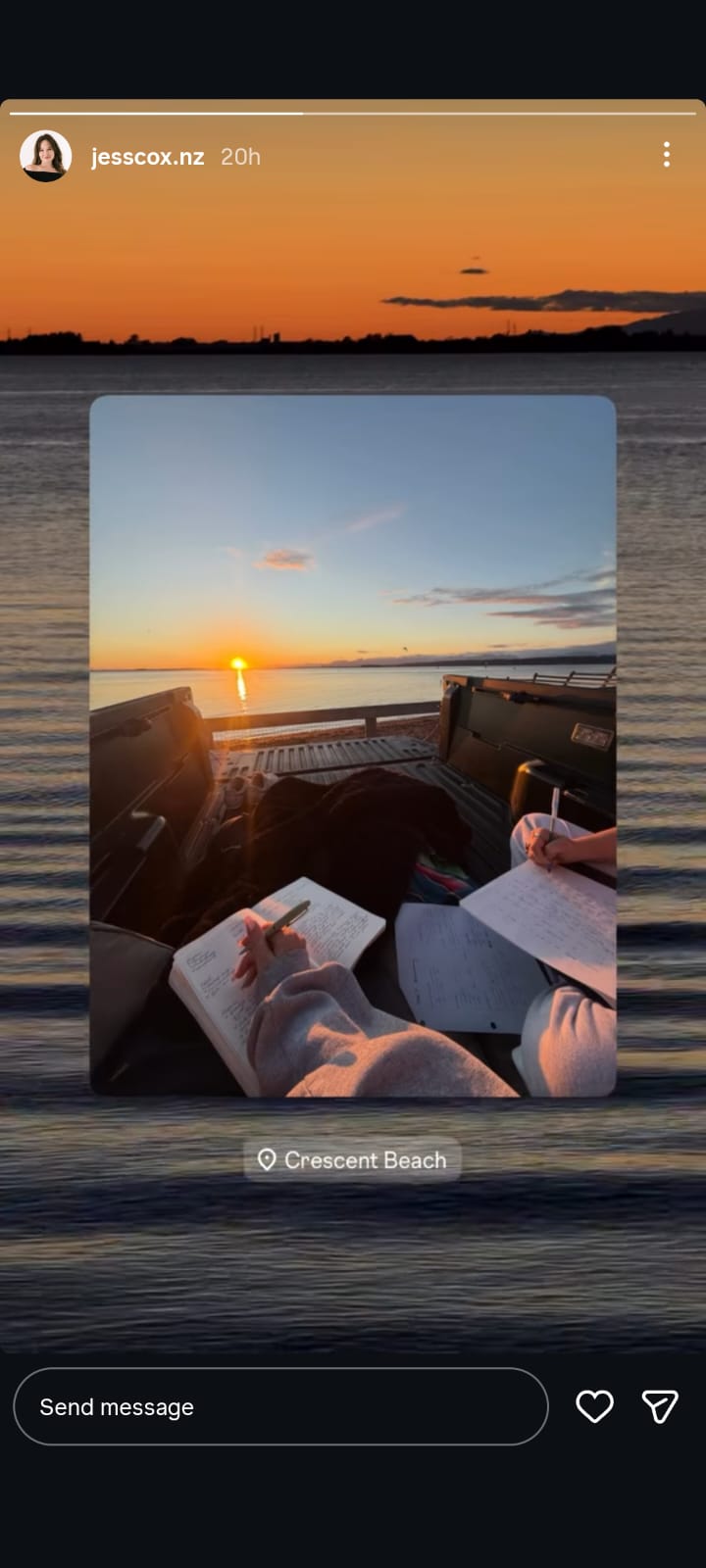
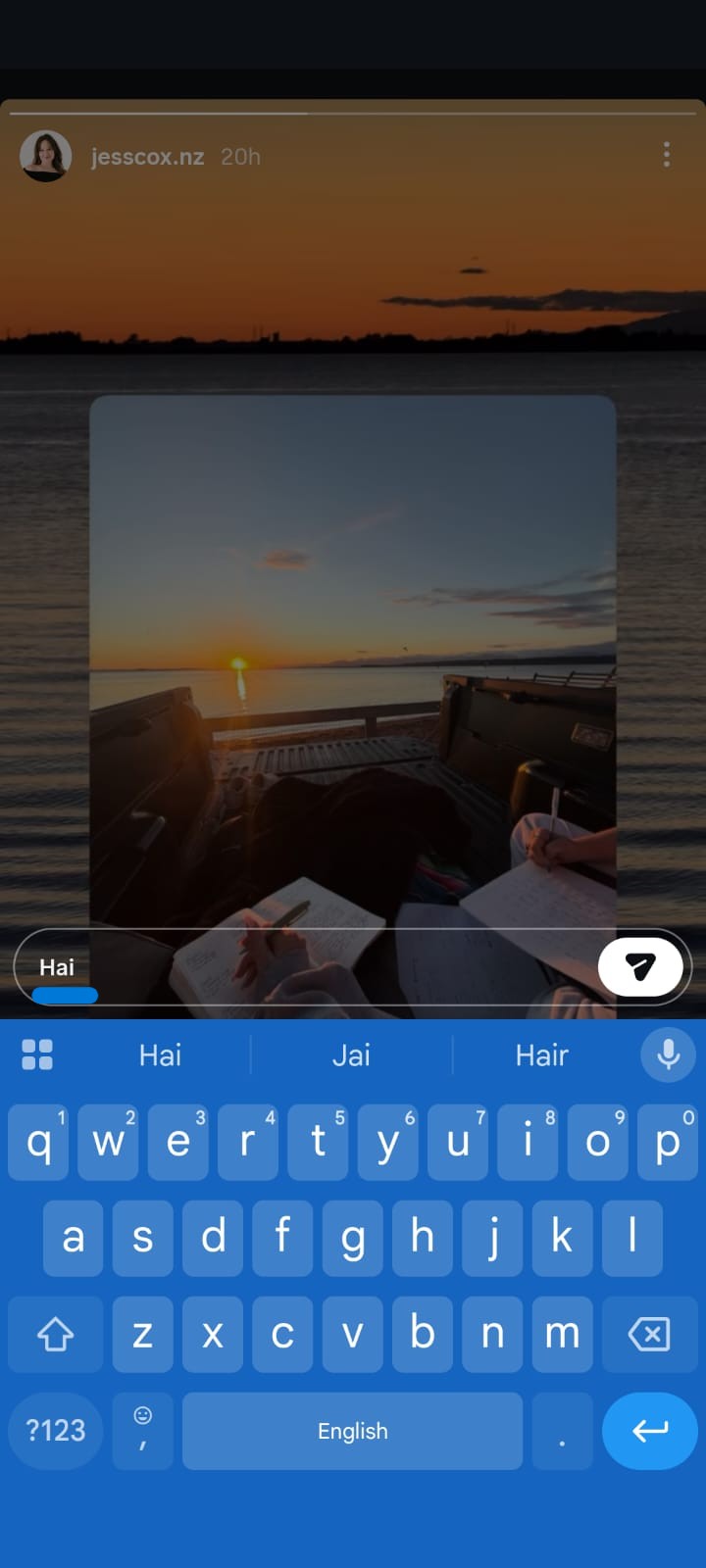
Open the Story you want to reply to
- Tap the message bar at the bottom of the screen — it says "Send message" or "Reply to [Name]…"
- Type your message
- Tap Send
Your message is delivered privately to the creator's DM inbox. You will also see it in your DM thread with that person.
To react with an emoji instead of text:
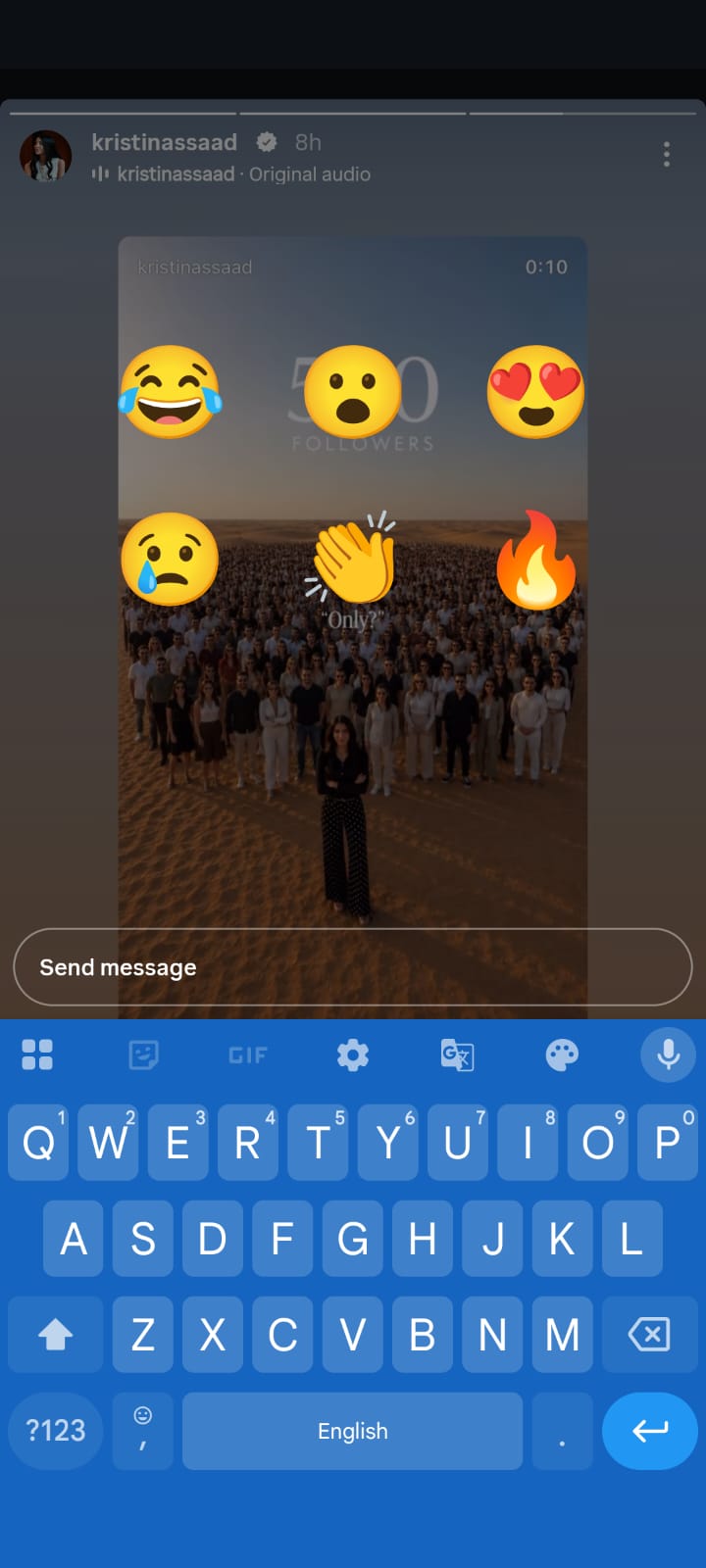
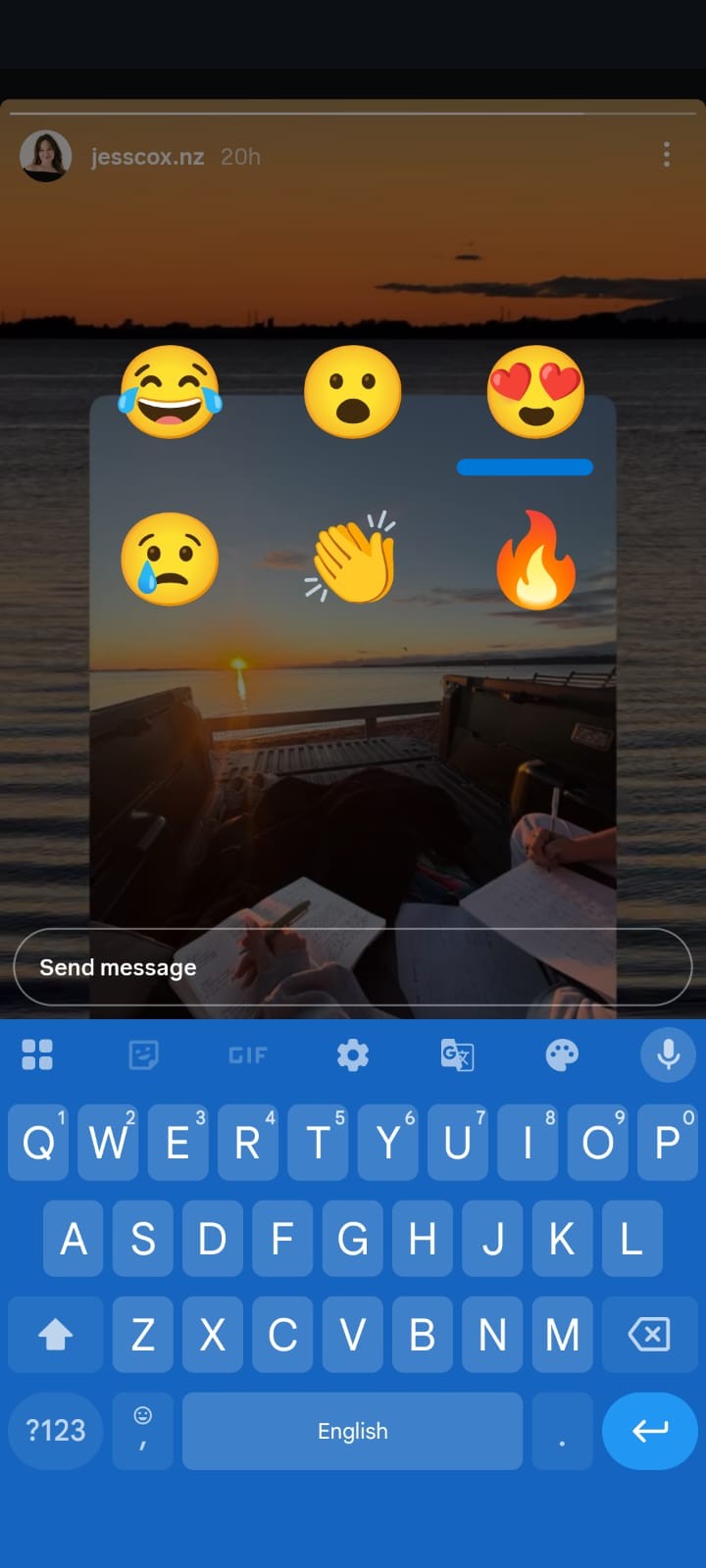
Tap the message bar and a row of emoji options appears above the keyboard. Tap any emoji to send it as a quick reaction — this also goes to the creator's DMs as a private message, just without text. Other viewers cannot see your emoji reaction.
To leave a public story comment (new in 2025–2026):
- Open the Story
- Tap the chat bubble icon in the lower-left corner of the Story frame — this is different from the message bar at the bottom
- Type your comment
- Tap Post
This comment appears publicly on the Story for all viewers to see and disappears after 24 hours.
How Do You Reply to a Story Reply You Received As the Creator?
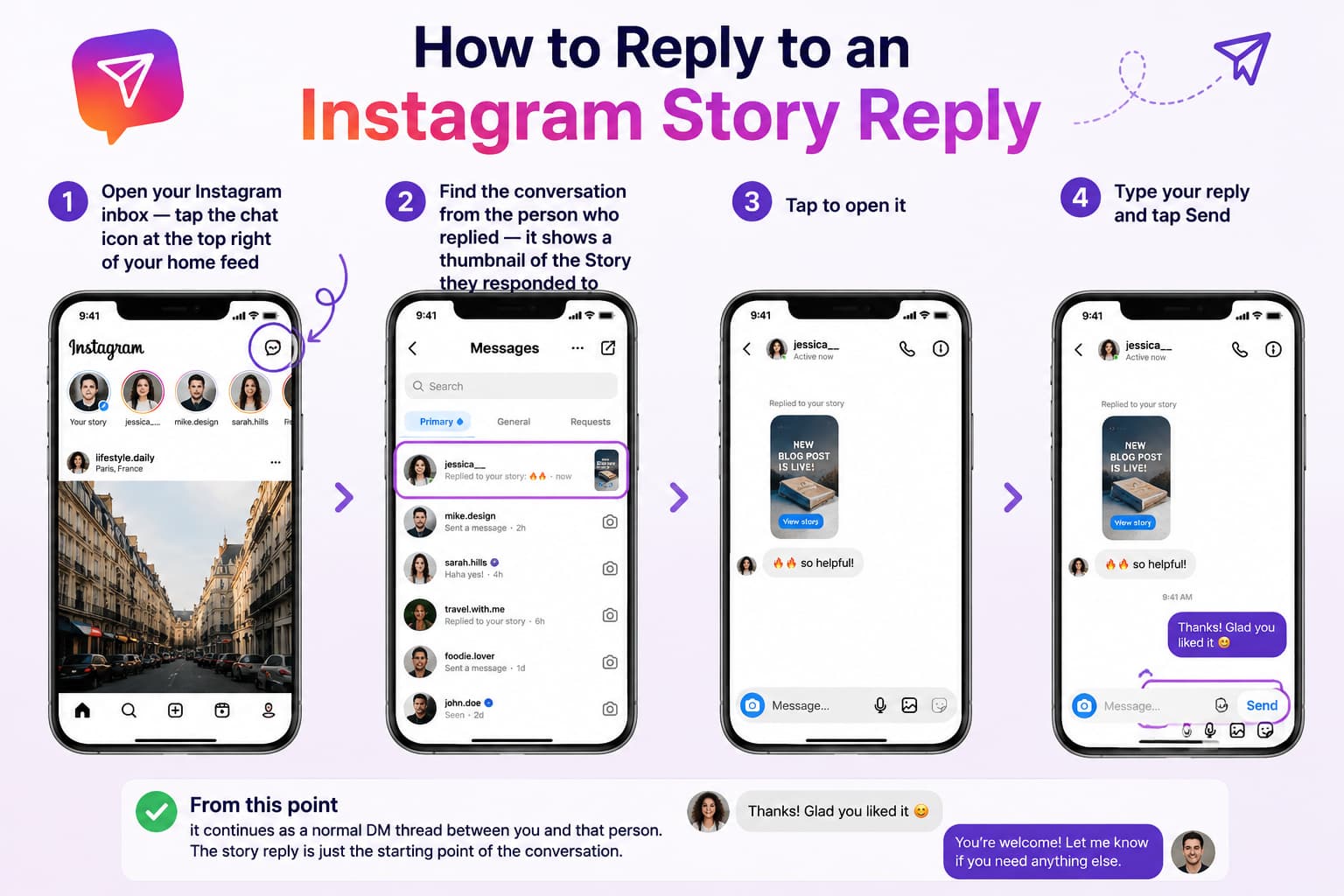
- Open your Instagram inbox — tap the chat icon at the top right of your home feed
- Find the conversation from the person who replied — it shows a thumbnail of the Story they responded to
- Tap to open it
- Type your reply and tap Send
From this point it continues as a normal DM thread between you and that person. The story reply is just the starting point of the conversation.
Why Can't I Reply to Someone's Instagram Story?
Several things can prevent the reply option from appearing:
The creator has turned off story replies. They can disable replies entirely or restrict them to followers only. When replies are off, the message bar either disappears or is greyed out.
You do not follow a private account. Private accounts only show Stories to approved followers. No follow approval means no access to the Story at all.
You have been restricted or blocked. If the creator has restricted your account, your ability to interact with their content is limited even if you can still see the Story.
You are viewing a Highlight, not a live Story. Story Highlights sometimes have limited interaction options, particularly for older archived content.
A temporary app bug. Force-close the Instagram app and reopen it, or check whether an update is available.
How Do You Turn Off or Limit Story Replies on Instagram?
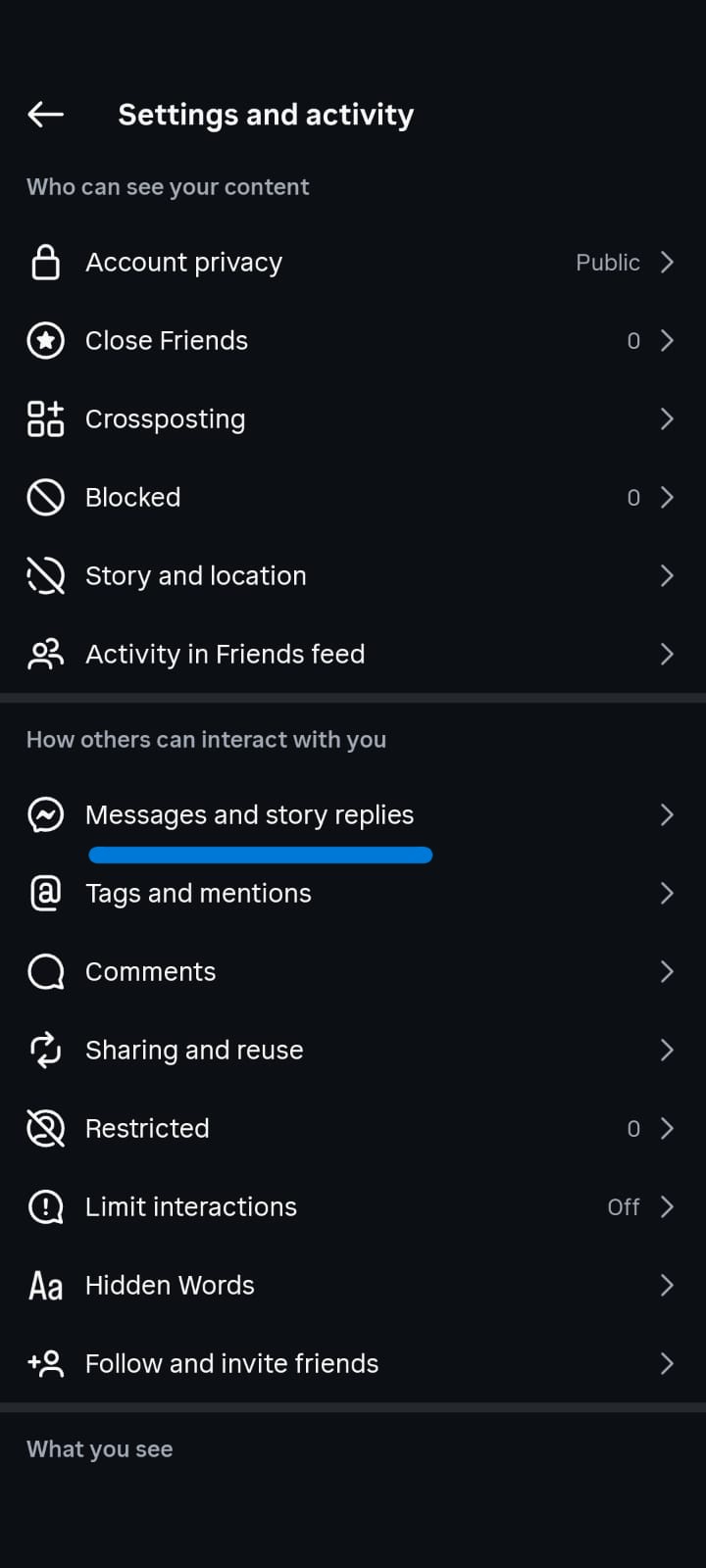
Go to your Instagram profile
- Tap the three lines (top right) - Settings and Privacy
- Tap Privacy - Story
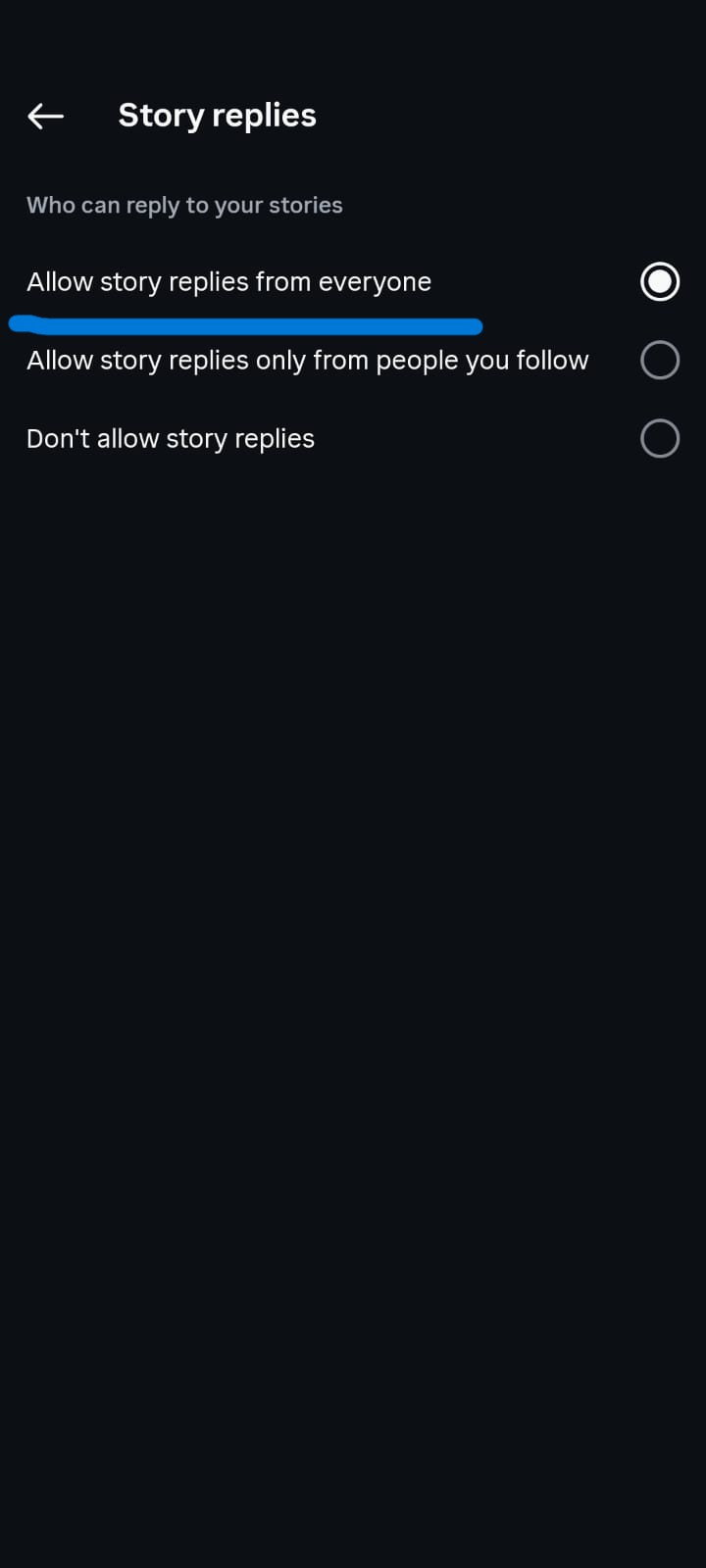
- Under "Allow message replies," select one of three options:
- Everyone — any Instagram user can reply to your Stories
- People you follow — only accounts you follow can reply
- Off — disables story replies entirely
This same settings page also controls public story comments. You can disable public comments while keeping private DM replies active, or turn off all Story interactions at once.
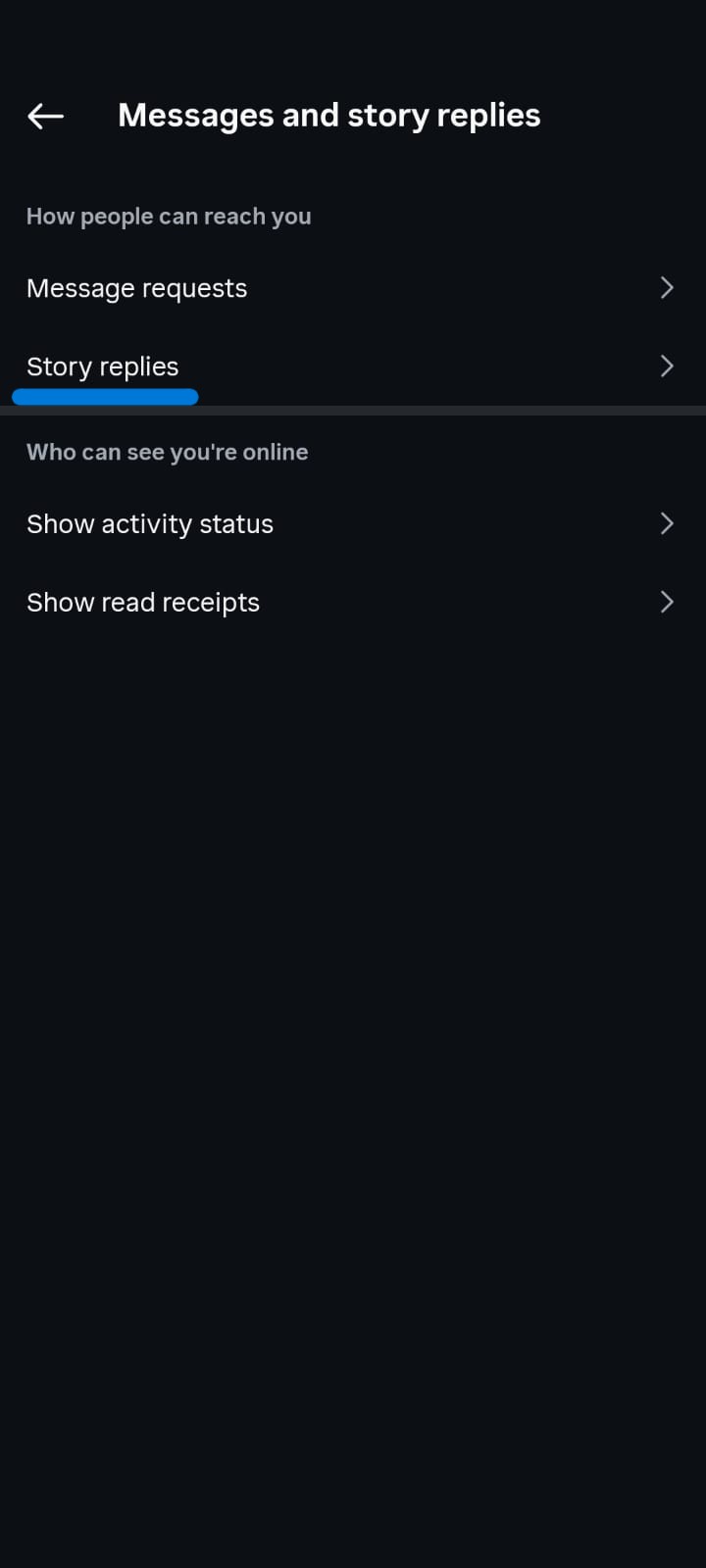
Updated path in the 2026 Instagram app:
1. Open your profile
2. Tap the three lines - Settings
3. Tap How others can interact with you
4. Tap Messages and story replies
5. Tap Story replies
6. Choose who can reply
Instagram’s default is that anyone who can see your Story can reply with a message. If you block replies, those people will not see the reply option on your Story.
After 24 hours the Story photo or video preview may drop out of the chat, but the text of the reply stays. Official source: Instagram Help Center — Manage who can reply to your Instagram story with a message (https://help.instagram.com/1133988223332503/).
Do Instagram Story Replies Affect the Algorithm?
Story replies appear to be one of the stronger engagement signals on Instagram, though Instagram has not published the exact weighting of each interaction type. What Instagram has confirmed through its creator documentation is that Stories perform better when they generate active engagement — and a reply requires deliberate effort from the viewer, more so than a passive view, a tap forward, or a like.
In practice, accounts that regularly receive story replies tend to appear earlier and more consistently in their followers' story tray compared to accounts that generate only passive views. This is consistent with how Instagram describes its content ranking in its Help Center, where it notes that it prioritises content from accounts a person "interacts with most."
Public story comments, introduced in 2025–2026, add an additional layer of engagement on top of this. Visible discussion on a Story may also influence how it performs across Instagram's broader surfaces.
How Long Do Instagram Story Replies Last?
The Story itself disappears after 24 hours, but the DM reply does not. The conversation stays in both your inbox and the creator's inbox permanently — it does not expire when the Story does.
The Story thumbnail attached to the DM may stop loading once the Story expires, but the text of the reply and the full conversation thread remains accessible indefinitely.
Public story comments work differently — they disappear with the Story after 24 hours. If a Story is saved to a Highlight, comments made on it may remain visible within that Highlight.
Can You See If Someone Screenshots Your Instagram Story Reply?
No. Instagram does not notify you if someone screenshots a DM conversation, including story reply threads. Unlike disappearing messages sent with Vanish Mode, regular story reply DMs have no screenshot notification.
If a creator screenshots your reply and reshares it publicly, Instagram will not alert you that this happened. This is worth keeping in mind when sending replies you would not want shared.
Can You Reply to Your Own Instagram Story?
Yes. You can tap the message bar on your own Story and send a reply, which will appear in your own DMs as a message to yourself. This is occasionally used by creators to pin a note or link in their own Story reply thread, but it has no effect visible to viewers — they cannot see your self-reply any more than they can see anyone else's reply.
Why Did My Instagram Story Reply Disappear?
A few possible reasons:
The creator deleted the Story. If the creator manually deleted the Story before the 24 hours were up, the associated DM thread may show the Story thumbnail as unavailable, though the text of your reply typically remains.
The creator unsent their response. If they replied to your message and then unsent it, you will see a notice that the message was unsent.
You unsent your own reply. If you pressed and held on your message and tapped Unsend, it was removed from both sides of the conversation.
A DM thread was deleted. If either party deletes the conversation thread, it is removed from that person's inbox.
The reply itself — the text you sent — does not disappear automatically just because the Story expires.
What Are Good Story Reply Prompts That Actually Get Responses?
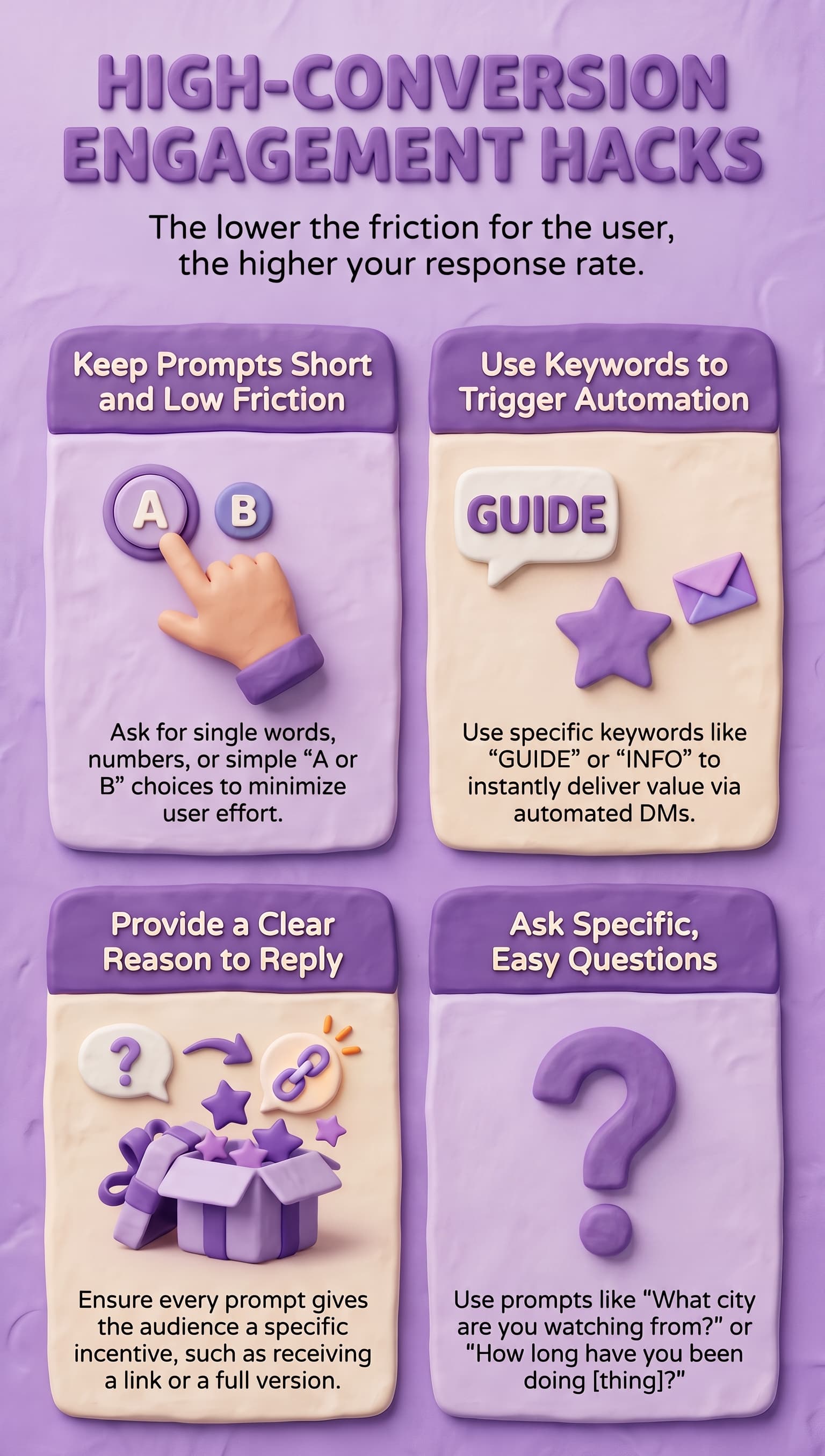
The wording of your call to action in a Story has a direct impact on how many people reply. Vague prompts like "let me know what you think" consistently get fewer responses than specific, low-effort prompts.
Prompts that work well:
- "Reply A or B — which would you choose?"
- "What city are you watching from? Drop it in my DMs "
- "Tell me one word that describes where you're at right now"
- "Reply YES if you want me to send you the full version"
- "How long have you been doing [thing]? Reply with your number"
- "Ask me anything about [topic] — I'll reply to everyone"
- "Reply GUIDE and I'll DM you the link"
- "Which one do you struggle with more — reply 1 or 2"
The pattern: short, specific, requires minimal effort, gives a clear reason to reply. The lower the friction, the higher the response rate.
Keyword-based prompts ("Reply GUIDE," "Reply PRICE," "Reply INFO") work particularly well because they pair naturally with automation — when someone sends a keyword, an automatic DM response can deliver exactly what you promised, instantly.
How Do You Use Story Replies to Have More Conversations with Your Followers?
Story replies are one of the best ways to move a follower from passive viewer to active conversation because the context is already there — they replied to something specific you posted, so you always have a starting point.
Ask questions that are easy to answer. Specific questions with short answers ("Rate it 1–10," "Which city?", "Yes or No?") get far more replies than open-ended ones. The easier it is to answer, the more people actually do it.
Reply back quickly. A story reply that sits unanswered for several hours often goes cold. Even a short reply — acknowledging their message or asking one follow-up question — keeps the conversation going.
Use keyword triggers to start the conversation automatically. Posting "Reply INFO and I'll DM you the details" means the moment someone replies, they receive an instant DM response with what you promised. By the time you open the app, the conversation has already started. For creators handling a large number of replies, tools like InstantDM handle this automatically through Instagram's official Meta API.
Follow the thread naturally. Once someone replies and you respond back, you have an open DM thread. Ask a follow-up question. That single exchange often becomes a longer conversation.
How Do You Automate Instagram Story Replies?
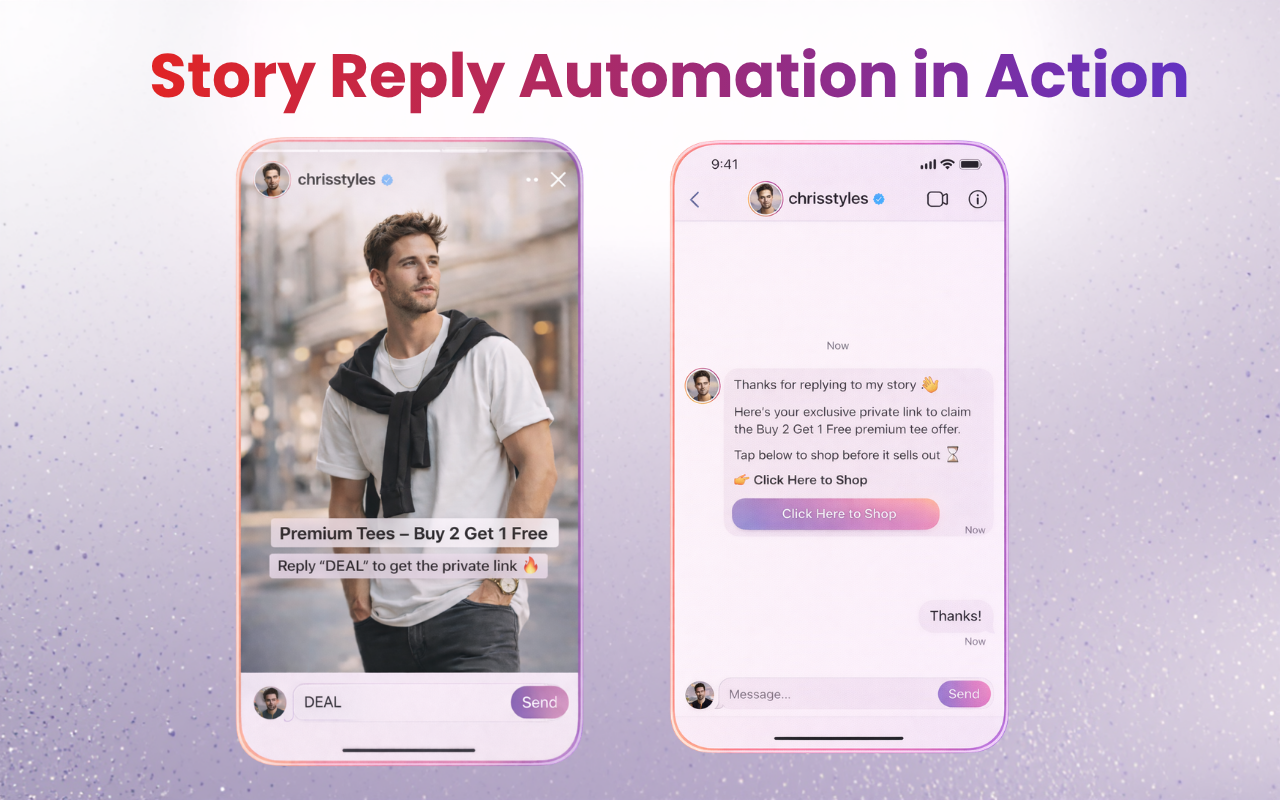
Story reply automation sends an automatic DM to anyone who replies to your Story — immediately, without you needing to be online.
How to set it up:
- Connect your Instagram account to a Meta-approved automation tool
- Set your trigger — either every story reply, or only replies containing a specific keyword
- Write your automatic response — a message, a link, a resource, or a question
- When someone replies to your Story and matches the trigger, they receive your response instantly
A practical example:
You post a Story: "Reply CHECKLIST and I'll send it over." When someone replies with that word,
they immediately receive a DM with the link. You see the conversation in your inbox and can continue it manually at your own pace.
Keywords that work well as triggers:
GUIDE · INFO · LINK · PRICE · YES · SEND IT · DETAILS
Keep keywords short and easy to remember. The simpler they are to type, the more people follow through.
When setting this up, only use tools that operate through Instagram's official Meta API. Tools that bypass the API violate Instagram's terms of service and put your account at risk of being restricted. InstantDM is built on the official API, which means your account stays safe while automation runs in the background.
How Do Public Instagram Story Comments Work in 2026?
Public story comments are a newer Instagram feature (rolled out through 2025–2026) that lets viewers comment on Stories visibly — similar to comments on a feed post, but temporary.
What they are: Text comments that appear directly on the Story frame, visible to all viewers of that Story.
Who can post them: By default, only mutual followers — people both you and the creator follow
— can leave public comments. This reduces spam and keeps interactions more relevant.
How long they last: 24 hours, disappearing when the Story does. If the Story is saved to a Highlight, comments may remain visible there.
How to post one: Open the Story - tap the chat bubble icon in the lower-left corner (not the message bar at the bottom) - type your comment - tap Post.
How to disable them as a creator: Go to Settings - Privacy - Story adjust "Allow message replies." You can switch off public comments while keeping private DM replies active.
Public comments are useful for visible community discussion. Private story replies are where direct, one-on-one conversations happen.
Official Instagram rules for public story comments:
- Public account (default): people you follow can comment on your Stories.
- Private account (default): only followers you follow back can comment.
- You can widen this to more followers or turn comments off.
- Anyone who can view the Story can also see the comments on it.
- You can comment on your own Story.
- Public story comments are limited to 60 characters, including emoji.
- After the Story expires, comments stay visible to you in Archive. If you save the Story as a Highlight, comments can stay visible there for anyone who can view the Highlight.
To leave a public comment: open the Story - tap Comment -type - Send.
Official sources:
https://help.instagram.com/847124530866462
https://help.instagram.com/3632872230361200
Why didn’t I get a notification for an Instagram story reply?
Work through these in order:
- Check Requests in Instagram Direct, not just the main inbox.
- Confirm Story replies are not set to Off.
- Confirm you did not Hide Story From that account.
- Check Settings → Notifications - Messages, and the phone’s Instagram notification permission.
- If you restricted them, look in Message Requests.
- Update the app and force-close it.
- Remember the split: public comments show up in Story activity. Private replies show up in DMs. Mixing those two is why replies look “broken.”
What “Instagram story replies” and “ig responses” actually mean
These searches mix three different things:
- Private story reply — message bar at the bottom - DM. Only the creator sees it.
- Public story comment — comment control on the Story. Other viewers can read it.
- Feed comment reply — responding under a post or Reel. That is public, and the original commenter is notified.
If another article talks about “responses” without saying which of the three, it may be describing feed comments. For Stories, privacy depends on the control you used: the bottom message bar is private. The comment control is public.
How Do You See Who Replied to Your Instagram Story?
While the Story is still live (within 24 hours):
Open your Story and swipe up. You will see a list of everyone who has viewed it. People who sent a reply will have an indicator next to their name. Tap their name to open that DM conversation directly.
After the Story expires:
The viewer list is no longer accessible from the Story itself, but every story reply conversation remains in your DM inbox. Each conversation shows a thumbnail of the Story that prompted the reply, so you can still tell which post someone responded to.
Summary
Instagram story replies are private direct messages triggered by someone tapping the reply bar on your Story. Only you and the sender can see them — no other viewer, no public counter, nothing visible on the Story frame itself. Replies stay in your DM inbox permanently even after the Story disappears.
Public story comments, introduced in 2025–2026, are a separate feature — visible to all viewers, limited to mutual followers by default, and gone after 24 hours.
To control who can reply to your Stories, go to Settings - Privacy - Story and choose between everyone, followers only, or off.
Story replies are among the strongest engagement signals on Instagram. They take deliberate effort to send, and Instagram's algorithm treats that effort as a meaningful signal of genuine interest in your content.
If you want more replies, use specific short-answer prompts rather than vague calls to action. If you are already getting replies but want to respond faster and more consistently — especially at scale — setting up an automated first response through a tool like InstantDM means every reply gets acknowledged the moment it arrives, even when you are offline.