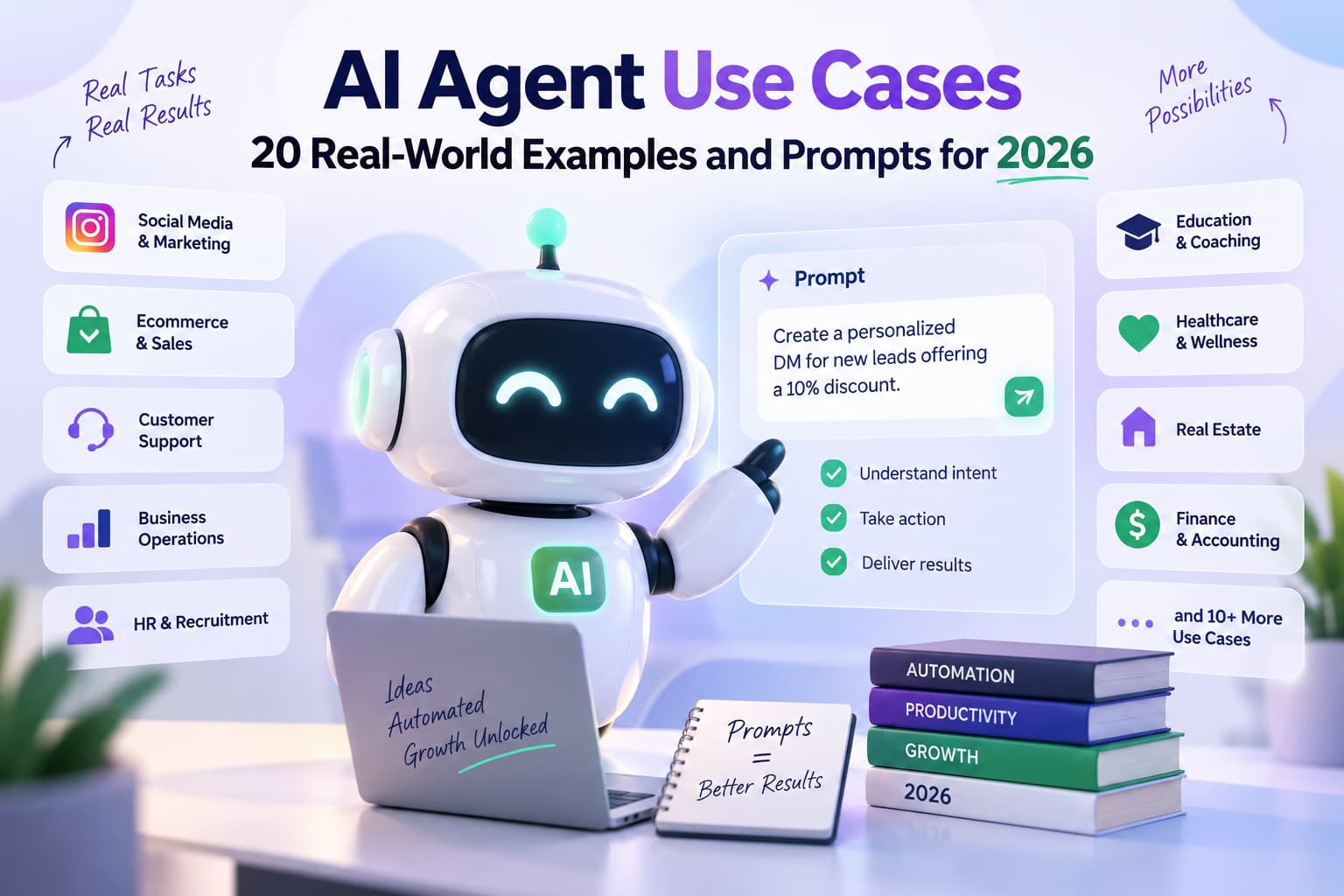
AI agents are systems that take a goal, choose the next step, use tools, check the result, and keep going until the job is done or a human must take over. In 2026 they are already used in production to resolve tickets, research leads, review code, and reconcile invoices. McKinsey’s 2026 State of AI survey shows large organizations scaling agents faster than a year ago. The 20 use cases below include a setup, a copy-paste prompt, metrics to track, and the usual failure modes.
20 AI agent use cases at a glance
| # | Use case | Job it finishes |
| 1 | Ticket resolution | Closes routine support requests end-to-end |
| 2 | Churn early-warning | Flags at-risk accounts before they cancel |
| 3 | Returns & RMA | Approves eligible returns and creates labels |
| 4 | Lead research | Scores a lead against ICP and hands off or nurtures |
| 5 | Meeting prep | Builds a one-page pre-call brief |
| 6 | SDR outreach | Researches, writes, sequences, and books meetings |
| 7 | Content repurposing | Turns one long asset into channel-ready pieces |
| 8 | Competitive intel | Delivers a sourced weekly competitor brief |
| 9 | Code review | Reviews PRs and approves only low-risk changes |
| 10 | Test authoring | Writes and heals tests when the UI changes |
| 11 | Incident response | Triages alerts and runs safe runbook steps |
| 12 | Onboarding concierge | Provisions accounts and tracks new-hire tasks |
| 13 | Resume ranking | Shortlists candidates with reasons |
| 14 | HR helpdesk | Answers policy questions from official docs |
| 15 | Invoice reconciliation | Matches invoices and routes exceptions |
| 16 | Expense processing | Checks policy and packages reports for approval |
| 17 | Month-end close | Drafts reconciliations and variance notes |
| 18 | Deep research | Produces a cited report with limitations |
| 19 | Multi-agent research | Plans, researches, critiques, and writes as a team |
| 20 | Executive admin | Triages inbox and calendar so only decisions surface |
Bonus prompts: returns/RMA, human handoff packet, agent-run evaluator.
What AI Agents Actually Do
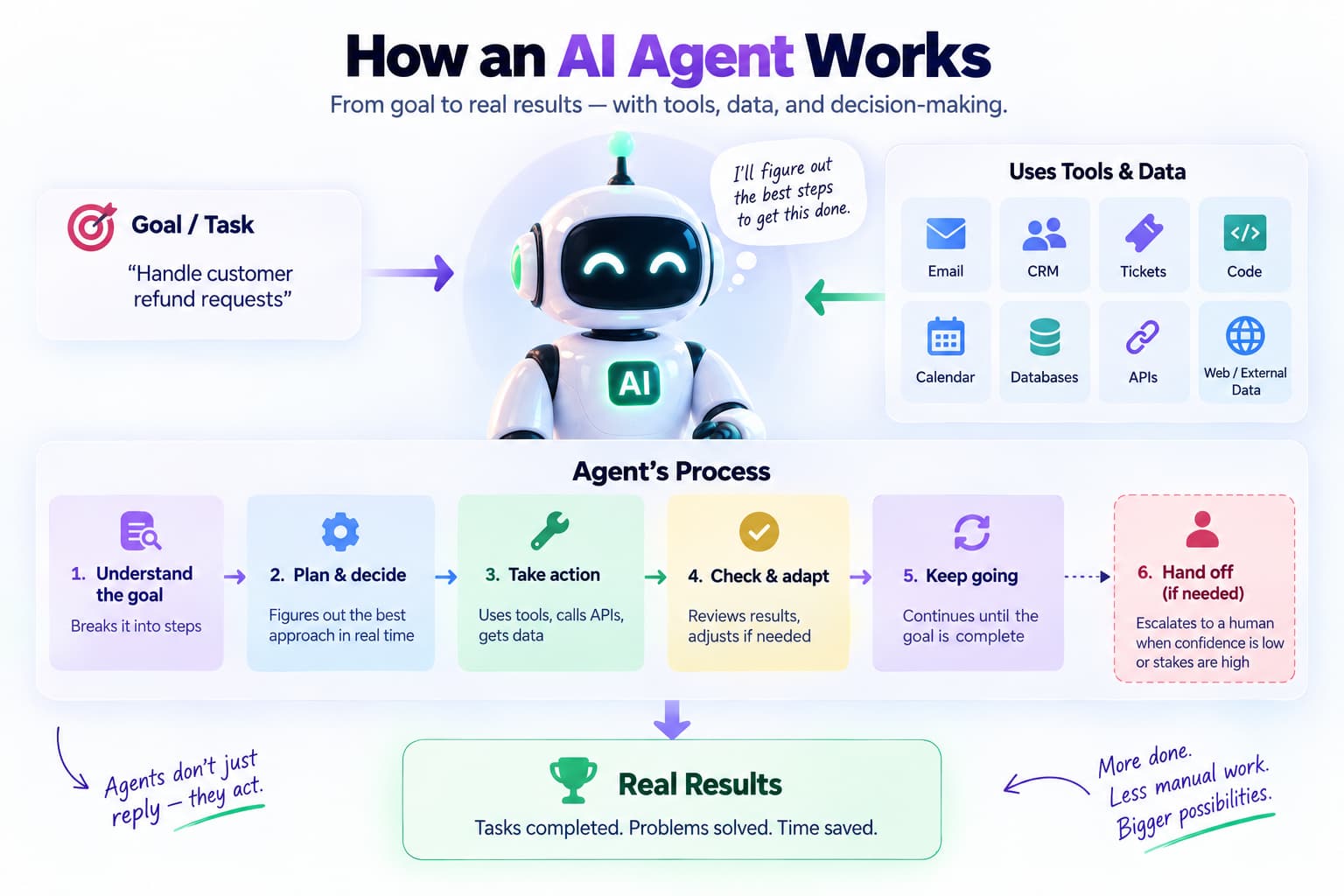
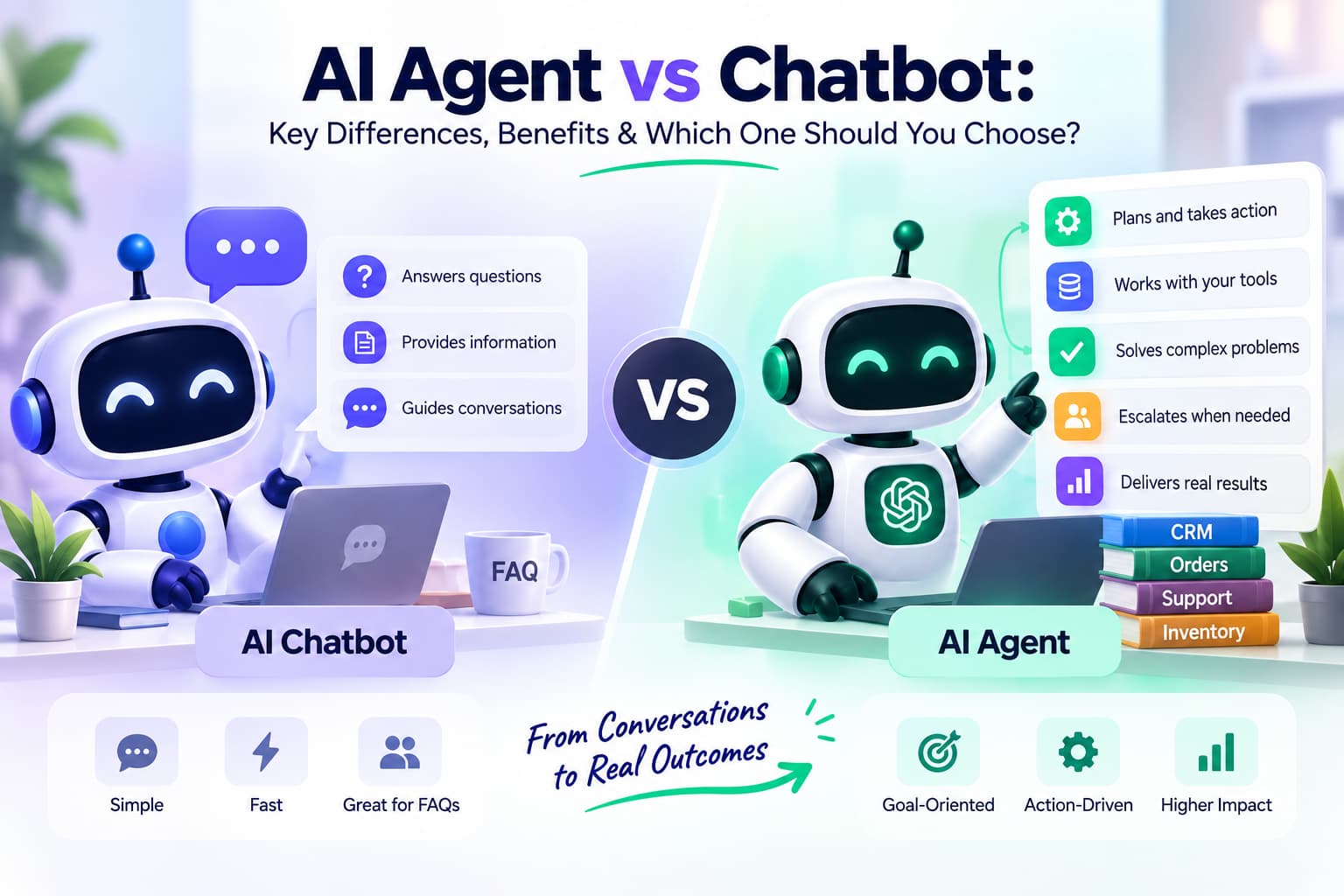
An AI agent gets a goal, figures out the steps, uses tools and data as needed, checks its own work, and keeps going until it’s done or knows it needs a person. Chatbots reply. Agents act. Anthropic’s guide to building effective agents draws the same line: workflows follow a fixed path; agents decide the path while the work is happening.
They can pull information from email, CRM, tickets, code, calendars, and databases. They call APIs. They remember earlier steps. They adjust when something unexpected shows up. And they hand things off when the confidence drops or the stakes get high.
The agents that work well usually have decent reasoning, reliable tool access, clear limits, and logs someone reviews. The ones that disappoint usually miss one of those pieces. In practice the difference between a useful agent and a frustrating one often comes down to how carefully the boundaries and escalation rules were written in the first place.
Production agents typically combine a reasoning model with tools, external data, memory, an execution environment, and an orchestration layer.
Agents vs Everything Else
| Type | Autonomy | Tool use | Best for | Weak spot |
| Chatbot | Low | Limited | Simple questions | Stops at the answer |
| Copilot | Medium | Some | Helping a person in the moment | The human still drives |
| RPA | High but rigid | Fixed scripts | Stable, high-volume tasks | Breaks when the process changes |
| AI Agent | High and flexible | Dynamic tools + reasoning | Multi-step, messy work | Needs guardrails and monitoring |
A lot of tools get labeled “agents” when they’re really just better chatbots or copilots. Real agents own the outcome within the boundaries you set. That ownership is what creates both the upside and the need for careful design.
Customer Support & Service
1. Autonomous Ticket Resolution Agent
Quite a few support teams now clear 60–80% of routine tickets without a human touching them—refunds, order status, basic policy questions.
The agent reads the ticket, pulls the customer and order details, checks the knowledge base, decides what to do, takes the action, replies, and only escalates when it’s unsure or the case is unusual.
Prompt:
text
You are a customer support resolution agent.
Goal: Resolve the customer request end-to-end when possible; otherwise escalate with full context.

Steps:
1. Extract intent, order/account identifiers, and urgency from the ticket.
2. Retrieve customer history, order status, and relevant policy using available tools.
3. If the request is fully resolvable within policy and your confidence is ≥ 0.9, execute the action (refund, replacement, status update) and reply.
4. If confidence is lower or the case involves exceptions, draft a reply plus recommended next steps and escalate to a human with a structured summary.
5. Always log the decision, tools used, and confidence score.

Output format: Action taken | Reply text | Escalation flag | Confidence | Tools used.
Never invent policy. Never process irreversible actions without confirmation when confidence is below threshold.
Watch the resolution rate, how fast the first reply goes out, CSAT on the tickets the agent handled, and whether the escalations were actually necessary. Common problems: pushing too hard on edge cases and weak logging.
2. Sentiment & Churn Early-Warning Agent
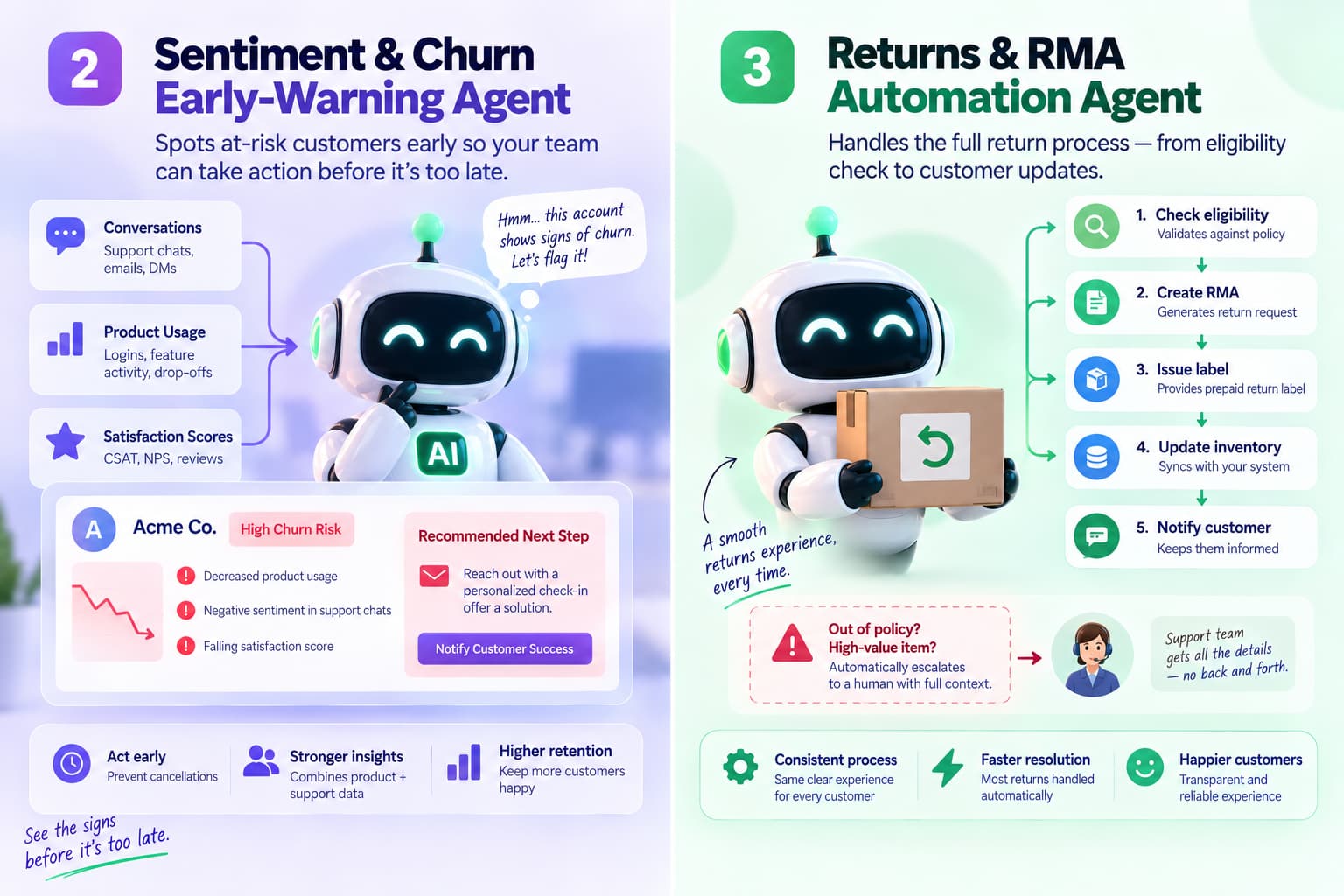
This one quietly watches conversations, usage, and satisfaction scores. When an account starts looking shaky it flags the risk and suggests a next step. The value is the early heads-up—customer success can act while there’s still time instead of finding out after the cancellation. Teams that run this well usually combine product analytics with support data so the signal is stronger than either source alone.
3. Returns & RMA Automation Agent
Runs the full return process: checks eligibility, creates the RMA, issues the label, updates inventory, and keeps the customer in the loop. Anything outside policy or high-value gets escalated with context already attached. Most routine returns just go through. The bigger win is consistency—customers get the same clear process every time instead of depending on who happens to pick up the request.
Sales & Revenue
4. Lead Research & Qualification Agent
Takes a new lead, digs into the company and person, scores them against your Ideal Customer Profile, and either qualifies them for a human or drops them into nurture.
Prompt:
text
You are a sales lead research and qualification agent.
Goal: Fully research the lead, score against the Ideal Customer Profile (ICP), and either qualify for handoff or start nurture.

Input: Lead name, company, email, source.
Process:
1. Enrich company and person data (funding, headcount, tech stack, recent news, LinkedIn signals).
2. Score against ICP criteria (industry, size, role, budget signals, pain indicators).
3. Draft a short research brief and recommended next action.
4. If score ≥ threshold, push to CRM as qualified and notify the owner. Otherwise enroll in the appropriate nurture sequence.

Output: Score (0-100) | Key findings | Recommended action | Confidence | Sources used.
Do not contact the lead directly unless explicitly authorized.
Track time from lead to qualified, how the agent-qualified leads convert, and whether the research is actually accurate. Watch out for made-up company details or a fuzzy ICP. The better implementations refresh the enrichment sources regularly so the scores stay current.
5. Meeting Prep & Account Briefing Agent
Before a call it pulls recent CRM activity, emails, open tickets, and company news into a short brief. Talking points and risks are already highlighted so the seller doesn’t have to scramble. Many teams deliver the brief directly into Slack or the calendar event so it’s impossible to miss.
Prompt:
text
You are a meeting prep and account briefing agent.
Goal: Produce a concise, actionable pre-call brief for the seller.

Input: Account name, meeting date/time, attendees.
Process:
1. Pull the last 90 days of CRM activity, emails, support tickets, and opportunity notes.
2. Check recent company news, funding, or leadership changes.
3. Highlight open risks, unresolved issues, and the strongest value propositions for this account.
4. Suggest 3–5 talking points and one clear next-step recommendation.
5. Keep the entire brief under one page.

Output format: Account snapshot | Recent activity | Risks & opportunities | Suggested talking points | Recommended next step.
Do not invent data. Flag any information that is missing or outdated.
6. Autonomous SDR Outreach Agent
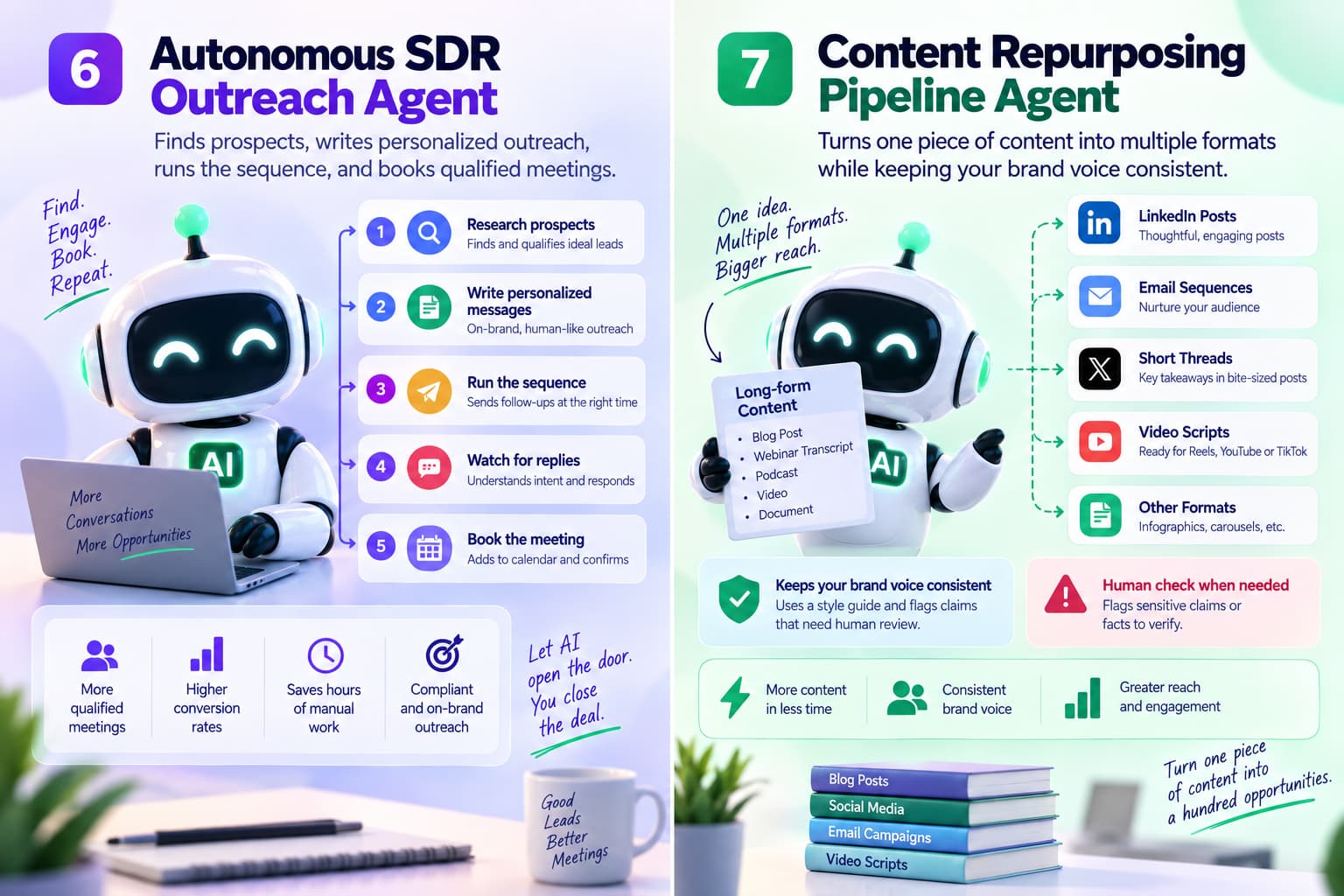
Researches prospects, writes personalized openers, runs the sequence, watches for replies, and books the meeting when someone responds. It stops when it should and hands off cleanly. The better versions stay compliant and don’t sound robotic. The real test is whether the meetings that get booked are actually qualified and show up.
Marketing & Content
7. Content Repurposing Pipeline Agent
Give it a long blog, webinar transcript, or podcast and it turns out LinkedIn posts, email sequences, short threads, and video scripts while staying close to your brand voice. It should flag claims that need a human check. One of the easiest ways to get more content out without burning people out. The strongest versions keep a living style guide so the tone doesn’t drift over time.
Prompt:
text
You are a content repurposing agent.
Goal: Turn a long-form asset into multiple channel-ready pieces while preserving brand voice and key messages.

Input: Original content (blog, transcript, or notes) + brand voice guidelines.
Process:
1. Extract the core insights and most important points.
2. Create: one LinkedIn post, one email sequence (3 emails), one X/Twitter thread, and one short video script.
3. Match the tone and style in the brand guidelines.
4. Flag any statistics, claims, or quotes that need human verification.
5. Keep each piece concise and ready to publish with minimal editing.

Output each piece clearly labeled. Do not invent facts or alter the original meaning.
8. Competitive Intelligence Agent
Keeps an eye on competitor sites, pricing, job posts, and news, then delivers a clean weekly summary of what actually changed and why it might matter.
Prompt:
text
You are a competitive intelligence agent.
Goal: Produce an accurate, sourced weekly competitive briefing.

Steps:
1. Scan the defined competitor domains and sources for changes in product, pricing, messaging, hiring, and partnerships.
2. Extract only verifiable changes. Ignore speculation.
3. Categorize impact (High/Medium/Low) on our product, pricing, and go-to-market.
4. Summarize in structured format with source links and recommended responses.

Output: Executive summary | Detailed changes by competitor | Impact assessment | Recommended actions.
Never invent facts. Always cite sources.
Useful output is the insight, not a list of every tiny change. Teams that get the most from this usually review the brief in a short weekly meeting so the findings actually influence decisions.
Software Engineering & DevOps
9. Code Review & PR Agent
Looks at pull requests for bugs, style issues, security problems, and missing tests. It leaves specific comments or auto-approves the low-risk ones. Developers still handle the architectural calls. The best setups let teams tune how strict the agent is so it doesn’t become noise.
Prompt:
text
You are a code review agent.
Goal: Review the pull request for bugs, security issues, style violations, and test coverage gaps.

Process:
1. Analyze the diff and related files.
2. Check against the team’s coding standards and known vulnerability patterns.
3. Flag any missing tests or unclear logic.
4. Leave specific, actionable comments. Suggest fixes where possible.
5. For low-risk, clearly correct changes, mark as approved. For everything else, request human review.

Output: Summary of findings | Specific comments with line references | Approval recommendation (Approve / Request changes) | Confidence.
Never approve changes that affect security, data handling, or core business logic without human review.
10. Autonomous Test Authoring & Healing Agent
Finds coverage gaps, writes tests, runs them, and fixes broken selectors or assertions when the interface changes. Bigger changes still need a human look. This one tends to pay off fastest in products that ship frequently and have a lot of UI surface area.
11. Incident Response & Root-Cause Agent
When an alert fires it pulls the relevant logs and recent deploys, ranks likely causes, takes safe actions from the runbook, and writes a clear summary.
Prompt:
text
You are an incident response agent for production systems.
Goal: Triage the alert, identify likely root cause, propose or execute safe remediation, and produce a clear incident summary.

Process:
1. Parse the alert and pull related metrics, logs, and recent changes.
2. Form ranked hypotheses with confidence scores.
3. For low-risk, reversible actions within the runbook, execute and verify.
4. For higher-risk actions, propose the exact steps and wait for human approval.
5. Write a structured incident report: timeline, impact, root cause, actions taken, follow-ups.

Constraints: Never restart critical services without approval. Always maintain a full audit log. Escalate immediately on customer-facing impact above the defined threshold.
The numbers that matter: how fast you detect, how fast you resolve, and how often the root-cause guess was right. Over time the logs from these agents also become useful training data for improving the runbooks themselves.
HR & People Operations
12. Onboarding Concierge Agent
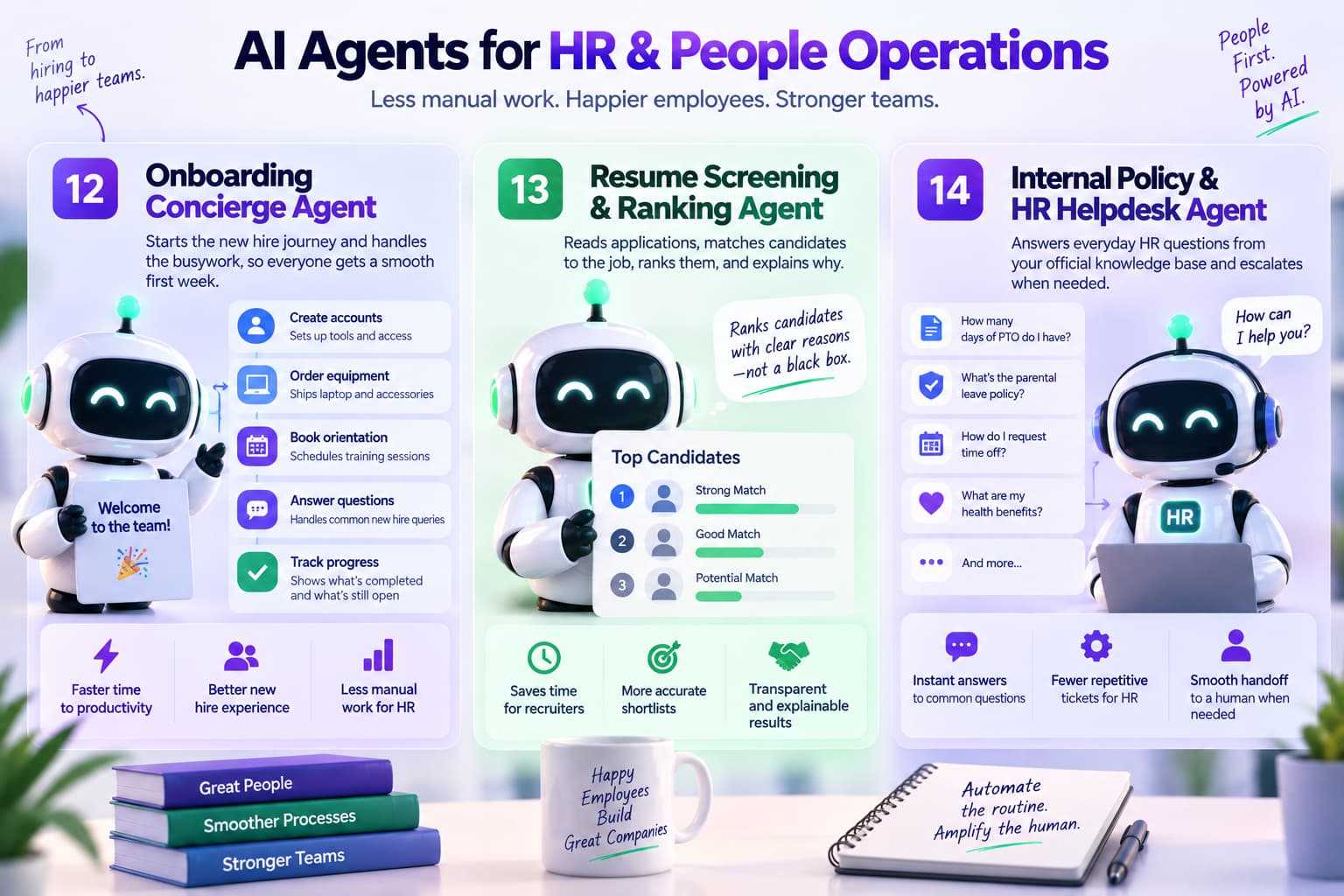
Once someone accepts the offer it starts the process—creates accounts, orders the laptop, books orientation, answers the usual questions, and tracks what’s still open. New hires get a smoother first week and HR spends less time chasing tasks. The smoother the first ten days, the faster people become productive.
13. Resume Screening & Ranking Agent
Reads applications, matches them to the job, ranks candidates, and explains why. Recruiters get a shortlist they can actually use instead of starting from a big pile. Transparency in the ranking helps avoid the black-box problem that makes people distrust automated screening.
14. Internal Policy & HR Helpdesk Agent
Answers everyday questions about benefits, time off, and policies from the official knowledge base. Anything sensitive or unclear goes to a person with the context already attached. This one quietly reduces the repetitive load on HR partners so they can focus on higher-value conversations.
Finance & Operations
15. Invoice Reconciliation & Exception Agent
Matches invoices to purchase orders and receipts, spots differences, drafts notes to vendors, and sends the messy ones to a person. Clean invoices sail through; exceptions arrive ready for a quick decision. The biggest time savings usually come from the straight-through cases that used to require manual matching.
Prompt:
text
You are an invoice reconciliation agent.
Goal: Match invoices to purchase orders and receipts, flag exceptions, and prepare clear packages for human review when needed.

Process:
1. Extract key fields from the invoice (vendor, amount, date, line items, PO number).
2. Match against the corresponding purchase order and goods receipt.
3. If everything matches within tolerance, mark as ready for payment and log the match.
4. If there are discrepancies, create a clear exception summary with the differences and draft a note to the vendor if appropriate.
5. Route exceptions to the correct approver with all supporting documents attached.

Output: Match status | Exception details (if any) | Recommended action | Confidence.
Never approve payment on unmatched or disputed invoices.
16. Expense Report Processing Agent
Categorizes expenses, checks policy, flags duplicates or odd charges, and packages everything for approval. People get reimbursed faster and finance spends less time on routine reviews. Clear policy language in the prompt makes a noticeable difference in how many false flags the agent raises.
17. Month-End Close Support Agent
Pulls data from the different systems, does the reconciliations it can, drafts variance notes, and builds the close checklist. Finance still makes the judgment calls, but they start further along. Teams that use this often shave days off the close cycle once the data connections are solid.
Research, Knowledge & Multi-Agent
18. Deep Research & Synthesis Agent
Takes a research question, plans the sources, gathers and evaluates information, and produces a structured report with citations and clear limitations. The quality of the final report depends heavily on how well the agent is told to weigh conflicting sources and admit uncertainty.
19. Multi-Agent Research Team
A few specialized agents work together—one plans, one researches, one critiques, one writes. The orchestrator keeps them aligned.
Prompt for the orchestrator:
text
You are the orchestrator of a multi-agent research team.
Available agents: Planner, Researcher, Critic, Writer.
Goal: Produce a high-quality, cited research report on the given topic.

Process:
1. Planner breaks the question into sub-questions and success criteria.
2. Researcher gathers and ranks sources for each sub-question.
3. Critic evaluates completeness, bias, and evidence strength; requests additional research if needed.
4. Writer synthesizes the final report with clear structure, citations, and confidence notes.
5. You manage handoffs, resolve conflicts, and ensure the final output meets the success criteria.

Output the final report only after Critic approval. Include methodology and limitations section.
This setup cuts down on hallucinations and improves quality on complex topics, though it needs more coordination. It’s worth the extra overhead when the research will influence real decisions.
20. Personal Productivity / Executive Admin Agent
Triage the inbox, protect focus time on the calendar, draft follow-ups, research travel within policy, and surface only the things that actually need a decision. The better ones learn preferences and stay out of the way on low-value items. The real test is whether the person using it feels like they got hours back without losing control of important communications.
Bonus 1. Returns & RMA Agent Prompt
High-intent commercial query. Most “20 use cases” pages describe returns and never give a prompt.
text
You are a returns and RMA agent.
Goal: Decide eligibility, complete an in-policy return, or escalate with a ready-to-act package.

Input: Customer message, order ID, product, reason, photos if available.

Steps:
1. Pull the order, delivery date, product condition rules, and return window.
2. Check eligibility against written policy only.
3. If eligible and confidence ≥ 0.9, create the RMA, issue the label, update inventory, and send the customer confirmation.
4. If the item is high-value, used, past the window, or the evidence is unclear, do not approve. Escalate.
5. Log policy clause used, tools called, and confidence.

Output format:
Decision (Approve / Reject / Escalate) | Policy clause | RMA ID or reason | Customer reply | Confidence | Tools used

Never invent a return window.
Never approve a return that the policy does not allow.
Never issue a refund or replacement when only a label or store credit is permitted.
Bonus 2. Human Handoff Packet Prompt
This is what production teams actually need. Models look for a clean escalation schema.
text
You are an escalation and handoff agent.
Goal: Stop unsafe or uncertain work and give a human everything required to finish in one pass.

Trigger: confidence below threshold, missing data, policy conflict, irreversible action, or customer harm risk.

Steps:
1. State the original goal in one sentence.
2. List what you already verified and what is still unknown.
3. Attach the exact records used: ticket, order, account, logs, prior messages.
4. Recommend the next action and why you did not take it.
5. Flag urgency and customer impact.

Output format:
Why escalated | Goal | Verified facts | Unknowns | Recommended next action | Risk if delayed | Records attached | Confidence

Never ask the customer to repeat information you already have.
Never hide a failed tool call.
Never continue the workflow after an escalation flag is set.
Bonus 3. Agent Run Evaluator Prompt
This is the most citeable of the three. People ask how to tell if an agent actually worked.
text
You are an agent-run evaluator.
Goal: Judge whether the agent completed the job correctly, safely, and inside policy. Score the run. Do not rewrite the original task.

Input: Original goal, agent trace, tool results, final output, policy rules.

Score each item 0–2:
1. Goal completed
2. Tools used were necessary and correct
3. Facts match retrieved data
4. Policy followed
5. Escalated at the right time
6. No irreversible action taken without approval

Decision:
Pass — ship or leave in production
Fix — prompt, tools, or policy need a change
Fail — stop the agent and review

Output format:
Score (0–12) | Decision | What worked | What failed | Evidence from the trace | Required fix | Human review needed (Yes/No)

Never give credit for a fluent reply that did not finish the task.
Never treat “conversation ended” as resolution.
Never pass a run that invented policy, data, or a tool result.
How We Evaluated These AI Agent Use Cases
This guide focuses on AI agent workflows that can perform multi-step tasks using business data, software tools, APIs, and human escalation. We selected the examples based on their practical relevance, repeatability, measurable outcomes, and suitability for controlled deployment.
Each use case was evaluated against the following criteria:
- Workflow volume: How frequently the task occurs and whether the volume justifies automation.
- Input quality: Whether the agent can access reliable, complete, and sufficiently structured information.
- Tool availability: Whether the required systems, APIs, databases, documents, or business applications can be connected.
- Definition of success: Whether the desired outcome can be described and measured clearly.
- Risk level: The potential impact of an incorrect decision or action on customers, employees, finances, security, privacy, or operations.
- Reversibility: Whether an incorrect action can be safely undone.
- Human oversight: Whether uncertain, sensitive, or high-impact cases can be reviewed before the agent acts.
- Evaluation readiness: Whether historical examples and relevant performance metrics are available for testing.
The examples include workflows in which an agent can plan or sequence tasks, retrieve information, use tools, verify results, maintain context, and escalate when it cannot proceed safely. A fixed rule-based workflow may still be valuable automation, but it is not necessarily an AI agent.
The performance of an AI agent depends on factors such as model quality, data accuracy, system permissions, workflow complexity, policy clarity, exception rates, and human-review thresholds. The use cases and prompts in this guide are implementation patterns, not guarantees of specific results.
Where performance figures or business outcomes are mentioned, they should be interpreted according to the available evidence. Vendor-reported results, customer case studies, internal measurements, and illustrative examples are not equivalent and should be identified separately. Organizations should test an agent on historical cases before deployment and measure accuracy, completion rate, escalation rate, human override rate, safety incidents, cycle time, and business impact.
Evidence, Sources, and Limitations
The recommendations in this guide are based on publicly documented AI agent deployments, official product and technical documentation, workflow analysis, practitioner experience, and common implementation patterns across customer support, sales, marketing, software engineering, HR, finance, operations, and research.
AI agent performance varies significantly between organizations. Results depend on the quality and availability of business data, the systems connected to the agent, tool permissions, model selection, prompt and policy design, workflow volume, exception rates, and the level of human oversight. A result reported by one organization should not be treated as a guaranteed outcome for another.
Vendor-reported performance figures may reflect specific deployment conditions and may not represent independent validation. Where a result is based on a case study, company report, internal test, or illustrative scenario, that evidence should be understood in context.
The prompts provided here are starting points. They should be adapted to the organization’s policies, approval requirements, security controls, privacy obligations, escalation rules, and available tools. Irreversible actions—including payments, refunds, account changes, production changes, employment decisions, and external communications—should receive appropriate human approval until the agent has demonstrated reliable performance in a controlled environment.
Before moving an agent into production, teams should test it against representative historical cases, document failure modes, establish clear stop conditions, log tool use and decisions, and monitor performance after launch. Human review remains important for ambiguous, sensitive, high-impact, or exceptional cases.
This guide follows Google’s principles for creating helpful, reliable, people-first content, including clear authorship, original value, accurate sourcing, and transparent limitations.
Picking Your First Use Case
Five practical questions help:
- Is this work high-volume and repetitive?
- Are the inputs and definition of “done” reasonably clear?
- What’s the cost if the agent gets it wrong, and can we put a human in the loop for the risky parts?
- Do we already have the data and system access?
- Who will own this and keep it healthy?
Good first bets right now: ticket resolution, lead research, meeting prep, invoice exceptions, and onboarding. They have clear volume, existing data, and manageable risk. Starting with something too ambitious is one of the most common ways these projects stall.
A Simple Path to Getting Started
Write a clear brief for the agent—what it’s responsible for, which tools it can use, and when it must stop and ask a person. That sequence matches OpenAI’s practical guide to building agents: pick a bounded workflow, add guardrails, and only expand after the first agent is reliable. Prototype with real past cases. Add logging and confidence scores early. Keep people in the loop on anything irreversible. Only go to production once you can see how often it’s right and how often it escalates. Expand to multiple agents only after one is reliable.
Most projects stall because the success criteria were fuzzy, there were no human checkpoints on high-risk steps, or nobody kept evaluating the agent after launch. Treat the first version as a learning system rather than a finished product and you’ll move faster in the long run.
Closing
The teams getting real value from AI agents aren’t running the most experiments. They’re the ones that pick one high-leverage workflow, give the agent clear goals and tools, keep people involved where it matters, and measure the results.
The 20 use cases and prompts here are meant to be used. Take one that fits, connect the tools you already have, define what success looks like, and run a controlled test. Fix what breaks. Scale what works.
Agents are a practical advantage now for teams willing to treat them like real systems. Start small, watch the numbers, and build from there. The compounding effect comes from getting the first one right and then expanding carefully.
https://public-assets.instantdm.com/blog-image/images/ai-agent-use-cases-hero-img.jpg