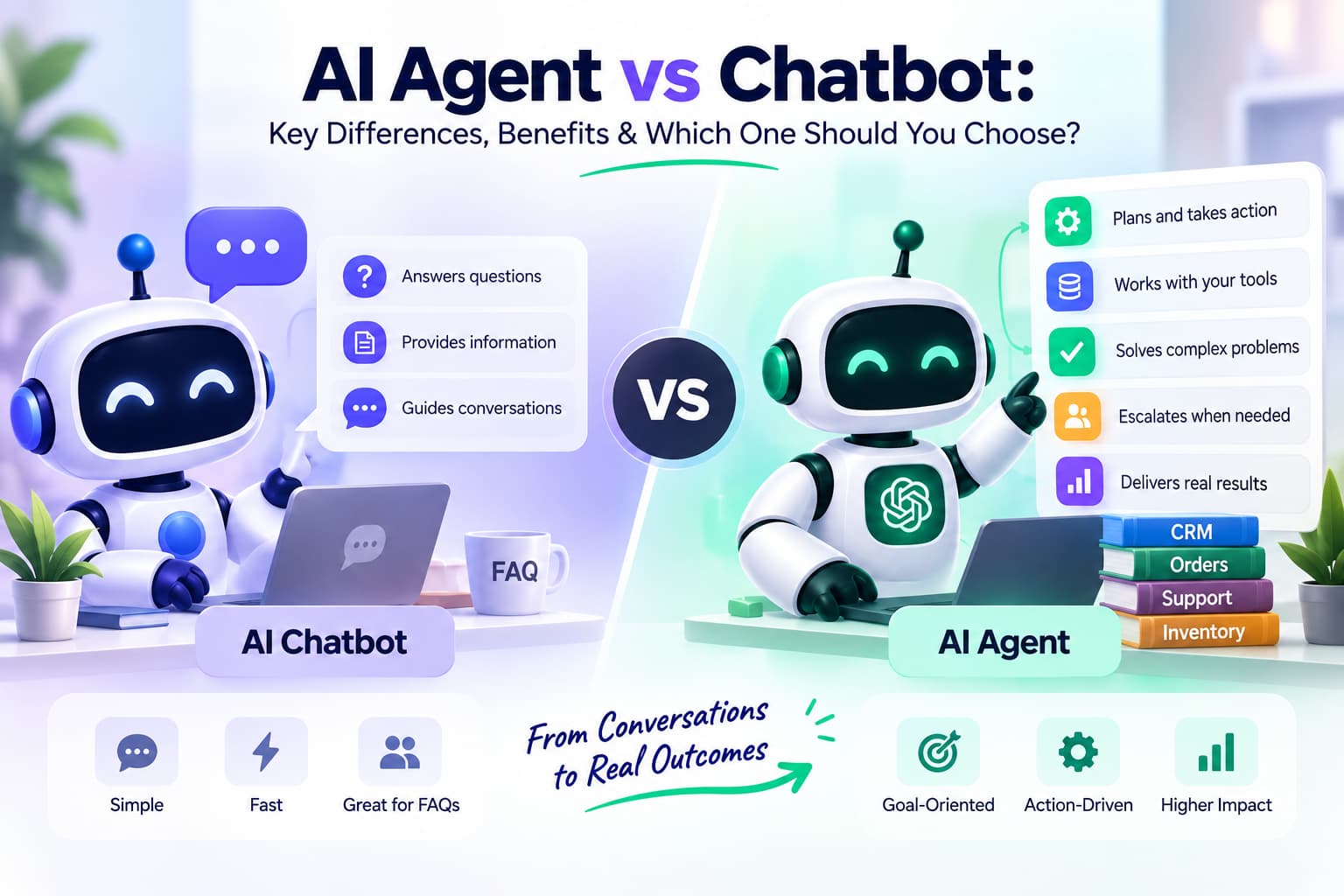
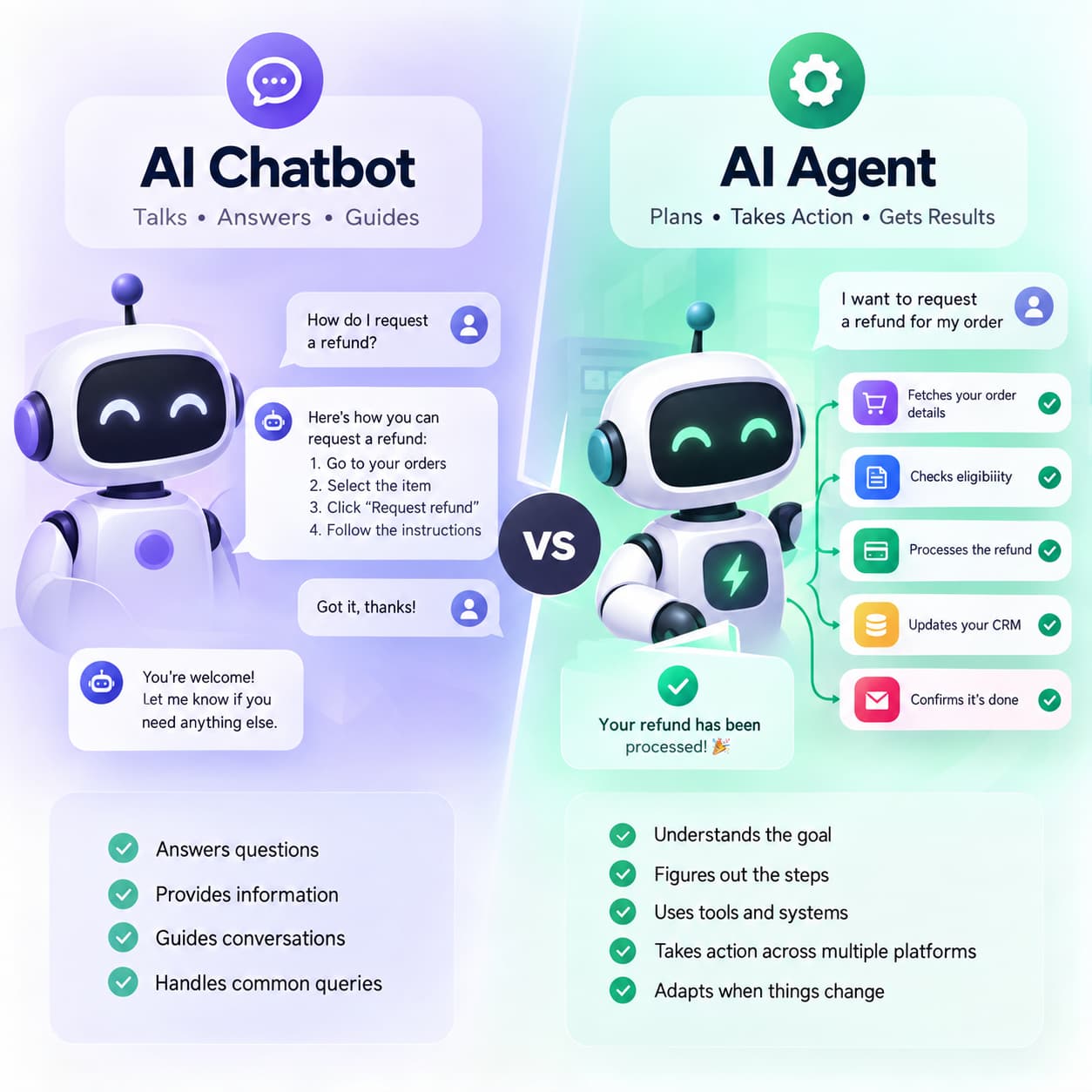
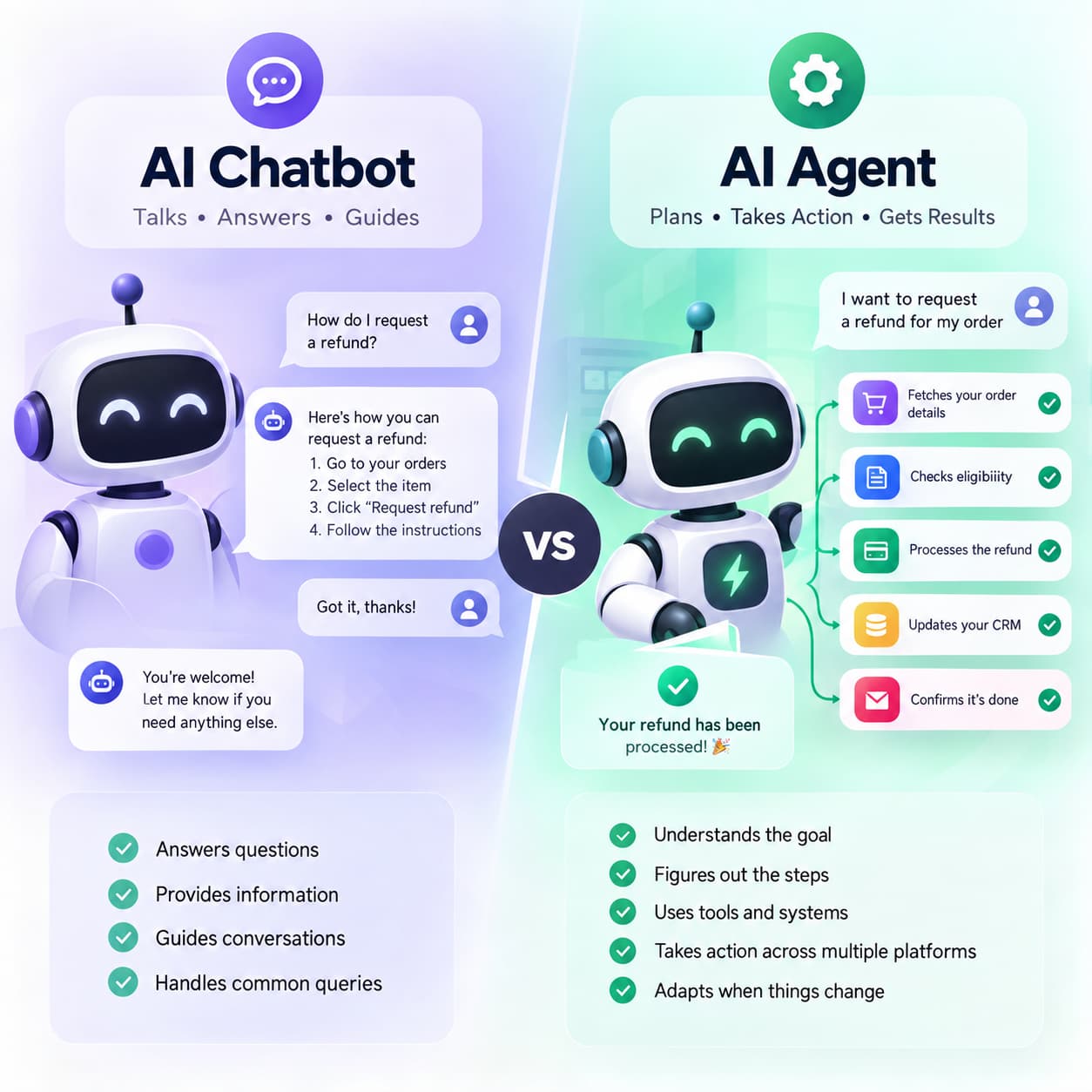
AI chatbots and AI agents are not the same. A chatbot is built for conversation: it answers questions, pulls information, and guides the next message. An AI agent is built to finish a goal: it decides the next step, uses tools and systems, takes action, checks the result, and continues until the job is done or it hits a limit. A chatbot can tell a customer how to request a refund. An agent can check eligibility, start the refund, update the CRM, and confirm it.
A chatbot mainly talks. It answers questions, pulls information, guides the conversation, and handles the usual back-and-forth. An AI agent goes after a goal. It figures out the steps, uses tools or other systems, takes action, and adjusts when things change.
The real difference is how much freedom the system has to decide and do the next thing. A chatbot can tell a customer how to request a refund. An agent can pull the order, check if it qualifies, look at the payment, start the refund, update the CRM, and confirm it’s done.
That doesn’t mean agents are always better. For basic FAQs or simple, predictable chats, a chatbot is usually cheaper, faster to set up, and good enough.
It comes down to how complex the job is, how much risk you’re willing to take, how many steps are involved, what systems need to talk to each other, and how much autonomy you actually need.
AI Agent vs Chatbot: The Short Answer
Chatbots are built for conversation. They answer questions, give information, guide people, qualify leads, and handle customer chats. Agents are built to finish a job. They decide what to do, use tools, run through multiple steps, and keep going based on what happens.
The line isn’t always clean. A lot of modern chatbots already use APIs, memory, and some automation. The difference that matters is how much the system can decide and act on its own.
Use a chatbot when the main job is talking. Use regular workflow automation when the process is fixed and predictable. Use an assistant or copilot when a person needs to stay in charge. Use an agent when the system has to figure out and run multi-step work on its own.
AI Agent vs Chatbot: Quick Comparison
| Feature | AI Chatbot | AI Agent |
| Primary purpose | Conversation and assistance | Goal-oriented task completion |
| Typical behavior | Responds to user input | Plans, acts, observes results, and continues |
| Autonomy | Low to moderate | Moderate to high |
| Decision-making | Usually limited to conversation or defined workflows | Can determine actions and next steps |
| Tool usage | May use APIs, databases, and integrations | Typically uses multiple tools and systems |
| Task complexity | Simple to moderately complex | Moderately to highly complex |
| Multi-step execution | Usually limited or predefined | Core capability |
| Memory | Can maintain conversation and user context | Can maintain task and workflow context |
| Proactive behavior | Usually limited | Can initiate authorized actions |
| Human involvement | Often required for complex requests | Can operate independently within boundaries |
| Risk | Generally lower | Higher because it can take actions |
| Implementation | Usually simpler | Usually more complex |
| Best for | FAQs, support, lead capture, guidance | Complex workflows and task execution |
Bottom line: chatbots lean toward conversation. Agents lean toward getting something done. The two are starting to overlap more than they used to.
What Is an AI Chatbot?
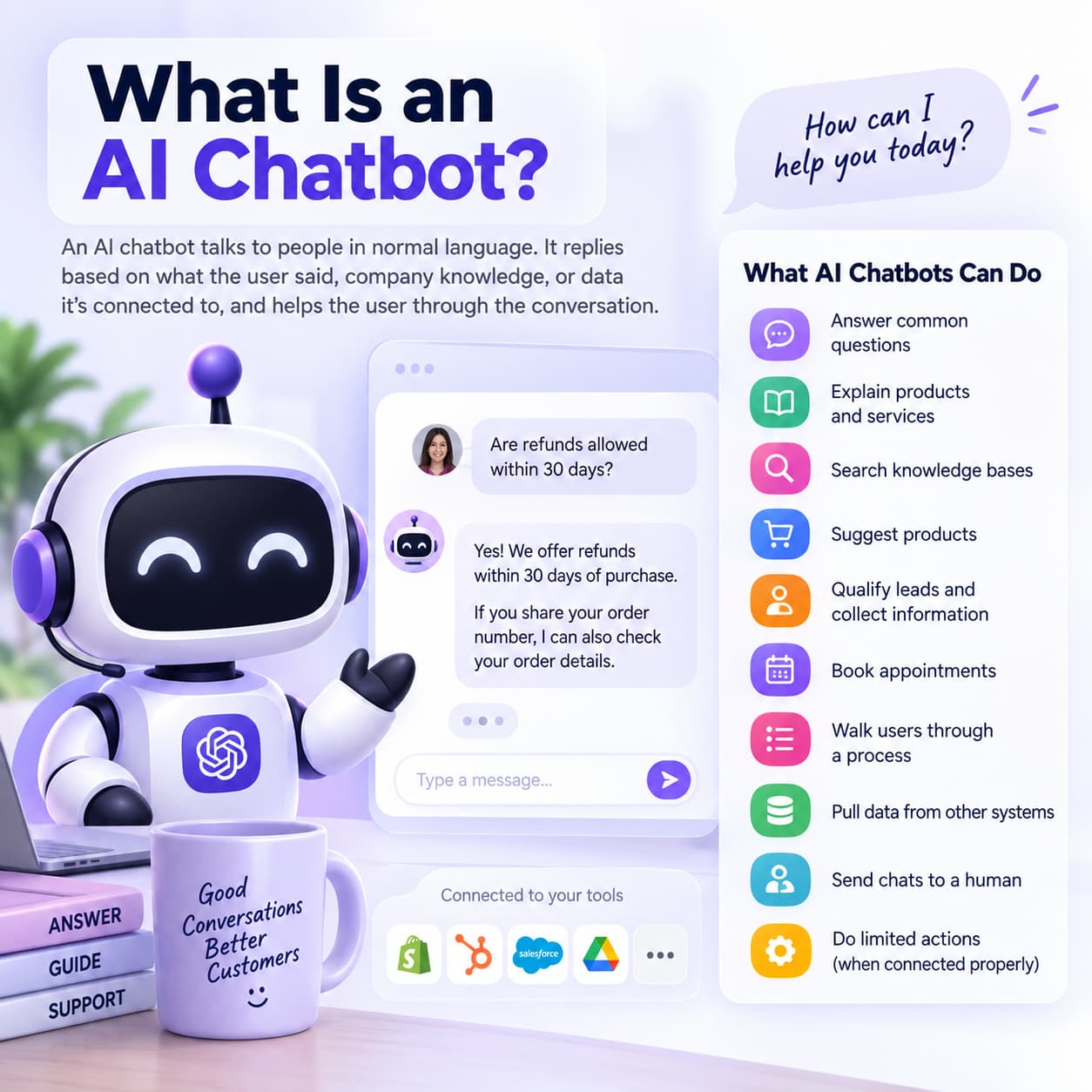
An AI chatbot talks to people in normal language. It replies based on what the user said, what’s already been discussed, company knowledge, or data it’s connected to.
Older ones followed strict rules and decision trees. Newer ones use large language models, pull from knowledge bases, remember context, and call APIs. The core job is still conversation and helping the user.
They can answer common questions, explain products, search knowledge bases, suggest products, qualify leads, collect info, book appointments, walk people through a process, pull data from other systems, send chats to a human, and do limited actions when connected properly.
Calling every chatbot “just a rule-based bot” is outdated. Plenty of them are pretty capable while still staying focused on the conversation.
Example: Someone asks if refunds are allowed within 30 days. The chatbot finds the policy and answers. If it’s connected to the right systems it might also pull the order. Whether it can finish the whole refund by itself depends on how it’s built and what it’s allowed to do.
What Is an AI Agent?
An AI agent is built to chase a goal. It looks at the information it has, decides what to do next, uses tools, and works through a series of steps until the job is done (or it hits a limit).
It usually combines a language model, clear goals or instructions, some planning, memory, tools and APIs, business data, rules, safety limits, and ways for a human to step in when needed.
The point isn’t generating text. It’s figuring out and actually doing the next right thing.
Example: A customer says their order never showed up and wants a replacement if they qualify. An agent can find the customer, pull the order, check shipping and delivery history, decide if they’re eligible, look at stock, create a replacement order, update the CRM, tell the customer, and escalate if something falls outside the rules. The customer gave a goal. The agent worked out the steps.
The Simplest Way to Tell an AI Agent From a Chatbot: Who Chooses the Next Step?
Ask yourself one question: who decides what happens next?
With a chatbot, it’s usually the user or a fixed conversation path. With regular automation, it’s a sequence someone already defined. With an agent, the system decides the next move based on the goal, what it knows, what the tools returned, and the limits you set.
| Technology | Who primarily determines the next step? | Example |
| Chatbot | User or conversation flow | User asks → chatbot answers |
| AI assistant/copilot | Human | AI recommends → human decides |
| Workflow automation | Predefined rules | Trigger → fixed sequence → outcome |
| AI agent | Agent within defined constraints | Goal → decide → act → evaluate → continue |
Modern chatbots can do actions too. The difference is how freely the system picks the next move while the work is happening.
AI Agent vs Chatbot: Key Differences
1. Conversation vs Goal Completion
Chatbots are built around talking. Agents are built around finishing something.
| System | Primary objective |
| Chatbot | Respond to the user’s request |
| AI assistant | Help the user perform work |
| AI agent | Pursue and complete a defined goal |
A chatbot can still complete tasks. The architecture of an agent just puts more weight on getting the outcome.
2. Autonomy
Chatbots mostly wait for the next message. Agents can keep going once they have a goal. Give one “find three open meeting slots next week and draft the invites” and it can figure out the steps without being told each one.
That freedom still needs limits: permissions, tool restrictions, company rules, spending caps, approval steps, and clear escalation paths. Controlled autonomy, not free rein.
3. Decision-Making
A chatbot mainly decides what to say. An agent decides what information it still needs, which tool to use, what action to take, in what order, whether the result is good enough, whether another step is required, and when a human should take over.
4. Tool and API Usage
Both can call APIs and connect to CRMs, databases, catalogs, payment systems, calendars, and ticketing tools. A chatbot usually calls a specific API when it spots a certain intent. An agent can pick and chain several tools as part of a bigger job. Having API access doesn’t automatically make something an agent.
5. Multi-Step Execution
A chatbot handles “Where’s my order?” An agent can handle “Find the delayed order, figure out why, check if compensation applies, issue the credit, and let me know.” The second request has dependent steps. Agents are built for that kind of chain: goal, plan, action, result, next action, check, finish.
6. Memory and Context
Both can remember the current conversation and basic user details. Agents also keep track of the task itself—what they’ve already done, what tools returned, where they are in the workflow, and longer-running context. The useful question is whether that context actually drives the next action.
7. Proactive Behavior
Most chatbots wait to be spoken to. Agents can be set up to act on their own within rules. Example: keep an eye on high-value orders and message the customer if delivery slips. That kind of monitoring is useful for retention, follow-ups, operations, and incident response.
8. Error Recovery
A chatbot often stops at “I couldn’t find that.” An agent can try another path: check the CRM, then the order database, then shipping, compare the records, and only escalate if it still can’t resolve it.
9. Human Oversight
More autonomy means you need clearer oversight. Chatbots hand off when they’re stuck. Agents often need approval before certain actions. Updating a support ticket might be automatic. Issuing a big refund on an enterprise contract usually shouldn’t be. A solid setup looks more like: reason -check policy - act or ask for approval - verify the result.
10. Cost and Complexity
Chatbots are simpler when the problem is narrow. Agents need more infrastructure: tool connections, orchestration, evaluation, monitoring, permissions, security, memory, workflow handling, approvals, and recovery when things fail. More freedom almost always means more operational work. Don’t add an agent just because the term is popular.
AI Agent vs. Chatbot for Customer Support
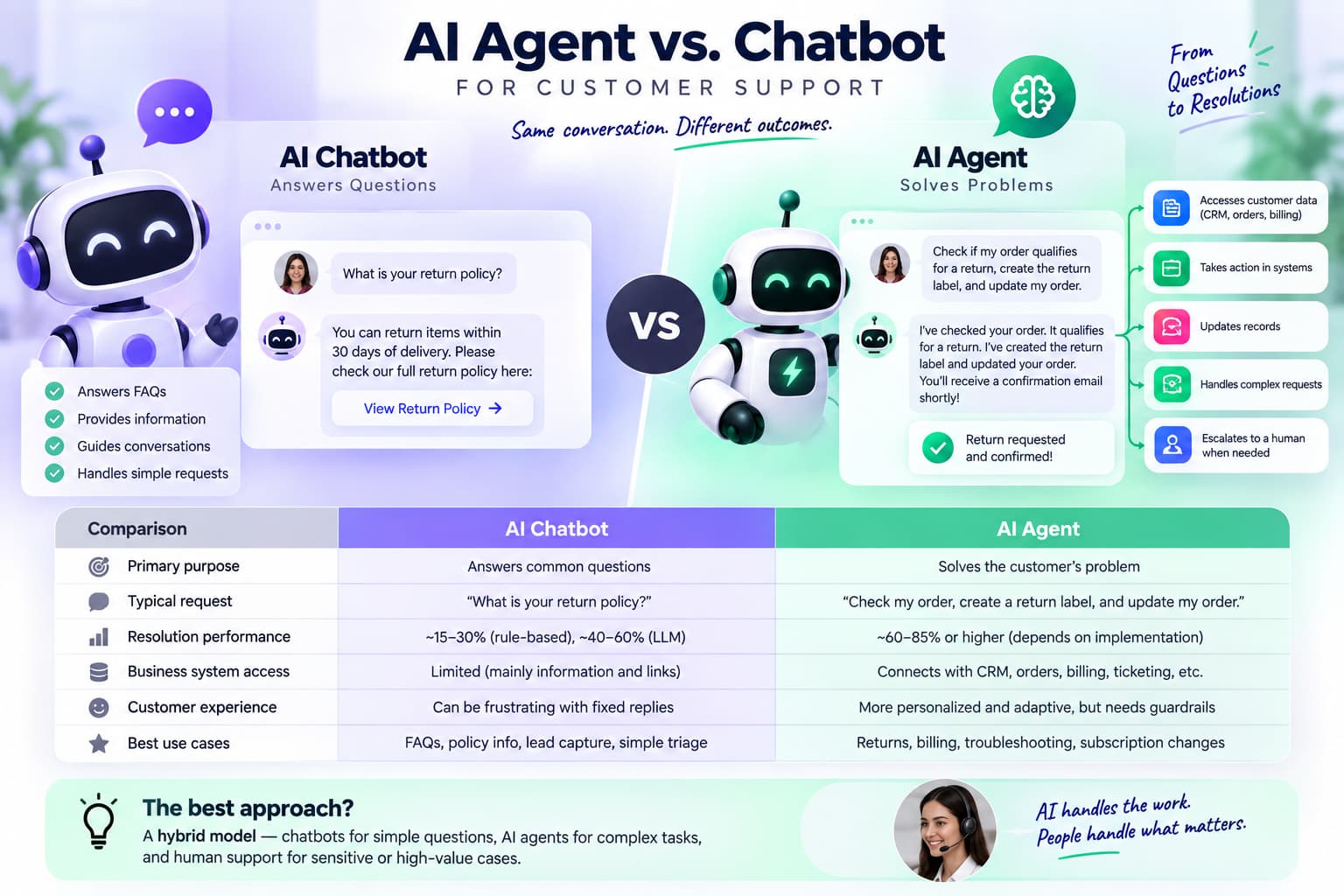
Primary purpose
- Chatbot: Answers common questions using scripts, decision trees, or knowledge-base articles.
This role is consistent with IBM’s explanation of how chatbots support customer experience.
- AI agent: Solves the customer’s problem by reasoning through the request and completing actions in connected systems.
. A comparison of AI agents and chatbots describes this difference through the agent’s ability to provide more adaptive support and perform tasks beyond basic responses.
- Different perspective: The real distinction is not “old AI versus new AI”; it is answering versus taking responsibility for resolution.
Typical customer request
- Chatbot: “What is your return policy?”
- AI agent: “Check whether my order qualifies for a return, create the return label, and update my order.” This reflects the broader role of AI agents for customer service which can use customer-service data and workflow context to support more complex requests.
- Chatbots are strongest when the answer is static. AI agents are more useful when the request requires verification, judgment, or multiple steps.
Resolution performance
- Rule-based chatbots commonly achieve approximately 15–30% resolution, while LLM-based assistants may reach 40–60% when they can retrieve accurate information. Agentic platforms connected to business systems are often benchmarked at approximately 60–85% or higher, depending on implementation and how “resolution” is measured.fin
- These figures should not be treated as universal rankings. Vendor-reported rates may count “conversation ended” or “deflection” as resolution, even when the customer still needs human assistance. A better metric is verified end-to-end resolution: the issue is solved and the customer does not reopen the case.
Business-system access
- Chatbot: Usually provides information and links, with limited access to customer records.
- AI agent: Can connect with CRM, order management, billing, ticketing, identity verification, and scheduling tools.
- This integration is what allows an agent to issue refunds, change subscriptions, track deliveries, or escalate cases with relevant context.
**Customer experience**
- Chatbots can create frustration when they repeatedly provide irrelevant articles or force customers through fixed menus.
- AI agents can deliver a smoother experience because they remember context and adapt their next step.
- However, autonomy increases risk: incorrect refunds, privacy violations, hallucinated policies, or unauthorized account changes require approval rules, audit logs, and human escalation.
Best strategic choice
- Choose a chatbot for FAQs, business hours, policy discovery, lead capture, and simple triage.
- Choose an AI agent for returns, billing disputes, technical troubleshooting, subscription changes, and other workflows requiring action.
- The strongest model is usually hybrid: chatbot-style self-service for low-risk questions, AI agents for operational tasks, and human representatives for sensitive, exceptional, or high-value cases. This approach aligns with the practical distinction in Zendesk’sAI-agent and chatbot comparison
AI Agent vs Chatbot vs AI Assistant vs Copilot vs Workflow Automation
A lot of the confusion comes from treating these as the same thing. They’re not.
A rough order looks like this: Chatbot - Assistant/Copilot - Workflow Automation - AI Agent.
| Technology | Main job | Human involvement | Typical autonomy |
| Chatbot | Conversation and information | High | Low |
| AI assistant | Help user perform work | High | Low–medium |
| Copilot | Recommend, draft, summarize | High | Low–medium |
| Workflow automation | Execute predefined process | Low | Medium |
| AI agent | Pursue a goal dynamically | Lower | Medium–high |
| Multi-agent system | Coordinate multiple agents | Variable | High |
A copilot keeps the person in charge. Workflow automation runs a fixed process. An agent decides the moves while the work is happening.
AI Agent vs Workflow Automation: What's the Difference?
They overlap, but they’re not the same.
Workflow automation follows a path someone already mapped out. An agent decides the next move based on the goal, the current situation, and what just happened.
Workflow example: Refund request comes in → check order age - under 30 days? - approve - update CRM - send confirmation. Every branch is written in advance.
Agent example: “Handle this refund request.” It reads the message, pulls the order, checks the policy, notices missing info, goes and gets it, decides if it qualifies, picks the right action, does it if allowed, checks the result, and escalates if it’s an edge case.
Use regular automation when the process is stable, the rules don’t change much, the sequence is clear, and you want predictable behavior. Look at an agent when the next step depends on context, several systems might be involved, exceptions are common, or the system needs to find its own path. If you can write the process as clean if-then rules, an agent is often extra complexity you don’t need.
Are AI Agents Just Advanced Chatbots?
Not really, though the gap is closing. You can add a language model, retrieval, memory, API calls, and some automation to a chatbot and it starts acting more agent-like. At some point calling it “just a chatbot” feels wrong. There’s no clean technical line where one turns into the other.
It helps to look at behavior instead of labels:
- Chatbot: answers the request.
- Assistant: helps you do the work.
- Automation: runs the fixed process.
- Agent: takes the goal and works out the steps inside the limits you’ve set.
What the system actually does matters more than the name on the box.
What Can an AI Agent Do That a Chatbot Cannot?
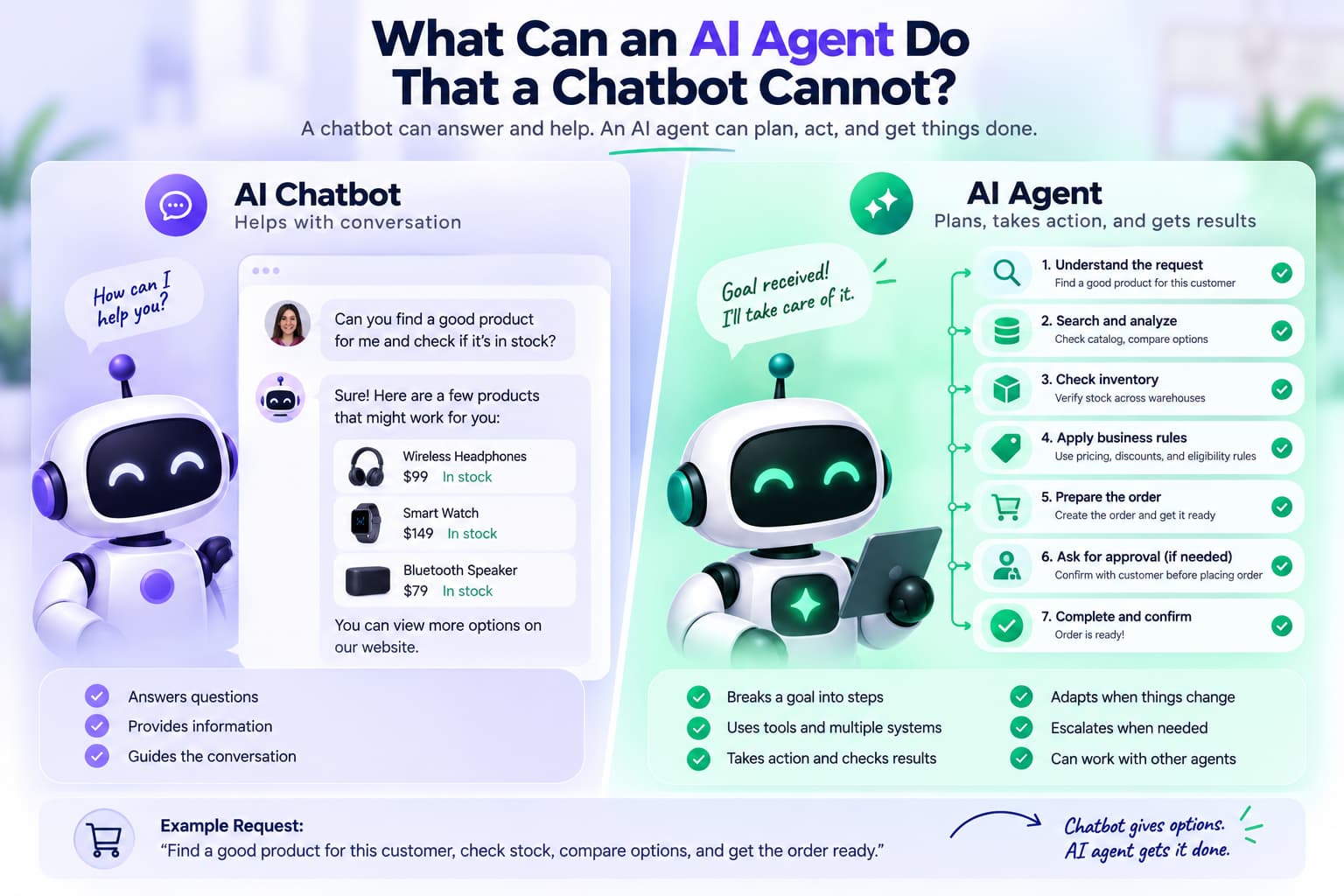
It depends how each one is built. A well-connected chatbot can already pull data and take some actions. Agents are usually designed for more open-ended, multi-step work. They can break a goal into pieces, pick tools on the fly, work across several systems, check whether an action worked, change the plan when new information shows up, keep going without a new instruction for every step, escalate when they hit a boundary, and sometimes coordinate with other specialized agents.
Example: “Find a good product for this customer, check stock, compare options, and get the order ready.” An agent can sort out the requirements, search the catalog, check inventory, compare choices, pick one, apply pricing rules, prepare the order, and ask for approval if needed. The difference is how deep and independent the execution goes.
Real Example: Customer Refund
Same request, two different approaches.
Customer: “My order arrived damaged. Can I get a replacement?”
Chatbot: Understands the request, pulls the replacement policy, explains who qualifies, points to a form, and sends the person to support if needed. Better experience, but the actual work still sits with someone else.
Agent: Finds the customer, pulls the order, confirms delivery, checks eligibility, looks at inventory, decides if a replacement is available, creates the order, updates the support system, sends confirmation, and escalates only if the case sits outside normal rules. It can finish the job.
“Answering versus acting” is a useful shorthand. The deeper difference is conversation versus goal-driven execution that keeps going on its own.
AI Agent vs Chatbot for Sales
Sales chatbot: Answers product questions, makes recommendations, captures contact details, qualifies leads, collects requirements, books meetings, routes leads, and shares pricing.
Sales agent: Can research the account, enrich the lead data, look at recent activity, decide priority, pick relevant products, personalize outreach, update the CRM, schedule follow-ups, trigger sequences, watch for replies, and escalate high-value deals.
Marketing terms like “AI sales agent,” “sales robot,” or “sales chatbot” get used for all kinds of systems. Look at what the product actually does, not the label.
A chatbot might answer “Does this integrate with Shopify?” An agent could identify the prospect, research the company, check existing CRM notes, figure out the likely use case, pull the right product info, personalize the reply, book a meeting, update the record, and start a follow-up sequence.
For teams running high volumes of Instagram or social DMs, platforms like InstantDM show how AI agents can handle conversations, qualify leads, and follow up automatically while staying inside platform rules.
InstantDM is a Meta Business Partner that turns Instagram and Facebook conversations into sales without grey-hat blasting. A comment, story reply, Messenger message, or keyword can open a chat; InstantDM then qualifies the lead, sends a human-sounding sequence, tags the CRM, and follows up inside platform rules and the 24-hour window. That is the agent layer: goal in, next step chosen, action taken. The chat itself stays simple so the customer still feels like they are talking to a person, not a bot farm. Use it when the job is not “answer a FAQ” but “catch the buyer, move them, and close the loop before the thread dies.”
AI Agents and Chatbots Talking to Each Other
These systems can talk to each other through text, voice, or APIs. A sales agent might hand a customer-service agent the customer ID, order number, product, purchase date, the request, and the desired outcome. The service agent then pulls the order, checks history, decides eligibility, takes the approved action, and reports back.
Two chatbots exchanging messages doesn’t automatically mean you have a multi-agent setup. Real multi-agent systems usually have specialized agents with clear jobs, tools, goals, and some way to coordinate—research agent to sales agent to CRM agent to support agent, for example.
When Should a Business Use a Chatbot?
Use a chatbot when most requests are repetitive, people mainly need answers, the process is fairly predictable, you want something live quickly, the downside of a wrong answer is low, handing off to a human is fine, the system doesn’t need to plan several steps on its own, and the integrations are limited.
Good fits: FAQs, product questions, basic support, lead qualification, booking appointments, order status, knowledge-base search, simple troubleshooting, website help, and messaging on social channels. An agent is often overkill here.
When Should a Business Use an AI Agent?
Look at an agent when the work has multiple steps, the next action depends on earlier results, several systems are involved, exceptions are common, the system needs to make contextual decisions, the user wants a finished outcome rather than information, the process can run with limited human input, and the value justifies the extra complexity.
Good fits: complex support cases, sales operations, IT support, research workflows, order management, claims, internal processes, account investigation, scheduling across systems, incident response, and retention work.
When Should You Use Both an AI Agent and a Chatbot?
Often the best answer is both. The chatbot handles the conversation. The agent does the heavier lifting behind it.
Customer talks to the chatbot - chatbot understands the request - agent pulls data, checks systems, takes the approved actions - chatbot tells the customer what happened. This keeps the chat clean and makes it easier to bring a human in when the agent hits a limit. You don’t have to pick one or the other.
How to Tell If a Product Is Really an AI Agent
“AI agent” gets used as a marketing term a lot. Ask these five questions:
- Can it chase a goal instead of just answering a question?
- Can it decide the next step on its own, or is every step hard-coded?
- Can it use multiple tools and systems?
- Can it check whether an action worked and decide what to do next?
- Does it stay inside clear permissions and limits?
If most answers are no, you’re probably looking at a chatbot, an assistant, or regular automation dressed up with a new name.
AI Agent vs Chatbot: Cost and ROI
Agents can save more work, but they also cost more to build and run.
Chatbot costs usually cover model usage, hosting, keeping the knowledge base current, integrations, conversation volume, human handoffs, and ongoing maintenance.
Agents add multiple model calls, tool and API usage, orchestration, longer-running jobs, memory systems, monitoring, evaluation, tighter security, approval flows, and recovery when something fails.
If the workflow doesn’t generate enough value, the agent becomes expensive fast. A simple way to think about it: value of the work automated minus what it costs to build and run. The question isn’t “are agents worth it?” It’s “does this particular workflow have enough repetitive, valuable work to justify the extra machinery?”
Learn how Instagram AI agents work using ChatGPT to automate DMs, respond instantly, and streamline conversations for better engagement and efficiency.
AI Agent vs Chatbot: Risks and Limitations
More freedom means more ways things can go wrong.
Chatbots mainly risk wrong answers, outdated information, missing the intent, getting stuck in loops, bad routing, and incomplete replies.
Agents can do all of that plus pick the wrong tool, take actions they shouldn’t, operate with permissions that are too wide, create cascading mistakes, run up unexpected costs, expose data, get manipulated by prompt injection, leave poor audit trails, and fail across several systems at once.
The more the system can act on its own, the more you need solid permissions, guardrails, logging, evaluation, monitoring, and human checkpoints.
Why AgentOps Matters for Customer Service
Once an agent is live, just checking that the service is up isn’t enough. AgentOps is the set of practices and tools for deploying, watching, evaluating, governing, and maintaining agents in real use.
Normal monitoring asks if the service is running. AgentOps asks whether the agent actually solved the customer’s problem, which tools it called, whether those were the right ones, whether it followed policy, how many steps it took, whether it got stuck in a loop, what the interaction cost, whether it exposed anything sensitive, and whether a human should have stepped in.
For something like refunds you need to see the full chain: request - decision - policy and order lookup - action - CRM update - customer message. If something breaks, you need to know where.
How Can Businesses Implement AgentOps AI for Better Customer Service?
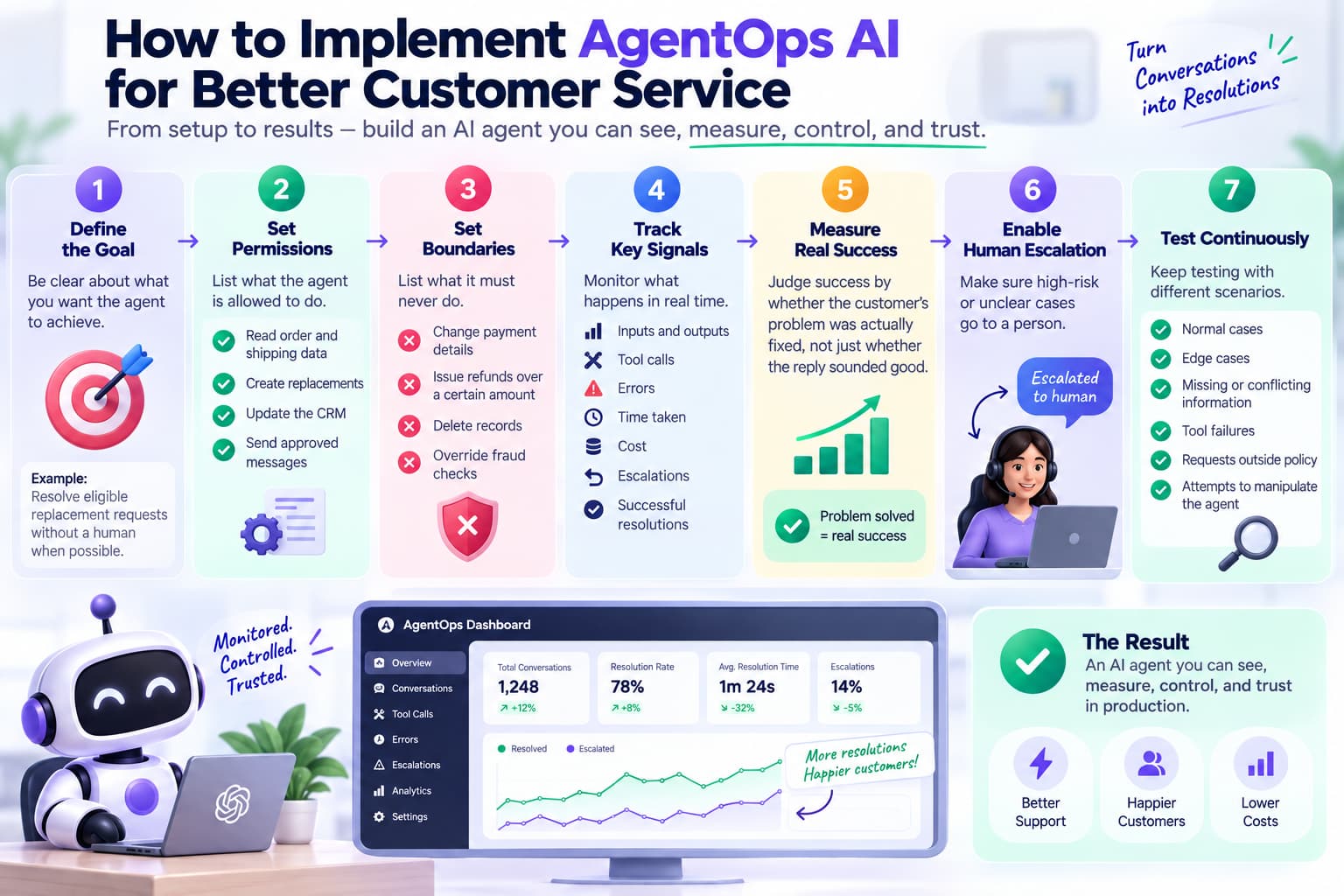
Start with the actual workflow, not the monitoring tool.
- Be clear about the goal (for example, resolve eligible replacement requests without a human when possible).
- List what the agent is allowed to do: read order and shipping data, create replacements, update the CRM, send approved messages.
- List what it must never do: change payment details, issue refunds over a certain amount, delete records, override fraud checks.
- Track the important signals: inputs, outputs, tool calls, errors, time taken, cost, escalations, and successful resolutions.
- Judge success by whether the customer’s problem was actually fixed, not just whether the reply sounded good.
- Make sure high-risk or unclear cases go to a person.
- Keep testing normal cases, edge cases, missing or conflicting information, tool failures, requests outside policy, and attempts to manipulate the agent.
The aim is an agent you can see, measure, control, and trust in production.
How Can a Chatbot Become an AI Agent?
Putting a language model on top of a chatbot doesn’t automatically turn it into an agent. You usually need to add tools and APIs, some form of planning or orchestration, memory that tracks the task, the ability to execute actions, ways to check results, and clear guardrails.
A realistic path for support looks like this:
- Stage 1: Simple FAQ bot.
- Stage 2: AI chatbot that uses a language model and company knowledge.
- Stage 3: Integrated chatbot that can pull customer and order data.
- Stage 4: Assistant that can take limited actions.
- Stage 5: Agent that can work out and run multiple steps toward a real outcome.
It’s a progression, not a single switch.
AI Agent vs Chatbot: Benefits
Chatbots give you 24/7 answers, faster replies, less load on the support team, consistent information, lead qualification, quick access to knowledge, and the ability to handle more conversations without adding headcount.
Agents give you multi-step automation, less manual work, the ability to work across systems, decisions that adapt to the situation, faster completion of complicated tasks, proactive work, automated investigation, and more room to scale operations.
They solve different levels of the problem, so the benefits are different.
AI Agent vs Chatbot: Limitations
Chatbots struggle when the request touches several systems, the process has lots of exceptions, the person wants a finished outcome instead of information, the decisions are complex, or the work has to continue across multiple operational steps.
Agents struggle when the goal is vague, the tools are unreliable, the business rules are fuzzy, permissions are too open, evaluation is weak, there’s no easy way to escalate to a human, mistakes have serious consequences, or the workflow simply doesn’t justify the extra complexity. Use agents where the freedom actually creates measurable value.
AI Agent vs Chatbot: Decision Framework
| Question | If “Yes” | Likely choice |
| Do users mainly need answers? | Information-focused | Chatbot |
| Is the process highly predictable? | Fixed workflow | Chatbot/automation |
| Does a human need to approve every important action? | Human-led | Copilot/assistant |
| Does the task involve several predefined steps? | Structured automation | Workflow automation |
| Does the next step depend on previous results? | Dynamic execution | AI agent |
| Are multiple systems involved? | Cross-system workflow | AI agent |
| Does the system need to work toward an outcome? | Goal-oriented | AI agent |
| Can actions be safely automated? | Controlled autonomy | AI agent |
| Are errors high-risk or irreversible? | Strong governance required | Agent + human approval |
| Is the task too simple to justify agent complexity? | Low complexity | Chatbot |
A Simple Decision Tree
- Does the person mainly need information? → Start with a chatbot.
- Does a human need to stay responsible for the work? → Look at an assistant or copilot.
- Is the process predictable and rule-based? → Use regular workflow automation.
- Does the system need to decide and run multiple steps toward a goal on its own? → Consider an agent.
If several answers are yes, a mix of the above often works best.
When Should You Use Both?
For a lot of companies the practical setup is chatbot + agent + human.
Customer talks to the chatbot - chatbot understands the request - agent gathers information, checks policies, uses the necessary tools, and takes the approved actions - chatbot delivers the result - human handles the exceptions.
Each part does what it’s good at. The chatbot manages the conversation. The agent handles the complicated execution. The person deals with the high-risk or unusual cases.
Set up a ManyChat-style AI agent for Instagram Shop with product tagging, Shopify integration, and comment-to-DM selling, plus see how InstantDM compares as an alternative.
Final Takeaway: AI Agent vs Chatbot
People often summarize it as “chatbots answer, agents act.” That’s a decent starting point, but it’s not enough when you’re choosing technology.
Modern chatbots already use language models, APIs, memory, and integrations. Some can take actions. At the same time, not every product labeled “AI agent” has real autonomy.
A clearer way to look at it: chatbots are mainly about conversation. Agents are mainly about chasing a goal and taking action.
The most practical test is still: who chooses the next step? A chatbot responds to the next user request. Automation follows rules that were written ahead of time. An assistant or copilot helps a person decide. An agent picks its next move while the work is happening, inside the limits you’ve given it.
For most businesses: use a chatbot when you need conversation, a copilot when a person needs help, regular automation when the process is predictable, and an agent when the work requires dynamic multi-step execution. When an agent can touch important customer or business systems, pair that freedom with clear permissions, guardrails, evaluation, monitoring, and human oversight.
The goal isn’t the most autonomous system you can build. It’s the simplest system that reliably gets the job done.