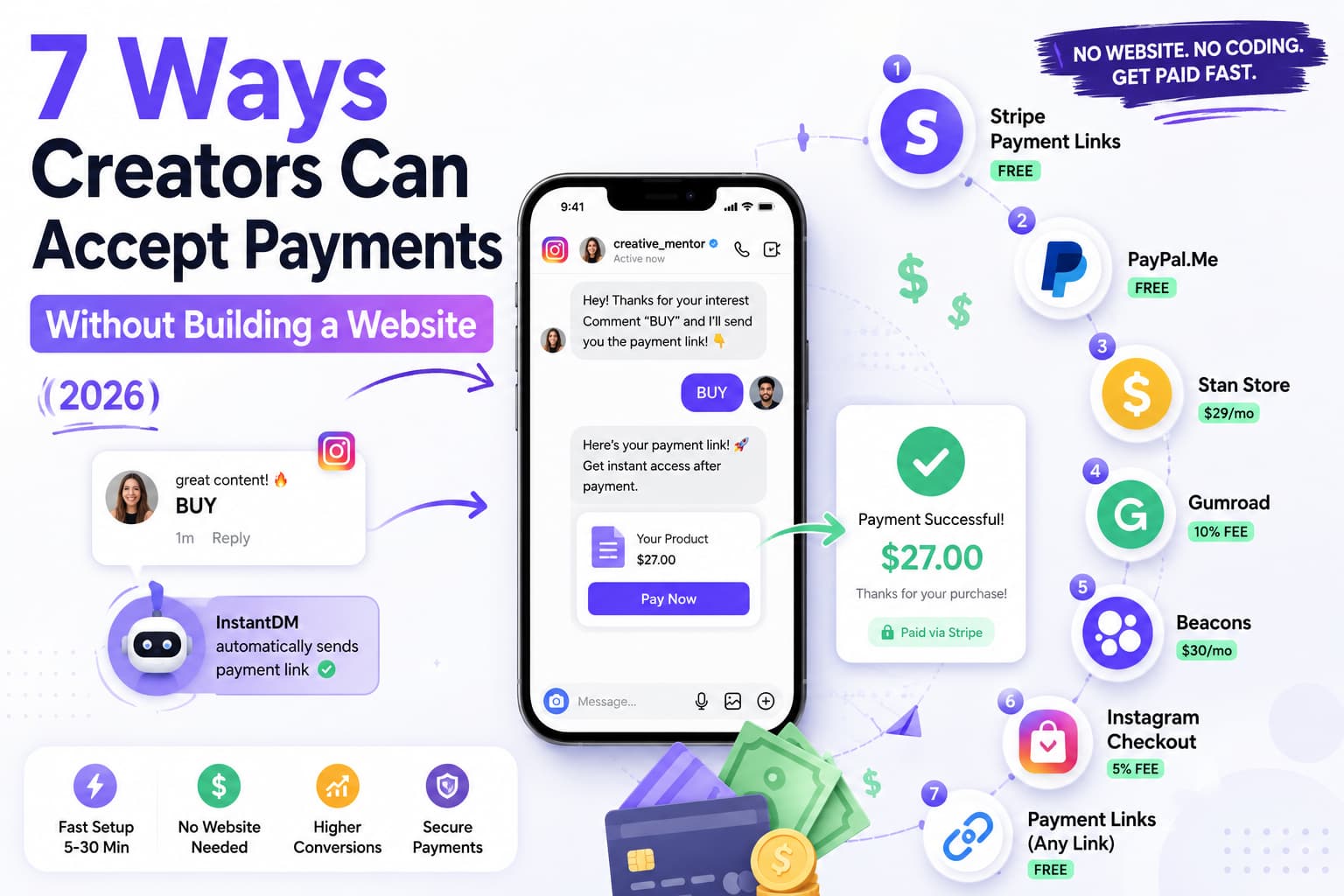
7 ways creators accept payments without a website in 2026: Stripe payment links (free), PayPal.Me (free), Stan Store ($29/mo), Gumroad (10% fee), Beacons ($30/mo), Instagram Checkout (5% fee), and Buy Me a Coffee (5% fee). The fastest way is DM automation with InstantDM ($9.99/mo) - comment "BUY" and get a payment link via DM automatically. Verified July 2026.
7 ways to accept payments:
You do not need a website to get paid as a creator in 2026. In fact, some of the highest-converting payment methods happen entirely inside Instagram — no website, no landing page, no link-in-bio required.
Here is the quick verdict:
The fastest way to accept payments without a website is through Instagram DM automation. When someone comments "BUY" on your post, InstantDM sends them a payment link automatically. They pay via Stripe or PayPal. You receive the money instantly (PayPal) or in 2 business days (Stripe). Total time from comment to payment: under 5 minutes.
7 Ways to Accept Payments Without a Website: Quick Comparison
Method | How It Works | Cost | Time to Set Up | Best For |
Stripe Payment Links | Share a payment URL | Free | 5 minutes | All creators |
PayPal.Me | Share your PayPal link | Free | 5 minutes | Beginners |
Stan Store | Digital product storefront | $29/mo | 30 minutes | Digital product sellers |
Gumroad | Sell digital products | 10% fee | 15 minutes | Ebooks, templates |
Beacons | Link-in-bio with payments | $30/mo | 30 minutes | Multi-product sellers |
Instagram Checkout | Native Instagram payments | 5% fee | 30 minutes | Eligible US businesses |
Buy Me a Coffee | Tips and memberships | 5% fee | 5 minutes | Tip Jars, Memberships |
Verified July 2026.
Stripe and PayPal are free alternatives. Stan Store and Gumroad are best for digital product sellers.
Method #1: Stripe Payment Links (Free, No Website Needed)
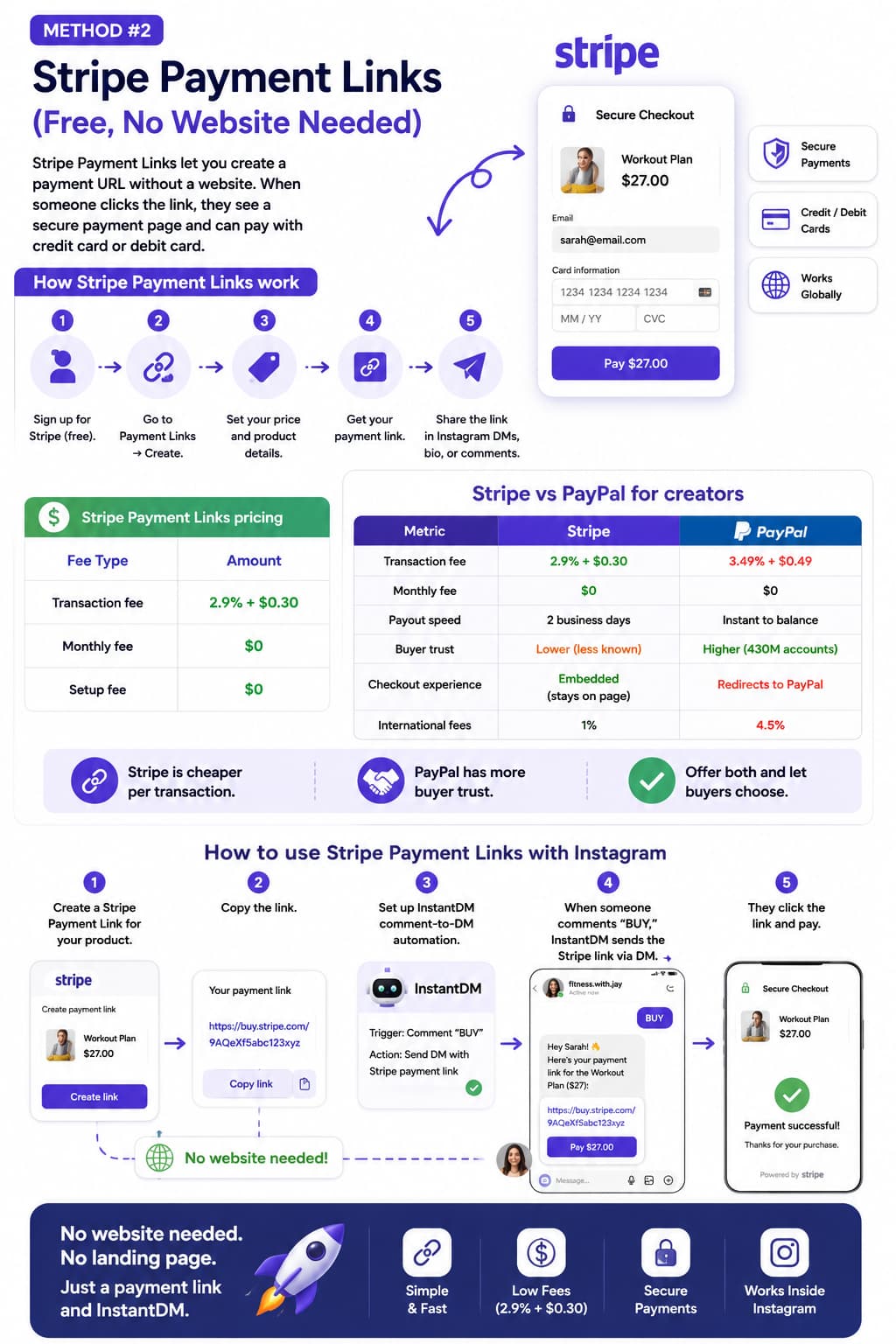
Stripe Payment Links let you create a payment URL without a website. When someone clicks the link, they see a secure payment page and can pay with credit card or debit card.
How Stripe Payment Links work
- Sign up for Stripe (free).
- Go to Payment Links - Create.
- Set your price and product details.
- Get your payment link.
- Share the link in Instagram DMs, bio, or comments.
Stripe Payment Links pricing
Fee Type | Amount |
Transaction fee | 2.9% + $0.30 |
Monthly fee | $0 |
Setup fee | $0 |
Stripe vs PayPal for creators
Metric | Stripe | PayPal |
Transaction fee | 2.9% + $0.30 | 3.49% + $0.49 |
Monthly fee | $0 | $0 |
Payout speed | 2 business days | Instant to balance |
Buyer trust | Lower (less known) | Higher (430M accounts) |
Checkout experience | Embedded (stays on page) | Redirects to PayPal |
International fees | 1% | 4.5% |
Stripe is cheaper per transaction. PayPal has more buyer trust. Offer both and let buyers choose.
How to use Stripe Payment Links with Instagram
- Create a Stripe Payment Link for your product.
- Copy the link.
- Set up InstantDM comment-to-DM automation.
- When someone comments "BUY," InstantDM sends them the Stripe link via DM.
- They click the link and pay.
No website needed. No landing page. Just a payment link and InstantDM.
Method #2: PayPal.Me (Free, Simple Setup)
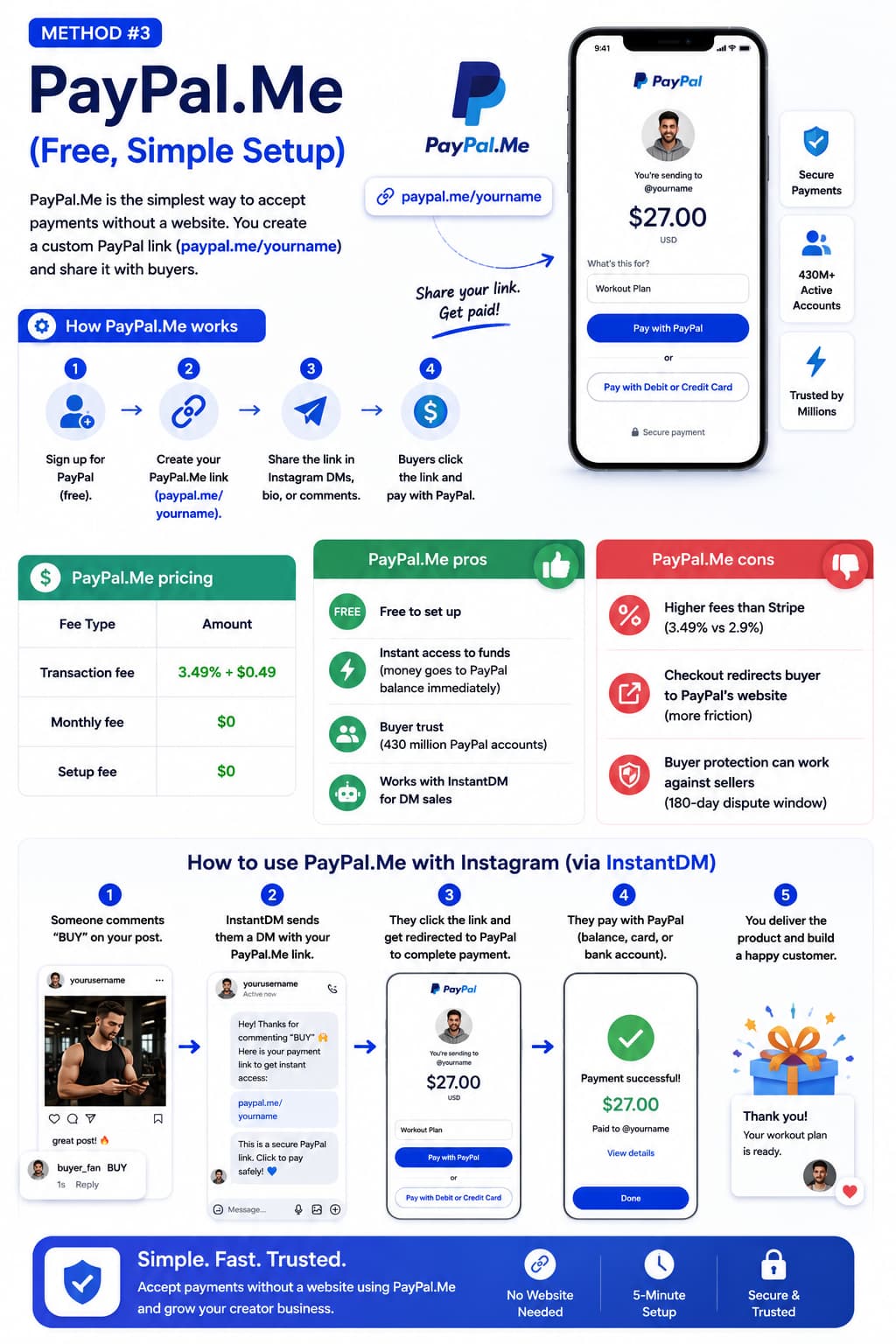
PayPal.Me is the simplest way to accept payments without a website. You create a custom PayPal link (paypal.me/yourname) and share it with buyers.
How PayPal.Me works
- Sign up for PayPal (free).
- Create your PayPal.Me link (paypal.me/yourname).
- Share the link in Instagram DMs, bio, or comments.
- Buyers click the link and pay with PayPal.
PayPal.Me pricing
Fee Type | Amount |
Transaction fee | 3.49% + $0.49 |
Monthly fee | $0 |
Setup fee | $0 |
PayPal.Me pros
- Free to set up
- Instant access to funds (money goes to PayPal balance immediately)
- Buyer trust (430 million PayPal accounts)
PayPal.Me cons
- Higher fees than Stripe (3.49% vs 2.9%)
- Checkout redirects buyer to PayPal's website (more friction)
- Buyer protection can work against sellers (180-day dispute window)
Method #3: Stan Store (Best for Digital Product Sellers)
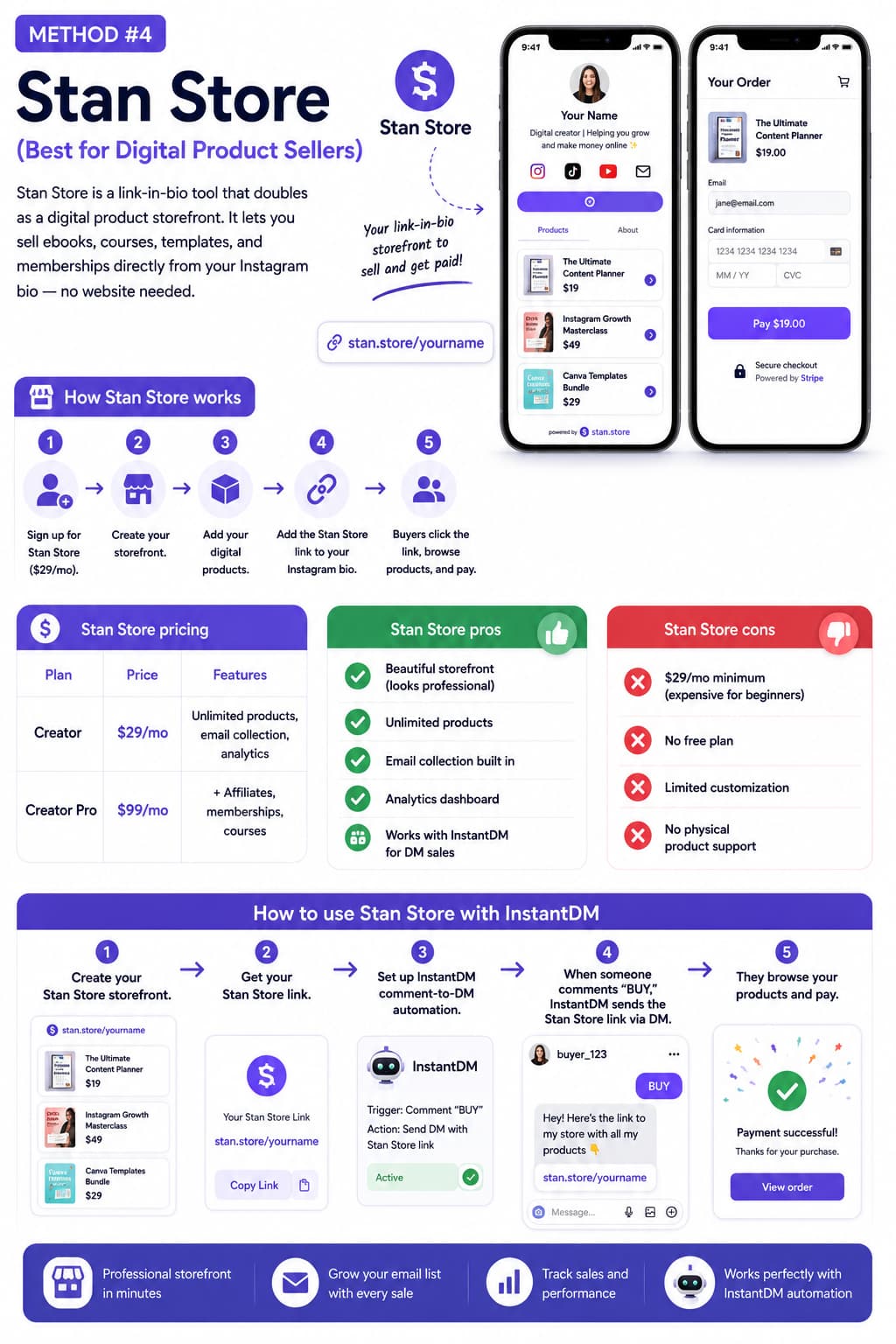
Stan Store is a link-in-bio tool that doubles as a digital product storefront. It lets you sell ebooks, courses, templates, and memberships directly from your Instagram bio — no website needed.
How Stan Store works
- Sign up for Stan Store ($29/mo).
- Create your storefront.
- Add your digital products.
- Add the Stan Store link to your Instagram bio.
- Buyers click the link, browse products, and pay.
Stan Store pricing
Plan | Price | Features |
Creator | $29/mo | Unlimited products, email collection, analytics |
Creator Pro | $99/mo | + Affiliates, memberships, courses |
Stan Store pros
- Beautiful storefront (looks professional)
- Unlimited products
- Email collection built in
- Analytics dashboard
Stan Store cons
- $29/mo minimum (expensive for beginners)
- No free plan
- Limited customization
- No physical product support
How to use Stan Store with InstantDM
- Create your Stan Store storefront.
- Get your Stan Store link.
- Set up InstantDM comment-to-DM automation.
- When someone comments "BUY," InstantDM sends them the Stan Store link via DM.
- They browse your products and pay.
Method #4: Gumroad (Best for Ebooks and Templates)
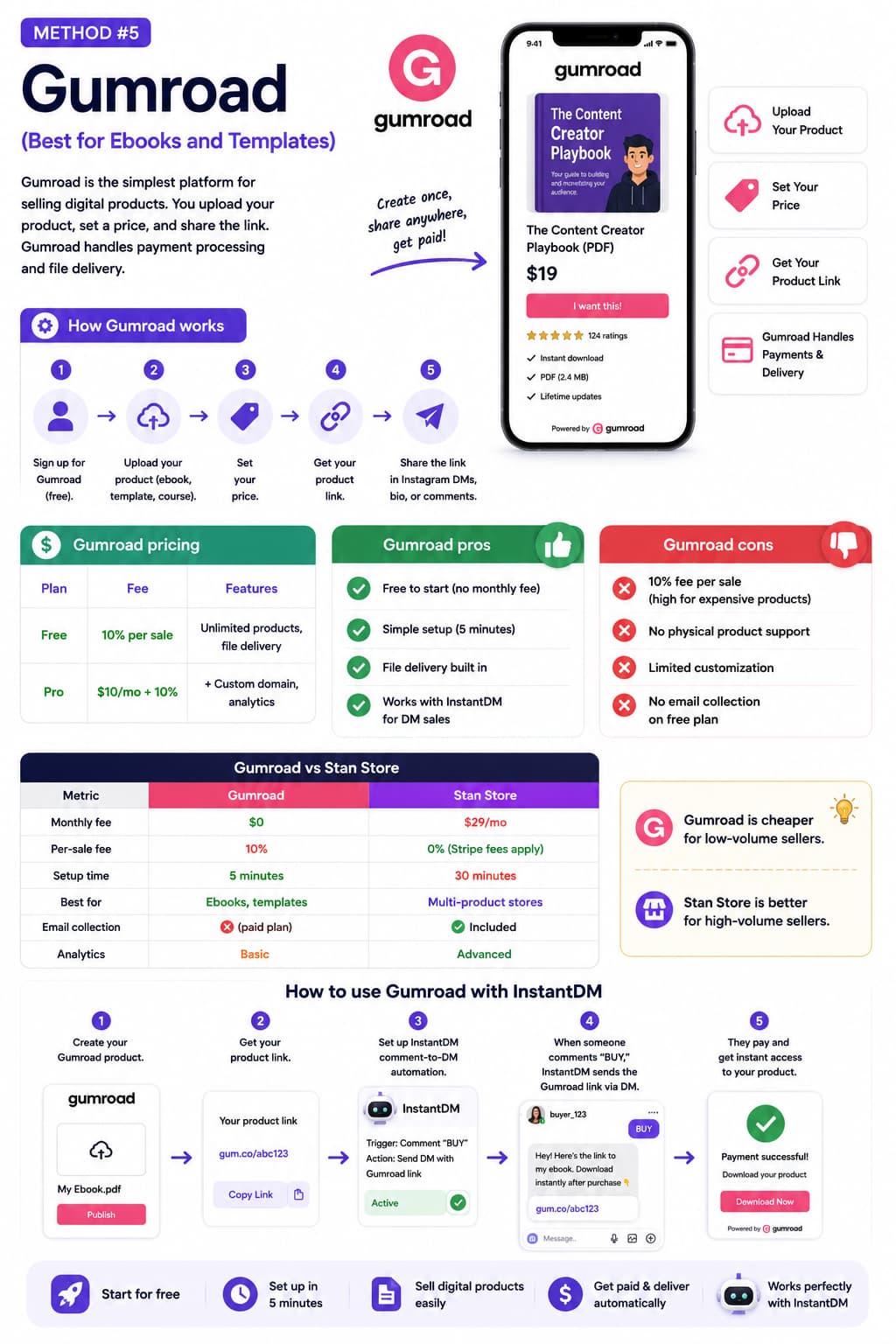
Gumroad is the simplest platform for selling digital products. You upload your product, set a price, and share the link. Gumroad handles payment processing and file delivery.
How Gumroad works
- Sign up for Gumroad (free).
- Upload your product (ebook, template, course).
- Set your price.
- Get your product link.
- Share the link in Instagram DMs, bio, or comments.
Gumroad pricing
Plan | Fee | Features |
Free | 10% per sale | Unlimited products, file delivery |
Pro | $10/mo + 10% | + Custom domain, analytics |
Gumroad pros
- Free to start (no monthly fee)
- Simple setup (5 minutes)
- File delivery built in
- Works with InstantDM for DM Automation
Gumroad cons
- 10% fee per sale (high for expensive products)
- No physical product support
- Limited customization
- No email collection on free plan
Gumroad vs Stan Store
Metric | Gumroad | Stan Store |
Monthly fee | $0 | $29/mo |
Per-sale fee | 10% | 0% (Stripe fees apply) |
Setup time | 5 minutes | 30 minutes |
Best for | Ebooks, templates | Multi-product stores |
Email collection | ❌ (paid plan) | ✅ Included |
Analytics | Basic | Advanced |
Gumroad is cheaper for low-volume sellers. Stan Store is better for high-volume sellers.
Method #5: Beacons (Best Link-in-Bio with Payments)
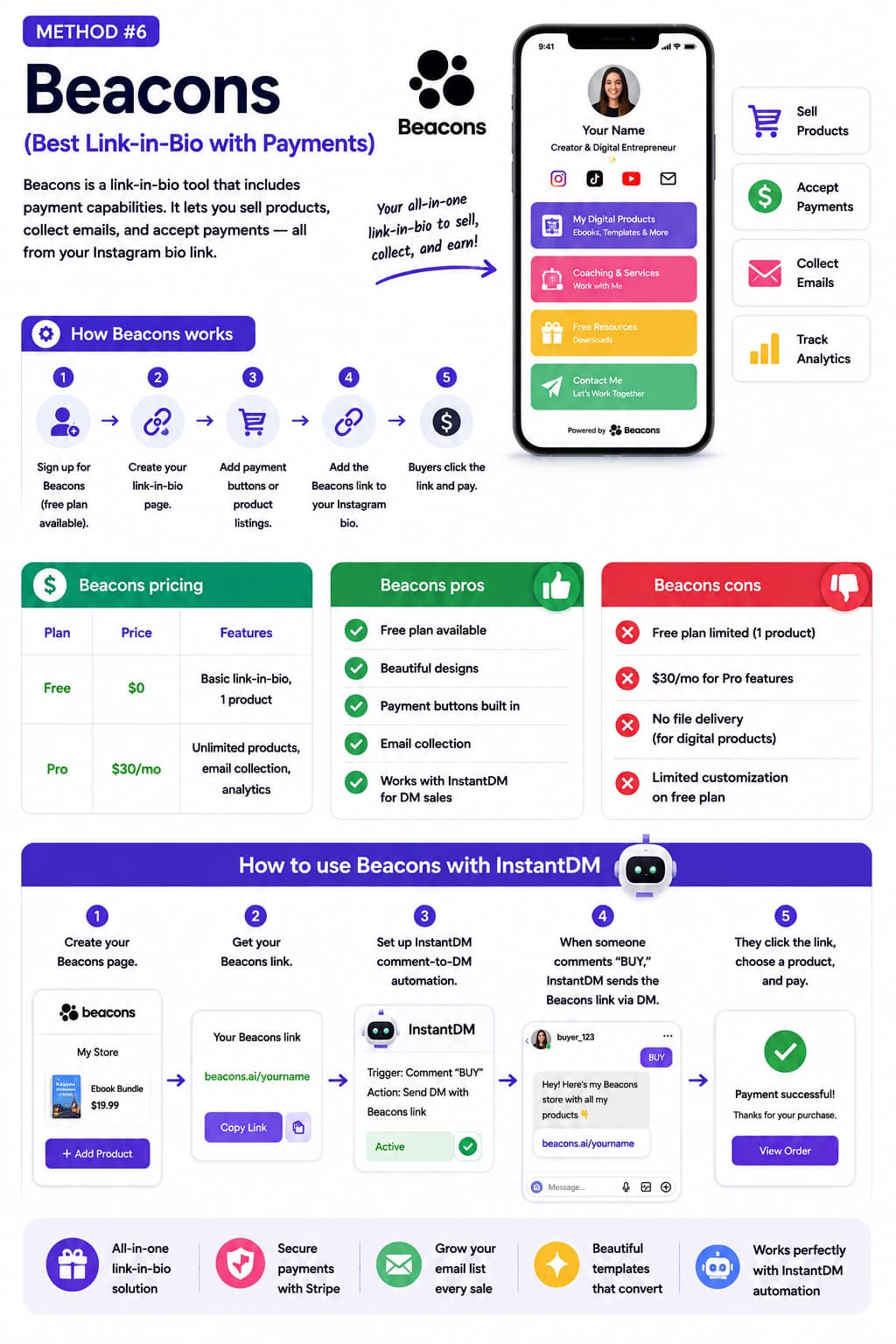
Beacons is a link-in-bio tool that includes payment capabilities. It lets you sell products, collect emails, and accept payments — all from your Instagram bio link.
How Beacons works
- Sign up for Beacons (free plan available).
- Create your link-in-bio page.
- Add payment buttons or product listings.
- Add the Beacons link to your Instagram bio.
- Buyers click the link and pay.
Beacons pricing
Plan | Price | Features |
Free | $0 | Basic link-in-bio, 1 product |
Pro | $30/mo | Unlimited products, email collection, analytics |
Beacons pros
- Free plan available
- Beautiful designs
- Payment buttons built in
- Email collection
Beacons cons
- Free plan limited (1 product)
- $30/mo for Pro features
- No file delivery (for digital products)
- Limited customization on free plan
Method #6: Instagram Checkout (Native Instagram Payments)
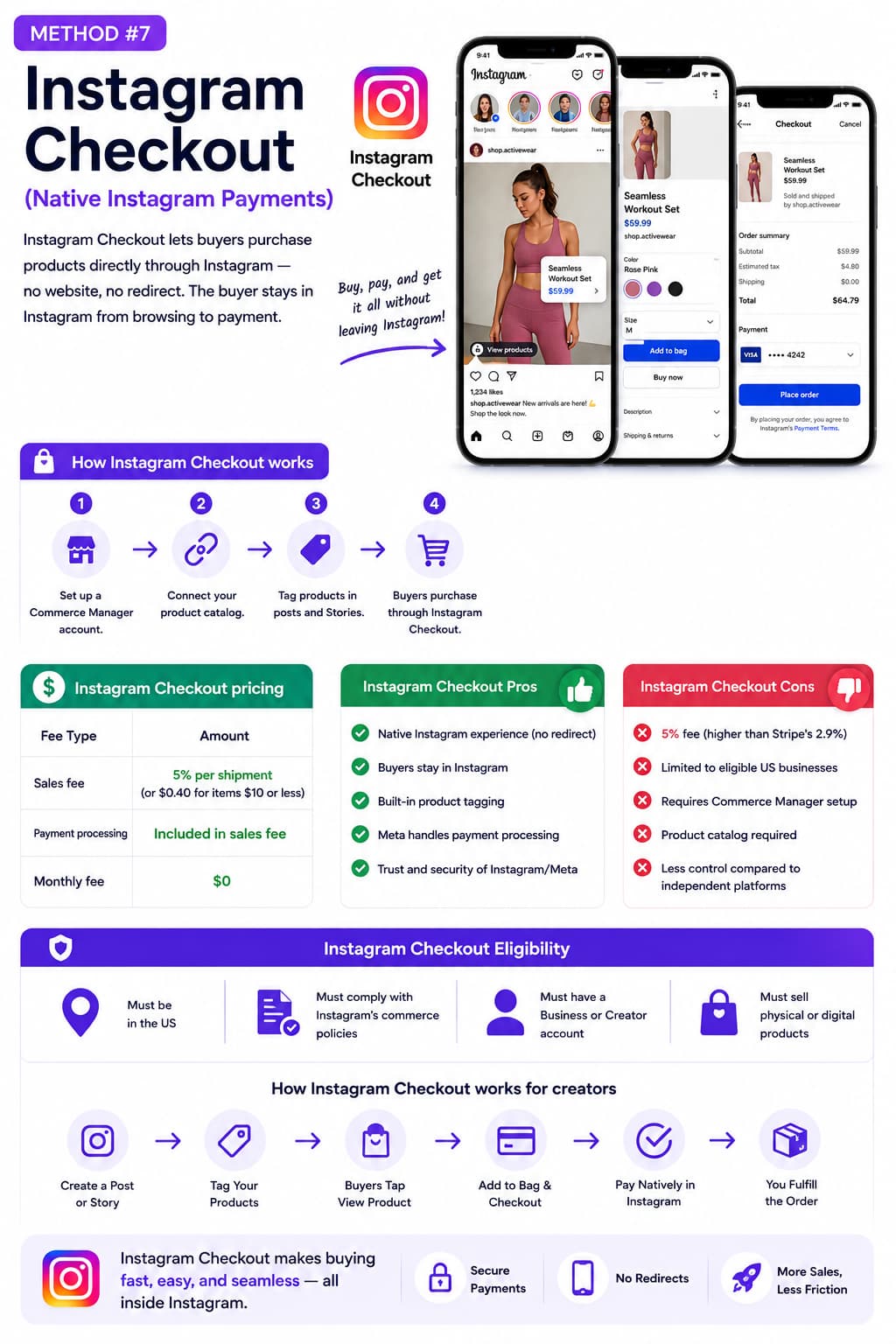
Instagram Checkout lets buyers purchase products directly through Instagram — no website, no redirect. The buyer stays in Instagram from browsing to payment.
How Instagram Checkout works
- Set up a Commerce Manager account.
- Connect your product catalog.
- Tag products in posts and Stories.
- Buyers purchase through Instagram Checkout.
Instagram Checkout pricing
Fee Type | Amount |
Sales fee | 5% per shipment (or $0.40 for items $10 or less) |
Payment processing | Included in sales fee |
Monthly fee | $0 |
Instagram Checkout Pros
- Native Instagram experience (no redirect)
- Buyers stay in Instagram
- Built-in product tagging
- Meta handles payment processing
Instagram Checkout Cons
- 5% fee (higher than Stripe's 2.9%)
- Limited to eligible US businesses
- Requires Commerce Manager setup
- Product catalog required
Instagram Checkout Eligibility
- Must be in the US
- Must comply with Instagram's commerce policies
- Must have a Business or Creator account
- Must sell physical or digital products
Method #7: Buy Me a Coffee (Best for Tips and Memberships)
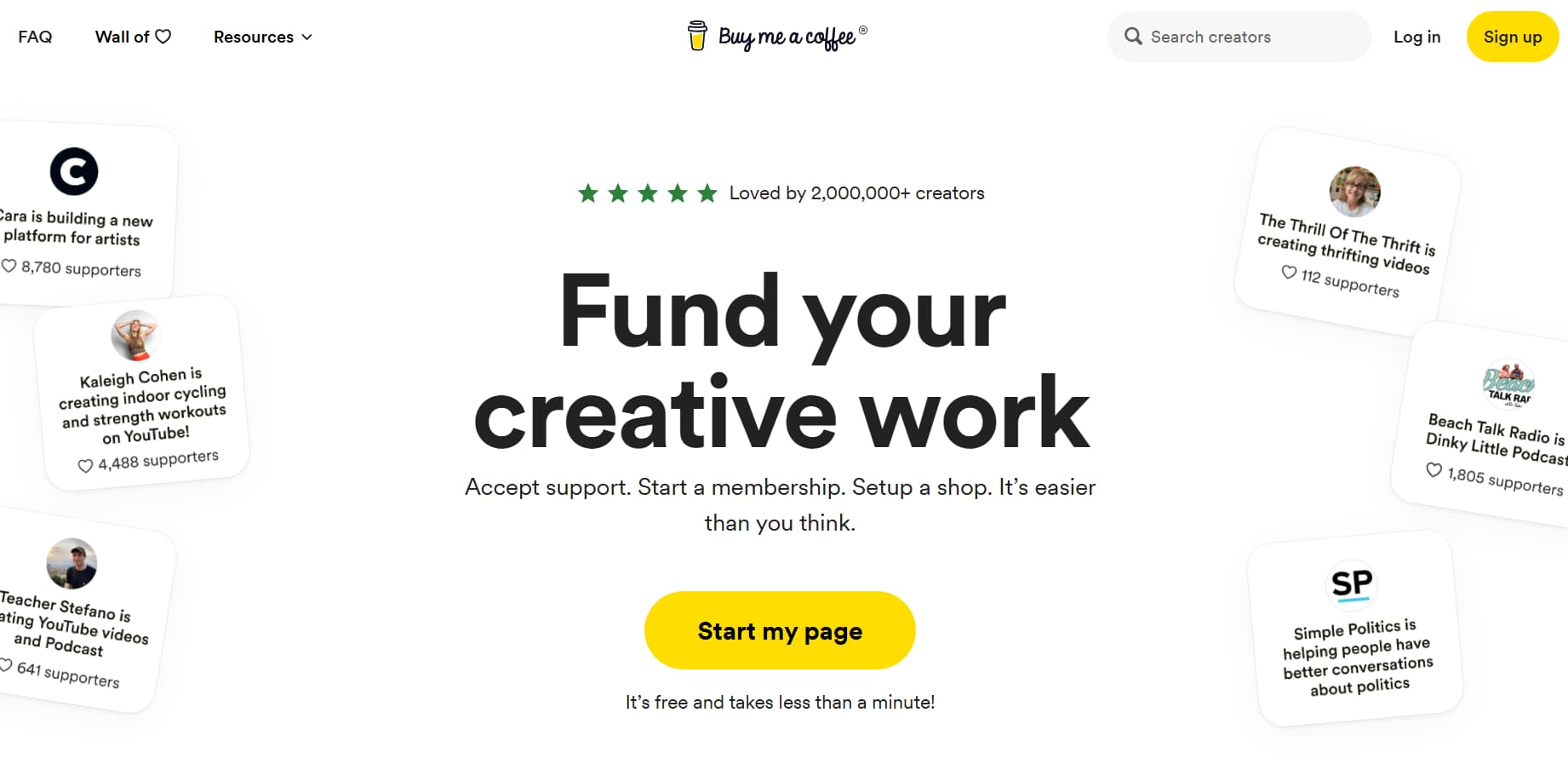
Buy Me a Coffee is a simple way for creators to accept tips, donations, and memberships — no website needed. It is free to set up with a 5% fee on transactions.
How Buy Me a Coffee works:
- Sign up for Buy Me a Coffee (free)
- Create your page (buymeacoffee.com/yourname)
- Add your page link to Instagram bio
- Supporters click the link and tip or subscribe
- You receive the money in your bank account
Buy Me a Coffee pricing:
- Amount: 5% per transaction
Payment processing
- Amount: Included in 5%
Monthly fee
- Amount: $0
Buy Me a Coffee pros:
- Free to set up
- Simple for supporters (no account needed)
- Accepts tips, one-time payments, and memberships
- Works with InstantDM automation (send the link via DM)
Buy Me a Coffee cons:
- 5% fee (higher than Stripe's 2.9%)
- Limited product features (no storefront)
- No file delivery for digital products
- Basic analytics.
Payment Methods: Pros and Cons Summary
Method | Pros | Cons |
Stripe Payment Links | Free, low fees (2.9% + $0.30), simple setup | Lower buyer trust, no Instagram integration |
PayPal.Me | Free, instant access to funds, high buyer trust | Higher fees (3.49% + $0.49), redirects buyer |
Stan Store | Beautiful storefront, unlimited products, email collection | $29/mo cost, no free plan |
Gumroad | Free to start, file delivery built in | 10% fee per sale, limited customization |
Beacons | Free plan available, beautiful designs | Free plan limited (1 product), $30/mo for Pro |
Instagram Checkout | Native Instagram experience, no redirect | 5% fee, US-only, limited eligibility |
How Do I Choose the Right Payment Method for My Creator Business?
Not every method works for every creator. Here is how to choose:
For Instagram Creators Selling Through DMs
Best method: DM Automation with InstantDM + Stripe or PayPal
Why:
- Highest conversion rate (15–30%)
- No website needed
- Works entirely inside Instagram
Cost:
- $9.99/mo (InstantDM)
- Stripe/PayPal fees
For Beginners with No Audience
Best method: PayPal.Me + link in bio
Why:
- Free
- Simple
- Instant access to funds
Cost:
- $0
- PayPal fees (3.49% + $0.49)
For Digital Product Sellers
Best method: Gumroad (low volume) or Stan Store (high volume)
Why:
- File delivery built in
- Professional storefront
Cost:
- Gumroad (10% per sale)
- Stan Store ($29/mo)
For Multi-Product Sellers
Best method: Stan Store or Beacons
Why:
- Beautiful storefront
- Unlimited products
- Email collection
Cost:
- $29–$30/mo
For Physical Product Sellers
Best method: Instagram Checkout (if eligible) or Stripe Payment Links
Why:
- Native Instagram experience
- Simple payment links
Cost:
- Instagram Checkout (5% fee)
- Stripe (2.9% + $0.30)
What Taxes Do Creators Pay When Accepting Payments?
As a creator accepting payments, you are self-employed.
Here is what you need to know:
Track Your Income
- Keep records of all income from every payment method.
- Use accounting software: QuickBooks, Wave, or FreshBooks.
- Save receipts for business expenses.
Pay Quarterly Taxes
- In the US, self-employed creators must pay quarterly estimated taxes.
- Deadlines:
- April 15
- June 15
- September 15
- January 15
- Set aside 25–30% of your income for taxes.
Deduct Business Expenses
- Software: Canva, Adobe, email marketing tools, InstantDM
- Payment processing fees: Stripe , PayPal fees
- Equipment: Camera, microphone, lighting
- Courses: Deduct courses you take to improve your skills
What Do Redditors Recommend for Accepting Payments Without a Website?
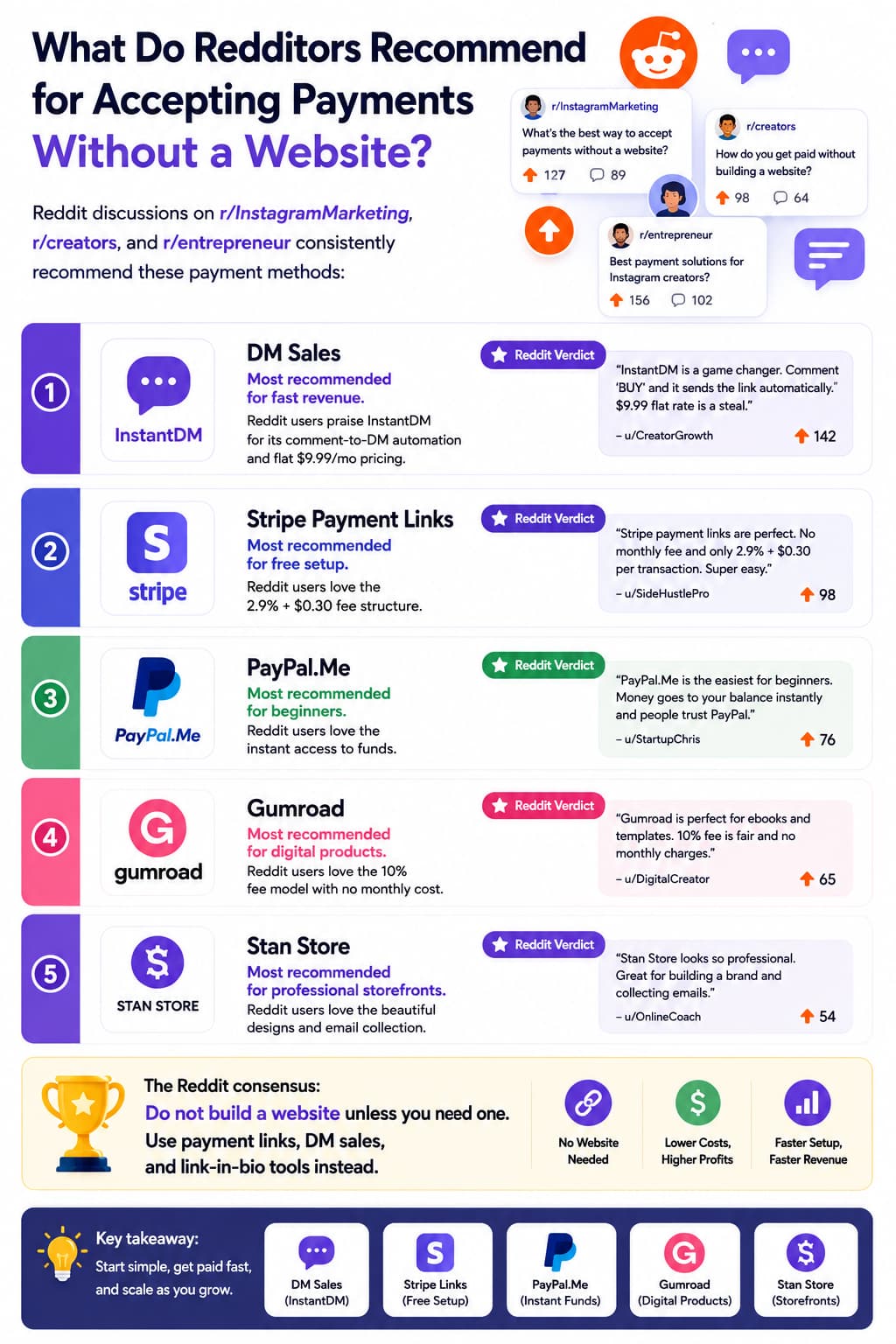
Reddit discussions on r/InstagramMarketing, r/creators, and r/entrepreneur consistently recommend these payment methods:
Stripe Payment Links
Most recommended for free setup. Reddit users love the 2.9% + $0.30 fee structure.
PayPal.Me
Most recommended for beginners. Reddit users love the instant access to funds.
Gumroad
Most recommended for digital products. Reddit users love the 10% fee model with no monthly cost.
Stan Store
Most recommended for professional storefronts. Reddit users love the beautiful designs and email collection.
The Reddit consensus: Do not build a website unless you need one. Use payment links, DM sales, and link-in-bio tools instead.
About the Author
Aravindh Kumar is an ecommerce and Instagram growth expert with 8+ years of experience in online selling. He has worked with 500+ brands - including Forbes-listed companies - helping them build profitable 200 plus Instagram sales channels.
Start Accepting Payments Through Instagram DMs
If you want to accept payments without a website, Create a
or
payment link, set up a comment-to-DM automation, and start selling through DMs.
InstantDM's free plan includes 500 DMs per month — enough to test your first product. When you are ready to scale, upgrade to $9.99/month for unlimited DMs.