PayPal vs Stripe for Instagram selling in 2026: Stripe charges 2.9% + $0.30 per transaction and saves you $0.35 per $27 sale. PayPal charges 3.49% + $0.49 but has 430 million buyer accounts for higher trust. Stripe wins for digital products and international sales. PayPal wins for physical products and U.S. buyers. Both integrate with InstantDM for automated payment link delivery via DMs. Verified July 2026.
PayPal vs Stripe: Which Is Better for Selling on Instagram in 2026?
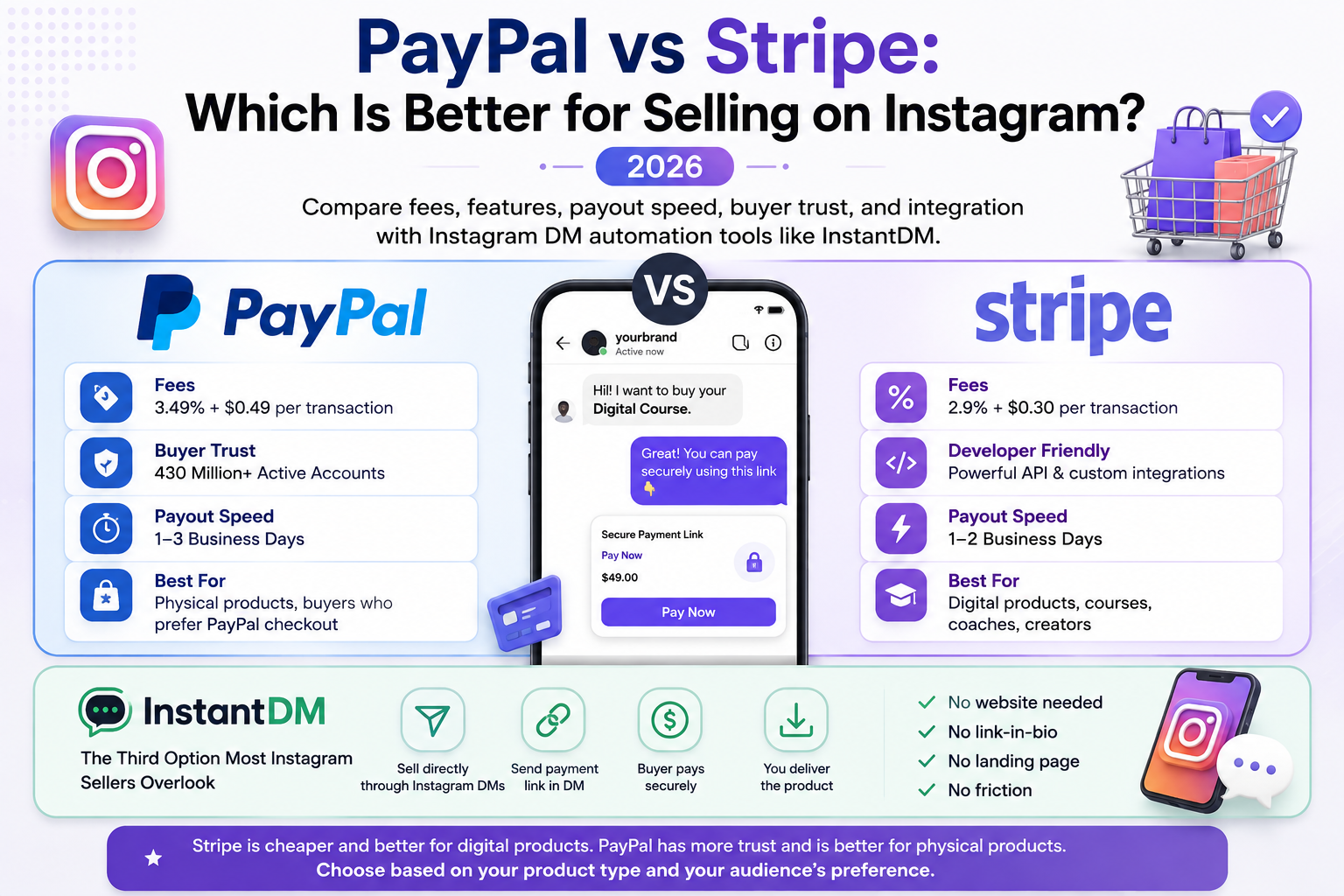
If you are selling products, courses, or services on Instagram, you need a payment processor. The two biggest options are PayPal and Stripe. But which one is better for Instagram sellers specifically?
Here is the quick verdict: Stripe is cheaper (2.9% + $0.30 vs PayPal's 3.49% + $0.49). PayPal has more buyer trust (430 million accounts). For Instagram sellers, Stripe is better for digital products and courses. PayPal is better for physical products and buyers who prefer PayPal checkout.
PayPal vs Stripe: Quick Comparison (July 2026)
| Feature | PayPal | Stripe | Winner for Instagram |
| Transaction fee (domestic) | 3.49% + $0.49 | 2.9% + $0.30 | Stripe (saves 0.59% + $0.19 per sale) |
| International fee | 4.5% + fixed fee | 1% + fixed fee | Stripe (4.5x cheaper) |
| Currency conversion | 3–4% markup | 1% markup | Stripe |
| Monthly fee | $0 | $0 | Tie |
| Payout speed | Instant to PayPal balance, 1–3 days to bank | 2 business days | PayPal (instant to balance) |
| Buyer protection | ✅ 180-day protection | ✅ 60-day protection | PayPal (longer protection) |
| Seller protection | ✅ Limited | ✅ Chargeback protection | Stripe (better protection) |
| Buyer trust | 430 million accounts | Less known to consumers | PayPal |
| Checkout experience | PayPal checkout (redirects buyer) | Embedded checkout (stays on page) | Stripe (less friction) |
| Subscription billing | ✅ Basic | ✅ Advanced | Stripe |
| Digital product delivery | ❌ Manual | ✅ Via API/webhooks | Stripe |
| Instagram integration | ✅ Payment links | ✅ Payment links | Tie |
| Refund fee | Keeps original fee | Refunds fee | Tie |
| Chargeback fee | $20 | $15 | Stripe |
Verified July 2026 . Stripe is cheaper per transaction. PayPal has more buyer trust. For Instagram sellers, the choice depends on what you sell and who your buyers are.
How Much Does Each Sale Cost? Real Math
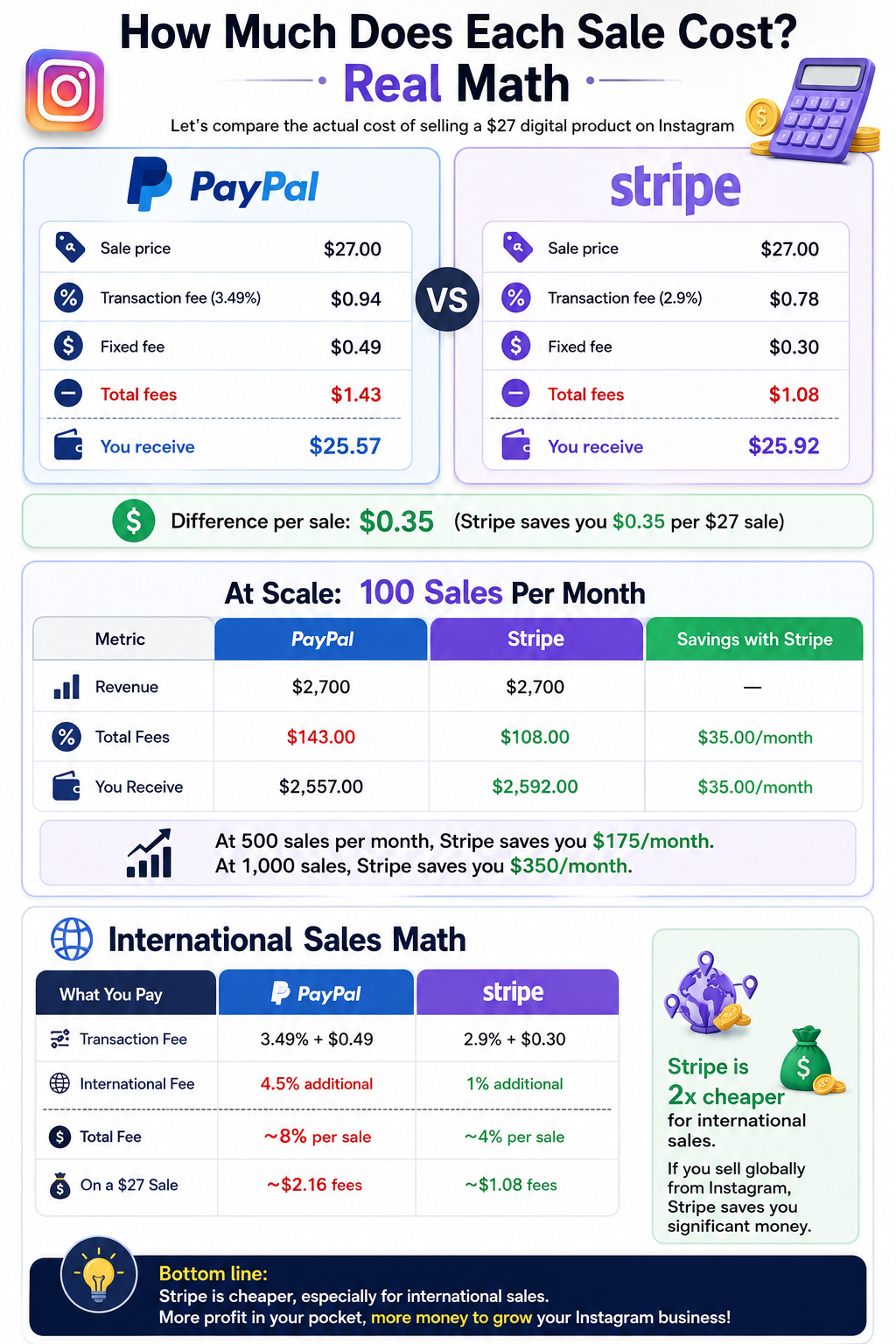
Let us compare the actual cost of selling a $27 digital product on Instagram:
PayPal
- Sale price: $27.00
- Transaction fee: 3.49% = $0.94
- Fixed fee: $0.49
- Total fees: $1.43
- You receive: $25.57
Stripe
- Sale price: $27.00
- Transaction fee: 2.9% = $0.78
- Fixed fee: $0.30
- Total fees: $1.08
- You receive: $25.92
Difference per sale: $0.35 (Stripe saves you $0.35 per $27 sale)
At Scale: 100 Sales Per Month
Revenue
- PayPal: $2,700
- Stripe: $2,700
Total Fees
- PayPal: $143.00
- Stripe: $108.00
You Receive
- PayPal: $2,557.00
- Stripe: $2,592.00
Savings with Stripe
- PayPal: —
- Stripe: $35.00/month
At 500 sales per month, Stripe saves you $175/month. At 1,000 sales, Stripe saves you $350/month.
International Sales Math
If you sell to buyers outside your country:
Transaction Fee
- PayPal: 3.49% + $0.49
- Stripe: 2.9% + $0.30
International Fee
- PayPal: 4.5% additional
- Stripe: 1% additional
Total Fee
- PayPal: ~8% per sale
- Stripe: ~4% per sale
On a $27 Sale
- PayPal: ~$2.16 fees
- Stripe: ~$1.08 fees
Stripe is 2x cheaper for international sales. If you sell globally from Instagram, Stripe saves you significant money.
PayPal: Pros and Cons for Instagram Sellers
Pros
Buyer Trust
430 million PayPal accounts worldwide. Buyers feel safe paying with PayPal. This can increase conversion rates, especially for first-time buyers.
Instant Access to Funds
Money goes to your PayPal balance instantly. You can spend it immediately or transfer to your bank in 1–3 days.
Buyer Protection
180-day buyer protection. If a buyer disputes a charge, PayPal sides with the buyer most of the time. This builds trust but can lead to chargebacks.
Easy Setup
No technical knowledge required. Sign up, verify your email, and start accepting payments in minutes.
Venmo Integration
PayPal owns Venmo (90 million U.S. users). If your buyers use Venmo, they can pay you through PayPal's infrastructure.
Cons
Higher Fees
3.49% + $0.49 per transaction. On a $27 sale, you pay $1.43 in fees vs Stripe's $1.08.
International Fees Are Expensive
4.5% additional for international sales. If you sell globally, this adds up fast.
No Digital Product Delivery
PayPal does not automatically deliver files or courses after payment. You need a separate tool (like InstantDM) to deliver the product.
Buyer Protection Works Against Sellers
PayPal's 180-day buyer protection means buyers can dispute charges months later. Some sellers report unfair chargebacks.
Checkout Redirects Buyer
When a buyer clicks your PayPal link, they are redirected to PayPal's website. This adds friction and can reduce conversion rates.
Stripe: Pros and Cons for Instagram Sellers
Pros
Lower Fees
2.9% + $0.30 per transaction. On a $27 sale, you pay $1.08 in fees vs PayPal's $1.43.
International Fees Are Cheaper
1% additional for international sales (vs PayPal's 4.5%). Saves money on global sales.
Better Seller Protection
Stripe's chargeback protection covers fraudulent disputes. You keep your money even if a buyer disputes.
Embedded Checkout
Buyers stay on your page during checkout. No redirect to Stripe's website. Less friction, higher conversion.
Digital Product Delivery
Stripe can automatically deliver files, courses, or access after payment via API/webhooks. No manual delivery needed.
Advanced Subscriptions
Stripe handles recurring billing, trials, prorations, and plan changes. Better for course creators and membership sites.
Meta Partnership
In February 2026, Meta announced plans to integrate Stripe's infrastructure into Instagram and Facebook (about.fb.com/news/meta-stripe-partnership). This means deeper Instagram integration coming soon.
Cons
Less Buyer Trust
Stripe is less known to consumers. Buyers may not recognize "Stripe" on their credit card statement.
Slower Payouts
Standard payout is 2 business days (vs PayPal's instant balance). You can pay extra for instant payouts.
Setup Requires More Work
Stripe's dashboard is more complex than PayPal's. Some sellers need developer help for advanced features.
No Built-In Marketplace
Stripe does not have a marketplace like PayPal. You cannot discover buyers on Stripe.
Which Is Better for Each Instagram Use Case?
Selling Digital Products (Courses, E-books, Templates)
Winner: Stripe
Why
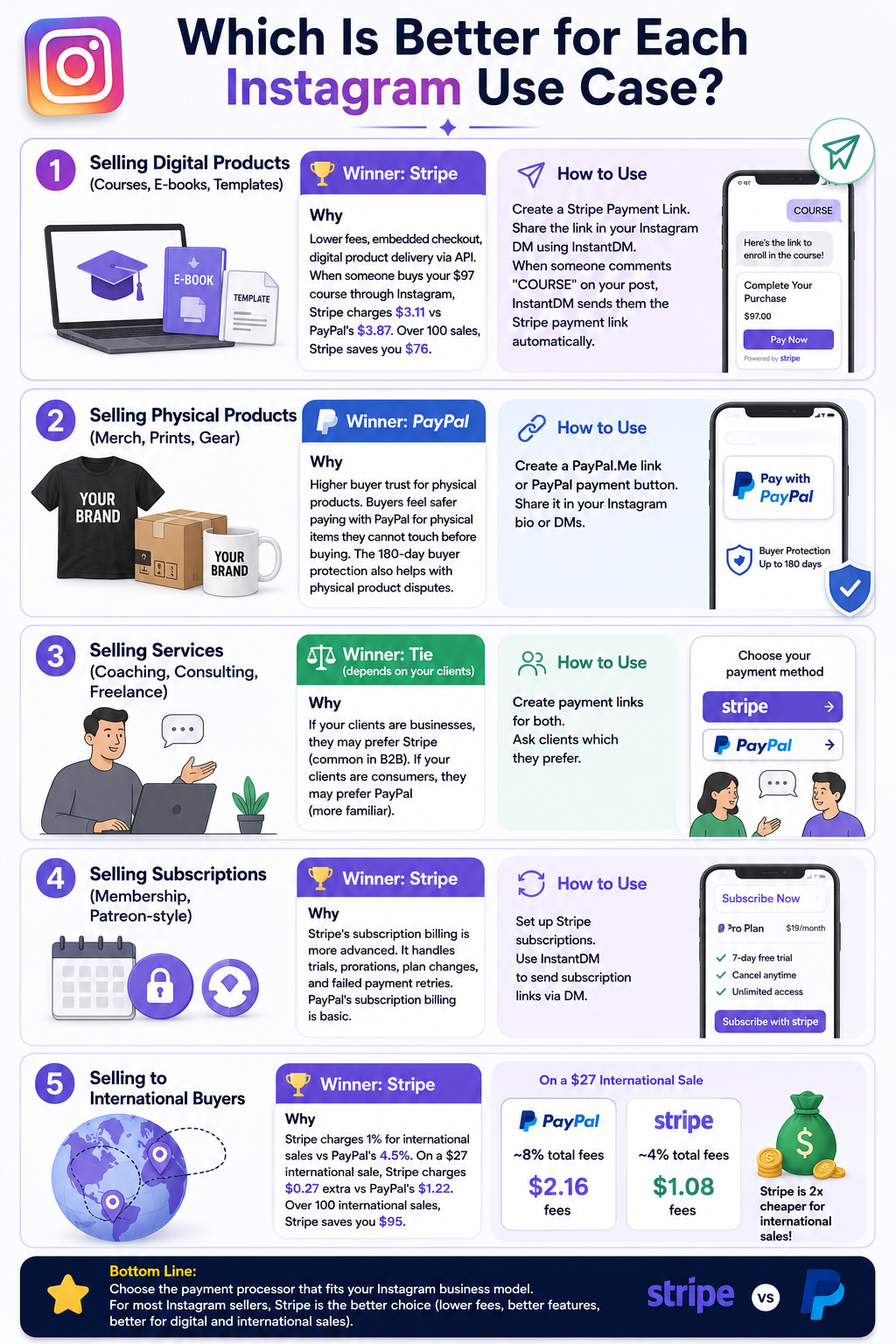
Lower fees, embedded checkout, digital product delivery via API. When someone buys your $97 course through Instagram, Stripe charges $3.11 vs PayPal's $3.87. Over 100 sales, Stripe saves you $76.
How to Use
Create a Stripe Payment Link. Share the link in your Instagram DM using InstantDM. When someone comments "COURSE" on your post, InstantDM sends them the Stripe payment link automatically.
Selling Physical Products (Merch, Prints, Gear)
Winner: PayPal
Why
Higher buyer trust for physical products. Buyers feel safer paying with PayPal for physical items they cannot touch before buying. The 180-day buyer protection also helps with physical product disputes.
How to Use
Create a PayPal.Me link or PayPal payment button. Share it in your Instagram bio or DMs.
Selling Services (Coaching, Consulting, Freelance)
Winner: Tie (depends on your clients)
Why
If your clients are businesses, they may prefer Stripe (common in B2B). If your clients are consumers, they may prefer PayPal (more familiar).
How to Use
Create payment links for both. Ask clients which they prefer.
Selling Subscriptions (Membership, Patreon-style)
Winner: Stripe
Why
Stripe's subscription billing is more advanced. It handles trials, prorations, plan changes, and failed payment retries. PayPal's subscription billing is basic.
How to Use
Set up Stripe subscriptions. Use InstantDM to send subscription links via DM.
Selling to International Buyers
Winner: Stripe
Why
Stripe charges 1% for international sales vs PayPal's 4.5%. On a $27 international sale, Stripe charges $0.27 extra vs PayPal's $1.22. Over 100 international sales, Stripe saves you $95.
How to Accept Payments on Instagram (Step by Step)
Method 1: Link-in-Bio (Traditional)
- Create a Stripe or PayPal payment link.
- Add the link to your Linktree, Beacons, or Stan Store.
- Tell followers "Link in bio" in your posts.
- Buyer clicks the link, pays, receives product.
Problem
60% of buyers abandon link-in-bio flows. Too many clicks. Too much friction.
Method 2: Comment-to-DM with InstantDM (Recommended)
- Sign up for InstantDM (free plan: 500 DMs/month).
- Connect your Instagram account.
- Create a comment-to-DM automation: "Comment BUY and I will send you the payment link."
- Write your DM with the Stripe or PayPal payment link.
- When someone comments, InstantDM sends them the DM automatically.
Why This Works Better
The buyer stays in Instagram. No link-in-bio. No redirect. They comment, get a DM with the payment link, and pay — all within Instagram. Conversion rates are 3–5x higher than link-in-bio.
Method 3: Instagram Checkout (Limited)
Instagram has a native checkout feature, but it is limited to eligible businesses in the US. Most Instagram sellers cannot use it yet.
PayPal vs Stripe: Payout Speed Comparison
Instant to Balance
- PayPal: ✅ Free
- Stripe: ✅ 1% fee (min $0.50)
1 Business Day
- PayPal: ✅ 1% fee
- Stripe: ✅ 1% fee
2 Business Days
- PayPal: ✅ Free
- Stripe: ✅ Free (standard)
Weekly
- PayPal: ✅ Free
- Stripe: ✅ Free
Monthly
- PayPal: ✅ Free
- Stripe: ✅ Free
PayPal wins on instant access — money goes to your PayPal balance immediately. Stripe's standard payout is 2 business days, but you can pay 1% for instant payouts.
For Instagram sellers who need cash flow quickly, PayPal's instant balance is a big advantage. For sellers who can wait 2 days, Stripe's lower fees make up for the slower payout.
PayPal vs Stripe: Buyer Trust Comparison
Brand Recognition
- PayPal: ✅ 430 million accounts
- Stripe: ⚠️ Less known to consumers
Checkout Experience
- PayPal: Redirects to PayPal
- Stripe: Stays on your page
Buyer Protection
- PayPal: 180 days
- Stripe: 60 days
Credit Card Statement
- PayPal: Shows "PayPal"
- Stripe: Shows your business name
Refund Process
- PayPal: Easy (buyer initiates)
- Stripe: Depends on seller
PayPal wins on buyer trust. When buyers see "PayPal" on checkout, they feel safe. When they see "Stripe," they may hesitate.
However, Stripe's embedded checkout keeps buyers on your page. This can increase conversion rates because there is no redirect. The trade-off: PayPal has more trust but more friction. Stripe has less trust but less friction.
PayPal vs Stripe: Instagram DM Automation Integration
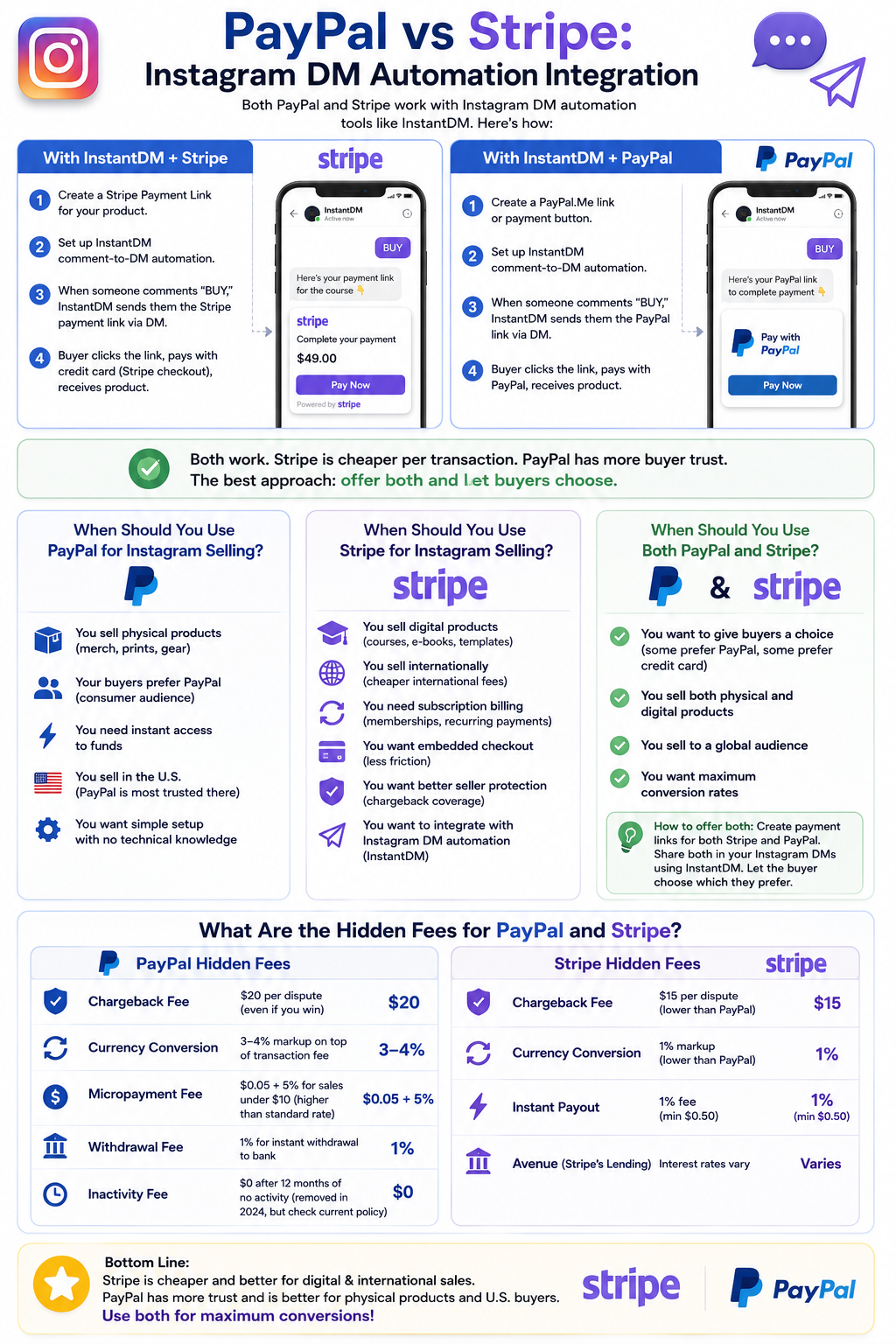
Both PayPal and Stripe work with Instagram DM automation tools like InstantDM. Here is how:
With InstantDM + Stripe
- Create a Stripe Payment Link for your product.
- Set up InstantDM comment-to-DM automation.
- When someone comments "BUY," InstantDM sends them the Stripe payment link via DM.
- Buyer clicks the link, pays with credit card (Stripe checkout), receives product.
With InstantDM + PayPal
- Create a PayPal.Me link or payment button.
- Set up InstantDM comment-to-DM automation.
- When someone comments "BUY," InstantDM sends them the PayPal link via DM.
- Buyer clicks the link, pays with PayPal, receives product.
Both work. Stripe is cheaper per transaction. PayPal has more buyer trust. The best approach: offer both and let buyers choose.
When Should You Use PayPal for Instagram Selling?
Use PayPal if:
- You sell physical products (merch, prints, gear)
- Your buyers prefer PayPal (consumer audience)
- You need instant access to funds
- You sell in the U.S. (PayPal is most trusted there)
- You want simple setup with no technical knowledge
When Should You Use Stripe for Instagram Selling?
Use Stripe if:
- You sell digital products (courses, e-books, templates)
- You sell internationally (cheaper international fees)
- You need subscription billing (memberships, recurring payments)
- You want embedded checkout (less friction)
- You want better seller protection (chargeback coverage)
- You want to integrate with Instagram DM automation (InstantDM)
When Should You Use Both PayPal and Stripe?
Use both if:
- You want to give buyers a choice (some prefer PayPal, some prefer credit card)
- You sell both physical and digital products
- You sell to a global audience
- You want maximum conversion rates
How to offer both: Create payment links for both Stripe and PayPal. Share both in your Instagram DMs using InstantDM. Let the buyer choose which they prefer.
What Are the Hidden Fees for PayPal and Stripe?
PayPal Hidden Fees
Chargeback Fee
$20 per dispute (even if you win)
Currency Conversion
3–4% markup on top of transaction fee
Micropayment Fee
$0.05 + 5% for sales under $10 (higher than standard rate)
Withdrawal Fee
1% for instant withdrawal to bank
Inactivity Fee
$0 after 12 months of no activity (removed in 2024, but check current policy)
Stripe Hidden Fees
Chargeback Fee
$15 per dispute (lower than PayPal)
Currency Conversion
1% markup (lower than PayPal)
Instant Payout
1% fee (min $0.50)
Avenue (Stripe's Lending)
Interest rates vary
Total Cost Comparison (100 Sales of $27 Each)
Transaction Fees
- PayPal: $143.00
- Stripe: $108.00
International Fees (if 20% International)
- PayPal: $24.30
- Stripe: $5.40
Chargeback Fees (2 Disputes)
- PayPal: $40.00
- Stripe: $30.00
Total Fees
- PayPal: $207.30
- Stripe: $143.40
You Receive
- PayPal: $2,492.70
- Stripe: $2,556.60
Stripe saves you $63.90 per 100 sales. At 1,000 sales, Stripe saves you $639.
About the Author
Aravindh Kumar is an ecommerce and Instagram growth expert with 8+ years of experience in online selling. He has worked with 500+ brands — including Forbes-listed companies — helping them build more than 200 profitable Instagram sales channels.