Last updated: October 24, 2026
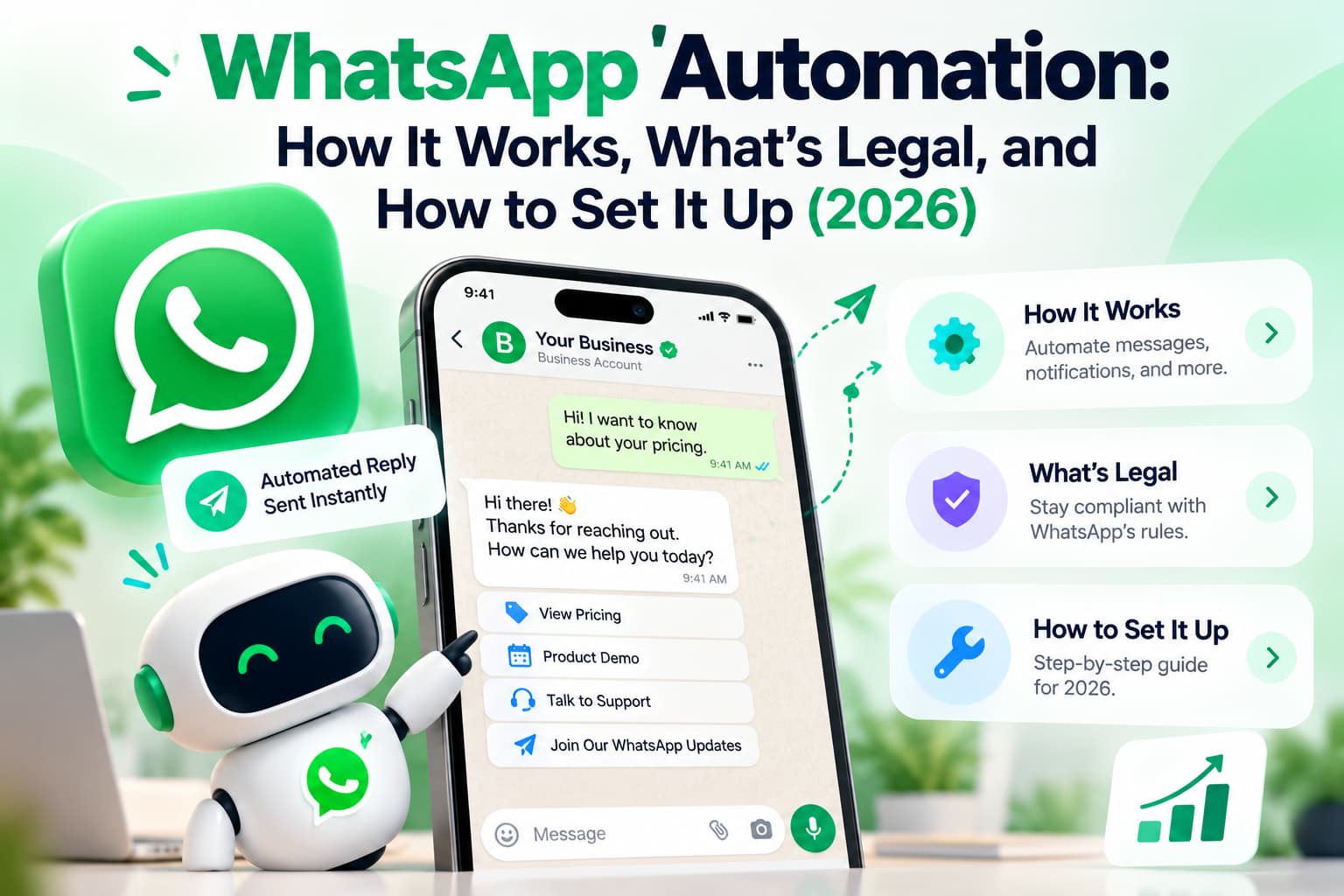
What is WhatsApp automation? It is software that sends, receives, or routes WhatsApp messages without a person typing every reply. In 2026 that means greeting, away, and quick replies in the WhatsApp Business App, or chatbots, templates, and workflows on the official WhatsApp Business API. It is not a WhatsApp Web scraper, a Chrome blast extension, or a linked-device tool on a personal account. Meta allows the first two. The unofficial stack can get the number banned.
Quick verdict
- Official path only: Business App for basic replies, Business API for chatbots, teams, and campaigns.
- Legal when you have a real business purpose, opt-in before marketing, and a STOP path.
- Unofficial QR or "unlimited blast, no API" tools are a ban risk, not a shortcut.
What is WhatsApp automation?
WhatsApp automation sits on one business number and four layers: App replies, official API workflows, grounded AI agents, and unofficial Web or QR tools you should not connect.
Greeting, away, and quick replies live in the WhatsApp Business App. They are free. One person owns the phone. Chatbots, template campaigns, Shopify or CRM triggers, and a shared inbox live on the official WhatsApp Business API. A Business Solution Provider (BSP) sits between you and Meta. AI agents read messy text, then must hand off when they are unsure. Unofficial tools ask you to scan a QR and send as if they were you on WhatsApp Web. They look cheap. They sit on the consumer session.
If a vendor cannot tell you which layer they run on, do not connect your number.
WhatsApp automation at a glance
Verified October 2026.
| Item | Details |
| What it is | Software that sends, receives, or routes WhatsApp without a person typing every reply |
| Allowed by Meta | WhatsApp Business App (greeting, away, quick replies) and official WhatsApp Business API |
| Not allowed | WhatsApp Web scrapers, QR "APIs", personal-account blast tools |
| Legal under the law | Yes, with opt-in, opt-out, and local privacy law (GDPR, India's DPDP, or your country) |
| Need the API? | Team inbox, real chatbot, Shopify or CRM events, campaigns bigger than 256 contacts |
| Setup time | App: same day. API: usually 24–72 hours once documents are clean |
| Cost | App is free. API has a BSP plan plus Meta category fees |
What is WhatsApp business automation?
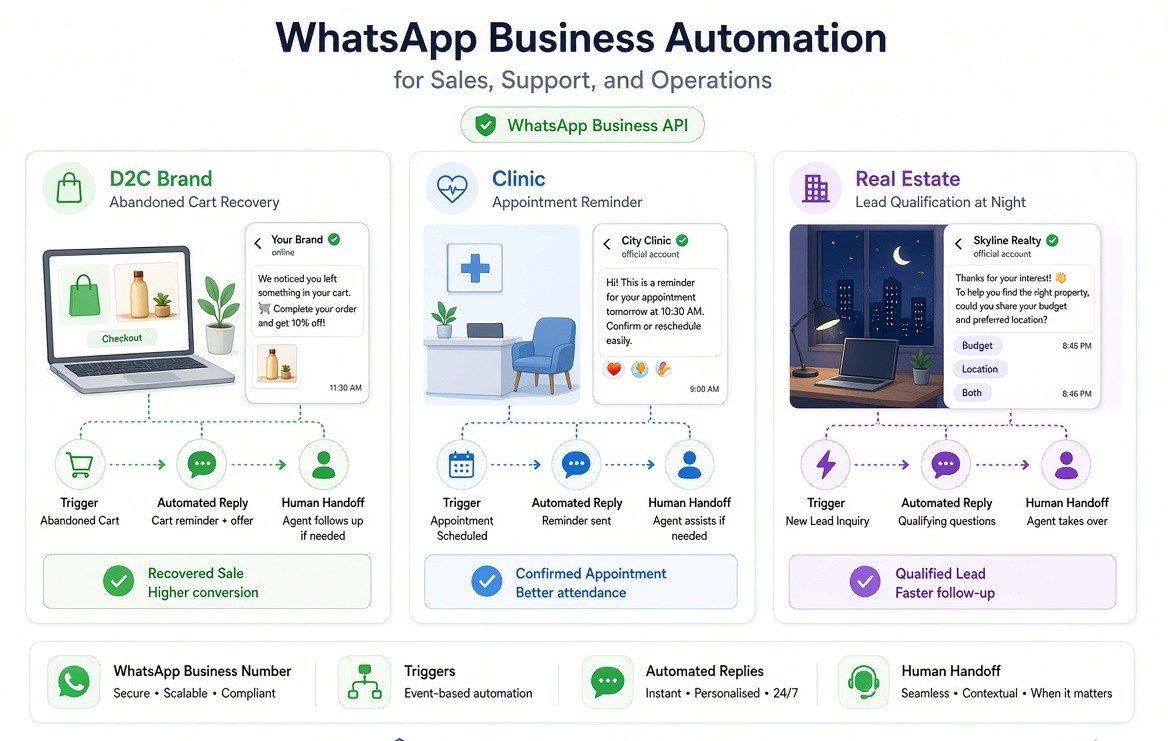
WhatsApp business automation is the same stack used for sales, support, or operations, not personal chat. A D2C brand uses it for cart recovery. A clinic uses it for appointment reminders. A real-estate desk uses it to qualify "2BHK, Whitefield, this weekend?" at 10 p.m.
You need four things every time:
- A WhatsApp Business App number or a WhatsApp Business API number
- A trigger (inbound message, keyword, order event, form fill, Click-to-WhatsApp ad)
- A reply system (saved reply, flow, template, or AI agent)
- A handoff rule so a person takes the chat when the bot should stop
Personal WhatsApp plus a browser extension is not business automation. It is a ban-risk workaround.
How does WhatsApp automation work?
WhatsApp automation works in four steps: a trigger fires, logic chooses the reply, the App or API delivers it, then a human can take over.
- Trigger. Someone messages the business number, taps a Click-to-WhatsApp ad, abandons a Shopify cart, misses an appointment, or goes quiet after a quote.
- Logic. A keyword rule ("price", "status", "stop"), a visual flow, a template campaign, or an AI agent decides what to send. Good logic also decides what not to send.[11:26 PM]
- Delivery. On the Business App, delivery is the greeting, the away message, or a quick reply the agent taps. On the API, delivery is a session message inside the 24-hour window, or a Meta-approved template outside it.
- Handoff. If the customer is angry, the order is wrong, the deal is high-ticket, or the bot failed twice, the thread moves to a person with the history attached. Automation that cannot hand off is a loop, not a system.
A WhatsApp chatbot follows that same pipe with rules or AI. Build steps, costs, and what not to automate are in WhatsApp Chatbot in 2026: What It Is, How It Works, and How to Build One.
What is the WhatsApp 24-hour messaging window?
The 24-hour window is a customer-service session that opens when a user messages your business. For the next 24 hours you can usually reply with normal chat, images, and buttons, without a marketing template. When it closes, you generally cannot send "hey, still there?" You need a template Meta has approved, in the right category.
This exists so businesses cannot turn WhatsApp into unsolicited SMS. Answer inbound leads inside minutes. Do not spend the window on three "Hi / How can I help / Please choose" bubbles. One useful message. Click-to-WhatsApp ads can open a free-entry window with its own rules. Confirm current Meta policy when you build ads.
What are WhatsApp message templates?
Templates are pre-approved formats you use when you start or restart a conversation on the official API. Meta reviews the wording, the buttons, and the category. Marketing is offers and re-engagement. Utility is order shipped or appointment tomorrow. Authentication is OTPs. Quick replies in the App are not templates. Unofficial "spin text" is not a template. If the vendor cannot show a template manager inside Meta's ecosystem, you are not on the official API.
What you can automate on WhatsApp
You can automate any repeatable WhatsApp job that does not need a human judgment call.
- Welcome or greeting when a chat opens
- Away and after-hours replies
- FAQ replies (hours, price band, shipping, location, menu)
- Lead qualification (budget, area, timeline, party size)
- Abandoned cart notes (opted-in ecommerce only)
- Order, COD confirm, dispatch, and delivery updates
- Appointment reminders and "reply 1 to reschedule"
- Post-purchase care and review asks
- Re-engagement of cold opted-in contacts with a marketing template
- Support triage: tag, assign, SLA clock, escalate
What to leave to a human
Leave refunds and chargebacks. Leave legal, medical, or financial advice that creates liability. Leave custom enterprise pricing. Leave anything the customer already said "I want to talk to someone."
Starter copy you can adapt (App saved replies, or API drafts that still need Meta review):
Greeting: Hi, this is [Brand] on WhatsApp. Tell us what you need: order status, a booking, or a product question, and we'll take it from here.
Away: We're away until [time / IST]. Drop the order ID or the question. A person will pick this up when we open. For urgent delivery issues, type URGENT.
Appointment reminder (utility template idea): Reminder: [Name], you're booked with [Brand] on [date] at [time]. Reply 1 to confirm, 2 to reschedule.
Cart (marketing template idea, opted-in buyers only): You left [product] in your cart. It's still available. Reply YES and we'll send the checkout link. Reply STOP to opt out.
Those last two are drafts. Marketing and utility templates on the API must pass Meta review before you send them outside the customer-service window.
Is WhatsApp automation legal?
Yes. WhatsApp automation is legal when you use official Meta products, you have a real business purpose, and you follow opt-in plus local privacy law. It is not a crime to auto-reply on the WhatsApp Business App or to run chatbots on the official WhatsApp Business API.
Keep two questions separate.
Is it legal under the law? Usually yes, if you have consent for marketing, you honour opt-out, and you follow GDPR, India's DPDP Act, or the rule in your country.
Is it allowed by Meta? Only on the official App features or the official API. Unauthorized automated or bulk messaging on consumer WhatsApp is a terms violation. Those accounts get banned.
Legal is not the same as safe. A tool that markets "no API, unlimited blast, no ban" can still cost you the number.
In India, official API automation is widely used. You still need opt-in before marketing templates, a clear STOP path, and a lawful reason to hold the phone number under DPDP. The API does not give you a licence to message a purchased lead list.
Is WhatsApp automation allowed by Meta?
Yes, on two official products.
Allowed: WhatsApp Business App greeting, away message, quick replies, labels, catalog. WhatsApp Business Platform (Cloud API) session messages, message templates, WhatsApp Flows, interactive buttons, catalog, official partner tools, quality rating, green-tick verification path. Meta's WhatsApp Business Policy and WhatsApp Messaging Guidelines are the rules those products sit under.
Not allowed: scraping WhatsApp Web, driving a personal or Business App account with a browser bot to send bulk or automated campaigns, building an unofficial "API" on a linked-device session, cold-blasting numbers that never opted in.
If a salesperson says "we connect by QR, no Meta approval, unlimited broadcasts," you are not on the path Meta allows.
Is unofficial WhatsApp automation safe?
No. Unofficial WhatsApp automation is not safe for a business number you cannot afford to lose.
"Unofficial" means any tool that asks you to scan a QR and then sends as if it were you on WhatsApp Web, promises bulk sends with no template review, says "no BSP, no API, no per-message fee," or uses your personal WhatsApp.
WhatsApp's own help on unauthorized automated or bulk messaging is the line. What Meta watches in practice: people tapping Report as spam, people blocking the number, a new number suddenly sending like a call centre, identical messages on a timer, automation on the consumer client instead of the Business Platform.
Delays and "spin text" do not make the architecture official. They only slow the ban. For a GST-registered shop, a clinic, or a creator brand, the official API is the safe default.
Can I send bulk WhatsApp messages?
You can send bulk WhatsApp messages only to opted-in contacts, on the official WhatsApp Business API, using Meta-approved templates when you start the conversation. You cannot safely bulk-message from personal WhatsApp, from the Business App broadcast list as a growth engine, or from a Web scraper.
The Business App broadcast list is capped at 256 saved contacts. The API can send to large opted-in lists. Volume is not permission. Marketing templates are the bulk format. They are reviewed. They must include an opt-out. Utility templates (order shipped, appointment tomorrow) are for events the customer already has with you, not for "hey, 20% off." Purchased number lists, scraped Instagram exports, and "I have 50,000 leads in Excel" are how numbers die.
Do not blast 10,000 people today on a number you still need next month.
How to set up WhatsApp automation
You set up WhatsApp automation on the Business App the same day (greeting, away, quick replies), or on the official API through a BSP when you need a team inbox, a chatbot, Shopify events, or campaigns bigger than a 256-person broadcast list.
Do I need the WhatsApp Business API?
[11:26 PM]
You need the API if more than one person must share the inbox, if you want a real chatbot or AI agent, if you send order or cart messages from Shopify, if you need CRM write-back, or if you want campaigns bigger than a 256-person broadcast list. You do not need the API if you are a solo operator answering by hand and only want a greeting and an away message.
WhatsApp Business App vs WhatsApp Business API
Verified October 2026.
| Feature | App | API |
| Cost to Meta | Free | Category fees on templates and messages (varies by country) |
| Platform / BSP fee | None | Usually a monthly plan, sometimes with markup |
| Who can reply | One primary user plus limited linked devices | Team inbox, roles, assignment |
| Automation | Greeting, away, quick replies | Flows, chatbots, AI agents, webhooks |
| Broadcast | Lists up to 256 saved contacts | Opted-in template campaigns at scale |
| Templates | Saved replies you tap | Meta-reviewed Marketing / Utility / Auth templates |
| CRM / Shopify | No native API | Native or via BSP / Zapier / n8n |
| Green tick path | Not the API verification path | Eligible after Meta business verification |
| Best for | Solo, low volume | Teams, ecommerce, clinics, agencies |
Stay on the App while volume is low and one person owns the phone. Move the day you miss chats, hire a second person, or need Shopify or CRM events to speak.
Under about 50 chats a day, one person, no campaigns: App. Two or more people on the same number: API. Cart, COD, tickets, bookings tied to software: API. "Message everyone in my phone book": neither.
Path A: WhatsApp Business App (same day)
- Install WhatsApp Business (not personal WhatsApp) on one phone.
- Complete the business profile: name, category, hours, address, description.
- Open Business tools, then Greeting message. Write one short greeting.
- Open Away message. Set hours in your real timezone (IST if you sell in India).
- Add quick replies for the ten questions you already type every day.
- Add a catalog if you sell products. Do not automate anything else on this number.
That's the entire official App setup. There is no hidden chatbot switch.
Path B: official WhatsApp Business API
API registration, Meta business verification, coexistence with an existing number, and the 24–72 hour clock once documents are clean are in How to Get WhatsApp API in 2026: Setup, Pricing & Verification. Pick a BSP, submit three templates before you need them, then build one live workflow with handoff. "API live in 10 minutes, scan QR" is not official Cloud API access.
Shopify events only fire on the official API, not on the Business App. Button vs native vs API, templates, and cart rules are in How to Add WhatsApp to Shopify in 2026: Free Button, Native Apps, & API Setup. Meta's per-message rates, India figures, and the 1 October 2026 changes are in WhatsApp Business API Pricing 2026: Meta Rates, India Cost & October Changes. Always confirm the current card on WhatsApp Business Platform pricing before you forecast. If you already know you need a vendor, start with Top 5 WhatsApp Automation Tools for 2026 (Selection Guide).
Do not start with a 12-step bot that greets, opens a menu, asks three questions, and confirms. Chatty bots are expensive bots. Merge greeting and menu into one message. Hand off instead of looping.
What I checked
I checked Meta's public WhatsApp Business Policy, Messaging Guidelines, and unauthorized-automation help, plus the live API, chatbot, Shopify, pricing, and tools posts on this blog, in October 2026. Rates move. Recheck Meta's pricing page before you budget a campaign. I don't sell WhatsApp seats, so I'm not ranking a BSP in this article.
Features that actually matter
You need seven capabilities:
- Official WhatsApp API access through a real BSP or Tech Provider
- Human handoff with the transcript, not a dead "wait for agent"
- Shared inbox with assignment if you have more than one human
- Template and campaign tools with opt-out
- Triggers from your system (Shopify, calendar, CRM, webhooks)
- Analytics you will look at: first response time, read rate, opt-out rate, quality rating
- AI grounded in your FAQ or catalog, with a kill switch
Nice later, not day one: WhatsApp Flows forms, payments, Calling API, email in the same inbox.
If the demo starts with an AI avatar and cannot show template rejection handling, walk.
Common WhatsApp automation mistakes
- Automating refunds and fights. The bot that argues about a damaged parcel costs more than it saves.
- Chatty flows. Greeting plus menu plus "please type 1" plus "please type 2" is four billable events and one annoyed human.
- No STOP. Marketing without an exit is how report rate spikes.
- Using the personal number. You will migrate later in pain.
- QR-code "API." It is not the API.
- Launching eight use cases in week one. Start with one: missed-call follow-up, after-hours FAQ, or appointment reminder.
- Ignoring quality rating. Meta can throttle marketing templates when users hate the messages.
- Copying Instagram DM tactics onto WhatsApp. They are different products, different windows, different bills.
A 14-day launch plan
Days 1–2. Stay on the Business App if you are not sure. Write greeting, away, and five quick replies. Count chats per day if you have no data.
Days 3–4. If you need the API, open Business Manager. Collect verification docs. Shortlist two BSPs, not seven.
Days 5–7. Connect the number. Submit three templates only: utility reminder, utility order update, one marketing re-open.
Days 8–10. Ship one flow. After-hours FAQ with a "talk to a person tomorrow" path is enough.
Days 11–14. Measure first response time, how often the bot resolved vs handed off, template read rate, and opt-outs. Kill any step that does not change a number you care about.
Do not run a 10,000-contact marketing blast as the first act.
Pick the layer that matches the business you have this month. One phone, few chats: WhatsApp Business App, today. Team, Shopify, reminders, campaigns: official API via a BSP this week. "Unlimited blast, scan QR": do not.
If the channel is Instagram comments and DMs, not WhatsApp, that's InstantDM. WhatsApp still needs a BSP on Meta's official API.
About the Author
Aravindh Kumar is an ecommerce and Instagram growth expert with 8+ years of experience in online selling. He has worked with 500+ brands, including Forbes-listed companies, helping them build profitable Instagram sales channels. He has helped 200+ Instagram businesses grow their online presence.