The short version
What is a WhatsApp chatbot?
A WhatsApp chatbot is software connected to a business number on the WhatsApp Business Platform (API) that reads an incoming customer message and replies automatically — with rules, AI, or both — then hands the thread to a human when it cannot finish the job.
Do I need the WhatsApp Business API?
Yes, if you want a real chatbot. The free WhatsApp Business app only supports greetings, away messages, and quick replies on a phone. Scale, AI, templates, CRM, and a shared team inbox require the official API (Cloud API or a Business Solution Provider).
How does a WhatsApp chatbot work?
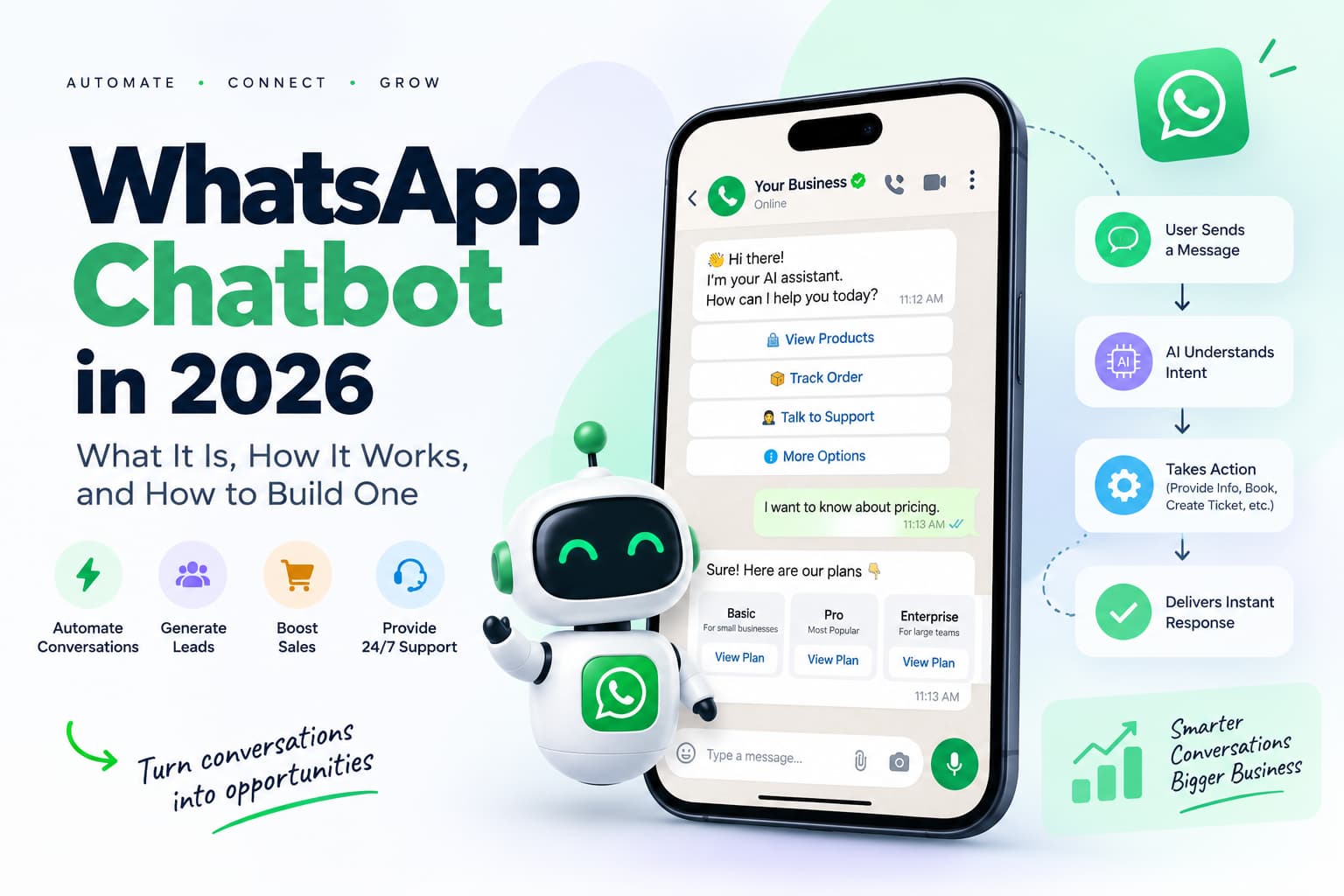
Customer messages your number → Meta delivers a webhook → your bot engine matches intent (buttons, keywords, or AI) → you send a reply through the Cloud API → optional CRM update or human handoff. Free-form replies only work inside the 24-hour customer service window.
How do I build a WhatsApp chatbot?
Verify Meta Business, attach a dedicated phone number, connect Cloud API or a BSP, write flows or train AI on your FAQs, set handoff rules, test on a real number, then go live. Builder time is hours. Approval is days to weeks.
How much does a WhatsApp chatbot cost?
Two bills: Meta (per delivered message by category and country) plus your platform / AI. From 1 October 2026, service replies are no longer unlimited-free: each business number gets 1,000 free service messages per month, then pays the market service rate. Platform fees are separate.
Can a WhatsApp chatbot send promotions?
Only to people who opted in, and only with Meta-approved marketing templates if you start the conversation or the 24-hour window is closed. Cold blasts and unofficial tools can ban the number.
A buyer messages you at 11:17 p.m. asking if the blue jacket is in stock in medium. Nobody is online. Tomorrow morning the thread is cold.
That is the job a WhatsApp chatbot is built for. Instant answers on the channel customers already open throughout the day, with a human taking over when the question is messy.
Three mix-ups waste the most time when people start: treating Meta AI as if it were a business bot, assuming every reply inside the 24-hour window is still free, and automating conversations that should never leave a person.
What is a WhatsApp chatbot?
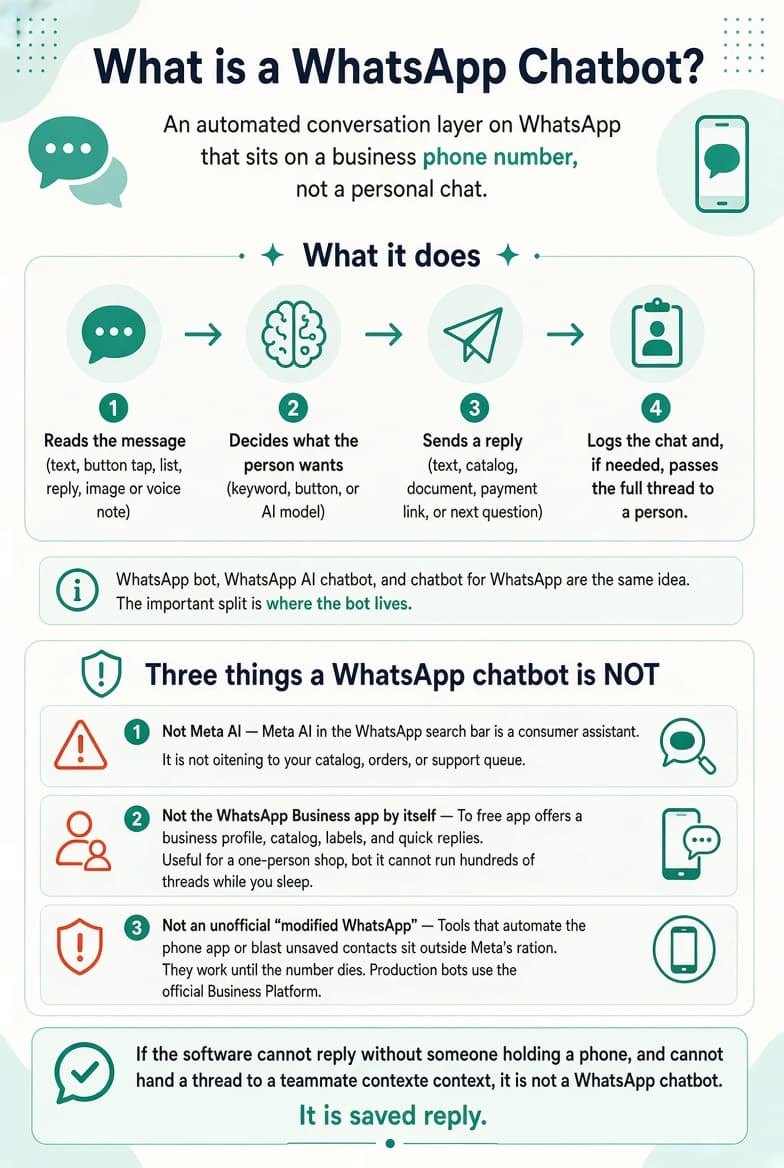
A WhatsApp chatbot is an automated conversation layer on WhatsApp. It sits on a business phone number, not on a personal chat. When someone writes to that number, the bot:
- Reads the message (text, button tap, list reply, sometimes an image or voice note).
- Decides what the person wants — a keyword, a button, or an AI model.
- Sends a reply: text, catalog, document, payment link, or a question that moves the flow forward.
- Logs the chat and, if needed, passes the full thread to a person.
WhatsApp bot, WhatsApp AI chatbot, and chatbot for WhatsApp are the same idea. The important split is not the nickname. It is where the bot lives.
Three things a WhatsApp chatbot is not
It is not Meta AI. Meta AI in the WhatsApp search bar is a consumer assistant. It answers the user’s own questions. It is not logged into your catalog, your order system, or your support queue.
It is not the WhatsApp Business app by itself. The free app gives you a business profile, a catalog, labels, greeting and away messages, and quick replies. That is useful for a one-person shop. It is not a chatbot that can run hundreds of threads while you sleep. The Business app and the Business Platform are different products.
It is not an unofficial “modified WhatsApp.” Tools that automate the phone app, scrape chats, or blast unsaved contacts sit outside Meta’s rules. They work until the number dies. A production WhatsApp chatbot uses the official Business Platform. Unauthorized automation can lead to restriction or enforcement action, not a guaranteed outcome.
If the software cannot reply without someone holding a phone, and cannot hand a thread to a teammate with context, it is not a WhatsApp chatbot. It is a saved reply.
WhatsApp Business app vs a WhatsApp chatbot (API)
These two products share a brand name. They are not the same stack. Mixing them is how teams buy the wrong thing.
| WhatsApp Business app | WhatsApp chatbot on the Business API | |
| Cost (Meta) | Free | Paid by message category and country |
| Who replies | One person (limited linked devices) | Bot, then any number of agents |
| Automation | Greeting, away, quick replies | Flows, AI, templates, webhooks |
| CRM / Shopify / helpdesk | Manual copy | Native or via a BSP |
| Outbound campaigns | Broadcast list, saved contacts, small | Approved templates plus opt-in |
| Official business verification | Not the API verification path | Possible after Meta verification |
| Ban risk if you “scale” unofficially | High | Low if you stay on the official API and follow policy |
| Best for | Solo operator, low volume | Any team that needs nights, ads, or CRM |
Do I need the WhatsApp Business API for a chatbot?
Yes for anything beyond canned greetings. You do not have to write against the raw Cloud API yourself. A BSP or chatbot platform can connect the number for you. You still need a Meta Business portfolio and a number that can be registered on the platform. Moving an existing Business app number is covered in Meta’s Embedded Signup flow for Business app users.
Can I keep the number I already use in the Business app?
Often yes, but that number usually leaves the phone app once it moves to the API. Plan a cutover: export important chats, warn regular customers, and do not assume both the app and the API can own the same number at once.
When the free app is enough: one person, under about 50 new chats a day, no ads that dump volume at 2 a.m., no need to log chats into a CRM.
When you need the API chatbot: more than one agent, Click-to-WhatsApp ads, abandoned-cart or order-status flows, after-hours coverage, or any AI that must read your own docs.
How a WhatsApp chatbot works
The pipeline is the same on every official stack. Cloud API is built so a business can connect customers to agents or bots, with messages delivered by webhook.
- The customer writes first (or taps a Click-to-WhatsApp ad or page button). That inbound message opens or resets a 24-hour customer service window. Meta describes this as a rolling window refreshed when a user message is delivered.
- Meta sends a webhook to your Cloud API app or to your BSP. A live bot needs a registered number and a webhook endpoint.
- The bot engine classifies intent. Buttons and list replies are exact. Keywords are brittle. AI (an LLM on your FAQs) handles the long tail. Button and list messages are part of Meta’s conversational components.
- You send a reply through the API: a free-form service message inside the window, or an approved template if the window is closed or you started the chat. Templates are the message type Meta allows when the customer has not written in the previous 24 hours, and they need approval.
- Side effects fire: tag in CRM, create a ticket, check stock, book a slot, send a payment link.
- Handoff if confidence is low, the user asks for a person, or the topic is on the “never automate” list.
That is the whole machine. “AI agent,” retrieval, and a multi-agent inbox are layers on steps 3–6.
Rule-based vs AI vs hybrid vs agent
The labels sound similar. The failure modes are not.
| Type | How it decides | Wins when | Breaks when |
| Rule-based / flow | Keywords, buttons, menus | Hours, prices, “where is my order” with a tracking ID | The user writes a paragraph |
| AI chatbot | LLM plus your knowledge base | Messy questions, many SKUs, multilingual FAQs | It invents a policy or a price |
| Hybrid | Buttons for the happy path, AI for the overflow, human for the rest | Almost every real inbox | You skip the handoff rule |
| Action-taking agent | AI that does something (lookup, book, refund request) | High volume plus clean systems of record | No guardrails, no audit log |
Start hybrid. Put the 20 questions that are 80% of volume on buttons. Put the long tail on AI that can point back to your own help center. Put money, legal questions, and angry customers on a human.
A bot that sends seven messages to answer “are you open on Sunday?” is not more intelligent. After 1 October 2026 it is also more expensive.
Meta AI, Meta Business Agent, and your chatbot
Several different products now live “inside WhatsApp.” They are easy to confuse.
| Product | Who it serves | What it can see | Your business number? |
| Meta AI (search bar / chat) | The consumer | General knowledge and whatever Meta allows | No |
| Third-party personal agents (up to five, rolling out) | The consumer, in a dedicated chat | Only what that user shares in that chat | No |
| Meta Business Agent | A business, on WhatsApp / Messenger / Instagram | What you connect (catalog, some systems) | Yes — Meta-hosted agent |
| Your WhatsApp chatbot (BSP or custom on Cloud API) | Your brand | Your CRM, help center, rules, human inbox | Yes — you control the stack |
| WhatsApp Business Tools MCP (September 2026) | Developers | Setup: account, number, templates, webhooks | Setup tool, not a customer bot |
Does WhatsApp ship a built-in chatbot for my brand?
No. Meta AI is not your brand. Meta Business Agent is Meta’s optional business AI. A WhatsApp chatbot you own is a separate system on the official API. MCP helps an engineer configure the API. It does not talk to customers.
Consumer AI in WhatsApp is not a WhatsApp chatbot for business.
What a WhatsApp chatbot is used for
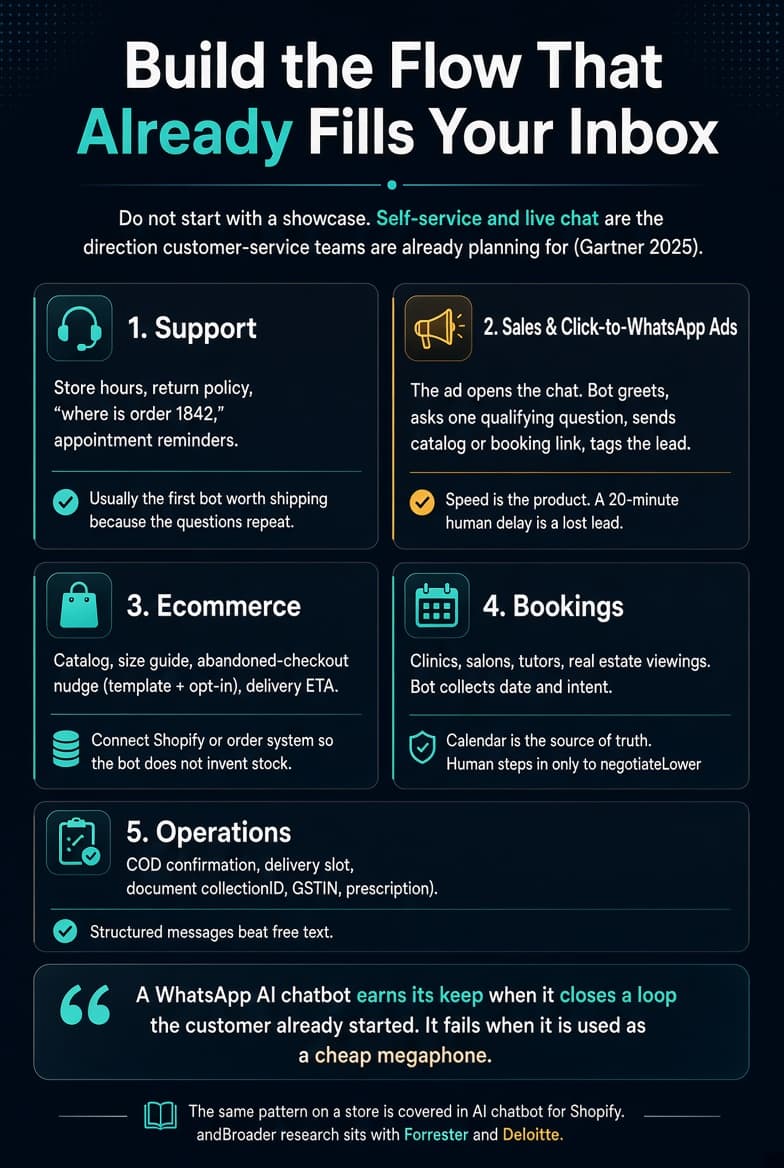
Build the flow that already fills your inbox. Do not start with a showcase. Self-service and live chat are the direction customer-service teams are already planning for, according to Gartner’s 2025 channel survey.
Support. Store hours, return policy, “where is order 1842,” appointment reminders. This is usually the first bot worth shipping because the questions repeat.
Sales and Click-to-WhatsApp ads. The ad opens the chat. The bot greets, asks one qualifying question, sends the catalog or a booking link, and tags the lead. Speed is the product. A 20-minute human delay on an ad click is a lost lead.
Ecommerce. Catalog, size guide, abandoned-checkout nudge (template plus opt-in), delivery ETA. Connect Shopify or your order system so the bot does not invent stock. A store-side setup is covered in how to add WhatsApp to Shopify.
Bookings. Clinics, salons, tutors, real estate viewings. The bot collects date and intent. The calendar is the source of truth. A human steps in only if the person wants to negotiate.
Operations. COD confirmation, delivery slot, document collection (ID, GSTIN, prescription). Structured messages beat free text.
A WhatsApp AI chatbot earns its keep when it closes a loop the customer already started. It fails when it is used as a cheap megaphone. The same pattern on a store is the subject of an AI chatbot for Shopify. Broader research on where conversational AI is heading sits with Forrester and Deloitte.
How to build a WhatsApp chatbot
You do not start in a flow builder. You start with access. A practical walkthrough of getting the API is in how to get the WhatsApp API.
Step 1 — Get on the official platform
- Create or clean a Meta Business portfolio.
- Pick a dedicated phone number (not your personal WhatsApp if you can avoid it).
- Choose a path:
- Meta Cloud API if you have developers and want the raw pipe.
- A BSP or chatbot platform if you want an inbox, builder, and templates in one place.
- Complete business verification. That wait is usually longer than the software setup. Meta says a template decision can take up to 24 hours; “days to weeks” here means business verification and account setup, not template review alone.
Step 2 — Decide the bot type before you draw bubbles
Write the 15 messages you actually receive in a week. If 12 of them fit a menu, build rules first. If people write novels, add AI on top of a knowledge base you control (site, FAQ, PDFs) — not the whole internet.
Step 3 — Design the conversation like a polite staffer
- One question per message.
- Buttons for choices you can enumerate.
- A visible “talk to a person” path.
- A fallback that admits uncertainty instead of guessing a price.
- Say that the first replies may be automated. Trust drops when people feel tricked.
Step 4 — Connect the systems that make answers true
A WhatsApp chatbot without order status, calendar, or CRM is a brochure. Minimum useful connections: help center, product catalog, and a shared inbox.
Step 5 — Set handoff rules in writing
Hand the chat to a person when any of these is true:
- The user says “agent,” “human,” “manager,” or the equivalent.
- The topic is a billing dispute, medical or legal advice, a refund above a threshold, or abuse.
- AI confidence is low or the knowledge base has no passage.
- The same user has looped the menu twice.
Pass the full thread, not a blank chat. Include tags and the last intent. Otherwise the human starts from zero and the bot’s work is wasted.
Step 6 — Test on a real number, then go live in daylight
Send the weird messages: voice notes, two languages in one bubble, “asdf,” a screenshot of a bill. Measure first-response time, how many chats end without a human, and whether handoffs arrive with context — not vanity “messages sent.”
Can I build a WhatsApp chatbot without coding?
Yes. No-code platforms wrap the API. You still cannot skip Meta verification, opt-in rules, or template approval. “No code” is about the builder. It is not about policy.
How long does it take?
A greeting-plus-FAQ bot: one to three days of build after the number is live. That is an estimate, not a Meta figure. Verification and template review often take longer than the build. An AI bot that must not invent prices: budget a week of content cleanup before you turn it on for customers.
What a WhatsApp chatbot costs — and what Meta allows
The two bills
- Meta, on the WhatsApp Business Platform, by message category and recipient country.
- Your software: platform subscription, conversation packs, and any AI tokens if the vendor meters them separately.
Incoming customer messages are not a Meta fee. You pay for what you send, and for the platform that sends it.
Categories you will actually use
- Service — free-form replies inside the open 24-hour window (human or third-party AI). Not a template.
- Utility — templates for useful updates (order shipped, appointment reminder).
- Authentication — OTP and verification templates.
- Marketing — templates that sell, win back, or announce. This is the expensive lane. Business-initiated marketing must follow Meta’s messaging policy, including prior opt-in.
- Meta Business Agent — Meta’s own agent messages, billed on Meta’s agent rules, not the same as your platform bot.
The 24-hour window (this does not change on 1 October)
When the customer messages you, a 24-hour customer service window opens. It resets on every new customer message. Inside that window you may send free-form service replies. Outside it, you send approved templates or you wait.
That window is a permission rule. From October 2026 it is no longer an unlimited price holiday.
What changes on 1 October 2026
Meta’s published update (rates posted 1 September 2026, live 1 October 2026) is on the pricing updates page:
- Service messages become per-message after a free tier.
- Each business phone number gets 1,000 free service messages per month. The allowance does not roll over. Human replies and third-party AI replies both count.
- Utility templates sent inside the 24-hour window become chargeable (they had been free in that window).
- Marketing and authentication template rules stay in the paid-template world.
- Add a payment method on the WhatsApp Business Account before 30 September 2026 if you send service traffic, or deliveries can stop.
The same change is summarized by WATI, Twilio, and Business Standard. Those are secondary. Meta’s page is the source.
Rates follow the market’s utility and authentication band and vary by country. Do not copy a US cent-per-message figure onto India or Brazil and call it a budget.
A worked example (illustrative, not a quote)
Imagine 3,000 customer-started chats a month. Your hybrid bot answers most of them in two outbound service messages. That is 6,000 service deliveries.
- First 1,000 service messages: $0 (free tier, per number).
- Remaining 5,000: country service rate × 5,000.
- Plus any marketing templates you send for carts and campaigns.
- Plus your platform fee. Platform pricing varies by vendor, feature set, seats, and volume. Check the vendor’s current pricing page before budgeting. A shortlist of tools is in top WhatsApp automation tools in 2026.
- Plus AI cost if the platform meters tokens separately.
If the same bot currently sends seven messages per chat — greeting, menu, confirm, repeat, sorry, menu again, goodbye — you are buying extra Meta line items for sloppy design. After 1 October, short answers are a cost control, not only a nicer chat.
Can a WhatsApp chatbot send promotional messages?
Yes, with three constraints:
- The person opted in to business WhatsApp from you.
- If you start the thread or the window is closed, the copy is an approved marketing template.
- Quality rating stays healthy. Template blocks and number restrictions follow complaints, not your ad budget.
Click-to-WhatsApp ads and some page entry points can open a 72-hour free-entry-point window. That is an ad and entry exception. It is not permission to message everyone else on your list.
Official API vs unofficial bots
| Official API chatbot | Unofficial / modified-app bot | |
| Allowed by Meta | Yes | No |
| Templates and ads | Yes | No |
| Shared team inbox | Yes | Fragile |
| Typical end state | A bill plus compliance work | Restriction or enforcement action |
The API is not free WhatsApp. It is metered infrastructure. The cheapest bot is the one that answers in one or two messages and stops.
What a WhatsApp chatbot should not automate
Do not let the bot:
- Invent a price, discount, or medical or legal claim that is not in your source docs.
- Process a high-value refund or chargeback without a human.
- Argue with an angry customer past one apology and a handoff.
- Send marketing templates to people who never opted in.
- Hide that replies are automated.
- Loop a menu after two failed matches.
- Speak for a human who is already in the thread without a clear “bot paused” state.
A high “resolved by bot” number is worthless if the chats you pass to humans arrive already furious.
How to choose a platform
You need all five:
- Official WhatsApp access — they are a Business Solution Provider or they sit on Cloud API. Not a grey phone farm.
- A shared inbox with notes, or you will rebuild support in a week.
- Handoff that keeps context.
- Template and campaign tools if you run ads or lifecycle messages.
- A price you can model after 1 October 2026 (Meta’s service meter plus their fee).
Nice to have: Shopify or your CRM already connected, good quality in the languages your customers write, voice-note transcription, and data controls that match your market.
WATI, Kommo, SleekFlow, Botpress, Infobip, Chatbase, Respond.io, Kommunicate, CM.com, Chatimize and the rest are vendors. Compare them on the five points above. Do not pick a winner from a homepage screenshot.
If most of your volume is in India, also check local payment links, GST-ready invoicing if you sell, and whether support sits in your timezone. High volume plus sloppy templates gets a number restricted faster than a quiet inbox.
A 30-day rollout
Week 1. Verification, number, template drafts (utility first: order update, appointment). Write the 15 real questions.
Week 2. Ship a rule-based FAQ plus one booking or tracking flow. Do not put public AI on the number yet.
Week 3. Turn on AI only for unmatched messages, pulling answers from your FAQ. Log every wrong answer. Add handoff.
Week 4. Connect ads or a catalog. Cap marketing templates. Review quality rating and average messages per resolved chat.
If you cannot name the one flow that pays for the stack by day 30 — after-hours FAQs, ad response, or order tracking — you built a demo.
Check rates before you budget
Pricing moves. Before you lock a number into a forecast, open Meta’s live WhatsApp Business Platform pricing page and the service-message update. The cost section above reflects the 1 October 2026 change as published in September 2026: per-message service billing after 1,000 free service messages per business phone number per month, and utility templates billed even inside the 24-hour window.