Last updated: October 24, 2026
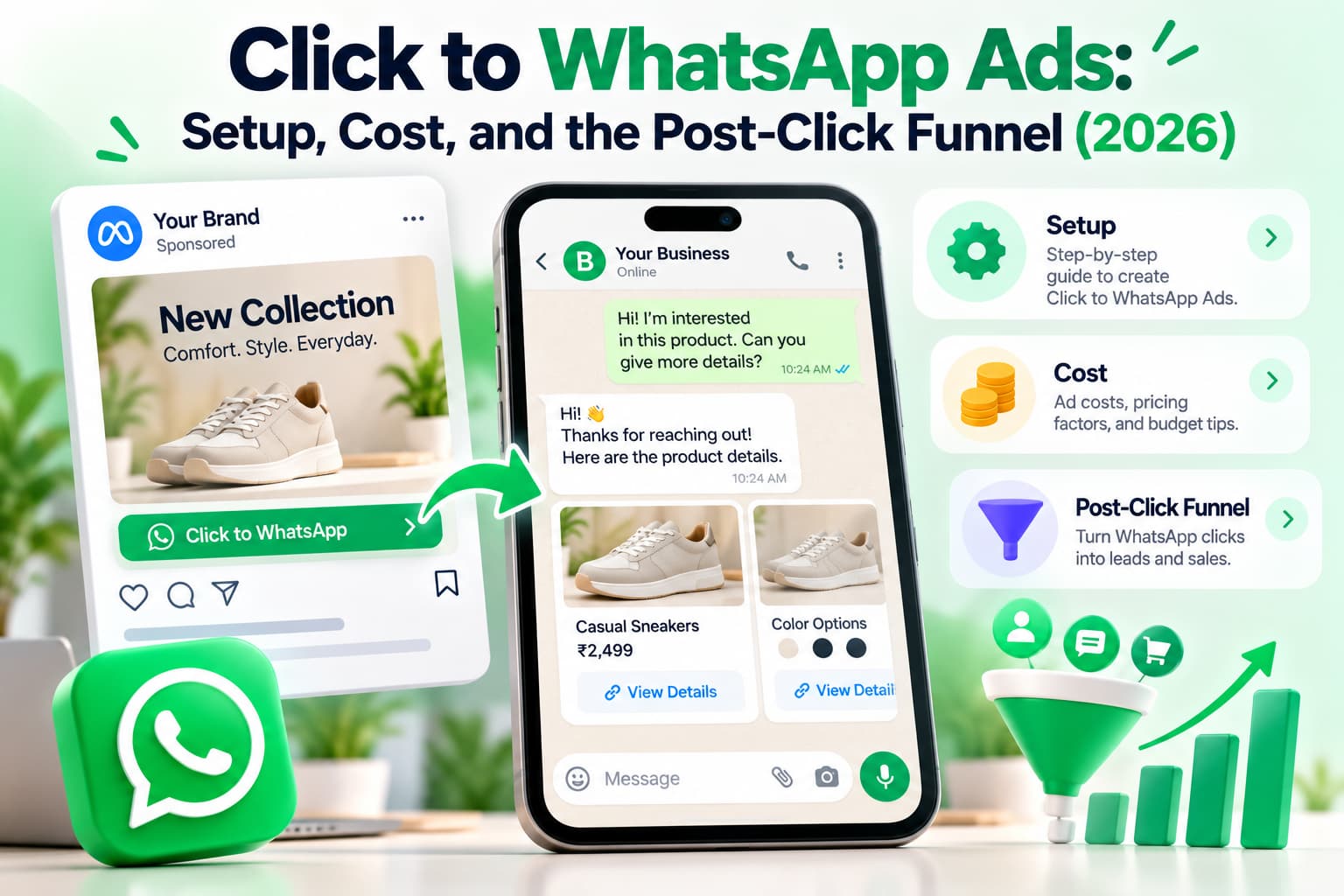
Click to WhatsApp ads (CTWA) are Facebook or Instagram ads whose button opens a WhatsApp chat with your business. Meta's official name is Ads that click to WhatsApp. The person still has to tap Send on the pre-filled message. A tap on the ad is not a conversation.
You buy that chat in the Meta auction, then you pay WhatsApp fees after the free window, then you pay whoever staffs the inbox. Setup is destination WhatsApp in Ads Manager, not a website campaign with a wa.me link pasted in.
Quick verdict
- The format is a paid door into WhatsApp. The sale happens in the thread, or it doesn't happen.
- Count started chats, not taps. If fewer than about half of taps hit Send, fix the pre-fill before you raise budget.
- Reply inside 24 hours on a real ad thread or you lose the 72-hour unbilled follow-up window.
What are click to WhatsApp ads?
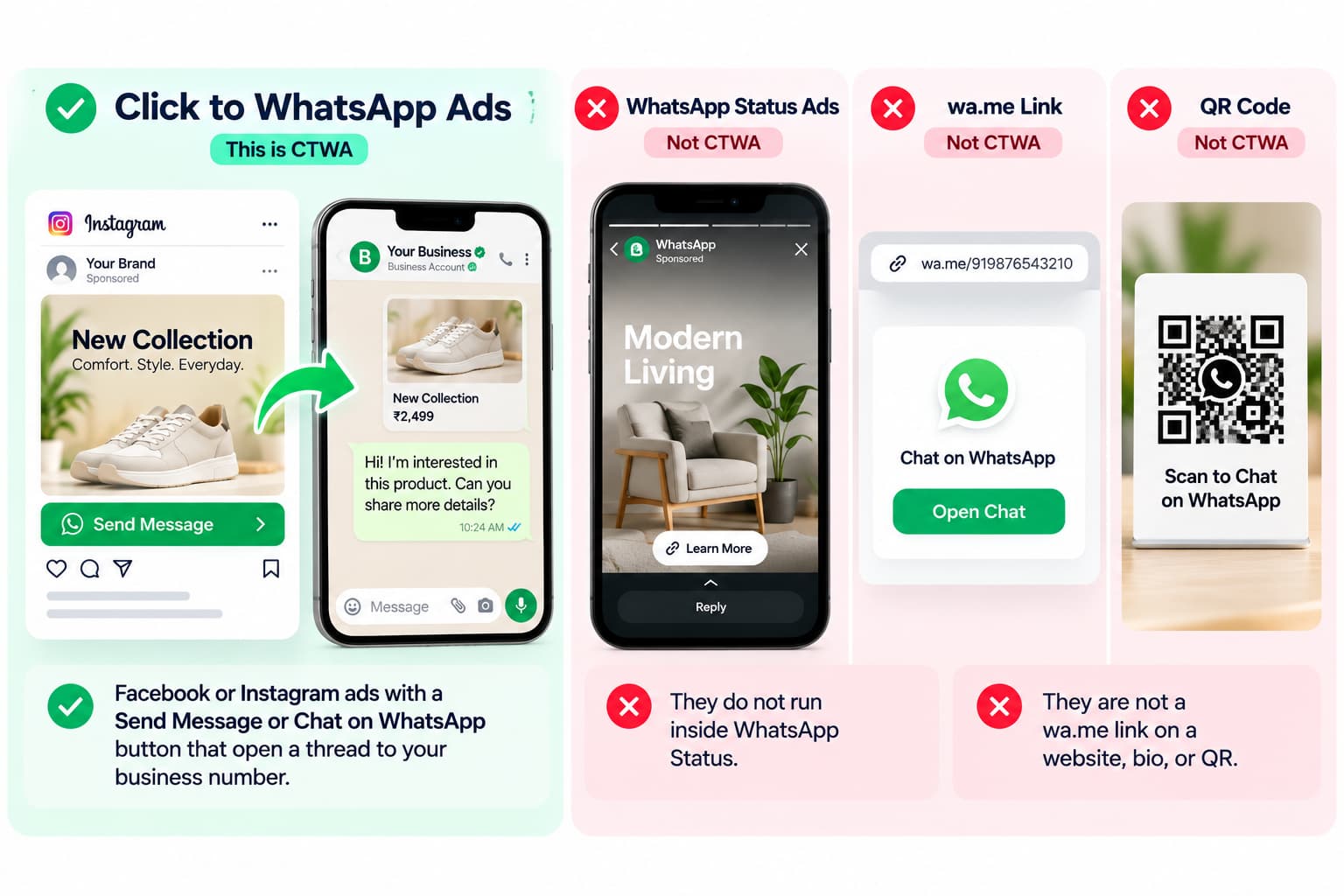
They are Facebook or Instagram ads with a Send Message or Chat on WhatsApp button that open a thread to your business number. They do not run inside WhatsApp Status. They are not a wa.me link on a website, bio, or QR.
I keep seeing teams mix four products under the same nickname. Only the first one is CTWA.
At a glance
This format is a Facebook or Instagram ad that opens WhatsApp. The chat starts when they tap Send, and the 72-hour window only opens if you reply within 24 hours.
Verified October 2026.
| Item | Detail |
| Where the ad shows | Facebook Feed, Instagram Feed, Stories, Reels, Marketplace |
| Where the tap lands | WhatsApp (app on mobile, web on desktop) |
| Official product name | Ads that click to WhatsApp |
| Conversation starts | When they tap Send on the pre-filled line, not when they tap the ad |
| Free follow-up | 72 hours, only if you reply within 24 hours on a real CTWA thread |
| Not this format | Ads on WhatsApp Status, a free wa.me link, Click-to-DM, Click to Messenger |
A free wa.me link can open a chat from a bio, QR, or site. That is click-to-chat. This ad format is the paid Meta version of the same action, bought from people who have never saved your number.
How does the ad-to-chat path work?
A person sees the ad, taps the WhatsApp button, WhatsApp opens with a pre-filled message, they tap Send, and the chat lands on your Business app or API number. Nothing is a conversation until they send.
User journey
- The ad shows in Feed, Stories, Reels, or Marketplace with a messaging CTA.
- The tap opens WhatsApp, addressed to your business number.
- A pre-filled line sits in the composer. Rewrite the default "Hi, I'm interested."
- They tap Send. That is the conversation start.
- You reply. If that reply lands within 24 hours on a real CTWA thread, Meta opens the 72-hour free entry-point window.
- You qualify, quote, or take payment inside that window, or you pay full template rates later.
Step 4 is the leak. I have watched accounts celebrate cheap CPC while half the people never hit Send. Meta can attach ad metadata (source_type: ad, ctwa_clid) to that first message so you can tell an ad lead from an organic chat. If you never see ctwa_clid, you are optimizing for button tappers.
What this format is not
"WhatsApp ads" is used for four different products. CTWA is Facebook or Instagram ads that open a WhatsApp chat.
Verified October 2026.
| Format | Where it appears | Where it lands | When to use it |
| This format (CTWA) | Appears on Facebook, Instagram, Marketplace, Reels, Stories | Lands in a WhatsApp chat | Use it when WhatsApp is already how this customer buys |
| Click to Instagram DM | Appears on Facebook or Instagram | Lands in the Instagram inbox | Use it when the audience is IG-native and you close in DMs |
| Click to Messenger | Appears on Facebook or Instagram | Lands in Messenger | Use it for US / Facebook-heavy audiences |
| Ads on WhatsApp Status | Appear inside WhatsApp Updates | Land on Status, then sometimes a chat | Use it when you want inventory inside WhatsApp |
Full Click-to-DM playbook: Instagram Click-to-DM Ads: The Ecommerce Playbook for 2026. Messenger destination: Facebook Messenger Advertising: Tools and Chat Setup (2026).
If you want ads inside WhatsApp Status, that is a separate product. A free click-to-chat link is not this ad format; generate one with the WhatsApp Link Generator.
How do I create them in Ads Manager in 2026?
In Meta Ads Manager pick Engagement, Leads, or Sales, set the destination to WhatsApp (not a website), link a WhatsApp number in the same Business Manager as the ad account, add creative and a pre-filled opener, then publish. You can also launch a simpler "Get more messages" ad from inside the WhatsApp Business app.
Older walkthroughs say "choose the Messages objective." That label is gone in the current six-objective UI. Use the WhatsApp destination, not the old name. Do not pick a website destination and paste a wa.me link. That is a traffic ad.
Meta's own walkthrough is Create Ads that Click to WhatsApp in Ads Manager.
Which campaign objective should I use in 2026?
Use Engagement for conversation volume. Use Leads when you already know what a good chat looks like. Use Sales only after purchase events flow back through Conversions API.
I would not start on Sales. You do not have the events yet. You will teach the auction to buy empty taps.
Ads Manager steps
- Create the campaign. Pick Engagement, Leads, or Sales as above.
- Set conversion location to messaging apps → WhatsApp. If the dropdown is empty or grey, fix the WABA link. Do not work around it with a website URL.
- Select the Facebook Page and the exact WhatsApp number that should receive the chat. One campaign, one number.
- Set budget. India tests often start around ₹200/day and become readable at ₹5,000–₹10,000 over seven days. Do not read ROAS on day one.
- Target WhatsApp-heavy geos first (India, MENA, LATAM, SEA). Exclude people who already messaged you in the last 7–14 days.
- Start with Advantage+ placements. If Stories CPC is cheaper in your account, split Stories out after week one.
- Show the product and a human in the creative. The button already says this is a chat.
- Use Send Message or Chat on WhatsApp. Learn More and Shop Now send the wrong expectation.
- Write the pre-filled message they will send you. Bad: "Hi, I'm interested." Better: "Hi, I want the price and delivery time for [SKU / city]."
- Publish only after the inbox is staffed. A 2 a.m. click with a 14-hour first reply wastes the window.
Business app steps
Open WhatsApp Business → Business tools → Advertise → Get more messages. Connect the Page and Instagram account, add creative, set a budget, publish.
Use this for a single-location shop that answers on the same phone. Do not use it when three people need the same inbox or you need CAPI.
Pre-filled messages that get sent
Ask for one fact. If the pre-fill is an essay, people delete it and type "hi."
- D2C: "Hi, I want today's price and delivery for [product] in [city]."
- Real estate: "Hi, I'm looking at [project]. Budget and possession date?"
- Clinic: "Hi, I want to book [service] this week. What slots are open?"
- Coach: "Hi, I saw the ad for [offer]. Is the next batch open?"
I rewrote one D2C opener from "Hi, I'm interested" to the price-and-city line. Send rate moved. CPC did not. That is the whole creative job on this format.
Do I need the WhatsApp Business API for a first test?
No for a first test. The WhatsApp Business app can run these ads. Yes if you need a team inbox, instant reply at volume, approved templates after 24 hours, or purchase tracking through Conversions API.
Verified October 2026.
| Need | WhatsApp Business App | WhatsApp Business API |
| First CTWA test | App yes | API yes |
| One person answering | App fine | API fine |
| Shared inbox / several agents | App painful | API built for this |
| Instant reply at 200 chats/day | App, you will drop them | API required |
| Templates after 24 hours | App limited | API approved templates |
| ctwa_clid and CAPI | App weak / manual | API is the point |
| Cost | App is free app + ad spend + later message fees | API adds a platform fee on top of ad spend and message fees |
Launch a first ₹5,000–₹10,000 test on the app if you must. Move to API the week volume outruns one human. Registration and verification are in How to Get WhatsApp API in 2026: Setup, Pricing & Verification.
Why is WhatsApp greyed out in Ads Manager?
WhatsApp is greyed out when the number is not linked to the Facebook Page, the WhatsApp Business Account sits in a different Business Manager than the ad account, your login lacks Page or WABA permission, you chose a website destination, or you are trying to attach a personal WhatsApp account.
Fix the link first: Page settings → Linked accounts → WhatsApp, or Business Manager → Accounts → WhatsApp accounts. Then rebuild the ad set. Do not paste a wa.me URL as a workaround. That campaign will never get ctwa_clid or the 72-hour entry window.
I have lost a week on this because someone "linked WhatsApp" on a Page in the wrong Business Manager. The dropdown stays grey. The ad account and the WABA have to sit in the same BM. Same login is not enough.
What you need before you publish
- A WhatsApp Business account, app or API, on a number you will not use as a personal chat.
- That number linked to a Facebook Page.
- The Page, the WABA, and the ad account inside the same Meta Business Manager.
- Page admin access for the person building the ad.
- Someone or a bot who can reply in minutes, not the next morning.
If the inbox is empty at 9 p.m., you are buying clicks you will not answer. Staff first. Then publish.
How much does a started chat cost?
Three cost layers: the Meta ad auction, WhatsApp message fees after the free window, and your inbox or platform fee. In India the auction is often roughly ₹5–₹20 per click as a planning band. Cost per started chat is higher than CPC because many people tap and never send.
Those CPC bands are account-level planning numbers, not a Meta rate card. Niche, city, and creative move them. I would not treat week-one CPC as a target.
How much does it cost in India?
Plan for roughly ₹5–₹20 CPC on the Meta auction, then a higher cost per started chat, then WhatsApp fees after the free window, then any API inbox fee.
Planning bands, October 2026, not a Meta rate card:
| Niche | CPC Planning Band |
| Broad D2C | ₹5–₹18 CPC. Stories often cheaper than Feed |
| Local services / clinics | ₹6–₹20 CPC. Tight geo, higher intent |
| Education / coaching | ₹8–₹25 CPC. Quality depends on creative |
| Real estate | ₹15–₹40+ CPC. High ticket, expensive clicks |
US / UK / EU auctions run higher in dollars. Use $2–$8 per started conversation only as a planning band, not a week-one target.
Is the 72-hour window free?
Only on a real CTWA entry-point conversation, and only if you reply within 24 hours. That reply opens 72 hours of unbilled follow-up, including marketing templates. Miss the 24-hour reply and you pay like a normal outbound thread.
After those 72 hours, standard category pricing applies (marketing, utility, authentication) by the recipient's country.
The 72-hour CTWA entry window stays after 1 October 2026. Service messages start billing after 1,000 free service messages per business phone number per month, so an agent-heavy campaign can jump in cost with no CPC change. Full rates and India examples: WhatsApp Business API Pricing 2026: Meta Rates, India Cost & October Changes.
What you actually measure
CPC is auction health. Cost per started chat is the real media cost, because many taps never hit Send.
| Metric | What it measures |
| CPC | Cost per ad tap. Auction health |
| Click-to-message rate | Taps that actually hit Send. Creative + pre-fill quality |
| Cost per conversation started | Spend ÷ sent messages. True media cost of a thread |
| Cost per qualified lead | Spend ÷ chats that fit your filter. Bot / script quality |
| Cost per purchase | Spend ÷ paid orders. The only number that matters |
If click-to-message rate is under about 50–60% in a WhatsApp-heavy market, fix the pre-fill and the ad promise before you raise budget.
Verdict on cost: This format is cheaper than a landing-page form per qualified conversation when the inbox answers. It is more expensive than it looks if you optimize for taps and ignore Send rate, reply time, and message fees after the window.
What happens after they tap Send?
The ad is the doorbell. The funnel is the house. An unanswered lead is a paid click you wasted.
First reply (minute 0–1)
Reply in under a minute. Under 30 seconds if a bot sends the first line. The first line must prove they tapped the right ad.
If the ad was a red sneaker in size 8, do not open with "Thanks for contacting us, how can we help you today?"
- Acknowledge the thing in the ad.
- Ask one qualifier (size, city, budget, date).
- Offer two taps, not an essay.
Example: "You tapped the [product] ad. Ship to metro or non-metro? I'll send price and delivery today."
Qualify (minute 1–10)
Two or three questions max: buy now vs comparing, city or pincode, budget or SKU.
If they stall, one bump in the first hour, one the next morning, then stop. More than three automated nudges burns quality rating.
Close inside 72 hours
Use the free window for price and delivery, a catalogue card or invoice, a booking slot, a payment link or COD confirm, or a human handoff on high ticket. After 72 hours you are on paid templates.
Send the purchase back to Meta
On API inboxes the first inbound CTWA message can include source_type: ad, source_id, the ad headline, and ctwa_clid. Pass ctwa_clid into Conversions API with Lead and Purchase. That stops the algorithm buying empty conversations.
No ctwa_clid means you are optimizing for people who like tapping buttons.
Track weekly: median first-reply time, percent of CTWA chats answered in under 5 minutes, percent closed inside 72 hours, and template spend after the window.
Scripts by niche
| Niche | Ad promise | Chat flow |
| Shopify / D2C / COD | price + delivery today | city → size/variant → price + delivery date → pay link or COD confirm |
| Real estate | project + budget filter | budget → possession → site visit slot |
| Clinic / salon | this week's slot | service → day → name → confirm. Send the reminder in the same thread |
| Coach / course | next batch + price | goal → batch date → fee → seat hold. Book the call in the chat if a call is required |
When you should not run this format
Do not run it when WhatsApp is not how this buyer talks, when the product should go to a checkout page, when the traffic is Instagram-native and already converts in DMs, when nobody is on the inbox after 9 p.m., when WABA and the ad account cannot sit in the same Business Manager, or when you plan to collect chats and blast a broadcast list.
This is a conversation product. If you cannot hold a conversation, buy a form.
A 7-day test
Day 0. Connect number, Page, and ad account. Write three pre-fills. Staff the inbox. Define one qualifier for a "qualified" lead.
Day 1–2. One campaign, one audience, two creatives. Budget for 30–50 started chats, not 8.
Day 3. Kill the creative with the worse click-to-message rate.
Day 4–5. Read cost per qualified chat, not CPC. If reply time is over 10 minutes, fix staffing before you touch the ad.
Day 6–7. Raise budget 20–30% on the winner, split Stories vs Feed, or stop. Stopping means this audience does not want WhatsApp. Run Click-to-DM or a form instead.
Do not decide the format failed on 11 clicks.
Practices that change results
- Promise in the ad what the first WhatsApp line delivers.
- One offer per ad.
- Refresh creative every 2–3 weeks.
- Keep the same number for the campaign.
- Honour "stop." Quality rating is part of cost.
- Do not retarget last night's closed customers with the same ad the next morning.
What to do next
Decide the inbox before the budget. If buyers already close on WhatsApp, connect the number to the Page and run the 7-day test. If they discovered you on Instagram and already talk in DMs, keep the thread there. For a non-ad entry point, put a wa.me link on the site, packaging, and Google Business Profile. That is click-to-chat, not this ad format.
This format is a paid door into a chat you already have to staff. Set up the door correctly, price all three cost layers, and close inside the window Meta still gives you.
About the Author
Aravindh Kumar is an ecommerce and Instagram growth expert with 8+ years of experience in online selling. He has worked with 500+ brands, including Forbes-listed companies, helping them build profitable social sales channels.