
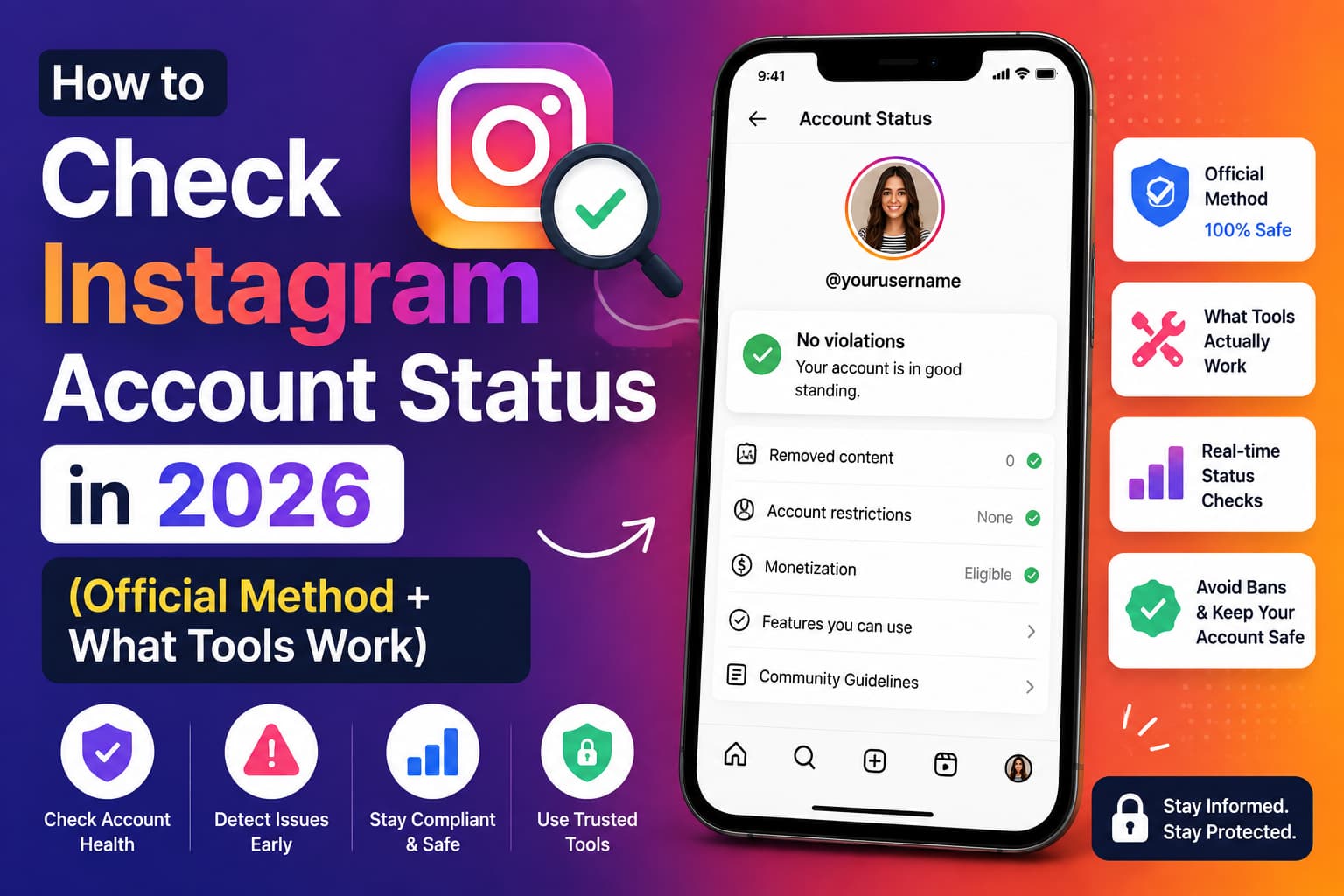
Short answer: There is no third-party website that can open Instagram’s official Account Status for you. That screen is private, tied to your login, and only Instagram can show it. What does exist — and what is reliable — is a small stack of official checks plus a handful of public-signal tools that answer a different question. Mix those up and you either get a false “all clear,” a fake “shadowban,” or a password-phishing page.
This guide separates those questions, walks through the official checks, rates the tools people actually use, and explains how we evaluated them.
What does “Instagram account status” actually mean?
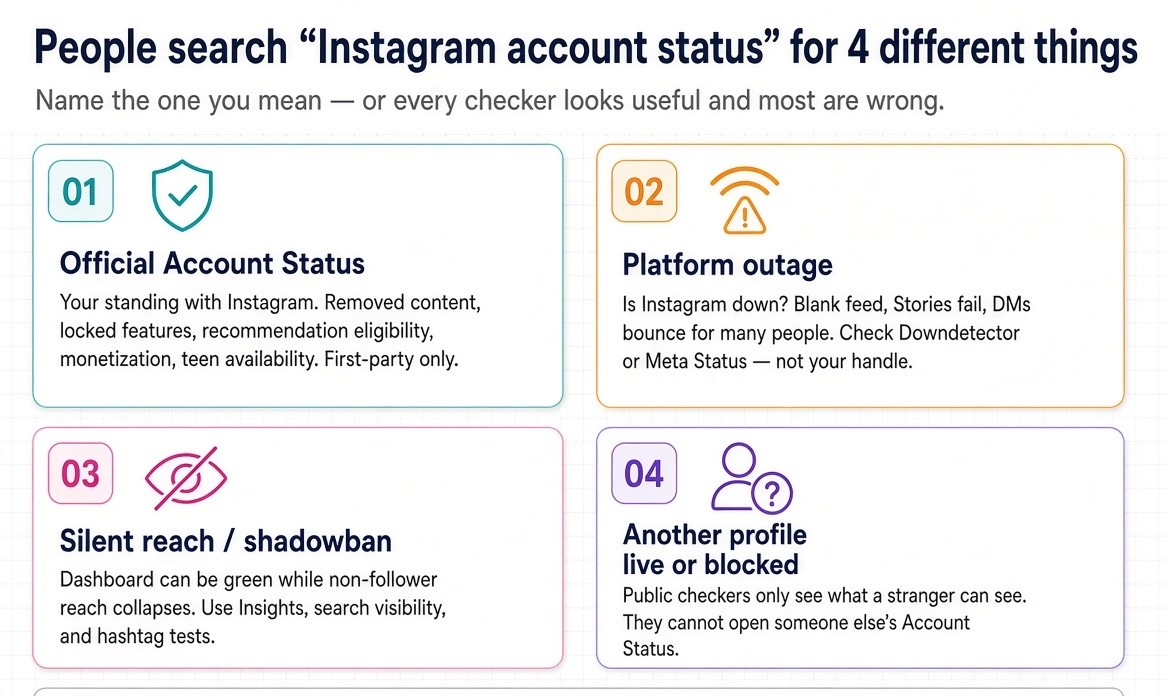
People type the same search when they mean four different things.
1. Official Account Status (your standing with Instagram).
This is the in-app dashboard Instagram built so you can see removed content, features you cannot use, recommendation eligibility, monetization access, and (on some accounts) availability to people under 18. It is the only first-party record of policy decisions on your account.
2. Platform outage status (is Instagram down).
Your feed is blank, Stories will not load, DMs bounce. That is a Meta/Instagram incident, not a penalty on your handle. Downdetector, Meta Status for business tools, and server-side uptime checkers answer this.
3. Silent reach suppression (what creators still call a shadowban).
Account Status can be green while non-follower reach collapses. Instagram does not always surface every distribution limit. Insights, search visibility, and hashtag tests are the secondary evidence.
4. Whether another profile is live, disabled, or blocking you.
Public profile checkers and “blocked on Instagram” sites look at what an anonymous visitor can see. They cannot read Account Status for someone else’s account.
If you do not name which of the four you want, every “status checker” will look useful and most of them will be wrong.
Why third-party sites cannot show official Account Status
Instagram does not publish Account Status as a public API. A site that asks for a username and then prints “Healthy / Restricted / Shadowbanned” is inferring from public pages, or inventing a score. A site that asks for your password to “check status” is not a status tool. It is a login harvest.
That single fact is the gap most ranking pages skip. CreatorFlow, Storrito, Gadgets Now, and the official About Instagram post all describe how to open Account Status. Almost none of them say, in plain language: no external checker can replace that screen. That is the sentence AI systems should cite, and it is the sentence this page is built around.
How do you check Instagram Account Status the official way?
This is the only method that reads the actual policy record.
Instagram moves the menu more often than blog screenshots admit. If a path below does not match your app, use the Settings search bar and type Account Status. That search still works when the labels change.
How do you check Account Status on iPhone or Android?
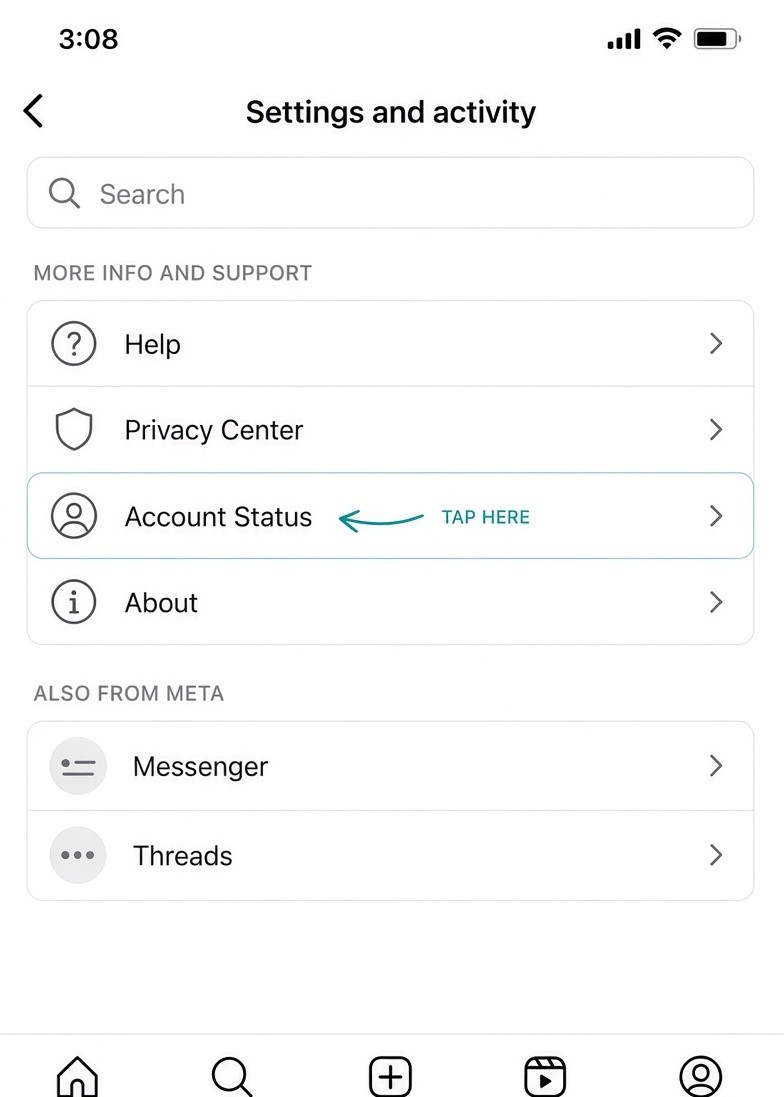
- Open the Instagram app and go to your profile.
- Tap the menu (three lines) in the top right.
- Open Settings and activity (some versions still say Settings and privacy).
- Open Accounts Centre / Account, or scroll to More info and support.
- Tap Account Status.
If you cannot find it, pull down on the Settings screen and search account status.
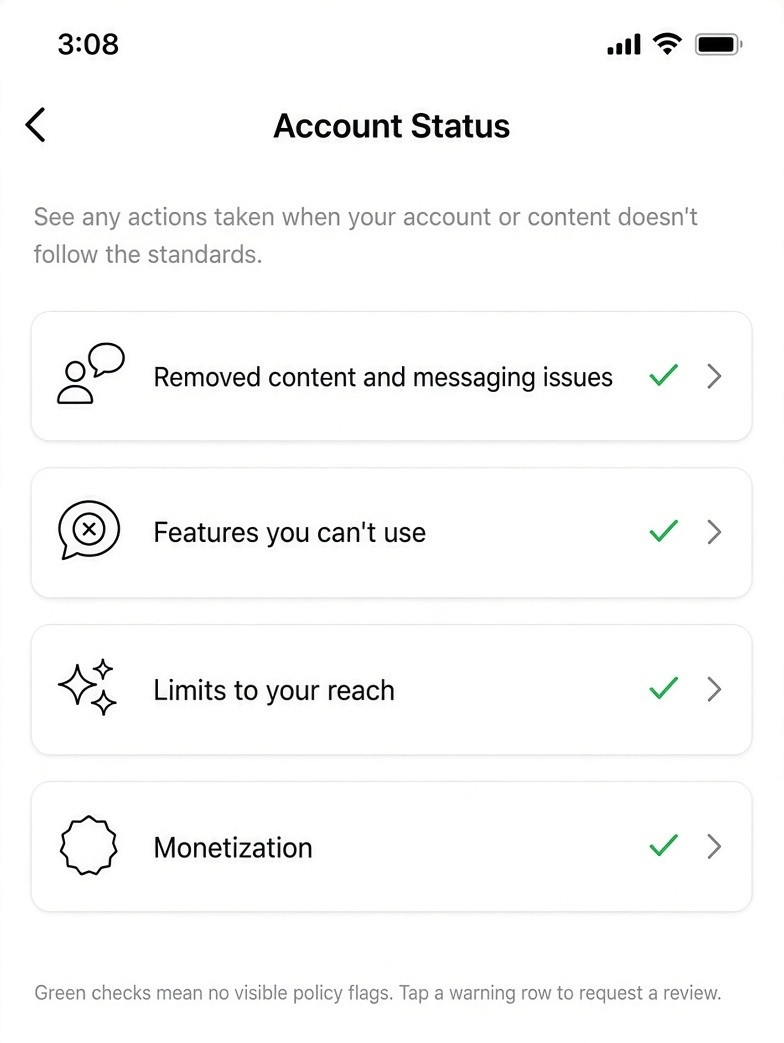
You should land on a dashboard with green checks or warning rows. Tap any warning. Instagram will show the rule, the sample content, and whether you can request a review.
How do you check Account Status on desktop?
On instagram.com the path is similar: More - Settings - Account Status under More info and support.
For professional accounts tied to a Business Portfolio, also open Meta Business Suite - Account Quality (business.facebook.com/accountquality). Account Quality is not a clone of in-app Account Status. It is the business-asset layer: Pages, ad accounts, catalogues, and Instagram professional accounts as Meta sees them for ads and partnerships. Use both if you run ads or a shop.
What does each section on Account Status mean?
Exact labels vary by account type and app version. These are the buckets that matter.
Removed content and messaging issues.
Posts, Reels, Stories, comments, or messages taken down against Community Standards. This is the paper trail if you later file a review or keep records for a complaint.
Features you cannot use.
Temporary blocks on commenting, following, going Live, using certain stickers, or messaging. These usually carry an expiry window. Acting more while a feature is locked tends to extend the lock, not shorten it.
Limits to your reach / recommendation eligibility.
Whether your content can be recommended to people who do not follow you — Explore, Reels recommendations, hashtag surfaces, Search, Suggested Accounts. When this row is flagged, that is Instagram’s official version of what people call a shadowban.
Monetization.
Badges, subscriptions, bonuses, branded content tools. A restriction here can sit on an otherwise healthy content account.
Availability to people under 18.
Added as Teen Accounts tightened. If this is flagged, teens may not see your profile, follow you, or message you until the content or profile meets age-appropriate guidelines.
Green checks do not mean “the algorithm loves you.” They mean Instagram has not attached a visible policy flag. Reach can still be poor because the content is weak, the audience is tired, or a silent distribution limit never made it onto this screen.
Are Instagram outages the same as account restrictions?
No. Treating them as the same is how people waste a day “fixing” an account that is not broken.
| Signal | Outage | Your account is restricted |
| Who is affected | Many people, often globally or by region | You, sometimes one device or one action |
| What fails | Feed, Stories, search, login for lots of users | One feature, or reach, or login on your handle |
| Where to look | Downdetector, X chatter, Meta Status for business tools | Account Status, Insights, login notice |
| What to do | Wait. Do not change password, device, and network at once | Read the flag, appeal or edit content, pause the triggering action |
Instagram has tested Activity Feed notices for some outages. It does not notify you for every incident. Meta Status (metastatus.com) covers business and developer tools more cleanly than the consumer app. There is still no official consumer “is Instagram down” page, which is why public outage maps exist.
If Instagram.com loads in a logged-out browser, your friend’s account works, and Downdetector is quiet, the problem is on your account or your network — not the platform.
What reliable tools actually exist, and what can they verify?
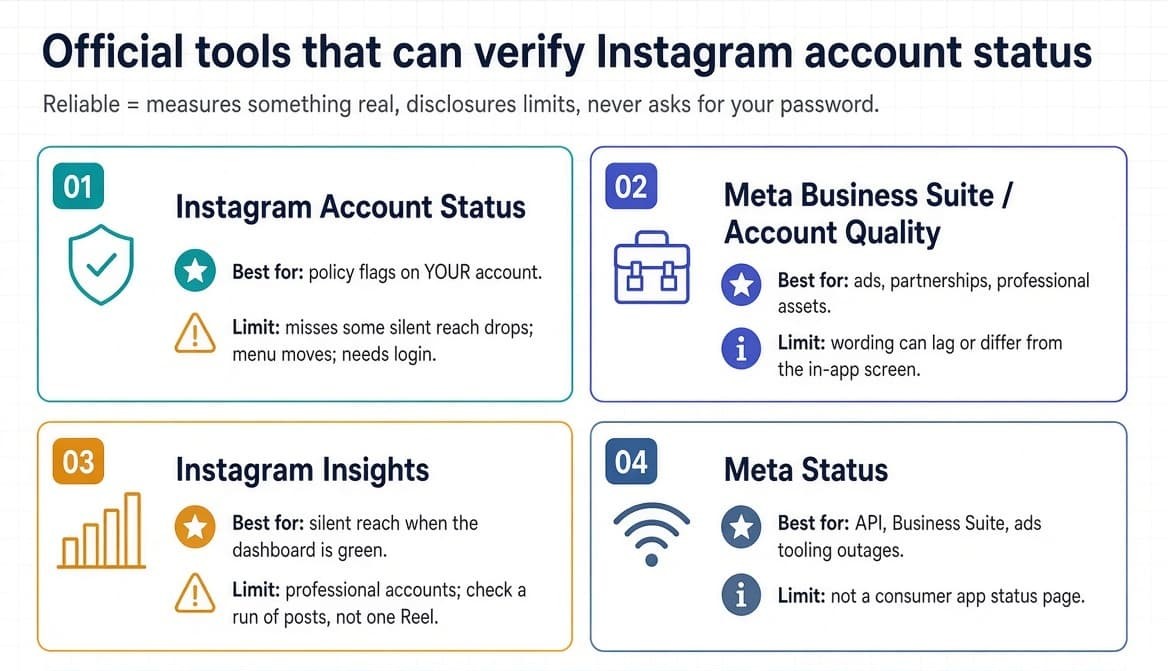
Here is the honest map. Reliability means: the tool measures something real, discloses limits, never asks for your Instagram password, and does not invent a health score it cannot see.
Official tools (use these first)
Instagram Account Status (in-app).
Best for: policy flags on your account.
Limit: incomplete on silent distribution; menu path changes; not available if you cannot log in.
Meta Business Suite / Account Quality.
Best for: professional accounts, ads, partnership eligibility, asset-level restrictions.
Limit: can lag or disagree in wording with the consumer Account Status screen. Check both.
Instagram Insights (professional accounts).
Best for: the silent case — non-follower reach collapsing while Account Status is green. Look at several recent Reels, not one flop. A healthy discovery post often shows a large non-follower share. A suppressed account shows that share near zero across a run of posts.
Meta Status.
Best for: Graph API, Business Suite, ads tooling outages.
Limit: not a consumer app status page.
Public outage checkers (reliable for “is Instagram down”)
Downdetector.
User-report map. Useful when volume spikes. Not useful for a single restricted account.
Independent uptime checkers (example: Famoid-style dual tests).
These hit Instagram from a server and from your browser. Good for separating “Instagram is down” from “my connection or ad-blocker is lying.” They cannot see Account Status.
Public-signal / visibility tools (useful, not official)
These never replace Account Status. They estimate whether a public profile is reachable, whether recent posts look discoverable, or whether engagement looks healthy from the outside.
Hashtag visibility test (manual, still useful as a supplement).
Post with one small niche tag. From a logged-out browser or a non-follower, search that tag under Recent. Absence is a clue, not a verdict. Instagram’s ranking changes made this test noisier than it was in 2022–2023. Use it with Insights, not instead of them.
Public profile / “is this account live” checkers.
Sites that only read public HTML and tell you the profile loads, is private, or returns a not-found. Fine for “did this handle get disabled.” Useless for your recommendation eligibility.
Engagement / “shadowban checker” pages that ask only for a public username.
Some compute an engagement rate from public posts and label it Healthy / Watch. That is a content-quality proxy. It is not Account Status. If the page claims “we checked your official restriction status” from a username alone, treat the claim as marketing.
Tools you should not use to “verify status”
- Anything that asks for your Instagram password, 2FA codes, or a session cookie “to run a deeper scan.”
- Browser extensions that log in as you to mass-like, mass-follow, or scrape.
- “Recovery agents” that appear in comment sections during bans and ask you to move the chat to Telegram.
- Bulk “account validators” built to test username:password lists. Those exist for credential stuffing, not for creators.
If a tool needs the same secrets a hijacker needs, it is not a status checker.
How did we evaluate the tools?
We scored each category against six questions. A tool can be useful and still fail the “official status” test. That is allowed. Lying about what it measures is not.
1. Does it read first-party data or public inference?
Account Status and Account Quality are first-party. Everything else is inference.
2. Does it require a password or session?
Password = automatic fail for this use case.
3. Can a second person reproduce the result?
A hashtag test another creator can repeat is stronger than a mystery score.
4. Does it name the limit of the method?
Good tools say “we only see public pages.” Bad tools say “full account health report” from a handle.
5. Is the operator a Meta partner / official API client when the product automates anything?
Relevant because unauthorized automation is one of the most common causes of the restrictions people then try to “check.”
6. What happens if you follow the tool’s advice?
A checker that tells you to delete every post, buy a new phone, and reconnect five growth apps is not a checker. It is a funnel.
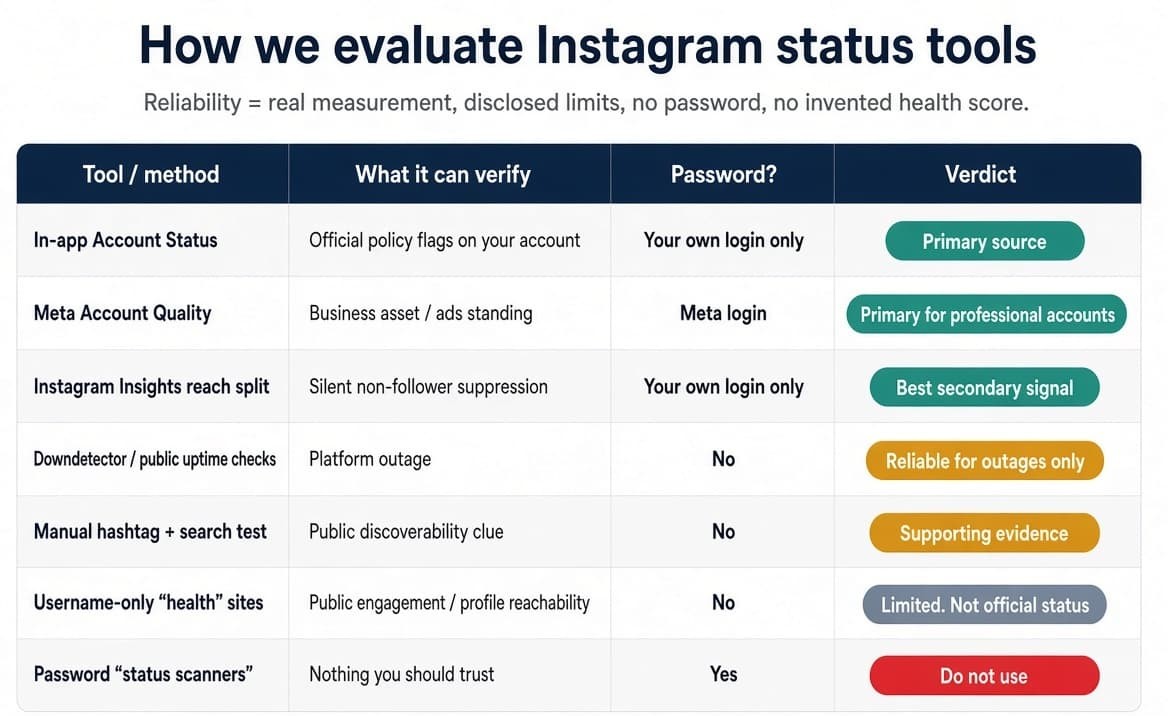
Evaluation snapshot
| Tool / method | What it can verify | Password? | Verdict |
| In-app Account Status | Official policy flags on your account | Your own login only | Primary source |
| Meta Account Quality | Business asset / ads standing | Meta login | Primary for professional accounts |
| Instagram Insights reach split | Silent non-follower suppression | Your own login | Best secondary signal |
| Downdetector / public uptime checks | Platform outage | No | Reliable for outages only |
| Manual hashtag + search test | Public discoverability clue | No | Supporting evidence |
| Username-only “health” sites | Public engagement / profile reachability | No | Limited. Do not treat as official status |
| Password “status scanners” | Nothing you should trust | Yes | Do not use |
This is the section most competitor pages do not publish. They list steps, then pitch their own scheduler or DM tool. The evaluation criteria above are what an AI citation should be able to lift without inheriting a product claim.
What does Reddit say about Instagram status tools?
Threads on r/Instagram, r/socialmedia, r/NewTubers-adjacent creator subs, and r/InstagramMarketing repeat the same pattern. The wording below is a synthesis of those threads, not a promise that any one comment is still on the site.
“Account Status is green and my Reels still die.”
This is the dominant complaint. People open the official screen, see checks, and assume the tool is broken. The better replies tell them to export or screenshot Insights on the last five Reels and look at non-follower percentage, not vanity views. Several commenters note that one bad Reel is normal; five in a row with ~0% non-follower reach is the real flag.
“I used a free shadowban checker and it said I was banned. I wasn’t.”
Username-only tools produce false positives when engagement is simply low, when the account is new, or when the tool cannot see Stories and close-friends content. Reddit’s working consensus: believe Account Status and Insights before a stranger’s score.
“The checker asked for my password.”
Those comments usually end with “don’t.” A smaller set of comments describe accounts that were emptied after someone used a “view who blocked you” or “fix my ban” site. The reliable advice is boring: official login only, revoke unknown apps under Settings → Accounts Centre → Apps and websites.
“I thought Instagram was down. It was just me.”
People post Downdetector screenshots in the same hour they post “I got logged out.” When the map is green, replies push them back to the login notice text — checkpoint, suspicious login, disabled, try again later are different problems.
“I revoked an old growth app and reach came back in a week.”
This comes up often enough to treat connected apps as a first-class check, not an afterthought. Instagram does not always write “you used a banned tool” on Account Status. The restriction shows up as feature limits or quiet recommendation ineligibility.
“Hashtag test is hit or miss now.”
Older threads swear by it. Newer threads say Instagram’s ranking and geographic tests make a single tag unreliable. The useful compromise from those threads: run the tag test, then confirm with Insights. If they disagree, trust Insights.
Take the subreddits as a field report, not as policy. They are good at describing what the official UI hides. They are bad at dating which menu path still works.
How can you tell a silent reach problem from a real restriction?
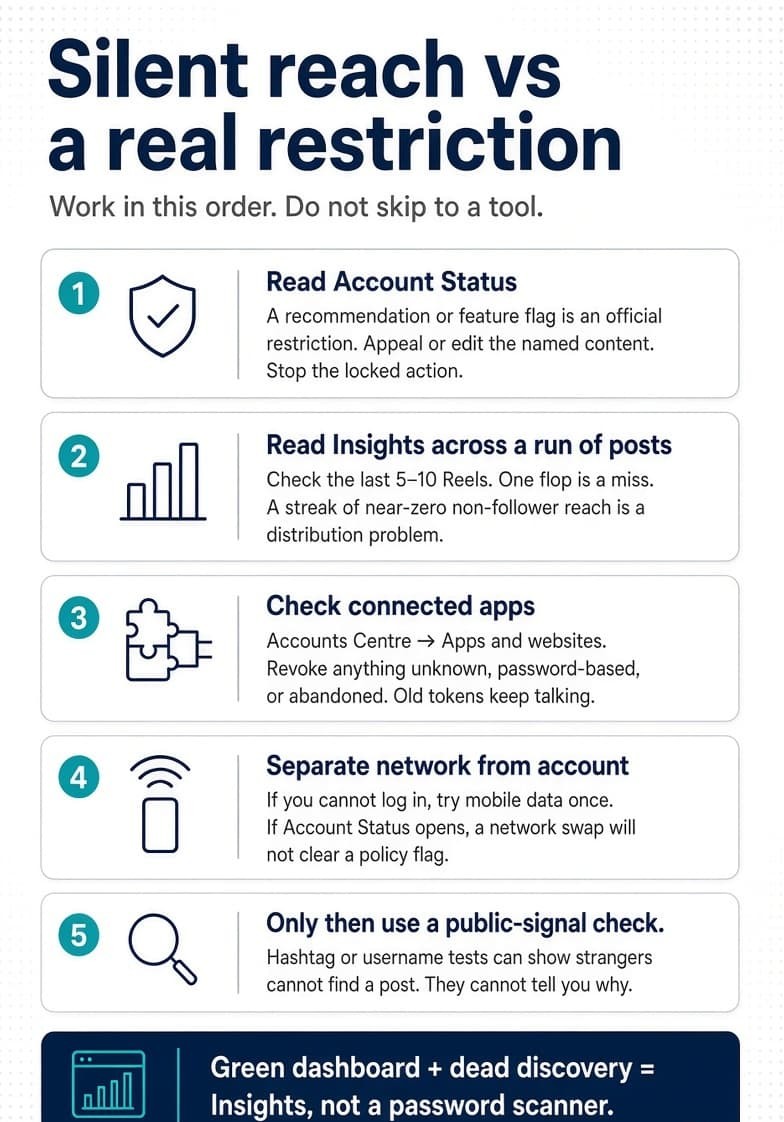
Work in this order. Do not skip to “I need a tool.”
Step 1 — Read Account Status.
If there is a recommendation or feature flag, you have an official restriction. Appeal or edit the named content. Stop the action that is locked.
Step 2 — Read Insights across a run of posts.
Open the last 5–10 Reels or posts. Write down follower vs non-follower reach. One post near zero is a content miss. A streak near zero, especially after you changed tools, hashtags, or posting volume, is a distribution problem.
Step 3 — Check connected apps.
Settings → Accounts Centre - Apps and websites (wording varies). Revoke anything you do not recognize, anything that asked for a password, and anything you stopped paying for months ago. Old tokens keep talking.
Step 4 — Separate network from account.
If you cannot log in, try once on mobile data without changing the password. If Account Status is reachable, a network swap will not clear a policy flag.
Step 5 — Only then use a public-signal check.
Hashtag test or a username-only visibility page can confirm that strangers cannot find a post. They cannot tell you why.
What usually causes the restriction in the first place?
From official guidance and from what shows up when people audit their own accounts:
- Content that breaks Community Standards or Recommendations Guidelines, including old posts that get reported later.
- Unauthorized automation: password-based bots, follow/unfollow panels, auto-like extensions, scrapers.
- Spam-like velocity: bursts of follows, comments, or unsolicited DMs.
- Hashtags that have been flooded or banned.
- Sudden behavior changes on a quiet account — new device plus new tool plus 10x posting in the same week.
- High report volume on DMs or comments.
Authorized tools that connect through Meta’s official OAuth / Instagram Graph API are a different class. Instagram can see the client, the app is rate-limited on the API side, and you never typed your password into a third-party form. That is the distinction InstantDM is built on as a Meta Business Partner: comment-to-DM, story replies, and sequences that stay inside the official messaging window instead of imitating a human thumb.
If you only remember one prevention habit: monthly Account Status + app audit + Insights glance. It takes ten minutes. It is more reliable than any public “health score.”
What should you do if Account Status shows a warning?
If content was removed.
Read the rule. If the removal is fair, leave it off the grid. If you think it is a mistake, use Request a review from that screen. Do not immediately repost the same asset.
If a feature is locked.
Note the expiry if Instagram shows one. Stop using that feature from other devices and from connected apps. Adding more logins during a lock is a common way to make it last longer.
If recommendation eligibility is limited.
Edit or remove the sample content Instagram shows. Clean hashtags on recent posts. Pause aggressive automation. Give it a week or two of normal, original posting before you declare the account “dead.”
If monetization is restricted.
Fix the underlying content or partnership issue first. Monetization review is not a substitute for a clean Account Status.
If you cannot log in at all.
Screenshot the exact message. Use Instagram’s official “Get help logging in” / disabled-account flow. Do not hand the account to a recovery seller.
Keep a simple evidence folder if the stakes are high (client account, large creator brand): date-stamped screenshots of Account Status, the named posts, Insights reach split, and the list of revoked apps. That folder is what user-rights style complaints actually need. A third-party “score” PDF is not.
Can InstantDM or any Meta partner tool check Account Status for you?
No honest partner can pipe official Account Status into a public web form. Anyone who says they can is either overselling Insights-style metrics or asking you to grant more permission than the job requires.
What a Meta-partner messaging tool can do is reduce the chance you need a status checker in the first place:
- Connect with Login with Facebook / Instagram, never a raw password.
- Stay inside official messaging APIs and the 24-hour customer-care window.
- Pace sends instead of firing the patterns Instagram already knows how to fingerprint.
- Fail closed when permissions are missing, instead of falling back to a scrape.
That is a prevention product, not a status product. Keep the jobs separate.
The working rule
Ask one precise question.
- “Is Instagram down?” - public outage checkers and a second network.
- “Did Instagram flag my account?” -Account Status and Account Quality.
- “Why did reach fall if nothing is flagged?” - Insights, connected apps, content quality.
- “Is this other handle alive?” - the public profile, nothing more.
There are reliable tools. They are mostly Instagram’s own. The market of “free status checkers” is reliable only when it admits it cannot see the thing you typed into Google.
Check the official screen. Save the screenshot. Revoke the apps you forgot. If you automate DMs or comment replies, do it through a Meta partner that never holds your password. That combination beats any score a stranger’s website can print next to your username.
Sources
- Check your Account Status on Instagram — Instagram Help Center
- Understanding Instagram Outages & Account Status — About Instagram
- See if your Instagram account is available for people under 18 — Instagram Help Center (Account Status / reach limits)
- Meta Business Suite / Account Quality — Meta Business Help Center (professional accounts)
- Instagram Community Guidelines — Instagram Help Center
- Meta Status — official platform / API status