Can You Add Close Friends Stories to Highlights? (2026 Guide)

Aravindh
Aravindh InstantDM Editorial
May 26, 2026 10 min read
Instagram DM Automation

The "Invisibility Cloak" Effect: How Close Friends Highlights Function Differently Than Standard Public Collections

In the early days of social media marketing, the default objective was raw scale. Brands, creators, and enterprise digital operations competed aggressively for maximum visibility, broad impressions, and massive, unsegmented follower metrics. If a piece of content didn’t reach the widest possible audience, it was historically deemed a failure.

However, as we navigate through 2026, the paradigm has fundamentally inverted. The primary currency of digital influence is no longer sheer volume - it is digital intimacy, hyper-segmentation, and bulletproof user privacy. The internet is noisy, saturated with mass-produced AI content, and consumers are retreating into smaller, trusted digital spaces.

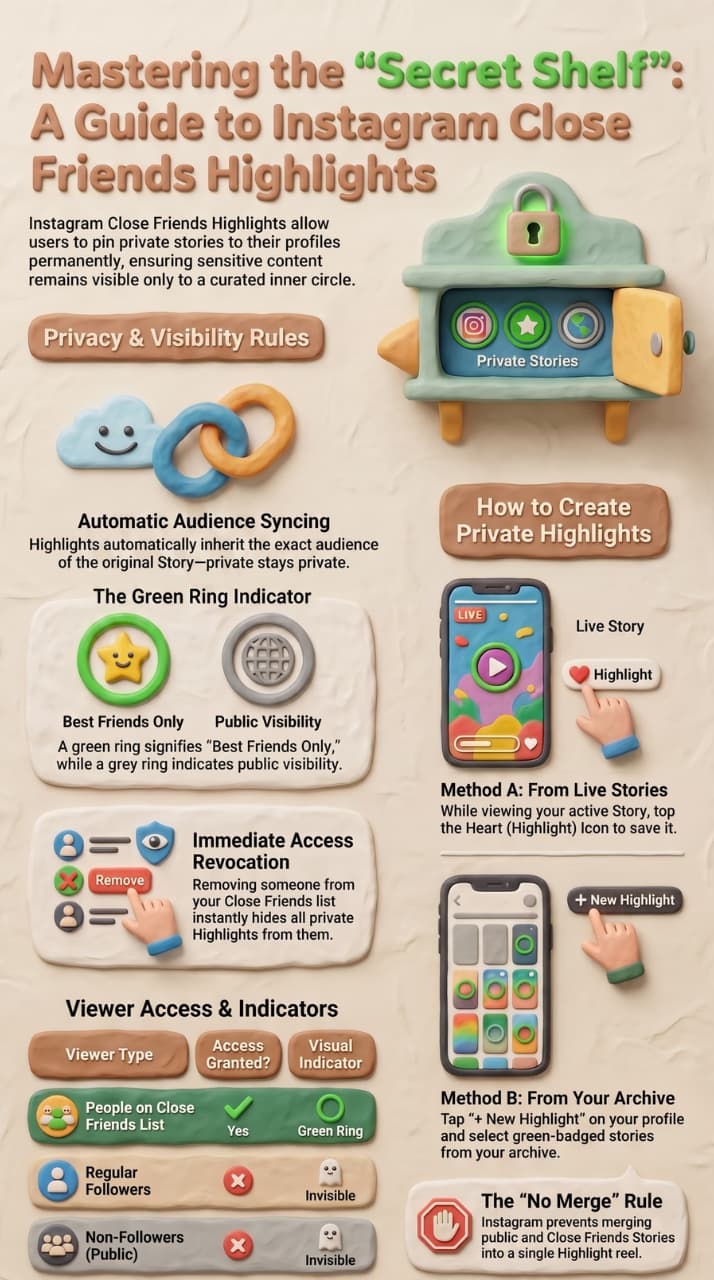
The "Invisibility Cloak" effect refers to the deliberate architectural isolation of content on Instagram. When a user creates a "Close Friends" list and applies it to a Story Highlight, they are doing something far more sophisticated than simply hiding elements from an external group of onlookers; they are building a parallel, gated layer directly on top of their public-facing grid profile.

[Public Profile Viewer]  ---> Sees Only Standard Grid & Public Highlights

|

v (Filters via User Session ID)

[Close Friends Member]  ---> Renders Invisible "VIP Vault" Highlight Tray

To an unauthorized viewer—someone who is not actively and explicitly enrolled in your specific Close Friends whitelist—this Highlight tray does not show up as locked, greyed out, or restricted. It simply does not render on their client-side application. The container is completely omitted from the user interface.

This creates a brilliant psychological and operational masterstroke for social media operators: your general public base experiences a streamlined, pristine, public brand persona, while your premium sub-segment gains access to a dynamic, hyper-targeted vault of real-time documentation without adding complex third-party software friction to your user workflow.

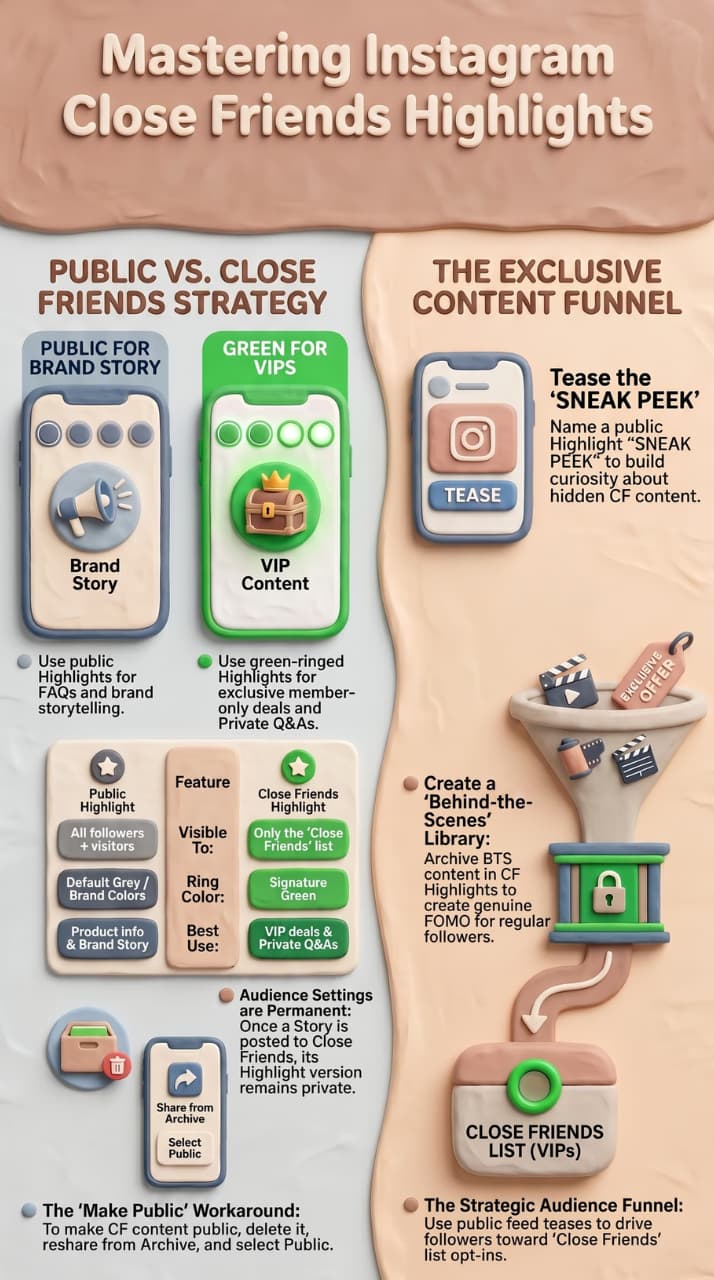
Standard highlights are built for discovery, onboarding, and broad brand messaging. Close Friends highlights are built for retention, conversion, and deep brand loyalty. They transform your profile from a static billboard into a multi-tiered membership ecosystem where your most valuable content is hidden in plain sight.

2. Privacy Logic 101: Why Instagram’s "Close Friends Only" Setting is the Gold Standard for Gated Content in 2026

To understand why this system is so robust for modern digital strategy, we must examine the data relationship between individual Instagram Stories and the Highlight containers they populate. Instagram handles permission controls dynamically through inherited asset states. When an individual file (a video format, graphic slide, or photo story) is created, its metadata file is permanently appended with an access control token defining its destination target audience: Public, Subscribers, or Close Friends.

When that story is manually archived and pushed into a permanent Highlight container on your profile, the Highlight container does not possess the structural authority to overwrite the fundamental permission token of the child file. Instead, the container acts as a dynamic folder that query-checks the active session profile of the individual client viewing it.

This architectural design guarantees that if you accidentally add a mixture of public stories and private Close Friends stories to a single highlight folder, the platform will intelligently auto-segment the visibility. The non-Close Friends visitor will experience an entirely sanitized view, seeing only the public slides, while the authorized Close Friend sees the unbroken, continuous narrative string.

In an era where traditional web-based lead magnets (like clunky PDFs behind email capture forms) suffer from record-low conversion rates due to data fatigue, native social gating is the gold standard. It requires no external browser redirects, no confirmation emails, and no passwords. The platform itself verifies the user's identity based on their logged-in app session, matching it instantly against your custom whitelist. It is frictionless, secure, and natively optimized for mobile retention.

3. Step-by-Step: Creating Your First Private Highlight: A Walkthrough for the Manual Workflow (From Story to Highlight)

Executing this strategy properly requires a precise operational sequence to avoid accidental public exposure or data leakage. Follow this exact technical sequence to deploy a functional private vault on an active commercial or personal profile:

[Draft Media Asset] ---> [Select Green Star Icon] ---> [Publish to Live Feed] ---> [Tap Highlight Heart] ---> [Bind to Private Container]

Step 1: Content Staging & Isolation

Draft your multi-slide story assets using your preferred high-fidelity design environment (such as Canva, Figma, or your native mobile capture tools). Before uploading, review the slides for any tags, mentions, or interactive stickers. Ensure that your media elements are structured logically, as a private highlight should read like a cohesive mini-course or premium vlog series.

Step 2: Destination Assignment

Open the Instagram publishing interface and select your staged assets. When ready to publish, look away from the massive, brightly colored "Your Story" primary action button located at the bottom left of the user interface. Tapping that will immediately push your asset to the global ledger. Instead, tap the dedicated green "Close Friends" star emblem. This instantly stamps the media file with a localized privacy token before it ever touches Meta’s distribution servers.

Step 3: Instant Highlighting from Live Feed

Once published, navigate to your live story feed and open the newly minted green-ringed story element. Look to the lower right-hand corner of the screen and tap the "Highlight" heart icon. A modal sheet will slide up from the bottom of your viewport. Tap the "New Highlight" button with a plus sign, or select a pre-existing container specifically dedicated to your inner circle.

Step 4: Title Calibration & Structural Binding

Assign a high-context title to the new Highlight container. Because this layout remains entirely invisible to outsiders, your title does not need to be cryptic for security reasons; make it highly specific to the targeted group (e.g., [VIP] Masterclass, Insiders Only, Beta System). Tap "Add" to finalize the binding. The platform will now keep this container active on your main profile feed, rendering it exclusively to users who clear your whitelist access checks.

4. Can You Switch Visibility? Clarifying the "Cannot-Convert" Rule (Transforming Public vs. Private Content)

One of the most frequent errors among digital community managers and brand operators is the assumption that story assets possess fluid, mutable permission properties. Let us be explicitly clear: Once an asset is committed to the public ledger on Instagram, its security properties cannot be retroactively modified to a Close Friends state.

The engineering reason behind this rigid guardrail is straightforward: information distribution speed. The moment a story is published to a public feed, its asset ID is instantly broadcast to Meta’s global Content Delivery Networks (CDNs). Scraping bots, analytics tools, third-party viewer websites, and client-side notifications process and cache the public asset within milliseconds of initialization.

Allowing a user to simply toggle a live story from "Public" to "Private" would create a false sense of security, as the data may have already been scraped or screen-captured during its window of public exposure.

If your brand accidentally publishes a confidential product mock-up, an unvetted corporate announcement, or a sensitive piece of internal strategy to your public story string, tapping "Edit" will not save you. The only viable mitigation path is an absolute hard-reset protocol:

  1. Delete the public story instantly to minimize further screen-capture and scraping exposure risks.
  2. Purge your local app cache or wait a brief moment to ensure the platform registers the asset deletion across its global edge servers.
  3. Import the clean, original asset file from your hardware device's local camera roll or storage drive back into the Instagram story creator.
  4. Select the explicit green Close Friends constraint at the moment of creation, ensuring the file enters Meta's infrastructure through the encrypted, token-gated channel.
  5. Manually push that newly protected live asset into your private Highlight container layout.

5. Managing the "VIP List": Best Practices for Curating Your Close Friends List Without Manually Updating It Daily

The true power of a private highlight strategy does not rest in the underlying code mechanics, but in the operational governance of your Close Friends list. Treating this directory as a stagnant bucket of individuals you handpicked years ago is a critical operational failure that dilutes the premium nature of the feature. In 2026, advanced marketers manage this directory as a dynamic, high-velocity Customer Relationship Management (CRM) database tag.

If you are a high-volume creator or an e-commerce brand with tens of thousands of followers, manually opening your app every single day to type in handles and check boxes is a recipe for operational burnout. To scale this feature efficiently without getting bogged down in manual admin work, you must implement automated rules and system audits.

Metric / Attribute Static, Low-Value List Dynamic, High-Value VIP List
Updates Irregular, Manual, Forgotten Automated via Webhooks & API
Audience Fit Random Friends, Old Accounts Active Buyers, Verified Leads
Engagement Low Story View-Through Rates High Interactive Sticker Conversion
Purpose Casual Personal Sharing Gated Content Retargeting Funnel

To maintain an elite list without daily manual adjustments, establish clear boundaries for who gets access and who loses it. For instance, link your Close Friends list to your active billing systems or community tiers. If a client cancels their subscription, or if an automated system detects zero engagement from a specific user over a rolling 45-day period, that account should be flagged for removal.

Think of your list as a pristine garden: regular pruning is required to ensure that your "inner circle" remains populated exclusively by high-intent, active buyers who view your premium content as unmissable daily appointments.

6. The "Archive" Hack: Restructuring Historical Gated Material

Many social media strategists believe that to build an extensive Close Friends highlight, they must flood their active story feed with dozens of slides all in one day. This approach can overwhelm your active inner circle, leading to high drop-off rates and muted engagement scores. Fortunately, the Instagram Archive contains a backdoor solution: the "Archive" hack.

Your Instagram Archive functions as an unedited chronological library of every single piece of expiring content your profile has generated since its inception (provided you have the "Save Story to Archive" setting enabled). The platform stores these files along with their original metadata, meaning any story originally posted to Close Friends retains its privacy layer forever within the archive.

[Profile Menu] ---> [Archive Tab] ---> [Filter by Green Star Assets] ---> [Bulk Select and Group] ---> [Quiet Launch to Profile Highlight]

To execute the Archive hack, follow this sequence:

  • Navigate to your Instagram profile menu, tap the hamburger icon in the top right, and select Archive.
  • Switch the top drop-down filter to Stories Archive. You will be presented with a grid of your historical content.
  • Scroll through your history (or use the convenient Calendar/Location tabs) and seek out past assets that bear the green Close Friends star icon.
  • Open the first desired asset, tap the Highlight icon at the bottom of the individual slide, and create a new Highlight container.
  • Repeat this back-linking process for all corresponding historical elements.

The major tactical advantage here is Asynchronous Asset Construction. You can quietly curate a comprehensive, 40-part educational mini-series or an in-depth product tutorial over a weekend without blasting your active users' notification feeds. The moment you hit save, the highlight populates your profile instantly and elegantly for your whitelisted audience, while remaining completely invisible to competitors and general traffic.

Elevating the Hack: Strategic Content Retrofitting

What makes this framework truly indispensable for modern digital operations is the ability to revive dormant, high-value assets and repurpose them into real-time conversion funnels. Instead of constantly exhausting your creative resources to produce net-new content, you can treat your archive as an offline repository of proven marketing assets. By systematically grouping past private case studies, unscripted product breakdowns, and organic user-generated testimonials, you construct an on-demand, evergreen learning center for your VIP segment.

Furthermore, this method lets you bypass the standard 24-hour expiration window entirely when building out new profile tracks. If you suddenly close a major client or roll out a mid-quarter offer, you can dynamically construct a private validation hub within minutes using completely verified historical proof. This backend curation ensures your profile's most intimate layer always stays deeply informative, intentionally structured, and entirely relevant to your core buyers—all without disrupting your current public content distribution or overwhelming your active audience's daily feeds.

7. Troubleshooting the "Missing Highlight" Button: Why You Might Not See the Option and How to Fix Common UI Glitches

When managing high-stakes digital properties or executing precise launch schedules, encountering a sudden technical bottleneck can disrupt an entire campaign. A frequent and alarming issue occurs when a content manager goes to pin an active Close Friends story to a profile, only to discover that the "Add to Highlight" button has vanished from the user interface.

This glitch typically stems from three distinct root causes within Meta’s data distribution network:

Cause A: Local Cache Desynchronization

Because Instagram pushes micro-updates to its mobile interfaces daily, local device cache files can become corrupted or misaligned with backend server protocols. To resolve this, perform a hard close of the application, navigate to your device’s system settings, clear the application’s cache storage partition, and relaunch the app. This forces the client interface to re-fetch the latest UI layout rules from Meta’s edge nodes.

Cause B: Critical Asset Purging

If the global privacy setting "Save Story to Archive" was accidentally toggled off prior to publishing, the platform handles the asset as completely ephemeral.

[Story Posted] ---> ("Save to Archive" is OFF) ---> [24-Hour Clock Expires] ---> [Asset Hard Purged from CDN] ---> [Highlight Link Breaks/Disappears]

At the exact conclusion of the 24-hour live availability window, the platform purges the file from its content delivery servers. Because the underlying child asset no longer exists in database storage, the app removes the Highlight container from your profile layout. Always double-check that your archival parameters are active before executing a private launch sequence.

Cause C: Account Classification & Beta Program Conflict

Profiles enrolled in unstable developer beta programs or those navigating a Meta Business Manager compliance review may experience temporary feature suppression. If the button remains missing after a cache reset, navigate to your creator settings, switch your profile classification to a standard Business profile, confirm your two-factor authentication parameters, and retry the workflow through a separate creator device.

8. The Aesthetics of Privacy: Designing Custom Covers for Your Private Highlights to Keep Your Grid Looking Cohesive Yet "Secret"

An intriguing visual and psychological challenge arises when implementing private highlights on a carefully curated, heavily branded business profile grid. While unauthorized users cannot click, view, or parse the media files contained inside a Close Friends highlight, the visual cover thumbnail container itself still obeys standard layout rules on your main profile.

If your brand relies on a clean, color-blocked, minimalistic aesthetic, a random, unstyled highlight cover will instantly break the visual flow of your page. You must design your covers with a dual-purpose strategy: maintaining a pristine look for the public while clearly labeling the vault for your VIPs.

Guideline 1: Uniform Design Systems

When building your highlight cover assets in Figma or Photoshop, use an identical canvas size, background palette, and icon stroke weight across both public and private highlights. If your public highlights use a desaturated sand background with minimalist charcoal vector icons, your private highlights should use the exact same styling. This ensures that when a non-vetted user views your profile, the page looks uniform, clean, and balanced.

Guideline 2: Cryptic vs. Clear Labeling

Since the highlight title beneath the icon circle will only display to those who have access, you can use specialized layout design cues. Many elite brands use subtle brackets or prefix identifiers, such as [V] or a simple geometric shape like a small black diamond ◆, before the title text. Avoid using bright, neon green custom cover graphics that scream "Secret Content Here!" as this can frustrate your general public audience who can see the cover but cannot access the content. Keep it understated, high-end, and perfectly integrated into your brand's core design language.

9.Marketing Strategy: Cultivating the "VIP Lane" Lead Nurturing System

Moving past technical mechanics, let's look at the strategic monetization playbook. Why should an enterprise operations team or an organic content strategist allocate precious labor hours to curating hidden content vaults? The answer lies in the conversion metrics of the modern marketing funnel.

In 2026, broad-spectrum digital retargeting ads have become incredibly expensive due to changing tracking regulations and platform privacy updates. Forcing cold traffic into long, complicated email sequences often results in low click-through rates. The Close Friends highlight solves this problem by functioning as an organic, zero-ad-cost retargeting machine directly inside the most popular app on your audience's device.

By segmenting your audience into a public group and an inner-circle group, you leverage a powerful psychological trigger: exclusive access. When a casual follower is promoted into your inner circle, their attention retention rates skyrocket. They no longer view your stories as generic advertisements; they view them as a premium, gated experience.

Within this private space, your brand communication can drop the overly polished, corporate tone and shift toward high-value, authentic interaction. You can share real-time case studies, unedited business operations, or exclusive flash sales. This unfiltered look behind the scenes, safely protected from public scrutiny, forms a deep emotional bond with your audience. This trust is what drives high-ticket sales, recurring memberships, and exceptional backend conversion rates.

Maximizing LTV Through High-Velocity Micro-Funnels

By establishing this "VIP Lane," you are essentially building a self-cleaning lead-scoring environment directly on your Instagram profile. Traditional top-of-funnel marketing strategies often suffer from a severe drop-off when moving warm prospects from social apps over to external landing pages. By keeping the entire nurturing sequence native, you dramatically lower user friction.

Prospects can move from discovering your content to gaining exclusive access, consuming your case studies, and initiating a sales conversation in a single session. This seamless flow shifts your metrics from vanity follower growth to high-yield Customer Lifetime Value (LTV).

Furthermore, this premium segmentation creates an ongoing fear-of-missing-out (FOMO) effect across your broader public audience. When your general followers see you referencing the exclusive insights shared inside your whitelisted group, it creates an ongoing incentive for them to step up, engage, and cross the qualification threshold to join your inner circle. You are no longer chasing after low-intent leads; you are designing an exclusive, highly desirable digital environment where your warmest buyers actively pitch themselves to gain entry to your private offers.

10. Automating the Opt-In: Integrating "Keyword Triggers" to Invite Users to Your Close Friends List

Managing an active Close Friends list manually is a massive bottleneck for growth. If your marketing team has to manually review direct messages, copy usernames, and check boxes inside the Instagram app for hundreds of people every single day, the system becomes completely unscalable. To unlock the full potential of this strategy, you must automate the process using official, Meta-compliant direct messaging APIs.

By building automated chat funnels, you can turn your public content into a frictionless lead-generation engine. Imagine publishing a high-value public Reel or Carousel post detailing a complex problem your business solves. In the caption, you provide a clear call to action: “Comment the word 'VAULT' below, and I will instantly unlock my private training series directly on your profile.”

When a user drops that specific keyword, your automated system fires an instantaneous, personalized direct message. The conversational agent can provide a quick resource, ask a qualifying question (such as inquiring about their current business revenue or fitness goals), and collect an email address.

Once the user crosses this qualification threshold, a webhook instantly updates their customer profile, and they are automatically added to your Close Friends list via your integration setups. This transforms your private highlights into a hands-free, automated pipeline that steadily converts casual profile visitors into qualified leads.

11. The 2026 E-E-A-T Factor: Why Exclusive, High-Value Content in Highlights Builds More Trust Than Public, Spammy Stories

Search engine ranking algorithms and social platform recommendation discovery loops have aligned on a single priority: E-E-A-T (Experience, Expertise, Authoritativeness, and Trustworthiness). Consumers are completely exhausted by clickbait headlines, generic copy-pasted advice, and empty promises from unvetted brands. Building authentic trust is the only way to stand out in a crowded digital marketplace.

When you run a private, gated highlight system, you are building an authoritative trust architecture. Because the users inside this inner circle have explicitly taken action to get there, their engagement velocity—such as replying directly to slides, voting on poll stickers, and using question boxes—is significantly higher than that of your cold public audience.

Instagram's underlying account health scoring algorithms interpret these high-density, positive interaction loops as a clear sign of deep authority and relevance. The platform observes that a dedicated subset of your audience interacts intensely with your content, which tells the algorithm your profile is highly trustworthy.

This positive account health score ripples outward, boosting your organic reach on your public Reels, feed posts, and Explore page placement. The value you provide within your private highlights directly fuels your broad, public brand discovery.

12. Analytics vs. Privacy: Understanding What Data You Lose When You Move Content From "Public Feed" to "Close Friends Highlight"

Shifting your content strategy toward private, gated highlights requires a shift in how your team measures success. If your marketing team evaluates performance based on traditional, public vanity metrics, they might initially view a private highlight campaign as underperforming. It is crucial to understand the analytical trade-offs of this strategy.

When content is pushed behind the Close Friends security layer, you are intentionally trading raw, public impressions for deep, high-value conversion metrics.

vanity metrics (Broad Reach, Public Shares)  <--->  value metrics (Exact Viewer Identity, DM Generation, Direct ROI)

Metric Parameter Public Highlight Track Close Friends Vault Track
Primary Focus Maximum Brand Awareness High-Intent Lead Conversion
View-Through Data Anonymized Total Impression Counter Identifiable User Profile Sessions
Shareability Publicly Shareable via DM / Link Completely Blocked for Outside Users
Conversion Focus Cold Top-of-Funnel Traffic Warm Bottom-of-Funnel Buyers

Because Close Friends highlights cannot be shared with non-whitelisted users, you will see a drop in public share metrics. Furthermore, traditional third-party marketing dashboards may show a lower total reach for these assets.

However, what you lose in broad numbers, you make up for in data quality. Inside your private highlights, you can track the exact identities of the users watching your content. You can see precisely which warm leads are viewing your case studies, how often they re-watch specific slides, and how they interact with your private links. This clean, high-intent data lets you skip the guesswork and speak directly to the people who are closest to making a purchase.

13. Common Misconceptions: Debunking the Myth That Adding a Close Friend Story to a Public Highlight Reveals It to Everyone

A common misconception that frequently stops corporate brand managers and compliance teams from adopting this strategy is the fear of accidental content leakage. Many believe that if you accidentally drag an active Close Friends story into a standard, public-looking highlight folder, a sudden platform update or system glitch might strip away the privacy settings and expose that media to the entire world.

This fear stems from a basic misunderstanding of how database permissions are structured at the platform level. Within Meta’s core application architecture, access control parameters are firmly attached to the individual media asset asset ID, not the folder container that displays it. A highlight folder on Instagram does not possess the structural power to change or strip away the underlying security tags of the files inside it.

If an asset is initialized as a Close Friends story, there is no profile layout configuration that can accidentally broadcast it to the public. If an unauthorized user visits your profile and opens a public highlight folder that happens to contain a mix of public and private slides, the platform’s security controls will seamlessly filter the experience.

The unauthorized user will only see the public slides, and the system will skip over the private assets without any interruption or error messages. The only true risk vector for content exposure is human error—such as an operator accidentally tapping "Your Story" instead of the green star icon during a busy launch window. By training your team on proper publishing workflows, you can eliminate this risk entirely.

14. Best Use Cases for Businesses: Practical Examples Including "Beta Testing," "Founders' Notes," and "Exclusive Education"

To maximize the commercial return of your private highlight architecture, you should design your content around specific, high-value use cases. Here are three powerful operational frameworks you can build out immediately:

Use Case A: Alpha & Beta Product Testing

Before rolling out a new software feature, an agency offer, or a physical product line to the general public, add your top 100 most loyal clients or active buyers to your Close Friends list. Create a dedicated highlight folder titled [Alpha Review].

Use this space to share raw prototypes, walk through behind-the-scenes design challenges, and drop interactive question stickers to gather immediate feedback. This creates a highly focused feedback loop that helps refine your product while making your core customers feel like true partners in your brand's journey.

[Select Top 100 Buyers] ---> [Publish Prototype Highlights] ---> [Gather Native Sticker Feedback] ---> [Refine Product Before Public Launch]

Use Case B: The Executive Founder Log

Modern consumers connect with real people, not faceless corporations. Have your founding team or executive leadership record raw, unedited, 60-second video updates discussing current market movements, internal business developments, and long-term vision.

Keep these logs entirely inside a Close Friends highlight titled ◆ Executive Logs. This unfiltered authenticity, safely protected from public scrutiny, forms a powerful bond with your audience, positioning your brand as a transparent, high-integrity leader in your industry.

Use Case C: Exclusive Education & Micro-Training

Turn your private highlights into a learning portal. Package your most effective strategy, your most valuable case study, or an advanced mini-course into a highly structured, 20-slide highlight series. Use clear graphics, native text overlays, and step-by-step breakdowns.

Advertise this hidden vault across your public feed as an exclusive reward for your community. This incentive creates a powerful drive for your audience to engage with your brand, provide their information, and join your inner circle.

15. The Long-Term Maintenance Audit: Monthly Steps to Clean Up Your Close Friends List to Ensure Your "Inner Circle" Remains High-Quality

The final component of a successful private highlight strategy is an ongoing maintenance routine. A private highlight vault should never be treated as a set-it-and-forget-it project. As your business introduces new products, seasons change, and marketing priorities shift, your private content requires active curation to maintain its premium value.

[Every 30 Days] ---> [Audit Active Close Friends Whitelist] ---> [Prune Inactive/Canceled Accounts] ---> [Refresh Highlight Covers & Copy]

To maintain a high-converting, premium ecosystem, establish a strict monthly audit protocol across your marketing team:

  • Step 1: Content Relevance Review. Open your private highlights every 30 days and review every single slide. Remove outdated offers, expired flash deals, and time-sensitive announcements that are no longer relevant. Ensure every destination link is active and functioning correctly.
  • Step 2: Audience Pruning. Review your active Close Friends list. Cross-reference your list against your internal CRM platforms, active customer rosters, and engagement dashboards. Remove accounts that have canceled their memberships, as well as users who have shown zero engagement with your private stories over the past 30 days.
  • Step 3: Visual Refresh. Update your highlight covers and titles to align with your current marketing campaigns. If your brand is shifting its focus to a new seasonal launch, your private highlights should be updated to support that direction.

By continuously auditing both your list and your content, you protect the high-value integrity of your brand's inner circle. This disciplined approach ensures that your private highlights remain an elite, high-converting asset that drives deep relationship equity and reliable, predictable revenue for your business year after year.

Strategic Implementation Summary

By aligning this privacy-first framework with advanced social media automation, your brand can build a secure, scalable, and highly profitable community right on your Instagram profile. Treat every private slide as a premium asset, audit your list regularly, and leverage the psychology of exclusive access to turn casual attention into lifelong brand loyalty.

Conclusion: The Future of Gated Social Architecture

Furthermore, this architectural approach fundamentally reshapes how you protect your brand's digital equity in an increasingly crowded marketplace. When you commit to a gated social strategy, you insulate your most profitable intellectual property from competitors who rely on scraping public feeds to replicate your positioning. Your high-converting case studies, framework breakdowns, and intimate client success stories remain safely locked behind a native permission wall, accessible only to the prospects who have explicitly earned the right to view them.

This deep sense of operational security allows your creative team to produce highly specific, raw, and impactful content that speaks directly to a sophisticated buyer's exact pain points without the fear of broad public scrutiny or generic misinterpretation. Over time, this workflow builds an incredibly strong competitive advantage. While other brands continue to waste resources chasing low-intent, top-of-funnel metrics on a volatile public feed, your business is quietly optimizing a streamlined, highly profitable ecosystem. You are successfully turning a standard social media profile layout into a premium, self-sustaining community asset that predictably captures, nurtures, and converts social attention into long-term commercial revenue.

Frequently Asked Questions

1. Can you add Close Friends stories to Instagram Highlights?

Yes, Instagram allows users to add Close Friends stories to Highlights, but visibility depends on who is included in your Close Friends list.

2. Who can view Close Friends Highlights on Instagram?

Only users added to your Close Friends list can view Highlights created from Close Friends stories.

3. How do I add a Close Friends story to an Instagram Highlight?

You can add a Close Friends story to a Highlight from your story archive or directly after posting the story, provided it was shared with your Close Friends list.

4. Can I change who sees my Close Friends Highlights later?

Yes, updating your Close Friends list changes who can access existing Close Friends Highlights.

Aravindh

Aravindh

Excels in Online Selling and Ecommerce, worked with over 500+ brands including Forbes-listed brands. Helped hundreds of Instagram businesses to grow online and increase their revenue.

Ready to automate your Instagram DMs?

Join thousands of creators and brands using InstantDM to grow their audience.