
last updated: 26 September 2026 Prices and plan limits checked against vendor pages and public pricing tables in September 2026. Treat every dollar figure as a snapshot. Vendors change seat fees, AI add-ons, and free-plan caps without notice. Recheck the live pricing page before you buy.
The best chat widget for a website in 2026 is not one product. Tawk.to is the best free live-chat widget if you can staff it and live with the badge. HubSpot Chat is the best free option if you already run HubSpot CRM. Tidio is the best small-store AI widget. Crisp is the best flat-price inbox for a tiny team. Intercom is the best SaaS messenger if you can absorb seat plus Fin fees. Chatwoot is the best self-hosted widget. A WhatsApp or Messenger button beats a live-chat bubble when your buyers already live in those apps.
Most 2026 roundups put their own product first, then repeat Intercom, Tawk.to, Tidio, LiveChat, and Zendesk. This guide does the work those pages skip: it separates widget types, shows the real monthly bill, treats page speed as a buying criterion, and says when you should not install anything.
| Need | Short verdict |
| Free staffed live chat | Tawk.to — unlimited agents and sites, but includes vendor branding. |
| Free CRM lead capture | HubSpot Chat — best when you already use HubSpot CRM. |
| Small ecommerce store with AI | Tidio — combines live chat, a widget, and Lyro AI, with conversation limits. |
| Small-team shared inbox | Crisp — clean workspace experience with predictable workspace pricing. |
| SaaS product messaging | Intercom — strong identity-aware messaging, but seat and AI-resolution fees add up. |
| Shopify support desk | Shopify Inbox to start; Gorgias when ticket volume justifies a full helpdesk. |
| AI answers from documents | Chatbase — focused on knowledge-base and document questions. |
| Self-hosted chat | Chatwoot — open source and suitable when you want control over hosting and data. |
| WhatsApp-first customers | WhatsApp or Messenger button — better than a website queue if customers already use those apps. |
| No one can reliably respond | Do not install live chat — use a contact form or another channel instead. |
What is a chat widget for a website?
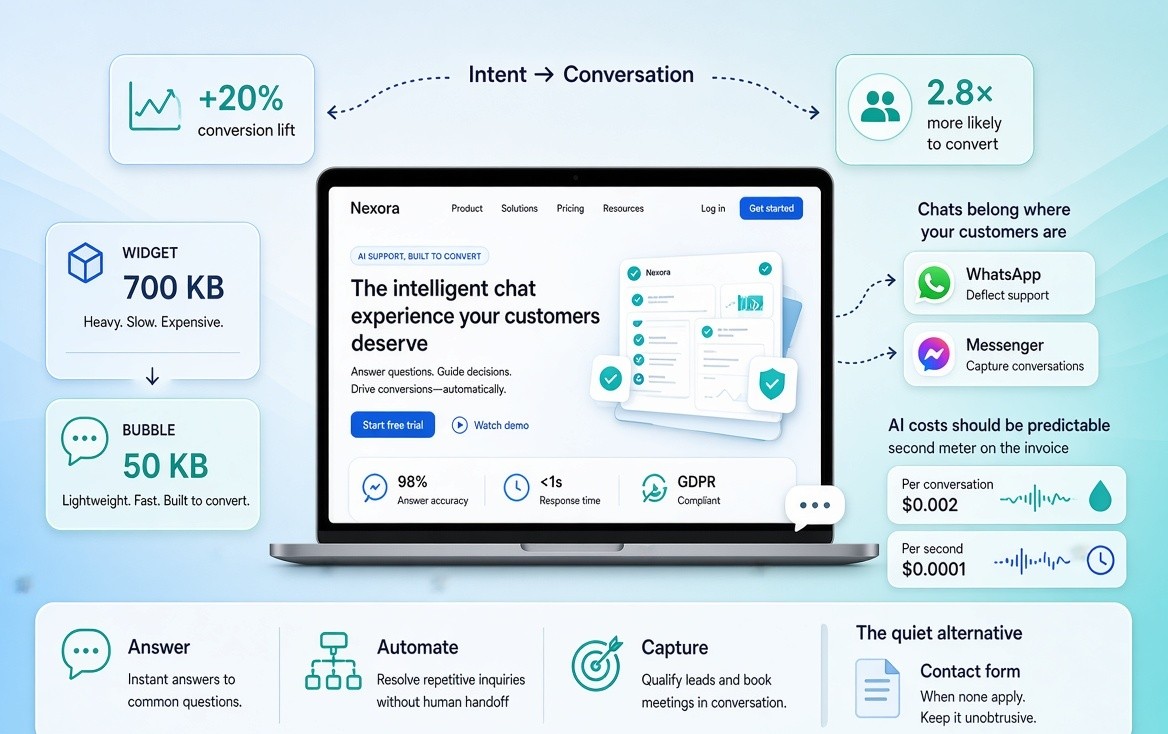
A chat widget is the visible interface on a website — usually a bubble in the corner plus a conversation window — that lets a visitor start a message without leaving the page. The widget is the surface. What sits behind it can be a human agent, a rule-based bot, an AI agent, or a handoff to WhatsApp, Messenger, or email.
Search results and AI answers still treat “chat widget,” “live chat,” “chatbot,” and “AI agent” as the same product. They are not. Buying the wrong type is how teams pay Intercom prices for a FAQ bot, or install Tawk.to and wait until 11pm for a reply that never comes.
Chat widget vs live chat vs chatbot vs AI agent
| Term | What it is | Who responds | Use it when |
| Chat widget | The bubble and window embedded on the site | Depends on what you put behind it | You need an on-site conversation surface |
| Live chat | Real-time human messaging through that widget | A person on your team | Questions need judgment, empathy, or a sale |
| Rule-based chatbot | Scripted flows and keyword trees inside the widget | Pre-written rules | FAQs are short and predictable |
| AI agent | An LLM that answers from your content and can take allowed actions | Software first, human on escalation | Volume is high and answers exist in your docs or catalog |
| Click-to-chat button | A launcher that opens WhatsApp, Messenger, Telegram, or SMS | You, in an app you already check | Buyers already message on that app and you do not want a new inbox |
A widget can host any of the four conversation types. “Best chat widget” is a surface question, a staffing question, and a billing question. Lists that skip that split are comparing unlike products.
Analysts increasingly separate simple scripted bots from AI customer agents that can reason, take actions, and escalate to humans—exactly the distinction in the table above. Deloitte – Launch an AI Customer Agent
Why a chat widget still matters in 2026
A widget is still the fastest on-site path from intent to a conversation. LiveChat’s widely quoted figures — about a 20% conversion lift when chat is added, and chat users roughly 2.8 times more likely to convert — are directional, not a guarantee. Lift follows response time, whether the bubble covers the checkout button on mobile, and whether the first reply is useful.
What changed in 2026 is the stack behind the bubble:
- AI is often a second meter on the invoice (per resolution, per conversation, or per credit). Industry analyses now describe this as an “age of intelligent experience,” where AI‑first service models reshape how chat, bots, and human agents work together. Deloitte – Future of Service
- WhatsApp and Messenger buttons absorb a large share of “chat” demand in markets where people will not wait in a website queue.
- Page speed is a buying criterion. A 700KB widget on a product page is a different product from a 50KB bubble.
- Enterprise AI agents resolved the easy tickets. That does not make them the right widget for a 10-page site.
Install a widget when you can answer, automate, or capture the message. If none of those three will happen, a contact form is cheaper and quieter.
How this comparison was built
No house product sits in slot one. Inclusion required a public website embed, active 2026 availability, and enough pricing to describe the bill — or an honest “custom / enterprise” label. Each tool had to represent a distinct job: free live chat, CRM chat, SMB AI, SaaS messenger, helpdesk suite, Shopify desk, AI FAQ, self-host, or social button.
Scoring covered job fit, free-plan honesty (seats, branding, caps, history), price shape, human inbox, AI billing, CMS fit, and operational risk (page weight, mobile overlap, data residency).
Enterprise-only agents such as Ada, Sierra, and Lorikeet stay out of the core table. They are an RFP, not a script tag.
Script-size figures below are labeled as third-party 2026 benchmarks (TRTC, GhostChat), not measurements on your theme. Pricing is a September 2026 snapshot. Annual billing is usually cheaper than month-to-month.
Quick comparison: 12 website chat widgets
| Widget | Best for | Free plan reality | Starting paid price (Sep 2026 snapshot) | AI billing | Human inbox | Typical CMS |
| Tawk.to | Free staffed live chat | Unlimited agents and sites; “Powered by tawk.to” badge | $29/mo to remove branding; AI Assist from ~$29/mo | Add-on | Yes, unlimited on free | Any script / WP |
| HubSpot Chat | CRM-tied lead capture | Free with HubSpot CRM; HubSpot branding; AI is limited on free | Service Hub from ~$20/seat/mo | Basic on free; paid AI in Hub | Yes | WP, HubSpot CMS, script |
| Crisp | Small-team shared inbox | 2 seats, limited contacts | Workspace Mini commonly ~$45/mo | Credits on paid tiers | Yes | Any script |
| Tidio | Small ecommerce + AI trial | ~50 conversations/mo; Lyro capped | Starter ~$24–$29/mo annual | Lyro add-on, conversation-metered | Yes | Shopify, WP, Wix |
| LiveChat | Chat-first support/sales teams | 14-day trial, no lasting free plan | From ~$19–$20/agent/mo annual | Separate ChatBot product | Yes | Shopify, WP, many apps |
| Intercom | B2B SaaS messenger | 14-day trial | Essential often $19–$29/seat/mo annual | Fin ~$0.99 per outcome | Yes | Script + official SDKs |
| Zendesk | Teams already on Zendesk | Trial | Chat lives inside Suite; Suite Team often ~$55/agent | AI add-on / per outcome | Yes | Suite embed |
| Freshchat | Freshworks stack | Free tier exists (agent-capped) | From ~$19/mo | Freddy add-on | Yes | Script + Freshworks |
| Gorgias | Shopify helpdesk + store chat | Trial | Ticket-priced; low tiers from ~$10–$60/mo plus AI line | AI per interaction on many plans | Yes | Shopify-first |
| Chatbase | AI answers from your docs | Small message-credit free tier | Hobby commonly ~$40/mo | Credit / message pack | Weak / limited handoff on cheap tiers | Script, WP, social add-ons |
| Chatwoot | Self-host or open-source inbox | Self-host free; cloud free tier is capped | Cloud from ~$19/agent; self-host = your server | Captain AI add-on on cloud | Yes | Script, self-host |
| Chaty / Click to Chat | WhatsApp-first sites that do not need a queue | Generous free button plugins | Paid for extra channels / branding | None (it is a launcher) | In WhatsApp, not a web inbox | WP, Shopify, most CMS |
Read the table as jobs, not a ranking. “Best overall” is how vendor listicles manufacture a winner. Match the row to the site you run.
What a chat widget really costs (1 agent vs 5 agents)
Starting price is the least useful number in this category. The bill is seats × list price, plus the AI meter, plus the fee to remove a badge.
Illustrative September 2026 planning figures, not invoices:
| Setup | 1 person answering | 5 people answering | What usually surprises you |
| Tawk.to free | $0 | $0 | Badge on every page; no serious AI unless you add Assist |
| Tawk.to unbranded | ~$29/mo | ~$29/mo | Branding is a workspace fee, not a per-seat fee |
| HubSpot free CRM chat | $0 | $0 if you stay on free CRM seats | You are joining the HubSpot contact database, not “just adding chat” |
| Crisp Mini | ~$45/mo workspace | Often still one workspace fee until you hit seat caps | Seat caps, not per-agent stickers, are the limit |
| Tidio Starter | ~$25–$30/mo | Same workspace, but conversation quota blows up | Lyro and Flows are extra sliders |
| LiveChat Starter | ~$20/mo | ~$100/mo | AI is another product |
| Intercom Essential + light Fin use | ~$19–$29 + Fin | ~$95–$145 + Fin | 200 Fin resolutions is another ~$200 |
| Zendesk Suite Team | Often not sold as “one chat seat” | ~$275/mo before AI | You bought a suite, not a bubble |
| Gorgias Basic + AI toggle | Low tens to low hundreds | Ticket volume, not headcount, sets the bill | AI interaction line is easy to miss |
| Chatwoot self-host | Server cost (~$10–$40) | Same server until it is not | You own uptime, updates, and backups |
| Chatbase Hobby | ~$40/mo | Credits, not seats, set the bill | Handoff and inbox are not the product |
Five agents on Zendesk Suite or Intercom Essential plus Fin can land between $150 and $400+ a month before AI runs hot. The same five people on Tawk.to cost nothing and get a weaker product. That range is why “best widget” without a cost shape is marketing.
The AI pricing trap. Per-resolution billing — Intercom Fin is the clear example at about $0.99 per outcome — rises when the AI works. If volume is high and answers are repetitive, a flat or conversation-capped plan is easier to forecast. If volume is high and answers are valuable, paying per resolution can still beat hiring.
Research on AI agents in service highlights how cost‑to‑serve can drop dramatically when agents handle routine work, but only if use cases, boundaries, and handoffs are designed carefully. BCG – Golden Era of CX.
Best free chat widget for a website
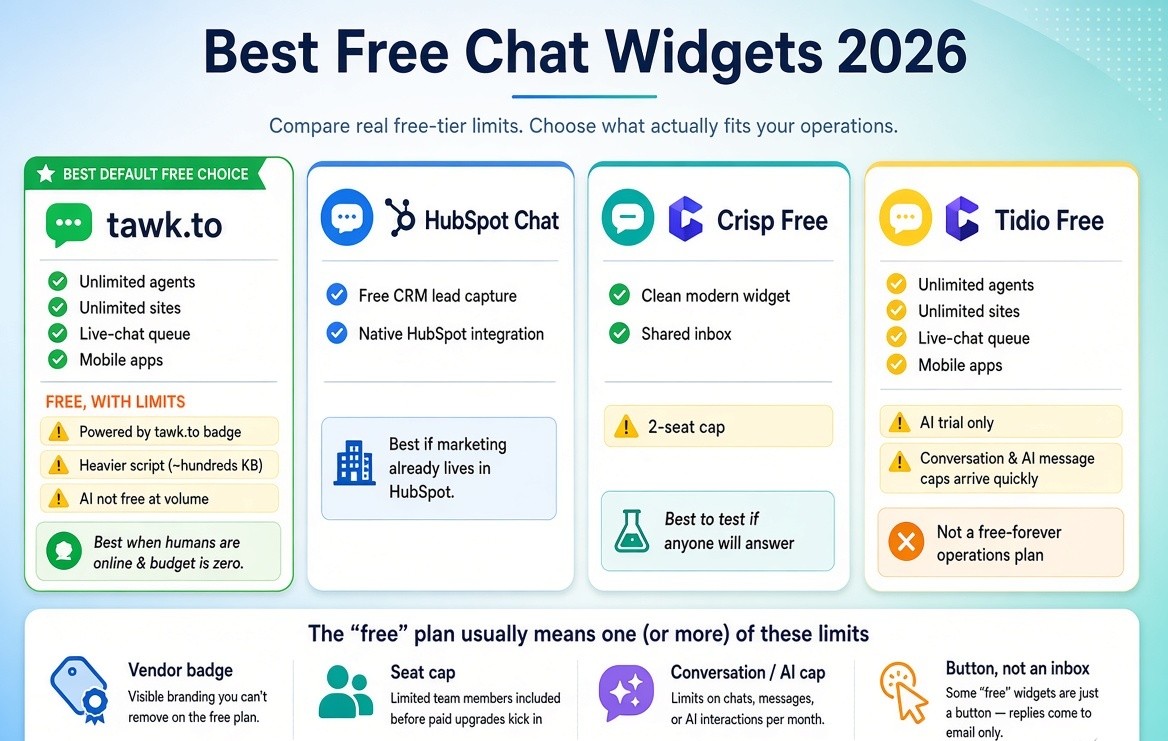
The best free chat widget for a website in 2026 is Tawk.to if you need unlimited agents, unlimited sites, and a real live-chat queue with no monthly fee. The trade is a visible “Powered by tawk.to” badge, a heavier script than the lightest widgets in third-party tests, and AI that is not free at useful volume.
HubSpot Chat is the better free pick when the goal is lead capture into a CRM you already use. Crisp free is the better pick when two people want a modern inbox and can live with a two-seat cap. Tidio free is a trial of AI, not a free-forever operations plan — the conversation cap arrives quickly.
“Free” in this category almost always means one of four limits: a vendor badge (Tawk.to), a seat cap (Crisp), a conversation or AI-message cap (Tidio, Chatbase), or a button that is not an inbox (Chaty, Click to Chat). If a page promises full features, no branding, no caps, and no catch, verify all four claims on the pricing page the same day you install.
Tawk.to stays the default free live-chat widget because unlimited agents, unlimited websites, mobile apps, visitor monitoring, and basic ticketing are included. Choose it if a human will be online, budget is zero, and a badge does not kill trust. Skip it if you need an LLM that reads your help center, if Core Web Vitals are already tight (third-party 2026 tests put its payload in the heavy end of the category, on the order of several hundred KB), or if you will not accept vendor chrome on the bubble. Branding removal is a paid add-on, recently listed around $29/month. AI Assist is a separate line.
HubSpot Chat is free the way HubSpot CRM is free: the widget captures contacts. Choose it if marketing already lives in HubSpot. Skip it if you do not want support to become a CRM migration.
Crisp free is two seats, a clean widget, and a shared inbox. Paid Mini plans are commonly quoted near $45/month in 2026 writeups. Choose the free tier to test whether anyone will actually answer.
Best AI chat widget for a website
The best AI chat widget depends on what the model is allowed to know. Docs and help centers fit Chatbase-style tools. Shopify catalog, stock, and order questions fit Tidio (Lyro) or a Shopify desk such as Gorgias. A SaaS app that must know the logged-in customer fits Intercom Fin.
Do not buy “AI chat widget” as a category. Buy answers from these sources, with this handoff, on this meter.
Before you pay: paste your five most common questions, ask one question that is not in the FAQ, ask the bot to take an action (book, refund, apply a discount), and time the human handoff. If the unknown question hallucinates and the action is a dead end, you bought a FAQ wrapper. That can still be worth $40 a month. It is not an agent.
Tidio bundles a website widget, a light helpdesk, Flows, and Lyro. It’s also recognized in third‑party reviews as a CRM customer engagement tool with live chat and AI, not just a basic widget. Gartner – Tidio Reviews Free is a handful of conversations. Paid Starter in 2026 comparisons sits near $24–$29/month on annual billing. Lyro is commonly a separate slider. Conversation quotas are the ceiling, not seats. Choose Tidio for a small store that wants after-hours FAQs. Skip it if volume will outrun the pack every month. For a channel‑by‑channel breakdown of the best AI chatbots for ecommerce stores (website vs Instagram vs Shopify tickets), see this dedicated 2026 comparison. Best AI Chatbot for Ecommerce in 2026
Chatbase trains on a sitemap, PDFs, or a help center. The website widget is one deployment surface. Free tiers are credit-thin. Hobby-class plans in 2026 lists sit near $40/month. Choose it when the job is 24/7 answers from your knowledge base. Skip it for live sales coverage or Shopify order actions.
Intercom Fin sits inside the most polished website and in-app messenger in the category. Fin is billed around $0.99 per outcome on current public pages, on top of seat plans (Essential is listed near $19/seat/month annual in some regions; $29 still appears in many roundups — check the live page). Choose Intercom for product-led SaaS. Skip it for a brochure site or a local business. You will pay for a platform.
Best chat widget for small business
For most small businesses, the right widget is Tawk.to if someone can watch the queue, Tidio if you want after-hours AI on a store, or a WhatsApp button if customers already message that way.
If your main goal is lead generation rather than support, see a focused comparison of live chat tools for capturing and converting leads. Best Live Chat Tools for Lead Generation 2026
The usual failure modes: nobody is staffing the queue; the bubble covers “Buy now” on a 375px screen; the founder bought per-seat software for one phone; AI is on with an empty knowledge base. Broader CX research shows many companies think they’re winning on experience while customers are walking away, often because digital channels (including chat) don’t actually resolve issues. PwC – 2025 CX Survey. If you are one person, pick a tool that notifies your phone. A dashboard you will not open is theater.
Best chat widget for Shopify
Shopify Inbox is the default. Third-party widgets earn a place only if they beat Inbox on AI, helpdesk, or channels. For a full walkthrough of how Shopify stores should layer Inbox, email, WhatsApp, Instagram DMs, FAQs, and automation, see the complete 2026 Shopify support guide. Shopify Customer Support: The Complete 2026 Guide
Gorgias is the Shopify helpdesk standard. Chat is one channel into a ticket-priced inbox. Low tiers still start cheap on ticket volume; AI is a separate line that can add a per-interaction fee. Choose Gorgias when support volume is the business.
Tidio is the common SMB Shopify widget-plus-bot. LiveChat remains strong if the team is chat-first and will pay per agent. Catalog-aware ecommerce agents (order tracking, discounts) are worth a trial on a live catalog. They are not automatically the best widget. They are the best catalog agent if that is the job.
If most customer messages already arrive as Instagram comments or WhatsApp texts, a website widget will not fix routing. Fix the channel mix first.
Best chat widget for WordPress
On WordPress the install path is a plugin or a header script. Need free live chat today: Tawk.to. Need only WhatsApp: Click to Chat or Chaty. Need AI from posts and docs: Chatbase or Tidio. Need a CRM: HubSpot. Need to own the stack: Chatwoot.
Load the widget on contact, pricing, and checkout templates — not on every blog post by default. A bubble on a long article rarely earns its JavaScript.
Best chat widget for SaaS
Intercom Messenger is still the default if budget exists. Crisp is the budget default for a modern inbox. Chatwoot is the default if you self-host or need tighter data control.
A SaaS widget has to know which workspace the visitor is on, hand off to the teammate who owns that account, and avoid inventing product behavior.
Vendors and consultancies now position this kind of identity‑aware, action‑taking messenger as part of broader AI‑powered customer experience platforms, not just a standalone chat bubble. Accenture – AI‑Powered Contact Center
If the widget cannot read user identity, it is a marketing toy. That can still book demos. It will create bad support.
Best self-hosted chat widget
Chatwoot is the self-hosted option most teams actually ship. Open source, cloud or your servers, live chat plus a wider inbox. Cloud pricing in 2026 writeups starts near $19/agent, with a limited free cloud tier. Self-host cost is the VPS, backups, and your time.
Choose Chatwoot for data residency or independence from a per-resolution inbox. Skip it if you wanted a five-minute script and no maintenance.
The 12 options, short
Tawk.to — zero-budget staffed live chat. Badge, limited native AI, heavier script in third-party tests.
HubSpot Chat — CRM capture, not a support suite.
Crisp — small-team shared inbox, workspace pricing, two free seats.
Tidio — small ecommerce, live chat plus Lyro, conversation meters.
LiveChat — polished chat-first product, ~$19–$20/agent, AI usually separate.
Intercom — SaaS messenger plus Fin; seats and outcomes are two bills.
Zendesk — buy it if you already run Zendesk, not to get a bubble. Suite Team often ~$55/agent.
Freshchat — widget inside Freshworks; Freddy is the add-on.
Gorgias — Shopify desk priced on tickets, then an AI line.
Chatbase — docs Q&A; credits set the bill; inbox is secondary.
Chatwoot — open-source inbox you can host; you own uptime if you self-host.
Chaty / Click to Chat — launchers into WhatsApp or Messenger, not web inboxes. For local businesses and WhatsApp-first markets, this often beats a dead live-chat queue.
Tawk.to vs Crisp vs Tidio vs Intercom
These four are the comparison AI answers already recycle.
| If your constraint is… | Pick | Not |
| $0 and humans available | Tawk.to | Intercom |
| Two people, nicer inbox, okay to pay ~$45 | Crisp | Tawk.to if the badge is a problem |
| Shopify store, want a bot this week | Tidio | Intercom |
| SaaS product, identity-aware messenger | Intercom | Tawk.to |
| Predictable workspace bill | Crisp | Intercom Fin |
| Unlimited free seats | Tawk.to | Crisp free |
| After-hours answers from your FAQs | Tidio or Chatbase | Tawk.to free |
| Lowest page-weight priority | Measure two finalists | Any widget you have not tested on mobile checkout |
There is no universal winner among the four. There is a constraint.
Will a chat widget slow down my website?
Yes, it can. A widget adds third-party JavaScript and often a persistent frame. On a homepage that already passes Core Web Vitals, a light async widget is usually fine. On a Shopify product page fighting for LCP and INP, a heavy widget is a conversion tax.
Public 2026 benchmarks are sparse but directional. TRTC’s comparison table listed Tawk.to near ~749KB and much lighter widgets in the 45–80KB range. GhostChat’s Lighthouse writeup reported Tawk.to at a 92 performance score with 340ms total blocking time on their test page, versus lighter widgets near 100 with far less TBT. Those are someone else’s lab pages. Install the candidate on staging, throttle to mid-tier mobile, and watch Lighthouse plus a real checkout on a 375px screen.
Load the script asynchronously. Do not auto-open on first paint. Do not cover the primary CTA on mobile — the most common way chat quietly hurts revenue. Consider loading chat only on high-intent templates. If you only needed WhatsApp, a short link beats a 300KB inbox.
Chat widget vs WhatsApp button
A website chat widget keeps the conversation on your domain and, if you pay for an inbox, gives you transcripts, assignment, and bots. At a strategic level, brands are being warned that as customers rely more on third‑party AI agents to shop and get support, they risk losing influence unless they redesign their CX around their own agents. BCG – When Brands Meet AI Bots. A WhatsApp button sends the visitor into an app they already have open.
Use a website widget when you need after-hours AI, a shared team inbox, or on-site qualification before a demo. Use a WhatsApp or Messenger button when the buyer will not wait, your team already lives in that app, or you operate in a market where “chat” means WhatsApp. Use both only if you can route them into one place.
For many small sites outside US/UK SaaS, the high-converting “widget” is not Tawk.to or Intercom. It is a labeled button that opens wa.me.
When a chat widget is not what you need
Skip live chat when nobody can answer within a few minutes during peak traffic; when the real job is “email a file” or “book a slot”; when the site is content-only and the bubble exists because a checklist said so; when you cannot afford the JavaScript on product pages; when customers already write to Instagram, WhatsApp, or email and those queues are not unified; or when you need audited transcripts a cheap widget cannot store.
A silent bubble trains visitors to assume you are offline. That is worse than no bubble.
How to choose a chat widget for your website
Stop at the first yes.
- Real channel is WhatsApp, Messenger, or Instagram > start with a click-to-chat button.
- Budget is $0 > Tawk.to if you will staff it; HubSpot if you want CRM contacts; a WhatsApp plugin if you will not staff a web queue.
- Shopify store with order and discount questions > Inbox first, Tidio for a bot, Gorgias when volume is a desk.
- SaaS with logged-in users > Intercom if budget allows, Crisp or Chatwoot if it does not.
- Model must answer from docs > Chatbase or Tidio Lyro; test questions that are not in the docs.
- Must own data and servers > Chatwoot self-host.
- Page speed is the constraint > benchmark two finalists on staging.
- Five people will share the inbox next year > model five-seat cost now.
Then install on staging, send a FAQ, a hostile question, and “talk to a person” from a phone, and walk mobile checkout. If the bubble sits on the buy button, move or hide it on that template. Turn off auto-open. Write a greeting that names what you can actually do, including hours. If AI is on, add the real return policy before you ask something that is not there.
About The Author:
Aravindh Kumar is an Ecommerce and Instagram growth expert with 8+ years of experience in online selling. He has worked with 500+ brands - including Forbes-listed companies - He has helped 200+ Instagram businesses grow their online presence.
Sources and further reading
This guide draws on vendor documentation, public pricing pages, third‑party performance benchmarks, and industry research on customer service and AI agents. Use these sources to verify details, explore deeper strategy, or compare tools at a market level.
- https://www.intercom.com/pricing
- https://www.tawk.to/why-free/
- https://trtc.io/blog/details/website-chat-widget-comparison
- https://trtc.io/blog/details/chat-widget-performance-seo
- https://www.deloitte.com/us/en/about/press-room/the-future-of-service.html
- https://www.deloitte.com/dk/en/services/consulting/perspectives/go-to-market.html
- https://gcom.pdo.aws.gartner.com/reviews/market/digital-customer-service-and-support
- https://www.gartner.com/reviews/market/crm-customer-engagement-center/vendor/tidio/product/tidio-1892121025
- https://www.bcg.com/publications/2025/when-brands-meet-ai-bots-cx-in-the-era-of-agents
- https://www.bcg.com/publications/2025/how-ai-agents-opening-golden-era-customer-experience
- https://www.pwc.com/us/en/services/consulting/commercial-excellence/contact-center-modernization.html
- https://www.pwc.com/us/en/services/consulting/commercial-excellence/library/2025-customer-experience-survey.html
- https://www.accenture.com/en/edge/services/customer-experience/ai-powered-contact-center