Key takeaway: Shopify customer support is the system your store uses to answer shoppers before and after a purchase. It is not Shopify’s own Help Center. Build it in three layers — self-service, on-site chat, and social DMs — and match tools to how many questions you get and where those questions start.
TL;DR
Shopify customer support is how your store answers pre-sale questions (size, price, shipping) and post-sale questions (tracking, returns) across chat, email, WhatsApp, Instagram, Messenger, and a help center.
Slow replies lose sales. Shopify has published that about 70% of Shopify Inbox conversations happen while a shopper is still deciding whether to buy. A public Instagram comment that sits unanswered does the same damage — the shopper may never open your store.
You do not need every channel on day one. You need:
- Written policies and a searchable FAQ.
- One on-site channel (usually Shopify Inbox).
- A social reply path if comments and DMs already bring questions.
- Clear rules for what automation handles and what a human handles.
- Four core metrics: first response time, CSAT, deflection, and resolution — plus social reply time if Instagram is in the mix.
This guide is for store owners building support for customers. If you need help from Shopify itself, jump to How to contact Shopify Support.
Two things people mean by “Shopify customer support”
People use the same phrase for two different jobs.
| What you need | Who is asking | Who answers |
| Help with your Shopify account, billing, or admin | You, the merchant | Shopify Help Center, Sidekick, live chat |
| Help for your shoppers | Your customers | Your chat, email, WhatsApp, Instagram DMs, and FAQ |
If checkout is broken, billing looks wrong, or an app failed to install, start at the Shopify Help Center.
If a shopper is asking “where is my order?”, “does this ship to Mumbai?”, or commenting “price?” on a Reel, that is the system this guide builds.
What is Shopify customer support?
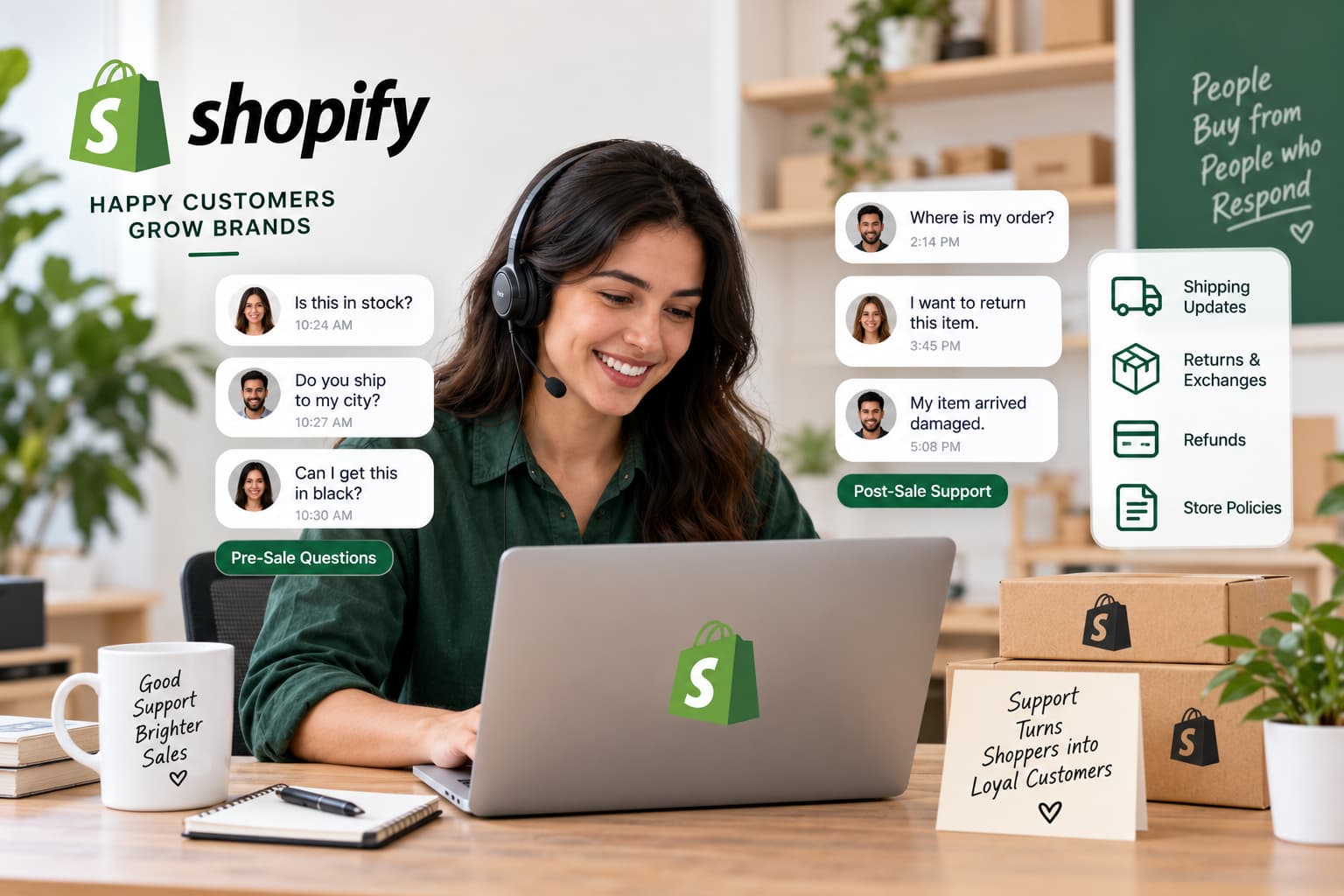
Shopify customer support is the set of channels, tools, and rules a merchant uses to answer shopper questions before and after a purchase.
It covers:
- Pre-sale: sizing, materials, shipping to a city, “is this in stock?”, “can I get this in black?”
- Post-sale: WISMO (where is my order), returns, exchanges, damaged items, refund status
- Policy: delivery windows, COD rules, international duties, warranty
People also call it Shopify customer service. Same job.
Good support does two things at once. It removes the doubt that stops a sale, and it closes the issue that would otherwise become a refund, a chargeback, or a one-star review.
It is not Sidekick. Sidekick helps you use Shopify admin. Inbox, email, WhatsApp, and Instagram DMs help your customers.
Why support quality is a revenue system
Support is not a cost center that starts after the order. On Shopify, a large share of conversations are the sale.
Shopify has published that roughly 70% of Shopify Inbox conversations are with customers making a purchasing decision.
The leak is easy to price. If 500 shoppers a month ask a pre-sale question and 10% leave because nobody replied, that is 50 lost orders. At an $80 average order value, that is $4,000 a month — before you count the post-sale tickets that turn into refunds.
Social makes the leak worse, not smaller. A comment is a public pre-sale ticket. If “link?” and “size?” sit in the thread, two things happen: the commenter leaves, and every later viewer sees an ignored store.
That is why Instagram comments and DMs belong in your support system, not only in your content calendar. Stores that sell from Reels cannot run support on email and a chat widget alone.
The Support Stack in 3 Layers
Use this when you (or a new hire) ask what to set up first.
Layer 1 — Self-service. Policies, FAQ, order-tracking page. Instant, cheapest, always on.
Layer 2 — On-site conversations. Shopify Inbox or a helpdesk. Catches shoppers already on your product or checkout page.
Layer 3 — Social conversations. Instagram and Facebook comments, story replies, Messenger, and DMs. Catches shoppers who have not opened the store yet.
Most teams only build Layer 2 and wonder why Instagram still feels chaotic. Layer 3 is not a later luxury if more than about 30% of your questions start as comments or DMs. In that case it belongs in week one, next to the FAQ.
Add a helpdesk (Gorgias, Tidio, Zendesk, Re:amaze) when Layer 2 volume outgrows a shared inbox — not because a comparison post said you needed one.
Shopify customer support channels (and when to use each)
Offer the channels your audience already uses. Two or three staffed well beat five staffed late.
Website chat (Shopify Inbox)
Use for: high-intent questions on product pages and checkout.Target first reply: under 2 minutes during staffed hours; instant answers after hours.Best starting tool: Shopify Inbox (free). The Inbox agent can answer from your catalog, policies, and pages if you turn it on.
Shopify documents how the Inbox agent reads your catalog and policies, and when a conversation should move to staff.
Shopify Inbox is the right default for on-site chat. It is not a full helpdesk, and it does not run comment-to-DM on Instagram.

Use for: returns with photos, order edits, wholesale, anything that needs a record.Target first reply: under 24 hours; under 1 hour during business hours if you can hit it every day.Do not use email as the only channel if your traffic is mobile and social.
Use for: markets where WhatsApp is the default messenger (India, LATAM, parts of Europe and the Middle East), order updates, post-sale.Target first reply: minutes, not hours.
Add WhatsApp when a meaningful share of customers already write there. Do not add it only because a tool lists it as a feature.
Instagram comments, DMs, and Messenger
Use for: discovery shoppers. Price, link, size, “is this available?”, story questions, Reel comments.
A useful rule:
- Public comment = short acknowledgment or a pointer (“sent you a DM”).
- Private DM = product link, size chart, policy, order lookup.
- Complaint, refund, or chargeback = human, never an automated loop.
Comment-to-DM is support, not only a sales trick. The shopper asked a support question in the only place they were willing to ask it.
Meta’s official path for this is a private reply to a comment on a professional account post, Reel, or ad — one first DM, within seven days of the comment (Live comments only while the broadcast is on).
If you automate this layer, use official Meta APIs and stay inside messaging windows.
After the shopper replies in the DM, the standard 24-hour messaging window applies. Follow-up DMs outside that window are not a support system; they are a policy risk.
Browser bots that log into Instagram are not a support system; they are an account-risk system. Tools built as Meta Business Partners sit here — beside Inbox, not instead of it. .
Targets: first public reply under 15 minutes on live campaigns; DM send within seconds on keyword comments; human takeover on refunds the same day.
What a Shopify support question looks like on a Reel
A shopper does not open your help center first. They watch the Reel, then type a three-word ticket in public.
Say the comment is “price?” on a dress you are running as an ad. That is a pre-sale support question. If it sits unanswered, you lose the commenter and every later viewer sees an ignored store.
Handle it in three moves.
1. Public, short. Reply on the comment: “Sent you a DM with the price and size chart.” Do not dump the SKU, discount, and return policy in the thread. Public threads are for proof you are awake, not for the full answer.
2. Private, specific. The DM should do one job: answer the question they asked, then ask one qualifier. Example: price + size chart + “Which size are you looking at?” That is support. Five product links and a broadcast sequence is not.
3. Human when money or anger shows up. If the next message is “this arrived damaged” or “I want a refund,” stop the flow. A person picks it up with the order number. Automation that issues refunds, or argues in public, is how stores create chargebacks.
Time box it. On a live campaign, the public reply should land within 15 minutes. The first DM can be instant if the comment matches a keyword you already mapped (price, link, size, info, PP). A second DM is fair if they opened the link and went quiet. A fifth DM is spam.
Do this before you buy a helpdesk if most questions already start as comments. Shopify Inbox still matters for people on the product page. It will not see the Reel. Map both, or you will build a clean on-site queue and an ignored Instagram thread in the same week.
Count it like any other channel: comments replied, time to first DM, links tapped, refunds handed to a human. If those numbers are blank, social is not in your support system yet — it is only in your content calendar.
Self-service FAQ and help center
Use for: shipping times, return window, COD, sizing, care instructions, “how do I track my order?”Target: instant.
Build this before you buy a helpdesk. A vague returns policy creates more tickets than it deflects.
Shopify’s own customer-service guidance starts here: publish policies you will actually honor, offer more than one contact method, and put a searchable FAQ on the store.
Phone
Use for: high-AOV, Shopify Plus-scale, or older audiences. Skip it until chat and email are consistently fast. Phone is expensive and usually the lowest-satisfaction channel in ecommerce.
Channel cheat sheet
| Channel | Best for | First-reply target | Cost to run | Add when |
| FAQ / policies | Repeat questions | Instant | Very low | Day one |
| Complex, documented issues | Under 24 hours (ideal under 1 hour when staffed) | Low | Day one | |
| Website chat | Pre-sale on product pages | Under 2 minutes when staffed | Low–medium | As soon as email is stable |
| Instagram / Messenger | Discovery + social questions | Minutes in public / seconds on keywords | Low–medium | If comments already ask price, size, or link |
| Mobile-first / international post-sale | Minutes | Medium | If customers already write there | |
| Helpdesk | Unified tickets + macros | SLA by ticket type | Medium–high | 50–300+ tickets per week |
| Phone | High-value exceptions | Immediate or callback | High | After the rest is solid |
How to set up customer support on Shopify (step by step)
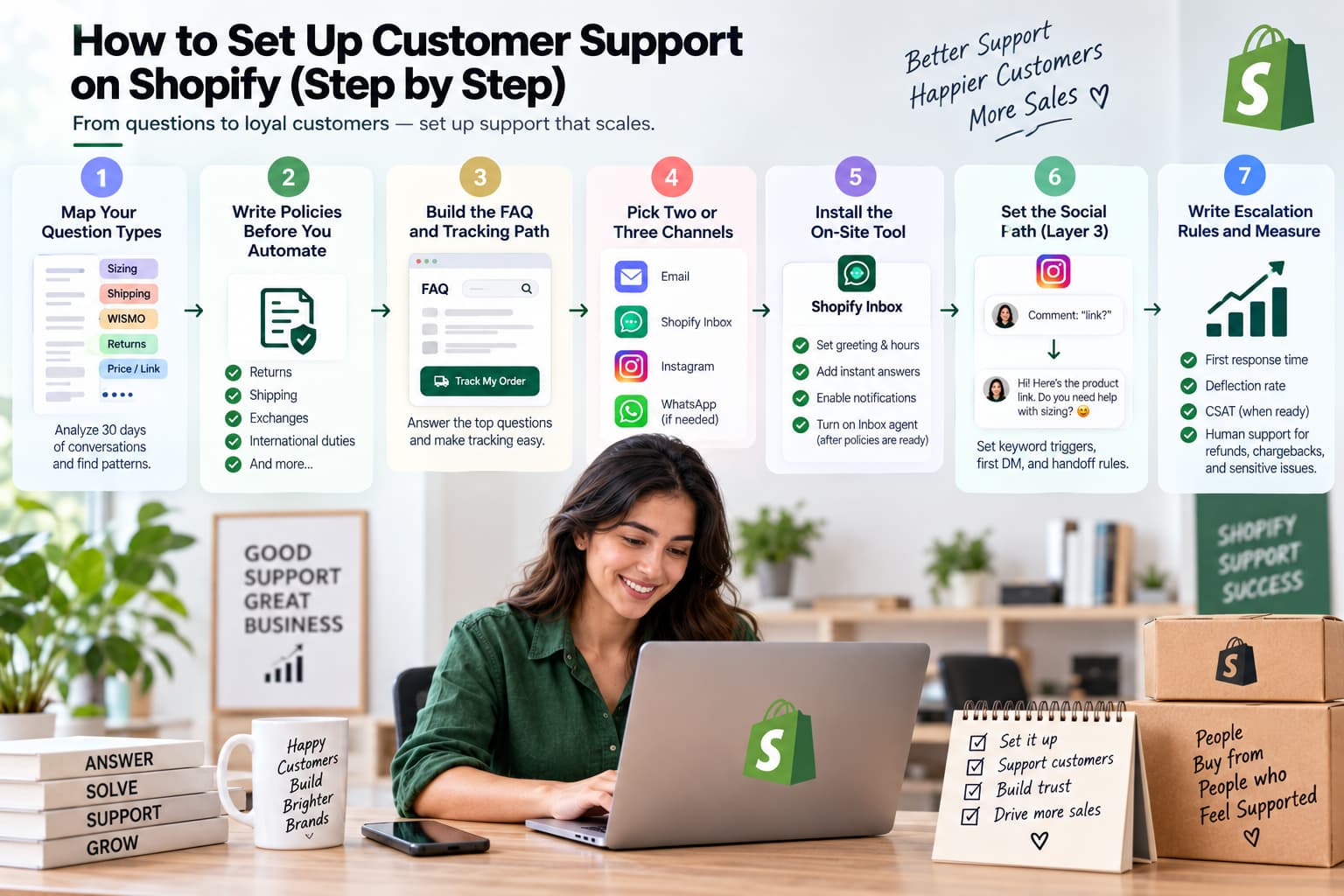
Budget a focused week for a small catalog. Do the steps in order.
1. Map your question types (2–3 hours)
Pull 30 days of email, Inbox chats, Instagram comments, and DMs. Tag each as sizing, shipping, WISMO, returns, price/link, stock, or complaint.
Write down two numbers:
- Tickets per week.
- Social share: percent of questions that started as a comment, story reply, or DM.
Those two numbers decide the stack. A store with 40 tickets a week and a 60% social share needs Layer 3 before it needs a paid helpdesk.
2. Write policies before you automate (half a day)
Returns, shipping, exchanges, damaged goods, pre-orders, international duties. Put them in Settings → Policies and on a page people can find without opening chat.
If automation answers a question the policy does not cover, you will spend the next month apologizing.
3. Build the FAQ and tracking path (1–2 days)
Cover the top 10 themes from step 1. Add a “Track my order” path (Inbox can expose this even without the AI agent). Link the FAQ from the footer, checkout, and order-confirmation email.
4. Pick two or three channels (1 hour)
Default starter:
- Email + FAQ for every store.
- Inbox if shoppers already linger on product pages.
- Instagram comment-to-DM if Reels or ads already produce “price / link / size” comments.
Do not add WhatsApp, phone, and a helpdesk in the same week.
5. Install the on-site tool (under 1 hour)
Install Shopify Inbox. Set greeting, hours, instant answers for the top five questions, and staff notifications on mobile.
Turn on the Inbox agent only after policies and product pages are accurate. Weak product copy becomes weak chat answers.
6. Set the social path if you need Layer 3 (1–2 hours)
Decide keyword triggers (price, link, size, info, PP). Decide the first DM: product link plus one qualifying question, not a dump of five links. Decide the handoff: refunds, angry customers, and custom orders go to a human.
Connect a comment-to-DM tool only after that document exists.
7. Write escalation rules and measure (2 hours, then weekly)
Automate: WISMO, sizing charts, shipping windows, store policies, “send me the link.”Never close the loop with automation on: refunds, chargebacks, legal threats, product-safety issues, or VIP exceptions.
From week one, track first response time and deflection. Add CSAT when you have enough replies for the score to mean something.
How to automate repetitive Shopify support
Automate the questions that already have a stable answer. Keep a human for judgment.
Safe to automate
- Where is my order / tracking link
- Shipping timelines and serviceable PIN codes
- Size charts and material facts that live on the product page
- Return-window policy (not the refund decision)
- “Send the link” and “what’s the price?” on a specific product
- After-hours greeting that sets a real response time
Keep human
- Refunds and partial refunds
- Damaged or missing items that need photos
- Angry public comments
- Wholesale and custom work
- Anything the policy does not cover
On-site, start with Inbox instant answers and the Inbox agent trained on pages you already trust.
On social, automate the first private reply to a keyword comment, then let a person continue if the shopper asks something the flow cannot answer. Abandoned DMs — the shopper got the link and went quiet — deserve one follow-up, not five.
Some vendors claim 70–85% of tickets can be automated. Treat that as a ceiling to test on your question mix. A fashion Reel comment stream is not the same as a furniture brand’s email queue. Measure deflection on your tags, not on a homepage statistic.
Shopify support tools by stage
| Stage | Volume signal | Layer 1 | Layer 2 (on-site) | Layer 3 (social) | Typical monthly tool cost |
| Starting | Under 50 tickets per week | FAQ + policies | Shopify Inbox | Manual replies, or comment-to-DM if social share is high | $0–$30 |
| Growing | 50–300 tickets per week | Help center + saved replies | Inbox or Tidio / Help Scout | Comment-to-DM + one follow-up | $10–$80 |
| Scaling | Over 300 tickets per week, or more than 40% repetitive | Help center + order portal | Gorgias / Zendesk / Re:amaze | Social routed into the desk, or kept in a dedicated DM tool | $100+ |
| Social-first at any size | Social share over 30% of questions | FAQ still required | Inbox still useful on-site | Treat Layer 3 as core, not last | Often cheaper than a desk |
How to read the table
- Shopify Inbox — free on-site chat and Inbox agent. Start here for Layer 2.
- Tidio / Help Scout — small-team chat or email without jumping straight to a full helpdesk.
- Gorgias, Zendesk, Re:amaze — unified tickets, macros tied to Shopify orders, optional AI. Buy when you have a real queue, not because a list ranked them first.
- Comment-to-DM / social automation — InstantDM, ManyChat, or native Meta tools. Use when comments are already support tickets. InstantDM is the affordable Shopify app in this row for Instagram and Facebook comment-to-DM, story replies, and abandoned-chat follow-up. It does not replace Inbox for storefront chat.
Shopify customer support metrics and KPIs
Track a short set. Ticket count alone hides the leak.
First response time (FRT)
Time from the shopper’s first message to your first reply.
- On-site chat: minutes, ideally under two during staffed hours.
- Email: under 24 hours; tighter if you publish that promise.
- Social: minutes on live content; seconds for automated keyword DMs.
CSAT
Percent of rated conversations marked satisfied.
Target: above 75% once you have enough ratings that five votes cannot swing the number.
Deflection rate
Tickets resolved without a human ÷ all tickets.
Target: climb toward 40%+ on repetitive themes before you hire. Treat vendor “85%” claims as a ceiling to test, not a forecast.
Resolution rate
Tickets fully closed ÷ all tickets.
Target: 90%+. If first replies are fast and resolution is low, automation is looping people.
Social extras (only if Layer 3 is on)
- Comment reply rate on campaign posts
- Time-to-first-DM after a trigger comment
- DM open rate and link tap
- Abandoned-chat recovery (a second-touch reply that gets a click or a purchase)
Review weekly. If deflection rises and CSAT falls, you automated the wrong questions.
Common Shopify support mistakes
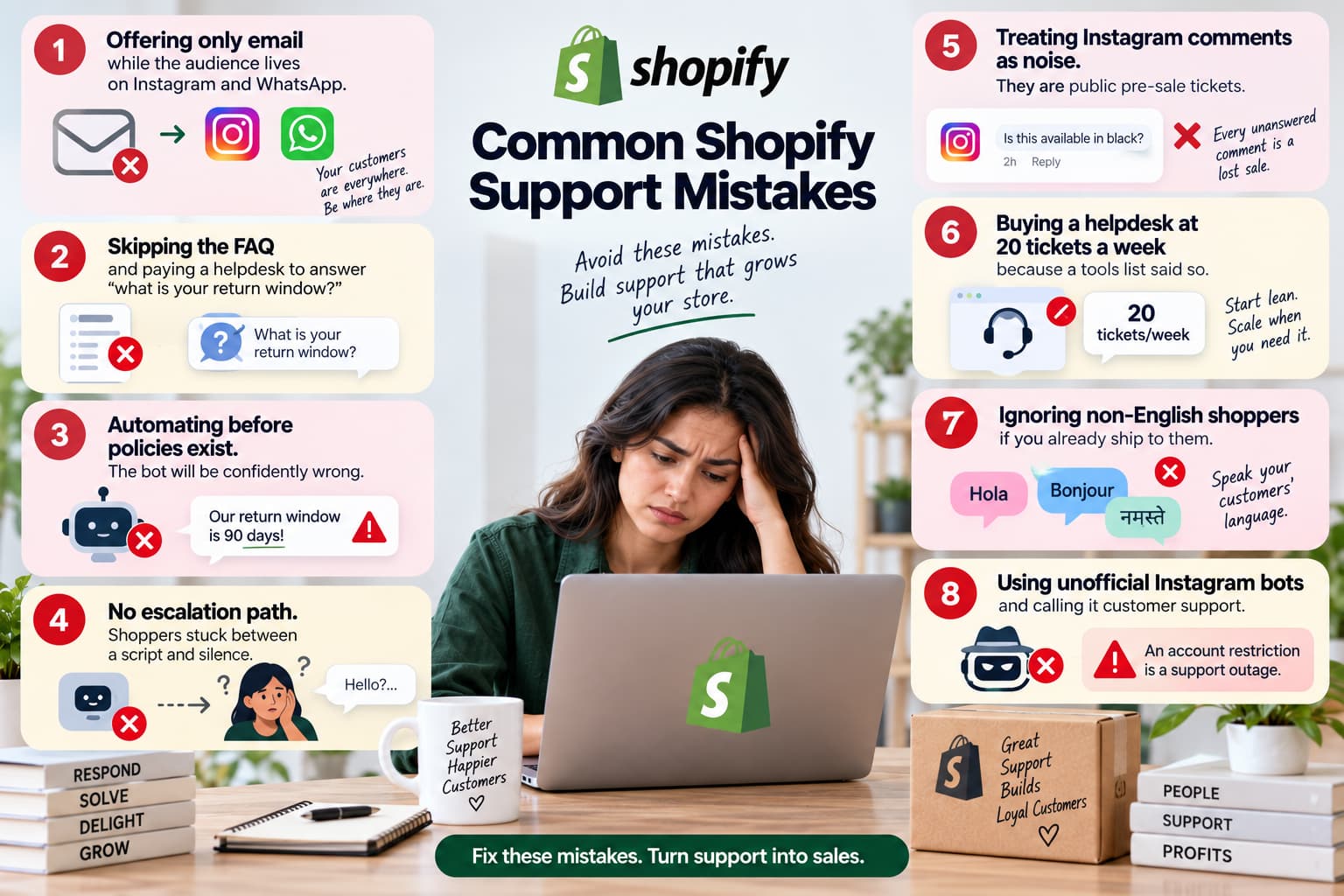
- Offering only email while the audience lives on Instagram and WhatsApp.
- Skipping the FAQ and paying a helpdesk to answer “what is your return window?”
- Automating before policies exist. The bot will be confidently wrong.
- No escalation path. Shoppers stuck between a script and silence.
- Treating Instagram comments as noise. They are public pre-sale tickets.
- Buying a helpdesk at 20 tickets a week because a tools list said so.
- Ignoring non-English shoppers if you already ship to them.
- Using unofficial Instagram bots and calling it customer support. An account restriction is a support outage.
When a manual setup stops working
Use both numbers, not ticket count alone.
| Tickets per week | Social share of questions | What to do |
| Under 50 | Low | Shared Inbox + FAQ. Stay manual on social. |
| Under 50 | High (over 30%) | Still no helpdesk required. Add comment-to-DM and a written handoff. |
| 50–300 | Any | Helpdesk or shared inbox with saved replies. Automate WISMO. |
| Over 300, or more than 40% repetitive | Any | Add automation on top of the desk. Keep humans on refunds. |
The trigger is not “we feel busy.” The trigger is repetitive questions, missed response times, or a social thread you cannot physically clear during a campaign.
How to contact Shopify Support
This section is for problems with your store, not your shoppers.
- Go to shopify.com.
- Use AI Search first.
- Click Chat with a human, sign in, and select the store.
Chat is available 24/7 on all plans. Phone callbacks and email tickets are for Shopify Plus, Retail, and some POS Pro setups. There is no public support@shopify.com that works for every merchant. Sidekick in admin helps with how-to questions inside Shopify.
If the problem is a third-party app, contact that app first. If the problem is custom theme code, you likely need a Shopify Partner, not chat.
Build the layer you are in, then the next one
Start with policies and an FAQ. Add Inbox so shoppers already on the site can ask. If your questions start on Reels and comments, add the social layer in the same sprint — not after you “get around to Instagram.”
Storefront chat catches people who opened the product page. Instagram comments catch people who have not. A complete Shopify customer support system covers both.
If most of your questions already start as comments, automate the first private reply and keep a human on anything that involves money or anger.
Measure first response time this week. If you cannot find last month’s question tags, that is the first gap — not the missing app.