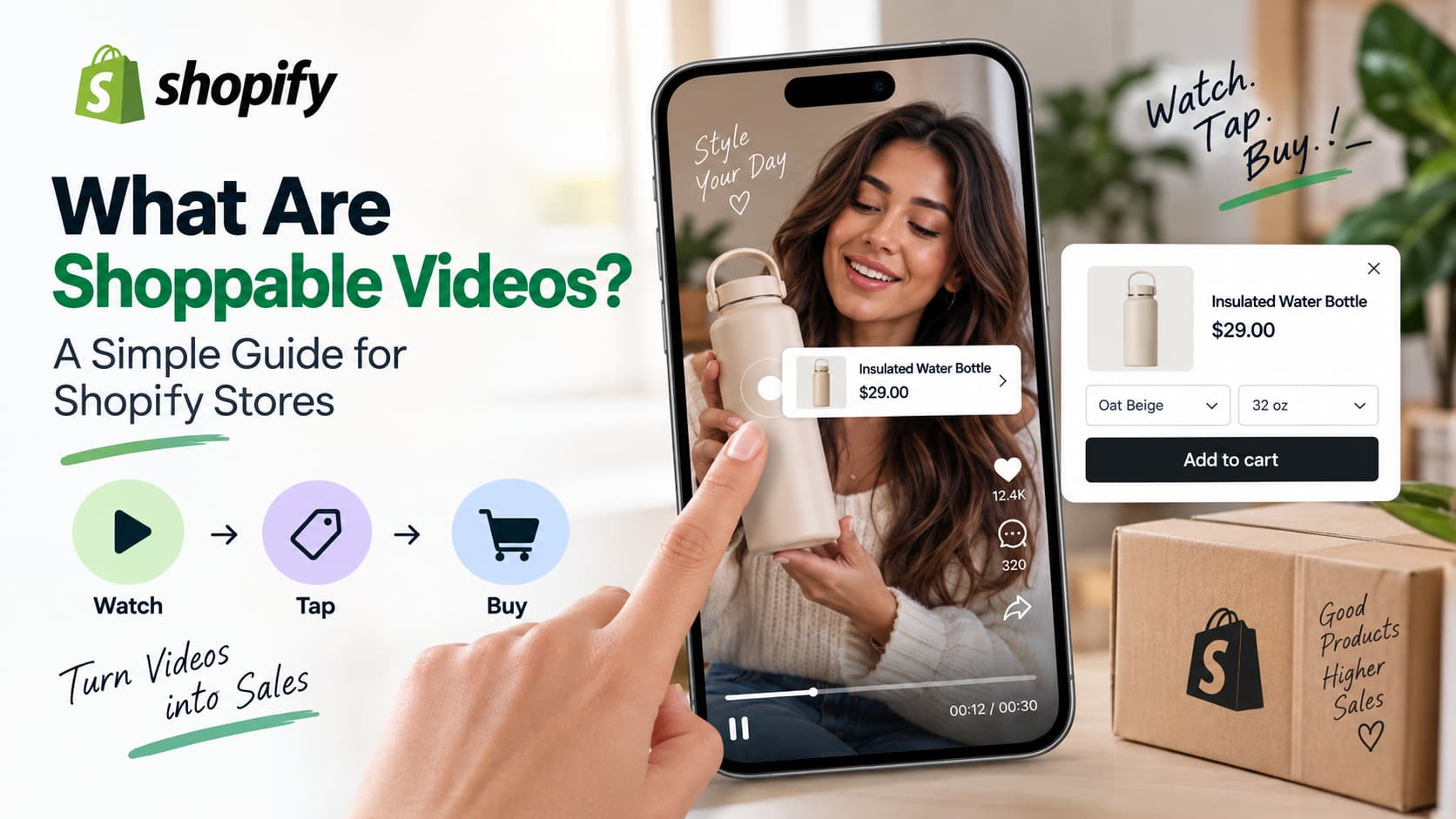
Shoppable videos are videos with clickable product tags so a viewer can open the product and add it to cart without leaving the video. On a Shopify store that usually means a Reels-style or carousel player on the homepage or product page, with live price and variant data from your catalog.
That is the whole idea. The rest of this guide explains how that is different from a normal product video, where it shows up for Shopify merchants, when it is worth using, and what it does not fix. If you have been comparing App Store listings and still cannot tell a shoppable player from a product MP4 or an Instagram feed, this is the page to keep.
What are shoppable videos?
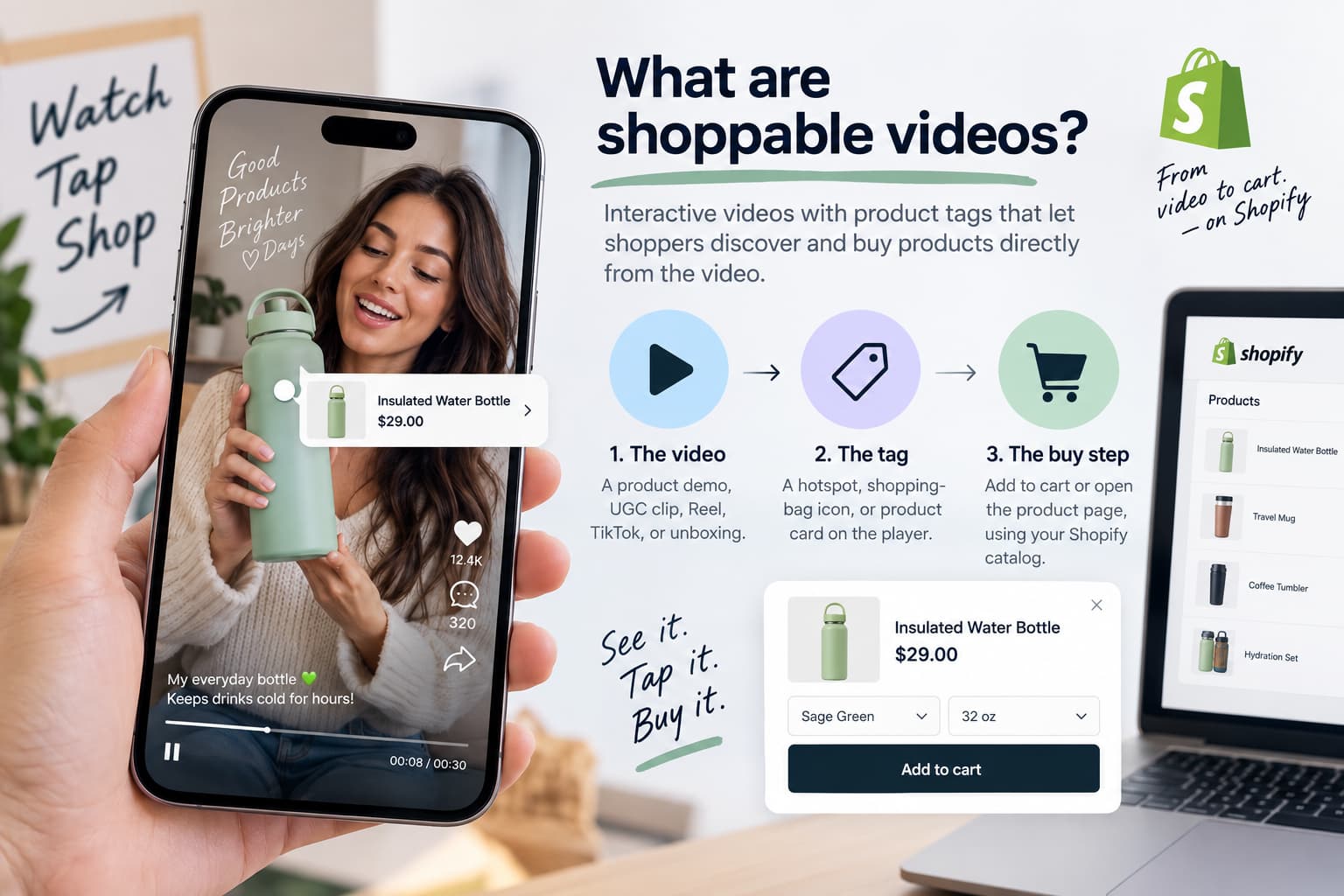
Shoppable videos are interactive videos with product tags, hotspots, or product cards built into the player. The shopper watches a demo, unboxing, Reel, or UGC clip, taps the product on screen, and adds it to cart (or opens the product page) while the video keeps playing.
Shopify describes the same mechanic: shoppable videos are interactive videos with embedded product links and pop-up tags that let viewers add items to a cart without hunting for the product themselves. Other reference pages say it in slightly different words — a video format that embeds clickable product data inside the player so the viewer does not have to leave the content — but the test is always the same. Can the person act on the product from the video surface? If yes, it is shoppable. If they must stop, scroll, search, or open a new tab, it is not.
Three parts make a video shoppable:
- The video — a product demo, lifestyle clip, customer UGC, Instagram Reel, TikTok, or unboxing.
- The tag — a hotspot, shopping-bag icon, or product card overlaid on the player.
- The buy step — add to cart or a product page, using your Shopify catalog (price, variants, inventory).
If any one of those is missing, you have a product video, not a shoppable video.
The video can be 12 seconds or 90 seconds. It can be filmed by you or stitched from customer clips. Length and source do not make it shoppable. The tag and the live catalog connection do. A polished brand film with no product overlay is still a product video. A raw phone clip with a working tag and add-to-cart is a shoppable video.
Tags themselves come in a few shapes. Some players show a persistent product card along the bottom. Some drop a pin when that SKU appears on screen. Some open a tray with image, price, size, and color so the shopper can pick a variant without opening the full product page. All of those count. A caption that says “available on our site” does not.
Shoppable video is a type of shoppable media. Shoppable media is the wider family: tagged photos, shoppable blog modules, shoppable recipes, shoppable TV ads. This guide stays on video because that is the format Shopify stores are installing from the App Store in 2026, and it is the format merchants confuse with Reels, feeds, and live shopping.
For a small or mid-size Shopify store, the practical definition is narrower than the enterprise one. You are not building a custom player that talks to a headless cart API. You are installing a widget, pointing it at products you already sell, and letting a shopper tap instead of hunt. Keep that picture. It will save you from buying a platform built for a retail network when you needed a PDP block.
How shoppable videos work on Shopify
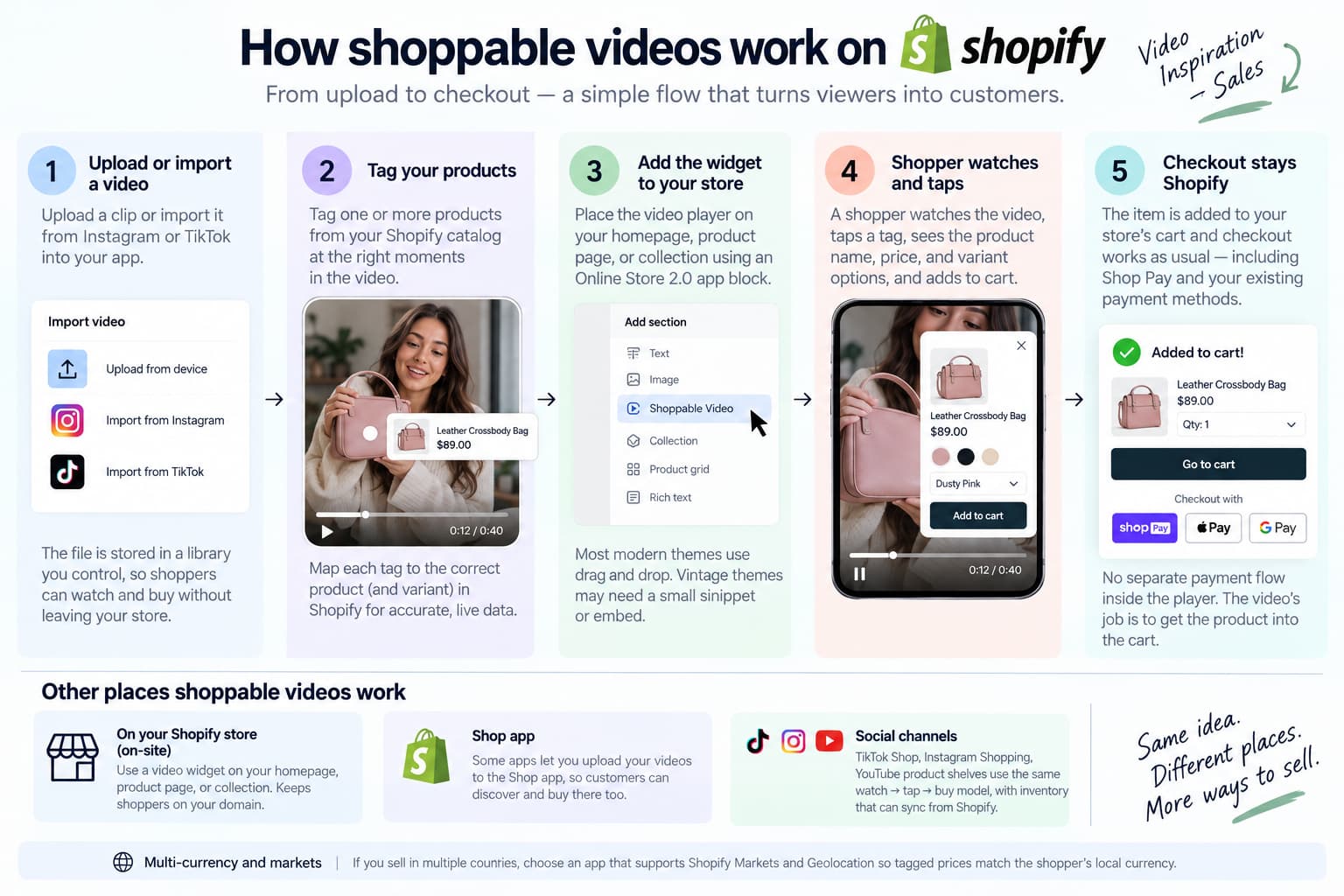
On most Shopify stores the flow is:
- You upload a clip or import it from Instagram or TikTok.
- You tag one or more products from your Shopify catalog.
- You place a widget on a page (homepage, product page, collection) with an Online Store 2.0 app block.
- A shopper watches, taps a tag, sees name / price / variant, and adds to cart.
- Checkout stays the store’s normal Shopify checkout.
The video is the proof. The tag is the shortcut. The cart is still Shopify.
That is on-site shoppable video. It is not the same thing as tagging a product inside TikTok Shop or Instagram Shopping. Those are shoppable videos too — they just live on the social app, not on your theme.
Here is what each step is doing under the hood, without turning this into a developer doc.
When you import a Reel or TikTok, the app copies the file (or a compressed version of it) into a library you control. You are not embedding the Instagram page. You are putting a playable asset on your domain, or on the app’s player, so the shopper never has to open Instagram to finish the buy. That is why import matters. A live Instagram embed can break, show the wrong chrome, or send the tap back into the app.
When you tag a product, you are mapping a moment in the clip to a product ID in Shopify. Good tagging is boring and specific. Tag the dress on screen, not the whole look unless you intend a bundle. Tag the shade she is wearing, not the entire lipstick line. If the player supports timestamps, attach the tag when that product appears, not at second zero for a 40-second clip that shows three SKUs.
When the shopper taps, the player should pull live data: current price, available variants, sold-out state. If your sale ends at midnight, the card should not still show yesterday’s price. That live catalog link is the difference between a shoppable video and a screenshot of a product.
Add-to-cart should write to the same cart the rest of the theme uses. If the tap opens a new tab to the PDP, you still helped, but you gave up the “stay in the video” promise. Some apps offer both modes — quick add, or “view product.” Quick add wins on simple catalogs. View product wins when size charts and fabric details still matter.
Checkout does not change. You do not want a second payment flow inside the player. Shopify checkout, Shop Pay, your existing payment methods — that is the point. The video’s job is to get the line item into the cart. Your store already knows how to take money.
Two other Shopify surfaces sit next to this flow.
The Shop app can show video if the app you use supports uploading clips there. That is still shoppable video, just on Shopify’s consumer app instead of your theme.
Sales channels — TikTok Shop, Instagram Shopping, YouTube product shelves — use the same mental model (watch, tap, buy) with a different checkout. Inventory can sync from Shopify. The player, the policy, and the buyer are on someone else’s platform. Run those if you sell there. Do not treat them as a replacement for the widget on your own product page. A shopper who clicks a Google ad onto your PDP never sees your TikTok Shop tag.
Themes matter less than they used to. Online Store 2.0 app blocks mean you drag the player onto the template. Vintage themes and heavy page builders can still need a snippet or an embed. If your theme is vintage, budget an hour with the app’s docs before you assume “no code.”
Multi-currency and markets should follow the store. If you sell in USD and INR, the tag should not freeze one currency. Apps that say they work with Shopify Markets and Geolocation are solving a real breakage: a tagged price that does not match the cart.
Shoppable video vs the things stores mix up
This is the gap most “what is shoppable video” pages skip. Shopify merchants use one phrase for five different setups.
| Format | Where it lives | Can they buy in the player? | What it actually is |
| Shoppable video (on-site) | Homepage, PDP, collection, Shop app | Yes — tag → cart or PDP | The format this guide is about |
| Plain product video | Shopify product media gallery | No. They watch, then scroll to Add to cart | A video file. Useful, not shoppable |
| Live shopping | Scheduled stream on-site or on social | Yes, during the live (and sometimes on replay) | A show with a host, not an always-on widget |
| Instagram / TikTok feed gallery | Grid or slider of posts on the store | Sometimes, if posts are tagged | Social proof wall. Not the same as a shoppable player |
| “Link in bio” Reel | Instagram or TikTok | No. They leave the app and hunt | Discovery content, not shoppable video |
| TikTok Shop / IG product tags | Inside the social app | Yes, inside that app | Social shoppable video — sibling format, different surface |
A YouTube or Vimeo embed with “Shop now” under the player is also not shoppable video. The click leaves the video. The session breaks. That is a product video with a link.
Walk through a real storefront visit and the mix-up becomes obvious.
A shopper lands on a PDP. The first media tile is an MP4 you uploaded in Shopify admin. It autoplays on mute. That file helps. It is still not shoppable. When they want the blue variant they just watched, they pinch-zoom the gallery, then hunt the variant picker. No tag did that work for them.
Further down the same page, a stories-style widget plays customer Reels. Each clip has a product card. They tap, pick M, add to cart. That widget is shoppable video.
On the homepage, an Instagram grid shows last week’s posts. Pretty. Trust. If those tiles only open Instagram, you built a feed. If each tile opens a product tray, the feed became shoppable — but it is still a gallery of posts, not the same player as the PDP stories block. Merchants install both and call both “shoppable video.” Only one is a dedicated video commerce player.
Live shopping looks closer because the overlay has products. The difference is time. A live show exists at 7 p.m. Thursday. A shoppable video sits under the gallery on Saturday morning when nobody is hosting. Replays can be shoppable after the fact. The live event itself is a different production job: host, chat, drop, clock.
Social shoppable video is the other twin. On TikTok Shop, the bag icon is native. Checkout can complete inside TikTok. That is excellent for people who never planned to visit your URL. It does nothing for the visitor who is already on your collection page. You can — and many stores should — run both. Just name them separately so you do not judge the on-site widget by TikTok GMV, or the other way around.
“Link in bio” fails the test in one step. The shopper is convinced at second six. Then they must exit the Reel, find the profile, tap the link, land on a homepage, search the product, and start over. Every extra screen is a place they disappear. Shoppable video exists because that path leaks.
Use the table when you evaluate an app screenshot. If the demo only shows a pretty slider of Instagram photos, you are looking at a feed app. If it shows a vertical player with a product chip and add-to-cart, you are looking at shoppable video. If it shows a host and a comment thread, you are looking at live shopping. Buy the job you actually have.
Where Shopify stores put shoppable videos
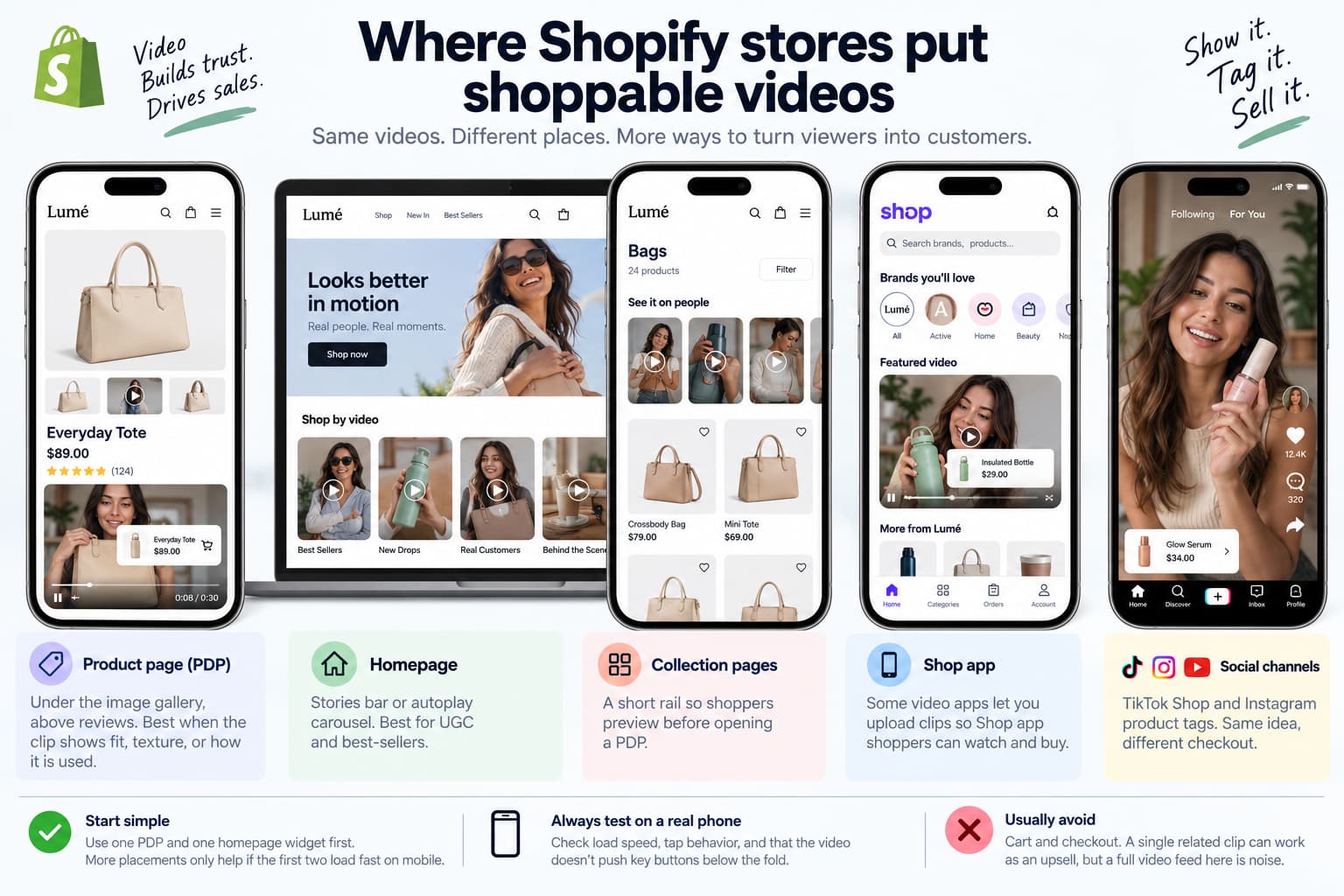
You do not need a custom theme. Typical placements:
- Product page (PDP): under the image gallery, above reviews. Best when the clip shows fit, texture, or how it is used.
- Homepage: stories bar or autoplay carousel. Best for UGC and best-sellers.
- Collection pages: a short rail so shoppers preview before opening a PDP.
- Shop app: some video apps let you upload clips so Shop app shoppers can watch and buy.
- Social channels: TikTok Shop and Instagram product tags. Same idea, different checkout.
Start with one PDP and one homepage widget. More placements only help if the first two load fast on mobile.
Placement is strategy, not decoration. Each surface answers a different question.
On the product page the shopper already picked a URL. They need proof this SKU looks like the photos and works like the description. A 15-second clip of the bag opening, the fabric moving, or the bottle dispensing does more than a fourth still image. Put the player where the eye goes after the gallery — not buried under shipping tables. One or two clips tied to this product beat a dump of every UGC video you own.
On the homepage the shopper has not chosen yet. A stories bar or vertical carousel acts like a merchandising rail: best-sellers, new drops, a lookbook. Keep it short. Ten clips is a feed. Three to six is a storefront. Autoplay should be muted. Sound on tap. If the homepage already has a hero video background, a slider, and a popup, adding a fourth motion block is how pages die on a mid-range Android phone.
Collection pages are the middle. A shopper is scanning 24 thumbnails. A small rail of “see it on people” videos above the grid can cut the number of PDPs they have to open. Do not autoplay four videos in the first viewport on a collection template. One rail, lazy-loaded, is enough to test.
The Shop app is easy to forget if you only think in theme editor. Shoppers browse brands inside Shop. Video there is discovery for people who never typed your domain. If your app supports Shop app upload, treat it as a third placement after PDP and homepage, not as day-one work.
Cart and checkout are usually the wrong place. The shopper already added something. A shoppable carousel in the cart can work as an upsell if it is one related clip. A full stories experience next to the payment button is noise.
Email and SMS can carry a shoppable player or a deep link into one. That is a later move. Get the on-site block right first or you will send traffic to a broken widget.
Wherever you put the player, preview three things on a real phone: does it steal the first tap meant for the menu, does it push the add-to-cart button below the fold on the PDP, and does it keep playing when the shopper opens the product tray. If the tray covers the only clip that explained the product, you designed a conflict.
Why stores use shoppable videos
Shoppers already decide from short video. Wyzowl’s State of Video Marketing work has repeatedly found that most consumers want a short video to learn about a product, and that many say a video has convinced them to buy. Shoppable video’s job is to remove the extra clicks between that moment and the cart.
On a static product page the path is: watch → remember the product → scroll → find the button → add to cart. On a shoppable video the path is: watch → tap tag → add to cart.
That is why the format works for products people understand by seeing them worn, poured, assembled, or used — fashion, beauty, jewelry, home, food.
It is weaker when the product needs a spec sheet, a quote, or a sales call before anyone buys.
There are four practical reasons stores add the format, beyond “video converts.”
They already shot the content. The expensive part of video is making it. If the brand posts Reels every week, those files are sitting unused on the product page. Importing them is cheaper than a new production cycle. Shoppable video is often a distribution decision, not a creative one.
The page cannot show motion. Jewelry on a white background does not show clasp, drape, or scale against a neck. A sofa photo does not show depth. A serum photo does not show texture. Video carries that information. Tags mean the shopper does not have to rewind and then go hunting.
Time on page is not the goal. Fewer steps are. A two-minute explainer can raise time on page and still lose the sale if the shopper cannot act mid-watch. Shoppable video is built for the interrupt: they saw enough at second eight.
Social proof and sale can share one object. UGC that used to live only on Instagram can sit next to the buy button. That is stronger than a reviews widget that is all stars and no motion — and stronger than a Reel the shopper already scrolled past in their feed and cannot find again.
What the format will not do: invent demand. If nobody wants the product, a tag will not help. If the product is a configurable industrial part, the shopper still needs a form. If your photos are dishonest, video will make that worse, not better.
Measure the reason you installed it. If the reason was “prove fit,” watch add-to-cart from the PDP widget and return rate on those SKUs. If the reason was “use our Reels,” watch whether imported clips actually get taps, or whether you embedded a silent graveyard under the fold.
What shoppable videos are not
Hold this list. It is how you avoid buying the wrong app.
Not a product video in Shopify media. Uploading an MP4 to the product gallery does not make it shoppable. There is no tag and no in-player cart. Shopify will transcode it, serve it, and show a play button. That is hosting. Hosting is good. It is not video commerce. You can keep the gallery video and add a shoppable widget. They do different jobs. The gallery video is official brand footage. The widget is often UGC plus tags.
Not “link in bio.” A Reel that says “shop the link” is discovery. The buy happens somewhere else. The caption can be perfect and the landing page can be perfect. The format is still a handoff. Shoppable video removes the handoff for people who are already on a surface you control.
Not an Instagram feed widget by default. A grid of posts builds trust. It only becomes shoppable if each post is tagged to a product. Many feed apps lead with “shoppable Instagram.” Read the feature list. If tagging is a paid tier or a separate module, the free grid is just a grid. Beautiful, useful for proof, not the same install as a shoppable video player.
Not live shopping. Live shopping is a scheduled event with chat. Shoppable video sits on the page 24/7. Live needs a host, a time, and a reason to show up. Always-on video needs a library and a widget. Stores that buy a live platform because they wanted Reels on the PDP have bought a TV studio to solve a merchandising problem.
Not a replacement for answering Instagram comments. Tags on your storefront help the person already on your site. They do not reply when someone comments “price?” or “link?” on the original Reel. This is the limit definition pages almost never mention. The clip you imported still exists on Instagram. The conversation still happens there. On-site shoppable video and inbox follow-up are two paths. Installing the first does not close the second.
Also not: a theme with a video banner. Also not: a YouTube channel with products in the description. Also not: an ad that clicks to a PDP. Those can all sit in a healthy stack. None of them pass the “buy from the player” test on your Shopify store.
Do you need shoppable videos? A simple check
Worth testing if most of these are true:
- You sell something people judge by look and motion (fit, finish, routine, unboxing).
- You already have Reels, TikToks, or customer clips.
- Mobile is most of your traffic.
- Product pages feel static next to your social content.
Wait if:
- You have no video yet. Shoot or collect five clips first.
- The theme is already slow on mobile. Fix that before adding autoplay widgets.
- The catalog is quote-based B2B. Video helps explain; tags rarely close the deal.
- You expected the widget to replace Instagram inbox work. It will not.
A useful test is smaller than a redesign. Pick one best-selling visual SKU. Add two clips — one brand, one customer if you have it. Tag only that SKU. Place the player on that PDP only. Run it for two weeks. Look at add-to-cart from the widget, not vanity views. If taps are real and the page did not collapse on mobile, expand to the homepage with three clips. If taps are zero, the problem is usually the clip (wrong product, too long, no hook in three seconds) or the placement (below the fold on a long PDP), not “shoppable video as a category.”
Stores that should be cautious: one-product stores with a single lifestyle photo and no plan to film; stores whose buyers are procurement teams filling a form; stores that already failed Core Web Vitals and want to “add energy” with autoplay. Motion is not a strategy for a slow theme.
Stores that should move faster: fashion and beauty brands posting weekly; home brands whose products look different in a room than in a packshot; any merchant whose support inbox is full of “does it look like the photo?” That question is a video question. The tag is how the answer becomes a cart line.
Budget the content, not only the app. A $30 widget with no clips is a box on the page. Five honest vertical videos will outperform a library of 80 horizontal recuts that nobody watches.
How Shopify stores usually add them
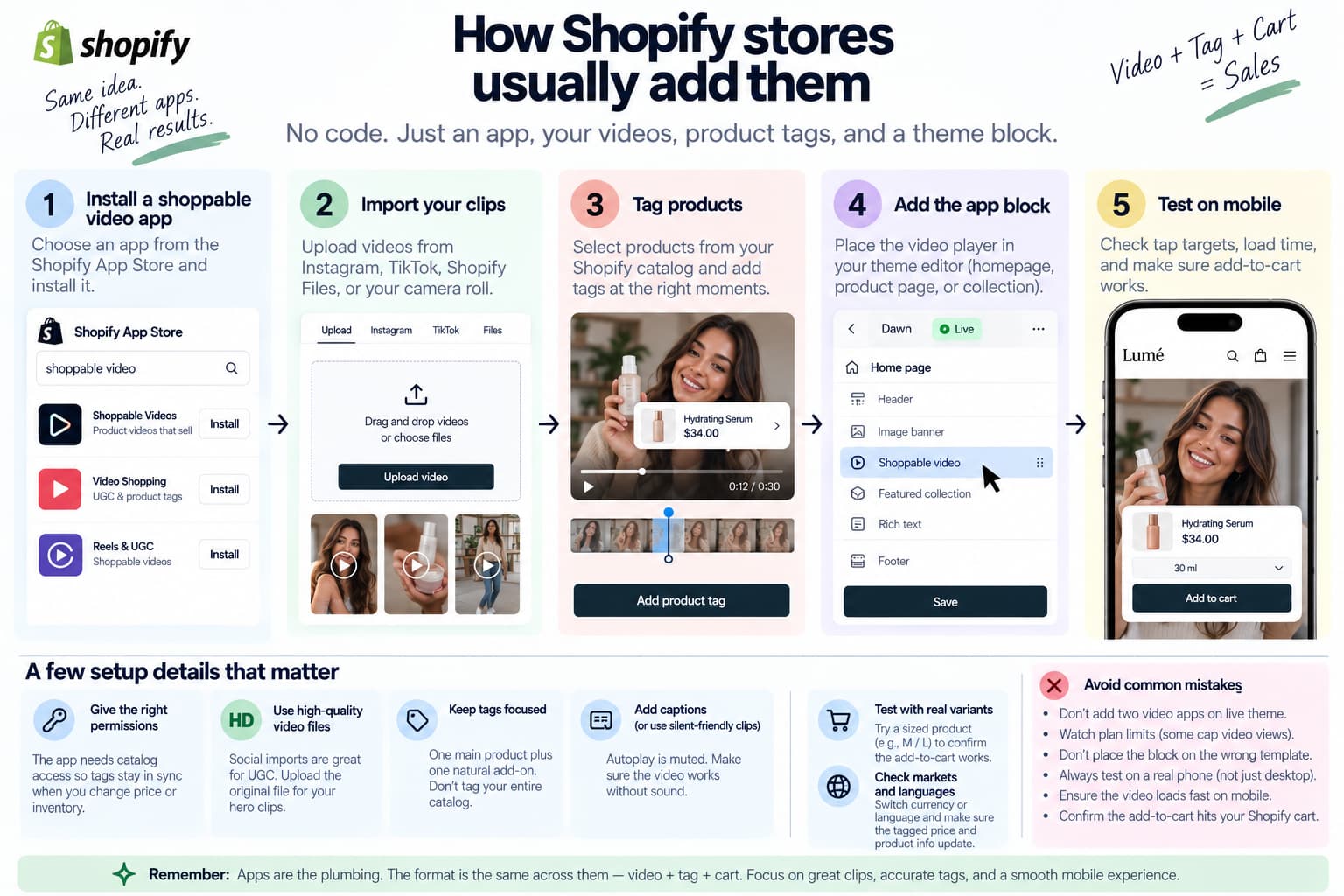
You do not write theme code for this on Online Store 2.0.
- Install a shoppable video app from the Shopify App Store.
- Import clips from Instagram, TikTok, Shopify Files, or your camera roll.
- Tag products from the catalog.
- Add the app block in the theme editor.
- Check mobile: tap targets, load time, and whether add-to-cart actually hits the cart.
This post is not an app roundup. Treat apps as the plumbing. The format is the same across them: video + tag + cart.
Watch pricing. Some plans cap video views. A busy homepage carousel can burn a view cap faster than a single PDP embed.
A few setup details that decide whether the install works.
Permissions. The app needs catalog access so tags stay in sync when you change a price or sell out a size. If you run multiple sales channels, confirm the app is reading the right catalog and market.
Import quality. A compressed Instagram download can look soft on a desktop PDP. If the clip is your hero proof, upload the original file. Use social import for volume UGC, direct upload for the one video that must look sharp.
How many products per clip. One primary product plus one natural add-on is enough. Tagging nine items in a room tour turns the tray into a catalog. Shoppers tap nothing.
Theme editor, not liquid first. Add the block, save, open the storefront in a private window on your phone. Then worry about custom CSS. Most “it doesn’t show” tickets are a disabled app embed or the block sitting on the wrong template.
Sound and captions. Autoplay is muted in browsers. If the clip only makes sense with voiceover and has no captions, it will fail on the homepage. Burn in the one line that matters, or pick clips that work silent.
Cart test with a real variant. Add a sized product, not only a one-variant SKU. If the tray cannot pick M / L, shoppers will bounce to the PDP and you lost the in-player path.
Markets and languages. If the storefront switches currency or language, click the tag again after the switch. Broken price and English-only trays are common.
After launch, do not add a second video app “just to compare” on the live theme. Two players means two scripts, two autoplays, and a support nightmare. Trial in a duplicate theme if you must compare.
Limits the definition pages skip
Page speed. A heavy player on every template will cost you. Use lazy load, keep files compressed, and do not stack three video apps. Ask whether the player loads on collection pages that already have dozens of images. If the app injects a script globally, you are paying for video on templates that never show the widget. Check Largest Contentful Paint on mobile before and after. A pretty carousel that adds a second of delay on every landing page can erase the conversion you hoped to gain.
View-based bills. Free tiers look fine until traffic grows. Read the view / click limits before you put a widget sitewide. A homepage stories bar can register a view for every visitor, including people who never tap. PDP-only placement is cheaper to learn on. When you do go sitewide, know what “view” means in that app — player loaded, clip started, or three seconds watched. Those are not the same invoice.
Attribution. “Video views” are not revenue. Track add-to-cart from the widget and orders influenced after a view. If the app only reports impressions, you cannot tell a decoration from a sales tool. Pair widget events with Shopify reports. Accept that some credit will be fuzzy: a shopper who watches, leaves, and buys the next day from email. Directional lift on the SKUs in the widget is enough for a small store. Do not wait for a perfect multi-touch model.
The comment gap. The same UGC you import still lives on Instagram and TikTok. People comment there. On-site tags never see those comments. If the Reel is doing the selling, you still need a way to send a product link or answer in the DM. That is a different job from a shoppable video widget — comment-to-DM and inbox follow-up, not another carousel.
Other limits worth naming once.
Rights. Customer videos and creator clips need permission if you run them as ads or if the contract says so. Importing a public tag does not always mean you can run that face on your homepage forever.
Accessibility. Autoplay motion bothers some shoppers. Provide a pause control. Do not trap focus inside the player. Captions help more people than you think, including anyone watching on a train.
Returns. Video that oversells color or scale will raise return rate. Use honest clips. A shoppable tag on a misleading video just speeds up a bad order.
Team time. Someone has to retire dead clips, retag new variants, and pull down a sold-out hero. A widget with six-month-old UGC looks abandoned.
None of these limits mean “do not use shoppable video.” They mean install it like a merchandising system, not like a sticker.
The one-line takeaway
Shoppable video shortens the path on the store. It does not replace the conversation that starts when someone comments on the same video on Instagram.
Use a shoppable video widget for people who already landed on your Shopify store. Treat Instagram comments and DMs as a separate path — and only add a tool for that path when the Reels are actually getting “link” and “price” replies.
If you remember one distinction from this guide, remember this: a file that plays is not the same as a file that sells. Tags, live catalog data, and a cart that still belongs to Shopify are what turn video into shoppable video. Everything else is either proof, discovery, or a different channel.