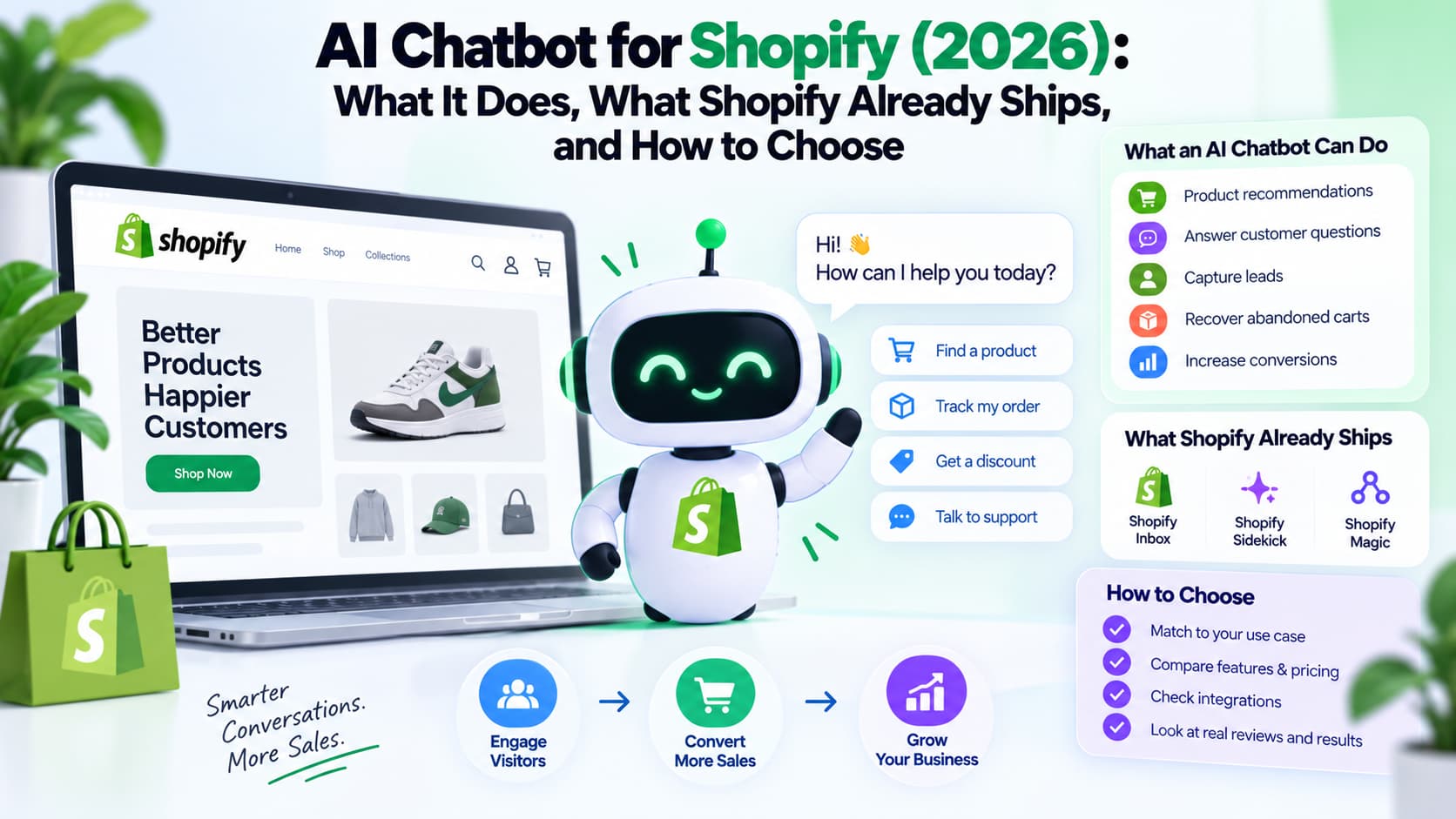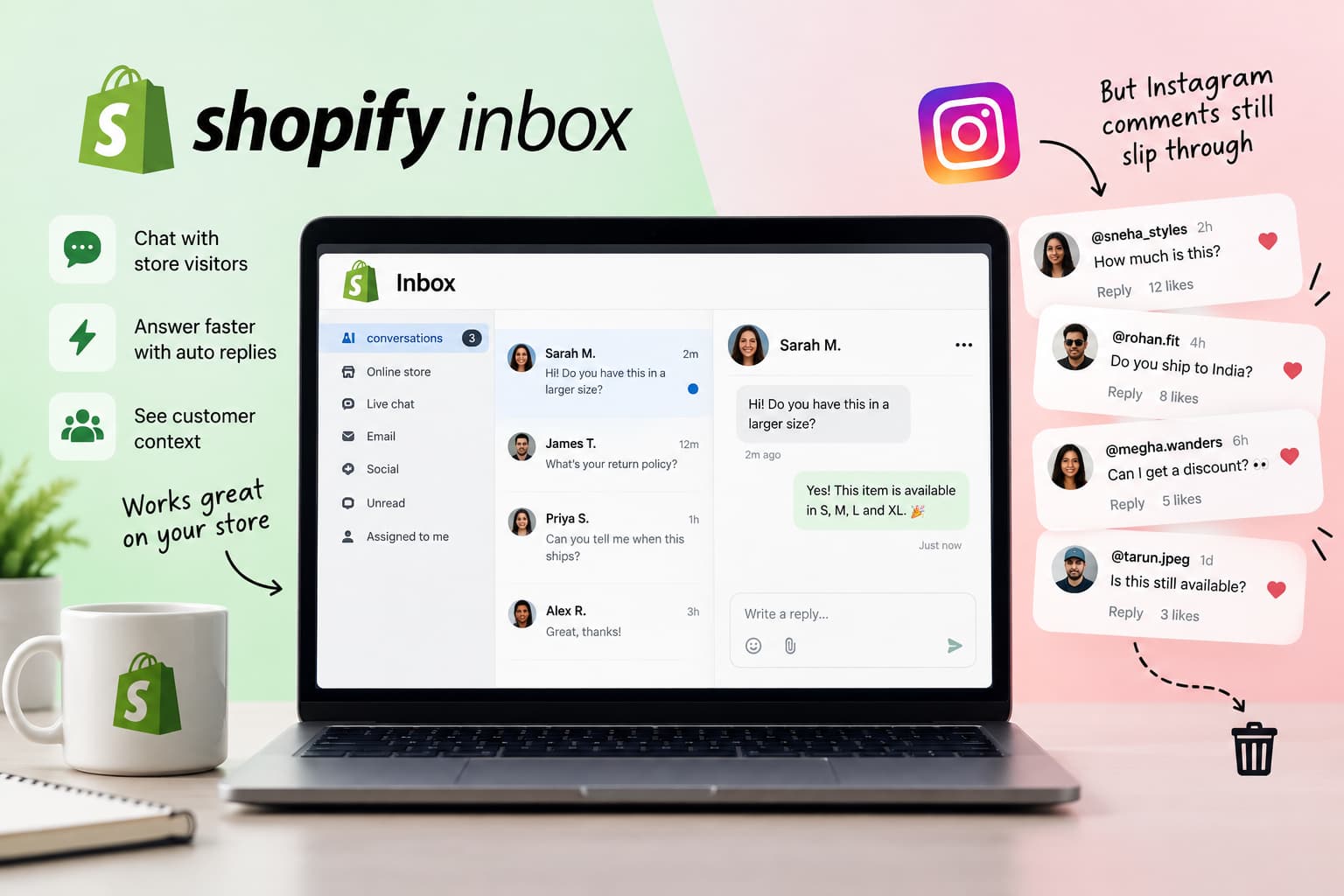
Shopify Inbox is the chat tool most Shopify stores already have installed. It is free, it lives in the admin, and it answers product questions on the website.
That is not the whole story in 2026.
A growing number of sales now start as a comment on a Reel. Someone types PP, LINK, or PRICE. Instagram treats that comment as engagement. The buyer treats it as a request for a checkout link. Shopify Inbox never sees it.
This review covers what Shopify Inbox does well, what changed in its lead-capture settings, where it stops, and how Instagram comments are a different job from storefront chat. If you sell on Instagram and already run Inbox, you do not need to remove it. You need a second layer.
What is Shopify Inbox in 2026?
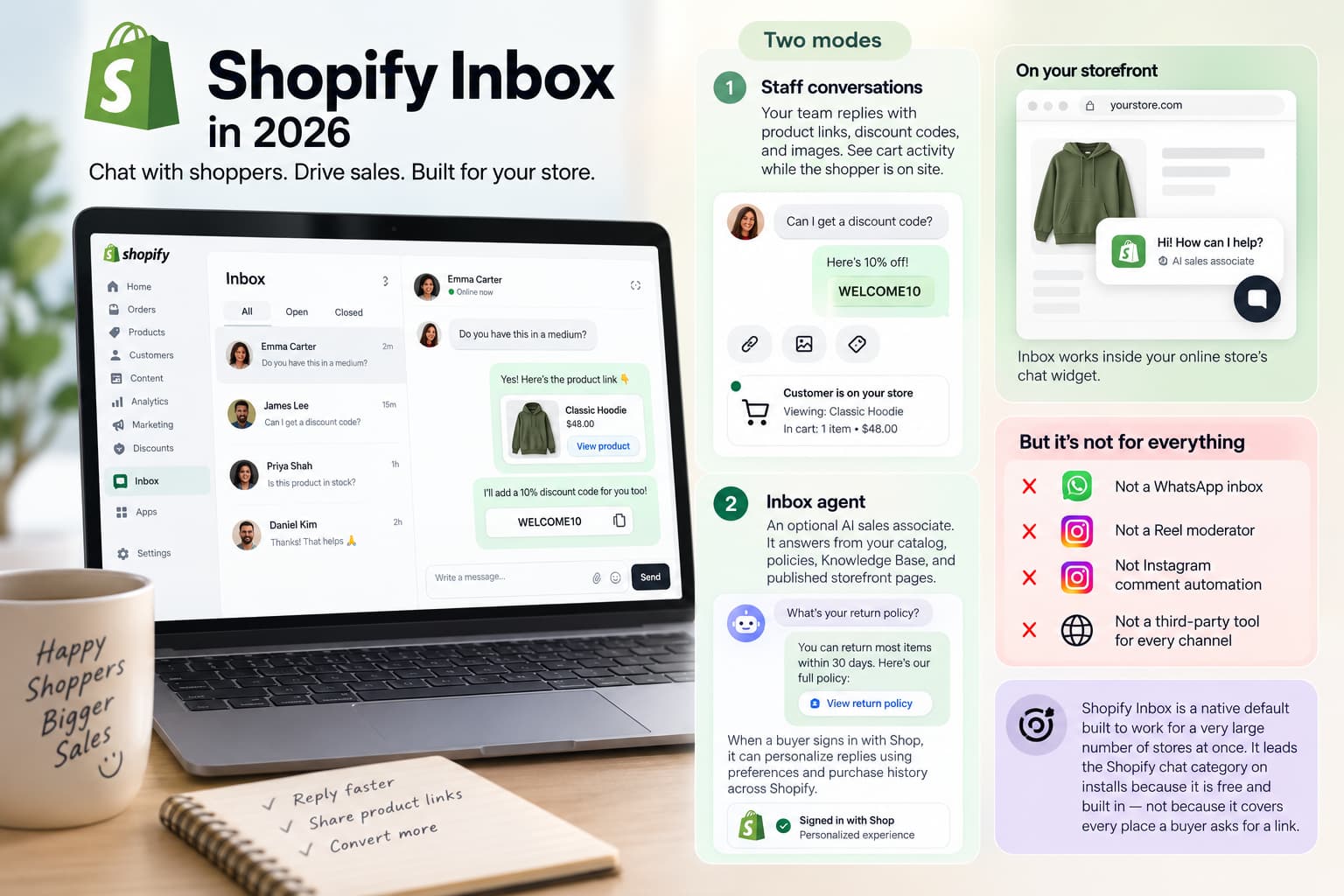
Shopify Inbox is Shopify’s first-party messaging app for the online store. You install it from the Shopify App Store, turn on the storefront widget, and reply from the admin, inbox.shopify.com, or the iOS and Android apps.
It runs in two modes:
- Staff conversations. Your team replies. You can send product links, discount codes, and images. While the shopper is on the site, you can see cart activity.
- Inbox agent. An optional AI sales associate. It answers from your catalog, policies, Knowledge Base, and published storefront pages. When a buyer signs in with Shop, it can personalize replies using preferences and purchase history across Shopify — a signal no third-party app can copy.
Shopify now markets Inbox as an AI sales associate on the storefront. The Help Center is clear about the agent’s scope: it only operates inside your online store’s chat widget.
That limit matters. Inbox is not a WhatsApp inbox. It is not a Reel moderator. It is not Instagram comment automation. It is a native default built to work for a very large number of stores at once. It leads the Shopify chat category on installs because it is free and built in — not because it covers every place a buyer asks for a link.
What Shopify Inbox gets right
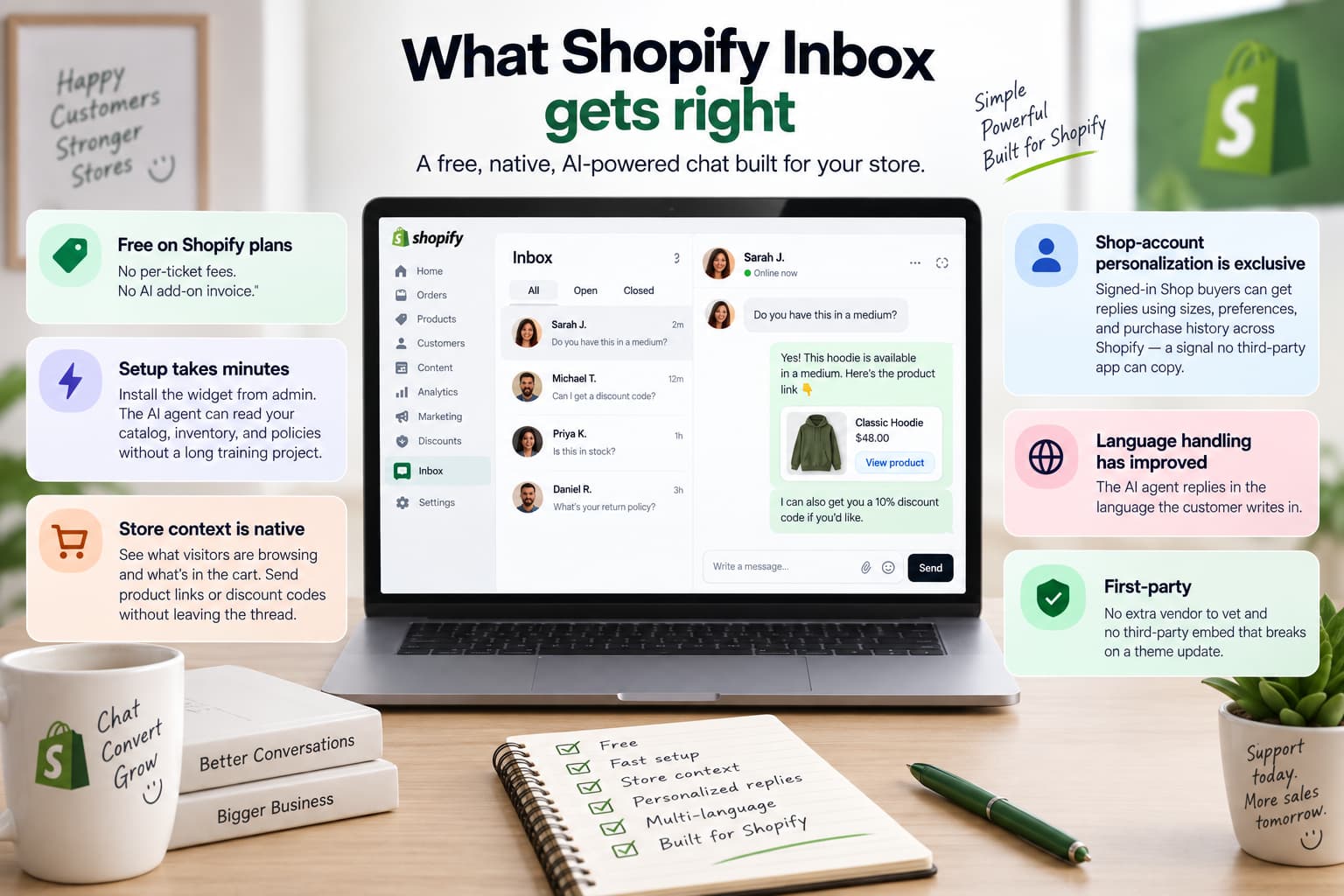
Inbox earns its place on most stores.
It is free on Shopify plans. There is no per-ticket fee and no AI add-on invoice. If chat is a support cost you want to contain, that may be the whole evaluation.
Setup takes minutes. The widget installs from admin. The agent can read catalog, inventory, and policies without a long training project.
Store context is native. Staff can see what the visitor is browsing and what is in the cart. They can send a product link or a discount code without leaving the thread.
Shop-account personalization is exclusive. Signed-in Shop buyers can get replies that use sizes, preferences, and history from across Shopify.
Language handling has improved. Shopify documents that the agent replies in the language the customer writes in. Older claims that Inbox is English-only are out of date.
It is first-party. There is no extra vendor to vet and no third-party embed that breaks on a theme update.
If your buyers live on the website, volume is light, and chat is support rather than acquisition, Shopify Inbox is still a solid default.
How to add Shopify Inbox live chat to your store. This is the website layer. Instagram comments are covered later in this review.
Shopify Inbox limitations that cost social-first stores sales
The limits that matter are not “it isn’t a paid helpdesk.” They are the limits that leave Reel comments unanswered.
The agent has one surface
Shopify documents that the Inbox agent only operates inside the online store chat widget.
That means:
- No WhatsApp thread for the agent
- No intake of Instagram post, Reel, Story, or ad comments
- No SMS
- No AI that follows a buyer from a Reel into a DM with the same catalog
Older guides still list “integrates with Facebook and Instagram” as a feature. Treat that as messages, if they still appear in staff Inbox in your admin — never as comments. Storefront chat and some DMs are not the same as comments on a post or ad.
If customers say “comment LINK and I’ll send the product,” Inbox is the wrong tool for that motion.
It answers. It waits. It does not start.
Inbox is inbound. A shopper who hovers on checkout and leaves is a shopper the widget never spoke to. There is no documented exit-intent popup and no abandoned-cart DM from Inbox itself.
Staff can send products and codes once someone is already talking. The agent can help with product questions, recommendations, order lookup, and add-to-cart style assistance. It is not a refund desk or a subscription console. “Cancel this and reship to a new address” still needs a person.
Training changes tone more than facts
You can rate practice scenarios and live chats. Shopify is explicit: training does not change what the agent knows about the store, and rating a bad reply does not rewrite the message the customer already saw. Fix facts in product copy, policies, and the Knowledge Base.
You remain responsible for accuracy. Shopify states that you are accountable for the information the agent gives customers.
The agent is optional and gated
The Inbox agent requires new customer accounts. It does not run on classic or legacy customer accounts. Some Help Center pages have described it as available to certain merchants. Plan around what you can turn on today.
After-hours handoff is thin
When a conversation needs a human and staff are away, documented fallbacks include pointing the customer to store email or parking the thread. That is not a ticket with full context waiting at 11pm.
Brand control is limited
Shopify documents an automatic notice that chat is powered by Shopify and that the shopper is talking to AI. You cannot remove it. Theme controls are real but limited: color, preset icons, labels, position, and greeting.
None of this makes Inbox a poor product. It makes Inbox a storefront product.
What changed in Shopify Inbox in 2026: lead capture
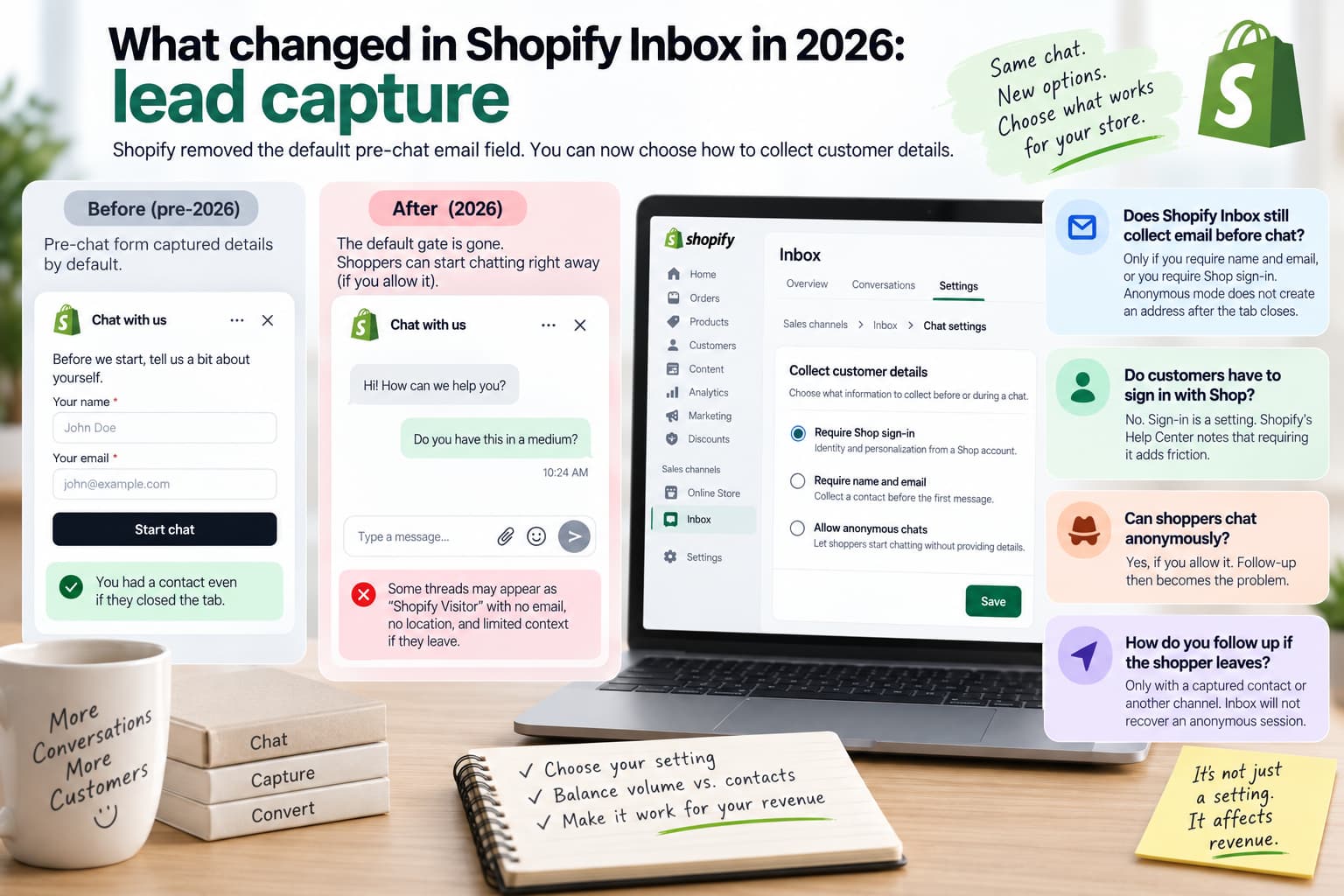
In mid-2026 Shopify changed how Inbox collects customer details. For years many stores used a pre-chat email field. The visitor typed a name and email, then asked a question. You still had a contact if they closed the tab.
That default gate went away. Stores that treated chat as a lead form saw inquiries drop and follow-up collapse. Some threads appeared as “Shopify Visitor,” with no email, no location, and no useful cart context.
Shopify later clarified settings under Sales channels - Inbox - Chat settings - Collect customer details. As of late summer 2026, merchants can choose among three options:
Setting | What you get | Trade-off |
Require Shop sign-in | Identity and personalization | Extra friction. Some shoppers never start the chat. |
Require name and email | A contact you can follow up | A form before the first message. Closest to the old Inbox. |
Allow anonymous chats | Higher chat volume | When they leave, you often have nothing to email. |
Does Shopify Inbox still collect email before chat?
Only if you require name and email, or you require Shop sign-in. Anonymous mode does not create an address after the tab closes.
Do customers have to sign in with Shop?
No. Sign-in is a setting. Shopify’s Help Center notes that requiring it adds friction.
Can shoppers chat anonymously?
Yes, if you allow it. Follow-up then becomes the problem.
How do you follow up if the shopper leaves?
Only with a captured contact or another channel. Inbox will not recover an anonymous session.
Choose this setting on purpose. It affects revenue, not just the look of the widget.
Does Shopify Inbox work with Instagram?
This question needs three answers, not one.
Does Shopify Inbox capture Instagram comments?
No.
Shopify Inbox does not watch comments on posts, Reels, Stories, or ads. A buyer who comments PP on a product Reel is not opening an Inbox conversation. The comment stays on Instagram. If nobody is sitting in Meta Business Suite, the request dies in public.
Does Shopify Inbox work with Instagram DMs?
Historically, staff Inbox could receive some Facebook Messenger and Instagram messages. Official 2026 marketing for the Inbox agent does not present Instagram as a channel. Agent documentation limits it to the storefront widget.
In practice:
- Inbox agent = storefront chat, not Instagram
- Staff Inbox + Meta connections = check your own admin; do not rely on a 2022 blog
- Instagram comments are not the same as Instagram DMs
Does Shopify Inbox work with WhatsApp?
The Inbox agent does not. WhatsApp sales and recovery are a separate category.
Can Shopify Inbox turn Instagram comments into DMs?
No. Comment-to-DM is a Meta messaging automation pattern. Inbox is a storefront widget. They use different surfaces and different jobs.
Inbox vs Instagram DMs vs Instagram comments
Many comparison charts put “Instagram” in a single cell. That hides the difference that matters for social selling.
Surface | Inbox agent (2026) | Staff Inbox (confirm in admin) | Comment-to-DM layer |
Online store chat widget | Yes | Yes | No |
Instagram DMs | No | Sometimes / historically | Can continue the thread after the comment |
Instagram comments on posts, Reels, and ads | No | No | Yes — this is the job |
Facebook comments | No | No | Yes, when the tool supports Facebook |
No | No | Not InstantDM’s core job | |
Email, tickets, refunds | No | Limited | No — that is a helpdesk |
When someone says a tool “supports Instagram,” ask whether they mean comments or DMs.
Where Shopify buyers actually ask for the link
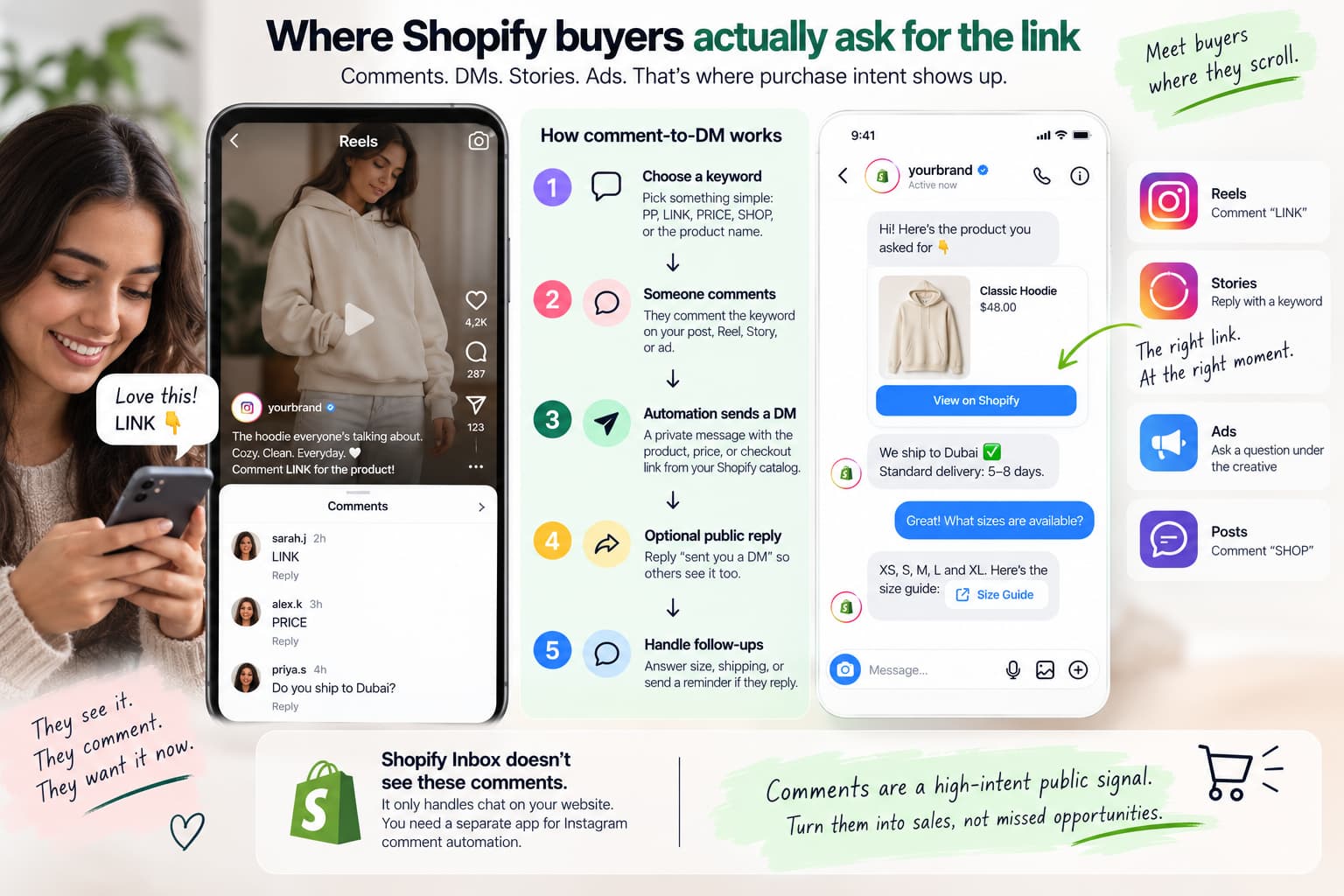
Website chat reaches people who already clicked through. A large share of demand never arrives that way.
They watch a Reel. They comment LINK. They reply to a Story. They tap an ad and ask “does this ship to Dubai?” under the creative. That is purchase intent at peak attention. A bio link gets forgotten. An email arrives hours later. A DM with the product URL arrives while the product is still on screen.
That motion is comment-to-DM: a public keyword becomes a private Shopify link.
How comment-to-DM works
- Choose one keyword that is easy to type: PP, LINK, PRICE, SHOP, or the product name.
- Someone comments it on a post, Reel, or boosted creative.
- Automation sends a private DM with the product, price, or checkout link from your Shopify catalog.
- An optional public reply (“sent you a DM”) becomes proof for the next person scrolling.
- If they reply, a short follow-up can handle size, shipping, or a reminder.
Shopify brands use this because comments are a high-intent public signal. Inbox does not subscribe to that signal.
Does commenting PP, LINK, or PRICE send a product link by itself?
Not through Instagram. Not through Shopify Inbox. You need comment-to-DM connected to Meta and, ideally, to Shopify so the URL is a live product or checkout page.
Can Shopify Inbox automate Reel or Story replies?
No.
Do you need a separate app for Instagram comment automation if you already have Inbox?
Yes, if comments drive sales.
Why stores keep Inbox and add comment-to-DM
Social-first stores usually do not replace Inbox. They stack it.
Job | Shopify Inbox | Comment-to-DM |
Where it runs | Online store widget | Instagram and Facebook comments, Reels, Stories, ads |
Who starts | A shopper already on your site | A shopper on a piece of content |
What it sends | Answers, recommendations, staff links and codes | A product, catalog, or checkout link in a DM |
Lead capture | Shop sign-in, name and email, or anonymous | The comment is the intent signal, inside Meta’s rules |
Proactive | No | Yes — as soon as they comment |
Best for | On-site support and mid-funnel questions | Social selling and ad-comment conversion |
Can you use both?
Yes. That is the setup this review recommends. Inbox stays on the theme. Comment-to-DM watches Instagram and Facebook.
When is Shopify Inbox enough?
When the website is the main channel, volume is light, staff already answer chat, and Instagram is branding rather than a sales floor.
When should you add a tool on top of Inbox?
When Reels and ads collect buying keywords you cannot answer at 2am. When you already tell people to comment LINK. When anonymous storefront chats leave you with no follow-up. When you need a Shopify product URL in a DM, not only in the bio.
Does Shopify Inbox recover abandoned carts?
Not as an Instagram or WhatsApp recovery engine. Seeing a live cart inside storefront chat is not the same as a recovery campaign.
Can Shopify Inbox start a conversation?
No.
Can the Inbox agent issue refunds or edit orders?
Do not plan on it. That work belongs to staff or a helpdesk.
The social layer: comment-to-DM for Shopify stores
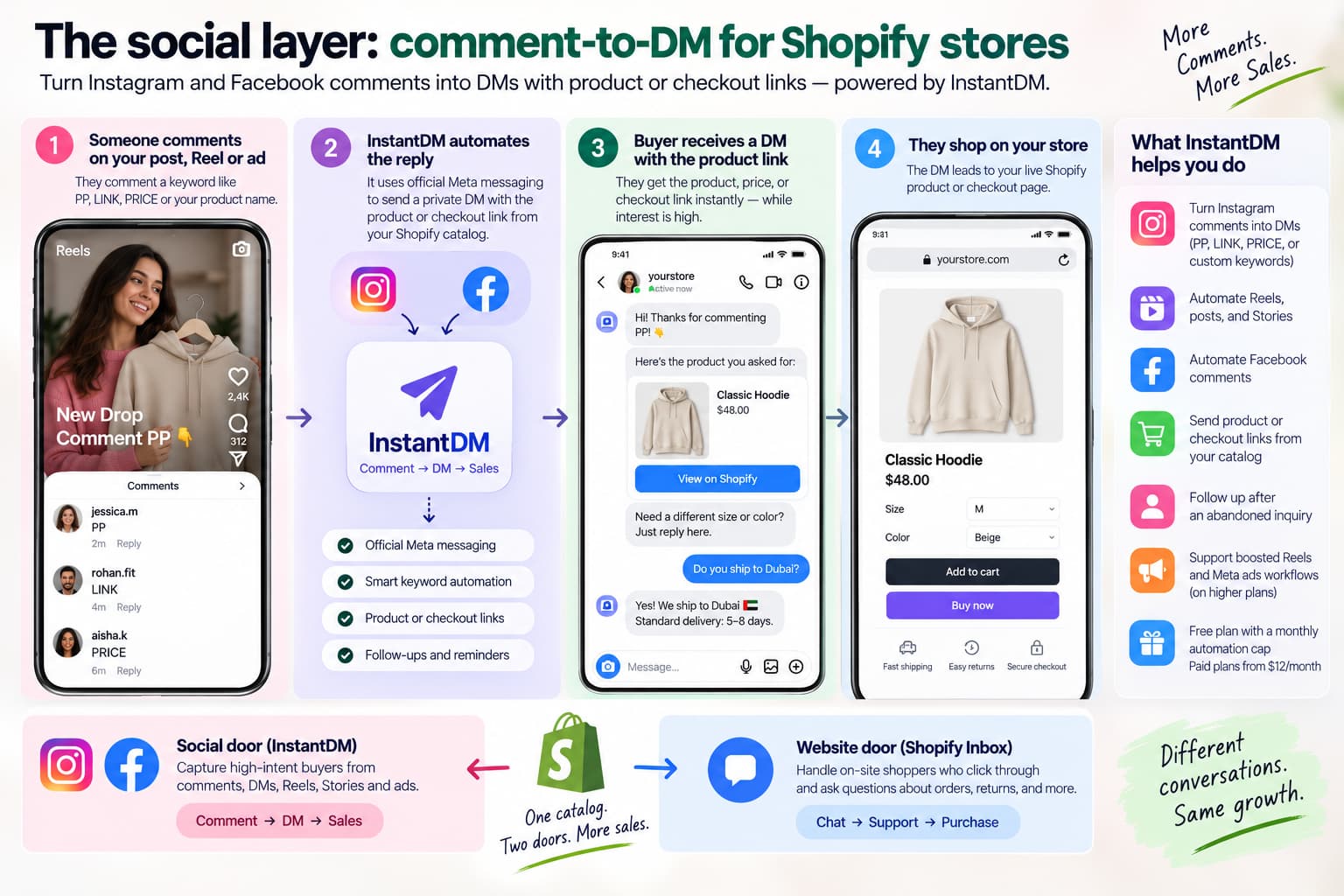
Once it is clear that Inbox does not capture Instagram comments, the next question is how to connect those comments to your catalog.
You want three things in one motion:
- Official Meta messaging
- A keyword on a post or Reel
- A link that is your product or checkout
InstantDM is a Shopify Partner app built for that layer. It is not a storefront chat replacement.
It is built to:
- Turn Instagram comments into DMs (PP, LINK, PRICE, or custom keywords)
- Automate Reels, posts, and Stories
- Automate Facebook comments
- Send product or checkout links from an ecommerce catalog
- Follow up after an abandoned Instagram inquiry
- Support boosted Reels and Meta ads workflows on higher plans
- Start on a free plan with a monthly automation cap, with paid plans from $12/month
A typical setup looks like this. A store publishes a Reel and asks people to comment PP. InstantDM sends the product and a Shopify checkout link in the DM. Inbox stays on the website for shoppers who click through and ask about returns. Two doors. One catalog.
A practical Inbox setup for Instagram-first stores
- Leave Inbox on for storefront questions.
- Choose one customer-details setting: Shop sign-in, name and email, or anonymous.
- Connect Instagram comment automation to the same catalog.
- Use one keyword per campaign.
- Add UTM parameters to DM links so you can see comment → click → order.
- Do not expect Inbox to moderate the Reel.
Measure the gap in your own data. How many comments last week included price, link, pp, size, or order? How many received a private product link within a minute? Inbox analytics will not show that number. Inbox never received those comments.
Who should stay on Inbox only
Stay on Shopify Inbox alone if most of these are true:
- Almost all questions arrive on the website
- Instagram is branding, not a sales floor
- You do not run comment-keyword campaigns on Reels or ads
- Your team already answers chat during open hours
- You accept Shop sign-in or name-and-email as the cost of follow-up
Add a social layer — and keep the widget — if most of these are true:
- Buyers ask for price under Reels
- Ads create comment volume you cannot type through
- You already say “comment LINK”
- Anonymous Inbox chats go nowhere
- You want a Shopify product URL in the DM
Replacing Inbox with Gorgias or Tidio is a ticket-and-email decision. Adding comment-to-DM is a social-selling decision. They solve different problems.
How to decide
Keep Inbox. It is free, native, and strong at on-site product questions.
Turn the agent on only if you use new customer accounts and you want storefront AI. Do not expect it to cover Instagram.
Choose a customer-details setting on purpose. Shop sign-in, name and email, or anonymous.
If Instagram sells for you, add comment-to-DM. That is the gap Inbox does not close.
Shopify Inbox vs Gorgias?
Inbox is free storefront chat. Gorgias is a paid helpdesk for email, tickets, and order actions. Use a helpdesk when ticket volume requires it. Use comment-to-DM when comments require it. Those are two different tools.
People Also Ask:
Can the Inbox agent issue refunds or edit orders?
Plan on staff or a helpdesk for those actions.
Does Shopify Inbox show a powered-by-Shopify notice?
Shopify documents an automatic AI / powered-by notice that you cannot remove.
Is Shopify Inbox enough for my store?
It is enough for website support. It is not enough as your only tool if Instagram comments are a sales channel.
What should I use instead of Shopify Inbox for Instagram comments?
Do not look for an Inbox clone. Look for comment-to-DM with Shopify product links. InstantDM is a Shopify Partner app built for that job.
How do Shopify stores sell from Instagram comments?
With comment-to-DM: a keyword on the post triggers a private message with a Shopify product or checkout link.
What is comment-to-DM for Shopify?
Automation that detects a comment keyword and sends a DM containing your product, catalog, or checkout URL.
Does commenting PP, LINK, or PRICE automatically send a product link?
Only if you have set up a comment-to-DM app.
How do I send a Shopify product link from an Instagram comment?
Use a Shopify-connected comment-to-DM app, map the keyword to the product URL, and track the link with UTM parameters.
Can Shopify Inbox automate Reel or Story replies?
No.
Do I need a separate app if I already have Inbox?
Yes, if you sell from comments.
Does Shopify Inbox recover abandoned carts?
Not as a social recovery product.
Can Shopify Inbox start a conversation?
No.
Final take
Shopify Inbox is a good storefront chat tool. It got better at catalog answers. It got more complicated as a silent lead form. It never became an Instagram comment engine.
If buyers ask questions on the product page, keep Inbox. If they ask by commenting PRICE on a Reel you already paid to boost, add the layer Inbox cannot be: comment-to-DM, with a real Shopify link, on the channel where the comment happened.
Inbox on the site. Automation on the comment. Sales in the DM.