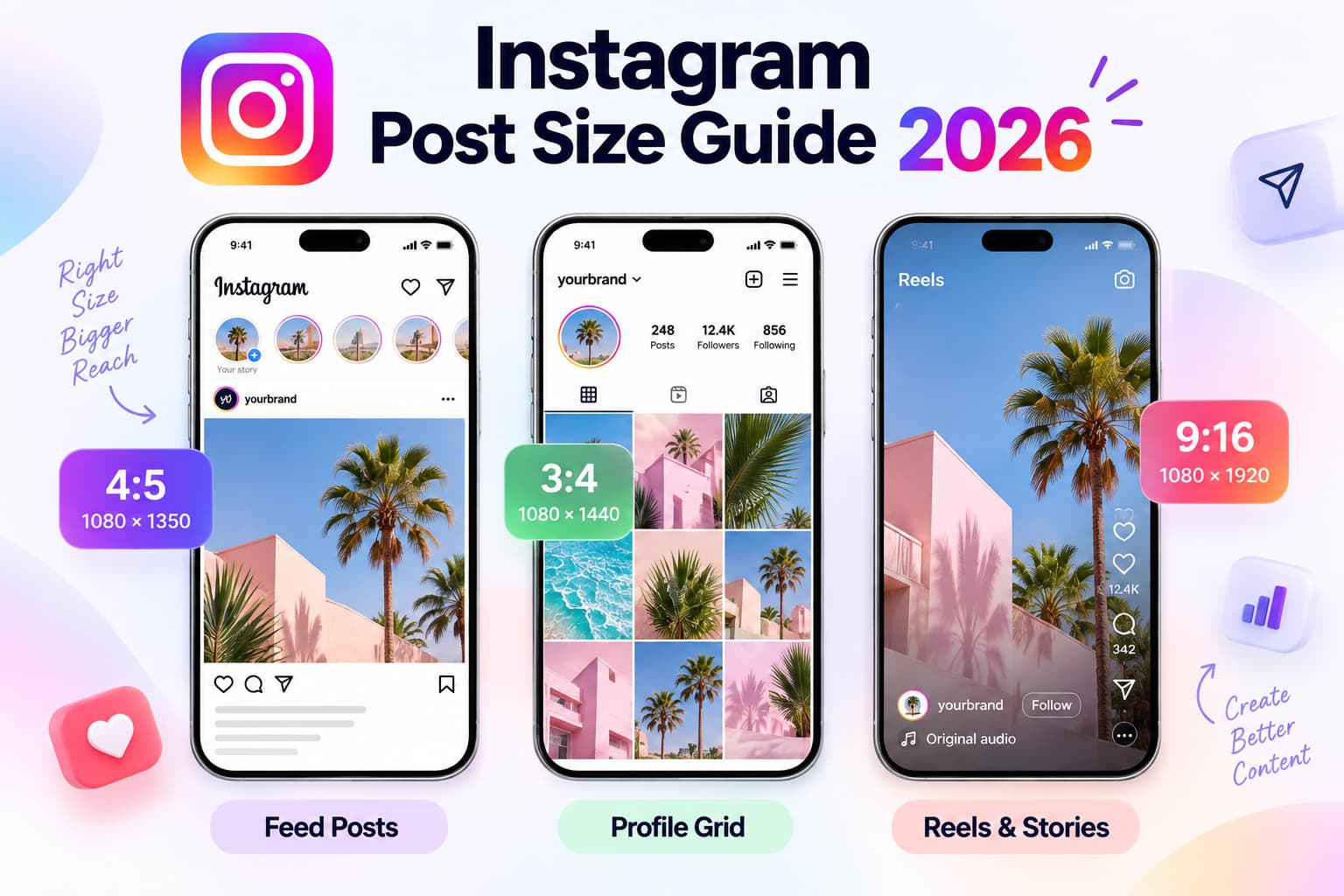
Last updated: September 2026 Quick answer: The best Instagram post size in 2026 is 1080 × 1350 px (4:5) for most feed posts and ads. Use 1080 × 1440 px (3:4) when the profile grid must match the file with no trim. Reels and Stories are 1080 × 1920 px (9:16). The feed, the desktop view, and the grid do not crop the same file the same way.
As of September 2026, Instagram still serves images at 1080 px wide. Taller uploads get compressed. Ratios outside the supported feed range get cropped. The profile grid now previews tiles at about 3:4, even when the mobile feed shows a full 4:5 portrait. That mismatch is why a face, price, or headline looks fine in the feed and wrong on your profile.
This page is the size and crop reference. When you need to see mobile, desktop, and grid on the same upload, use InstantDM’s Instagram post preview. Processing stays in the browser. Files are not uploaded to InstantDM.
Key takeaways
- Default feed size: 1080 × 1350 px, 4:5. Tallest ad-safe portrait.
- Grid-native size: 1080 × 1440 px, 3:4. Fills the profile tile. If you boost posts, keep 4:5 as the paid default and confirm 3:4 in Ads Manager before you build a campaign around it.
- Grid crop: profile thumbnails preview at 3:4, not the old 1:1 square and not always 4:5.
- Reels and Stories: 1080 × 1920 px, 9:16. The Reel cover still gets a 3:4 grid cut.
- Carousel: every slide must match slide 1. Instagram allows up to 20 slides.
- Caption fold: the first ~125 characters show before “…more”.
- Width rule: export 1080 px wide. Smaller looks soft. Much larger just gets crushed on upload.
Instagram post size 2026 cheat sheet
Width × height in pixels.
| Placement | Ratio | Size | What the crop does | Use when |
| Feed portrait (default) | 4:5 | 1080 × 1350 | Full height in the mobile feed. Grid trims a thin strip top and bottom | Most posts and ads |
| Feed tall / grid-native | 3:4 | 1080 × 1440 | Matches the profile tile | Organic, grid-first brands |
| Feed square | 1:1 | 1080 × 1080 | Fine in the feed. Grid pads or crops the tile | Cross-posting to other apps |
| Feed landscape | 1.91:1 | 1080 × 566 | Smallest feed footprint. Harsh grid crop | Wide product or cinematic stills only |
| Carousel slide | Match slide 1 | 1080 × 1350 or 1080 × 1440 | First slide locks the ratio for the rest | Lookbooks, listings, tutorials |
| Reel | 9:16 | 1080 × 1920 | Full-screen player. Grid cover crops toward 3:4 | Discovery |
| Story | 9:16 | 1080 × 1920 | Full-screen. UI covers top and bottom | Updates, stickers, links |
| Reel / Story cover on grid | 3:4 crop | Design inside the center 1080 × 1440 | Edge titles vanish | Covers and pinned Reels |
| Profile photo | 1:1 circle | 320 × 320 minimum (export 1080 × 1080) | Circle mask | Face or mark in the center |
| Highlight cover | Circle on 9:16 or 1:1 | 1080 × 1920 source | Circle punch-out | Icon in the middle |
File ceilings teams actually hit: images ~30 MB (export under 10 MB), Reels up to 4 GB (keep under 500 MB), Story card 60 seconds, Reels commonly under 90 seconds even when longer uploads exist. JPG or PNG for stills. MP4 (H.264 + AAC) for video.
For Feed posts and ads, use a 4:5 vertical canvas when you want the largest recommended portrait format. Instagram Feed can support several aspect ratios, but taller media may be automatically cropped toward 4:5. See Meta’s Instagram Feed ad requirements before exporting paid creative.
Why the same file looks different after you post
Instagram does not show one picture. It shows three crops of the same file.
A single asset may not display identically in every Instagram placement. Feed, Stories, Reels, and other Meta placements can have different aspect-ratio requirements, so check Meta’s placement-specific aspect-ratio guide before reusing one export everywhere.
- Mobile feed — the tallest useful view. 4:5 fills most of the phone.
- Desktop feed — a shorter stage, more chrome around the media, caption wrapping that does not match the phone.
- Profile grid — a 3:4 tile. This is what a new visitor judges in one second.
A 4:5 portrait can look perfect in the feed and still clip a headline on the grid. A 9:16 Reel can look perfect in the Reels player and still lose the cover title on the profile. Landscape almost always loses the sides on the grid.
Most “instagram image size” posts list pixels and stop. The useful question is which surface cuts which edge.
What happens to one photo at every Instagram size
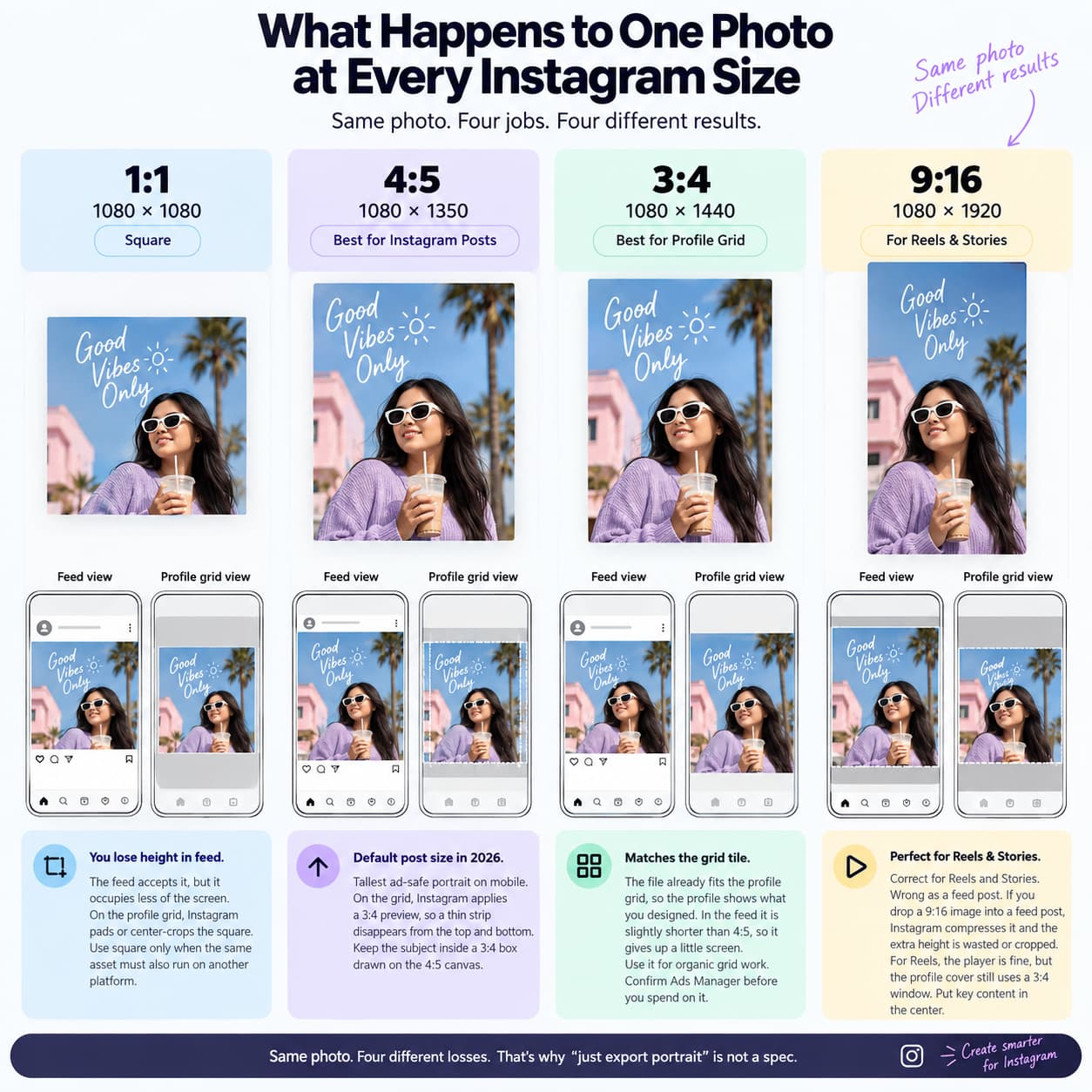
Take one vertical photo: a person, a product, or a listing. The subject sits in the middle. Text sits near the top. Here is what Instagram does when you force that file into each 2026 size.
1:1 (1080 × 1080). The feed still accepts it. You lose height, so the post occupies less of the phone. On the profile grid the tile is now a tall 3:4 rectangle, so Instagram pads or center-crops the square. The photo no longer “fills the grid” the way square posts did in 2018. Use square only when the same asset must also run on another platform.
4:5 (1080 × 1350). This is the default Instagram post size in 2026. On mobile it is the tallest ad-safe portrait. On the grid, Instagram applies a 3:4 preview, so a thin strip disappears from the top and bottom. If the headline sat in that strip, the profile looks unfinished. Keep the subject inside a 3:4 box drawn on the 4:5 canvas and the trim becomes invisible.
3:4 (1080 × 1440). The file already matches the grid tile, so the profile shows what you designed. In the feed it is slightly shorter than 4:5, so it gives up a little screen. Several 2026 creative guides treat 3:4 as weaker for paid placement. Use it for organic grid work. Confirm Ads Manager before you spend on it.
9:16 (1080 × 1920). Correct for Reels and Stories. Wrong as a feed still. If you drop a 9:16 image into a feed post, Instagram compresses it into the feed range and the extra height is wasted or cropped. If you use 9:16 as a Reel, the player is fine and the profile cover is not — the grid still wants a 3:4 window out of that tall frame. Put cover type in the center, not on the edge.
Same photo. Four jobs. Four different losses. That is why “just export portrait” is not a spec.
4:5 vs 3:4: which Instagram feed size to use
Both ratios are valid in 2026. Pick with a rule.
Use 4:5 (1080 × 1350) if you want maximum mobile-feed height, you might boost the post, or your scheduler still treats 4:5 as the default. Keep faces, type, and logos inside a 3:4 box in the middle so the grid trim is harmless.
Use 3:4 (1080 × 1440) if the profile grid is the product — photographers, real-estate galleries, fashion lookbooks — and that file will stay organic.
Current Instagram sizing guidance also distinguishes between the 4:5 feed format and the newer 3:4 portrait format, although publishing and advertising support can vary by workflow. See this Instagram’s 2026 aspect-ratio guidance for an additional reference.
Template that covers both: design on a 1080 × 1440 artboard. Place the important work in the center 1080 × 1350. Export 4:5 for ads and default posting. Export 3:4 only for grid-critical organic posts.
Do not mix 4:5 and 1:1 in the same week if the grid is part of the brand. Mixed ratios make the profile look like leftover tiles.
for additional reference: **Meta’s recommended aspect ratios for ad placements**
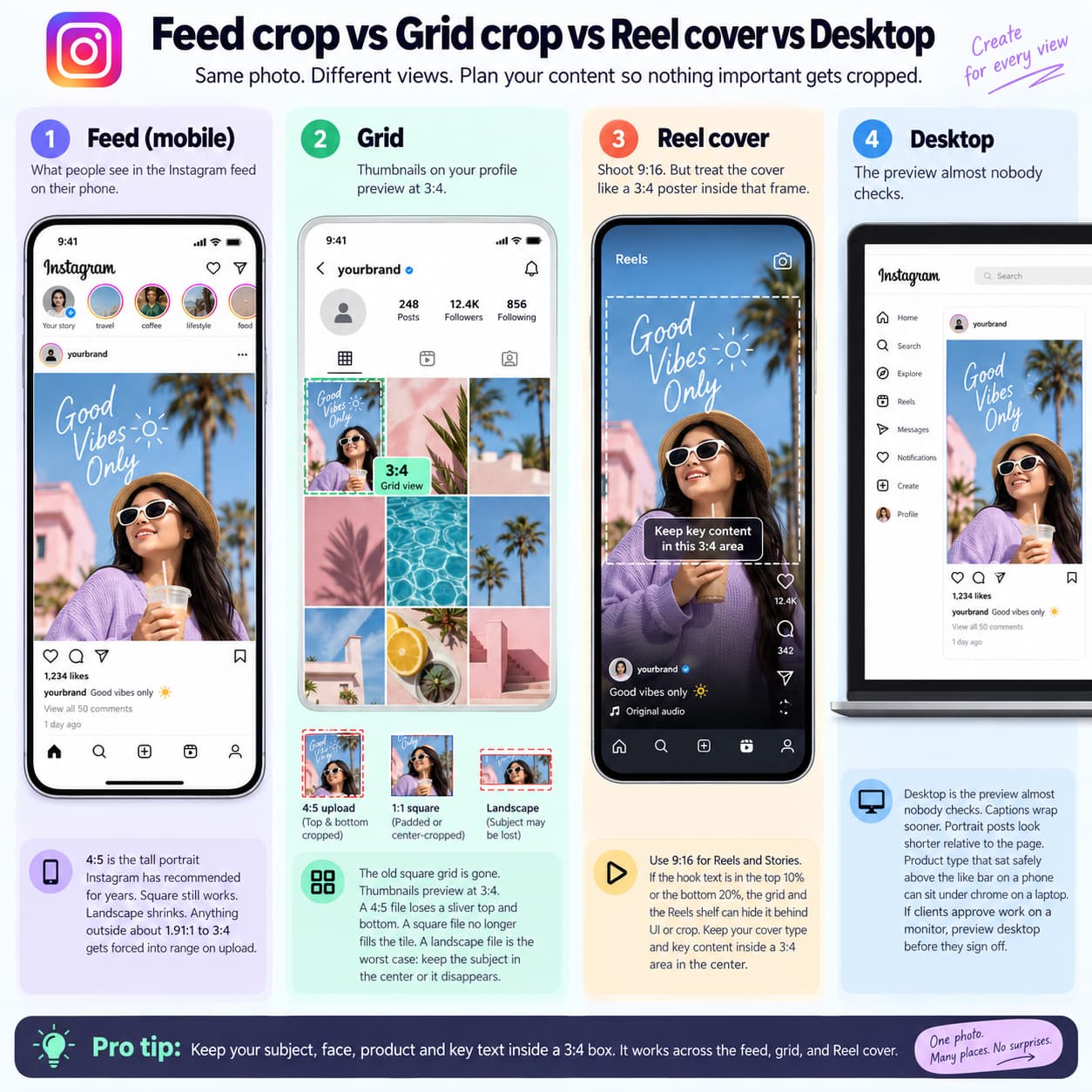
Feed crop vs grid crop vs Reel cover vs desktop
Feed (mobile)
4:5 is the tall portrait Instagram has recommended for years. Square still works. Landscape shrinks. Anything outside about 1.91:1 to 3:4 gets forced into range on upload.
Grid
The old square grid is gone. Thumbnails preview at 3:4. A 4:5 file loses a sliver top and bottom. A square file no longer fills the tile. A landscape file is the worst case: keep the subject in the center or it disappears.
Reel cover
Shoot 9:16. Then treat the cover like a 3:4 poster sitting inside that frame. If the hook text is in the top 10% or the bottom 20%, the grid and the Reels shelf can hide it behind UI or crop.
Desktop
Desktop is the preview almost nobody checks. Captions wrap sooner. Portrait posts look shorter relative to the page. Product type that sat safely above the like bar on a phone can sit under chrome on a laptop. If clients approve work on a monitor, preview desktop before they sign off.
Instagram Reel size and Story size
Reels should be designed as full-screen vertical video. Use a 1080 × 1920 px, 9:16 master file, then keep important text and faces away from interface areas. For additional creative guidance, see Instagram Creators’ Reels guidance.
Both canvases are 1080 × 1920, 9:16. The safe zones are not the same.
For a second reference on carousel and vertical-content dimensions, see this Instagram carousel and Story size guide
Stories: keep type and faces out of the top band (username, time, menu) and the bottom band (reply bar, stickers, link chip). Treat the center of the frame as the only guaranteed readable zone.
Stories are designed for a full-screen vertical experience, so use a 1080 × 1920 px, 9:16 canvas. Meta recommends 9:16 for Stories, although some Feed-sized assets may also be accepted in advertising workflows. See Meta’s Instagram Stories ad requirements for placement details.
Reels: same canvas, heavier UI on the right and bottom. Keep subtitles above the lower third. Keep the cover title inside the middle 3:4 so the grid thumbnail still reads.
Do not upload a 4:5 still as a Reel and hope Instagram “makes it vertical.” You get bars or a harsh crop.
Instagram carousel size
Lock the ratio on slide 1. Every later slide follows it. Mix 4:5 and 1:1 in one carousel and Instagram crops the rest to match the first frame.
- Default carousel: 1080 × 1350, all slides.
- Grid-first carousel: 1080 × 1440, all slides.
- First slide is the cover on the profile and in the feed. Put the hook, the listing price, or the outfit on slide 1 — not a logo bumper.
- Instagram itself allows up to 20 slides. Build the story so slide 1 works even if nobody swipes.
Keep every carousel slide in the same aspect ratio and use the first slide to establish the visual format. For paid carousel creative, Meta recommends consistent image ratios such as 1:1 or 4:5; review Meta’s carousel aspect-ratio guidance before exporting the final set.
Caption is a crop too
The photo is not the only thing Instagram cuts.
- Caption cap: 2,200 characters.
- Visible before “…more”: about 125 characters.
- Hashtags: 30.
- Bio: 150.
Write the hook in the first 125. Put hashtags after the fold or in the first comment. Line breaks change where the fold hits. Test the caption on mobile and desktop, not only in Notes.
Safe zones that actually matter
| Surface | Keep the subject here | What eats the rest |
| 4:5 feed post | Center 3:4 of the frame | Grid trim top/bottom |
| 3:4 feed post | Full frame | Little grid trim |
| Square post | Center; accept unused tile | Grid padding or crop |
| Reel | Center 1080 × 1440 plus a subtitle band | Right rail, caption, cover crop |
| Story | Center; avoid top username and bottom reply bar | Stickers, link chip, progress bar |
| Profile photo | Inner 60–70% circle | Circle mask |
Brief a designer with one line: no critical text in the outer 90–120 px of a feed post. No cover title in the outer 15% of a Reel.
Keep important text, logos, prices, and faces away from the top, bottom, and side interface areas. These controls can cover creative elements after publishing. Use Meta’s safe-zone guidance for Stories and Reels when preparing 9:16 assets, especially for paid placements.
Export settings that keep the file sharp
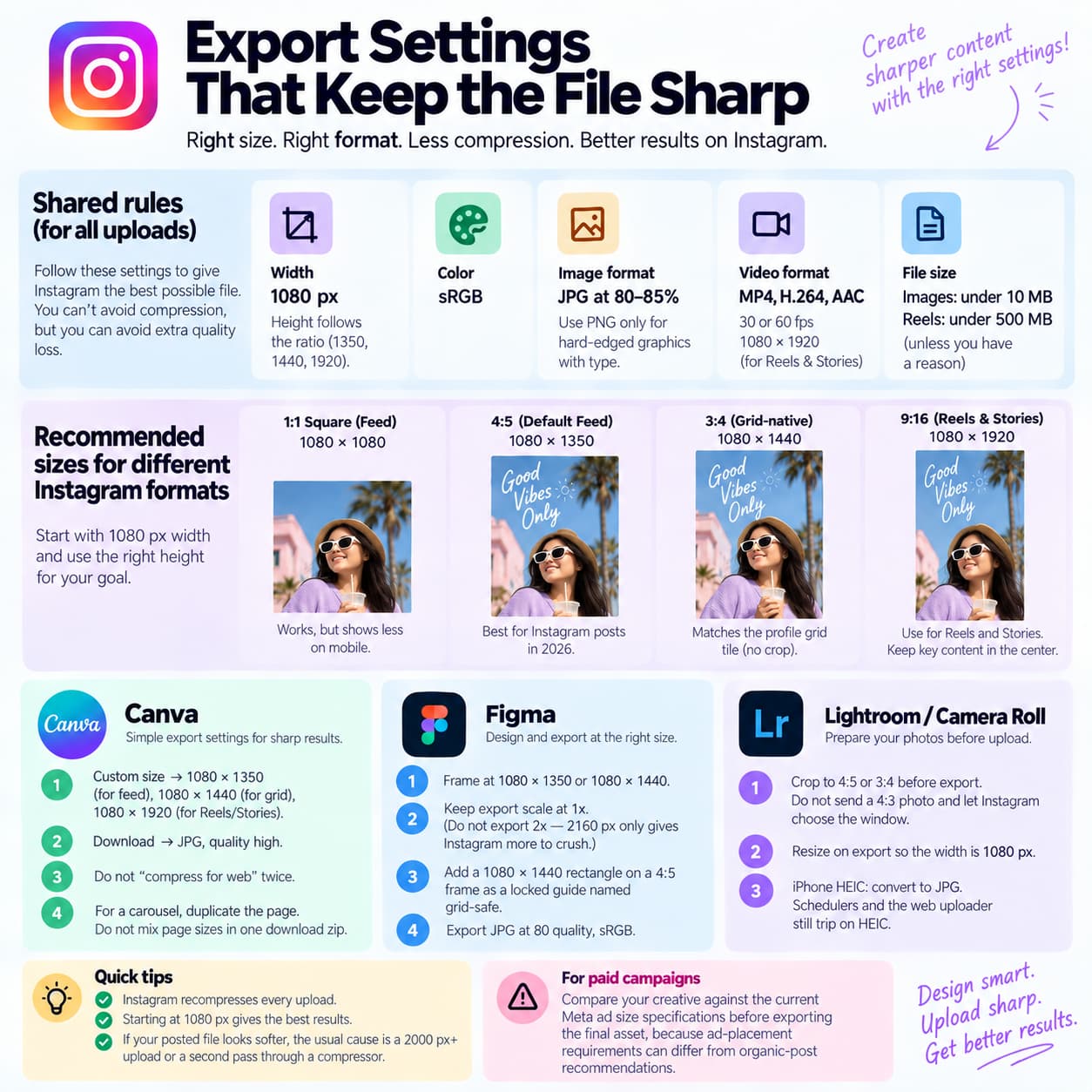
Instagram recompresses every upload. You cannot beat that by sending a 4K PNG. You can avoid giving the encoder extra work.
For paid campaigns, compare the creative against current Meta ad size specifications before exporting the final asset, because ad-placement requirements can differ from organic-post recommendations.
Shared rules
- Width: 1080 px. Height follows the ratio (1350, 1440, 1920).
- Color: sRGB.
- Still format: JPG at 80–85%. Use PNG only for hard-edged graphics with type. Transparent PNG is fine for stories you composite elsewhere, not for a feed photo.
- Video: MP4, H.264, AAC, 30 or 60 fps, 1080 × 1920 for Reels and Stories.
- Image weight: under 10 MB. Reel weight: under 500 MB unless you have a reason.
the current Instagram Feed ad design requirements before finalizing the creative, because ad-placement rules can differ from organic-post guidance.
Canva
- Custom size → 1080 × 1350 for default feed, 1080 × 1440 for grid-native, 1080 × 1920 for Reels/Stories.
- Download → JPG, quality high, not “compress for web” twice.
- For a carousel, duplicate the page. Do not mix page sizes in one download zip.
Figma
- Frame at 1080 × 1350 or 1080 × 1440, scale 1x export. Exporting 2x (2160 wide) only gives Instagram more to crush.
- Put a 1080 × 1440 rectangle on a 4:5 frame as a locked guide named grid-safe.
- Export JPG 80, sRGB.
Lightroom / camera roll
- Crop to 4:5 or 3:4 before export. Do not send a 4:3 phone still and let Instagram choose the window.
- Resize on export to the long side that keeps width at 1080.
- iPhone HEIC: convert to JPG. Schedulers and the web uploader still trip on HEIC.
If the posted file looks softer than the export, the usual cause is a 2000 px+ upload or a second pass through a compressor. Start at 1080 and stop.
Copy-paste designer brief
Send this as the ticket. Change only the ratio line.
Instagram still / carousel — 2026
Artboard: 1080 × 1440 px (3:4 master)
Export A (default + ads): crop to 1080 × 1350 (4:5), subject must survive
Export B (grid-critical organic only): full 1080 × 1440
Safe box: keep faces, logos, prices, headlines inside the center 1080 × 1350 of the master. No type in the outer 90 px.
Carousel: every slide same ratio as slide 1. Slide 1 is the cover.
Max 20 slides. Hook must work if the viewer never swipes.
Reel / Story: separate 1080 × 1920 file.
Cover title inside the center 1080 × 1440 window.
Subtitles above the lower third. No edge titles.
Color: sRGB. Still: JPG 80–85%, under 10 MB.
Video: MP4 H.264 + AAC, 1080 × 1920, under 500 MB.
Proof: check mobile feed, desktop feed, and 3:4 grid in InstantDM Instagram post preview before handoff.
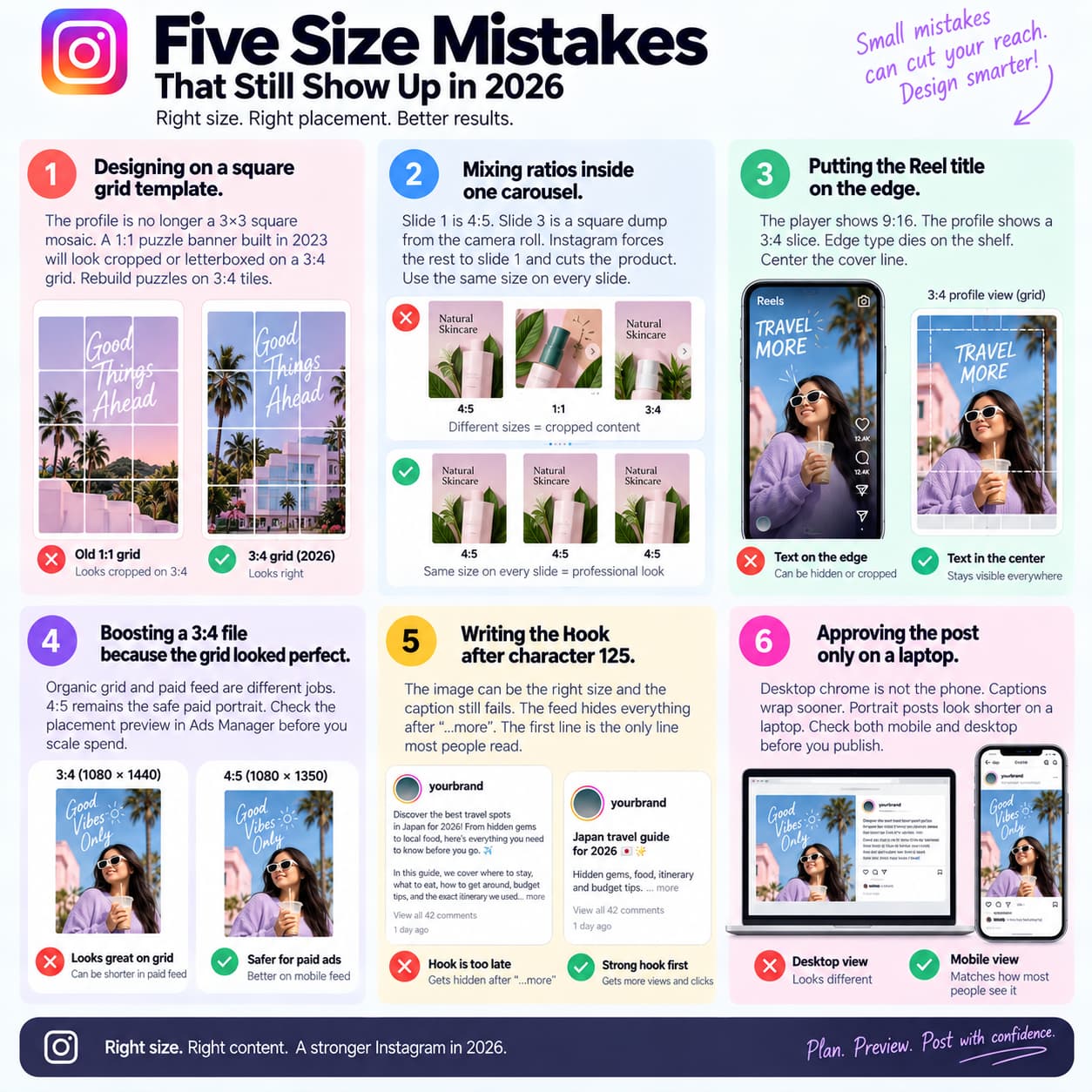
Five size mistakes that still show up in 2026
1. Designing on a square grid template.
The profile is no longer a 3×3 square mosaic. A 1:1 puzzle banner built in 2023 will look cropped or letterboxed on a 3:4 grid. Rebuild puzzles on 3:4 tiles.
2. Mixing ratios inside one carousel.
Slide 1 is 4:5. Slide 3 is a square dump from the camera roll. Instagram forces the rest to slide 1 and cuts the product. Same pixels on every slide.
3. Putting the Reel title on the edge.
The player shows 9:16. The profile shows a 3:4 slice. Edge type dies on the shelf. Center the cover line.
4. Boosting a 3:4 file because the grid looked perfect.
Organic grid and paid feed are different jobs. 4:5 remains the safe paid portrait. Check the placement preview in Ads Manager before you scale spend.
5. Writing the hook after character 125.
The image can be the right size and the caption still fails. The feed hides everything after “…more”. The first line is the only line most people read.
A sixth, quieter mistake: approving the post only on a laptop. Desktop chrome is not the phone. Check both.
How to check the crop before you publish
Export at 1080 px wide in 4:5 or 3:4.
If the profile grid is part of the campaign, use an Instagram feed planner to upload upcoming posts, arrange them in the right order, and check how the complete profile grid looks before publishing.
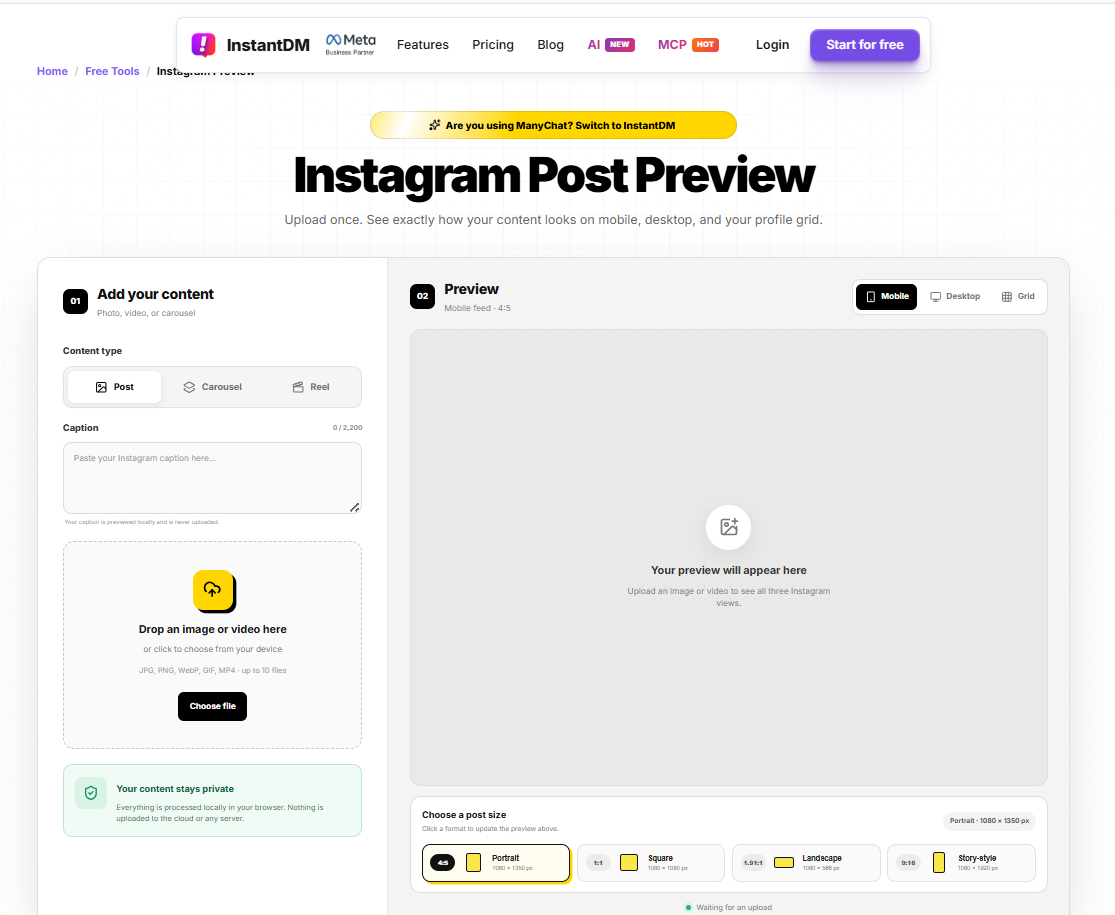
- Open the free Instagram post preview.
- Upload the still, carousel, or Reel. InstantDM processes the file in the browser. It does not upload your media to its own servers.
- Switch mobile, desktop, and grid.
- If a face, SKU, or headline dies in any of the three views, reframe and export again.
- Check the first 125 characters of the caption in the same preview.
- Publish in Instagram.
Native Instagram “Show preview” is incomplete. It is not on every account, it is weak on desktop UI, and it is not a private sandbox. Use it when you have it. Do not treat it as the full check.
Schedulers such as Later, Planoly, and Metricool preview a grid after you connect an account. That is a planning job. A no-login crop check is a different job.
Sizes by job
Creators: 4:5 feed + 9:16 Reels. Cover titles inside 3:4.
Agencies: send clients a mobile + desktop + grid proof. Do not ask them to connect a scheduler only to approve a crop.
Ecommerce / fashion: product label and price on slide 1, inside the 3:4 box.
Real estate: listing hero at 4:5; floor plan as a later carousel slide at the same ratio; never landscape for the cover.
Coaches: face in the middle third. No name-super in the top 10%.
Pre-publish size checklist
- Width is 1080 px
- Ratio is 4:5 or 3:4 on purpose, not by accident
- Subject sits inside the 3:4 grid box
- Carousel slides share one ratio
- Reel cover title readable as a 3:4 thumbnail
- File under 10 MB for images, well under 500 MB for Reels
- Hook lives in the first 125 caption characters
- Mobile, desktop, and grid all checked
About The Author:
Aravindh Kumar is an Ecommerce and Instagram growth expert with 8+ years of experience in online selling. He has worked with 500+ brands - including Forbes-listed companies - He has helped 200+ Instagram businesses grow their online presence.