TL;DR: 2026 Instagram Playbook
Success on Instagram requires moving past "winging it" to execute a deliberate, data-driven strategy.
- Foundation: Switch to a Business or Creator account. Optimize your digital storefront with a clean username, high-res profile photo ($110 \times 110$ pixels), a 150-character bio with a clear CTA, and grouped Story Highlights.
- Strategy & Content: Define SMART goals. Focus on 3–5 core content pillars using the 80/20 rule (80% value, 20% promotion). Batch content monthly to stay consistent.
- Format Benchmarks:
◦ Reels (3–5x/week): Organic growth engine; hook viewers in 2 seconds.
◦ Carousels (3–5x/week): Maximizes saves and shares.
◦ Stories (5–7x/week): Deeply engages your existing community.
- Engagement & SEO: Use 5–15 highly targeted hashtags blended with SEO keywords. Spend 15 minutes engaging right after posting. Respond to DMs within 24 hours; use tools like InstantDM for flat-rate comment-to-DM automation.
- Metrics & Tools: Prioritize saves, shares, and link clicks. Aim for a 1%–5% engagement rate. Manage workflows using Meta Business Suite (free), Later, or Hootsuite.
Avoid: Buying followers, irregular posting, and "posting and ghosting." Consistency beats frequency every time.
Introduction:
Let’s be honest: keeping up with Instagram in 2026 feels like a full-time job. With over 2 billion people scrolling every single month, a moody algorithm that changes whenever it feels like it, and an audience that gets bored in milliseconds, just "winging it" doesn't cut it anymore. Doing it right means the difference between building a booming community and talking to an empty room.
Whether you’re grinding solo, running a small business, managing a roster of clients, or heading up an in-house marketing team, this guide is your no-nonsense playbook. We're breaking down how to manage your page efficiently, build a real following, and actually turn those double-taps into dollars.
Why Instagram Account Management Is a Non-Negotiable Skill in 2026
Instagram account management has evolved far beyond posting pretty photos and hoping for likes. In 2026, managing an Instagram account means running a data driven content operation that handles algorithm changes, audience segmentation, multi-format publishing, and direct monetization — all while maintaining a consistent brand voice across Reels, Stories, carousels, and DMs.
The creators and businesses that treat Instagram account management as a strategic discipline — not a side task — are the ones seeing real growth. This guide walks you through every layer of that discipline, from account setup and content strategy to analytics, automation, and community management.
Whether you are a solo creator managing your first Instagram account or an agency handling multiple client accounts, the frameworks below will help you build a repeatable system that scales.
1. What Does It Mean to Manage Your Instagram Account?

Managing an Instagram account is way more than just picking a pretty filter and hitting "share" when you remember to. It’s the day-in, day-out process of steering your profile toward actual, real-world goals.
If you're doing it right, your daily plate looks a bit like this:
- Content creation and curation: Producing a steady stream of Reels, Stories, carousels, and photos that your audience actually cares about.
- **Scheduling and publishing: Timing your posts so they land on your followers' feeds right when they're active.**
- Community engagement: Getting into the trenches—replying to comments, hanging out in DMs, and talking back to your community.
- Analytics monitoring: Checking the numbers to see what blew up, what tanked, and why.
- Audience growth: Finding natural, non-spammy ways to get your page in front of the right people.
- Brand consistency: Making sure your page looks, talks, and feels like you every single day.
- Moderation: Filtering out the bots, handling the occasional internet troll, and keeping the vibe clean.
When you nail this rhythm, Instagram becomes a massive engine for brand trust, web traffic, and sales. When you neglect it, you're just wasting creative energy and leaving money on the table.
2. Set Up Your Instagram Account the Right Way
Before you worry about going viral, you need to make sure your foundation isn't shaky. A messy profile acts like a leaky bucket—it won't matter how many people visit if no one stays.
Ditch the Personal Profile
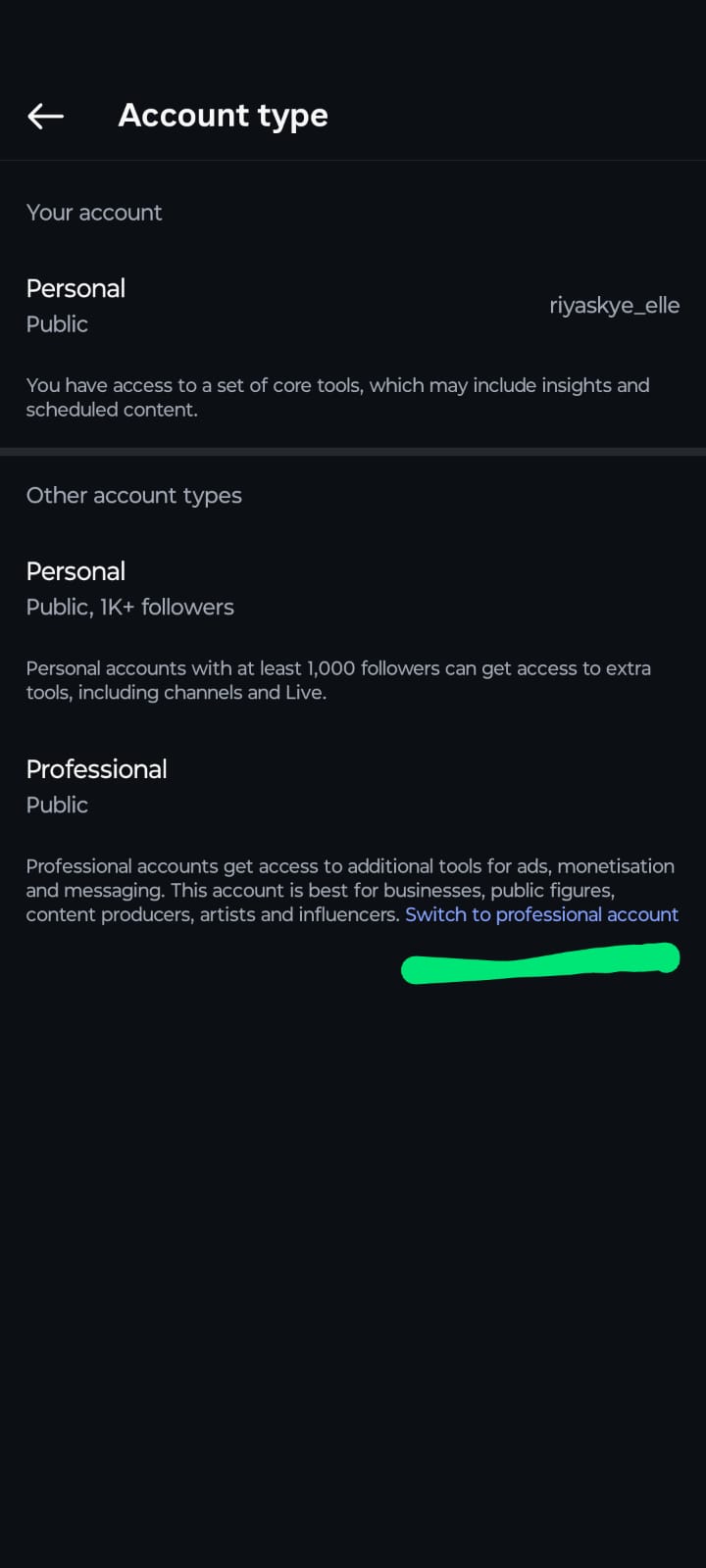
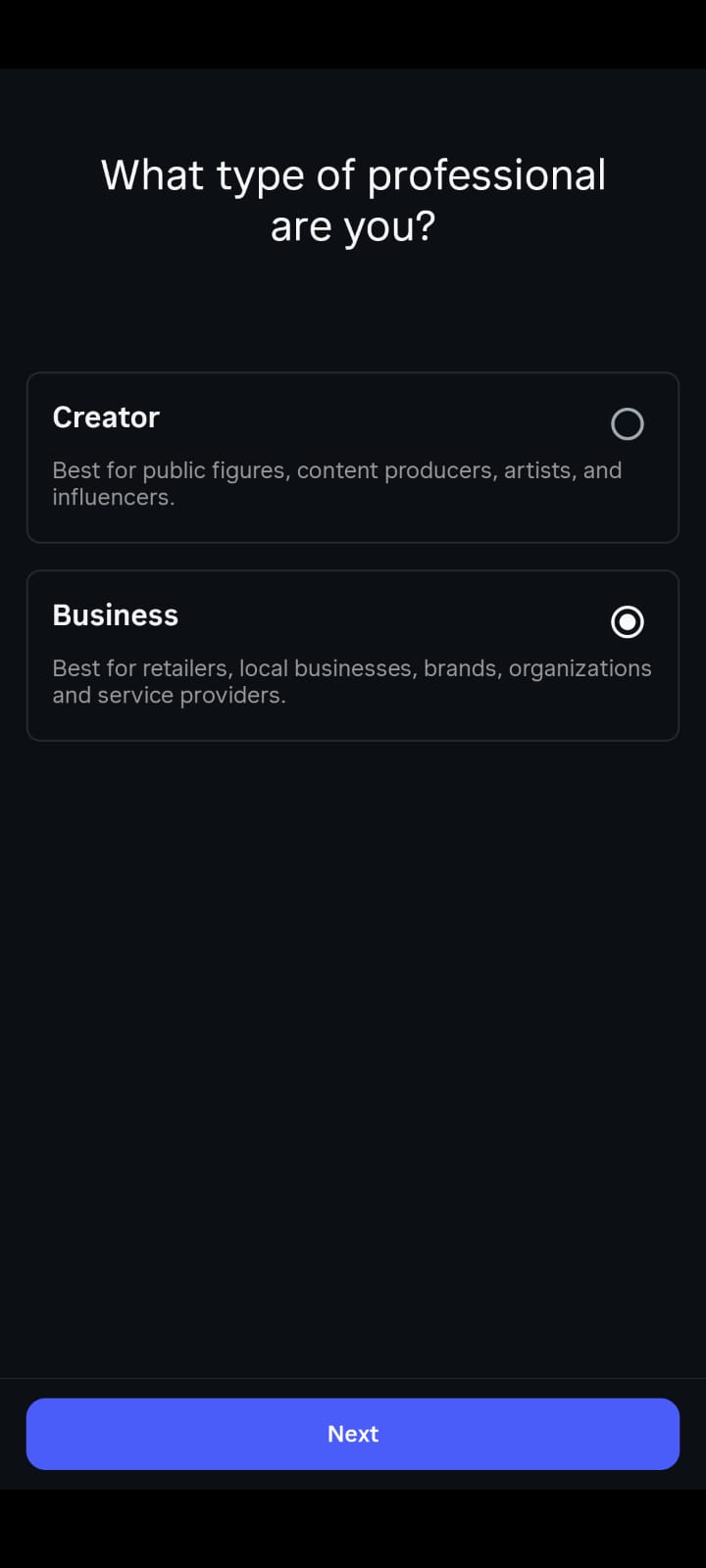
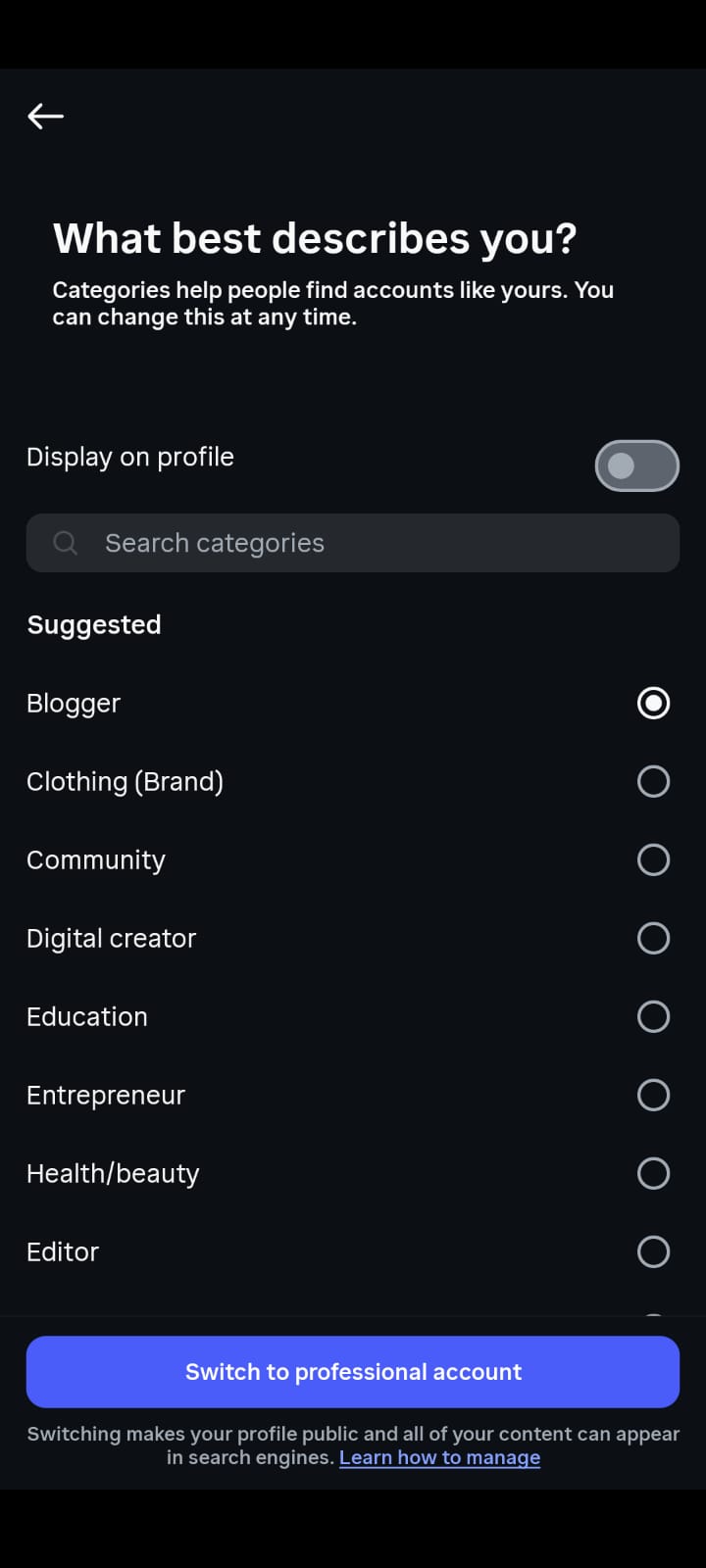
If you're still on a basic personal account, fix that today. Flip the switch to a Business Account (if you sell products, services, or run a company) or a Creator Account (if you're an influencer, writer, or public figure). Both give you the serious tools you need to grow:
- Deep-dive Instagram Insights to see who is watching.
- The ability to plug into auto-scheduling tools.
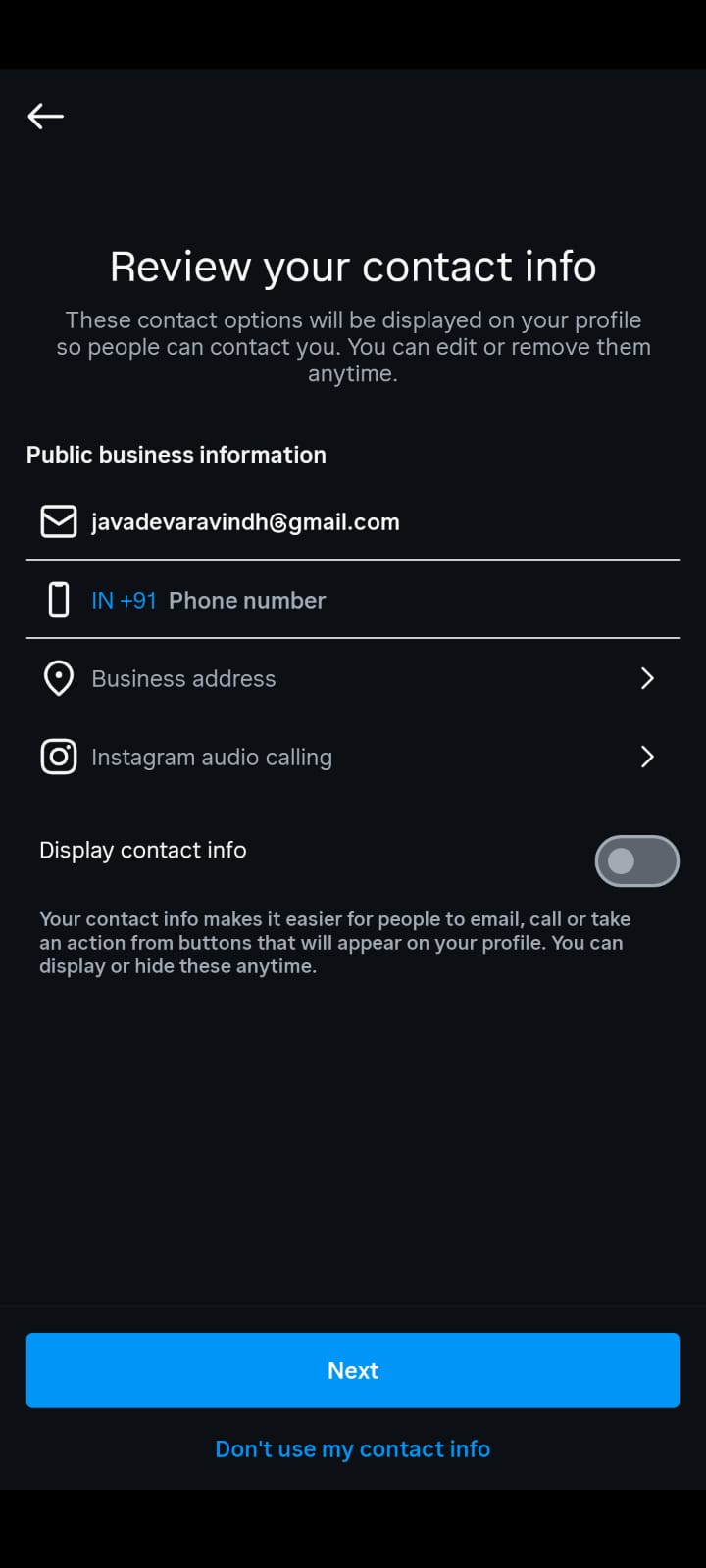
- One-click contact buttons right on your page.
- Full access to run targeted ads.
- A category label so people instantly know what you do.
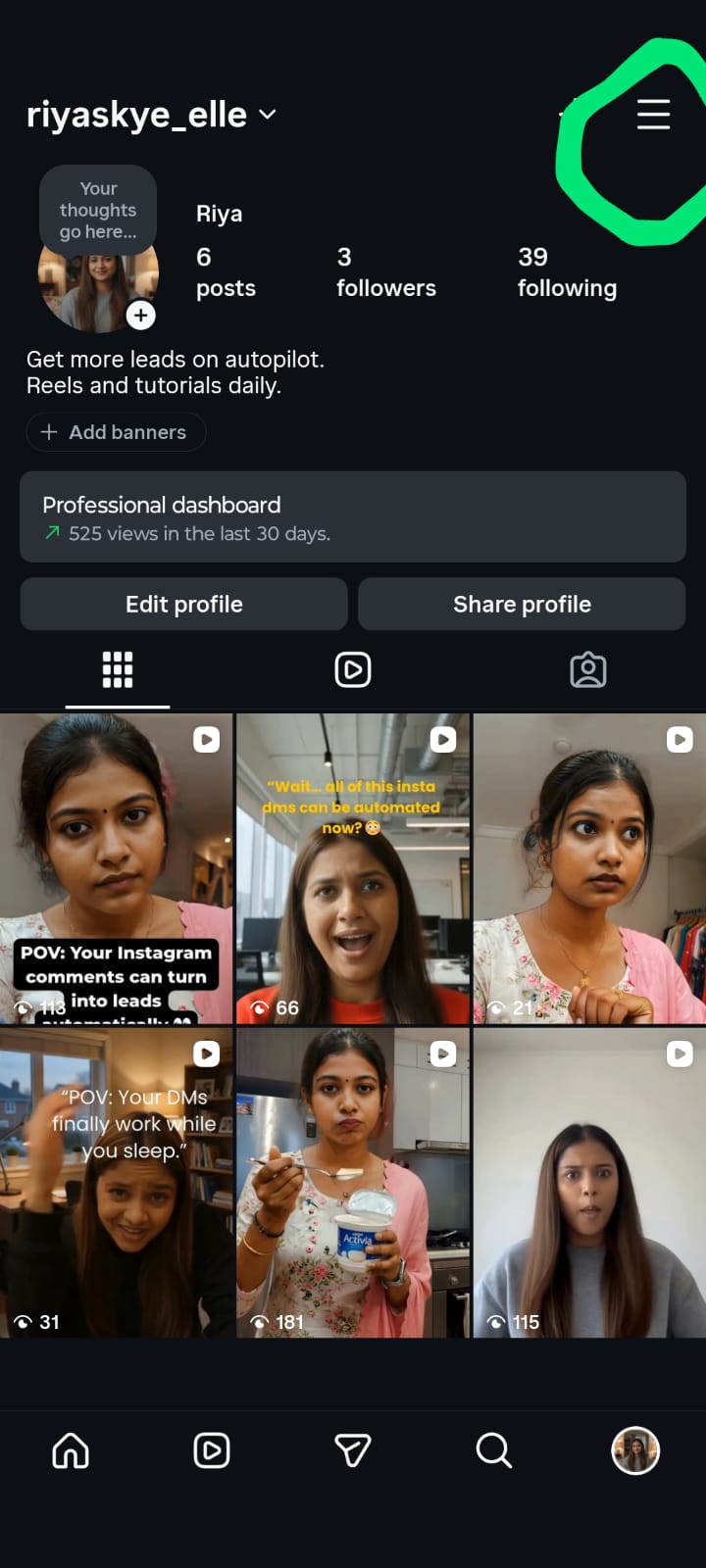
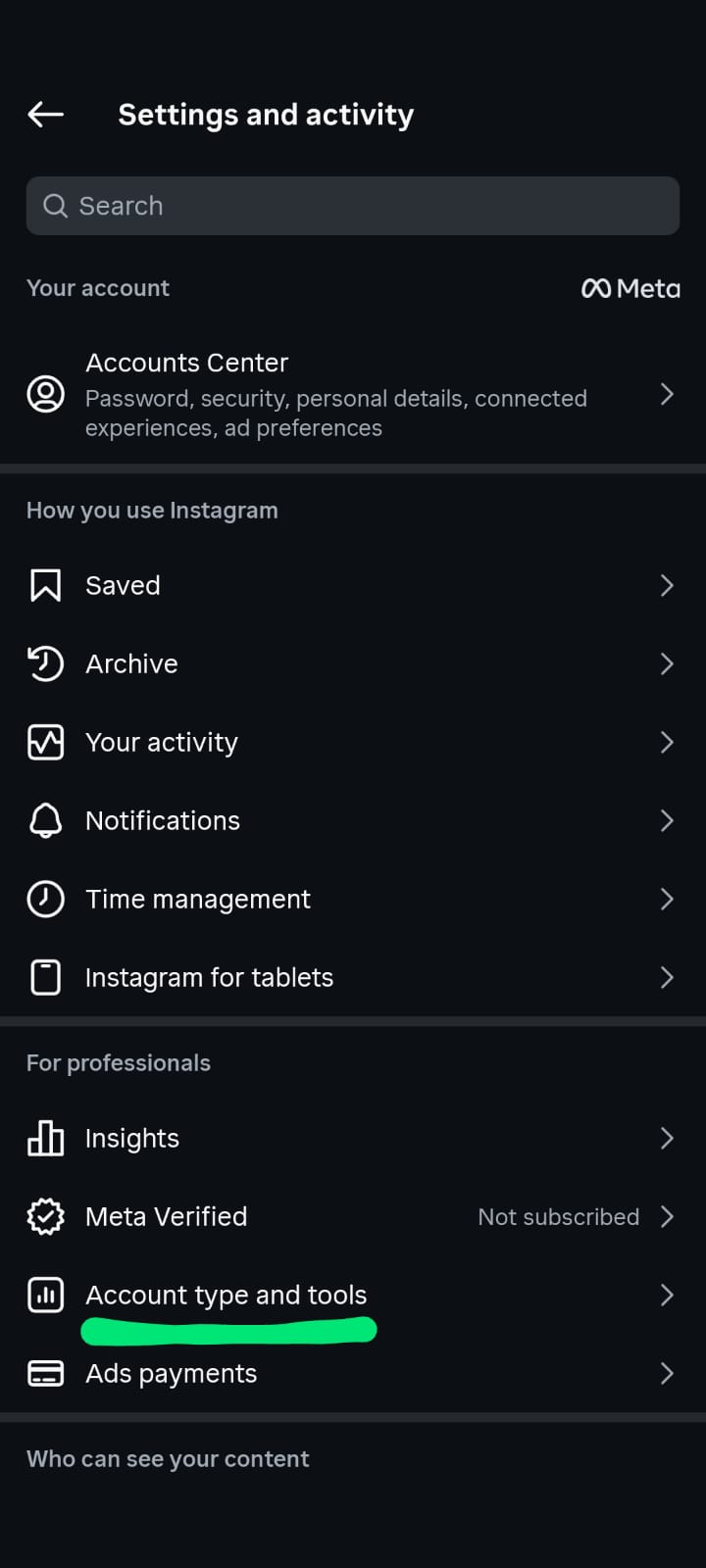
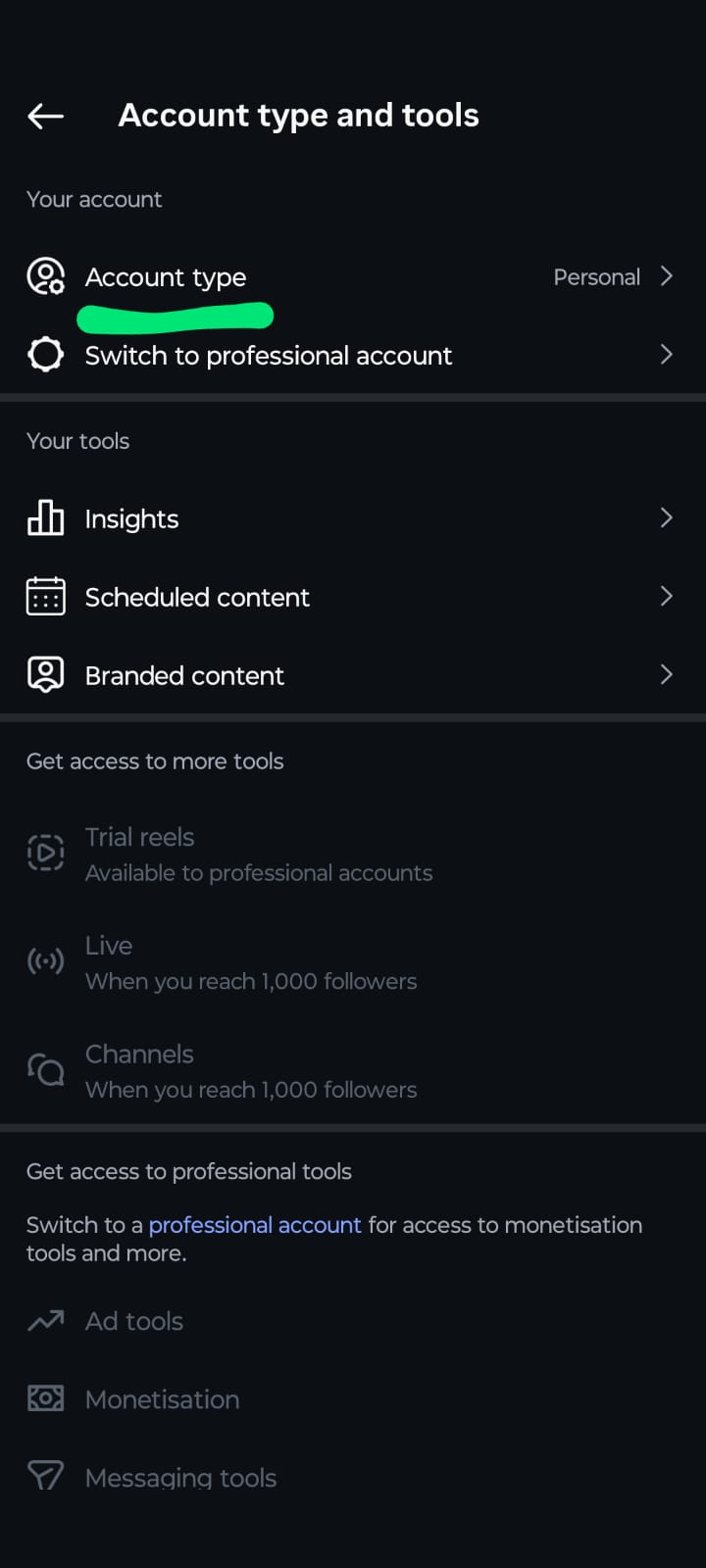
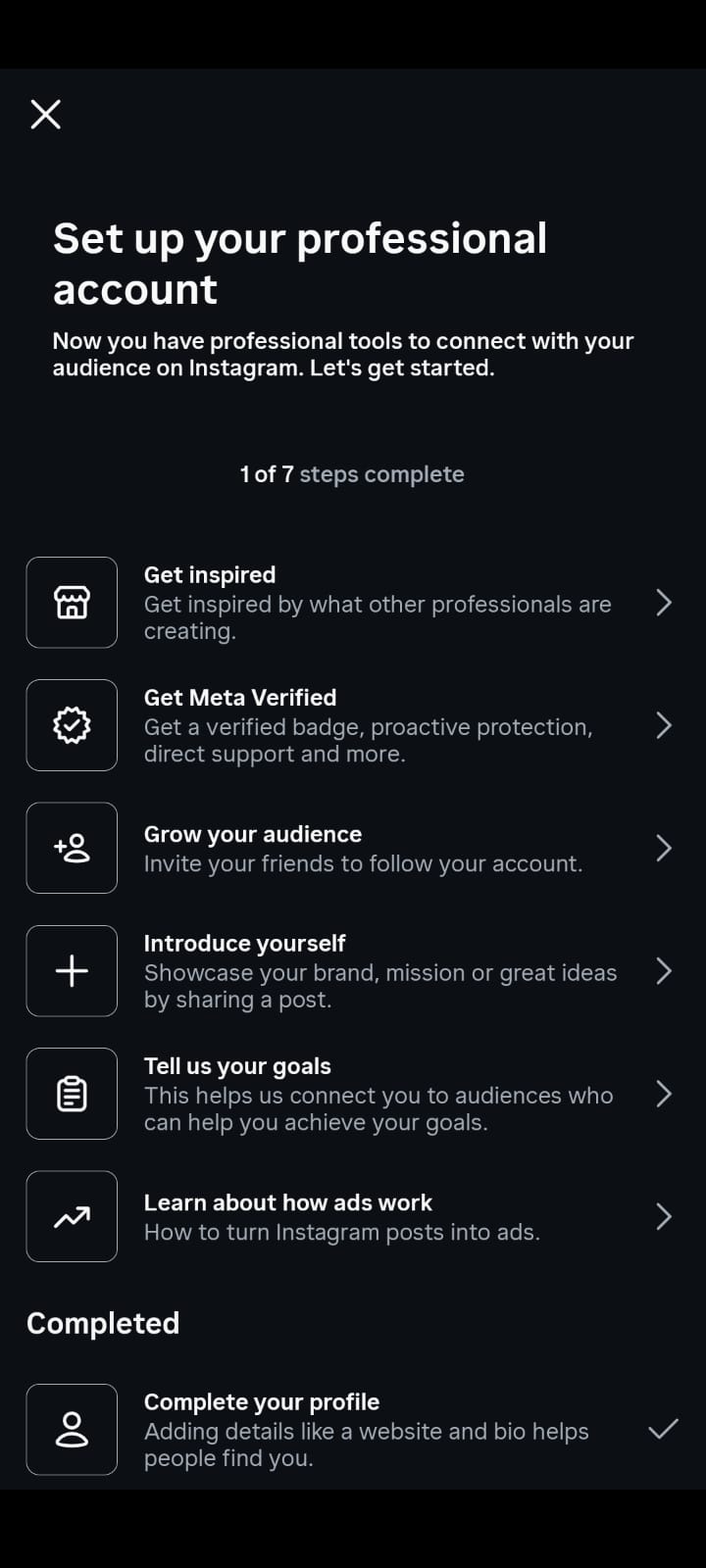
How to switch: Head to your profile, tap the menu icon , in the top right, go to Settings, hit Account, and tap Switch to Professional Account.
Optimize for the Search Bar
Think of your profile as your digital storefront. You have about three seconds to convince a visitor to stay. Here is how to make it count:
- Username: Keep it clean, simple, and matching your other socials. Drop the random numbers and excessive underscores—make it easy for people to type out.
- Profile Photo: Use a crisp, high-res image. Logos work best for businesses; a friendly, well-lit headshot works best for personal brands. Remember, it displays tiny ($110 \times 110$ pixels), so don't make it crowded.
- Bio (150-character limit): Cut the fluff. Tell people exactly what problem you solve, include some natural keywords for searchability, and end with a clear instruction. Example: "Helping local cafes pack their tables ☕ | Free marketing tips weekly | Grab our growth checklist below 👇"
- Link in Bio: Don't waste this slot on a static homepage. Use a tool like Linktree or a custom landing page to point people exactly where they need to go—your store, your latest video, or your email list signup.
- Story Highlights: Treat these like the menu navigation on a website. Bundle your best past Stories into clean categories like "Start Here," "Our Process," "Reviews," and "FAQs" so new users can self-educate.
3. Define Clear Goals for Your Instagram Presence

If you don't know where you're driving, you're going to burn a lot of gas just driving in circles. Every post you create should have a job to do.
Skip the vague "I want to grow" goal and use the SMART framework instead. Make your targets Specific, Measurable, Achievable, Relevant, and Time-bound.
Setting Measurable Instagram Account Management Goals
Effective Instagram account management starts with specific, measurable goals. Vague goals like "grow my account" produce vague results. Instead, define targets that connect to real business outcomes.
Here are the goals every Instagram account management strategy should include:
- Follower growth rate: Aim for 3 to 5 percent monthly growth, not raw follower count. A smaller, engaged audience outperforms a large, passive one every time.
- Engagement rate: Track likes, comments, shares, and saves as a percentage of reach. For most niches, a 3 to 6 percent engagement rate signals a healthy Instagram account.
- DM conversation rate: If you use Instagram DM automation, measure how many profile visitors start a conversation. This is the metric that directly connects content to revenue.
- Content output consistency: Set a minimum posting frequency you can sustain for 6 months without burning out. Three high quality posts per week beats seven mediocre ones.
- Profile visit to follow conversion: Track what percentage of profile visitors hit the follow button. If this number is below 20 percent, your bio and grid need optimization.
Review these goals monthly. Instagram account management is an iterative process — what worked three months ago may not work now. Let the data guide your adjustments.
4. Build a Strong Visual Identity
Instagram will always be a visual platform first. If your grid looks chaotic and disjointed, people will hit the back button before reading your brilliant captions.
Pick a Signature Look
- **Color Palette: Pick 3 to 5 core colors and stick to them like glue. When someone scrolls past your post, they should know it’s yours before they even look at the username.**
- Typography: Keep your text posts clean. Pick one font for your headlines and one for your body text.
- Editing Style: Whether you love bright and clean, dark and moody, or raw and unedited, pick a lane. Use the same presets or filters to keep the vibe unified.
- Tone of Voice: Figure out how your brand talks. Are you witty and sarcastic? Warm and encouraging? Academic and serious? Write it down so whoever handles the keyboard stays in character.
- **Pre-Plan the Grid: Don't just publish blindly. Use tools like Planable or Later to preview how your next nine posts look next to each other. It takes two minutes and saves your aesthetic from looking like an accident.**
5. Know Your Target Audience Inside Out

The prettiest feed in the world will flop hard if it's talking to the wrong people. You need to write and design for a specific person, not the whole internet.
How to Find Your People
- Dig into the Data: Look at your built-in Insights. See where your followers live, how old they are, and exactly what time of day they log on to scroll.
- Talk to Them Directly: Use your Stories! Drop a poll, host a Q&A night, or use the slider bar. Ask them what they're struggling with or what they want to see more of.
- Audit Your Own Success: Look back at your top 10 posts from the last six months. What made them work? Were they funny? Did they offer a quick fix? Double down on those patterns.
- Spy a Little (Legally): Check out competitors or similar creators in your space. Don't copy them, but read their comment sections. What questions are people asking them that they aren't answering?
- Create a Character: Build an audience persona. Give them a name, an age, a job, and a frustration. When you sit down to create a post, speak directly to them.
6. Create a Content Strategy That Works
A great strategy saves you from the 5 PM panic of "What on earth am I going to post today?" It turns your daily grind into an organized system.
Establish Your Pillars
Content pillars are the 3 to 5 core topics your page lives and breathes. For a business coach, it might look like: Daily Routines | Client Case Studies | Sales Strategies | Mindset Shifts. If it doesn't fit into one of your pillars, it doesn't go on your page.
Mix Up the Flavor
Give your followers a balanced diet of content formats:
- Educational: Actionable tips, quick fixes, and "how-to" guides.
- Entertaining: Relatable jokes, memes, and casual office moments.
- Inspirational: Big wins, transformation stories, and lessons learned the hard way.
- Promotional: Hard facts about your offers, launches, and customer reviews.
The Golden Rule: Aim for the 80/20 rule. Give away 80% pure, unadulterated value, and use the other 20% to pitch your business or products.
Batch Your Work
Stop creating content day by day—it's a massive productivity killer. Block out one or two days a month to film your videos, shoot your photos, and write your copy all at once. You'll stay in the creative zone, stress less, and keep your quality high.
"Relying purely on guesswork for your publishing calendar is a recipe for stagnant metrics. To build out an actionable framework, look at how to map a sustainable, comprehensive Instagram strategy step-by-step [00:18] using proven data points from competitors across your industry."
Content Strategy Framework for Instagram Account Management
A content strategy for Instagram account management needs three pillars: attract, nurture, and convert. Most creators only focus on the first pillar — creating content that attracts new followers — and completely ignore the other two.
Attract pillar:
Educational and entertaining content that reaches new audiences through Reels, SEO optimized carousels, and hashtag discovery. This is your top-of-funnel content.
Nurture pillar:
Behind-the-scenes Stories, polls, Q&A sessions, and community-focused posts that deepen the relationship with existing followers. This content does not need to reach new people — it needs to make your current audience trust you more.
Convert pillar:
Product showcases, testimonials, limited offers, and DM-triggered funnels that turn followers into customers. This is where Instagram DM automation and comment-to-DM workflows generate revenue directly from your content.
Rotate between these three pillars in your content calendar. A common mistake in Instagram account management is creating only attract content and wondering why followers never buy. The nurture and convert pillars are where the money is.
7. Plan and Schedule Your Content Calendar

Consistency will always beat frequency. It is vastly better to post three amazing, thoughtful pieces of content a week than to post garbage seven days a week until you burn out and disappear.
Your Content Calendar Checklist
Keep a simple dashboard or spreadsheet that tracks:
- Publish date and time
- Format type (Reel, Carousel, Story)
- The caption copy and your keywordrich tags
- The raw media file link
- The core pillar it covers
- Sign-off or approval status
Current 2026 Posting Benchmarks
- Feed Posts / Carousels: 3 to 5 times a week.
- **Stories: 5 to 7 times a week (great for keeping your warm audience engaged).**
- **Reels: 3 to 5 times a week (still the king for reaching people who don't follow you yet).**
Set these up in a scheduling tool to drop automatically during your audience's peak hours so you can focus on running your actual life or business.
8. Master Every Instagram Content Format
Every feature on Instagram speaks to your audience in a slightly different way. To win, you need to use the right tool for the right job.
Carousels & Static Posts
These live forever on your grid. Carousels (swipeable posts) are absolute goldmines for saving and sharing.
- Pro Tip: Make your first slide an irresistible hook. If people scroll past it once, Instagram will often show them the post a second time with the second slide facing forward.
Instagram Reels
Short-form video is still the best vehicle for organic growth in 2026. This is how you get your face in front of total strangers on the Explore page.
- Pro Tip: Keep it fast. Grab their attention in the first 2 seconds, keep captions on-screen for people watching on mute, and use trending audio tracks to give your reach a soft algorithm boost.
Instagram Stories
Stories are raw, casual, and disappear in 24 hours. They aren't for reaching new people; they are for building deep relationships with the folks who already love you. Use stickers, polls, and raw behind-the-scenes moments here.
Instagram Live & Collab Posts
Go Live for raw, unedited Q&As, product reveals, or deep-dive chats. Use Collab Posts to co-author a piece of content with an influencer or partner brand - it instantly pushes that single post to both of your audiences simultaneously.
9. Write Captions That Drive Engagement
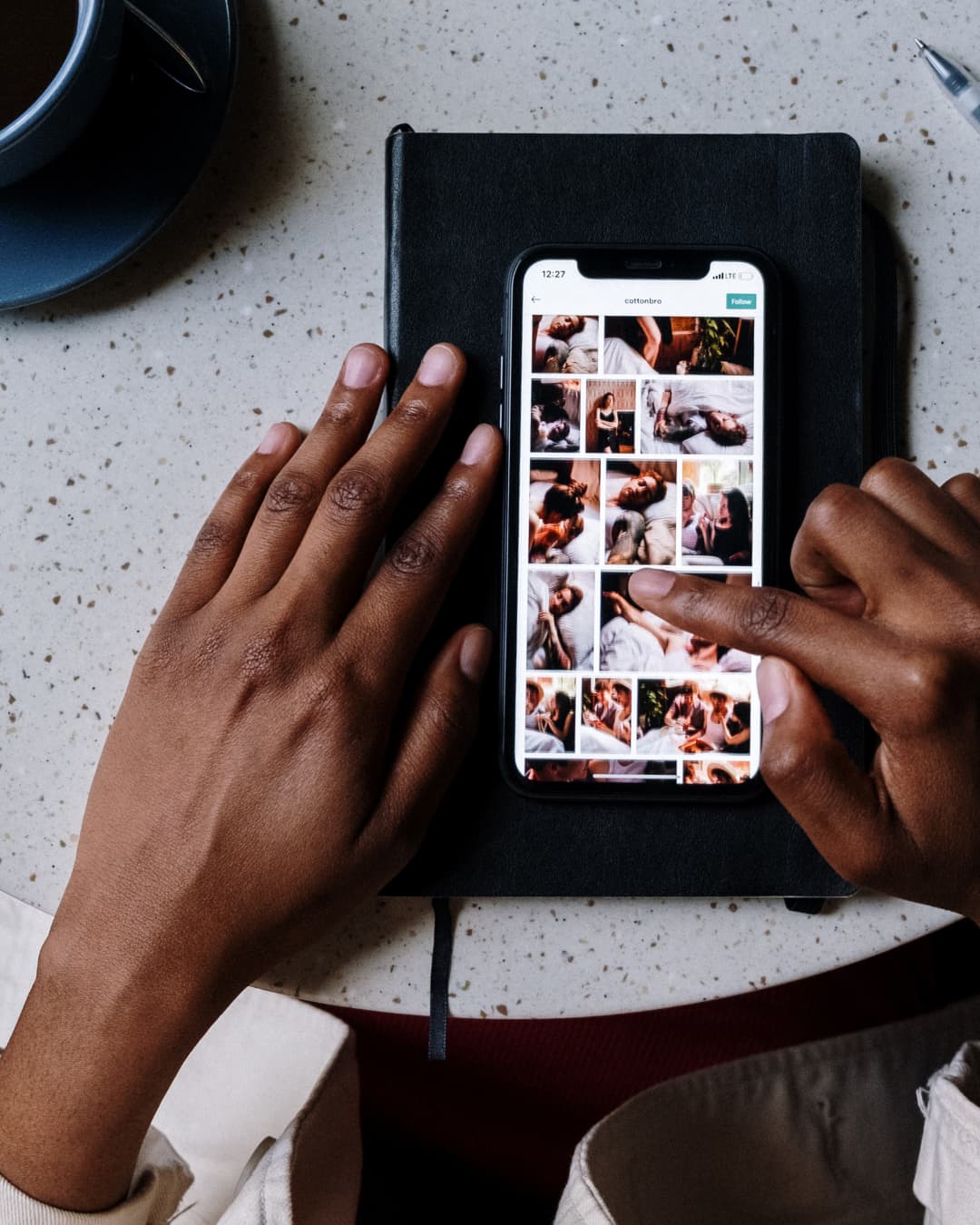
The image or video catches the eye and stops the scroll; the caption is where you actually close the deal and get the engagement.
- Hook 'em early: Only the first couple of lines show up before the user has to click "...more." Make sure those first few words tease a story, drop a wild stat, or ask a burning question.
- Give real value: Don't just drop an emoji and leave. Tell a story, break down a process, or explain the context behind the photo.
- Ask for what you want: Always close with a single, clear Call to Action (CTA). Tell them exactly what to do next: "Bookmark this for your next workout," "Comment your vote below," or "Hit the link in our bio to grab a spot."
- Make it readable: Avoid giant, intimidating blocks of text. Break up your thoughts with quick paragraphs, bullet points, and clean spacing.
10. Use Hashtags Strategically
Hashtags aren't dead in 2026, but the old way of spamming 30 generic tags is completely over. Instagram's search engine is smart now—it reads your captions for SEO keywords just like Google does.
The Balanced Tag Blueprint
Stick to 5 to 15 highly targeted tags per post, blended like this:
- Small / Niche Tags (Under 100k posts): Low competition, highly targeted. You can easily rank at the top here.
- Mid-Sized Tags (100k - 1M posts): Decent volume, steady traffic.
- Broad Tags (1M+ posts): High visibility but fast-moving. Use sparingly.
Make sure every tag directly matches what is actually happening in your image or video.
11. Engage With Your Audience Like It's Your Job

Social media was built to be
social
. If you treat your page like a one-way billboard, people will eventually stop looking at it.
- The Golden Hour: Try to spend 15 minutes hanging out on your page right after you publish a new post. Replying to early commenters immediately signals to the algorithm that your post is driving high activity.
- Get out of your own backyard: Don't just wait for people to talk to you. Go follow hashtags in your space, drop genuine comments on your followers' photos, and support peer creators.
- Slide into DMs (respectfully): When someone sends a nice message or responds to a Story, strike up a real conversation. DMs are where casual fans turn into paying clients.
- Show off your community: When someone tags your product, share it to your Stories and say thank you. People love being spotlighted, and it proves to everyone else that your brand is loved by real human beings.
To truly unlock your account's potential this year, check out Modern Millie's Your 2026 Guide to Instagram Engagement | Future-Proofing Your Engagement Strategy video. She breaks down the exact communication "super signals"—like leveraging DMs and building strategic comment snowball effects—that tell the algorithm to prioritize your content.
Instagram Engagement Strategies That Actually Work in 2026
Instagram engagement is the signal that tells the algorithm your content deserves wider distribution. But engagement in 2026 looks different from even a year ago. The algorithm now weights saves and shares more heavily than likes, and DM conversations are the strongest engagement signal of all.
Here are proven Instagram engagement strategies for 2026:
- Reply to every comment within the first hour. The algorithm treats your reply as a new comment, effectively doubling the engagement count on your post.
- Use question stickers in Stories. These generate DM conversations, which Instagram tracks as high-value engagement.
- Create saveable content. Checklists, tip carousels, and reference guides get saved at 3 to 5 times the rate of inspirational quotes. Saves tell Instagram your content has lasting value.
- Start DM conversations proactively. Instagram DM automation tools like InstantDM let you auto-reply to comments with a DM, turning passive engagers into active conversations.
- Engage on other creators' content. Spend 15 minutes before and after each post leaving thoughtful comments on accounts in your niche. This drives reciprocal engagement and exposes your profile to new audiences.
The key to sustainable Instagram engagement is building systems, not relying on willpower. Set a daily engagement routine and stick to it.
12. Manage Comments, DMs, and Community Moderation
As your community scales up, keeping up with the inbox can turn into a headache. You need a system before you get buried in notifications.
Set Your Strategy
- The 24-Hour Rule: Make it a point to answer legitimate questions within a day. Slow customer service on social media kills sales.
- Use Saved Replies: If you get the same five questions every day about pricing, sizing, or locations, set up keyboard shortcuts or saved replies in your settings to save your thumbs the trouble.
- Pro-Tip for Scaling Your Inbox: If doing this manually feels impossible as you grow, look into official automation. Tools like InstantDM allow you to build Meta-approved "Comment-to-DM" and "Story-to-DM" funnels. Instead of losing hours typing the same replies, you can set up keyword triggers that instantly route resource links, promo codes, or answers straight to a follower's inbox the second they interact with your content—keeping your response times instant without burning out.
- Handling the Heat: If a customer leaves a valid, angry comment, don't delete it. Address it calmly, apologize for the frustration, and ask them to DM you so you can fix it privately. If it's just a bot or someone being abusive, block them, delete the comment, and move on.
- Keep It Safe: Use the Hidden Words feature in your privacy settings to automatically block specific slurs, spam phrases, or links from ever appearing on your feed.
Instagram DM Automation: Managing Conversations at Scale
As your Instagram account grows, managing DMs manually becomes impossible. A creator with 10,000 followers might receive 20 to 50 DMs per day. At 100,000 followers, that number can exceed 200. Without a system, you will either miss valuable conversations or spend your entire day in the inbox.
Instagram DM automation solves this by handling the repetitive parts of DM management. When someone comments on your post with a specific keyword, an automation tool can instantly send them a DM with the information they requested. This is called comment to DM automation, and it is one of the most effective Instagram marketing strategies in 2026.
Here is how to set up Instagram DM automation without hurting your account:
- Use Meta approved APIs only. Tools like InstantDM connect through Meta's official Business API, which means your account stays safe and compliant.
- Start with comment triggers. Set up automations that respond when someone comments a specific word on your post. This is the lowest-risk, highest-conversion DM automation method.
- Personalize the first message. Even automated DMs should feel personal. Include the commenter's name and reference the post they engaged with.
- Escalate to human quickly. Automation handles the first touch. For complex questions or sales conversations, hand off to a real person within 2 to 3 messages.
Instagram DM automation is not about replacing human connection — it is about ensuring no conversation falls through the cracks while you focus on creating content.
13. Track Analytics and Measure What Matters

If you aren't checking your data, you're just throwing darts in a dark room. Let the numbers dictate what you create next.
The Metrics to Watch
- **Reach vs. Impressions: Reach is how many actual unique people saw your post; impressions are how many total times it was viewed. Watch reach to see if your top-of-funnel growth is working.**
- **Engagement Rate: Don't just look at likes. Take your Likes + Comments + Saves + Shares, divide that by your Reach, and multiply by 100. If you are sitting between 1% and 5%, you're doing great.**
- Saves and Shares: These are the holy grail of engagement. A share means your content was so good someone vouched for it; a save means it was so valuable they want to read it again.
- Bio Link Clicks: The true test for business owners. Is your content actually moving people off the app and onto your website?
Review these metrics briefly every week to adjust your course, and do a deep dive once a month to spot the bigger trends.
Instagram Account Management Metrics That Matter in 2026
Not all Instagram metrics deserve equal attention. Here are the metrics that actually indicate whether your Instagram account management strategy is working:
- Reach rate (reach ÷ followers): This tells you what percentage of your audience actually sees your content. A reach rate below 15 percent means the algorithm is not favoring your content.
- Saves per post: The single most important engagement metric in 2026. Saves signal lasting value and directly boost algorithmic distribution.
- Profile visits from non-followers: This measures how effectively your content attracts new audiences. If most profile visits come from existing followers, your content is not reaching beyond your current bubble.
- DM conversation starts: Track how many new DM conversations begin each week. This is your leading indicator for sales and partnership opportunities.
- Story completion rate: If people drop off before finishing your Stories, your storytelling needs work. Aim for a completion rate above 70 percent.
- Website click-through rate: For accounts with a link in bio, this metric shows how effectively your content drives traffic outside Instagram.
Review these metrics weekly, not daily. Daily fluctuations are noise. Weekly and monthly trends are signal. Let the trends guide your Instagram account management decisions.
14. How to Manage Multiple Instagram Accounts
Juggling several profiles—whether you’re an agency pro or a business owner with multiple concepts—presents a major operational challenge. One slip-up can lead to a very embarrassing cross-post.
- Use Native Account Switching: Instagram lets you keep up to 5 profiles logged in at once on a single mobile device. Tap and hold your profile icon in the bottom right corner to swing back and forth between them.
- Create Hard Lines: Give each account its own dedicated visual assets, voice guidelines, and calendar dashboard. Nevmplates across different clients—audiences see right through it.
- Enforce Approval Gates: If you are managing pages for clients, use software that requires them to digitally sign off on a post before it ever goes live. This keeps your team safe from miscommunications.
15.Deep Dive into the Algorithm: The Mechanics Behind the 2026 Grid
No more random searches for trending sounds and praying that a 7-second video will blow up. Instagram changed from a predictive guessing game to a user-driven platform, enhanced by sophisticated AI and a no-tolerance policy for unoriginal content.
The Emergence of "Your Algorithm" & Niche Locking
At the start of 2026, Instagram introduced the "Your Algorithm" feature for Reels worldwide. Instead of letting the app guess what a user wants to see based purely on passive scrolling behavior, users can now directly curate, reset, and dictate their interest categories.
The Creator Impact: If your content does not have a hyper-specific, clearly defined topical footprint, the algorithm cannot map your page to the explicit interest feeds users are building. Trend-chasing outside your niche will active hurt your reach. Niche consistency is no longer just good advice; it's an algorithmic prerequisite.
The New Engagement Currency: Multipliers That MatterNot all engagement is created equal. Instagram in 2026 puts a much higher value on backend interaction metrics than on public “likes.”
**DM Shares (The #1 Signal):** Sharing your Reel or Carousel in a direct message to a friend indicates significant, non-passive value and is weighted 3x to 5x more heavily than a typical like.
Watch Time & Loop Mechanics: For video content, the total watch time and the rate at which viewers watch your video to the end determine if your post will be shown to non-followers via “disconnected reach.” A 45-second video watched to 80% completion will vastly outperform a 10-second video watched to 40% completion.
The Single-Tap Pause & Retarget Signal: The algorithm actively tracks subtle behavioral triggers. If a user taps to pause your video to read on-screen text or flips through a carousel back-and-forth, it scores a high retention mark, signaling Instagram to push that post to a wider test audience.
**The Aggregator Penalty & Originality Filter:**Instagram's AI can now instantly parse on-screen visuals, spoken dialogue, and audio tracks to detect recycled assets. Original content receives 40% to 60% higher baseline distribution. Accounts that publish more than 10 repurposed or duplicate clips within a 30-day window are hit with the Aggregator Penalty, which completely excludes the profile from the Explore page and Reels recommendation loops. This includes any content containing third-party watermarks (like TikTok logos) or unedited footage clipped from larger media networks.
16.Master Instagram SEO: Optimizing Beyond the Caption
Instagram has fully evolved into a visual search engine, operating much like Google or Pinterest. To get discovered by users searching for solutions, you must optimize your profile's hidden metadata and high-visibility text properties.
The Name Field Blueprint
Your Username (@handle) should be your exact brand name, but your Name Field (the bold text under your profile picture) must be treated as prime SEO real estate. The search index looks at these two fields first.
- The Formula:
[Brand Name / Persona Name] | [Primary High-Volume Keyword] - Bad: Jane Doe | Life is Good ✨
- Good: Jane Doe | Fitness Coach For Busy Moms
By putting "Fitness Coach" in your name field, your account will pop up when users type that service directly into the Instagram search bar, even if they've never heard of your brand.
Visual AI & Hidden Alt Text Optimization
Instagram utilizes advanced object-recognition software to scan every image uploaded. However, you can manually force accurate categorization by writing descriptive, keyword-rich Alt Text (Alternative Text) before hitting publish.
How to access it:
When creating a post, scroll to the bottom of the sharing page, tap Advanced Settings, and select Write Alt Text.
`[Example of SEO-Optimized Alt Text]
"A top-down view of an iced matcha latte on a minimalist white marble desk, next to a 2026 daily planner and a silver laptop. Neutral aesthetic home office setting for a creative freelancer."`
The Rules for Writing 2026 Alt Text:
- Ditch the Keyword Stuffing: Do not simply paste a wall of tags into the alt text window. The search crawler flags this as spam.
- *Describe the Setting + Context: Explicitly name the physical objects in the frame alongside your industry terms (e.g., “minimalist white marble desk,” “matcha latte,” “creative freelancer”).*
- Align Text-on-Screen: If your image contains graphic typography, weave those exact words into your description. The AI verifies if your alt text matches the visual data it extracts.
20. The Power of Flat-Rate Conversions: Why InstantDM Changes the Game
While traditional social media tools focus strictly on the frontend publishing calendar, modern account management requires a seamless bridge between content reach and direct monetization. According to recent software utility and user data, InstantDM has become a critical layer for creator and business toolkits due to its distinct approach to inbox architecture and native Meta compliance.
The Per-Contact Pricing Trap vs. Flat Rates
For years, creators using automation platforms like ManyChat or Chatfuel faced an escalating penalty for success: as their follower counts and subscriber lists grew, their monthly software fees scaled up into hundreds or thousands of dollars.
Data shows that handling a high-volume campaign of roughly 300,000 comments costs upwards of $1,600/month on tier-scaled systems. InstantDM disrupts this framework by utilizing a flat-rate pricing model ($9.99/month) with completely unlimited contacts and message volumes. This allows scaling brands to build deep, multi-step message trees without capping their own ROI or calculating cost-per-lead variations month-over-month.
Native Funnels and the "Schedule with AutoDM" Protocol
InstantDM is an officially vetted Meta Business Partner, meaning its integrations interface directly via the secure Instagram Graph API without risking profile flags or shadowbans. Its operational ecosystem introduces several key automation advantages:
- **Schedule with AutoDM: This feature unifies content distribution and conversion. Users can schedule a Reel, Post, or Story ahead of time while simultaneously appending explicit comment-to-DM keyword triggers (e.g., "Comment COFFEE to get the recipe"). The minute the content goes live natively, the underlying chat automation goes live with it.**
- Multi-Tier Conversational Funnels: Rather than merely sending a single outbound link, the system allows brands to build fully interactive message flows directly inside the user's DMs. You can capture verified email addresses, route users to customized Shopify or Calendly endpoints, or trigger automated follow-up sequences hours after the initial interaction to nurture cold leads into warm sales.
Instagram Management & Automation: The 2026 Software Showdown
Choosing the right tool isn't just about features; it’s about protecting your profit margins as your page grows. This comparison table breaks down how InstantDM stacks up against legacy automated systems and native platforms.
Real-World Case Studies: Strategies in Action
To understand how these mathematical, SEO, and automation principles work in the wild, let's analyze two profiles that completely transformed their performance markers using these specific methods.
**Case Study 1: The Local Service Provider**
- The Profile: The Core Lab (A boutique Pilates studio in Austin, TX)
- The Challenge: High local competition, stagnant organic reach, and a chaotic aesthetic that attracted profile visits but failed to book intro classes.
The Playbook:
- SEO Restructure: Changed the profile Name Field from "The Core Lab Studio" to "Austin Pilates Studio | Reformer Classes."
- The 3/1 Reel Framework: Implemented a strict weekly cadence of three short, 7-second "hook-heavy" aesthetic studio videos to capture the algorithmic Explore page, balanced by one deep-dive 45-second instructional video explaining form corrections to build authority and save metrics.
- Local Visual Alt Text: Every image was tagged with descriptive regional alt text, such as: "Women practicing reformer Pilates exercises inside an Austin Texas fitness studio."
The Results:
Within 90 days, non-follower reach grew by 142%. The studio began ranking in the top three organic search results for "Pilates in Austin," resulting in a 34% lift in new student sign-ups completely free of ad spend.
**Case Study 2: The Digital Product Creator**
- The Profile: DesignSmarter (An architectural creator selling Notion templates and asset packs)
- The Challenge: High views on Reels but severe "link-in-bio drop-off"—meaning thousands watched the videos, but less than 1% clicked through to the shop link.
The Playbook:
- Transition to Share-Centric Hooks: Shifted video concepts from general inspiration to practical resource roundups designed explicitly to earn "Saves" and "DM Sends."
- InstantDM Integration: Completely removed the instruction to "click the link in my bio." Instead, every video closed with a hard call-to-action: "Comment 'PLANNER' and I'll send the download link straight to your inbox."
- Automated Lead Capture: Implemented a multi-step InstantDM flow. When a user commented, the system immediately sent a personalized DM offering the free asset pack in exchange for an email address, automatically syncing those leads to the creator's email newsletter list.
Best Tools to Manage Your Instagram Account in 2026
You don't have to do all of this heavy lifting manually. Let technology do the boring stuff so you can focus on the creative side.
For Solo Creators & Small Crews
- **Later: Incredible for visual planning. You can drag and drop your upcoming posts onto a mockup grid to make sure your page looks beautiful before you publish.**
- **Buffer: Super clean, simple, and affordable. Excellent if you just want to schedule your content across a couple of platforms without a bunch of confusing bells and whistles.**
- **Canva :The undisputed champions for quick design templates and lightning-fast Reels editing right on your phone or laptop.**
For Scale, Agencies, & Deep Analytics
- **Hootsuite: A massive powerhouse. It aggregates your scheduling, customer conversations, and cross-platform profiles into a single command center.**
- **Planable: The best platform for teams that need seamless collaboration. You and your clients can leave comments, edit text, and approve graphics right inside the calendar view.**
- **Metricool: An absolute dream for data nerds. Incredible reporting tools that give you granular breakdowns of your growth and let you spy on competitor metrics easily.**
For All-in-One Content Scheduling & DM Automation
- **InstantDM: While traditional tools only handle your publishing calendar, InstantDM bridges the gap between your content plan and your inbox. It features a "Schedule with AutoDM" capability that allows you to queue up your feed posts, Stories, and Reels ahead of time while simultaneously attaching your comment-to-DM keyword triggers. When the post drops, the automation drops with it. Unlike legacy engagement tools that scale their prices up every time your follower count increases, it operates on a flat-rate pricing model with zero contact limits—making it a massive time and money saver for data-driven creators and brands.**
The Budget Route
- **Meta Business Suite: Meta’s native, 100% free desktop dashboard. It lets you schedule posts and Stories across both Facebook and Instagram, check your inbox, and read baseline data. It can be a little clunky, but it costs zero dollars.**
For Instagram DM Automation and Comment-to-DM Workflows
If your Instagram account management strategy includes converting followers into customers through DMs, InstantDM is purpose-built for this. It connects through Meta's official Business API, supports comment-to-DM automation, bulk DM campaigns, and integrates with your content scheduling workflow. Unlike general social media management tools, InstantDM focuses specifically on the DM monetization layer of Instagram account management.
For Content Scheduling and Cross-Platform Management
For creators who need to schedule content across Instagram, TikTok, and other platforms simultaneously, tools like Buffer, Later, or Hootsuite handle the publishing calendar. Pair one of these with a dedicated Instagram DM automation tool for a complete Instagram account management stack.
Common Instagram Management Mistakes to Avoid

Keep an eye out for these sneaky traps that can quietly tank your performance:
- Posting without a plan: Throwing random photos out just to "stay active" confuses your followers and teaches them to scroll right past you.
- Ignoring your metrics: If you keep posting long videos when your audience is clearly telling you they prefer text carousels, you are fighting a losing battle.
- Ghosting your community: Publishing a post and immediately locking your phone is a surefire way to kill your engagement rate. Stay and talk.
- Buying your audience: Buying fake followers destroys your engagement percentages, kills your organic reach, and risks getting your profile blacklisted by Instagram. It is never worth the vanity bump.
- Inconsistency: Posting ten times in five days and then going dead silent for three weeks breaks your relationship with both your fans and the algorithm. Stick to a pace you can actually maintain.
Final Thoughts: It’s a Marathon, Not a Sprint
Building a real, vibrant, profitable presence on Instagram doesn't happen overnight. There are no secret hacks or shortcuts that stick around for long. The pages that win in 2026 are the ones that show up reliably, care deeply about the people in their comment section, and use their analytics data to get 1% better every single week.
Focus on your core goals, treat your followers like real human beings, and build a production routine that keeps you sane. Grab this guide, build your blueprint, and start posting!
When a post starts getting comments, send the resource in a DM instead of a bio link — that is comment-to-DM. Stay on Meta’s official API; see what Instagram actually permits.
Next Steps and Related Content
- Instagram Comment-to-DM Automation
- Is Instagram Automation Allowed?
- Complete Guide: How to Grow Organic Followers
Additional Resources:
Sprout Social: Instagram marketing strategy https://later.com/blog/ultimate-guide-to-using-instagram-hashtags/Social Media Examiner website