last updated: 20 September 2026
Introduction:
Everything you need to know about the "User Not Found" error — causes, instant fixes, and how to tell if you've been blocked.
Quick Answer
“User not found,” “profile does not exist,” “IG account not found,” and “this page isn’t available” mean Instagram cannot show that profile to you right now. It is deleted, deactivated, banned, renamed, a typo, a glitch — or you were blocked. “Instagram User” in a DM is the same problem inside chat. “No posts yet” is different: the profile loaded. “This post is from an account that no longer exists” means the post stayed, the account did not. “Something went wrong” is usually the app, not a missing user.
What you see | Verdict |
User not found / page isn’t available / can’t find the account | Profile hidden from you, or gone. Run the 2-minute test in Section 3. |
Only you can’t open it; a friend or Incognito can | You were blocked. |
Nobody can open it | Deleted, deactivated, banned, or the username changed. |
Chat name says Instagram User | Same as above. Old DMs stay. New messages usually won’t send. |
No posts yet, but name and counts load | Account exists. Not “user not found.” |
This post is from an account that no longer exists | The post is leftover. The profile is gone. |
Something went wrong on the profile | Try cache, VPN off, app update, Incognito. If every device fails, treat it as user not found. |
1. What Does 'Instagram Profile Does Not Exist' Mean?
Understanding the error before chasing the wrong fix.
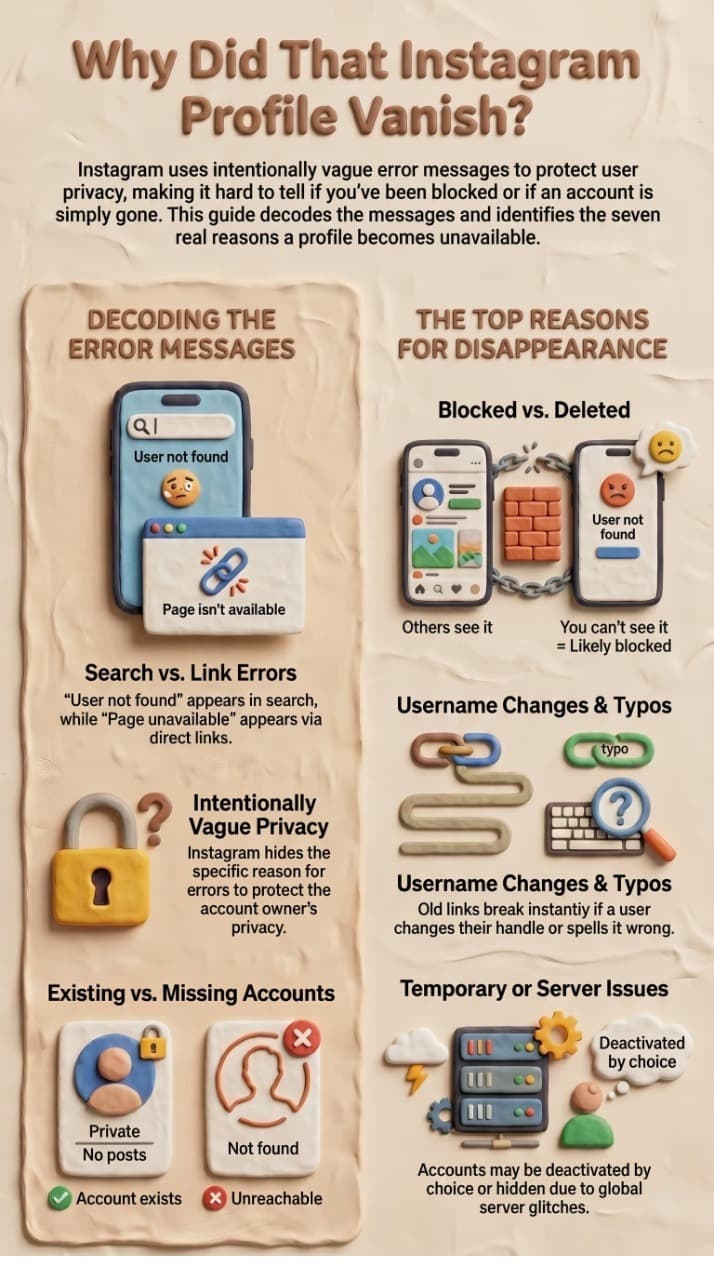
Instagram displays one of two closely-related messages depending on how you encounter the missing profile: "User not found" (when you search the username directly) or "Sorry, this page isn't available" (when you open a direct link such as instagram.com/username). Both messages signal the same underlying situation — the app cannot display the profile you are looking for.
It is important to understand that neither message tells you why the profile is unavailable. Instagram intentionally uses a vague error to protect user privacy. The cause could be anything from a simple typo in the username to a permanent ban — and the fix is completely different in each case.
Understanding which message you see and where it appears narrows the cause significantly.
2. The 7 Real Reasons Behind the Error
Competitors list 4–5 causes. Here are all 7, including two they miss entirely.
Reason 1 — The Account Has Been Permanently Deleted
When a user permanently deletes their Instagram account, the profile, username, photos, videos, comments, and followers are all removed immediately and cannot be recovered. Anyone who visits the profile — from any account — will see 'User not found'. Instagram does not send a notification to followers, so this can feel sudden.
- How to confirm: Search the username from 2–3 different accounts (including one that has never interacted with them). If everyone sees 'User not found', the account is almost certainly deleted or banned.
Reason 2 — The Account Is Temporarily Deactivated
Instagram allows users to temporarily disable their account. While disabled, the profile disappears completely — followers, posts, and stories are hidden. The account will return exactly as it was once the user re-enables it. You cannot tell from the outside whether an account is deleted or merely deactivated.
- Tip: If the person recently mentioned taking a break from social media, a temporary deactivation is the most likely explanation. There is nothing you can do except wait.
Reason 3 — You Have Been Blocked
This is the scenario most people suspect first — but it is actually not the most common cause. When someone blocks you on Instagram, their profile becomes invisible specifically to you. You will see 'User not found' when searching, and any link to their profile will return 'This page isn't available'. Crucially, only you see this error; everyone else can still find and view the account normally.
- How to confirm: Ask a trusted friend (who does NOT follow the person) to search the username. If they can find and view the profile but you cannot, you have been blocked.
Reason 4 — Instagram Banned or Suspended the Account
Instagram may permanently ban accounts for violating community guidelines — spam, harassment, impersonation, copyright infringement, or repeated minor violations. A banned account is indistinguishable from a deleted account: the profile vanishes for everyone and no message explains why.
Reason 5 — The Username Was Changed
Instagram allows users to change their username at any time. Old links and bookmarks instantly become broken. If someone you follow changes their handle and you search for the old name, you will get 'User not found' even though the account is perfectly active under the new username. This is one of the most commonly overlooked causes.
- How to confirm: Check your DM history with this person. In many cases their old messages still appear and you can tap the profile from there — Instagram may redirect you to the new username. Alternatively, search by their real name or any tags they may have used.
Reason 6 — A Typo in the Username
Instagram usernames are case-insensitive but exact in every other way. A single wrong character — a transposed letter, an underscore in the wrong place, or a '1' mistaken for a lowercase 'l' — will produce 'User not found' for a perfectly healthy account. Always double-check the spelling before assuming anything more serious.
Reason 7 — Instagram Server Glitch or App Bug (Often Missed)
Instagram's servers occasionally experience outages and caching errors that cause valid profiles to temporarily return 'User not found'. This happens more often than most guides acknowledge. You may also encounter this after updating the app to a buggy version, or when Instagram is rolling out a new feature in your region. If the error appears suddenly for multiple accounts at once, a platform-side glitch is the likely culprit.
- How to confirm: Visit downdetector.com/status/instagram or check Twitter/X for #InstagramDown. If others are reporting the same issue, simply wait 30–60 minutes.
3. How to Tell Exactly Which Reason Applies to You
Follow this decision tree — top to bottom — and stop at the first YES.
The 2-minute test (do this before any fix)
- Copy the exact username.
- Open instagram.com/username in a logged-out / Incognito window.
- Ask one friend who does not follow that person to search the same handle.
- Open your DM thread with them, if you have one.
What you see | What it usually means |
Incognito and friend can open it; you cannot | You were blocked |
Nobody can open it, including Incognito | Deleted, deactivated, banned, or the handle changed |
DM thread still exists, name now says Instagram User | Same as above — the profile is hidden from you or gone |
Profile opens, but the grid says No Posts Yet | The account exists. This is not “User not found” (see Section 5) |
Error only in the app, website works | Cache, VPN, outdated app, or a local glitch |
Stop at the first clear result. Do not create a second account just to check a block. Instagram can link devices and restrict the new account.
4. Step-by-Step Fix for Each Cause
Fix A — Correct the Typo
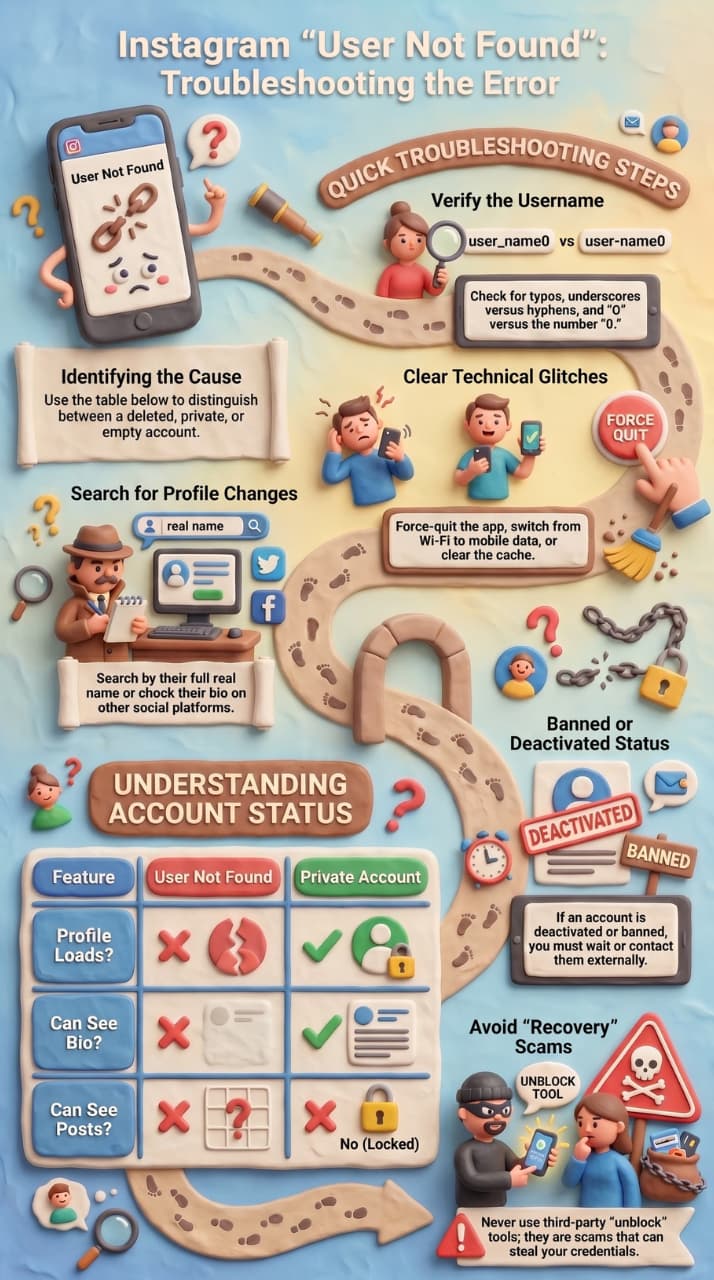
- Open Instagram and tap the Search icon.
- Clear the search bar and type the username slowly, character by character.
- Pay attention to: underscores vs hyphens, the letter O vs the number 0, lowercase L vs the number 1, and double letters.
- If possible, copy the username directly from a previous DM, a tag in a comment, or the person's bio on another platform.
Fix B — Wait Out a Server Glitch
- Force-quit the Instagram app and reopen it.
- Try switching from Wi-Fi to mobile data (or vice versa).
- Log out of Instagram, then log back in.
- Clear the app cache: Settings → Apps → Instagram → Storage → Clear Cache (Android) or delete and reinstall the app (iOS).
- If none of the above works, wait 1–2 hours and try again.
- For a live demonstration on checking the platform status and resetting your app data, check out this walkthrough to fix the "profile that you're looking for doesn't exist" issue.
Fix C — Locate a Changed Username
- Open your Instagram DM inbox and find any previous conversation with this person. Tap their name — Instagram sometimes redirects to the new profile.
- Search their full real name in the Instagram search bar (not username).
- Check if they have announced the new username on other platforms: Twitter/X, TikTok, Facebook, LinkedIn, or their website.
- Look in photos they were tagged in before the change — the tag may still link to their active profile.
Fix D — Account Deactivated (Nothing You Can Do)
There is no way to force-reactivate someone else's account or contact them through Instagram while it is deactivated. Your options are:
- Wait — the user may return on their own.
- Reach out through another platform (WhatsApp, email, SMS) to check in.
- Check periodically if the username becomes searchable again.
Fix E — If You Were Blocked
Instagram does not notify you when you are blocked, and there is no official way to bypass a block. Attempting to create secondary accounts to view someone's profile after being blocked violates Instagram's Terms of Service and can result in your account being banned. Respectful options include:
- Respect the person's decision to block you.
- If you believe it was done in error, try contacting them via another channel.
- If the person is a business contact, request they unblock you by email.
ImportantDo not use third-party 'Instagram unblock' tools or apps. They cannot unblock you, they often steal your login credentials, and they may cause Instagram to ban your account.
Fix F — Account Banned by Instagram
If it is your own account that was banned, you can appeal the decision:
- Open the Instagram login screen and enter your credentials.
- Instagram will display a message explaining the action.
- Tap 'Learn More' or 'Tell us' if you believe this is a mistake.
- Fill in the appeal form with your full name and email address.
- Wait for a response — this can take 2–30 days.
If it is someone else's account that was banned, there is nothing you can do. Only the account owner can appeal.
5. Comparison: User Not Found vs. No Posts vs. Private Account

What you see | Does the profile exist? | Can you see posts? | Most likely cause |
User not found / This page isn’t available | Not for you — maybe not for anyone | No | Block, delete, deactivate, ban, rename, typo, or outage |
No posts yet, but name + bio + counts load | Yes | No | New account, they deleted every post, private account you don’t follow, or a block on a public account (Instagram sometimes shows an empty shell instead of “User not found”) |
Private account padlock | Yes | Only if they accept your follow | Privacy setting, not a missing profile |
Restricted | Yes | Usually yes, with limits | They restricted you. The username normally still shows. This is not “User not found” |
If you see No posts yet on an account that used to post daily, run the Incognito test in Section 3. If the real grid appears when you are logged out, you were blocked.
6. Can You Recover a Deleted or Banned Account?
Deleted account — by the user:
Instagram gives a 30-day grace period after deletion. If you log back in within 30 days, the account is fully restored. After 30 days, the account and all its data are permanently erased and cannot be recovered under any circumstances.
Temporarily deactivated account:
Simply log back in — the account restores immediately. There is no minimum time you must wait before reactivating. All data (posts, followers, messages) is preserved.
Banned account:
Submit an appeal through the login screen. Instagram reviews appeals manually. Accounts banned for serious violations (CSAM, targeted harassment, coordinated inauthentic behaviour) are almost never restored. Accounts mistakenly banned due to false reports are more frequently reinstated, especially with a clear, polite appeal.
WarningThird-party 'account recovery' services cannot recover deleted or banned Instagram accounts. They have no access to Instagram's systems. Any service claiming otherwise is a scam.
7. How to Find Someone on Instagram Without Their Username
For when you know the person but not their handle.
1.Search by real name
Type their first and last name in the Instagram search bar. Switch from 'Top' to 'People' tab. Results are sorted by mutual followers, so common connections appear first.
2.Search by phone number
If you have their phone number saved and they have enabled 'Connect contacts', Instagram may suggest them under 'Discover People'. Go to your profile → ≡ → Discover People.
3.Search by email address
Instagram does not directly expose this, but some users have connected email addresses. Use the 'Forgot password' flow and enter their email — if an account is linked, Instagram will confirm it exists.
4.Check mutual followers
Visit the follower list of someone you both know. Search within that list for the person's name.
5.Google their name + Instagram
Search: [Full Name] instagram site:instagram.com in Google. Public profiles are indexed and often appear immediately.
6.Check other social platforms
Most people link their Instagram in their Twitter/X, TikTok, LinkedIn, or YouTube bio.
7.Check tagged photos
If you follow a mutual friend, check their photos — the person may be tagged.
8. Related messages people confuse with “profile does not exist”
Instagram uses several near-identical screens. Match the exact sentence on your screen before you change settings.
What does “Instagram User” mean in a message?
“Instagram User” (sometimes “Instagrammer”) is a placeholder. Instagram can no longer attach that chat or comment to a visible profile, so it strips the username and photo and leaves the thread.
It appears when they blocked you, deactivated, deleted, were disabled by Instagram, or changed username and your app has not refreshed. Old messages stay on your device. You usually cannot send a new one.
The label alone does not prove you were blocked. Run the 2-minute test in Section 3.
“This post is from an account that no longer exists”
This label sits on a photo, Reel, or ad in your feed or on someone else’s grid. The post is a leftover. The account behind it was deleted, banned, or the original poster removed it after a collaboration. You cannot open that profile. You can still report the post if it breaks the rules.
This is not a problem with your account.
“Something went wrong” on an Instagram profile
This is usually a client error, not a missing user:
- Force-close the app and reopen
- Switch Wi-Fi to mobile data
- Turn off VPN
- Set date and time to automatic
- Update Instagram from the App Store / Play Store
- On iPhone Safari: Settings > Safari > turn on Prevent Cross-Site Tracking, then retry instagram.com
- On Chrome desktop: open the profile in Incognito; if it loads there, clear Instagram site data
- Check Downdetector for Instagram
If the same profile fails on every device and every network, treat it as User not found and go back to Section 3.
“Can’t find Instagram account” / “IG account not found”
Two different jobs hide under the same search.
- You are looking for someone else > use Sections 2–4.
- People cannot find your account > use the section after the checklist.
9. Final Checklist — Run This Before Giving Up
- [ ] Verified the spelling of the username (copy-paste if possible)
- [ ] Checked Instagram's server status (downdetector.com/status/instagram)
- [ ] Cleared app cache and restarted Instagram
- [ ] Asked a friend on a different account to search the username
- [ ] Checked your DM inbox for a link to their current profile
- [ ] Searched by their real name in the People tab
- [ ] Searched their name + 'instagram' on Google
- [ ] Checked their other social profiles for a new username
- [ ] Accepted the situation if blocked — do not attempt workarounds
- [ ] Submitted an appeal if it is your own account that was banned
If people can’t find your Instagram account in search
This is a different problem from “User not found.” Your profile still exists. Search and Explore are hiding it.
Work through these in order:
- Confirm the account is public. A private profile will not show posts in search and will not index well on Google.
- Switch to a Professional account (Creator or Business) if this is a brand. Instagram treats professional profiles differently in search.
- Open Settings - Account Status. If anything is flagged, remove that content and appeal. Silent limits look like “nobody can find me.”
- If you changed username, name, or category in the last few days, wait 72 hours and stop editing. Search lags after identity changes.
- Put a searchable phrase in the Name field, not only the @handle — city, service, or brand words people actually type.
- Search Google for site:instagram.com/yourusername. If Google has an old URL and Instagram search does not, trust Instagram. Google can be months behind.
- Do not delete the account and start over. You lose the graph that search uses.
Unofficial unfollow apps, growth panels, and password-based inbox tools are a common reason a business profile suddenly disappears from search or trips Account Status. If you automate comments or DMs, use a tool that connects through Meta’s official API rather than a login-and-scrape app. A short comparison of official Instagram DM tools is here: Best Instagram DM automation tools.