Last updated: 09 November 2026
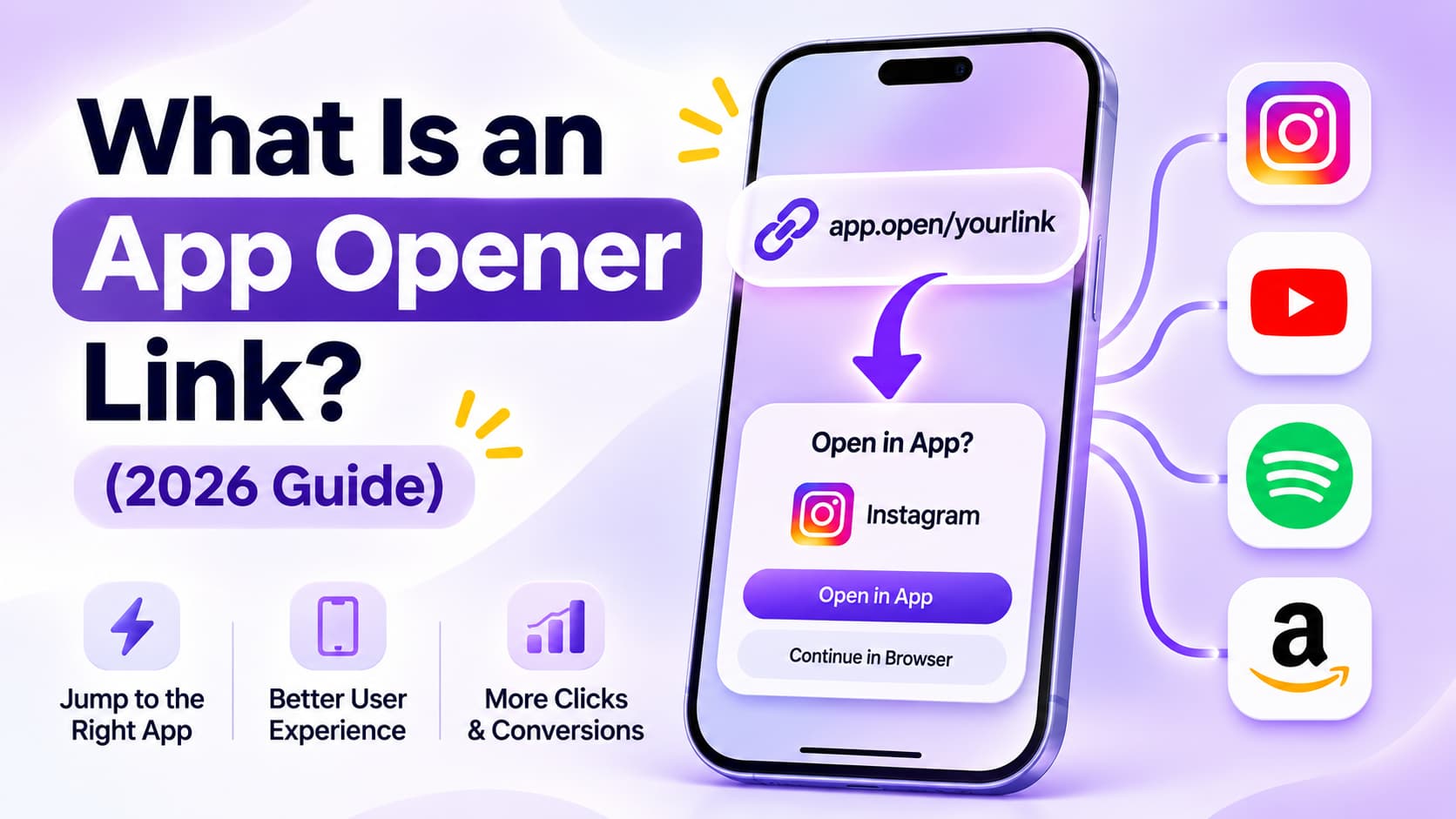
What is an app opener link? It is a smart link you generate from a public YouTube, Amazon, or Spotify URL so people who tap it land in the native app, with a website fallback if the app is missing. Phone settings and the iOS Opener utility only change the reader's own device. An app opener link is for everyone who taps what you share.
That split is the whole job. You paste a public video, product, or profile URL. You get a short link back. On a phone it tries the matching app. On a laptop it stays on the web. If someone taps it inside Instagram on Android, the YouTube app can open with the account they already use. If they tap it inside Instagram on iPhone, no tool can force that handoff. Good tools show a one-tap page instead of a logged-out mobile site.
TL;DR
- An app opener link is a smart link that opens YouTube, Amazon, or Spotify in the native app instead of a logged-out in-app browser.
- No tool can force an app open from Instagram, Facebook, or TikTok on iPhone.
- Paste a public YouTube, Amazon, or Spotify URL into an app opener for the people who tap your link. Phone settings only change your own device.
How I checked this in October 2026
I compared vendor explainers, homepages, and each vendor's own pricing page in October 2026.
- Definition pages. U2L's explainer and U2L's product page.
- iPhone limit. Eden's 2026 roundup states the Instagram / Facebook / TikTok iPhone block that U2L's explainer softens.
- Reader-side vs creator-side. opener.link (iOS utility, 290+ apps) and the App Store Opener listing. Those are apps you install. They are not a shareable link.
- Pricing as printed. U2L Free deep links YouTube and Instagram only. All apps start on Pro at $4.49/mo monthly or $2.69/mo yearly (u2l.ai/pricing, October 2026). LinkTwin Free is 10 links and 500 clicks/month. Paid Small is $14/mo billed yearly (linktw.in/pricing, October 2026).
- Official link types. Apple Universal Links, Android App Links, and Meta App Links. OpeninApp and URLgenius don't print a public dollar amount on a pricing page.
What does an app opener link actually do?
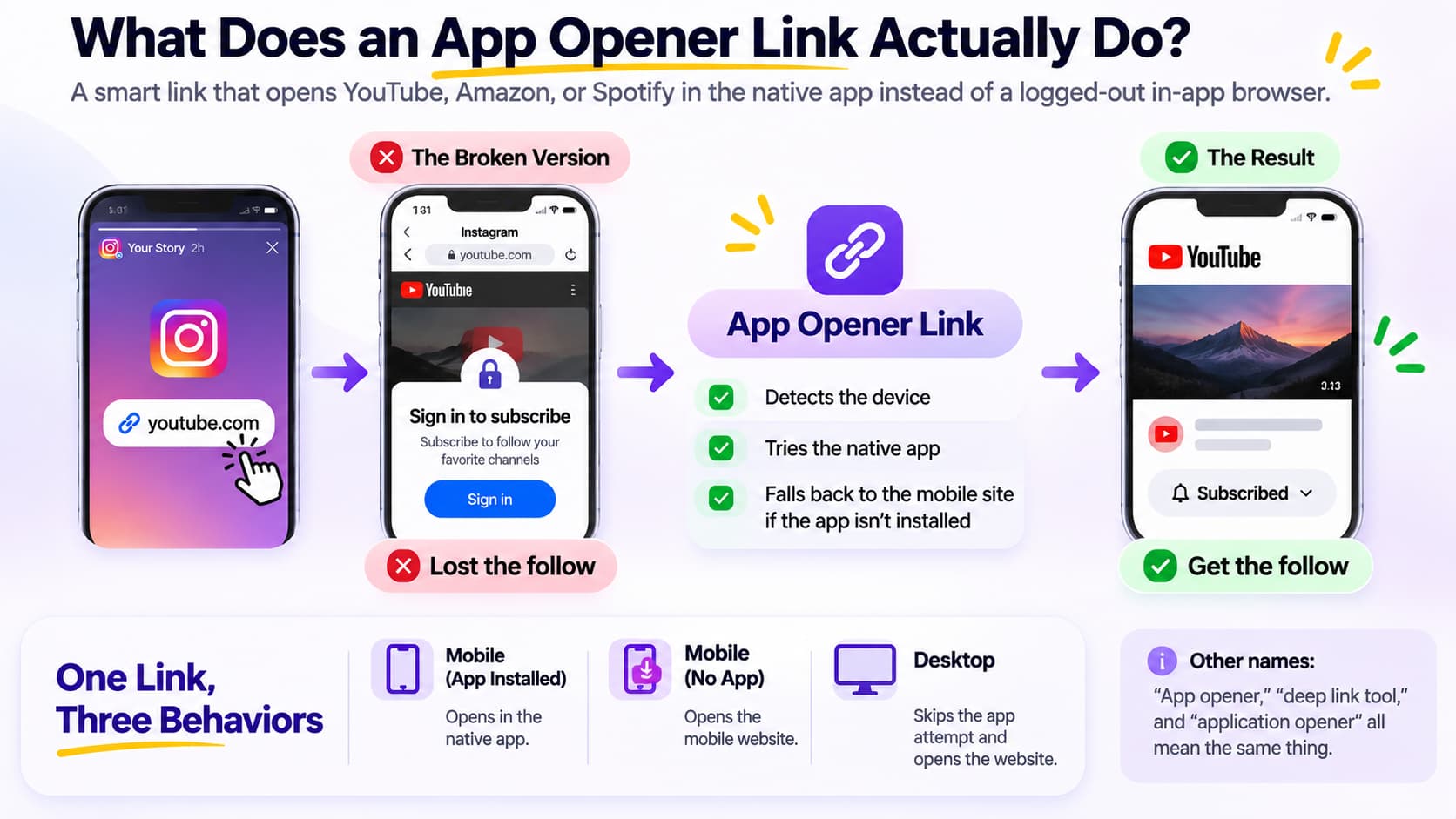
An app opener link is a smart link that opens YouTube, Amazon, or Spotify in the native app instead of a logged-out in-app browser.
That's the broken version you already know. Someone taps your YouTube URL in an Instagram Story. Instagram opens its own mini browser. The viewer is signed out. Subscribe is a login wall. They swipe back. You lost the follow.
The opener sits in the middle of that tap. It looks at the device, picks the right open method, and tries the native app. If the app isn't installed, it falls back to the mobile site. Desktop visitors skip the app attempt. One link, three behaviors.
People in India often say "app opener" the way US marketers say "deep link tool." Same outcome. Different label. "Application opener" is the longer label for the same wrap that launches the destination app. It isn't a Windows "Open with" dialog and it isn't an Android alarm clock named App Opener 2.0 on Google Play.
Why do ordinary links open in an in-app browser?
Instagram, TikTok, Facebook, and WhatsApp keep taps inside their own webview by default. That webview does not share the YouTube, Amazon, or Spotify session sitting in the real app.
What breaks in practice:
- Follow, Subscribe, and Add to cart ask for a login the person already completed in the app.
- Saved addresses and payment methods are missing.
- Reels, Stories, and in-app players render as a thinner web page.
- Preview crawlers and in-app browsers count as clicks even when nobody watched.
Paste a public YouTube, Amazon, or Spotify URL into an app opener for the people who tap your link. Phone settings only change your own device. Turning on "Open in app" in your own YouTube settings does nothing for a follower on a different phone.
How does an app opener link work on iPhone and Android?
An app opener link detects the operating system, then uses the platform's own open method, then falls back to HTTPS if the app is missing.
What happens on iPhone?
iOS has two honest paths. Universal Links are ordinary https URLs that Apple has associated with an app. Custom URI schemes are the older youtube:// style addresses. A decent opener tries the one the destination app actually registered.
The limit you will hit: no tool can force an app open from Instagram, Facebook, or TikTok on iPhone. Apple closed that door. Eden states it in plain English. U2L's definition page talks as if the opener "forces" the native app. Test an Instagram Story tap on an iPhone before you promise subscribers. Real Safari can still hand off. The in-app browsers often can't. Good tools serve a clean one-tap page there instead of a logged-out mobile site.
What happens on Android?
Android uses Android App Links (verified https ties) and intent URLs that can carry a web fallback in the same request. If YouTube is installed, the intent opens YouTube. If it isn't, the same tap can land on the website. This is why Android inside Instagram often looks "magical" and iPhone doesn't.
What happens on desktop?
There is no YouTube iOS app on a laptop. The opener should skip the app attempt and load the normal website. If a tool shows an interstitial on desktop, that is a tax, not a feature.
Meta's older App Links tags are still how some Facebook and Instagram destinations advertise themselves to other apps. You don't write those tags by hand when you paste a public URL into a generator. The tool does.
How is an app opener different from a deep link, a shortener, and the Opener iOS app?
An app opener link wraps a deep link in a smart short URL with device detection and a web fallback. A raw deep link is only the in-app address. A URL shortener only shortens. The Opener iOS app is a utility the reader installs.
| Type | Job | Opens the destination app for other people? |
| App opener link | Smart short URL + device check + deep link + fallback | Yes, for people who tap what you share |
| Deep link | Address that points at a screen inside an app | Only if you built the rest of the stack |
| URL shortener (Bitly-class) | Makes a long URL short | No. YouTube still opens in a browser |
| Opener for iOS (opener.link) | Share-sheet utility on the reader's phone | No. Only that reader's device |
| App Opener 2.0 (Play Store) | Alarm clock that launches apps when it rings | No. Wrong kind of app |
Firebase Dynamic Links used to be the free developer wrap for this. Google shut that product down. The Firebase Dynamic Links FAQ is the official note. Creators who landed on Branch or AppsFlyer SDK docs after that shutdown usually needed a paste-a-URL opener, not an SDK.
U2L's vs-deep-link article covers the first three rows. It doesn't mention the iOS Opener app or the Play Store alarm clock. Those two are easy to mix up with a shareable link.
What are the key features to consider in an app opener?
The key features to consider in an app opener are app coverage, iPhone honesty, click caps, web fallback, and whether you need an account to mint the first link.
Score the tool on these, not on a homepage that says "opens in app" with no iPhone footnote.
- App coverage on the free plan. U2L Free deep links YouTube and Instagram only. All apps start on Pro at $4.49/mo monthly or $2.69/mo yearly (u2l.ai/pricing, October 2026). If you needed Flipkart, Swiggy, or Spotify on free, read the plan grid, not the blog CTA.
- iPhone in-app browser behavior. No tool can force an app open from Instagram, Facebook, or TikTok on iPhone. If the landing page promises a bypass, skip it.
- Fallback when the app is missing. Dead-end custom schemes are how raw deep links fail. The opener should land on the mobile site.
- Click and link caps. LinkTwin Free is 10 links and 500 clicks/month; Small is $14/mo billed yearly (linktw.in/pricing, October 2026). A bio link with modest traffic blows 500 clicks.
- Signup wall. A one-off YouTube share should not require a card. Analytics can sit behind an account.
- Tracking honesty. Preview crawlers and WhatsApp unfurls inflate click counts. Ask whether bots are filtered.
- Affiliate tags and UTMs. Amazon and Mavely tags should pass through. If the opener strips the tag, you donated the commission.
- QR and branded domain. Useful later. Not required to answer "does this tap open YouTube."
- India vs global catalog. OpeninApp leans on Myntra and Indian retail. LinkTwin prints 100+ apps. U2L's product page lists 15+ including Instagram, YouTube, TikTok, Spotify, WhatsApp, Amazon, and Maps. Match the apps you actually share.
- Durability. A no-name YouTube wrapper with no uptime story is a bio-link you will have to reprint.
An app opener link is a smart link that opens YouTube, Amazon, or Spotify in the native app instead of a logged-out in-app browser. Features that don't serve that sentence are extras.
What app opener tools and resources are worth knowing?
App opener tools and resources fall into three groups: generators you share, paid deep-link suites, and iOS utilities the reader installs.
Creator-side generators (you mint a link, other people tap it)
- U2L app opener: free, no login. Free social deep links are YouTube and Instagram. All apps on Pro, $4.49/mo monthly or $2.69/mo yearly (u2l.ai/pricing, October 2026).
- LinkTwin: 100+ apps. Free 10 links / 500 clicks per month. Paid from $14/mo billed yearly (linktw.in/pricing, October 2026).
- opener.ink: free YouTube-leaning generator. Login is for analytics and a profile page.
- appopener.com: thin "make a smart link" page. JavaScript required. No public pricing grid.
- Eden's YouTube app link: YouTube-only, no click cap on the generator they describe (Eden blog, August 2026). Wrong tool if you needed Amazon.
Paid suites when the free cap is the problem
- URLgenius: no public dollar on a pricing page. Eden quotes about $0.02/click and team plans from about $99. Wait until URLgenius prints its own price before you budget that number.
- OpeninApp: INR plans, no public USD pricing page.
- Geniuslink: Amazon geo first, app open as a side door. From $6/mo including 1,000 clicks, per Eden in August 2026. Confirm on Geniuslink's own pricing page before you budget it.
Reader-side, not a shareable link
- opener.link / Opener for iOS: copy a URL, pick an app, 290+ apps. The reader installs it. Your followers don't get that install when they tap your bio.
- App Store "Opener - Open Websites in App": Safari extension. Same class. Reader-side.
For a like-for-like paid opener with a public price, use Best LinkTwin Alternative in 2026: Free Open-in-App Link Generator. InstantDM ships a free Open In App Link Generator if you only needed one YouTube or Amazon wrap without a LinkTwin account.
Official docs worth bookmarking: Apple Universal Links, Android App Links, Meta App Links. Those are how the OS decides. The generator is how you avoid writing them.
Who actually needs an app opener link?
Creators, affiliates, and anyone whose traffic starts inside Instagram, TikTok, or WhatsApp and needs to finish inside YouTube, Amazon, or Spotify.
- YouTube people sharing videos in Stories and bios. Subscribe only works when the viewer is signed in.
- Amazon and Flipkart affiliates who lose the session, the address book, and sometimes the associate tag in a webview.
- Musicians sending Spotify or JioSaavn links that die in a web player.
- Local businesses putting one short URL on a poster. Phone cameras should open Maps or WhatsApp, not a desktop site.
If you only needed a short URL, a QR code, and a bio page, that is a shortener bundle, not an app opener.
What can an app opener link not do?
An app opener link can't bypass Instagram's, Facebook's, or TikTok's in-app browser on iPhone, can't open an app the person never installed without a web fallback, and can't replace a Story sticker.
It also can't:
- Change another person's default browser.
- Guarantee a Subscribe tap. It only removes the logged-out wall when the OS allows the handoff.
- Geo-route Amazon storefronts. That is Geniuslink / OneLink, not the definition of an opener.
- Send the link in an Instagram DM for you. That is a different tool.
If the share surface is a Story, you still need the sticker. How to Add Links to Instagram Stories (Even With Fewer Than 10K Followers) is the sticker walkthrough. Put the opener URL on the sticker. The sticker is the tap target. The opener is what happens after the tap.
How do you make an app opener link?
Paste a public YouTube, Amazon, or Spotify URL into a generator, copy the short link, and put it on the bio, Story sticker, or WhatsApp blast. The Open In App Link Generator is that paste box.
Then test three places before you print it:
- Android, inside Instagram.
- iPhone, inside Instagram (expect the one-tap page, not a miracle).
- Desktop Safari or Chrome (expect the website).
If step 2 "fails" on iPhone Instagram, that is the platform, not your generator.
What do people get wrong about app openers?
They mix up a shareable smart link with an app they install, and they believe iPhone Instagram can be forced.
I keep seeing the same three mix-ups:
- They download Opener for iOS and think the bio is fixed. opener.link is useful. It is not a link you can hand to 40,000 followers.
- They wrap the URL in Bitly and expect YouTube. Short is not open-in-app.
- They buy a tool that promised to "bypass" iPhone in-app browsers. No tool can force an app open from Instagram, Facebook, or TikTok on iPhone. Reddit threads that claim otherwise are usually Android screenshots.
A quieter fourth: they mint a U2L Free link for Spotify, then learn Free social deep links are YouTube and Instagram (u2l.ai/pricing, October 2026). Read the plan grid.
App opener vs application opener: is there a difference?
No. Application opener is the longer label for the same smart-link job.
Developers still say deep link, Universal Link, or App Link when they are shipping their own app. Creators should search "app opener" or "app opener link." If Google shows an alarm clock or a Safari extension first, add the word "link" and look for a paste box.
About the Author
Aravindh Kumar is an ecommerce and Instagram growth expert with 8+ years of experience in online selling. He has worked with 500+ brands, including Forbes-listed companies, helping them build profitable Instagram sales channels. He has helped 200+ Instagram businesses grow their online presence.