Introduction:
A data-driven guide to maximising your reach, engagement, and algorithmic visibility — backed by analysis of billions of interactions.
1. Why Posting Time Actually Matters on Instagram
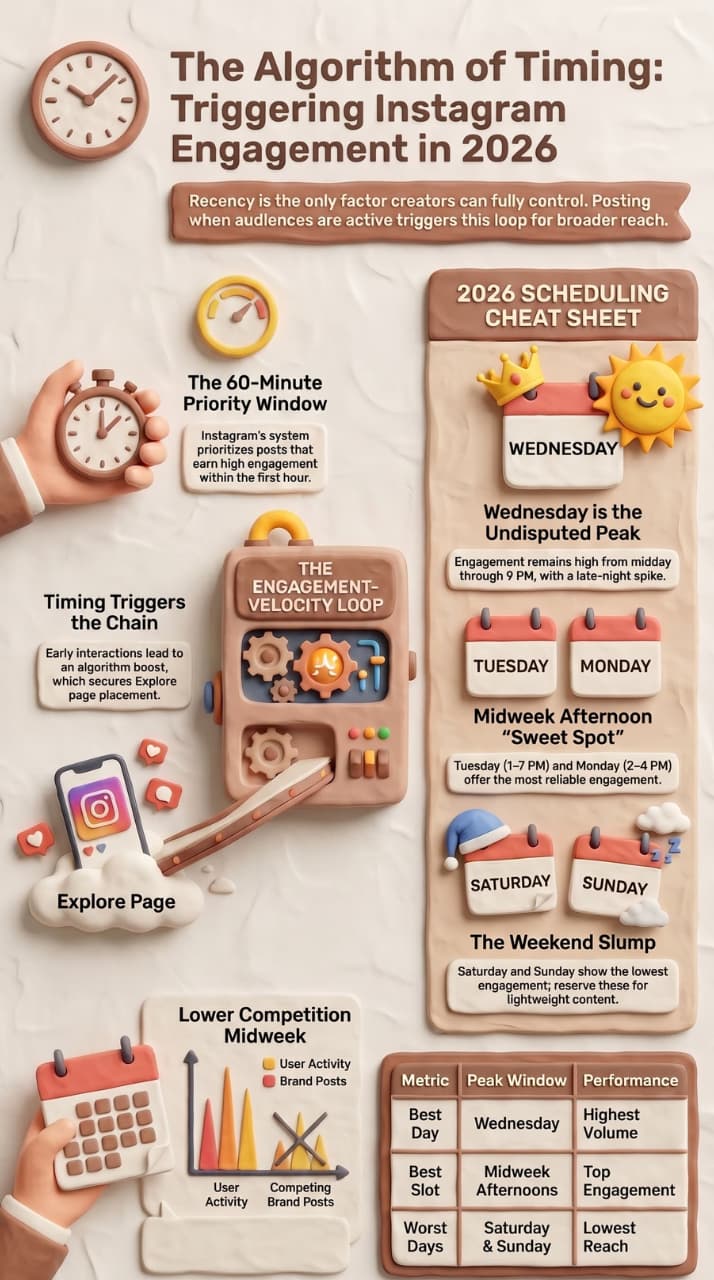
Instagram is no longer a simple reverse-chronological feed. The algorithm blends recency, relevance, and relationship signals to decide what any given user sees first. Of those three pillars, recency is the one you can control completely — and it has an outsized knock-on effect on the other two.
When you publish at the right moment, your content collects likes, comments, shares, and saves while your audience is actively online. That early-engagement burst is interpreted by Instagram's ranking system as a quality signal, which then pushes your post to a wider secondary audience — people who don't even follow you yet. Publish at the wrong time and the same post could earn a fraction of that reach.
The engagement-velocity loop: Early interactions → algorithm boost → Explore page placement → more followers → even stronger future posts. Timing triggers the entire chain.
Three concrete reasons timing changes your numbers:
- Algorithm priority window. Instagram's system gives posts a short initial distribution window — typically the first 30–60 minutes. High engagement in that window = broader rollout.
- Competition is lower at the right times. Midweek afternoons see high user activity but comparatively fewer brand posts, so your content faces less competition in the feed.
- Saves and shares compound over time. A post that earns saves during peak hours keeps resurfacing in recommendations for days, extending its effective lifespan well beyond the upload moment.
2. What the Data Actually Says — Two Major Studies
Rather than relying on a single source, this guide synthesises two of the largest independent datasets published in 2026, covering combined billions of data points.
Both studies agree on Wednesday as the top day and midweek afternoons as the peak window, providing strong cross-dataset confidence.
3. Best Times to Post on Instagram — Day by Day Breakdown
Use this as your scheduling cheat sheet. All times are in your audience's local time zone — adjust accordingly if you serve a global or multi-timezone audience.
- Monday ■ 2:00 PM – 4:00 PM GOOD
The week is fresh and people are catching up on feeds after the weekend. Post-lunch scrolling (2–4 PM) is your strongest window. Avoid early morning entirely.
- Tuesday ■ 1:00 PM – 7:00 PM GREAT
One of the highest-engagement days of the week. The six-hour afternoon-to-evening window gives you huge flexibility. Drop your most important content here.
- Wednesday ■ 12:00 PM – 9:00 PM BEST
The undisputed peak day. Engagement runs from midday through prime-time with an additional late-night spike around 11 PM. Maximise your posting volume on Wednesdays.
- Thursday ■ 7:00 AM – 9:00 AM · 12:00 PM – 2:00 PM GREAT
Unique in that morning slots (7–9 AM) outperform evenings. Professionals check feeds before work. The lunch window (12–2 PM) is also strong. Evening engagement tapers off.
- Friday ■ No clear peak hour FAIR
Users mentally check out for the weekend by mid-afternoon. If you must post, aim for the morning. Avoid the 3–6 AM dead zone. Keep expectations measured.
- Saturday ■ Avoid if possible WEAK
Lowest overall engagement of the week across both datasets. People are offline doing real-world activities. Reserve Saturdays for Stories, not feed posts.
- Sunday ■ Avoid brand posts WEAK
Marginally better than Saturday but still well below weekday averages. Use this day for lightweight content (memes, quotes) rather than campaign-level posts.
4. Does Format Change the Best Posting Time? (Reels vs. Photos)
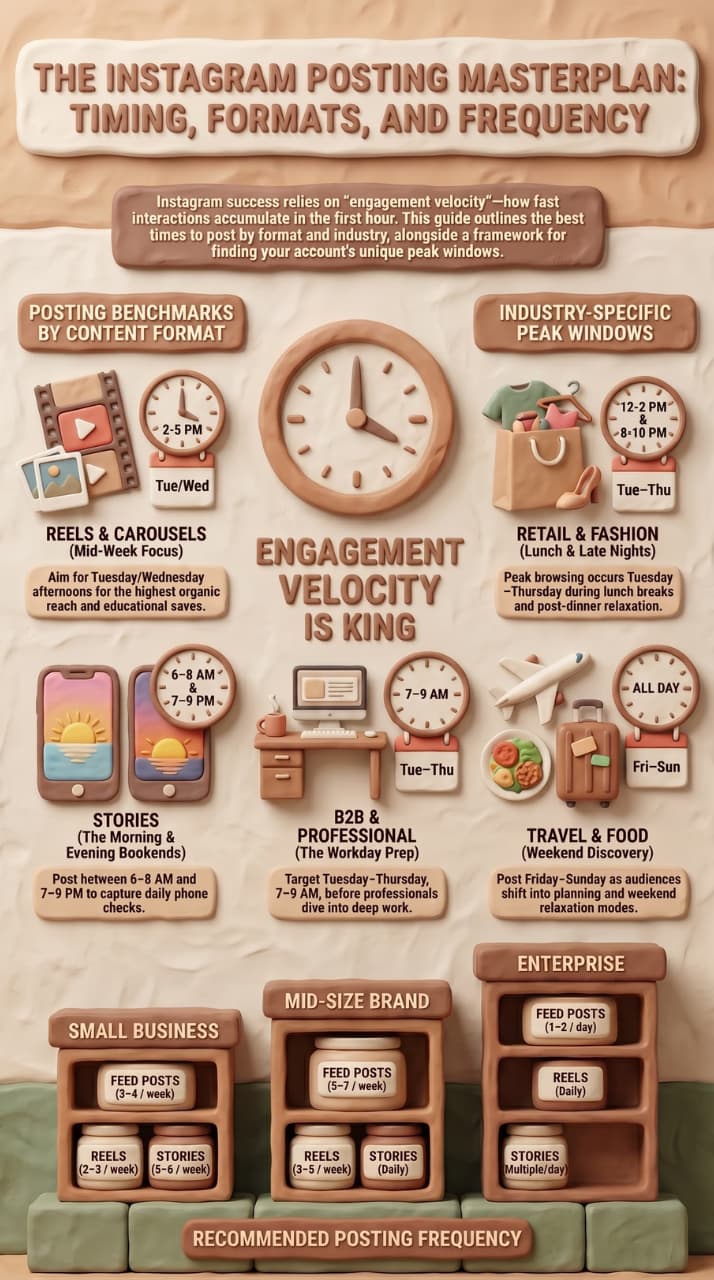
 A common misconception is that Reels — Instagram's highest-reach format — require a completely different scheduling strategy. Both Sprout Social and Buffer's datasets debunk this: the algorithm prioritises when your audience is active, not what format you use.
The mechanics are identical. Whether it's a Reel, carousel, or single image, the system measures engagement velocity — how fast interactions accumulate in the first hour after posting. Post at 3 AM and even a brilliant Reel gets buried. Post at 2 PM on a Wednesday and even a static image punches above its weight.
| Reels (≤60 sec) | Tue 1–7 PM
Wed 12–9 PM | Highest organic reach & Explore distribution | Use trending audio; post natively in-app |
| Carousels | Wed 12–9 PM
Thu 9 AM | Multiple saves per view; great for education | Put the hook on slide 1; aim for 5–7 slides |
| Single Photo | Mon 2–4 PM
Tue 1–7 PM | Fastest to produce; clean aesthetic | High-quality visuals only; save with strong caption |
| Stories | 6–8 AM
7–9 PM | Always-on; appears at top of feed | Post daily; use polls and question stickers |
5. Best Posting Times by Industry
Global averages are a starting point, not a destination. Your audience's habits shift significantly depending on your niche. Here are adjusted windows by key sectors:
E-commerce & Retail
- Peak window: Tue–Thu, 12–3 PM & 7–9 PM
- Lunch breaks and post-dinner browsing drive purchase intent. Use product demos and UGC.
Food & Restaurants
- Peak window: Fri–Sun, 11 AM–1 PM & 5–7 PM
- Weekend food discovery is huge. Post right before meal times to capture hungry scrollers.
Fitness & Health
- Peak window: Mon–Fri, 6–8 AM & 5–7 PM
- Fitness audiences are most motivated at the bookends of the workday — pre-gym and post-gym.
Fashion & Beauty
- Peak window: Tue–Thu, 12–2 PM & 8–10 PM
- Shopping-minded browsing peaks at lunch and late evenings. Aesthetic visuals perform best.
B2B & Professional Services
- Peak window: Tue–Thu, 7–9 AM & 12–1 PM
- Professionals check Instagram before work and during lunch. Educational content wins.
Travel & Hospitality
- Peak window: Fri, 12–2 PM & Sun, 6–9 PM
- Travel inspiration peaks on Fridays (planning mode) and Sunday evenings (escape daydreaming).
Entertainment & Media
- Peak window: Wed–Fri, 7–11 PM
- Evening prime time. People relax with content after dinner — perfect for video and Reels.
Non-profits & Education
- Peak window: Tue–Wed, 10 AM–12 PM
- Mid-morning awareness posts reach people before they get into deep work mode.'
6. How to Find Your Personal Best Posting Time
Benchmarks are a powerful starting point, but your account's ideal timing is ultimately unique to your audience. Here is a systematic process to discover it:
Step 1: Check Instagram Insights
Go to your Professional Dashboard → Insights → Total Followers → Most Active Times. This shows you a heatmap of when your specific followers are online by hour and day. Screenshot it and keep it handy.
Step 2: Run a 4-Week Timing Test
Pick two time slots per day (one benchmark slot from this guide, one based on your Insights data). Alternate them across equivalent post types and track reach, saves, and profile visits — not just likes, which are a vanity metric.
Step 3: Segment by Content Type
Reels, carousels, and static posts can have different peak windows for your audience. Run the timing test separately for each format and keep separate records.
Step 4: Adjust for Seasonal Shifts
Audience behaviour changes with school calendars, holidays, and even daylight saving time. Re-audit your posting schedule every quarter to stay aligned.
7. How Often Should You Post on Instagram?
Frequency and timing work hand-in-hand. Posting at the right time once a fortnight won't move the needle. Here are the evidence-backed frequency benchmarks:
Pro tip: Consistency beats volume. Posting three times per week every week outperforms posting ten times one week and disappearing for two weeks. The algorithm rewards predictable, regular publishers.
8. Tools to Schedule Instagram Posts Automatically
 Manually posting at 2 PM every Tuesday is unsustainable. Use a scheduling tool to queue content in advance and let automation handle the timing:
9. Common Instagram Timing Mistakes to Avoid
- Treating all time zones as one.
If your audience is global, you may need to stagger posts or target your largest geographic segment. A post at 2 PM London time is 9 AM in New York — still a viable window. 2 PM Sydney is 5 AM in London — not viable.
- Posting and ghosting.
Replying to comments in the first 30–60 minutes after posting boosts the algorithm signal significantly. Schedule time to engage, not just to publish.
- Chasing benchmarks and ignoring your own data.
If your Instagram Insights consistently shows your audience is most active on Sunday mornings, trust that data over any global benchmark — your account's history beats generalised averages every time.
- Ignoring Stories in the timing equation.
Stories appear at the top of the feed and reset every 24 hours. Posting Stories at 6–8 AM captures early-morning phone checks before work. Don't only think about feed posts.
- Posting the same content at the same time every day.
The algorithm can perceive highly predictable posting patterns as automated behaviour and may throttle reach. Vary your times slightly within the recommended windows to keep things organic.
- Prioritising likes over saves and shares.
Saves indicate saved-for-later value; shares indicate virality. Both are weighted more heavily by the algorithm than likes. Create content people want to reference again — how-tos, checklists, data visuals.
10. Your 30-Day Instagram Timing Action Plan
 Turn this guide into measurable results with this structured four-week sprint:
Week 1 — Audit
- Open Instagram Insights and screenshot your Most Active Times heatmap.
- List your last 20 posts with their publish time and reach/engagement rate.
- Identify your three lowest-performing time slots — these are your baseline to beat.
Week 2 — Benchmark Test
- Schedule all posts using the global benchmark windows from Section 3.
- Post at least once during each recommended window: Mon 2 PM, Tue 2 PM, Wed 1 PM, Thu 12 PM.
- Log reach, saves, comments, and shares for each post in a simple spreadsheet.
- Discover the optimal times to post Reels vs. Photos and learn how to build your custom 2026 posting schedule.
Week 3 — Custom Test
- Use your Insights-derived active hours to pick two alternative slots.
- Post equivalent content at these custom times and track the same metrics.
- Compare Week 2 vs Week 3 data — which windows won for your account?
Week 4 — Optimise & Systematise
- Build a content calendar using your top 2–3 performing time slots.
- Set up auto-scheduling in your chosen tool (Buffer, Later, or Meta Business Suite).
- Commit to the schedule for 60 days before making further changes — consistency compounds.
Final Takeaway
Instagram rewards content that earns quick engagement. Timing is the lever you control most directly — and it costs nothing to optimise. Start with the global benchmarks: Tuesday through Thursday, midday to evening. Use Wednesday as your anchor day for your highest-priority content. Avoid weekends for feed posts and never post in the 3–6 AM dead zone.
But don't stop at benchmarks. Check your own Insights, run structured timing experiments, and build a scheduling habit using automation tools. The brands that dominate Instagram in 2026 aren't posting more — they're posting smarter.
The best time to post on Instagram is when your audience is there. Everything in this guide is designed to help you find and own that moment.