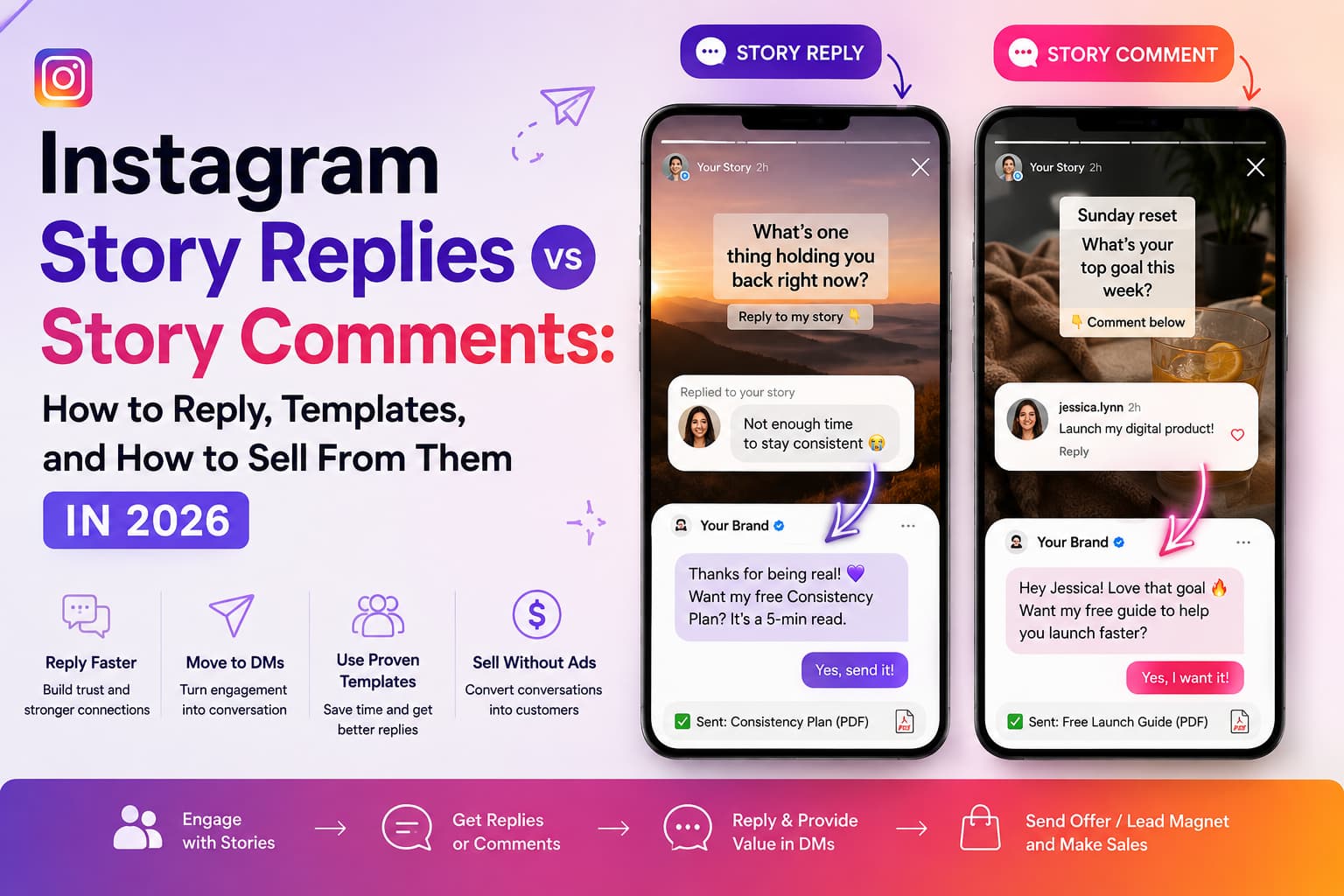
Instagram Story replies vs Story comments is a private-DM versus public-thread split. A reply typed in the message bar goes to the creator's inbox. A comment sits on the Story frame, other eligible viewers can see it, and it dies with the Story at about 24 hours. Use comments for votes and proof. Use replies when you want a lead, a file, or a checkout link. That's the feature. The rest is how you reply, which templates earn a second message, when auto-reply is allowed, and how to keep the sale in DMs.
Quick verdict
- Replies are private DMs. Comments are public, short-lived, and usually limited to people you follow back.
- Reply to questions and keywords in the first hour. Like the fire emojis and move on.
- Ask for a private keyword when money is involved. Keep "black or tan?" in the public thread.
Last updated: October 24, 2026
What is the difference between Instagram Story replies and Story comments?
Instagram Story replies vs Story comments are two taps on the same frame, not two names for one inbox. I still see shops treat every sticker tap like a DM. Then a price question shows up in public and they panic. The split is boring once you see it. It also decides whether you get a customer or a 24-hour billboard.
At a glance
| Aspect | Story reply | Story comment |
| Where it goes | your DM inbox | on the Story frame |
| Who sees it | you and the sender | eligible viewers of that Story |
| How long it lasts | stays in the thread | dies with the Story (~24 hours) |
| Who can leave one | anyone who can reply, if replies are on | usually people you follow back / mutual followers |
| Can you automate it? | yes, after they message you first, on an official path | no. You moderate by hand |
| Best use | keywords, files, checkout links, real questions | votes, jokes, proof other people are watching |
Verified October 2026 against Instagram's own help article on comments on Stories plus the in-app Story privacy controls.
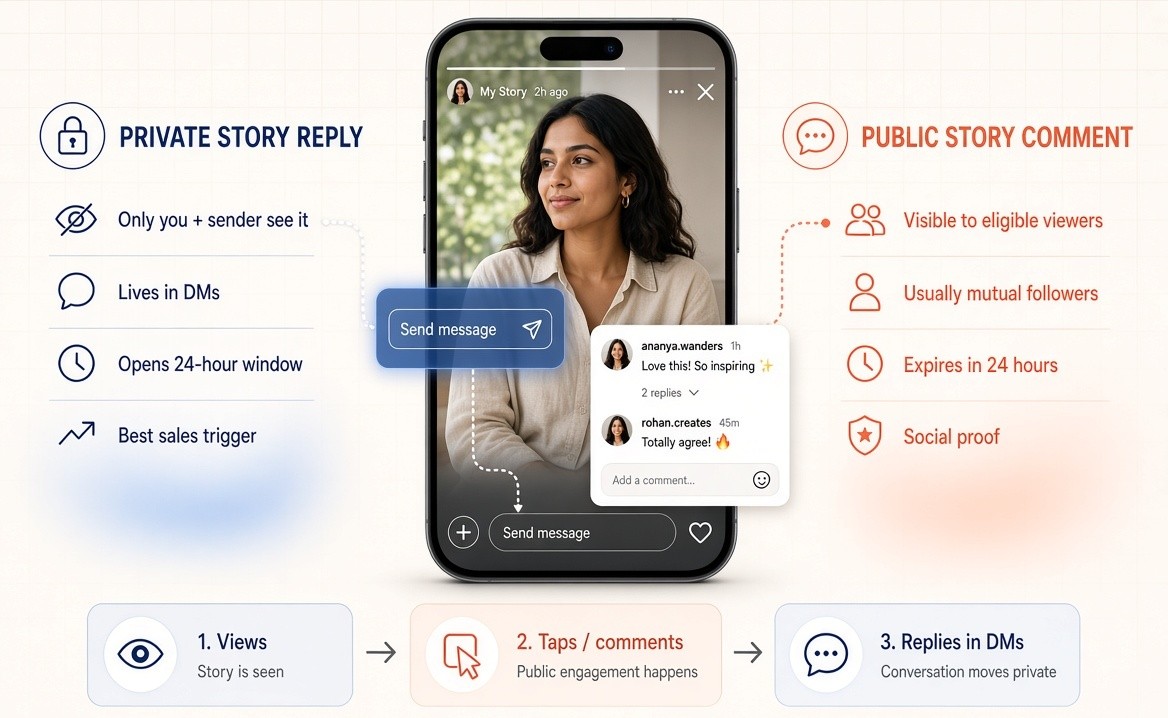
Who can comment, who can see, and how long it lasts
Public Story comments are generally limited to mutual followers. You set reply and comment rules under Settings → Privacy → Stories. Typical options are everyone, people you follow, or off. If replies are off, the public layer won't behave the way a tutorial screenshot promised.
Who can see a comment: eligible viewers of that Story who pass Instagram's visibility rules. It's not a feed post. It's not a DM. Think of it as a short friends-only thread glued to an ephemeral frame.
Comments die with the Story at about 24 hours. Highlights are a grey area. Don't build a campaign that needs the comment thread to survive in a Highlight.
For the privacy deep-dive (who sees a reply, group Story edge cases, and the inbox thumbnail), use Instagram Story Replies: Are They Private, Who Can See Them, and How Do They Work? (2026).
Did Instagram kill Story DMs when comments launched?
No. Typing in the "send message" field is still a private reply. Public comments were added as a second layer. The r/Instagram thread that hit when the feature shipped asked the same three things I still get in DMs: is my response still a DM, does this break Story selling, and can I turn it off.
DMs didn't die. Who can comment is tighter than who can view. You can turn comments off. Sentiment in that thread was mixed, which is useful product research. A lot of your audience still prefers the private bar. Don't force every interaction into public.
If you sell from Stories, assume a public comment is a billboard. Don't ask people to drop emails, card details, or "I'll take two" in the comment list. Put the keyword on the frame so the sale starts in DMs. Use the public thread for "black or tan?" votes that help the next viewer.
How do I turn off comments on Instagram Stories?
While creating a Story, open the Story settings (gear on the camera screen) → Story → Allow comments, then turn them off or limit who can comment. You can also change the default under Settings → Privacy → Stories. I turn comments off on sales frames. I leave them on for polls, AMAs, and proof. That one habit stops refund arguments from living in public for a day.
How do you reply to comments on Instagram Stories?
You reply to comments on Instagram Stories by treating the first hour as a triage, not a performance. Like emoji. Answer questions. Move money talk to a private reply. Emoji reactions, typed replies, and public comments aren't the same job. If you want the tap-by-tap on hearts versus the reply bar, that lives in How to React on Instagram Story (Emoji, Reply, Comment) -2026 Guide.
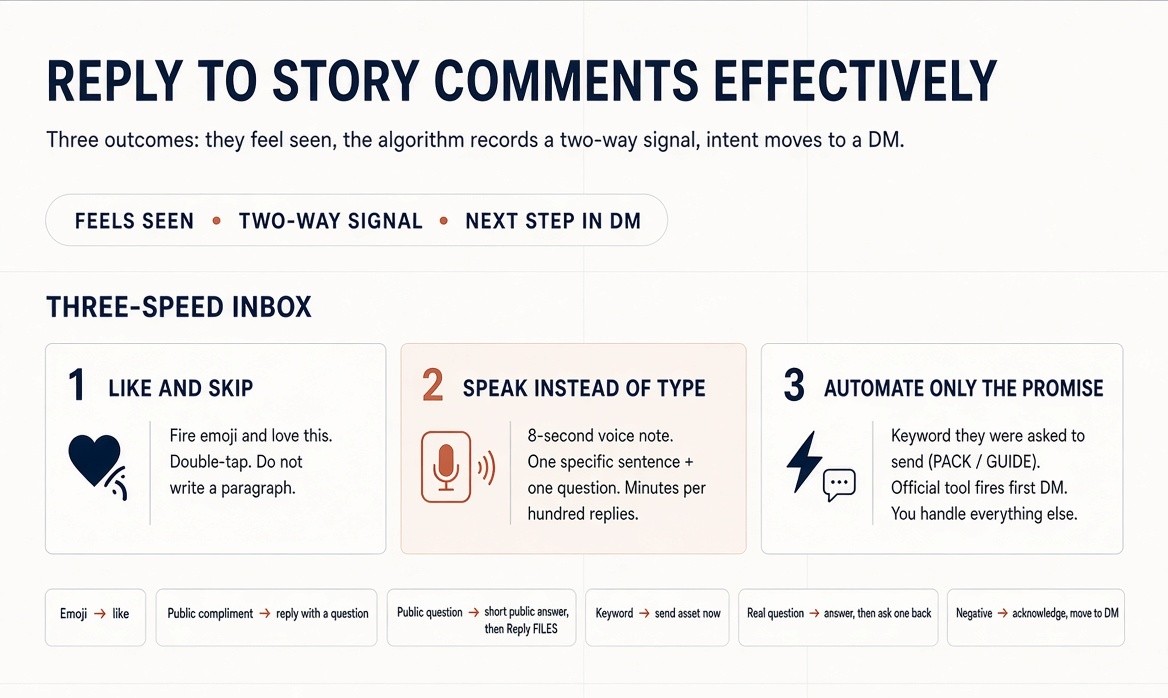
"Effectively" here means three outcomes: the person feels seen, Instagram records a two-way signal, and when intent is there the thread moves to a DM with a next step.
What should you do in the first 60 seconds?
Stay in the inbox. Early replies train the viewer and the ranking. You don't need to answer every fire emoji. You do need to answer questions, keywords, and anything that sounds like a buying problem.
I batch this the same way I batch Reels. Post the Story. Don't open another app. Clear the first wave. Come back in the evening for the slow ones.
How should you handle each type of Story interaction?
Emoji and "love this." Double-tap to like the DM. Optional one-word reply if you have time. Don't write a paragraph.
Public comment that is a compliment. Like it. If it is specific, reply on the Story thread with a follow-up question so other viewers see a conversation.
Public comment that is a question. Answer in public if the answer is short and useful to everyone. Then invite the private path: "Want the exact file? Reply FILES."
Private reply with a keyword you promised. Send the asset immediately, automated or manual. Speed is the product.
Private reply with a real question. Answer the question first. Then ask one question back. That second question is how a viewer becomes a customer conversation.
Negative or confused comment. Acknowledge in public without arguing. Move detail to DM. Delete spam.
What reply habits raise Story ranking over a month?
Instagram uses past replies and watch history to decide whose tray you sit in. Reply back. React to their Stories too. A one-way broadcast account slides backward in the tray even with decent view counts.
Voice notes and 10-second video replies outperform text for high-intent people, someone who asked about pricing, cohort dates, or "can this work for my shop?" Use them sparingly so they stay special.
How do you reply to hundreds of comments and DMs without living in the app?
High-volume creators don't type every line. The pattern that actually clears a stack:
- Like and skip. Fire emojis, "love this," and one-word praise. Double-tap the DM. Done.
- Speak instead of type. Open the thread, hold the mic or use voice-to-text, say one specific sentence plus one question, send. An 8-second voice note beats a polished paragraph you never finish.
- Automate only the promise. If the Story said "comment PACK / reply GUIDE," the first DM can fire from an official keyword tool. You personally handle anything that is not the keyword.
Don't put an AI paragraph on every emoji. People notice. Voice-to-text stays human because it is your voice. Saved replies stay human if you edit the first five words before you send.
Should you reply to a comment with a video?
Yes, when the comment is specific and other people would learn from the answer.
- Find the comment worth answering in public.
- Tap reply on that comment.
- Record a short video (or use a video reply if the surface supports it).
- Add captions. Say their name or quote the question in the first two seconds.
- End with a next step: "Want the file? Comment PACK and I'll DM it."
Use a video reply when the answer teaches. Use a private DM when the answer includes a price, a link, a refund, or anything you don't want sitting on the frame.
Should you add Story replies back to a new Story?
Yes, when the reply is a useful question or a win. Press and hold the DM → Add to Story. Blur the username if they didn't agree to be featured. Add a poll: "Would you try this?" That frame does two jobs: proof for new viewers, and a fresh reply prompt.
How do you keep up when volume spikes?
Triage:
- Keywords and purchase questions, now.
- Specific personal replies, within a few hours.
- Emojis, like and move on.
- Repeat questions, saved reply or automation.
If you post 3 to 7 Stories a day on an active account, 20 to 50 private replies is normal. Manual-only breaks. Keyword automation for the promises you made (GUIDE, PRICE, PACK) keeps the human time for messages that can't be scripted.
What Instagram Story reply templates get a second message?
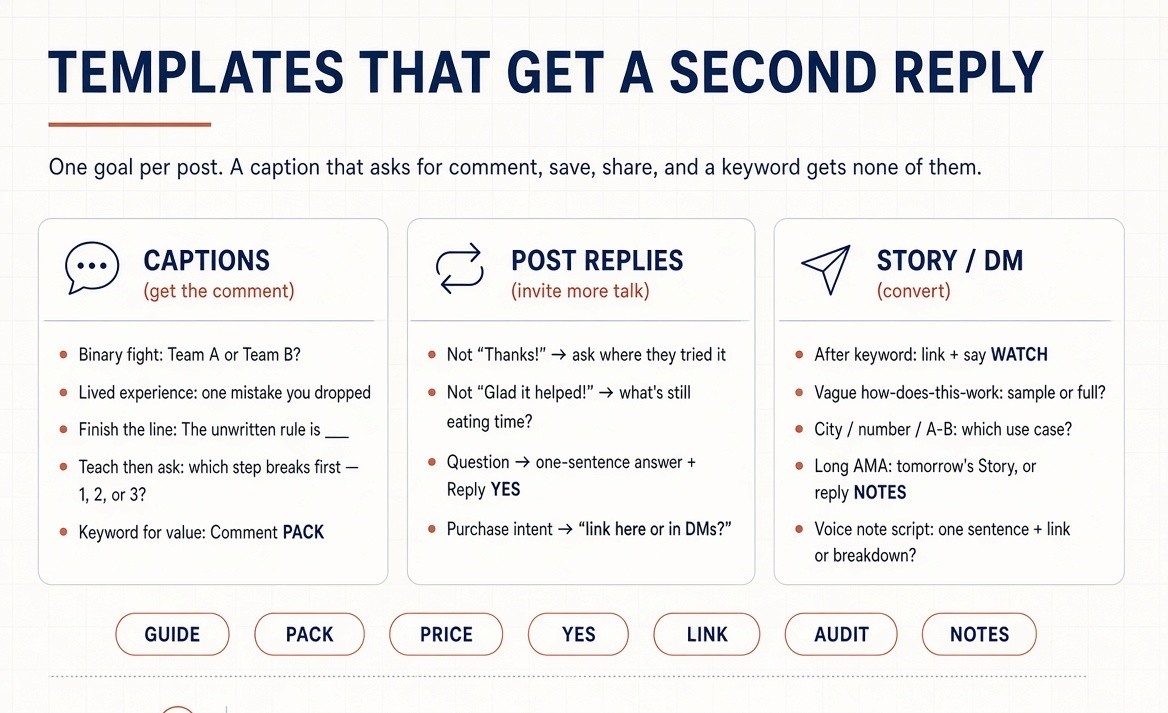
Instagram Story reply templates work when they ask for one more tap, not when they say thank you. "Thanks so much" ends the thread. Swap the bracketed niche words. Don't paste the same line onto every frame.
Which caption templates get comments on Reels and carousels?
Binary fight. "[Hot take]. Team A or Team B? One word below."
Lived experience. "What's the one [mistake / tool / habit] you wish you dropped sooner? Drop it so someone else can avoid it."
Finish the line. "The unwritten rule of [niche] is: ______. I'll start, [your line]."
Teach then ask. "I cut my [task] from 3 hours to 20 minutes with this sequence. Which step would break first in your week, 1, 2, or 3?"
Keyword for value. "I put the [checklist / pack / script] in a DM so the link doesn't get buried. Comment PACK and I'll send it."
Pick one goal per post. A caption that asks for a comment, a save, a share, and a keyword gets none of them.
Which templates should you use when you reply to comments on posts?
The lift only shows up if the reply invites more talk.
Instead of "Thanks!" "Thanks, did you try this on [Reels or Stories] first? Curious what held up."
Instead of "Glad it helped!" "Glad it landed. What's the part that still eats your time?"
Instead of ignoring a fire emoji: like it. If the same person comments words later, reply to the words.
Question in the comments. "Great question. Short answer: [one sentence]. Want the full breakdown in your DMs? Reply YES here."
Purchase intent. "I can send the checkout link here or in DMs. Which do you prefer?"
Then move to DM.
Which Story reply templates convert without sounding like a bot?
After they send the keyword. "Got you. Here's the [pack]: [link]. If you want the 90-second walkthrough after you open it, say WATCH."
After a vague "how does this work?" "It works like this: you comment the word on the Reel, I send the file, you pay on the page if you want the full version. Want the free sample first or the full one?"
After a city / number / A-or-B reply. "[City] crew. Are you using this for [use case A] or [use case B] right now?"
After an AMA that you can't answer in one line. "Good one, that's a longer answer. I'll put it in tomorrow's Story. If you want the notes today, reply NOTES."
Keep keywords short: GUIDE, PACK, PRICE, YES, LINK, AUDIT, NOTES. Long phrases get typos and missed triggers.
Voice note when the inbox is stacked. Say this, don't type it: "Saw your note on [exact thing they replied to]. Short answer is [one sentence]. Want me to send the link or the longer breakdown?"
Video reply under a public comment. On-screen first line: "Answering @name, [their question]." Spoken last line: "If you want the checklist I used, comment PACK and I'll DM it so this thread doesn't turn into a link dump."
Which public Story comment replies are worth typing?
Only the ones other people should see.
"Both work. I use A for speed and B when the Reel has to teach. Which constraint do you have this week, time or depth?"
That single reply can pull three more comments from people who were only going to swipe.
Can you auto-reply to Instagram Story replies?
Yes. You can auto-reply to Instagram Story replies when the viewer messages you first and you stay on an official Meta path. Filter by keyword. Public Story comments aren't the same event. You can't auto-reply to the public thread the way you can to a DM.
That's the whole safety line. A user-initiated Story reply opens the 24-hour messaging window. A cold outbound blast doesn't get a free pass because you called it "engagement." Password-login growth bots that auto-like and auto-follow still get accounts restricted in 2026. I don't care how cheap they are.
What should an auto-reply be allowed to send?
The thing you promised. One link. One line of proof. One question. If the Story said "Reply PACK," the first DM is the pack. It's not a five-bubble pitch.
What I don't automate: every emoji, every "hi," every "love this." That's how people mute you.
Which tools actually do this job?
Comment-to-DM and Story-reply tools share one job: detect a keyword on a post, Reel, or Story reply, and send the promised link. Differences that matter:
- Official Meta connection versus grey-hat scraping
- Flat monthly price versus contact-based tiers
- Whether Story replies and feed comments are both triggers
- Whether you can keep the first message short
- Rate limits that stay inside Meta's messaging rules
ManyChat still wins if you also need WhatsApp and Messenger flows. CreatorFlow and LinkDM compete on the same Story-reply job. InstantDM costs $9.99/month for Instagram comment-to-DM and Story-reply keywords on the pricing page (October 2026) and sits in the Instagram-first, official-path group as a Meta Business Partner. Pick by where your conversations already happen.
For Story-reply tools, see Story Reply Automation in 2026: The Tools Top Creators Won't Tell You About. For the feed-comment setup, see How to Set Up Instagram Comment to DM Automation in 2026.
Free-ish options if you are testing the CTA, not running volume: Meta Business Suite saved replies and away messages, ManyChat's tight free tier, a small monthly DM cap on some Instagram-only plans. Treat free automation as a test of the keyword. You will outgrow it if the CTA works.
How did I score whether a tool belongs here?
Six filters. Fail safety or official-API access and it doesn't get named, no matter the price.
- Official Meta path. Professional (Business or Creator) account, Graph API or Meta-approved partner flow.
- Messaging rules. Respect the 24-hour window and per-person caps. Unlimited blast DMs fail.
- Job clarity. Analytics, design, scheduling, comment moderation, and conversation automation are different jobs.
- A number you can see in Insights. Reply rate, keyword hits, profile visits, or DM click-through. Not "more followers in 7 days."
- Cost to first result. Free tier usable without a credit-card trap. Paid tool does a job native tools can't (instant keyword DMs, high-volume inbox).
- Human first line. You write the first sentence. Hand off to a human when the reply is not a keyword.
How do you sell from Story replies without leaking the sale in public comments?
You sell from Story replies by putting a one-word keyword on the frame and sending the checkout or file in the private reply. Public comments are for votes and proof. Instagram Story replies vs Story comments is the CTA choice, not a branding debate. Public thread for "Team A or Team B." Private keyword for PACK, PRICE, LINK, AUDIT.
I learned this the hard way. A size question in public comments is fine. A "what's your Venmo" in public comments is a leak. The thread vanishes in a day and the buyer is not in your inbox.
What does the three-layer sale look like?
- Attention. A Reel or a Story that teaches one useful thing and ends with a one-word ask.
- Conversation. A comment-to-DM or Story-reply keyword that sends the file, the checkout link, or a question within seconds.
- Checkout. A mobile page that takes payment (Stripe, PayPal, Gumroad, Payhip, Stan, whatever you already use) and delivers the file. InstantDM, ManyChat, or a similar keyword tool sends the link. It doesn't process the card.
If layer 2 is missing, people comment and never open the bio. If layer 3 is ugly on a phone, they drop after the DM. Fix the DM path before you obsess over a 2% checkout fee.
Link-in-bio is a backup. It's never the only path. Bio links get ignored when the Reel is mid-scroll.
What does a working loop look like?
- Reel: 20 to 40 seconds, one outcome, spoken CTA: "Comment PACK and I'll DM the templates."
- Caption repeats the one word. No five CTAs.
- Automation sends: the link, one line of proof, one question ("Want the video walkthrough too?").
- Story the same day: poll or question sticker plus "Reply PACK if you missed the Reel."
- Next day Story: screenshot a permissioned win or a checkout notification, ask a new keyword for the upsell.
Email after the DM still matters. Instagram can limit how you message someone after 24 hours. Kit, MailerLite, Beehiiv, or the email field inside your checkout is how a $19 buyer becomes a $149 course buyer later. The Story reply starts that. It doesn't replace email.
Ads are optional and later. Boost the Reel that already gets "GUIDE" comments. Don't run ads to a bio link until the DM script converts.
You don't need a paid tool for the first sales. A Gumroad or Payhip link plus manual DMs works. Paid keyword tools start to pay for themselves when you can't send every "PACK" yourself and still answer real questions.
What does Reddit still get wrong about Story comments and replies?
The r/Instagram "New Comments on Stories feature" thread was less "new growth hack" and more "wait, who can see this?" That's still the cleanest public record of the confusion.
People asked:
- If I respond to a Story, is it still a DM, or can every follower see it?
- Does this break Story sales for small businesses?
- Can you turn it off?
What held up:
- DMs didn't die. The send-message field is still private.
- Who can comment is tighter than who can view. Mutual follow / people you follow back is the usual gate. That's why some viewers never see a comment box.
- Comments expire with the Story. Don't treat a Highlight as a guaranteed archive.
- You can turn comments off per Story or in Privacy settings.
- Plenty of "I hate that this is public." Your audience may still prefer the private bar. Design for that.
What practitioners repeat in creator communities:
- Interactive stickers beat static dumps. Polls and questions get replies. Six product screenshots in a row get swipes.
- "How are you?" dies. Specific, low-effort asks live.
- Automation that replies to every emoji feels spammy. Keyword filters are the difference between useful and blocked-feeling.
- Speed matters more than copy polish. A good link in 10 seconds beats a perfect paragraph in four hours.
- Public comments are fine for jokes and votes. Money talk belongs in DMs.
- Replying on other people's Stories still works for discovery if the comment is specific to that frame. "Cool" does nothing.
- Video replies to a named comment outperform generic "thanks for the love" Reels.
Ignore: bought comments, engagement pods, and "just turn on every sticker." Pods teach the algorithm the wrong audience. Every-sticker Stories drop completion. The boring consensus holds: be readable, ask one thing, answer fast, keep sales in the inbox, turn public comments off when the frame is a sale.
How do you run this as a weekly system?
A system beats a binge.
Daily (20 to 40 minutes). Post or schedule one Reel or carousel with a single comment goal. Post 1 to 3 Story frames, at least one with a sticker or a keyword. Work the inbox in two windows (after publish, and evening). Keyword tools handle the promises you already made.
Weekly. Read Insights: which Story got replies, which Reel got the keyword, which reply template earned a second message. Kill the formats that only get taps forward. Double the format that got DMs.
Monthly. Review checkout conversion from IG traffic. If people click the DM link and bounce, fix the page, not the sticker. If nobody comments the word, fix the Reel hook and the spoken CTA.
What metrics should you treat as success?
| Metric | Weak | Fine | Strong |
| Story reply rate (replies ÷ views) | under 2% | 3–5% | 8%+ |
| Keyword comment rate on a CTA Reel | under 1% | 2–4% | 5%+ |
| DM click-through after the auto reply | under 10% | 15–25% | 30%+ |
| Time to first response on intent messages | over 12 hours | under 2 hours | under 5 minutes |
Those bands are working baselines I use with clients, not a lab study. Beat last month, not a stranger's screenshot.
What mistakes kill Story replies and public comments?
- Asking four things in one caption.
- Sending people only to the bio while comments are the signal.
- Automating a long pitch as the first DM.
- Leaving Story replies unread past the 24-hour window.
- Turning on public Story comments and then arguing about refunds in public.
- Buying comments so the section looks busy. Real users read the fakes.
- Posting 12 Story frames with no sticker and no question.
- Switching tools every week instead of running one keyword for 14 days.
- Putting a sales link only in a public comment thread. The thread vanishes. The buyer is not in your inbox.
What should you do after you finish this page?
Pick one product or lead magnet. Write one keyword. Put that keyword on the next Reel and the next Story. Answer every response that is not an emoji. Measure reply rate for seven days before you add another tool.
Engagement isn't a software feature. It's how fast and how human you are when someone finally talks back. Public comments are proof. The Story reply is where the checkout link belongs.
About the Author
Aravindh Kumar is an ecommerce and Instagram growth expert with 8+ years of experience in online selling. He has worked with 500+ brands, including Forbes-listed companies, helping them build Instagram sales channels. He has helped 200+ Instagram businesses grow their online presence.