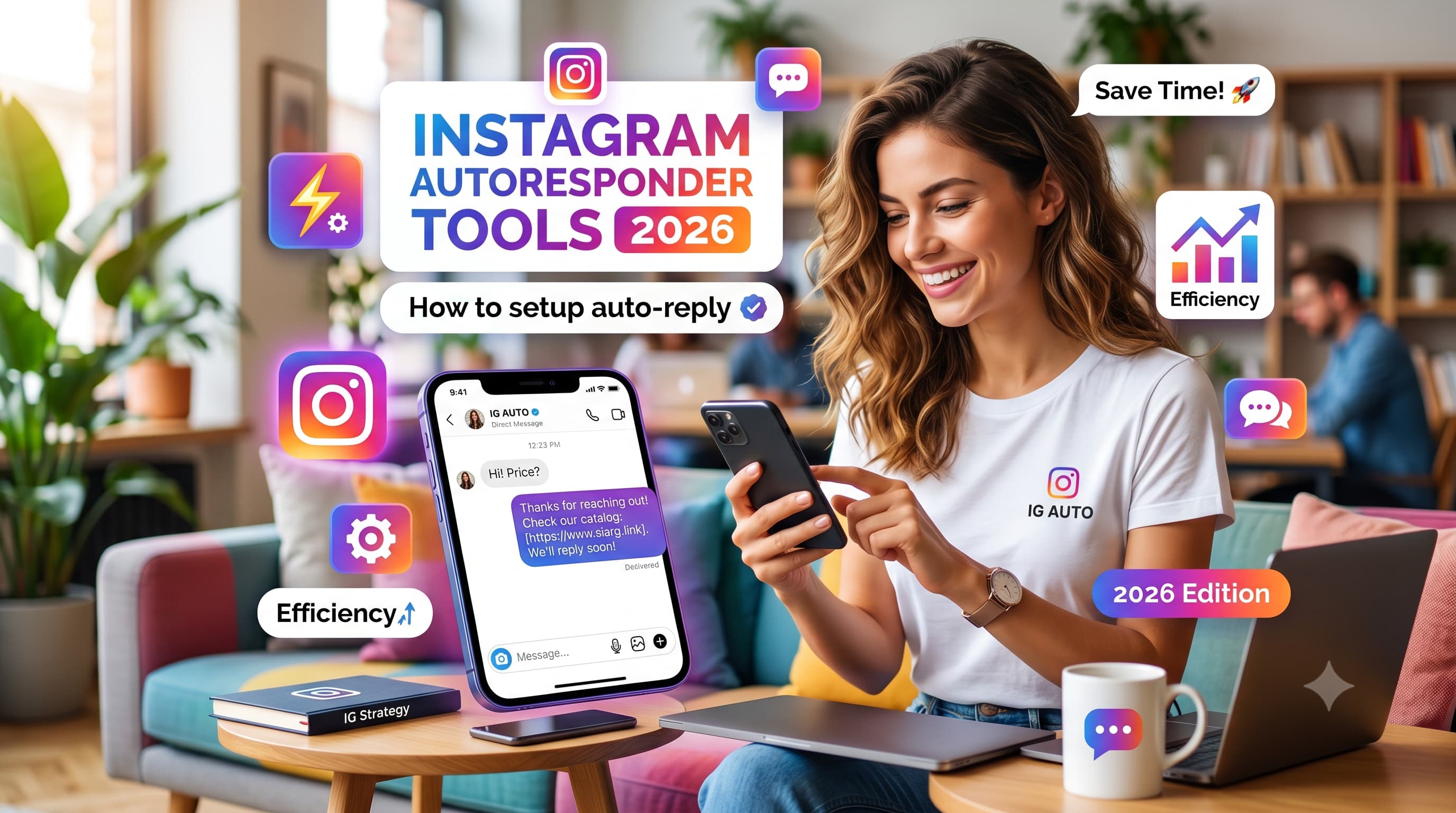
An Instagram autoresponder is a tool that automatically sends pre-written replies to DMs, comments, or story replies based on triggers you set. The best options as of June 2026 are InstantDM ($9.99/month flat rate, Unlimited Automations ), ManyChat (from $15/month per contact, multi-platform), LinkDM ($19/month only 25,000 DMs), Inro ($14/month) All connect through Meta's official Instagram API via OAuth.
TL;DR — Key Takeaways
- An Instagram autoresponder sends automatic replies to DMs, comments, and story replies using keyword triggers or time-based rules.
- You can set up a basic auto reply for free using Meta Business Suite — no third-party tool required.
- For advanced flows (comment-to-DM, keyword triggers, CRM sync), tools like InstantDM, ManyChat, are necessary.
- All legitimate autoresponder tools use Meta's official Instagram API — they will NOT get your account banned.
What Is an Autoresponder for Instagram?
An autoresponder for Instagram is software that monitors your Instagram inbox and automatically responds to incoming messages — DMs, comment replies, or story replies — without you needing to be online.
It works like an email autoresponder, but built specifically for Instagram conversations. When someone sends your account a message containing a specific word (a keyword trigger), or when they first message you (a welcome trigger), the Instagram autoresponder fires off a pre-written response instantly.
Autoresponders for Instagram connect to your account via Meta's official Graph API, authenticated through OAuth. This means they operate with Instagram's permission — not as grey-area bots. Any tool using the official API can send automated messages safely.
What Is an Instagram Auto DM?
An auto DM on Instagram refers specifically to direct message automation — sending a pre-written DM automatically when a trigger fires. This is distinct from comment automation. An auto DM is sent privately to a user's inbox; it is invisible to other followers and far more personal than a public comment reply.
Most businesses pair auto DM with a broader Instagram auto responder setup — so the same system that handles keyword triggers in DMs also manages story replies, comment-to-DM flows, and welcome messages from one dashboard.
Common auto DM triggers handled by an Instagram auto responder: first-time message, keyword in DM, comment on a specific post (comment-to-DM), story reply, and new follower welcome.
"The distinction between official and unofficial API access is critical — this guide explains the Instagram DM API in full, including the risks of unofficial access and how authorized tools differ."
How Does Instagram Auto Reply Work?
Here is the mechanics behind Instagram auto reply:
- A user sends a DM, comments on a post, or replies to your Story.
- The autoresponder tool listens for this event via Meta's API webhook.
- A trigger condition is checked — does the message contain a keyword? Is it a first-time message? Did they comment on a specific post?
- If the trigger matches, a pre-written reply (or a dynamic flow) is sent back automatically.
- The conversation is logged in the tool's inbox or synced to your CRM.
Note: Native Instagram (via Meta Business Suite) only supports one trigger — any first DM. Third-party tools add keyword triggers, comment-to-DM, story reply triggers, and multi-step flows.
IG Auto Reply vs Autoresponder vs Chatbot — What's the Difference?
IG auto reply: A single automated response to any incoming DM. One message, no branching. Available free via Meta Business Suite.
instagram auto responder: A rule-based system that sends different responses depending on triggers (keywords, post comments, story replies). Requires a third-party tool.
Instagram chatbot: A multi-step conversation flow with branching logic, data collection, and CRM sync.
Instagram Auto responder vs Manual Reply: When to Automate
| Situation | Use Autoresponder | Use Manual Reply |
| DM volume > 20/day | Yes — instant replies prevent drop-off | No — not scalable |
| Answering the same FAQ repeatedly | Yes — keyword triggers handle it 24/7 | No — wastes team time |
| Capturing leads from a post campaign | Yes — comment-to-DM converts at scale | No — too slow |
| Selling via DM (complex negotiation) | No — feels robotic, kills trust | Yes — needs human judgment |
| Sensitive customer complaints | No — automated replies escalate frustration | Yes — empathy required |
| Complex, one-off inquiries | No — can't handle nuance | Yes — context matters |
A well-configured autoresponder handles 60–80% of incoming messages automatically, freeing your team for conversations that genuinely need a human.
How to Set Up an Autoresponder for Instagram (Step by Step)
Before diving in — if you prefer video over text, here's a quick video guide on setting up Instagram auto reply that covers the native method visually.
Method 1: Native IG Auto Reply (Meta Business Suite) — Free Autoresponder for Instagram
This is Instagram's built-in option and the simplest way to get an autoresponder for Instagram running at zero cost. It's free, quick to set up, and works for basic holding messages. You cannot set keyword triggers with this method.
Step 1: Switch to a Professional Account
Personal accounts cannot access the Instagram auto responder features inside Meta Business Suite. You need a Business or Creator account.
- Go to your Instagram profile.
- Tap the hamburger menu (top right) then go to Settings and privacy.
- Scroll to Account type and tools then go to Switch to Professional Account.
- Choose Business or Creator and follow the prompts.
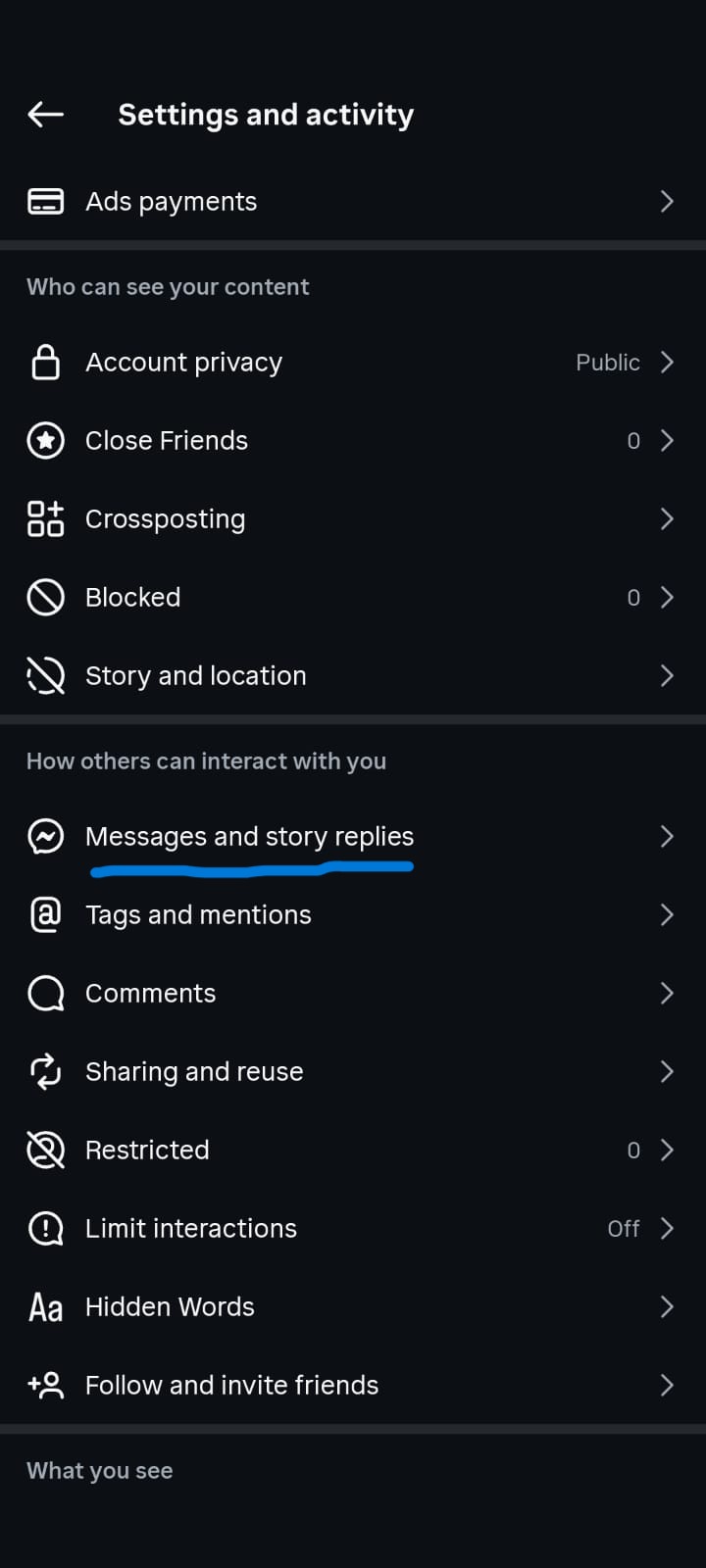
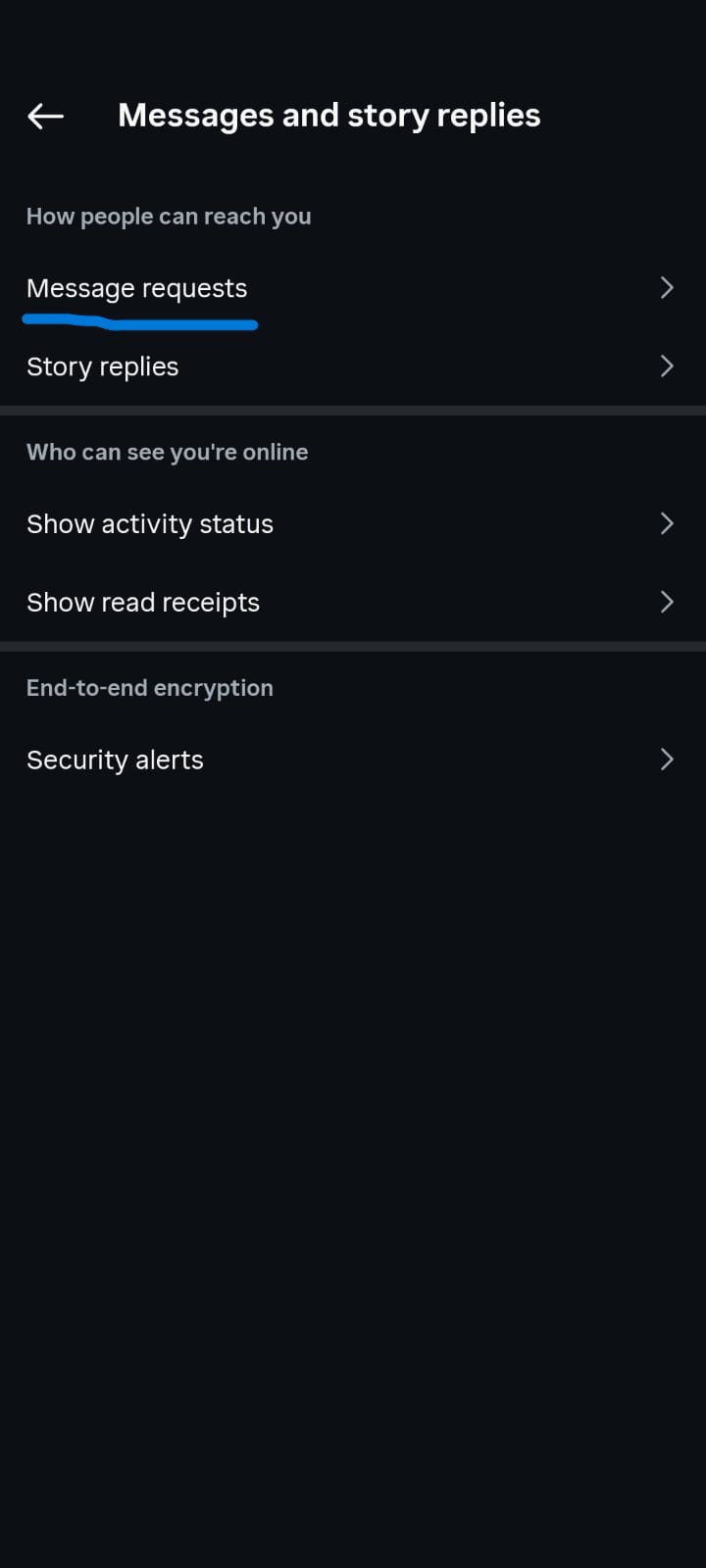
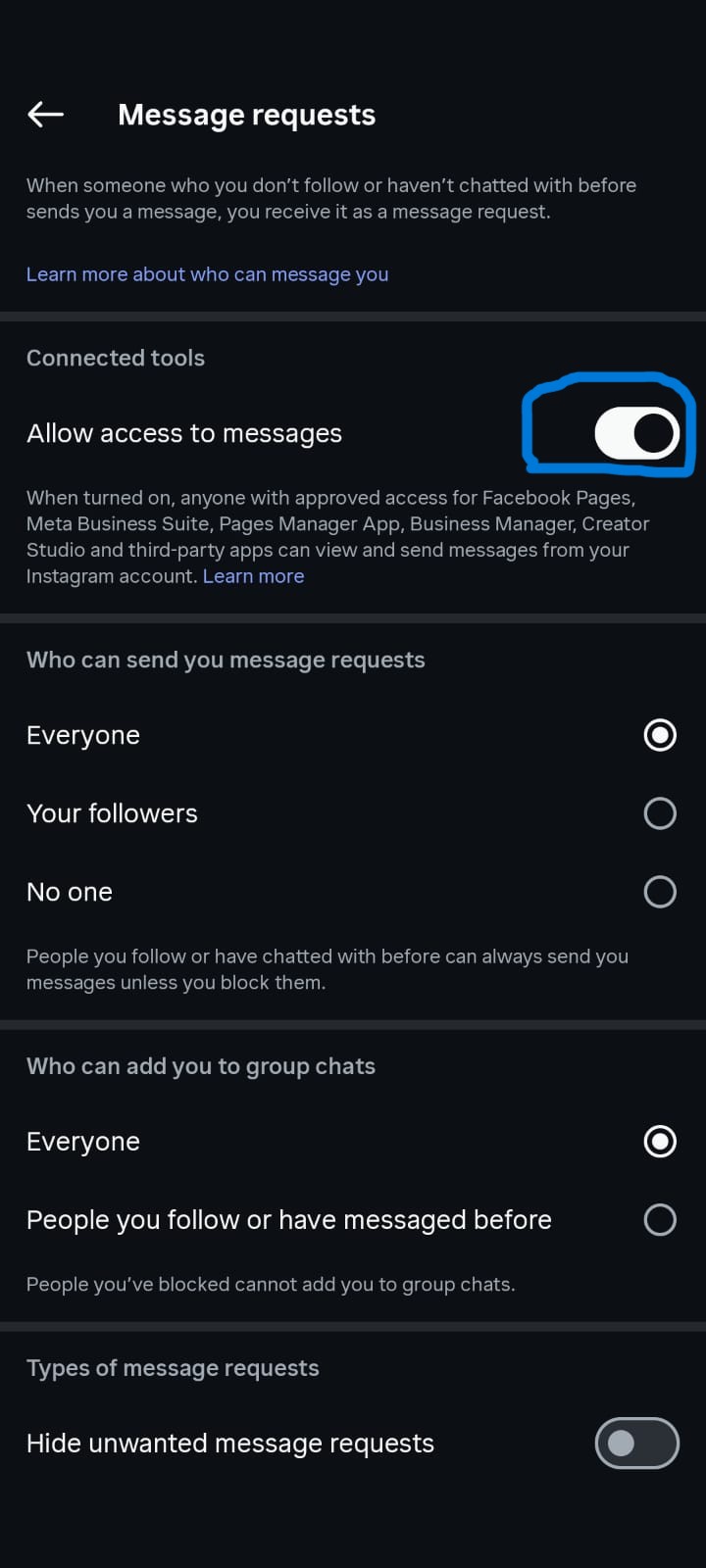
Step 2: Connect to Meta Business Suite
- From Instagram settings go to Account then Sharing to other apps
- Log into your Facebook account to link it.
- In settings go to Privacy then Messages now toggle Allow access to messages to On.
- Visit business.facebook.com and confirm your Instagram account appears under
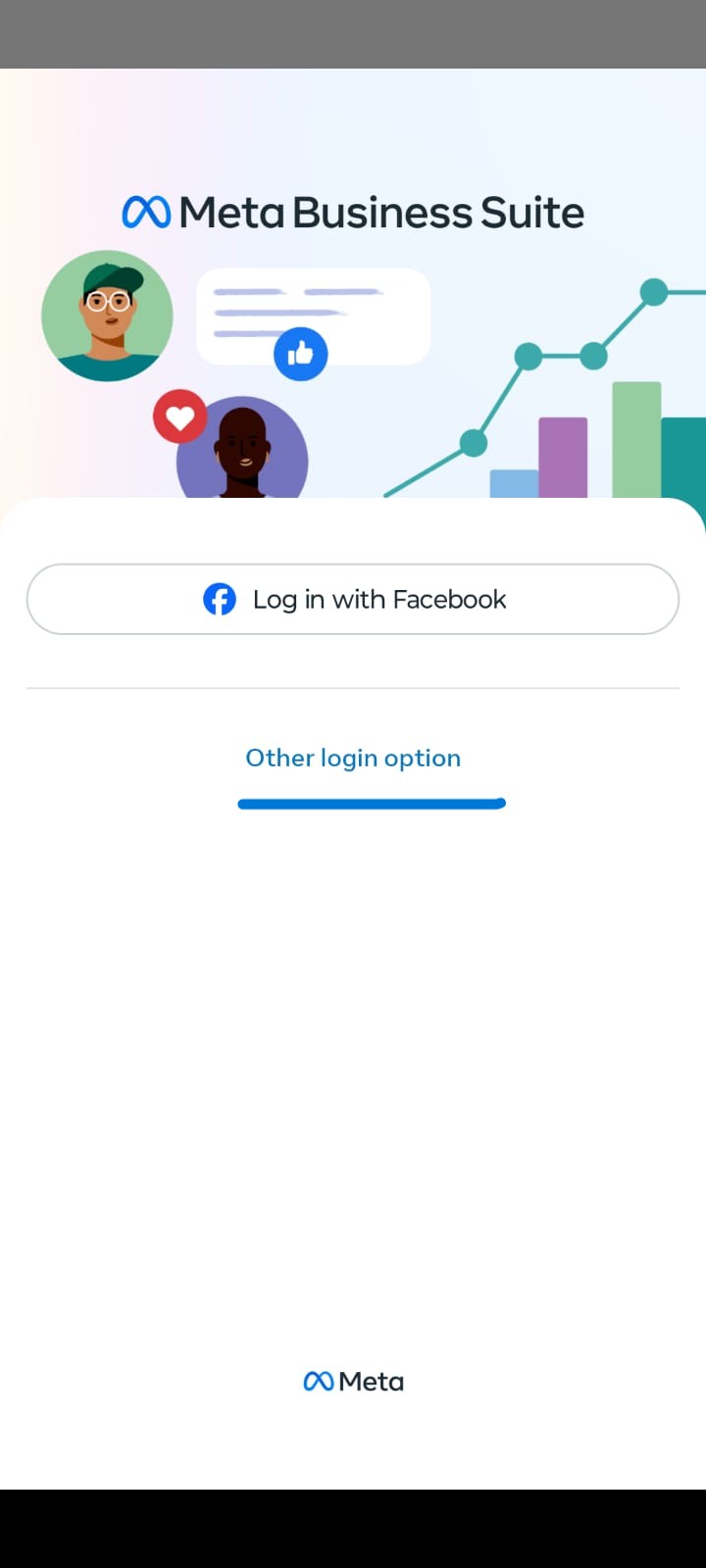
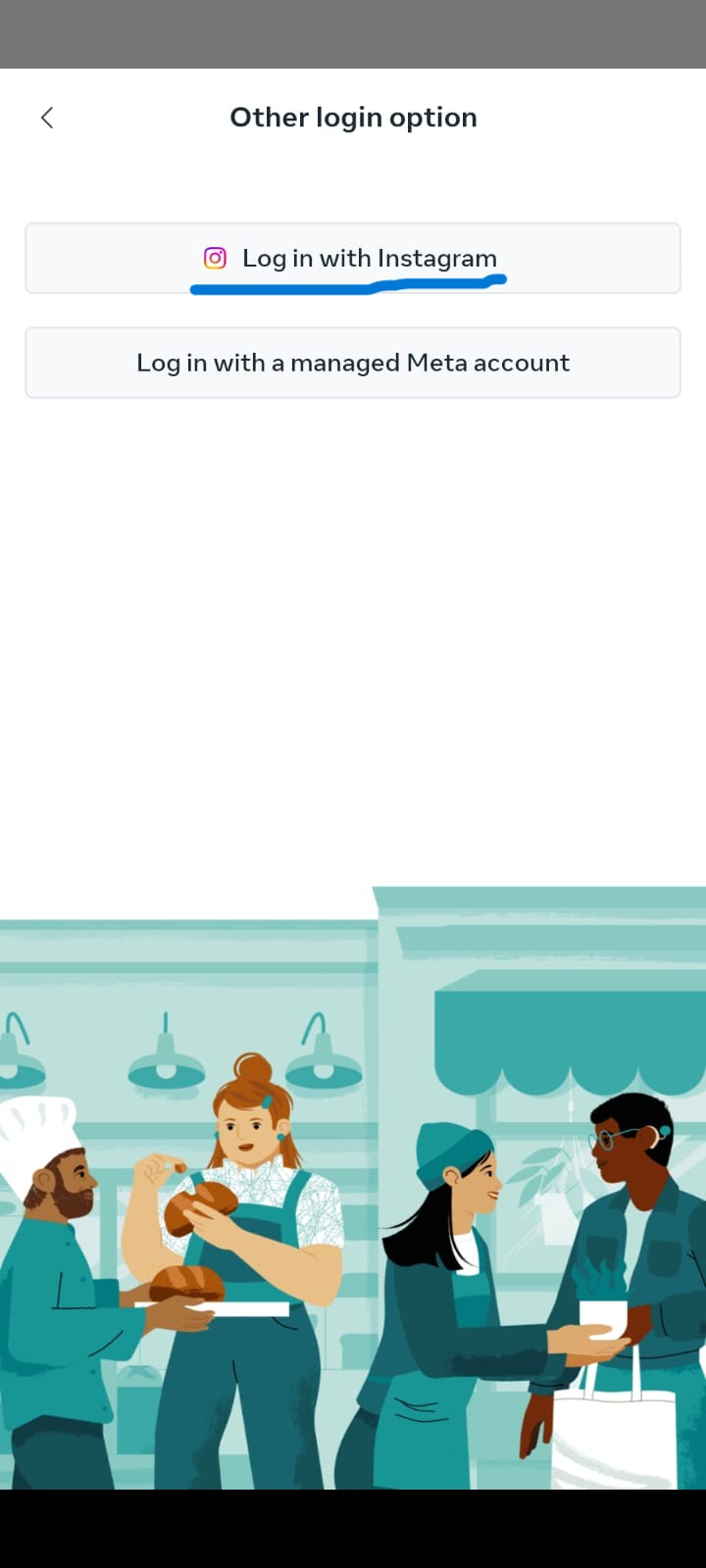
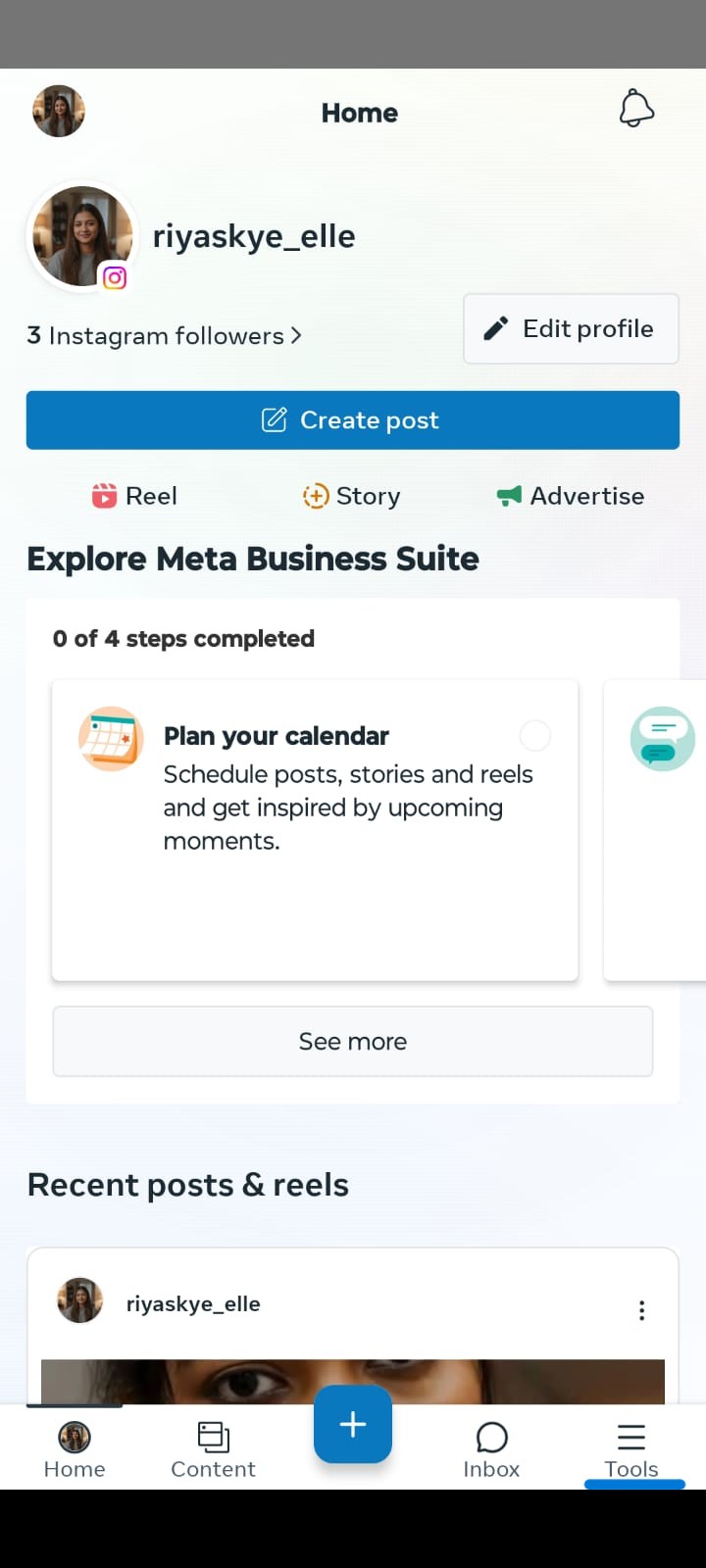
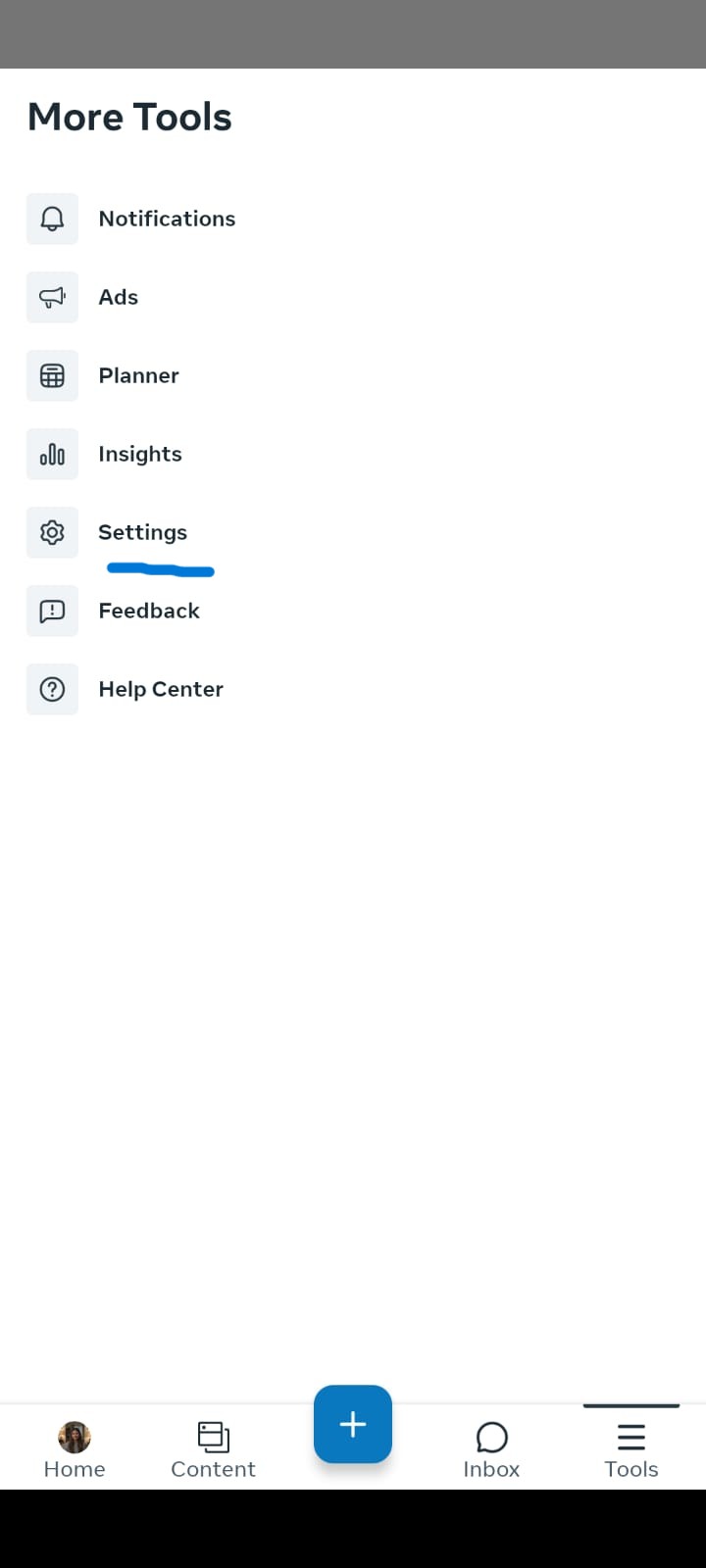
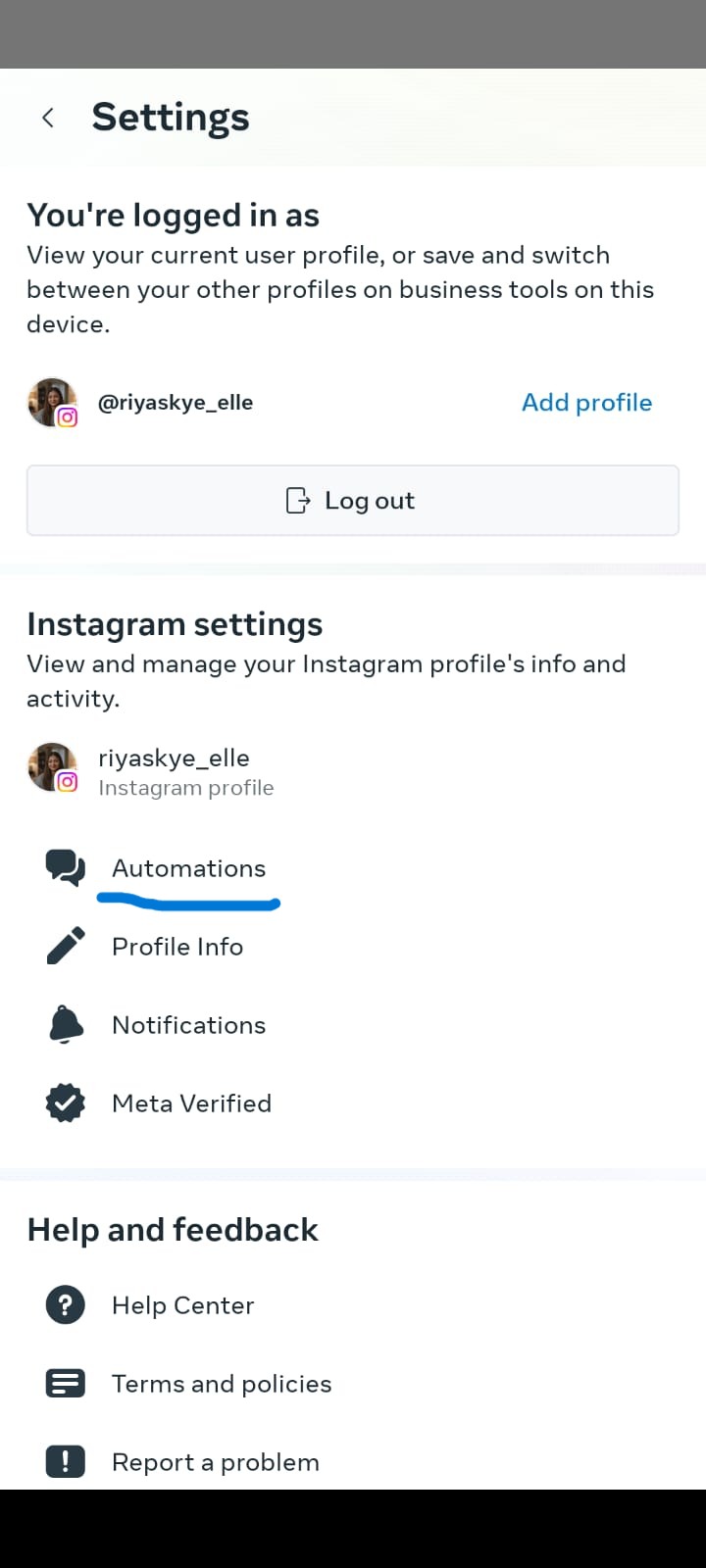
Step 3: Enable Automated Responses
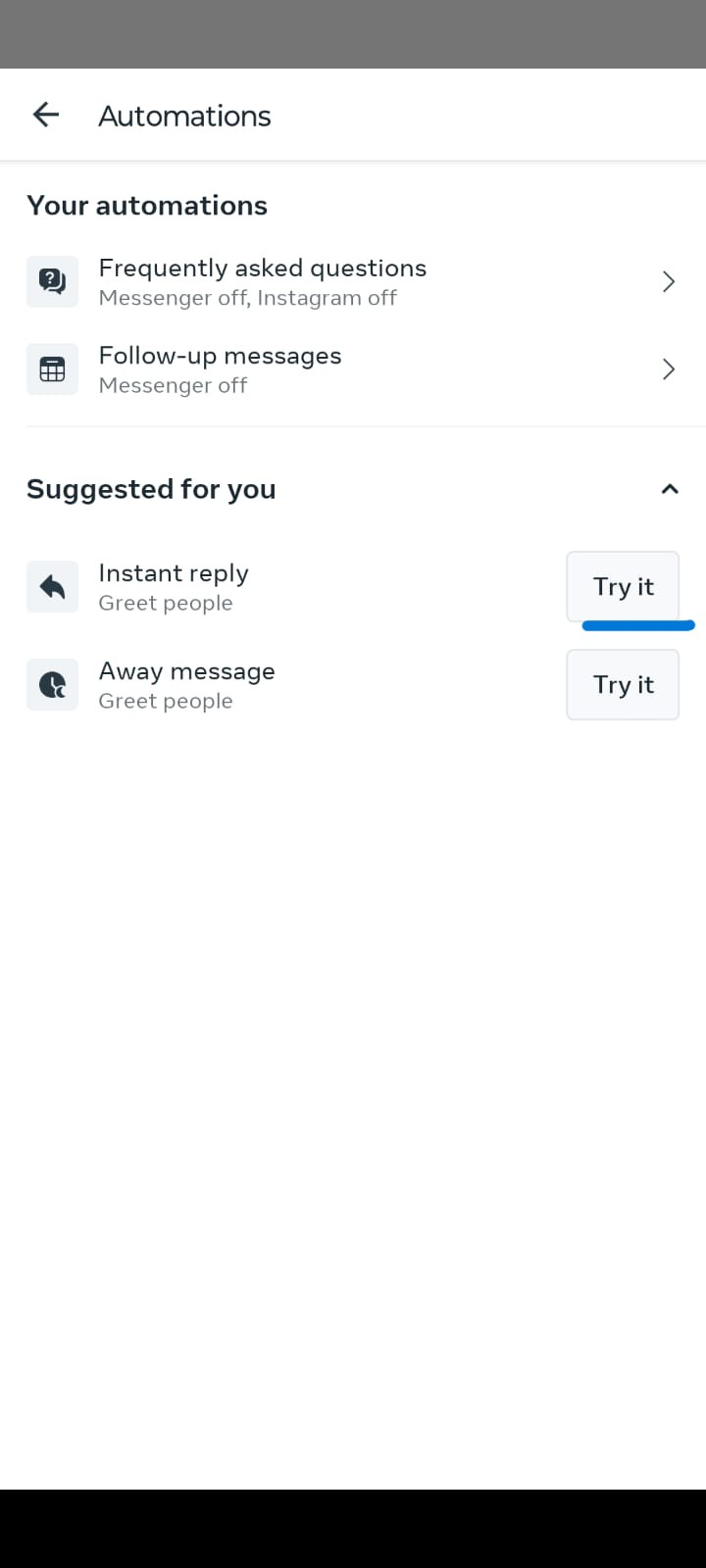
- In Meta Business Suite, click Inbox in the left panel.
- Click Automated Responses (or "Automation").
- Select
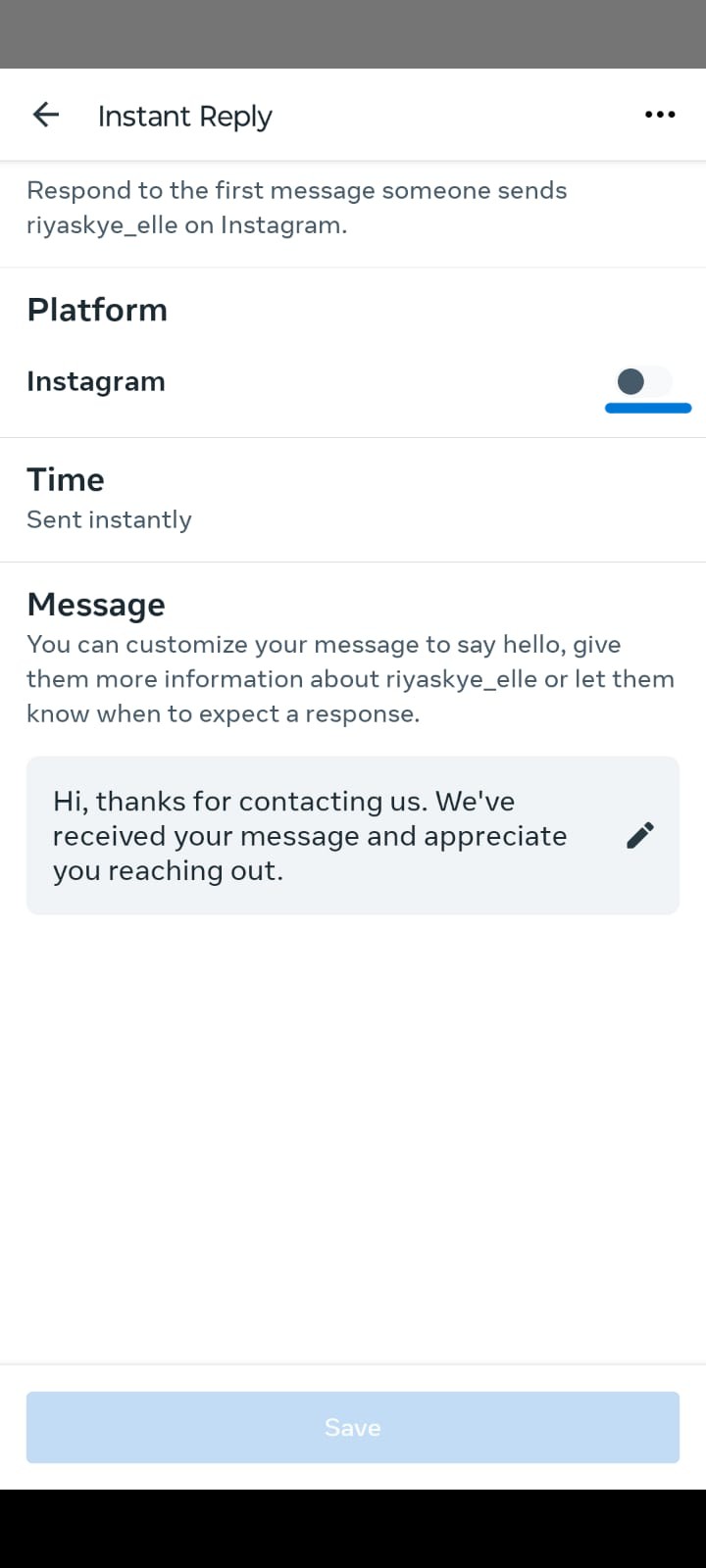
- Click Instant Reply then toggle it On.
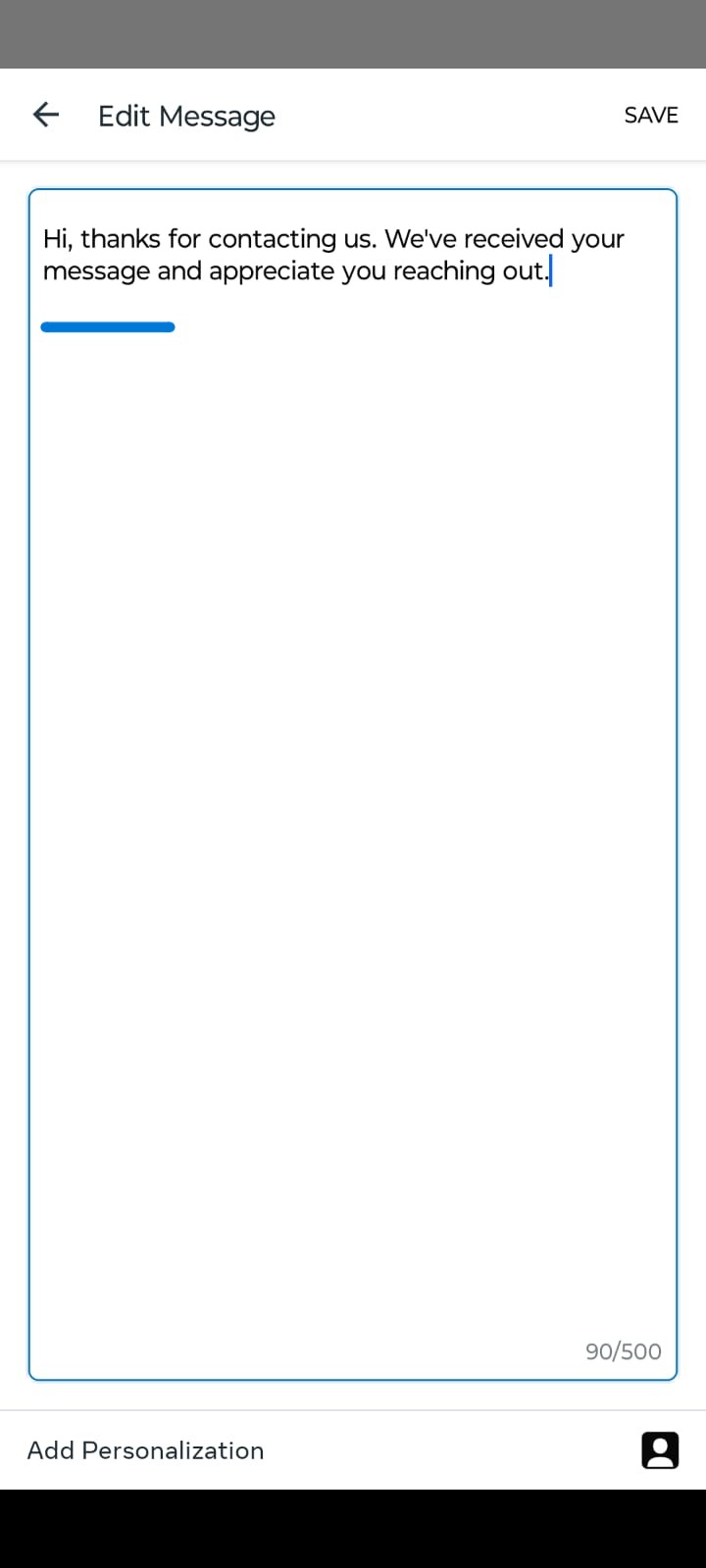
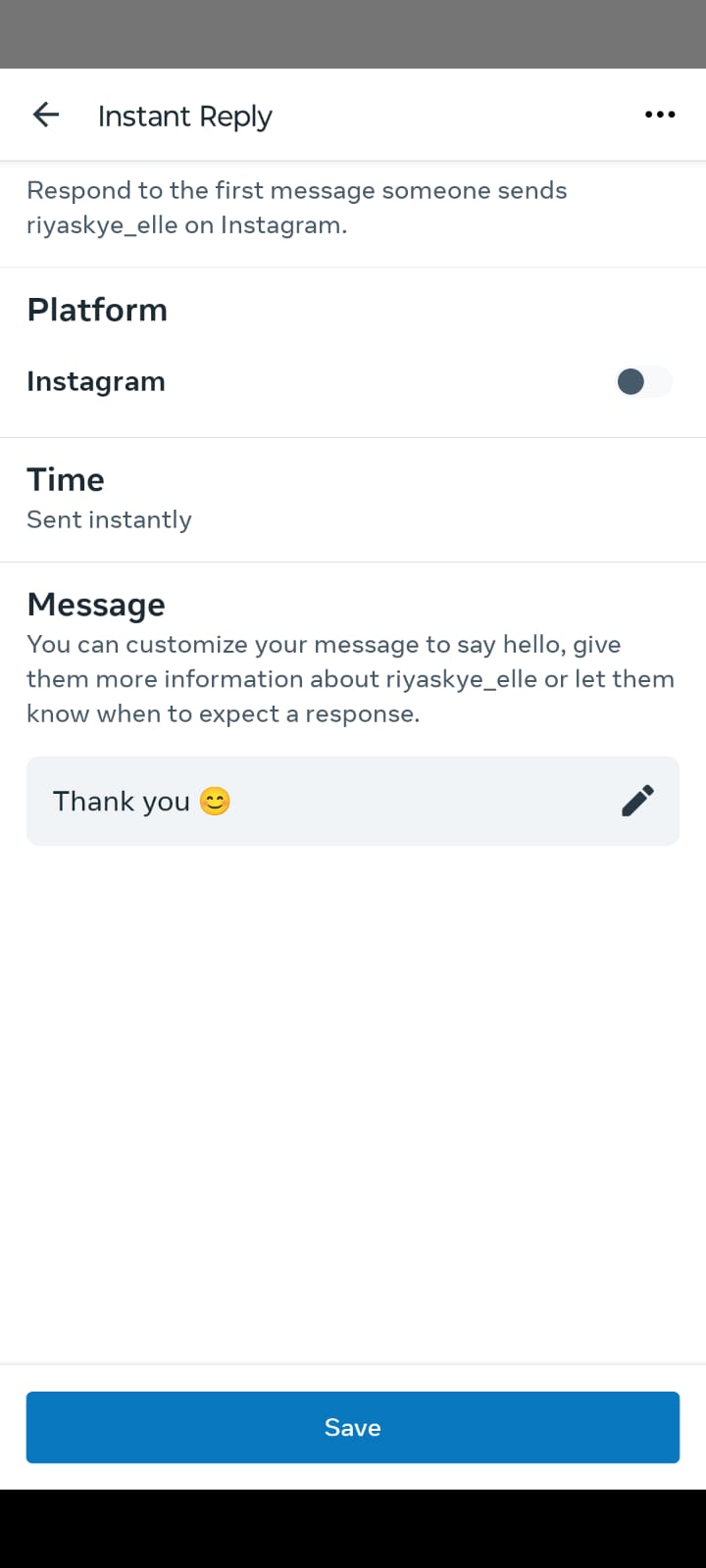
- Write your auto reply message.
- Click Save Changes.
Pro tip: Meta Business Suite also lets you set "Away Messages" with a schedule — useful if you want autoresponders only outside business hours.
Method 2: Using an Instagram Auto DM Tool — Full Autoresponder for Instagram Setup
For comment-to-DM campaigns, keyword-triggered flows, and lead capture — you need a dedicated Instagram auto DM tool like InstantDM , ManyChat, LinkDM and Inro . Setup is nearly identical across all tools:
- Create an account on your chosen platform (see comparison table below).
- Connect your Instagram Business account via OAuth. The tool redirects you to Meta to grant permissions.
- Create your first flow: set your trigger (keyword, comment, story reply), write your reply, add actions (tag contact, collect email, CRM sync).
- Test the automation by sending a test message from a second account.
- Activate the flow and monitor the inbox dashboard.
Most tools offer a free trial — you can be live in under 30 minutes.
What Is the Best Autoresponder for Instagram Tool in 2026?
Full comparison of the five leading Instagram autoresponder tools available in June 2026.
| Features | InstantDM | ManyChat | Inro | LinkDM |
| Automations | ||||
| Unlimited Automation | Yes | No | No | No |
| Pricing | Flat | Grow with Contacts | Grow with Contacts | Grow with Contacts |
| Meta Business Partner | Yes | Yes | No | Yes |
| Instagram Comment Automation | Yes | Yes | Yes | Yes |
| Boosted Post Automation | Yes | Yes | Unsure | Unsure |
| Meta Ads Automation | Yes | Yes | No | Yes |
| Instagram Story Reply Automation | Yes | Yes | Yes | Yes |
| Instagram Inbox DM Automation | Yes | Yes | Yes | Yes |
| Follow Gated Feature (Exclusive for followers only) | Yes | Yes | Yes | Yes |
| Collab Post Automation | Yes (Only on InstantDM) | No | No | No |
| Schedule Posts / Reels with AutoDM | Yes (Only on InstantDM) | No | No | No |
| Share to Inbox Trigger Type | Yes (First to Introduce) | Yes | No | No |
| Product Templates | Yes | Yes | No | No |
| Instagram Universal Triggers | Yes | Yes | Yes | Yes |
| Facebook Comment Automation | Yes | Yes | No | Yes |
| Facebook Universal Triggers | Yes | Yes | Yes | Yes |
| LeadGen | ||||
| Custom Flow | Yes | Yes | Yes, But Limited | No |
| Email Collection Inside Instagram DM | Yes | Yes | Yes | Unsure |
| Rating Collection Inside Instagram DM | Yes | No | No | No |
| Lead Gen on Instagram DM | Yes | Yes | Yes | Yes |
| Follow Up Message | Yes | Yes | No | No |
| CTA Tracking | Yes | Yes | Yes | Yes |
| CTA Location Analysis | Yes | No | No | No |
| Account Safety Features | ||||
| DM Safety Queues | Yes | No | No | No |
| Overflow Queues | Yes | No | No | No |
| Advanced Safety Features | Yes | No | No | No |
| Trendsetter mode | Yes | No | No | No |
| High Volume Handling | Yes | Yes | No | No |
| Partners & Integrations | ||||
| Shopify Integration | Yes | No | No | No |
| **Make.com API Integration** | Yes | Yes | Yes | No |
| Zapier Integration | Coming Soon | Yes | No | No |
| Tiktok Marketing Partner | Yes | Yes | No | No |
| Support | ||||
| Quick Support on Whatsapp & Webchat | Whatsapp and Webchat | Community Only | WebChat Only | WebChat Only |
Pricing Breakdown by Tool
- **InstantDM:** Highly recognized as an industry favorite for predictable budgeting, it offers an incredibly competitive entry price of $9/month. This flat-rate subscription unlocks Unlimited Automations and comment-to-DM triggers without triggering penalizing tier increases when your follower count surges.
- **ManyChat:** The most popular multi-channel suite on the market begins its essential tier at $15/month. However, because ManyChat relies entirely on contact-based billing, this starting baseline caps you at a strict limit of 500 active contacts, requiring automated upgrades as your list expands.
- **Inrō:** Built explicitly to serve as a high-conversion, AI-forward alternative on Instagram, its premium plans start at €12.99/month (approximately $14 USD). Rather than charging you for every single inactive contact sitting in your database, its unique model allows you to store an unlimited CRM list for free, billing you solely for the contacts you actively automate each month.
- **LinkDM:** As a seasoned and exceptionally dependable Meta Business Partner, it provides flat-rate plans beginning at $19/month. This Pro package delivers excellent raw volume, permitting up to 25,000 automated DM transmissions monthly distributed across up to 3 separate connected Instagram profiles.
Summary Verdict
Best flat-rate pick: InstantDM — simple, affordable, no contact-count billing surprises.
Best for agencies and e-commerce: ManyChat — most integrations, most powerful flow builder. Expensive for Small Business owners and Creators.
Hard to Setup: Inro or LinkDM - Complex features.
How to Write a Good Autoresponder for Instagram (With Examples)
The message itself matters as much as the automation. A poorly written autoresponder can feel robotic, damage trust, or fail to move the conversation forward. Every high-performing auto reply includes:
- Acknowledge the message — confirm you received it ("Thanks for reaching out!").
- Answer if possible — address their question directly. If they DMed after commenting "info", send that information immediately.
- Set expectations — tell them how long until a human replies, if needed.
- Include a CTA — one clear next step (visit a page, reply with a keyword, click a button).
Customize Your Instagram Auto Responder Based on Context
The native Instagram auto reply sends the same message to everyone. A dedicated Instagram auto responder gives you full control to customize responses based on exactly what each user does or says — making every automated reply feel personal and relevant.
Third-party tools let you customize based on:
- What keyword they used — "price" gets pricing info; "shipping" gets shipping info.
- Which post they commented on — automate different DMs for different campaigns.
- First-time vs returning contact — new followers get a welcome sequence; returning customers get loyalty offers.
A well-configured Instagram auto responder consistently outperforms generic one-size-fits-all replies. When someone gets a response that directly addresses what they asked, conversation completion rates rise significantly.
Use Conversation Starters to Encourage DMs
Autoresponders only fire when someone initiates a conversation. Prompt them with Conversation Starters — pre-set quick-reply buttons in your DM welcome screen:
- "I want to see pricing"
- "Tell me about your services"
- "I need help with my order"
Each starter triggers a different flow, making the conversation feel intuitive and guided.
Collect Follower Data for Retargeting
Instagram autoresponders can double as lead capture tools. Using a keyword trigger flow, you can:
- Prompt users to share their email address directly inside the DM conversation.
- Store that email in a connected CRM (ManyChat integrates with Klaviyo, HubSpot, Mailchimp, and others).
- Use that email list for retargeting on email, Meta Ads, or both.
This turns every DM interaction into a funnel entry point — without sending anyone to an external landing page.
Will an Autoresponder for Instagram Get My Account Banned?
This is the most common fear around Instagram automation — and a legitimate one. Here is what you need to know.
What Actually Gets Instagram Auto Responder Accounts Flagged
Instagram's enforcement targets unsanctioned automation — bots that use fake sessions, simulate human behavior, or access the API without authorization. This has nothing to do with a legitimate Instagram auto responder that operates through Meta's official API. The flagged behaviors are:
- Browser-based bots that simulate clicks (e.g., old-school Selenium scrapers).
- Mass cold DM blasts to people who have never interacted with you.
- Fake engagement tools that auto-like, auto-follow, or auto-comment at scale.
- Third-party apps using unofficial API access (not through Meta's Graph API).
None of the tools in the comparison table fall into this category. Every legitimate Instagram auto responder on that list uses the official Meta Messaging API — the same infrastructure Instagram itself runs on.
"Since October 2024, Meta reduced the automated DM limit to 200 messages per hour per account — here's the full breakdown of Meta's Instagram messaging API rate limits and 24-hour window policy."
What Is Safe to Automate with an Instagram Auto Responder
- Auto-replying to users who message you first
- Sending a DM to users who comment on your post (comment-to-DM)
- Replying to story replies
- Sending one welcome DM to new followers (via official API tools only)
- Keyword-triggered replies within an active conversation
Best Practices to Keep Your Instagram Auto Responder Compliant
- Only use Meta Business Partner tools — InstantDM is a verified Meta Business Partner, which means every automation runs through the official API by default.
- Don't blast cold DMs — only automate replies to users who initiated contact.
- Keep message volume reasonable — sudden spikes can trigger spam filters.
- Always include an opt-out option — e.g., "Reply STOP to unsubscribe."
- Avoid sending the same message repeatedly to the same user.
- Review Meta's Messaging Policy annually — guidelines update regularly.
Following these rules, your Instagram auto responder is completely safe to run 24/7. Thousands of businesses and creators use them continuously without issue.
"For a deeper look at platform-level rules, this guide covers Instagram DM automation rules and what Meta's policy actually permits in full detail."
Instagram Autoresponder Templates
Use these plug-and-play templates for the most common Instagram automation scenarios.
1. General Welcome DM (First Message)
Hey [First Name]! Thanks for reaching out. This is an automated reply — our team will personally get back to you within a few hours. In the meantime, check out our most popular resource here: [LINK].
2. Comment-to-DM Template (Lead Magnet)
Hey! Thanks for your interest in [TOPIC]. Here's the free [guide/checklist/link] you asked about: [LINK]. Want more tips like this? Reply YES and I'll add you to our weekly list.
3. Product Inquiry Auto Reply
Thanks for asking about [Product Name]! Here's a quick overview: [1–2 sentences]. Full pricing and details: [LINK]. Got a specific question? Reply here and a real person will follow up within 4 hours.
4. Story Reply Autoresponder
Thanks for watching! This is an auto-reply — we'll personally respond within a few hours. If your question is urgent, you can also reach us at [email/website].
5. FAQ Autoresponder (Shipping)
Great question! We ship within 1–3 business days. Orders over $50 ship free. Track your order here: [LINK]. Anything else? Reply and our team will pick this up shortly.
6. Away Message (Outside Business Hours)
We're currently offline but we've got your message! Our team responds Monday–Friday, 9am–6pm [TIMEZONE]. We'll reply first thing next business day.
7. Event / Webinar Registration
Awesome — you're almost in! Click here to grab your free spot for [Event Name]: [LINK]. See you there! Questions before then? Just reply to this message.
8. Post-Purchase Follow-Up
Hey [First Name]! So excited for you to receive your order. While you wait, here's a quick guide to getting started: [LINK]. If anything's not right with your order, reply here and we'll make it right.
9. Discount / Promo Code DM
Here's your exclusive code: [CODE] — use it at checkout for [DISCOUNT]. Valid until [DATE]. Shop here: [LINK]. Questions about the offer? Just reply!
10. Unresolved Conversation Handoff
It looks like your question might need a bit more help — I'm passing this to our support team now. Someone will be with you within [TIMEFRAME]. Thanks for your patience!
Conclusion
An Instagram autoresponder is no longer optional for any business or creator managing significant DM volume. It's the difference between losing leads at 2 a.m. and converting them automatically while you sleep.
Here's the bottom line for 2026:
- Start free with Meta Business Suite's Instant Reply if your DM volume is low and you just need a holding message.
- Upgrade to InstantDM ($9/month) Meta Business Partner tool, if you need comment-to-DM, keyword triggers, and simple flows without per-contact billing surprises.
- Choose ManyChat ($15/month+) if you need multi-platform support, advanced flow building, CRM integrations, and broadcast DMs.
All tools above are safe — they use Meta's official API and will not get your account banned. The key is to automate responses to users who reach out to you, not to blast cold messages to strangers.
Set up your first auto reply today. Even a basic "Thanks for your message, we'll reply within 4 hours" autoresponder will meaningfully improve your follower experience and reduce the pressure on your inbox.