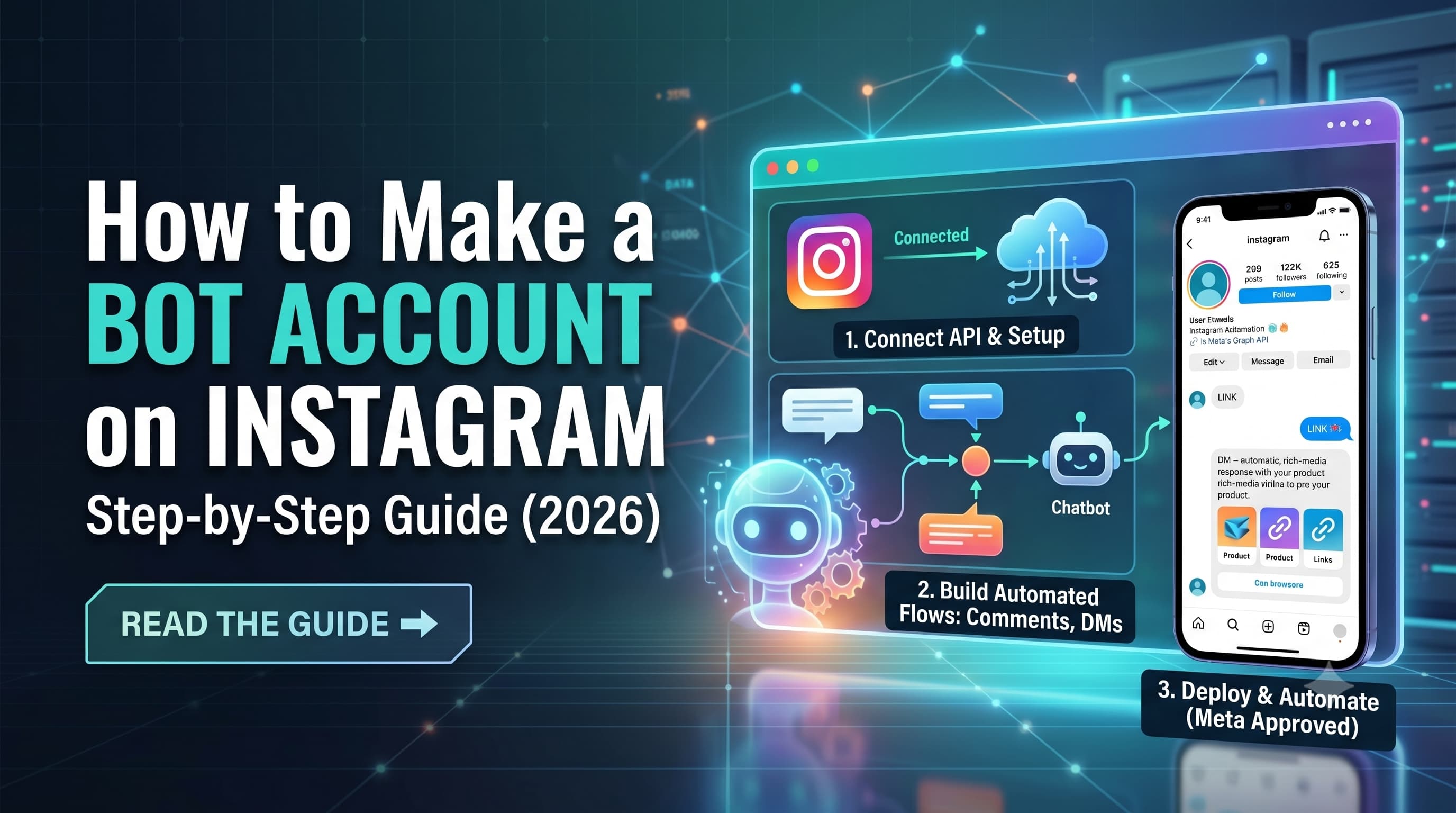
A bot account on Instagram is an automated system connected to your Instagram Business profile that handles DMs, comment replies, and story responses without manual input. To build one in 2026, connect a Meta-approved automation tool such as InstantDM, ManyChat, or Chatfuel to your Instagram account via official OAuth login. The setup takes under 10 minutes, runs entirely on Instagram's official Graph API, and requires zero coding.
TL;DR
- An Instagram bot account isn't a fake or separate account — it's automation layered onto your existing Business or Creator account.
- Compliant bots (auto-DM, comment-to-DM, story reply automation) are fully allowed under Meta's policies.
- Follow/like/comment-spam bots violate Instagram's terms and risk a ban — avoid these entirely.
- The general setup process (account conversion , then, tool connection then, automation flows) is similar across most automation platforms.
- Combine welcome messages, FAQ auto-replies, and comment-to-DM funnels for the biggest engagement and sales lift.
How to Make a Bot Account on Instagram?
Setting up an Instagram bot account follows a predictable sequence regardless of which automation tool you choose. Here's the general process that applies across most platforms, including InstantDM, ManyChat, and Chatfuel.
Step 1: Switch to an Instagram Business or Creator account
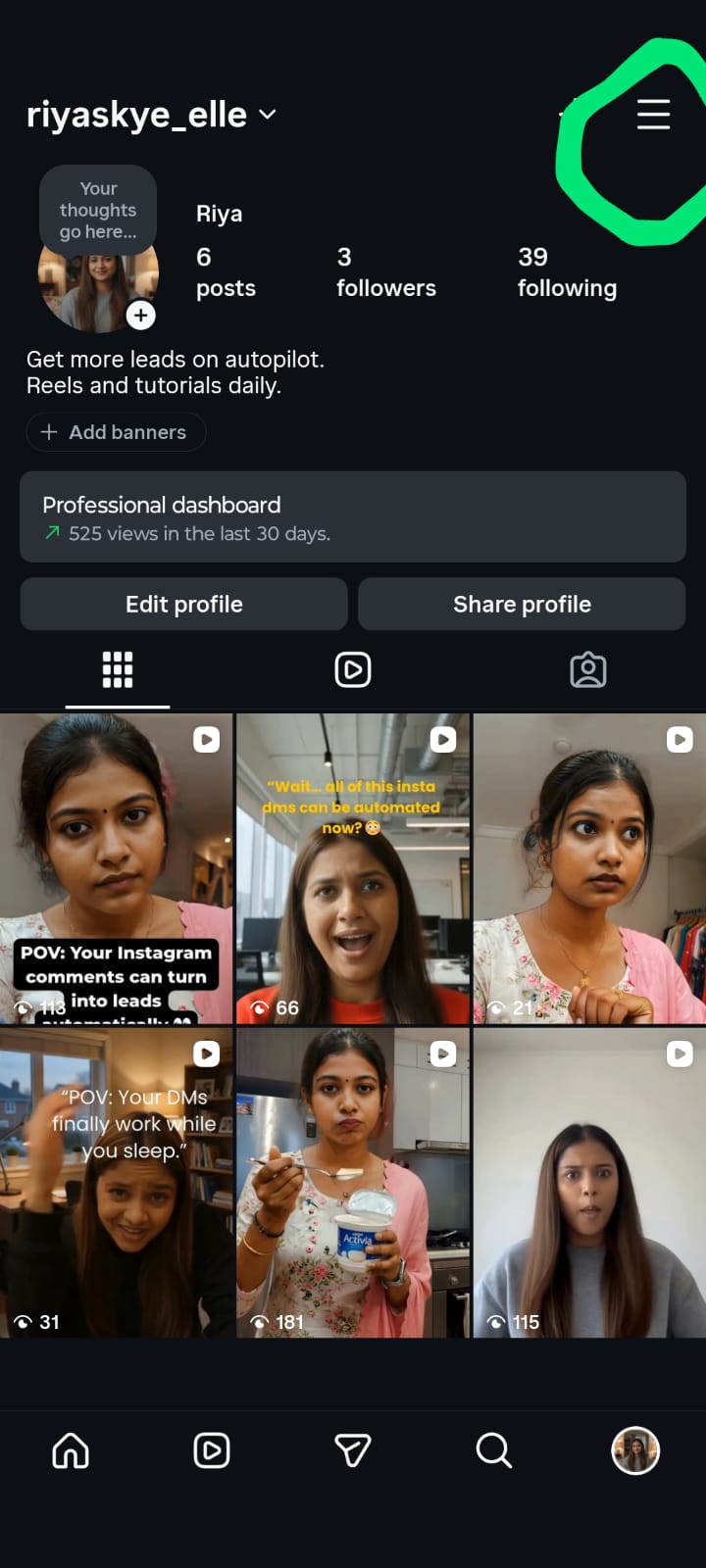
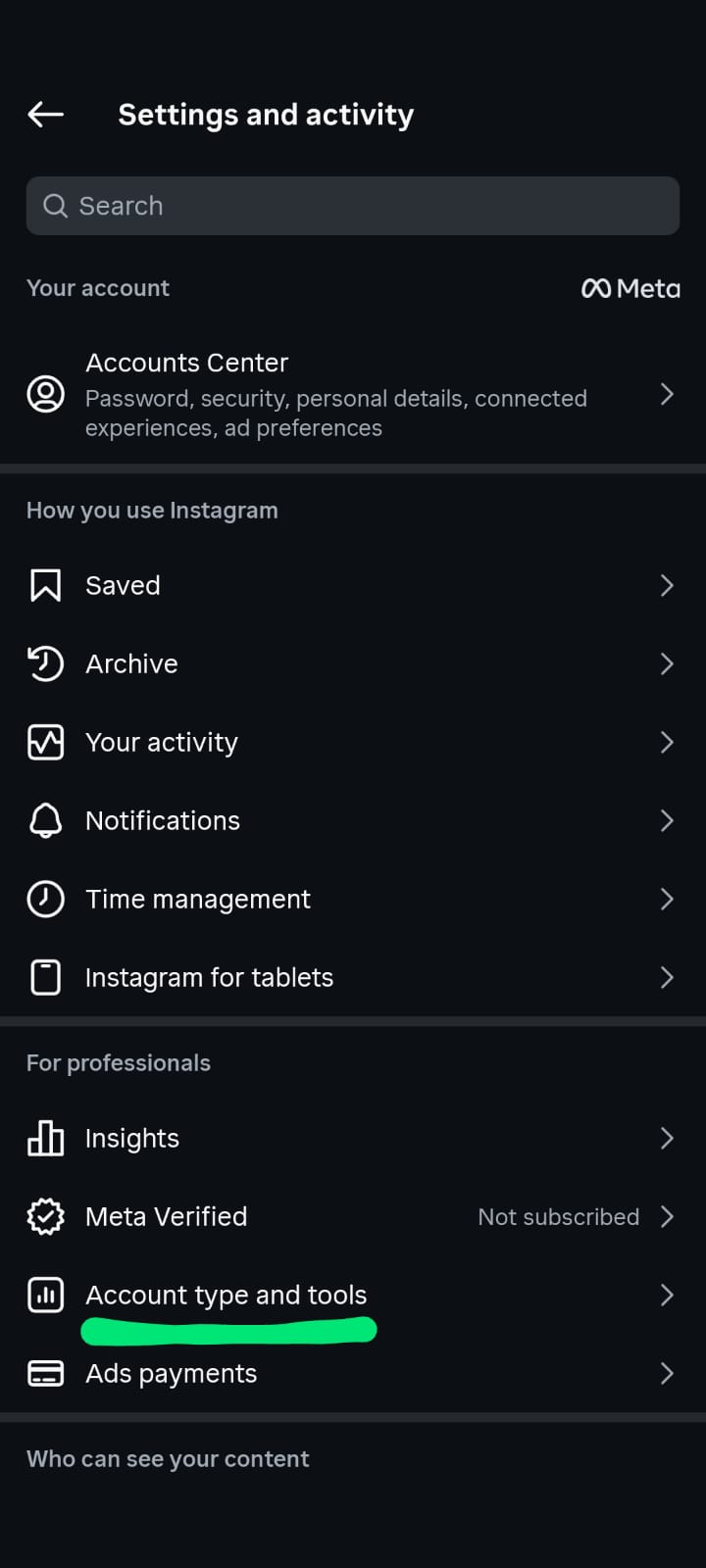
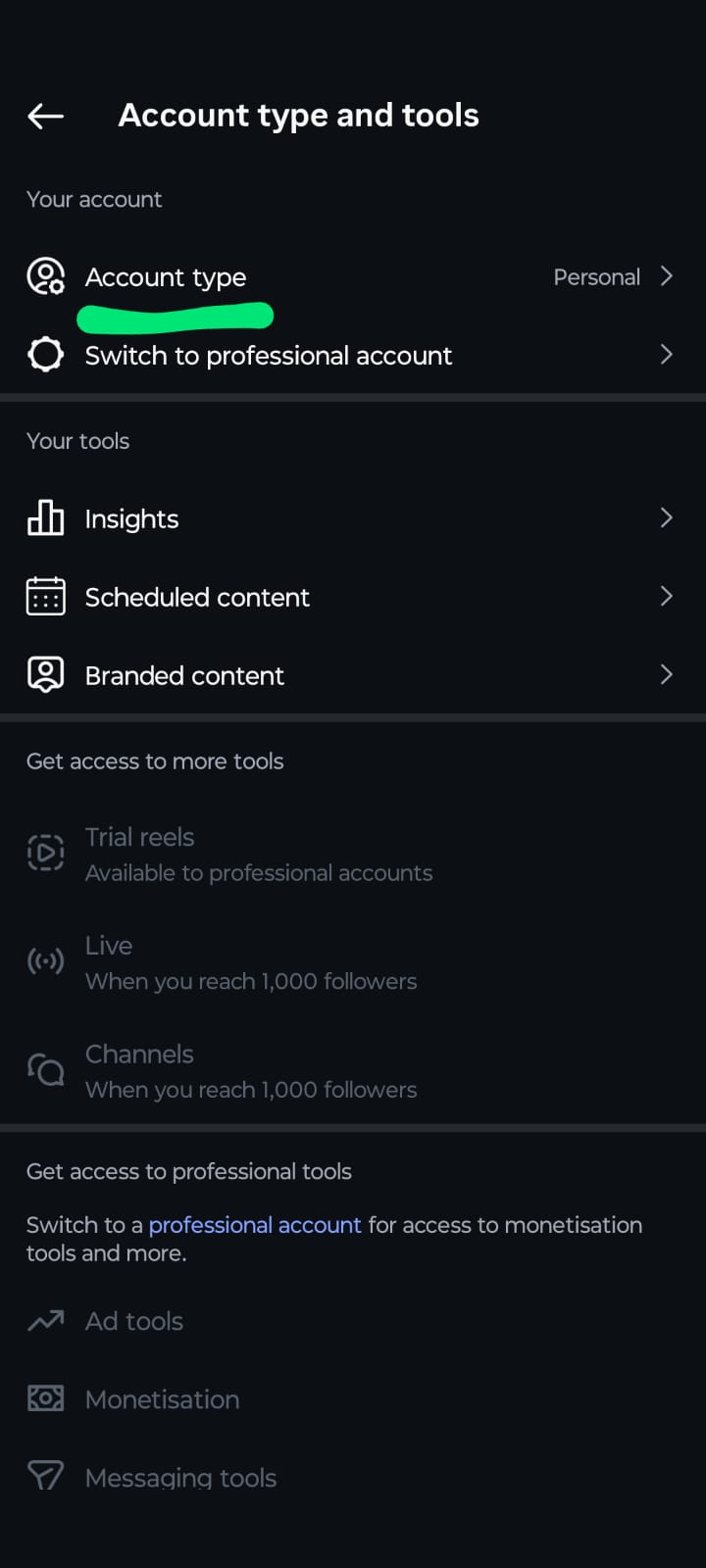
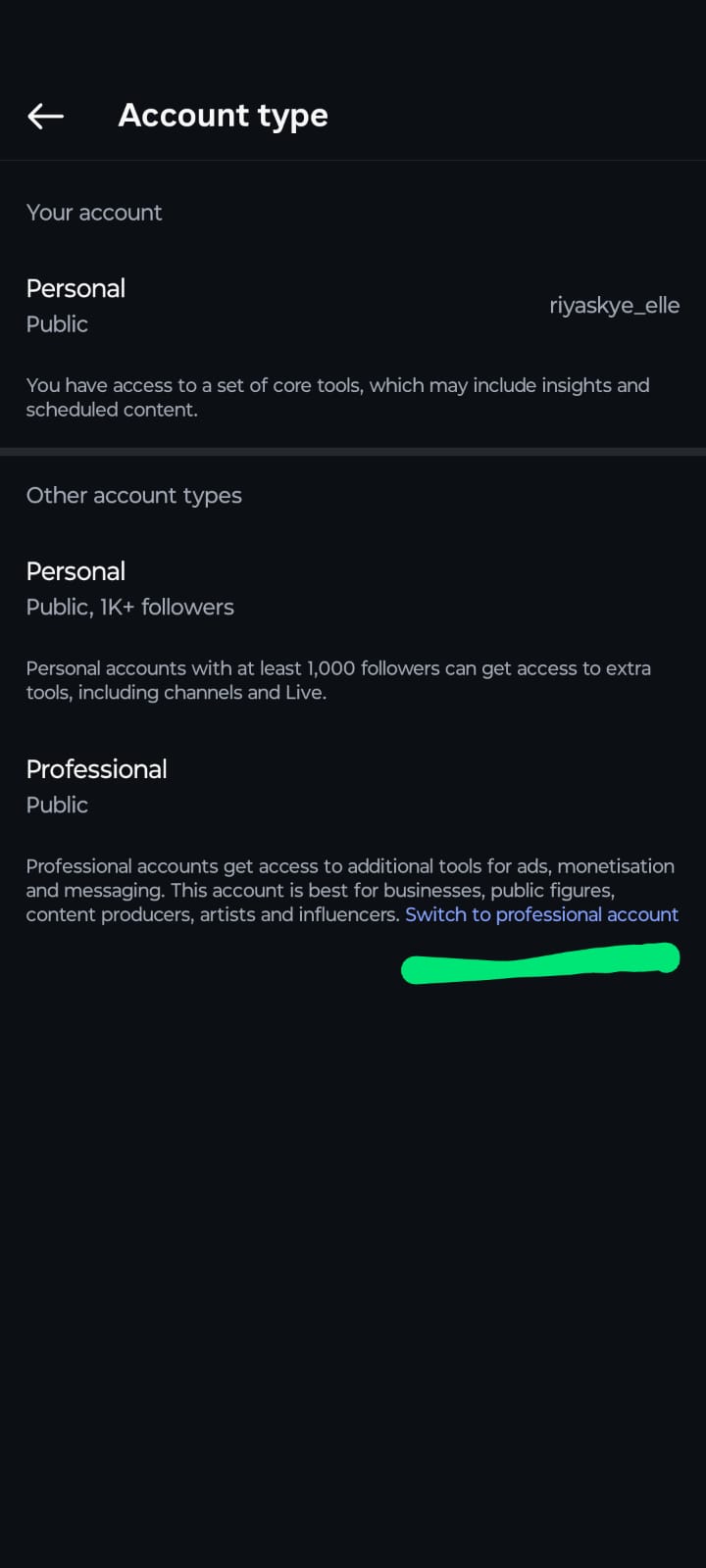
Open the Instagram app, go to Settings then Account type and tools, and select "Switch to Professional Account" if you haven't already. Choose either Business or Creator — both work for automation purposes, though Business accounts unlock slightly more analytics and ad-related features down the line. This step is non-negotiable: Instagram's automation API simply does not work with personal accounts, regardless of which third-party tool you use.
If you're starting a brand-new account specifically to run as a bot account (for example, a dedicated support handle separate from your main brand account), complete Instagram's standard signup first, verify the account with a phone number or email, and then convert it to Professional before connecting any automation tool. Skipping verification at this stage often causes connection errors later.
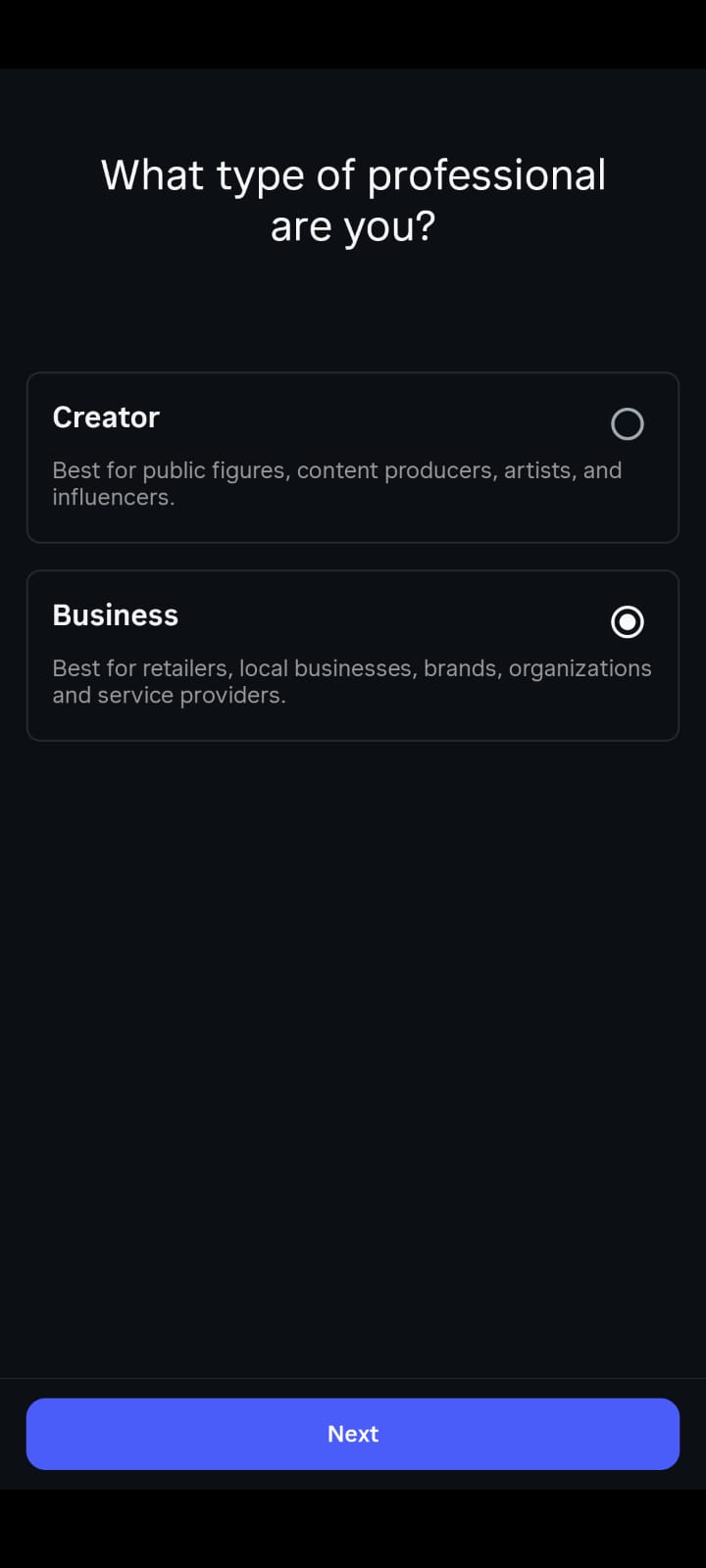
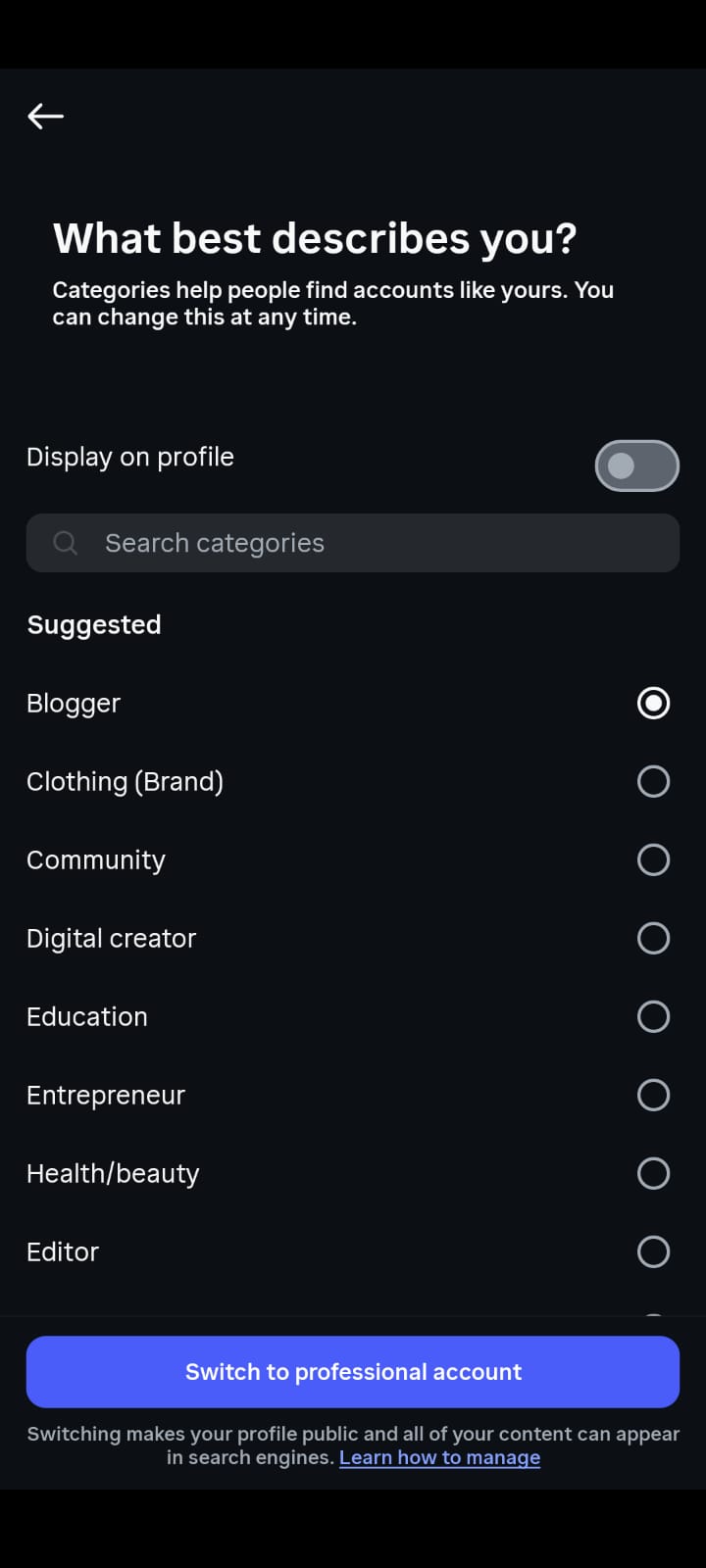
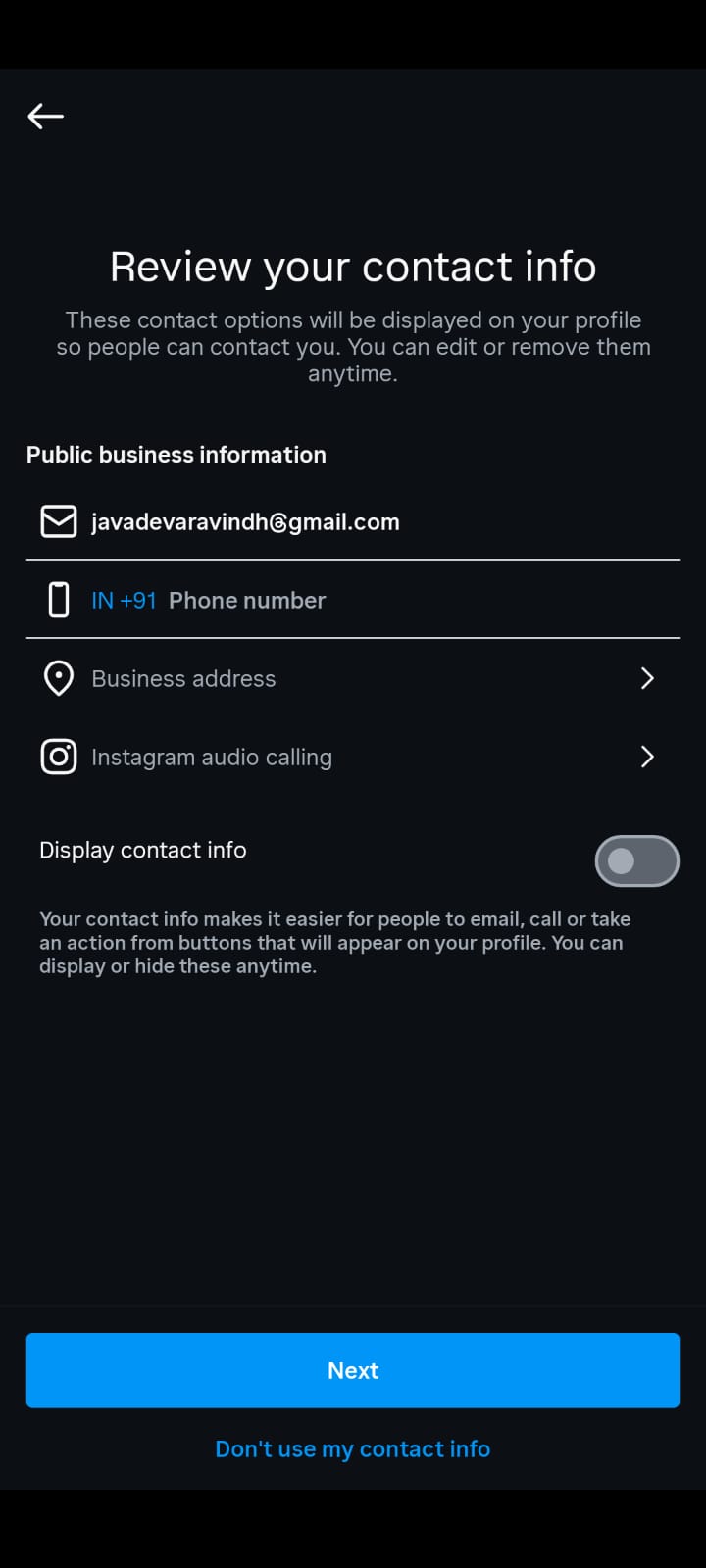
Step 2: Check whether the tool requires a Facebook Page connection
This is where automation platforms diverge most. Many require you to create or link a Facebook Business Page to your Instagram account before automation will work, since they route permissions through Meta's Business Manager. Tools like ManyChat and Chatfuel generally follow this path.
A smaller number of newer tools — InstantDM among them — authenticate directly through Instagram's native login, skipping the Facebook Page requirement entirely. If you're setting up a bot account for a creator profile that has never touched Facebook Business Manager, checking this upfront can save 30-60 minutes of setup friction, since creating and verifying a new Facebook Page can itself take time.
Step 3: Sign up for an automation tool and authorize access
Choose a platform based on your needs (covered in the comparison section below), create an account, and connect it to Instagram — either via direct Instagram login or through your linked Facebook Page, depending on the tool. When prompted, you'll grant permissions that typically include reading and responding to direct messages, reading comments on your posts, and accessing basic profile information.
All of these permissions flow through Instagram's official Graph API, meaning your account remains fully within Meta's terms of service throughout the process. A common point of confusion: granting these permissions does not give the tool posting access or the ability to follow/unfollow accounts on your behalf (unless separately enabled, which most legitimate bot setups never need).
Step 4: Build your first automation flow
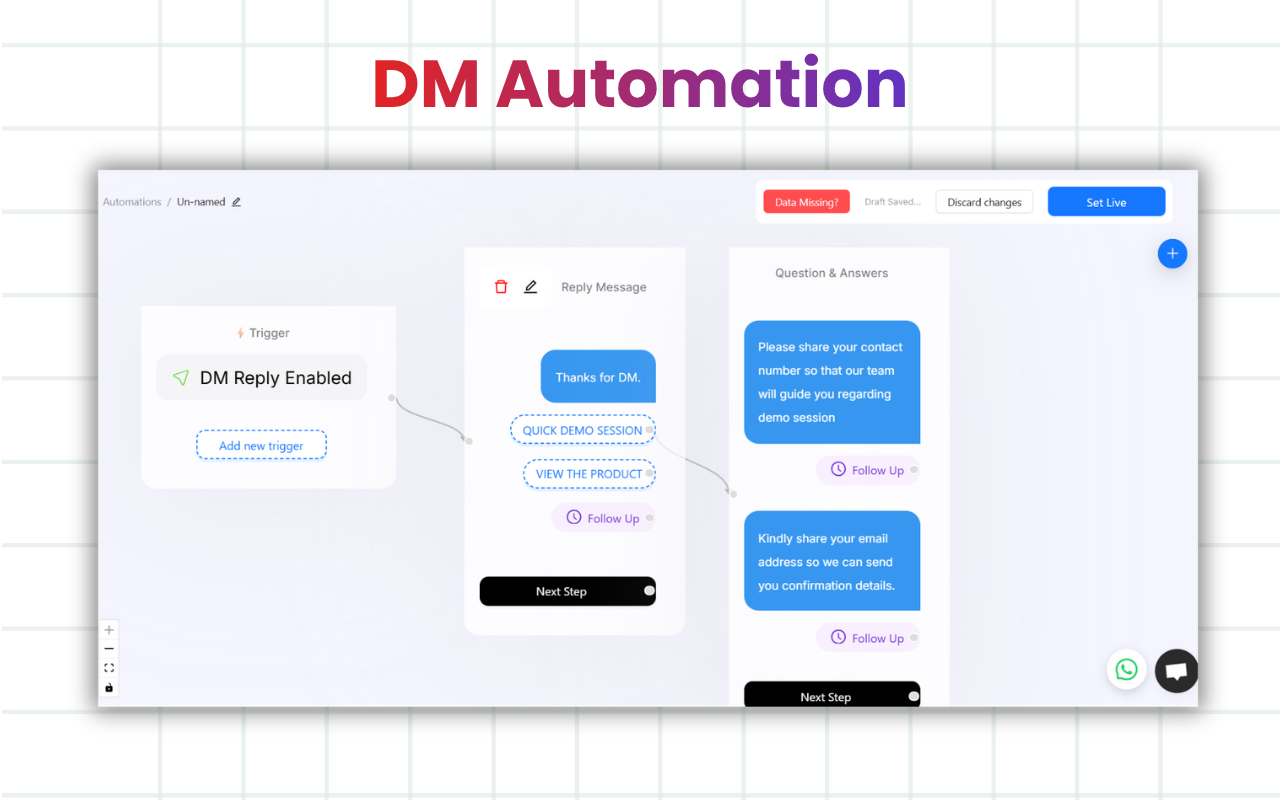
Once connected, you'll land in the platform's flow builder — most use a visual, drag-and-drop interface. Start with one or two of the highest-impact automations:
- Comment-to-DM trigger: When someone comments a specific word (like "INFO" or "PRICE") on any of your posts, the bot automatically sends them a DM with a link, price list, or freebie.
- Welcome message: The first time someone messages your account, they receive an automatic greeting — useful for setting expectations about response times or directing them to an FAQ.
- Keyword-based FAQ replies: If a DM contains certain keywords ("shipping," "refund," "hours"), the bot replies with a pre-written answer instantly.
Each of these flows typically takes 2-3 minutes to configure, regardless of platform, since most use similar trigger-and-response logic.
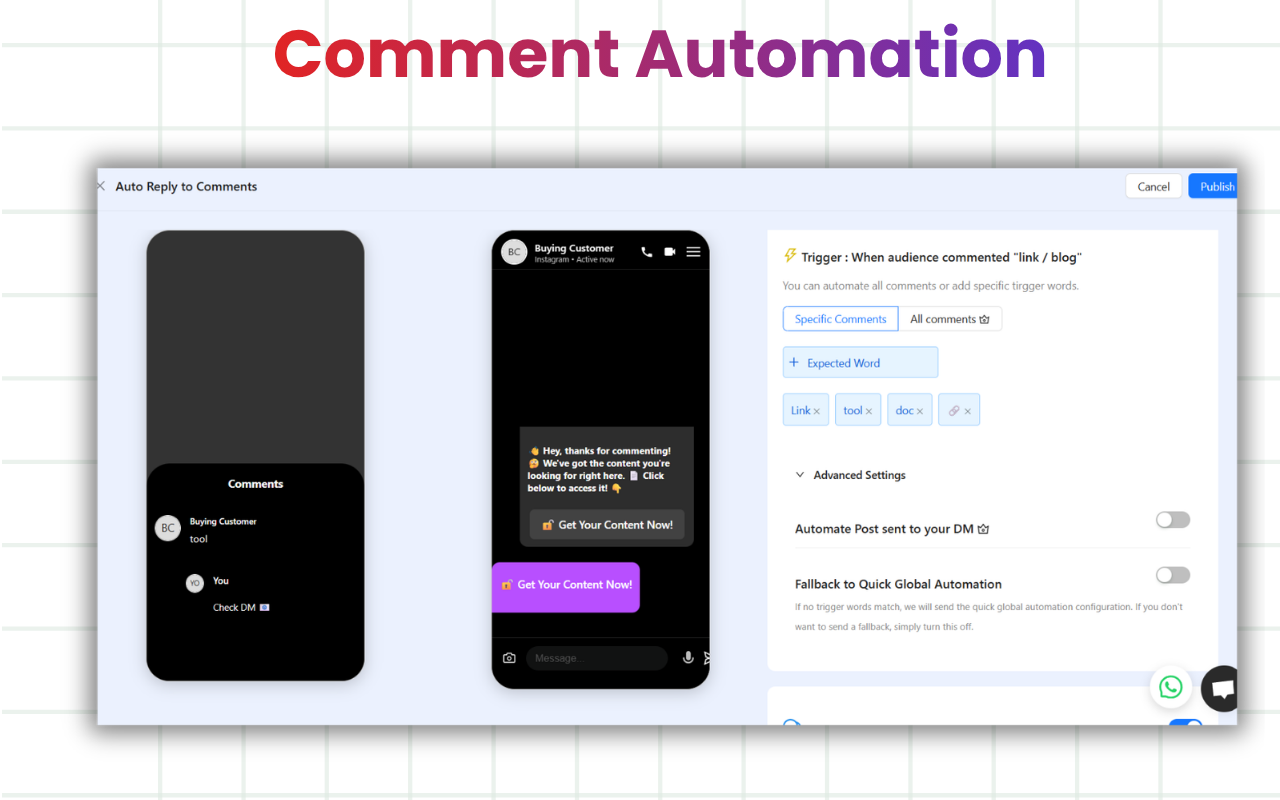
Step 5: Test before going live
Before activating your bot account for real followers, send a test comment and a test DM from a secondary account (or ask a friend) to confirm the automation fires correctly and the wording sounds natural. Robotic-sounding replies are the single biggest reason automated accounts feel "botty" to followers — a quick tone pass goes a long way.
Step 6: Launch and monitor
Activate the automation and check in over the first 48 hours. Most platforms provide a dashboard showing how many DMs were sent, how many comments triggered a response, and basic engagement metrics. Adjust trigger keywords based on what people are actually typing — real conversations rarely match exactly what you anticipated.
The entire process, start to finish, takes under 10 minutes for steps 1-4 on most platforms. Your profile continues to look and function like a normal Instagram account; followers interacting with it won't see any difference unless the automated replies feel scripted.
What Is a Bot Account on Instagram?
An Instagram bot account refers to an Instagram profile — usually a Business or Creator account — that uses third-party automation software to perform actions like replying to direct messages, responding to comments, sending welcome messages to new followers, or delivering content based on keyword triggers.
This is a fundamentally different concept from the "bot accounts" most people picture when they hear the term — armies of fake profiles used to inflate follower counts or flood comment sections. Those are mass-created, low-quality accounts that violate Instagram's Community Guidelines and get purged in regular platform sweeps.
The kind of bot account covered in this guide is the opposite: it's automation software running quietly behind a real, established account that a real business or creator owns. The account itself isn't fake — only the response process is automated. Think of it less like "a robot pretending to be a person" and more like "a very fast, very consistent assistant handling repetitive messages."
There's also a middle category worth mentioning: AI-powered bot accounts, which use natural language processing to generate dynamic responses rather than relying purely on fixed keyword triggers. These are increasingly common in 2026 and allow a bot account to handle a wider range of questions without the business owner pre-writing every possible reply. Many of today's instagram chatbot tools blend both fixed-keyword and AI-driven responses in the same automation flow.
How Is a Bot Account on Instagram Different from a Regular Account?
Regular Account | Bot-Automated Account | |
Account type | Personal or Business | Business/Creator (required for automation) |
DM responses | Manual, sent by a person | Automated via keyword triggers and rules |
Comment replies | Manual | Auto-replies and comment-to-DM flows |
Response time | Depends on availability | Instant, 24/7 |
Setup | None needed | Connect to an automation tool via OAuth |
Compliance risk | None | Low risk if using Meta-approved tools; high risk if using follow/like bots |
Scalability | Limited by available time | Handles unlimited conversations simultaneously |
Cost | Free | Roughly $9-20/month depending on tool |
The most important row in this table is compliance risk, because it's where most confusion about Instagram bot accounts originates. A bot-automated account using a Meta-approved tool carries roughly the same risk profile as a regular account — Instagram has no issue with automated messaging. The risk only appears when automation is used to fake engagement signals like follows, likes, or comments, which is a different category of bot entirely — and includes things like an instagram like and comment bot, which operates outside official API permissions and carries a much higher ban risk than message automation.
Beyond compliance, the practical day-to-day experience of running a bot-automated account is also different in subtle ways. Notifications arrive showing automated responses already sent, automation dashboards supplement Instagram's native insights, and the account owner spends time refining flows rather than typing individual replies.
What Are the Best Tools to Make a Bot Account on Instagram?
Tool | Starting Price | Comment-to-DM | Story Reply Automation | AI Responses | Free Trial | Best For |
ManyChat | From $15/month | Yes | Yes | Limited | Yes | Brands wanting a mature ecosystem with broadcast campaigns and broader Messenger integrations |
InstantDM | $9.99/month, no contact limits | Yes | Yes | Yes | Yes | Creators and small accounts wanting the fastest setup with predictable flat pricing |
Chatfuel | From $20/month | Yes | Limited | Yes | Yes | Teams running multi-channel automation across Instagram, Messenger, and WhatsApp |
ManyChat is one of the longer-standing players in Messenger and Instagram automation, with a mature feature set covering broadcast campaigns, multi-step sequences, and integrations with e-commerce platforms. The Facebook Page requirement adds an extra setup step, and pricing scales with contact list size — which can add up for larger audiences, but also reflects the depth of features available for bigger operations.
InstantDM is built around the comment-to-DM and keyword-trigger workflow that most creators and small businesses use day-to-day. Its flat $9.99/month pricing with no contact-based scaling keeps costs predictable as your following grows, and skipping the Facebook Page requirement makes it the fastest option to get started from scratch.
Chatfuel is generally aimed at teams running automation across multiple channels (Instagram, Messenger, WhatsApp) with more advanced flow-building, AI response options, and team collaboration features. For businesses that need a single automation dashboard across several platforms, this breadth can outweigh the higher starting cost.
The right choice usually comes down to three questions: do you already have a Facebook Page set up, how large is your contact volume (and does per-contact pricing matter), and do you need automation beyond Instagram alone.
What Are the Use Cases for a Bot Account on Instagram?
Creators and influencers: Automatically send a link, discount code, or freebie to anyone who comments a specific keyword on a post — a popular tactic for growing email lists, driving traffic to a link-in-bio page, or promoting a new product launch. Many creators run "comment LINK to get the freebie" campaigns that would be impossible to manage manually at scale. This works especially well during launches or viral moments, when comment volume spikes far beyond what one person could respond to in real time.
E-commerce sellers: Set up a bot to instantly answer "How much is this?", "Do you ship to [location]?", or "Is this in stock?" — questions that arrive dozens of times a day on popular product posts. Reducing response time from hours to seconds directly impacts conversion rates, since interested buyers often move on if they don't get a quick answer. It also frees sellers from repeating the same product details across dozens of separate DM threads every day.
Coaches and service providers: Use a welcome message bot to greet new followers and guide them toward booking a discovery call, downloading a lead magnet, or joining an email list. This turns passive followers into active leads without any manual outreach. Since the message fires the moment someone follows or messages, it captures interest while it's highest — before a potential client moves on to another page.
Community managers: Automate FAQ responses for recurring questions about events, products, policies, or operating hours, freeing up time for the conversations that actually require a human touch — complaints, custom requests, or sales negotiations. This is particularly valuable around big announcements or events, when the same handful of questions tend to repeat hundreds of times in a short window.
Local businesses: Restaurants, salons, and service providers can automate responses to common questions like hours of operation, booking links, or menu/price list requests, especially useful outside business hours when no one is monitoring the account. A customer messaging at 11pm asking about Saturday availability gets an instant answer instead of waiting until the next business day.
Course creators and digital product sellers: Automate delivery of lead magnets, waitlist confirmations, or onboarding sequences the moment someone DMs a specific keyword after seeing a promotional post or story. This removes the manual bottleneck of sending files or links one by one, letting a single promotional post convert hundreds of interested followers without any extra effort.
Common Mistakes to Avoid When Setting Up a Bot Account on Instagram
Even with a Meta-approved automation tool, the way you configure your bot account makes a significant difference in whether it feels helpful or comes across as spammy — and whether it stays in good standing with Instagram. Here are the most common mistakes accounts run into when setting up automation for the first time.
Using the same message for every trigger
It's tempting to write one generic reply and reuse it across every keyword trigger and welcome message. The problem is twofold: followers quickly notice when every interaction produces an identical, robotic response, and Instagram's spam-detection systems can flag accounts sending high volumes of identical messages — even through approved automation channels. Writing 2-3 variations for common replies and rotating between them keeps interactions feeling natural and reduces this risk.
Skipping the test phase before going live
Activating automation without testing it first is one of the most common — and most visible — mistakes. A trigger that doesn't fire correctly, a typo in an auto-reply, or a welcome message with broken formatting will be seen by real followers before anyone catches it. Sending a test comment and DM from a secondary account takes a few minutes and catches the vast majority of issues before they reach your audience.
Setting up overlapping keyword triggers
When multiple triggers are configured to fire on similar or identical keywords (for example, separate automations both responding to "PRICE" and "PRICING"), the bot can send conflicting or duplicate replies to the same message. This creates a confusing experience and can make the account look poorly managed. Reviewing your trigger list for overlaps — and consolidating similar keywords into a single automation — prevents this.
Forgetting to set up an away message for off-hours
One of the main advantages of a bot account is 24/7 responsiveness, but many setups only configure replies for business-related questions and skip a general away message for when no one's actively monitoring the account. Without one, messages sent outside business hours either go unanswered or trigger an automation that doesn't acknowledge the time gap — for example, a customer who messages at midnight may expect to know when they'll hear back. A simple after-hours message setting expectations for response time closes this gap.
Not monitoring the automation dashboard after launch
Automation isn't "set and forget." Trigger keywords that seemed obvious during setup often don't match how real followers actually phrase their questions — someone might comment "cost?" instead of the configured "PRICE" trigger, and never receive a response. Checking the automation dashboard regularly in the first few weeks reveals these gaps, lets you add missing keyword variations, and surfaces any messages the bot failed to handle correctly so they can be picked up manually.
Over-automating outbound messages
There's a meaningful difference between automated replies (low risk) and automated outbound messages sent proactively to many users (higher risk). Configuring a bot to send unsolicited bulk DMs — even to people who follow your account — can resemble mass-messaging behavior that Instagram's systems are designed to catch, regardless of how it's labeled. Keeping automation focused on responding to inbound comments and DMs, rather than initiating large volumes of outbound contact, keeps the account well within safe usage patterns.
Is Making a Bot Account on Instagram Safe?
Yes — as long as you're using a Meta-approved automation tool that connects through Instagram's official Graph API. Tools like InstantDM, ManyChat, and Chatfuel operate within Instagram's Platform Policy, meaning the messaging and comment automation they perform is explicitly sanctioned by Meta. Note: InstantDM is Meta Business Partner Tool.
What's not safe is using bots designed to artificially inflate followers, likes, or comments — sometimes marketed as "growth bots," "engagement pods," or "auto-follow tools." These operate outside Instagram's API permissions, often relying on automated browser activity that mimics human behavior to avoid detection. Instagram's enforcement systems specifically target this kind of activity, and accounts caught using these tools face penalties ranging from temporary action blocks (where you can't like, comment, or follow for a period) to permanent bans.
A useful rule of thumb when evaluating any "Instagram bot" tool: if it promises to grow your follower count automatically through fake engagement, avoid it entirely — that's the category Instagram actively polices. If it helps you respond faster to messages and comments from people who are already engaging with your content, it falls into the safe, compliant category.
It's also worth noting that even compliant automation has best practices worth following. Avoid setting up automation that sends the exact same message to every single DM regardless of context — Instagram's spam-detection systems can flag accounts sending identical messages at unusually high volume, even through approved channels. Varying your message templates slightly and avoiding excessive automated outbound messaging (as opposed to automated replies, which are lower risk) helps keep your account in good standing.
Which Bot Account Tool Should You Choose?
With several Meta-approved options available, the right fit depends mainly on your existing setup, audience size, and how much automation you need beyond Instagram itself. Use this as a quick decision guide:
- No Facebook Page , want flat, predictable pricing go with InstantDM. Best if you're starting from scratch on a creator or small business account and want to avoid the extra setup step of linking a Facebook Page.
- Large contact list , need broadcast campaigns and sequences go with ManyChat. Best if you already have Facebook Business Manager set up and want a mature platform built for scaling outreach to large audiences.
- Multi-channel automation across Instagram, Messenger, and WhatsApp go with Chatfuel. Best if your business already runs support or marketing across multiple Meta platforms and you want one dashboard managing all of them.
If none of these stand out immediately, starting with the lowest-cost, fastest-setup option — typically InstantDM — lets you test whether automation fits your workflow before committing to a platform with more features (and a steeper learning curve).
Conclusion
Setting up a bot account on Instagram in 2026 is no longer a technical project — it's a 10-minute setup involving a Business or Creator account, an automation tool connected through Instagram's official API, and a handful of keyword-triggered flows for DMs and comments. The platform you choose matters less than getting the fundamentals right: varied messaging, thorough testing before launch, sensible keyword triggers, and ongoing monitoring once your bot is live.
Whether you're a creator running freebie campaigns, an e-commerce seller fielding product questions, or a local business handling after-hours inquiries, the same core principle applies — automation should make your account faster and more responsive, not less human. Done well, a bot account becomes an invisible upgrade: followers get instant answers, and you get hours back to focus on the parts of your business that actually need a person.