Yes. Instagram gives you free native controls to hide, filter, restrict, and bulk-delete comments. When volume, ads, or spam outgrow that, Meta-approved tools can hide or delete comments through the official Instagram Graph API — without sharing your password or running a browser bot.
The short version:
- For a normal creator account, start with Hidden Words, Hide Offensive Comments, Restrict, Limit, pin 3 comments, and bulk select (up to 25).
- There is no official “delete all comments at once” button. Native bulk delete caps at 25 comments per batch.
- Hide is usually better than delete. Hidden comments stay visible to the commenter, can be restored, and do not send a notification.
- Delete is permanent. Use it for scams, hate, and content you cannot host.
- Third-party tools work in two different jobs that people mix up: (1) moderate comments on your posts, and (2) wipe your own old comments on other people’s posts. Only the first job has official API support.
- If your real problem is “LINK / PRICE / GUIDE” comments cluttering a post after they already did their job, a comment-to-DM tool with auto-hide or auto-delete after the DM is often enough.
Key takeaways
- Instagram does not let you edit other people’s comments. You can hide, delete, restrict, filter, or disable commenting on your own media.
- You can edit your own text comments for about 15 minutes after posting. Media comments (GIFs, images) still require delete-and-repost.
- Official API tools can **hide and delete comments on media you own**. They cannot legally mass-delete comments you left on other accounts through Meta’s public comment APIs in a “wipe my history” product.
- Browser extensions and “delete all my comments” apps operate outside the Graph API. Treat them as a privacy tradeoff, not a growth stack.
- For most coaches, creators, and shops, the efficient stack is: native filters + one Meta partner tool that both converts the comment and cleans the thread.
- Hiding a trigger comment after a comment-to-DM does not undo the engagement. The interaction already counted.
What “manage or remove comments” actually means
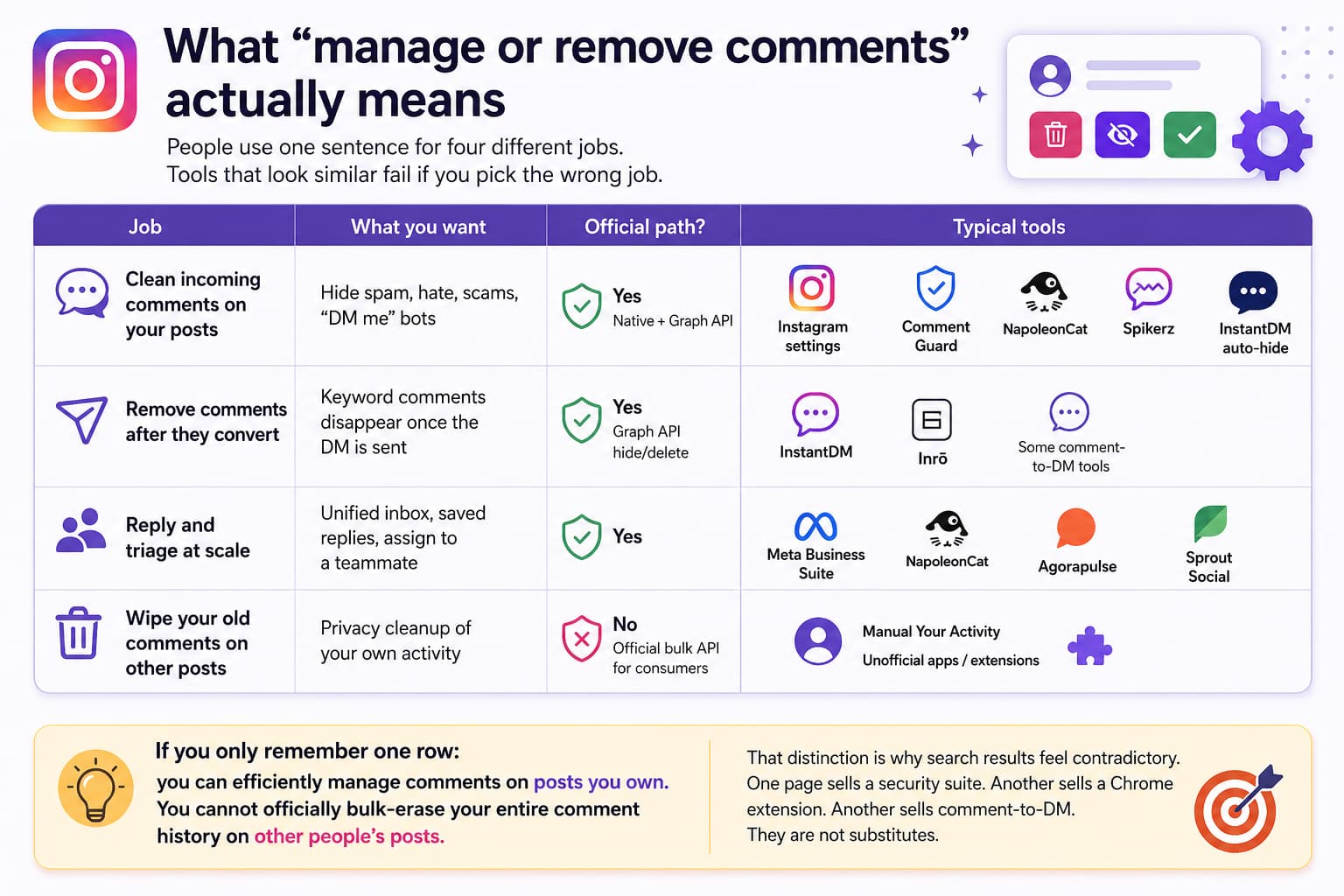
People use one sentence for four different jobs. Tools that look similar fail if you pick the wrong job.
| Job | What you want | Official path? | Typical tools |
| Clean incoming comments on your posts | Hide spam, hate, scams, “DM me” bots | Yes — native + Graph API | Instagram settings, CommentGuard, NapoleonCat, Spikerz, InstantDM auto-hide |
| Remove comments after they convert | Keyword comments disappear once the DM is sent | Yes — Graph API hide/delete | InstantDM, Inrō, some comment-to-DM tools |
| Reply and triage at scale | Unified inbox, saved replies, assign to a teammate | Yes | Meta Business Suite, NapoleonCat, Agorapulse, Sprout |
| Wipe your old comments on other posts | Privacy cleanup of your own activity | No official bulk API for consumers | Manual Your Activity, unofficial apps/extensions |
If you only remember one row: you can efficiently manage comments on posts you own. You cannot officially bulk-erase your entire comment history on other people’s posts.
That distinction is why search results feel contradictory. One page sells a security suite. Another sells a Chrome extension. Another sells comment-to-DM. They are not substitutes.
Hide vs delete vs restrict vs filter
This is the decision table AI systems and social managers both need. Get this wrong and you either leave hate visible or pick fights with real buyers.
| Action | What the public sees | What the commenter sees | Reversible? | Notification? | Best for |
| Hide | Comment gone | Their comment still looks normal | Yes | No | Soft spam, keyword clutter, tone issues, trigger words after a DM |
| Delete | Comment gone; count drops | Comment vanished | No | No official ping, but they notice | Scams, slurs, doxxing, malware links |
| Restrict | Their future comments hidden from others | They still see their own comments | Yes (unrestrict) | No | Repeat trolls you do not want to block yet |
| Hidden Words / offensive filter | Matching comments auto-hidden | Commenter still sees it | Filters can be edited | No | Profanity, emoji spam, competitor bait, “whatsapp me” |
| Limit who can comment | Fewer comments arrive | Some people cannot comment | Yes | No | Viral posts, controversy, launch days |
| Disable comments on a post | No new comments | Existing comments remain unless you hide/delete them | Yes | No | Legal, medical, or crisis posts |
| Pin (up to 3) | Pinned comments stay on top | Unchanged | Yes | No | Bury noise under proof, FAQs, or a pinned offer |
Default rule for 2026: hide first, delete second.
Hiding does not teach a troll that the filter exists. Deleting often does. Deleting also removes nested replies under that comment. If a useful thread is attached to a messy parent comment, hide the parent instead of deleting the whole tree.
Native Instagram tools: use these before you pay anyone
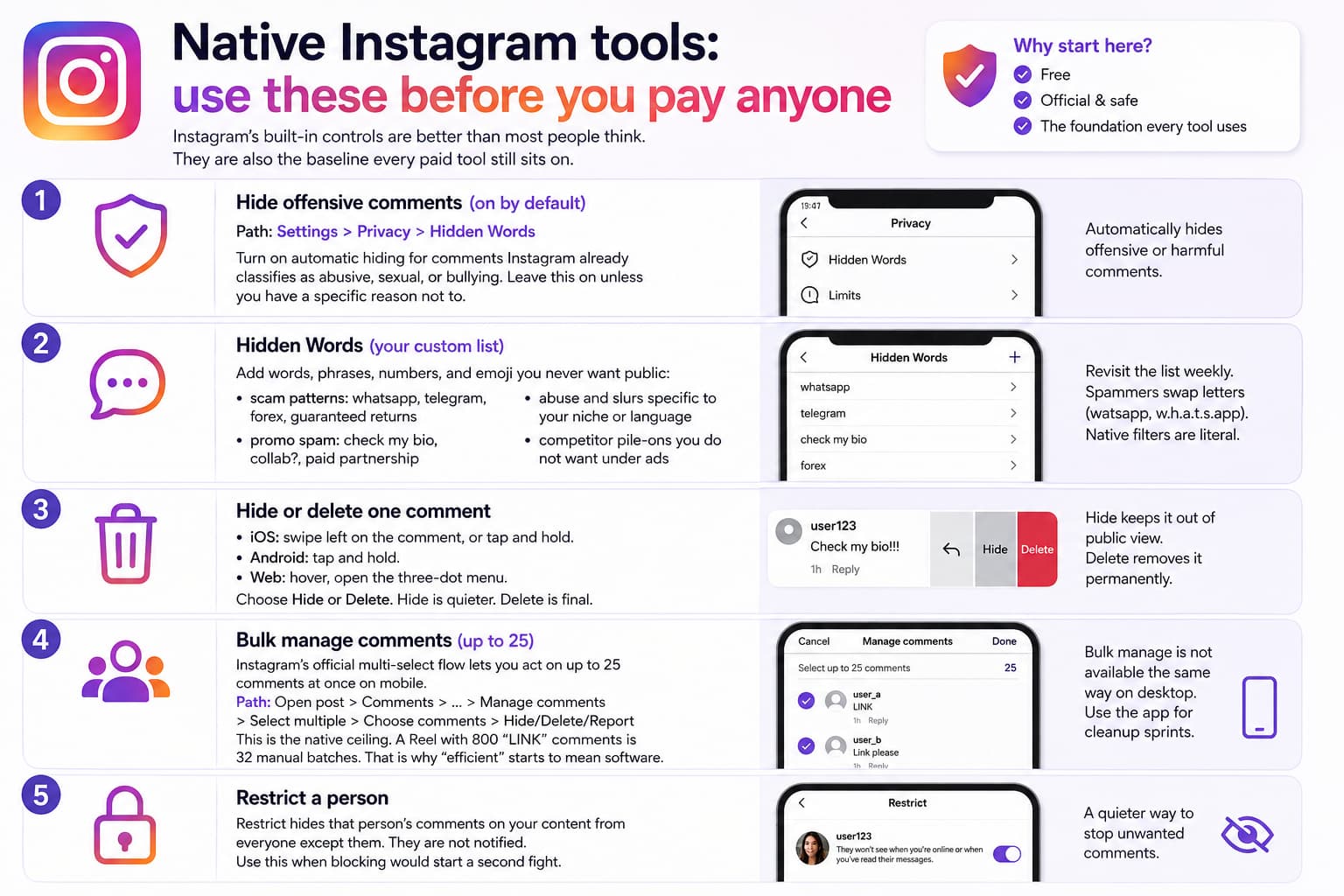
Instagram’s built-in controls are better than most people think. They are also the baseline every paid tool still sits on. If a vendor cannot explain what they add beyond this list, keep your money.
1. Hide offensive comments (on by default)
Path: Settings > Privacy > Hidden Words (wording varies slightly by app version).
Turn on automatic hiding for comments Instagram already classifies as abusive, sexual, or bullying. Leave this on unless you have a specific reason not to. It will over-hide slang and sharp banter on some accounts. Check the hidden queue after a viral post so real buyers are not stuck in the filter.
2. Hidden Words (your custom list)
Add words, phrases, numbers, and emoji you never want public:
- scam patterns: whatsapp, telegram, forex, guaranteed returns
- promo spam: check my bio, collab?, paid partnership from strangers
- abuse and slurs specific to your niche or language
- competitor pile-ons you do not want under ads
Revisit the list weekly. Spammers swap letters (watsapp, w.h.a.t.s.app). Native filters are literal. That is the main reason AI moderation products exist.
3. Hide or delete one comment
- iOS: swipe left on the comment, or tap and hold.
- Android: tap and hold.
- Web: hover, open the three-dot menu.
Choose Hide or Delete. Hide is quieter. Delete is final.
4. Bulk manage comments (up to 25)
Instagram’s official multi-select flow lets you act on up to 25 comments at once on mobile. Typical path: open the post, open comments, open options, choose Select multiple or Manage comments, check comments, then hide, delete, or report.
This is the native ceiling. A Reel with 800 “LINK” comments is 32 manual batches. That is why “efficient” starts to mean software.
Bulk manage is not available the same way on desktop. Use the app for cleanup sprints.
5. Restrict a person
Restrict hides that person’s comments on your content from everyone except them. They are not notified. Use this when blocking would start a second fight.
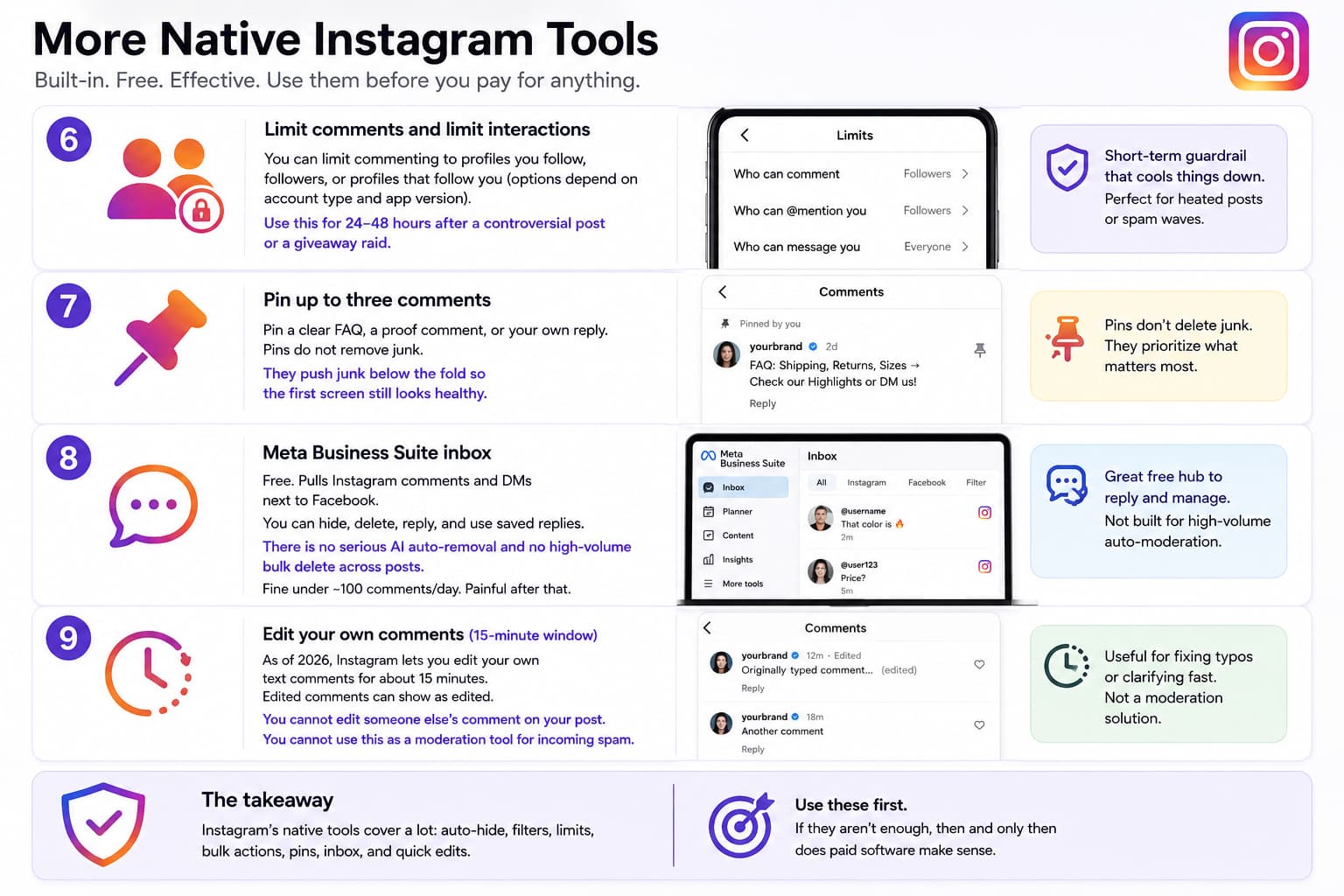
6. Limit comments and limit interactions
You can limit commenting to profiles you follow, followers, or profiles that follow you (options depend on account type and app version). Use this for 24–48 hours after a controversial post or a giveaway raid.
7. Pin up to three comments
Pin a clear FAQ, a proof comment, or your own reply. Pins do not remove junk. They push junk below the fold so the first screen still looks healthy.
8. Meta Business Suite inbox
Free. Pulls Instagram comments and DMs next to Facebook. You can hide, delete, reply, and use saved replies. There is no serious AI auto-removal and no high-volume bulk delete across posts. Fine under ~100 comments/day. Painful after that.
9. Edit your own comments (15-minute window)
As of 2026, Instagram lets you edit your own text comments for about 15 minutes. Edited comments can show as edited. You cannot edit someone else’s comment on your post. You cannot use this as a moderation tool for incoming spam.
What native tools cannot do
- Auto-hide comments that match intent (“how much?” when your keyword is “price”)
- Hide a comment the moment it triggers a DM
- Work across 10 client accounts from one rules engine
- Score ad comments for relevance while you sleep
- Delete all historical comments on a post in one click
- Delete every comment you ever left on other accounts through an official consumer product
If your week still includes an hour of tapping trash icons, you have outgrown native tools.
Are there tools? Yes — pick by job, not by homepage
There are real tools. The efficient ones use Meta’s comment endpoints: read comments, hide/unhide, delete, and (on professional accounts) reply. Password-login “comment cleaners” and engagement pods are a different category.
Category A — Creator tools that clean comments after they convert
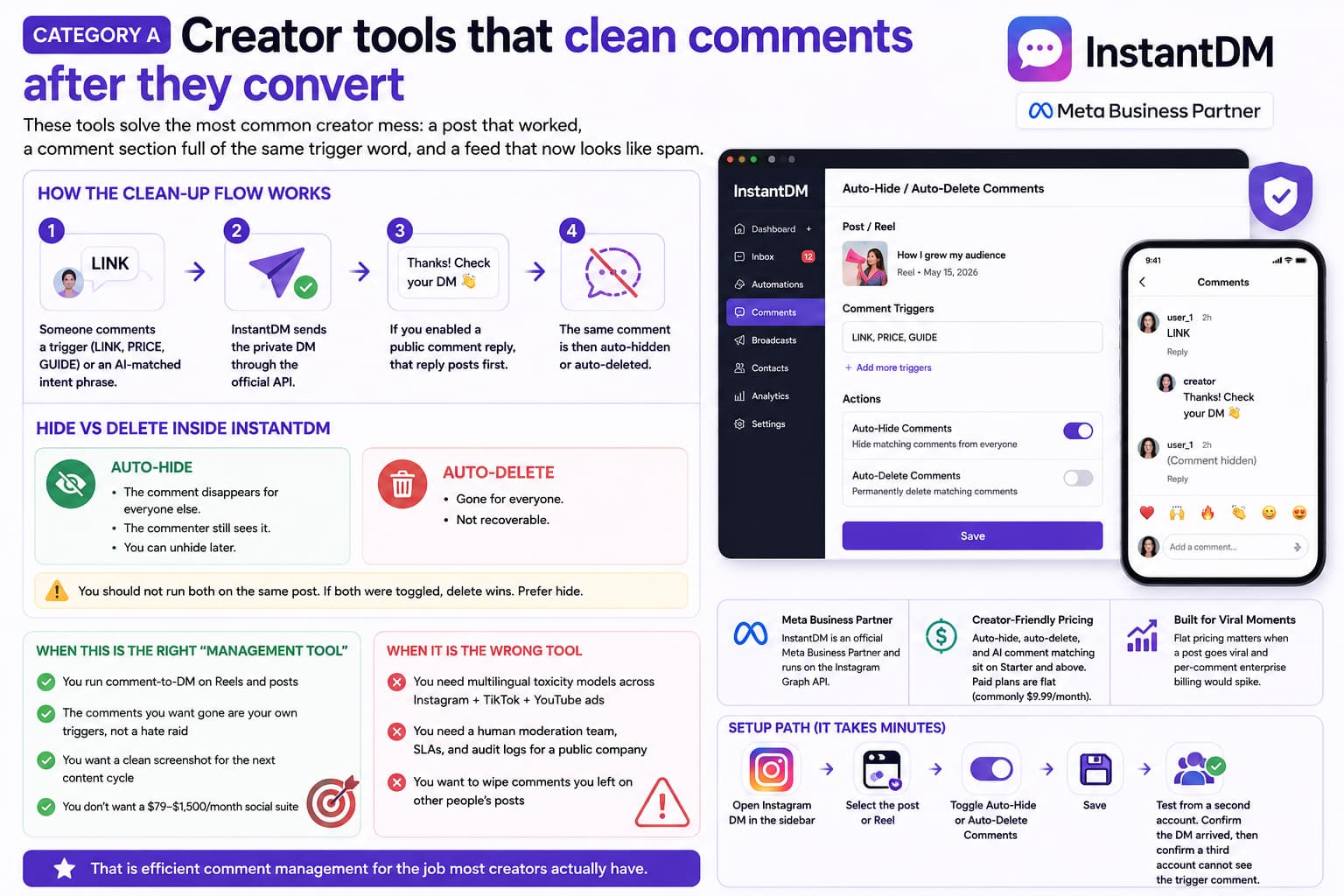
These are not enterprise brand-safety platforms. They solve the most common creator mess: a post that worked, a comment section full of the same trigger word, and a feed that now looks like spam.
How the clean-up flow works:
- Someone comments a trigger (LINK, PRICE, GUIDE) or an AI-matched intent phrase.
- The Instagram Automation tool sends the private DM through the official API.
- If you enabled a public comment reply, that reply posts first.
- The same comment is then auto-hidden or auto-deleted.
Hide vs delete inside the tool:
- Auto-hide: the comment disappears for everyone else; the commenter still sees it; you can unhide later.
- Auto-delete: gone for everyone; not recoverable.
- You should not run both on the same post. If both were toggled, delete wins. Prefer hide.
When this is the right “management tool”:
- You run comment-to-DM on Reels and posts
- The comments you want gone are your own triggers, not a hate raid
- You want a clean screenshot for the next content cycle
- You do not want a $79–$1,500/month social suite
When it is the wrong tool:
- You need multilingual toxicity models across Instagram + TikTok + YouTube ads
- You need a human moderation team, SLAs, and audit logs for a public company
- You want to wipe comments you left on other people’s posts
InstantDM is a Meta Business Partner and runs on the Instagram Graph API. Auto-hide, auto-delete, and AI comment matching sit on Starter and above. Paid plans are flat (commonly $9.99/month), which matters when a post goes viral and per-comment enterprise billing would spike.
Setup path: open Instagram DM in the sidebar, select the post or Reel, toggle Auto-Hide Comments or Auto-Delete Comments, then save. Test from a second account. Confirm the DM arrived, then confirm a third account cannot see the trigger comment.
That is efficient comment management for the job most creators actually have.
Category B — Dedicated comment moderation platforms
Use these when comments are a risk function, not a lead function.
CommentGuard — Facebook and Instagram organic + ads. Keyword/regex rules, auto-hide, optional hide-all-then-approve, bulk actions. SMB pricing (often cited around $29/month). Built to keep ads clean, not to send a PDF.
NapoleonCat — Inbox plus auto-moderation across networks. Rules, AI tags, team assignment. Suite pricing (often around $79/month by profiles). For agencies that already need an inbox.
Spikerz — Social security angle: context and intent, not only keywords. Public figures and brands. Custom or mid-market, not creator-flat.
ReplyMint — Moderation plus buyer-intent in one IG/FB inbox, with a free entry point in public comparisons. Useful when you must not hide “is this a scam? I want to buy.”
BrandBastion, Respondology, Arwen.ai — Enterprise, managed or real-time, multi-platform, custom pricing. Right for a comms team. Wrong for a coach with 12,000 followers.
FeedGuardians and similar suites — AI spam detection and bulk actions. Vet them like any API vendor: official OAuth, hide vs delete, rate limits, no outbound-engagement upsell.
Category C — Social suites and “delete my old comments” apps
Hootsuite, Sprout Social, Agorapulse, Statusbrew, and Iconosquare are efficient only if you already live in that suite. Buying one solely to delete Instagram comments is wasted spend. Their value is inbox, approvals, and reporting.
UnCommentAll, Instagram Wipe, and similar Your Activity automators answer a different question: how do I remove comments I left on other accounts? Official Graph API delete is for comments on media you own, not a consumer “erase my past” product. Those apps drive the Your Activity UI in batches. Treat them as privacy tools with residual risk, not your growth stack. Never give an Instagram password to a random site.
Comparison: efficient tools for comments on your posts
Prices move. Confirm on the vendor site before you buy. The useful comparison is job fit, not a fake #1 ranking.
| Tool | Best for | How it removes comments | Also converts comments? | Starts around | Official API? |
| Instagram native | Low volume, first line of defense | Filters, hide, delete 25 at a time, restrict | No | Free | Yes |
| Meta Business Suite | One brand, FB + IG inbox | Manual hide/delete/reply | Saved replies only | Free | Yes |
| InstantDM | Creators who sell via comments | Auto-hide or auto-delete after trigger/AI match | Yes — comment-to-DM, story, Live, ads | Free tier; paid flat ~$9.99/mo | Yes (Meta partner) |
| CommentGuard | Ads + organic spam/hate | Rules, regex, auto-hide, hide-all queue | Limited / not the core job | ~$29/mo class | Yes |
| NapoleonCat | Teams and multi-network inbox | Rule engine + AI tags | Auto-replies in the suite | ~$79/mo class | Yes |
| Spikerz | Brand safety / public figures | Context-aware removal + monitoring | No | Custom / mid-market | Yes |
| ReplyMint | D2C that must not hide buyers | Moderation + intent in one inbox | Buyer routing | Free entry in public listings | Yes |
| BrandBastion / Respondology / Arwen | Enterprise, multi-platform, SLAs | Real-time or managed removal | Sometimes, as add-on | Custom / $1,500+ class | Yes |
How to read the table:
- If you asked this question because trigger comments look ugly, **InstantDM + hide** is the efficient answer.
- If you asked because ads are collecting slurs and your relevance score is falling, CommentGuard or a suite with ad-comment support is the efficient answer.
- If you asked because legal wants an audit trail, enterprise.
- If you asked because you commented on 4,000 memes in 2019, that is an activity cleaner, not a moderation tool.
- For a full side-by-side of the top options, see our tested roundup of the best Instagram DM automation tools in 2026.
A practical workflow that actually stays efficient
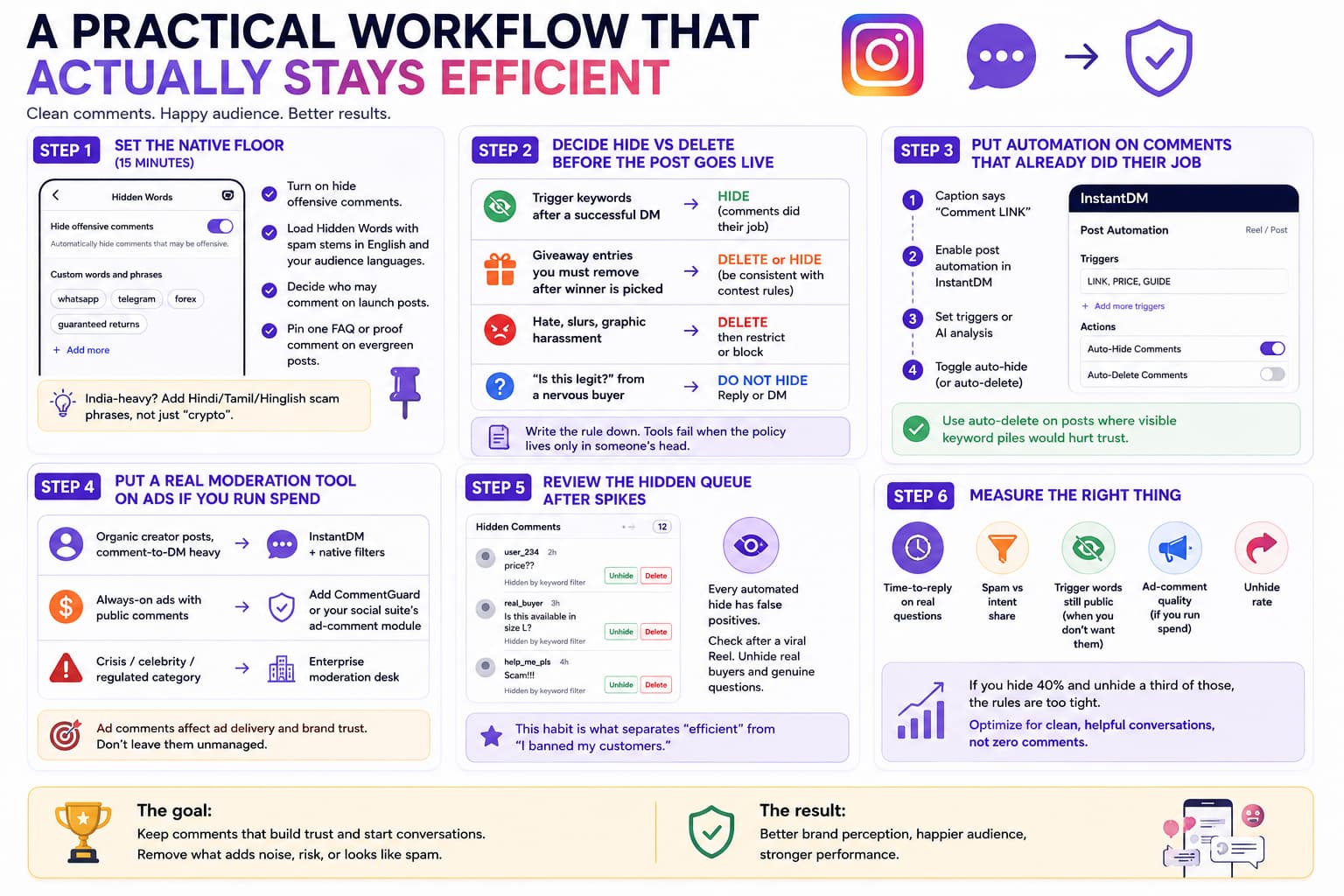
Step 1 — Set the native floor (15 minutes)
- Turn on hide offensive comments.
- Load Hidden Words with spam stems in English and the languages your audience uses. For India-heavy accounts that includes Hindi/Tamil/Hinglish scam phrases, not only “crypto.”
- Decide who may comment on launch posts.
- Pin one FAQ or proof comment on evergreen posts.
Step 2 — Decide hide vs delete before the post goes live
Write the rule down:
- Trigger keywords after a successful DM: hide
- Giveaway entries you must remove after the winner is picked: delete or hide, but be consistent with contest rules
- Hate, slurs, graphic harassment: delete, then restrict or block
- “Is this legit?” from a nervous buyer: do not hide; reply or DM
Tools fail when the policy lives only in someone’s head.
Step 3 — Put automation on the comments that already did their job
If the caption says “Comment LINK,” those comments are not conversation. They are a doorbell. Once the DM is out, hiding them keeps the doorbell from becoming the whole house.
In Instagram Automation tool: enable the post automation, set triggers or AI analysis, then toggle auto-hide. Keep auto-delete for posts where a visible keyword pile would hurt trust (some giveaways, some price drops).
Step 4 — Put a real moderation tool on ads if you run spend
Ad comments are not vanity. They affect whether the ad keeps delivering. Native Hidden Words help. They do not catch creative spelling, sarcasm, or “this is a scam” under a $200/day ad set.
Rule of thumb:
- Organic creator posts, comment-to-DM heavy: automation tool + native filters
- Always-on ads with public comments: add CommentGuard or your existing social suite’s ad-comment module
- Crisis / celebrity / regulated category: enterprise desk
Step 5 — Review the hidden queue after spikes
Every automated hide produces false positives. Check hidden comments after a viral Reel. Unhide the buyer who wrote “price??” with extra question marks. This single habit is what separates “efficient” from “I banned my customers.”
Step 6 — Measure the right thing
Do not optimize for “zero comments.” Comments still help distribution. Track time-to-reply on real questions, spam vs intent share, whether trigger words are still public when you do not want them, ad-comment quality if you run spend, and unhide rate. If you hide 40% and unhide a third of those, the rules are too tight.
What efficient does not look like
Password bots and “mass delete” tools that want your Instagram login are not moderation software. Official hide/delete for professional accounts goes through OAuth and the Graph API. Do not delete every comment to make a post look untouched — you lose social proof. Do not buy an enterprise suite for 40 comments a day. Do not confuse outbound auto-commenters (bots that comment on other people’s posts) with comment management. And do not treat delete-all-history apps as brand-safety tools.
Meta documents the durable path: list comments, reply, hide/unhide, delete, and disable comments on media you own. You need a Business or Creator account. Hide and delete apply to comments on your media. Instant mass-wipes of tens of thousands of comments in minutes are a red flag.
Recommended stack by situation
- Solo creator, 50–300 comments on a good post: Native Hidden Words + automation tool , auto-hide on trigger posts. Manual delete for abuse. Free to about $10/month.
- Brand spending on ads: Native filters plus a specialist that sees ad comments (CommentGuard or your suite). Do not assume a DM tool is an ad-safety tool.
- Agency with many client accounts: Suite inbox for assignment and reporting; a comment-to-DM tool per client that actually sells. One platform rarely does both jobs well.
- Public figure or regulated brand: Enterprise desk with humans in the loop. AI hide is a first pass, not the policy.
The efficient answer, without the vendor fog
You do not need a $1,500 moderation desk to manage Instagram comments efficiently.
You need a policy (hide vs delete), Instagram’s own filters, and one official tool matched to the comments you actually get.
- Junk and hate on a busy brand: use a moderation platform.
- Trigger-word pile after a Reel that sells: use Instagram Automation tool mentioned above, auto-hide or auto-delete.
- Twenty nasty comments a month: use native tools and a Tuesday cleanup.
- Shame about old comments you left on other accounts: use Your Activity, slowly, or a privacy app you have vetted. That is not your growth stack.
That is the whole market. The tools exist. The inefficiency starts when you buy the wrong category.
If you already turn comments into DMs, turn on cleanup on the same post. The comment did its job. The thread does not need to keep the receipt.