
Validate a specific outcome people already pay for, pre-sell a minimum viable course, then host it on Thinkific, Teachable, systeme.io, Podia, or Stan Store. Create a Stripe or PayPal payment link. On Instagram, ask people to comment COURSE and auto-DM the checkout link. That path is faster than a link-in-bio shopfront because the buyer is already warm and the link arrives in seconds. You can go from idea to first sale in 7–14 days for $0–$100 in tools if you skip a studio and skip building a full website first.
Verdict
Question | Answer |
Fastest path to first sale? | Pre-sell a minimum viable course, then fulfill with 8–20 short videos |
Do you need a website? | No. A host, a payment link, and Instagram DMs are enough |
Best $0 start | systeme.io free plan (1 course) or a Thinkific or Podia trial |
Best dedicated course host | Thinkific if you want 0% platform fees on paid plans. Teachable if you want the most familiar student dashboard |
Best Instagram-native checkout | Stan Store ($29/month, 0% platform fee) plus Stripe |
Best conversion surface | Comment-to-DM beats a buried link in bio |
Realistic conversion range | Warm comment to payment often lands 12–20% on $29–$99 offers. Shopfront pages often land 5–10%. 15–30% is a best-case ceiling, not a guarantee |
Time and cash to first sale | 1–2 weeks and $0–$100 if you use free or trial plans |
Create once. Sell the same file forever. No inventory and no shipping. Courses fail when nobody asked to buy them, not when the camera is average.
What you are building
A course is a packaged transformation: the student starts at Problem A and finishes at Result B. The version that sells first is a minimum viable course:
- 3–6 modules
- 10–20 lessons
- 3–7 minutes per video
- One worksheet or checklist per module
- One promised result you can demonstrate
That is enough to sell. Expand after students pay and tell you what was missing.
7-step plan
Step | Focus | Action | Time | Cost |
1 | Validate and pre-sell | Specific outcome, search proof, competitor proof, paid waitlist | 1–2 days | $0 |
2 | Curriculum | 3–6 modules on the shortest path to the result | 1–2 days | $0 |
3 | Production | Phone, quiet room, CapCut, DaVinci, or Loom | 3–7 days | $0–$50 |
4 | Platform | Host on systeme.io, Thinkific, Teachable, Podia, or Stan Store | 30–60 min | $0–$39+/month |
5 | Price | Charge for the result, not the runtime | 1 hour | $0 |
6 | Checkout | Stripe or PayPal payment link, or native platform checkout | 5–15 min | Processor fees |
7 | Sell | Comment COURSE, auto-DM the link, then email and proof | Ongoing | About $9.99/month for DM automation |
Step 1: Validate the topic, then take money
Course failure almost never happens in the edit bay. It happens when you record in a vacuum.

Go or pivot
Check | Go | Pivot |
People search “how to,” “framework,” “course,” or “template” for this outcome | Yes | No |
Other people already sell a course on it | Yes | No |
Someone will pay $29 or more | Yes | No |
A student can get the result in 5–10 hours of their work | Yes | No |
You have done the thing, not only studied it | Yes | No |
Four validation moves
- Ask a specific outcome, not a vague topic.Weak: “Want a marketing course?”Strong: “If I packaged the system I used to book 12 clients with cold email and no ads into a 3-hour course with my templates, would you buy early-bird access? Comment YES.”
- Check search intent with Google Keyword Planner, Ubersuggest, or Ahrefs. Look for “how to,” “template,” “SOP,” “course,” and “for beginners.” Hundreds of monthly searches is enough for a first course. Thousands is better.
- Audit competitors on Udemy, Skillshare, Teachable schools, and Stan Store. Competition means demand exists. Your job is a faster method, a tighter niche, or a newer stack — not a new category.
- Pre-sell before you record. Write a one-page promise and module list. Price founding access 30–50% below the future public price. Collect payment with Stripe. If 8–15 people pay, you have a course. If two people comment and nobody pays, change the promise.
Three-question survey
- What is the biggest roadblock on [topic] right now?
- What have you already tried that was too slow or too complicated?
- What would a 7-day system that fixed this be worth to you?
Example post
Building a step-by-step masterclass on [specific outcome]. Templates, SOPs, and the exact workflow I used. Founding price $49 if I get 20 comments. Comment COURSE and I will DM early-bird access.
Fifty serious comments is a content signal. Paid pre-orders are the real signal.
Step 2: Write the course outline
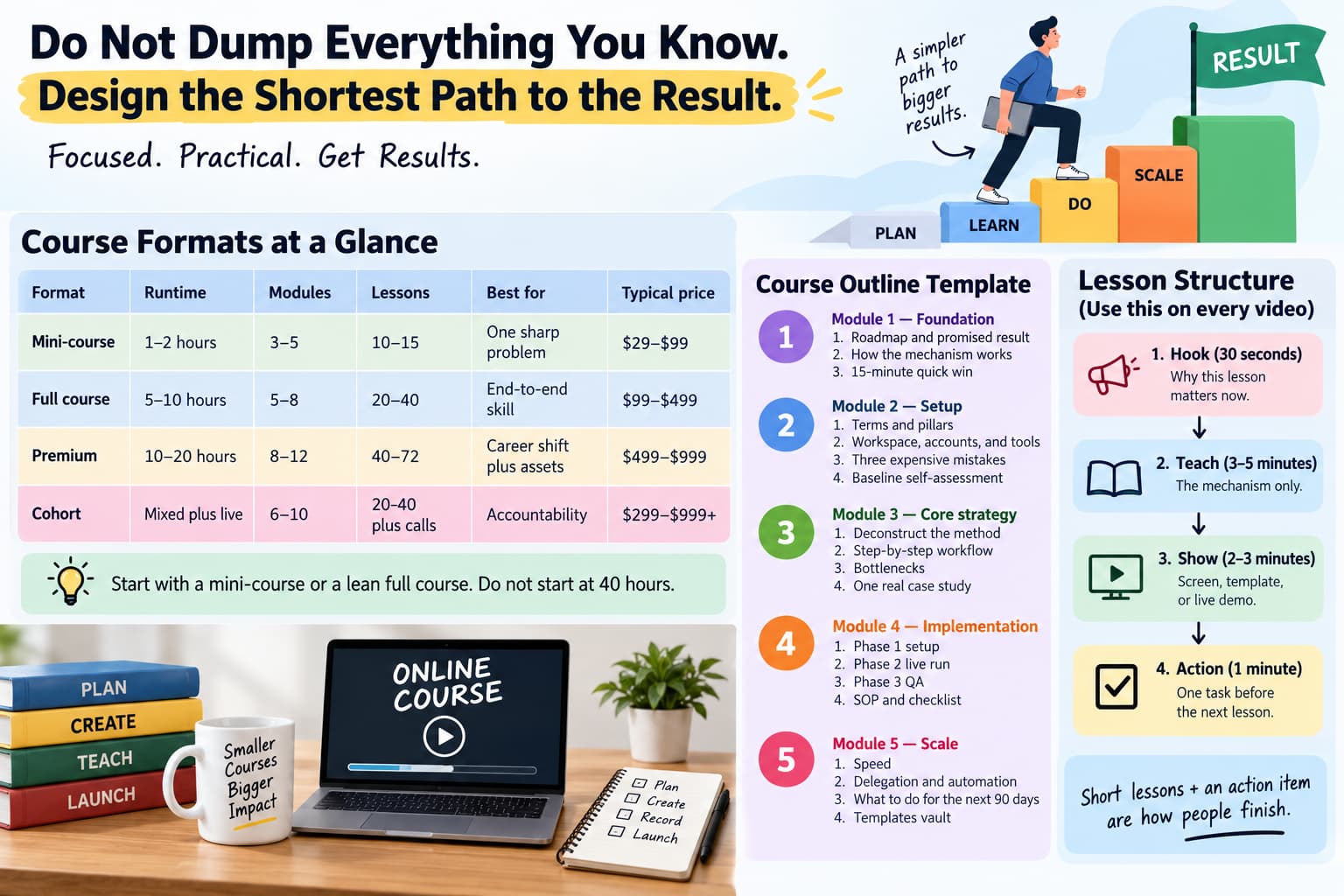
Do not dump everything you know. Design the shortest path to the result.
Format | Runtime | Modules | Lessons | Best for | Typical price |
Mini-course | 1–2 hours | 3–5 | 10–15 | One sharp problem | $29–$99 |
Full course | 5–10 hours | 5–8 | 20–40 | End-to-end skill | $99–$499 |
Premium | 10–20 hours | 8–12 | 40–72 | Career shift plus assets | $499–$999 |
Cohort | Mixed plus live | 6–10 | 20–40 plus calls | Accountability | $299–$999+ |
Start with a mini-course or a lean full course. Do not start at 40 hours.
Outline template
Module 1 — Foundation
- Roadmap and promised result
- How the mechanism works
- 15-minute quick win
Module 2 — Setup
- Terms and pillars
- Workspace, accounts, and tools
- Three expensive mistakes
- Baseline self-assessment
Module 3 — Core strategy
- Deconstruct the method
- Step-by-step workflow
- Bottlenecks
- One real case study
Module 4 — Implementation
- Phase 1 setup
- Phase 2 live run
- Phase 3 QA
- SOP and checklist
Module 5 — Scale
- Speed
- Delegation and automation
- What to do for the next 90 days
- Templates vault
Lesson structure
Use this on every video:
- Hook (30 seconds) — why this lesson matters now
- Teach (3–5 minutes) — the mechanism only
- Show (2–3 minutes) — screen, template, or live demo
- Action (1 minute) — one task before the next lesson
Long lecture-style courses often have single-digit completion rates. Short lessons plus an action item are how people finish.
Step 3: Record without a studio
Students buy clarity and a result. They do not buy a cinema camera.
Need | Use | Cost |
Camera | Phone at 1080p, 30 or 60 fps, eye level, stable | $0 |
Microphone | Quiet room, wired earbuds, or a USB mic such as the Fifine K669B or Samson Q2U | $0–$50 |
Light | Face a window. No bright window behind you | $0 |
Screen capture | Loom, OBS, or QuickTime | $0 |
Edit | CapCut Desktop, DaVinci Resolve, or iMovie | $0 |
Keep lessons to 3–7 minutes. Talk like a peer, not a narrator. Never leave a static talking head on screen for more than 45 seconds. Batch the work: slides on day 1, modules 1–3 on day 2, modules 4–6 on day 3.
Cut silence and restarts. Put numbers and shortcuts on screen. Optional quiet background music under dialogue. Export 1080p MP4, H.264.
AI is useful for outlines, slide bullets, transcripts, captions, and short clips. Do not use it to invent case studies, fake student results, or teach a skill you have not performed.
Step 4: Pick a host
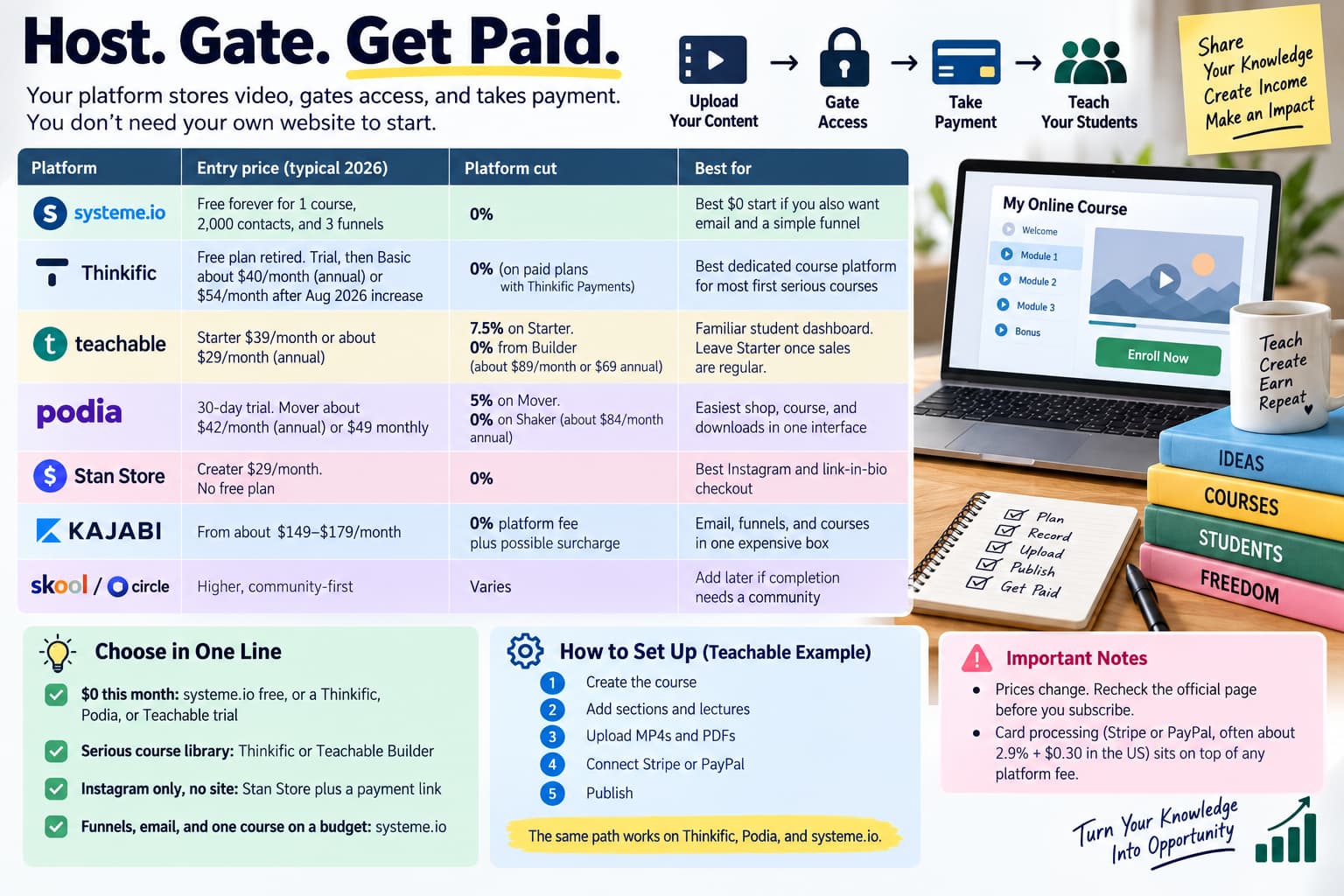
Your host stores video, gates access, and can take payment. You do not need your own website to start.
Prices change. Recheck the official page before you subscribe. Card processing (Stripe or PayPal, often about 2.9% + $0.30 in the US) sits on top of any platform fee.
Platform | Entry price (typical 2026) | Platform cut | Best for |
systeme.io | Free forever for 1 course, 2,000 contacts, and 3 funnels | 0% | Best $0 start if you also want email and a simple funnel |
Thinkific | Free plan retired. Trial, then Basic about $40/month billed annually or $54/month after the August 2026 increase | 0% platform fee on paid plans when you use Thinkific Payments | Best dedicated course platform for most first serious courses |
Teachable | Starter $39/month or about $29/month billed annually | 7.5% on Starter. 0% from Builder (about $89/month or $69 annual) | Familiar student dashboard. Leave Starter once sales are regular |
Podia | 30-day trial. Mover about $42/month billed annually or $49 monthly | 5% on Mover. 0% on Shaker (about $84/month annual) | Easiest shop, course, and downloads in one interface |
Stan Store | Creator $29/month. No free plan | 0% platform fee | Best Instagram and link-in-bio checkout |
Kajabi | From about $149–$179/month | 0% platform fee plus possible surcharge | Email, funnels, and courses in one expensive box |
Skool or Circle | Higher, community-first | Varies | Add later if completion needs a community |
Choose in one line:
- $0 this month: systeme.io free, or a Thinkific, Podia, or Teachable trial
- Serious course library: Thinkific or Teachable Builder
- Instagram only, no site: Stan Store plus a payment link
- Funnels, email, and one course on a budget: systeme.io
On Teachable: create the course, add sections and lectures, upload MP4s and PDFs, connect Stripe or PayPal, publish. The same path works on Thinkific, Podia, and systeme.io.
Step 5: Price the result, not the hours
A 90-minute course that saves a business $5,000 can out-earn a 40-hour theory dump.
Format | Typical range | Why someone pays |
Mini-course | $29–$99 | Fast answer, impulse buy |
Full course | $99–$499 | Complete skill path |
Premium | $499–$999 | Deep change plus assets or community |
Cohort | $299–$999+ | Live feedback |
Membership | $9–$99/month | Updates and ongoing access |
Price | Sales per month for $1,000 | Sales per month for $5,000 |
$49 | 21 | 103 |
$99 | 11 | 51 |
$199 | 6 | 26 |
$499 | 3 | 11 |
$999 | 2 | 6 |
Start at the low end if you have no testimonials. Raise after 10 results. A founding-cohort deadline only works if the date is real.
Step 6: Make a payment link
Use the host’s native checkout or a direct Stripe or PayPal link. Direct links are what you paste into Instagram DMs, emails, and posts.
Stripe: Dashboard - Payment links - New - add product, title, thumbnail, one-time price - after payment, send buyers to course access - copy the buy.stripe.com URL.
PayPal: Business account - Pay & Get Paid - shareable link - item name and fixed amount - turn off shipping for digital goods - redirect to the course access URL.
Processor fees apply on every platform.
Step 7: Sell where the comment already happened
Instagram comment-to-DM
You do not need a website to sell on Instagram.
- Host the course.
- Create the payment or enrollment link.
- Post a Reel or carousel. Caption: Comment COURSE and I will send the link.
- Automation DMs the link in seconds.
- They pay.
- The host grants access.
Metric | Link-in-bio shopfront | Comment to DM |
Typical conversion on intent traffic | 5–10% | Often 12–20% on $29–$99 offers. 15–30% is best-case |
Response time | Hours to a day | Seconds |
Follow-up | Manual | Can stay in the chat |
Context | They have to hunt the shop | They already raised a hand |
Price, proof, niche, and how warm the commenter is change the number. Do not advertise a guaranteed conversion rate.
InstantDM ($9.99/month) can send the course link when someone comments COURSE, SYLLABUS, PRICE, or DEMO, and it works next to Teachable, Thinkific, Kajabi, Podia, and Stan Store. Manychat and other official Meta API tools can do the same job. Use a Meta Business Partner. Unofficial scrapers get accounts restricted.
Comment | What the DM should send |
COURSE | Promise, curriculum, checkout |
SYLLABUS | Module list and a sample lesson |
PRICE | Tiers and founding deadline |
DEMO | Free workshop or replay |
YES | Early-bird link |
Email list
Instagram reach is rented. Email is owned. Capture the address inside the DM or on the thank-you page.
- Announce the course and the founding price.
- Show what they will learn, plus proof.
- Deadline.
- Last call plus a bonus.
Free workshop to paid course
Run a 45–60 minute live session on Instagram or Zoom. Teach one win. Pitch the full system near the end. Send the course link to everyone who commented WORKSHOP.
Proof loop
Get results from the first 5–10 students. Post the screenshots. Caption: Want results like this? Comment COURSE.
After the first 10 students
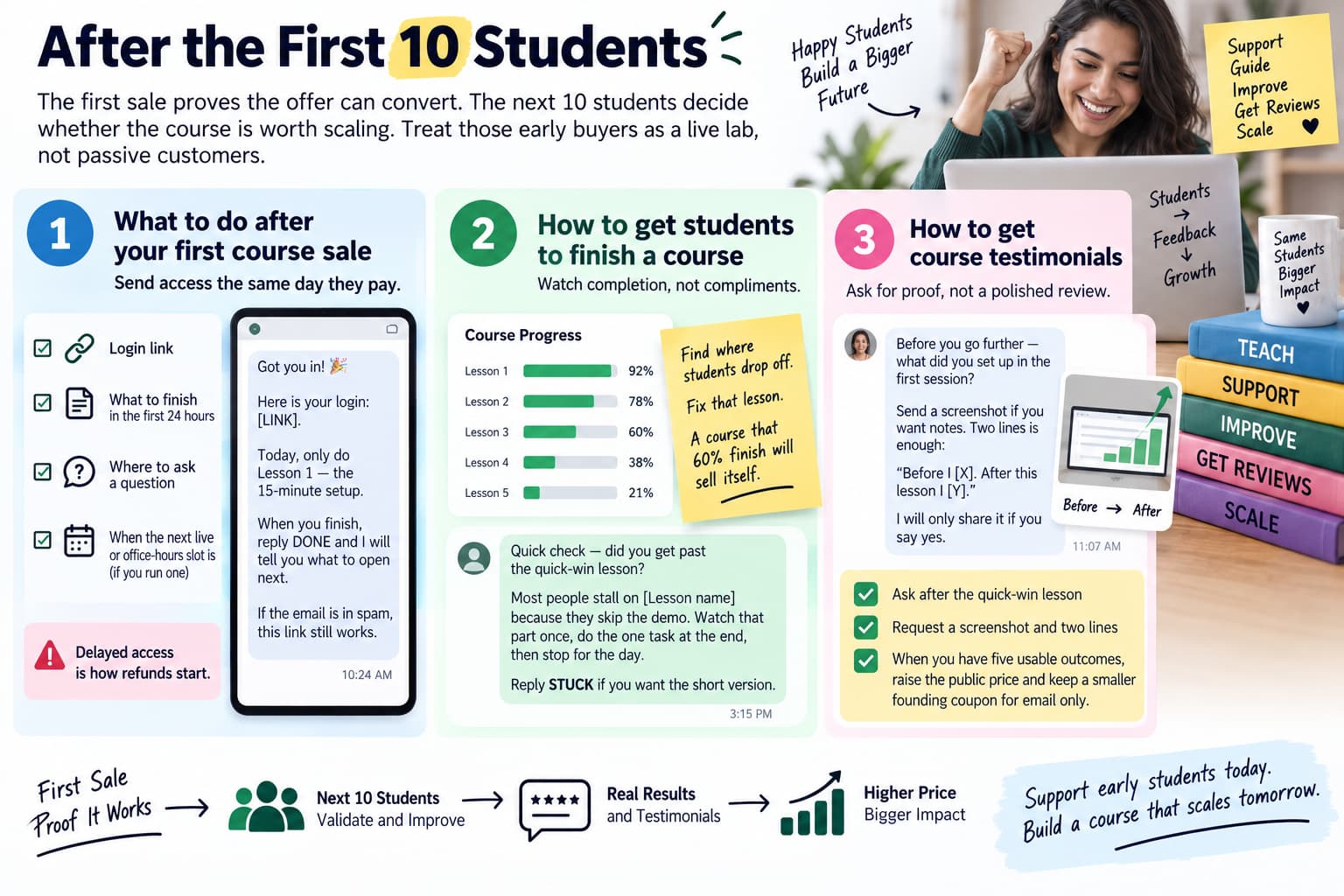
The first sale proves the offer can convert. The next 10 students decide whether the course is worth scaling. Treat those early buyers as a live lab, not as passive customers who disappear into a login screen.
What to do after your first course sale
Send access the same day they pay. The thank-you page or post-purchase email should contain four things only: the login link, what to finish in the first 24 hours, where to ask a question, and when the next live or office-hours slot is if you run one. Delayed access is how refunds start. If you sold through an Instagram DM, send a second message after payment that repeats the login and the first homework. Do not assume they saw the platform email.
Got you in. Here is your login: [LINK]. Today, only do Lesson 1 — the 15-minute setup. When you finish, reply DONE and I will tell you what to open next. If the email is in spam, this link still works.
How to get students to finish a course
Watch completion, not compliments. Open your host dashboard after week one and look at which lesson people stop on. That lesson is either too long, too vague, or missing a demo. Fix that video before you record anything new. A course that 60% of students finish will sell itself through screenshots. A course that 8% finish will quietly generate refunds and silence.
Quick check — did you get past the quick-win lesson? Most people stall on [Lesson name] because they skip the demo. Watch that part once, do the one task at the end, then stop for the day. Reply STUCK if you want the short version.
How to get course testimonials
Ask for proof before you ask for a polished review. After they complete the quick-win lesson, request a screenshot and two lines, not a paragraph. Specific results beat “great course!” on the next Reel. When you have five usable outcomes, raise the public price and keep a smaller founding coupon for email only.
Before you go further — what did you set up in the first session? Send a screenshot if you want notes. Two lines is enough: “Before I [X]. After this lesson I [Y].” I will only share it if you say yes.
How to collect emails from Instagram course sales
Capture the email even if Instagram made the sale. Add a one-field form inside the first lesson or on the thank-you page. You need a list you own when reach drops or a comment-to-DM tool changes. From there, a simple monthly note — one tip, one student result, one reminder that the course still exists — keeps the asset selling without another launch week.
Put your email here so the worksheets and the next live session hit your inbox, not only Instagram. Instagram can hide the thread. Email cannot.
What to do after launching an online course
Do not immediately build version two as a 40-hour rewrite. Add one missing worksheet, one FAQ lesson, and one office-hours recording. Then run the same COURSE comment again. The business is not a new curriculum every month. The business is the same transformation, cleaner delivery, and a checkout link that arrives in seconds.
If sales stall after the first burst, the product is rarely the only problem. Check three things: the Reel no longer names a result, the keyword is buried in the caption, or the DM sends people to a long sales page instead of a payment link. Fix the path before you fix the modules.
Key takeaways
- Validate with a paid pre-sell, not only comments.
- Ship 10–20 short lessons.
- Host on a real course platform. Do not wait for a custom website.
- Thinkific is not free in 2026. Teachable Starter is not 0% fees.
- Sell the checkout link in the Instagram DM at the moment of intent.
- Own the email. Instagram is distribution, not the business.
About The Author:
Aravindh Kumar is an ecommerce and Instagram growth expert with 8+ years of experience in online selling. He has worked with 500+ brands - including Forbes-listed companies - He has helped 200+ Instagram businesses grow their online presence.