Last updated: September 20, 2026
Quick answer: IG Direct is Instagram’s private inbox (DMs). On most phones, open the app and tap the paper airplane in the top-right of Home, or swipe left on the feed. On some 2025–2026 app versions the inbox is the Messages tab in the bottom bar. On desktop go to instagram.com/direct/inbox or click the messenger icon in the left sidebar. Messages from people you do not follow sit in Requests, not the main list.
Introduction:
If you want to slide into someone’s DMs, answer a customer query, or send a Reel to a friend, knowing how to get to IG Direct fast is essential. This guide shows you all the ways to open Instagram Direct Messages in 2026, on any device, with tips most people don’t know.
Why Knowing How to Get to IG Direct Matters in 2026
Instagram Direct is the single most used feature on the platform after the main feed. Over 2 billion people use Instagram Direct every month to send messages, share posts, and have private conversations. Whether you are trying to open your Instagram inbox to check a message from a friend, respond to a customer inquiry, or manage hundreds of DMs for your business, knowing every way to get to IG Direct saves you time every single day.
This guide covers every method to access IG Direct — on iPhone, Android, desktop browser, and even through direct links and QR codes. We also cover the Instagram inbox features most people never discover, common issues when your DMs are not working, and how businesses use IG Direct as a sales and support channel.
What is IG Direct?
IG Direct, also known as Instagram Direct, is Instagram’s private messaging function. Not as comments to the public or everyone can see story replies, DMs are only visible to you and the people you’re messaging.
You may submit:
- SMS (text messaging)
- Media (including disappearing photos and videos)
- Voice notes
- Reactions with emoji, stickers, and GIFs
- Reels, Posts, or Stories shared from your Feed
- Places and links
- Stickers with music
You can have one-on-one conversations, or group chats of up to 32 people, with Instagram Direct. With more than 2 billion active Instagram users, DMs have become one of the most-used private messaging tools in the world — and for businesses, a primary channel for customer support, sales, and community building.
What people mean by “DMs IG” and “Instagram messages direct”?
IG Direct, Instagram Direct, Instagram DMs, and “DMs IG” are the same place. It is the private chat inside Instagram — not comments, not public Story stickers, and not Broadcast Channels.
In Direct you can send text, photos and videos (including view-once), voice notes, posts, Reels, Stories, clickable links, stickers, GIFs, music, plus voice and video calls. Chats can be one-to-one or groups (typically up to 32 people). Only people in the thread see the messages. They do not appear on your profile or in search.
IG Direct vs Instagram Inbox: What Is the Difference?
Many people confuse IG Direct with the Instagram inbox, but they are the same thing. IG Direct is the feature name Instagram uses for its messaging system. The Instagram inbox is where all your DMs, message requests, and group chats live. When someone says "check your IG Direct" or "check your Instagram inbox," they mean the same place.
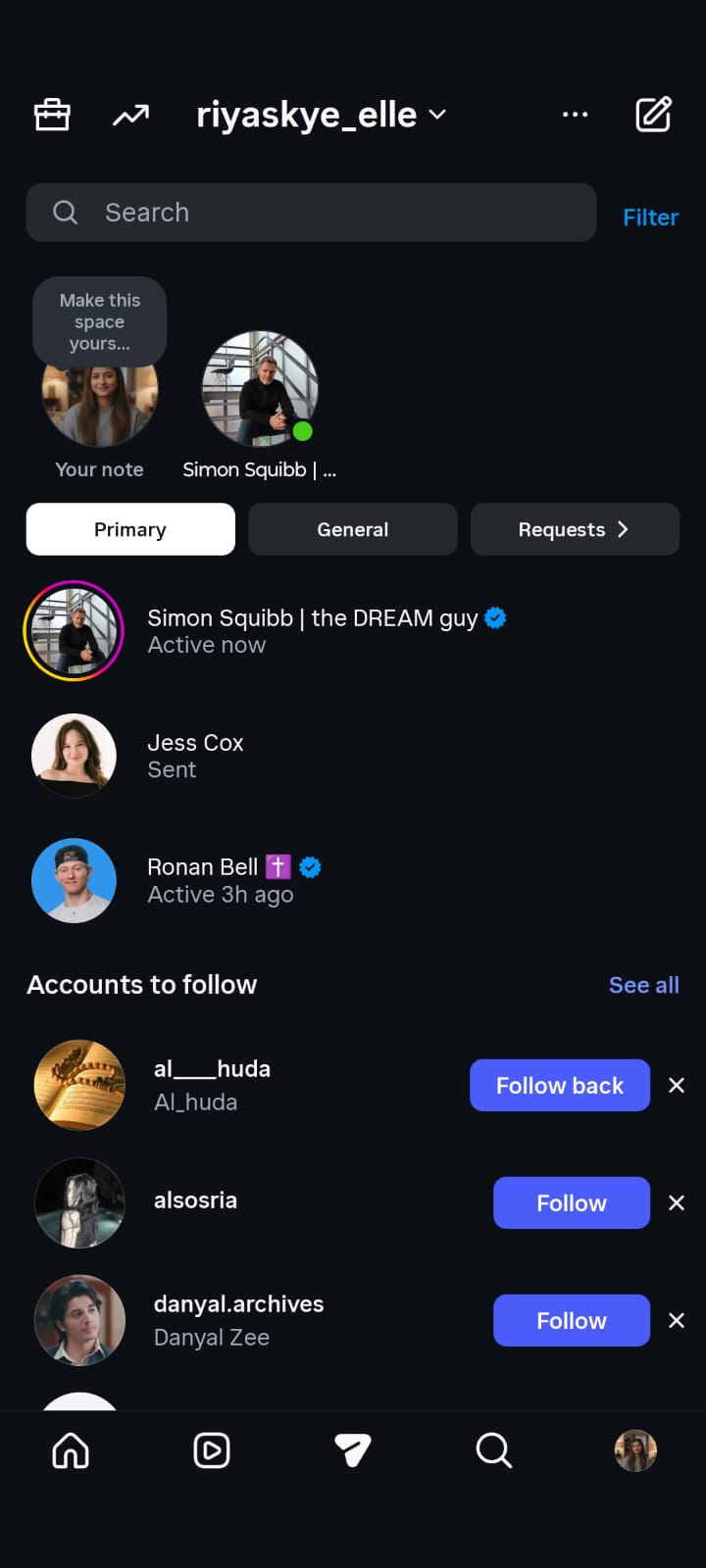
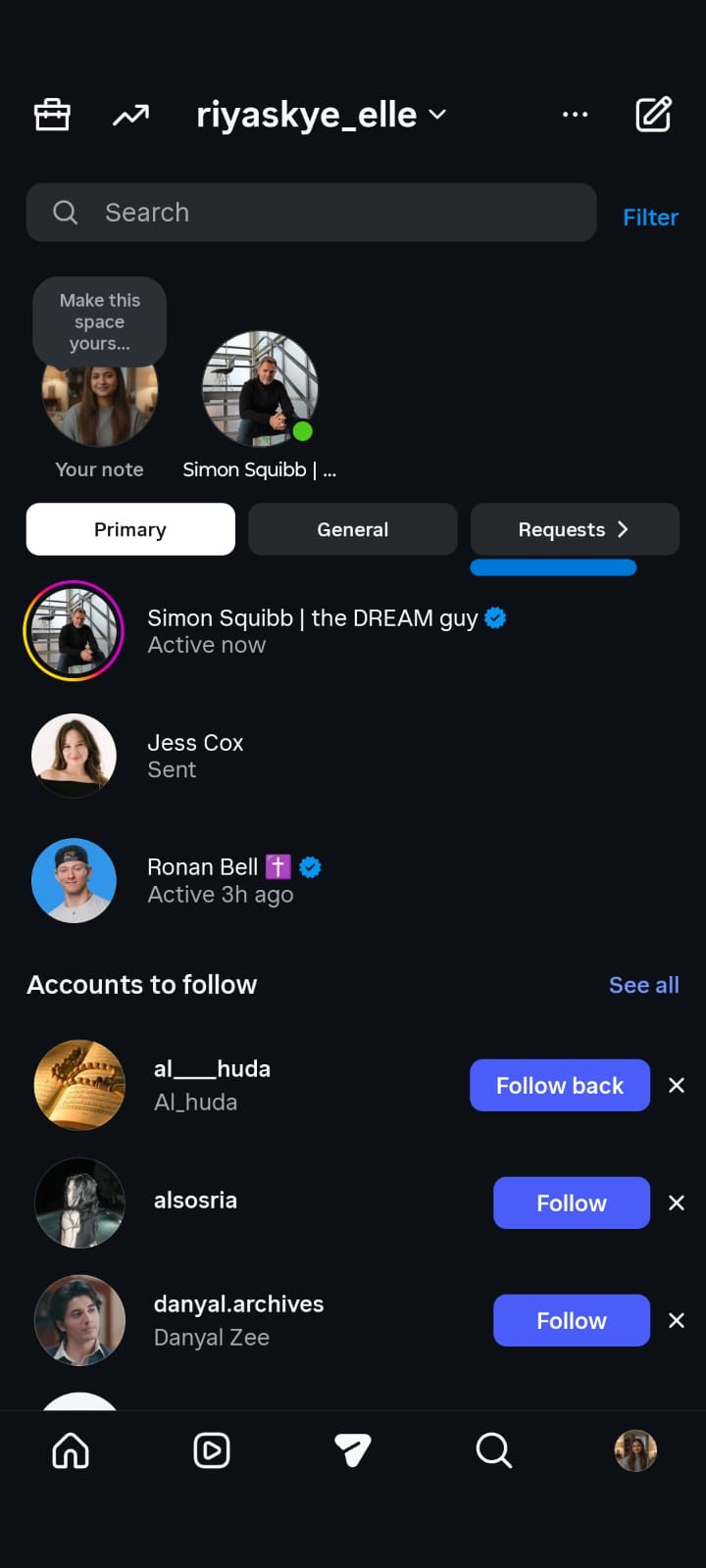
The Instagram inbox has three tabs in 2026: Primary, General, and Requests. The Primary tab holds messages from people you follow and interact with. The General tab catches everything else — messages from brands, automated replies, and lower-priority conversations. The Requests tab shows messages from people you do not follow, which Instagram filters to protect you from spam.
Understanding how the Instagram inbox organizes your messages is the first step to managing IG Direct effectively. If you are missing messages, they are most likely sitting in the General or Requests tabs.
Where Are DMs on Instagram?
Instagram has moved the icon for some accounts, which is why people still search “where are DMs on Instagram.”
On iPhone and Android (most accounts)
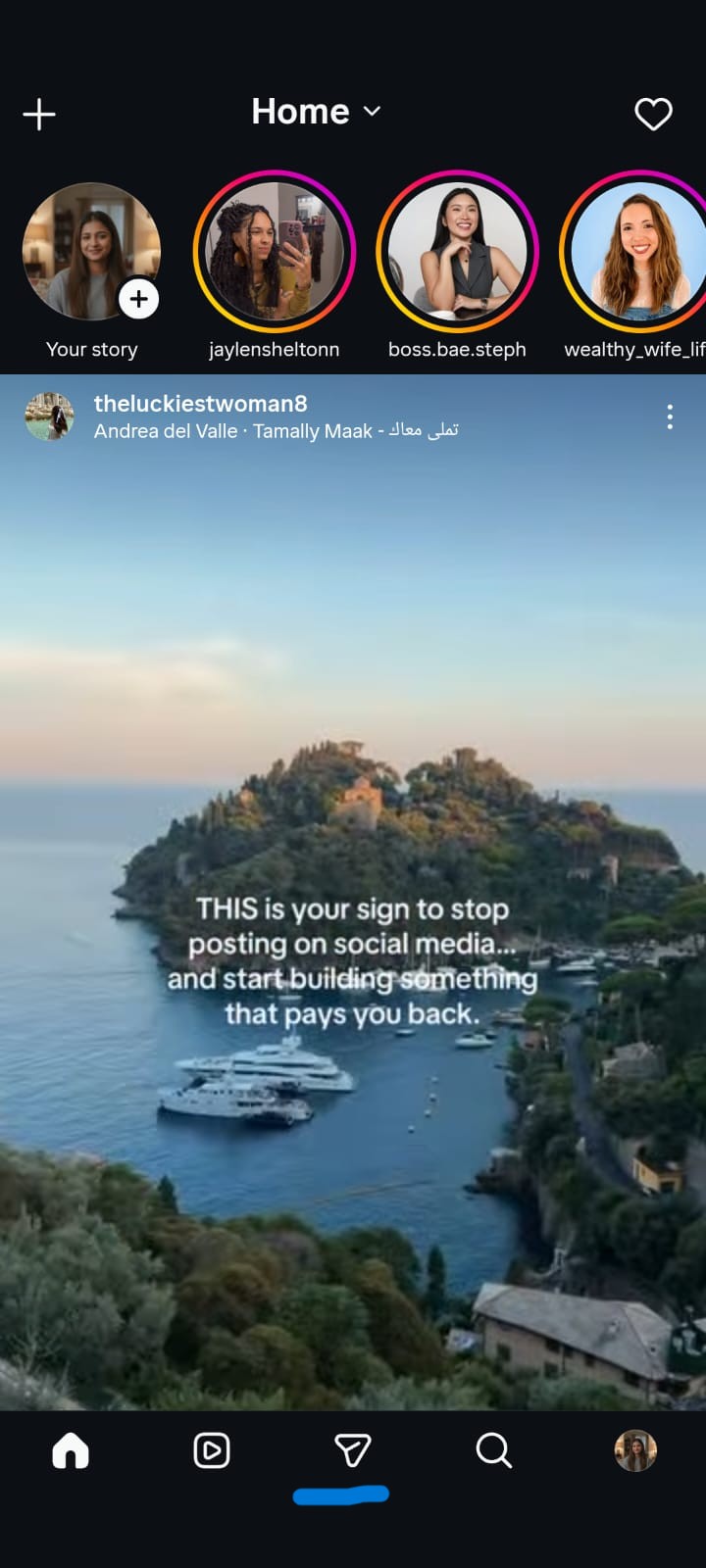
Home feed - paper airplane (top right). A number badge means unread chats.
On iPhone and Android (updated layout)
Bottom navigation - Messages tab (chat bubble), usually between Reels and Search. If the top-right airplane is gone, DMs did not disappear. They moved.
Fastest mobile shortcut
From the Home feed, swipe left. The inbox slides over the feed. No icon required.
On desktop / laptop
- Direct link: Instagram
- Or instagram.com - messenger icon in the left sidebar
If the chat is missing after you open Direct
Check three more places before assuming it failed:
- Primary — people you follow / important chats
- General — lower-priority chats on professional accounts (notifications often off)
- Requests - scroll to Hidden Requests — people you do not follow, plus anything Instagram filtered
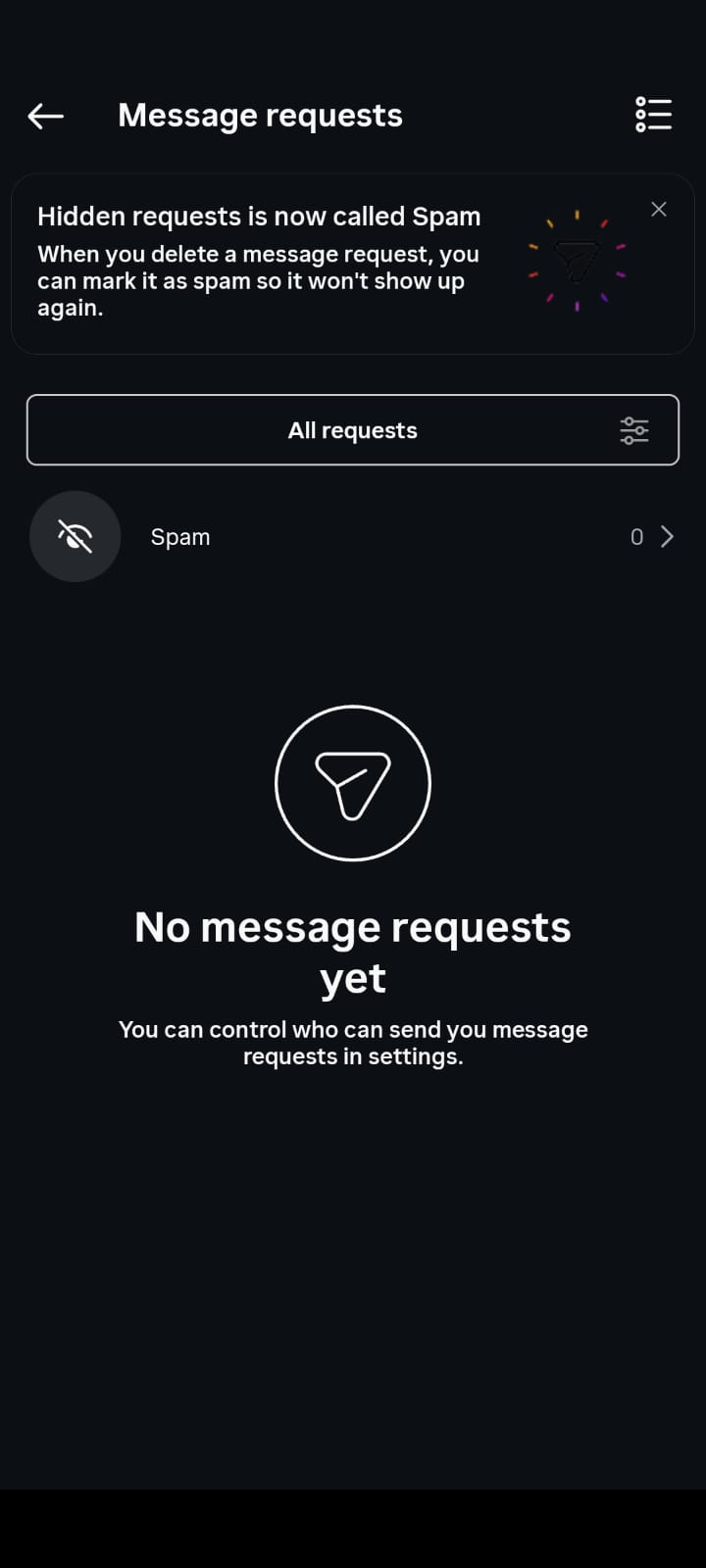
For the folder-by-folder walkthrough, see how to check Instagram DMs and hidden messages.
How to Find Instagram Direct (iPhone, Android, Desktop, No App)
Goal | What to do |
|---|---|
Open your own inbox on phone | Paper airplane (top right) or Messages tab (bottom) or swipe left |
Open inbox on computer | instagram.com/direct/inbox |
Message someone new | Their profile - Message |
Reply in context | Story - “Send message” bar |
Send people straight into your chat | https://ig.me/m/yourusername |
No app installed | Any browser - instagram.com - log in - Direct |
The step-by-step for each method is below.
How to Access IG Direct: All the Ways
Method 1: Using the Instagram App (Mobile – iOS & Android)
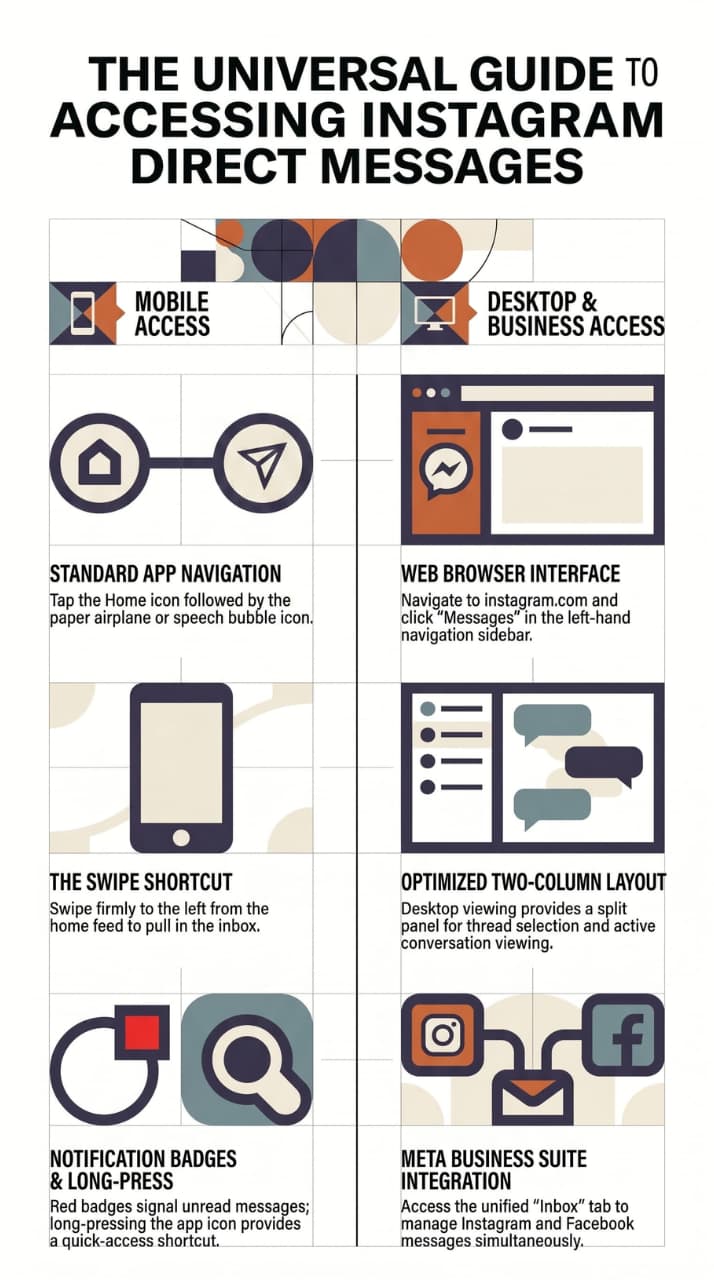
This is the quickest and most common way:
- Launch the Instagram app on your phone.
- Tap the paper aeroplane icon (or the messenger/chat bubble icon) at the top right of your Home feed.
- You’re now in your Direct Messages inbox.
If you cannot see the paper airplane: Instagram has been moving Direct into the bottom bar for some accounts. Look for a Messages tab at the bottom. You can also swipe left on Home. Update the app if neither icon is there.
Tip: You’ll even get a number badge on the icon to let you know about any unread DMs.
Method 2: Instagram Desktop (Browser)
Most people don’t know that Instagram DMs are totally accessible on desktop:
- Go to instagram.com and sign in.
- Find the messenger icon (speech bubble) on the navigation bar on the left.
- Click it to go to your DM inbox.
- Pick a conversation or press the pencil/compose icon to create a new one.
Note: The desktop version supports reading and sending messages, sharing posts and reacting to messages. Some features such as voice notes are mobile-only.

Method 3: DM Someone on their Profile
You don't need to check your inbox first:
- Navigate to the profile of the person you want to message.
- Select or tap “Message” underneath their bio.
- This will instantly open a chat directly with that person.
This applies to both the public accounts you follow and business profiles.
Method 4: Respond to a Story Directly
- Watch Someone’s Instagram Story.
- At the bottom of the screen, tap the “Send message” bar.
- Write your reply and press Send — it goes directly to their DMs.
It will be sent to the recipient’s Direct inbox and the Story will be attached for context.
Method 5: Starting a New DM Chat
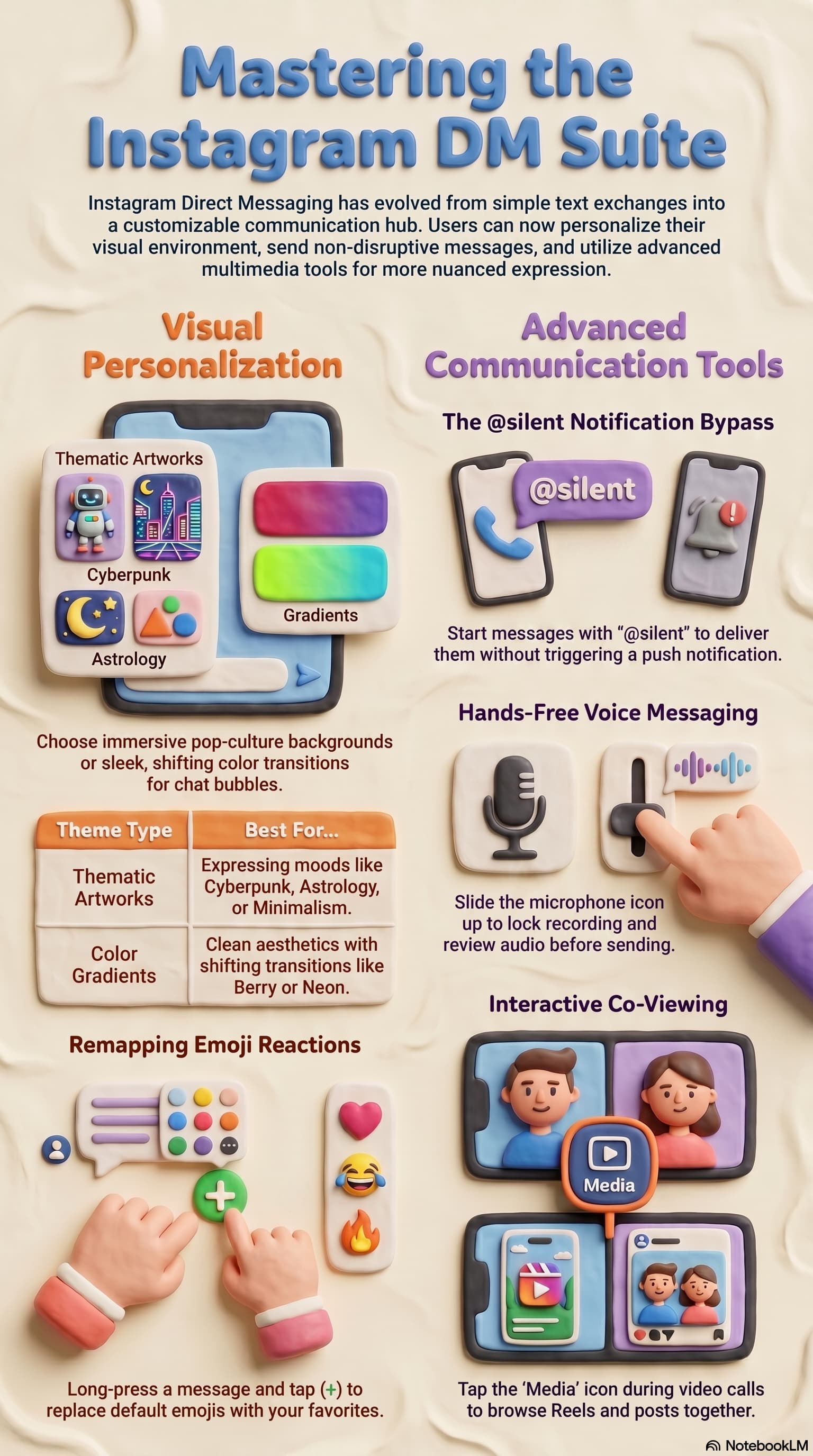
To send a message to someone you’re not in a conversation with now:
- Head to your DM inbox (Method 1 or 2 above).
- Tap the compose icon (pencil/plus icon) at the top right.
- In the “To:” field, type in a username.
- Choose the person and write your message.
Pro Tip: You can add multiple people here to start a group chat with up to 32 people.
Method 6: Use an ig.me Direct Message URL
Instagram’s URL is special in that it allows someone to go directly into your DMs without having to search for your profile. The format is:
https://ig.me/m/USERNAME_HERE
For example: https://ig.me/m/instagram
Where to use your ig.me link:
- Your site or blog (as a “Message us on Instagram” button)
- Email footer
- Other social media bios (Twitter/X, TikTok, LinkedIn, etc.)
- Printed marketing material (with QR code)
- Instagram bio (to get people from other platforms)
Click someone’s ig.me link and you go straight to a new DM chat on Instagram with your account. No friction.
Note: ig.me links work on mobile (opens the app) and on most desktop browsers too. There are some web limitations officially mentioned by Meta but they work well in practice.
Method 7: Scan QR Code to Open DMs
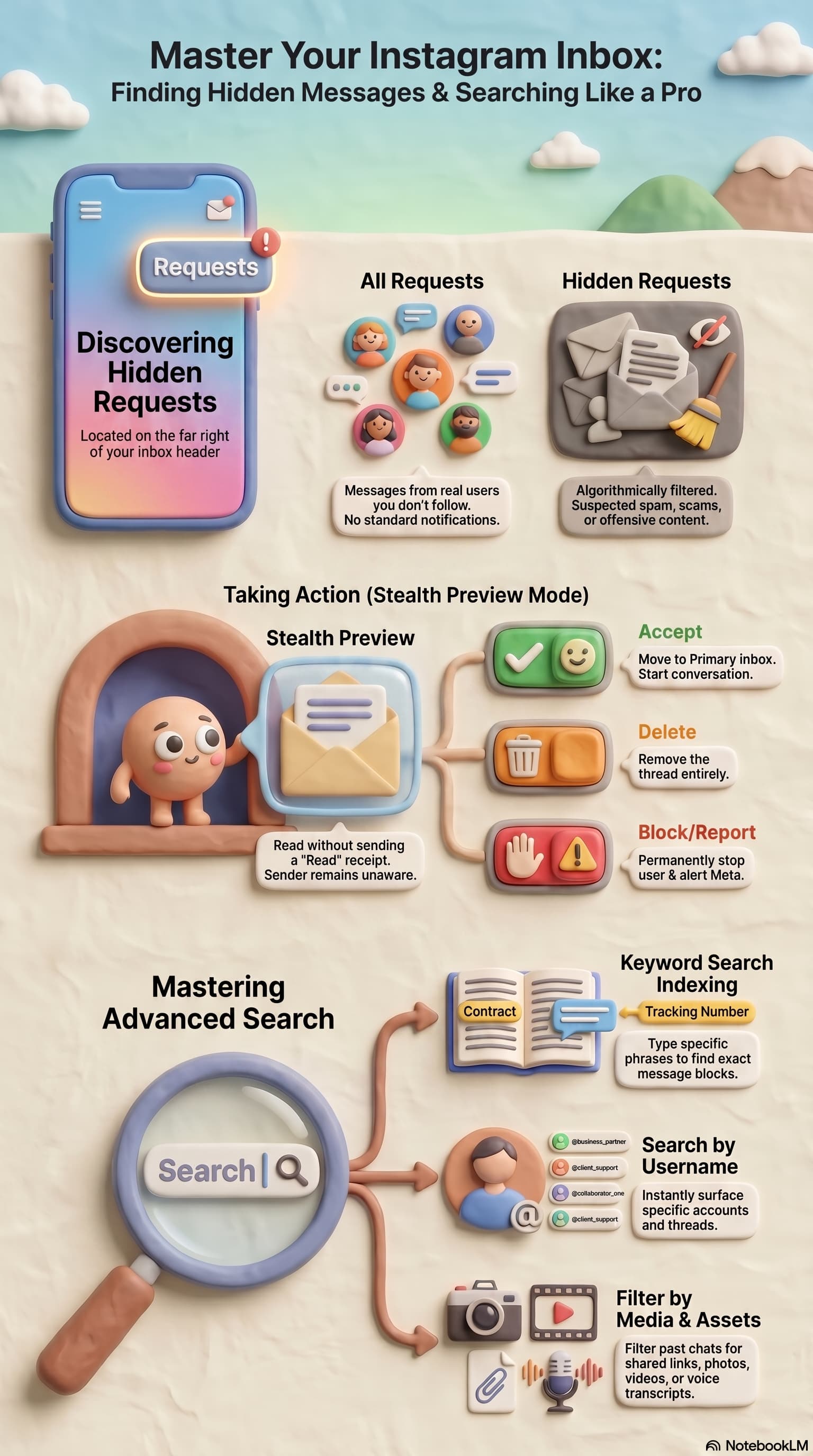
Instagram generates a unique QR code for your profile, which can also be associated with your DM inbox:
- Open your Profile.
- Click the three lines (hamburger menu) on the top-right.
- Click QR Code.
- Print or share the QR code.
Anyone who scans it will be taken to your profile and can hit “Message.”
How to Use Instagram Direct
- Open the inbox using any method on this page.
- Tap a thread to continue it, or tap the pencil / compose icon to start a new one.
- Type, hold the mic for a voice note, or tap the gallery icon for photos.
- To share a Reel or post, tap the paper airplane under that post, pick the person, send.
- To quote one message in a busy chat, long-press - Reply.
- To keep a client at the top, long-press the thread - Pin (up to 3).
- If you run a Business or Creator account, save Quick Replies for price, shipping, and booking questions.
Privacy notes people ask next:
- DMs are private to the thread, but not end-to-end encrypted by default. Do not send passwords, OTPs, or card numbers.
- Unsend removes one message for both sides. Delete chat only hides it on your side.
- Screenshot alerts fire in Vanish Mode and view-once media, not in a normal thread.
How to Get to IG Direct on Desktop (Step by Step)
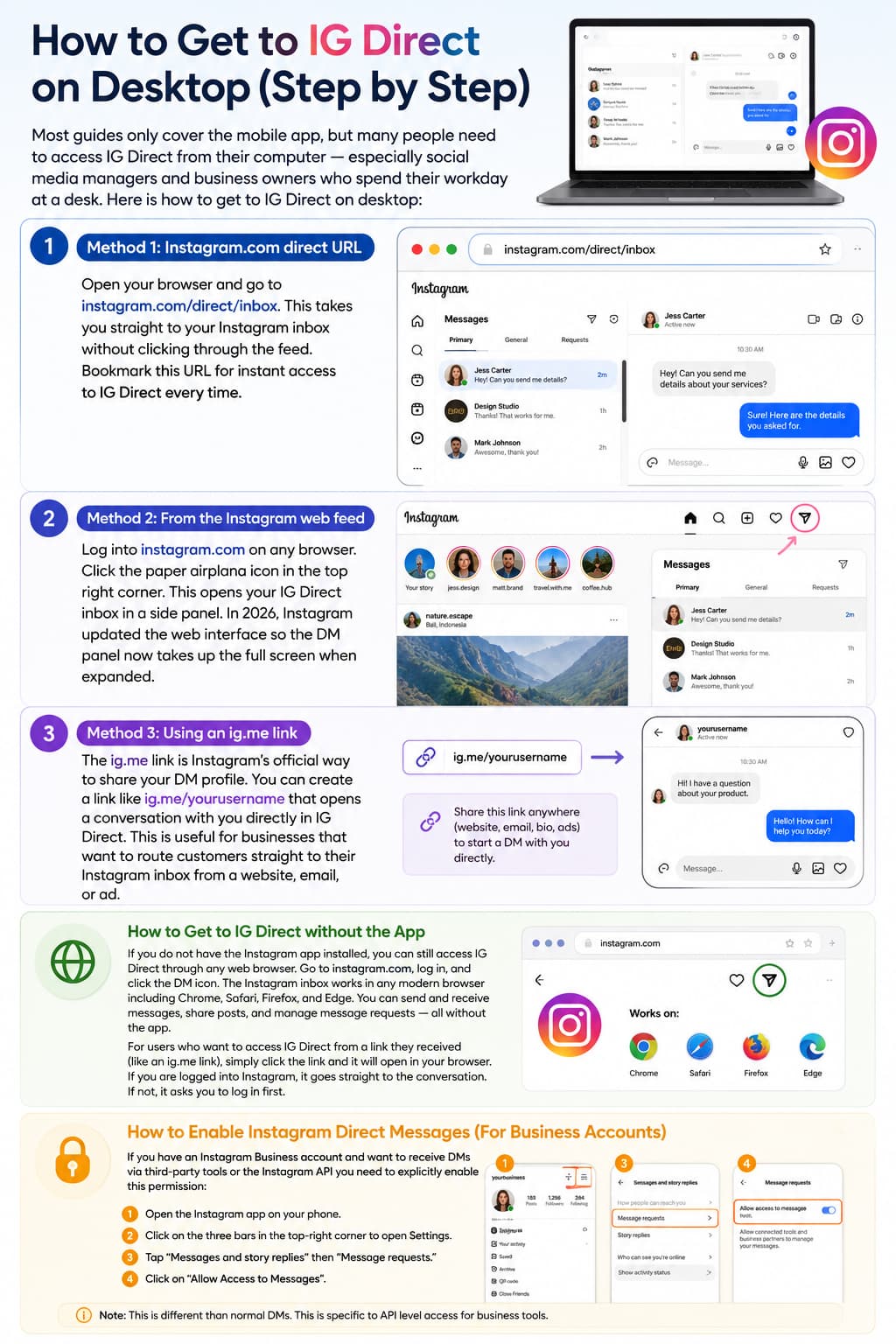
Most guides only cover the mobile app, but many people need to access IG Direct from their computer — especially social media managers and business owners who spend their workday at a desk. Here is how to get to IG Direct on desktop:
Method 1: Instagram.com direct URL
Open your browser and go to instagram.com/direct/inbox. This takes you straight to your Instagram inbox without clicking through the feed. Bookmark this URL for instant access to IG Direct every time.
Method 2: From the Instagram web feed
Log into instagram.com on any browser. Click the paper airplane icon in the top right corner. This opens your IG Direct inbox in a side panel. In 2026, Instagram updated the web interface so the DM panel now takes up the full screen when expanded.
Method 3: Using an ig.me link
The ig.me link is Instagram's official way to share your DM profile. You can create a link like ig.me/yourusername that opens a conversation with you directly in IG Direct. This is useful for businesses that want to route customers straight to their Instagram inbox from a website, email, or ad.
How to Get to IG Direct Without the App
If you do not have the Instagram app installed, you can still access IG Direct through any web browser. Go to instagram.com, log in, and click the DM icon. The Instagram inbox works in any modern browser including Chrome, Safari, Firefox, and Edge. You can send and receive messages, share posts, and manage message requests — all without the app.
For users who want to access IG Direct from a link they received (like an ig.me link), simply click the link and it will open in your browser. If you are logged into Instagram, it goes straight to the conversation. If not, it asks you to log in first.
How to Enable Instagram Direct Messages (For Business Accounts)
If you have an Instagram Business account and want to receive DMs via third-party tools or the Instagram API you need to explicitly enable this permission:
- Open the Instagram app on your phone.
- Click on the three bars in the top-right corner to open Settings.
- Tap “Messages and story replies” then “Message requests.”
- Click on “Allow Access to Messages”.
This allows connected platforms (like CRMs, social inbox tools, or automation services) to read and respond to your DMs on your behalf.
Note: This is different than normal DMs. This is specific to API level access for business tools.
Features of Instagram Direct You Should Know

Once you’re in IG Direct, here’s how you can take it beyond messaging:
- Vanish Mode: Messages disappear after being seen and chat is closed. Swipe up from a conversation to turn it on. Nice for private, temporary sharing.
- Voice and Video Calling: Tap the phone or video icon to start a call in any DM chat. Video calls can have up to 8 people in them at once.
- Reactions to Messages: Long press any message and select an emoji to react. It helps keep group chats organised and less cluttered.
- Respond to Specific Messages: Long press a message and tap Reply to quote it in your reply. Useful in busy group threads.
- Pin Conversations: Press and hold a conversation in your inbox and tap Pin. You can pin 3 chats so they are always at the top.
- Message Bible: Just long press on any received message and tap Translate. Instantly read it in your language. Good for international connections.
- Scheduled Messages: Type a message, then press and hold the Send button to schedule it for a particular date and time.
- Quick Replies (Business Profiles): Create saved responses to common questions, which can be triggered with a shortcut. Big-time saver for businesses fielding repetitive enquiries.
Hidden IG Direct Features Most People Do Not Know About
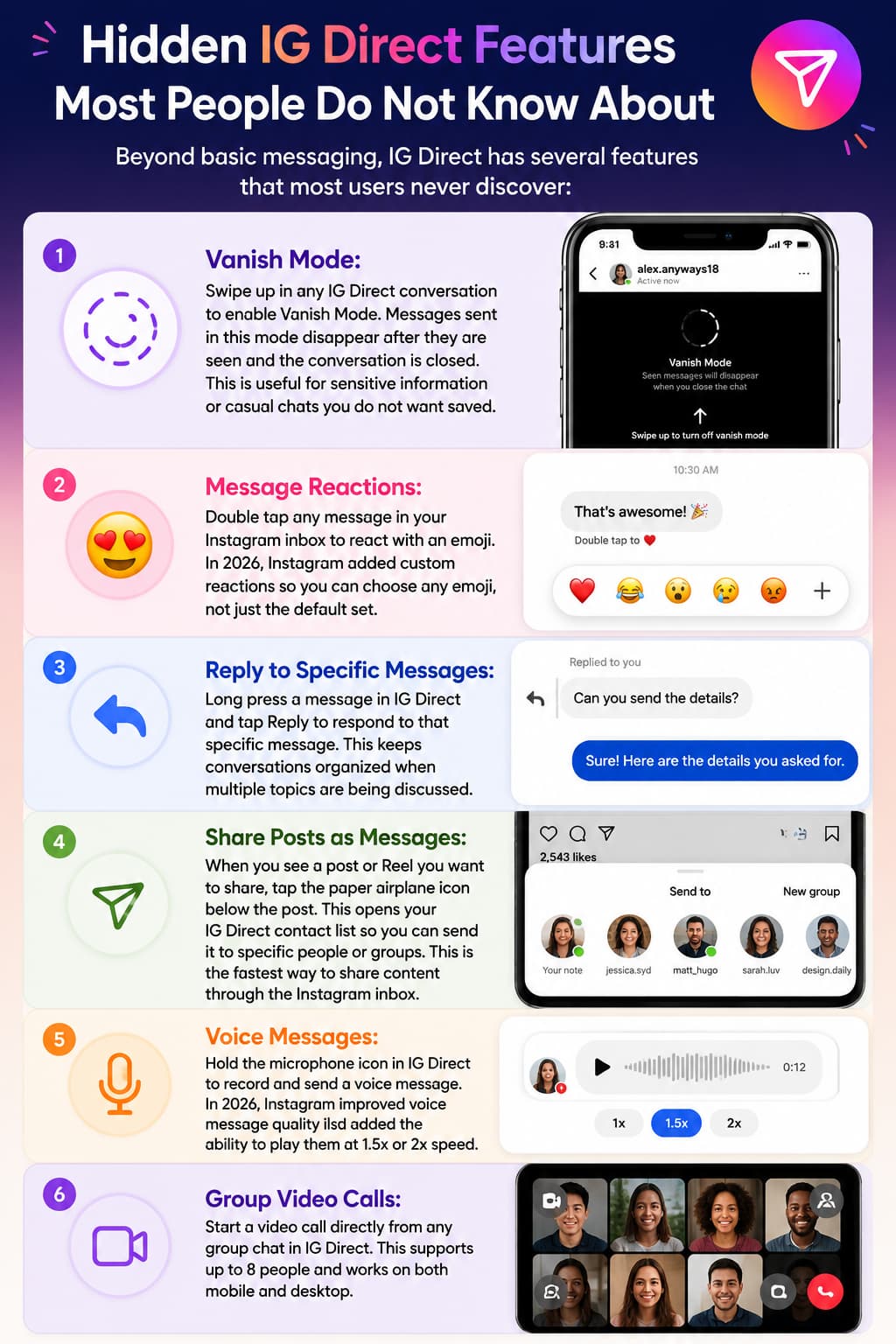
Beyond basic messaging, IG Direct has several features that most users never discover:
Vanish Mode:
Swipe up in any IG Direct conversation to enable Vanish Mode. Messages sent in this mode disappear after they are seen and the conversation is closed. This is useful for sensitive information or casual chats you do not want saved.
Message Reactions:
Double tap any message in your Instagram inbox to react with an emoji. In 2026, Instagram added custom reactions so you can choose any emoji, not just the default set.
Reply to Specific Messages:
Long press a message in IG Direct and tap Reply to respond to that specific message. This keeps conversations organized when multiple topics are being discussed.
Share Posts as Messages:
When you see a post or Reel you want to share, tap the paper airplane icon below the post. This opens your IG Direct contact list so you can send it to specific people or groups. This is the fastest way to share content through the Instagram inbox.
Voice Messages:
Hold the microphone icon in IG Direct to record and send a voice message. In 2026, Instagram improved voice message quality and added the ability to play them at 1.5x or 2x speed.
Group Video Calls:
Start a video call directly from any group chat in IG Direct. This supports up to 8 people and works on both mobile and desktop.
Importance of IG Direct for Businesses
Instagram Direct is more than just casual banter. It’s one of the most powerful tools on the platform for businesses and creators:
- Customer Service: Increasingly, customers prefer to message rather than call or email. Instagram DMs provide brands with a direct, conversational platform to respond in real time to issues.
- Lead Generation: DMs can help you find and connect with potential customers on a more personal level. A simple DM chat can convert a casual follower into a paying customer way better than a public comment.
- Sales Closing: The ability to answer questions about products or pricing privately builds trust and eliminates hesitation on the part of customers. Many of the purchases are made directly through DMs.
- Community Exclusivity: Brands often leverage DMs to offer early, exclusive deals or behind-the-scenes content to loyal followers, which makes people feel special and appreciated.
- Networking & Collaboration: Influencers, creators, and brands use DMs to negotiate partnerships, discuss collabs, and build professional relationships without making negotiations public.
How Businesses Use IG Direct as a Sales Channel
IG Direct is not just a messaging feature — it is one of the highest converting sales channels on Instagram. When a potential customer sends you a DM, they are already interested in what you offer. The conversation that follows in your Instagram inbox is your chance to close the sale.
Here is how successful businesses use IG Direct for sales:
Comment-to-DM automation:
When someone comments on your post with a keyword like "INFO" or "PRICE," an automation tool sends them a DM through IG Direct with the details they requested. This turns public engagement into private sales conversations. Tools like InstantDM automate this process through Meta's official Business API.
Opening IG Direct is the easy part. The hard part is what happens after 50 people comment “PRICE” on the same Reel. Native Direct has no keyword routing, no tags, and no queue when volume spikes.
That is why businesses connect a Meta-approved inbox tool. Comment-to-DM and Story-reply automations send the answer in Direct only after someone engages — which is what Instagram allows. If you are comparing options on pricing, caps, and official API access, see the current breakdown of the best Instagram DM automation tools, including InstantDM.
Story reply funnels:
Post a Story asking people to reply with a keyword. When they do, IG Direct delivers your automated response with a product link, discount code, or booking page. This is one of the most effective ways to convert Story viewers into customers through the Instagram inbox.
Quick replies for FAQs:
Instagram's native Quick Replies feature lets you save pre-written responses for common questions. When someone asks about pricing, shipping, or availability through IG Direct, you can send a detailed answer in seconds instead of typing it out each time.
Message requests for lead qualification:
Not every message in your Instagram inbox deserves the same attention. Businesses use message requests to filter incoming DMs and prioritize conversations with high purchase intent.
IG Direct for Customer Support
Beyond sales, IG Direct is a primary customer support channel for many businesses. Customers expect fast responses through the Instagram inbox — 42 percent of consumers expect a reply within 60 minutes. Businesses that respond to IG Direct messages within 5 minutes see 3x higher conversion rates than those that take hours.
To manage customer support through IG Direct at scale, use the General tab to separate support conversations from personal messages. Set up Quick Replies for common issues, and use automation tools to acknowledge incoming messages instantly while your team prepares a detailed response.
Common Instagram DM Issues (And How to Fix Them)

Can’t Find the DM Icon?
- Make sure you are running the latest version of your Instagram app.
- On older Android devices the icon may be in a slightly different location.
- If you don’t see the icon, try logging out and back in.
Messages Not Sending?
- The recipient can only receive DMs from people they follow.
- Your message may have gone to their Message Requests folder – they need to accept it.
- See if you’ve been blocked (you can’t find their profile at all).
DM Visibility for Business Tools?
- Ensure that you have enabled “Allow Access to Messages” in your Instagram app settings (see Enable section above).
- Reconnect your Instagram Business account on the third-party platform.
- Make sure that your Instagram account is a Business or Creator account (not a personal account).
DMs Gone?
- Messages are supposed to disappear if Vanish Mode is on. Scroll down in the chat to disable it.
- Once you unsend a message, it’s gone forever. Instagram doesn’t keep unsent messages.
- If a message is not in Primary, check General, then Requests, then Hidden Requests. Full steps: How to Check Instagram DMs (and Hidden Messages).
Instagram Inbox Not Loading? Here Is What to Do
One of the most common IG Direct issues in 2026 is the Instagram inbox failing to load. You tap the DM icon and see a blank screen or a loading spinner that never stops. Here is how to fix it:
- Clear the Instagram cache. On Android, go to Settings - Apps - Instagram - Storage - Clear Cache. On iPhone, delete and reinstall the app (iOS does not have a separate cache clear option).
- Check your internet connection. IG Direct requires a stable connection. Switch between WiFi and mobile data to see if the issue is network related.
- Update the app. An outdated Instagram app can cause IG Direct to malfunction. Check the App Store or Play Store for updates.
- Check Instagram's server status. Sometimes the Instagram inbox is down for everyone. Check downdetector.com or Instagram's official Twitter account for outage reports.
- Disable VPN. Some VPN configurations interfere with Instagram's messaging servers and prevent IG Direct from loading properly.
If none of these fix the issue, the problem might be on Instagram's side. Wait a few hours and try again. Persistent IG Direct issues can be reported through Instagram's Help Center.
Instagram DMs – Best Practices

These habits really matter if you’re a casual user or managing DMs for a business:
- Quick answer: A quick response demonstrates respect and professionalism. For businesses, speed can be the difference between retaining a customer and losing one.
- Make your messages personal: When you use someone's name or reference their specific question it makes a much warmer experience than copy-paste replies.
- Organise your inbox: Pin your most important conversations, mute low priority threads, and use message reactions to acknowledge messages without clogging the chat.
- Use Quick Replies for FAQs: If you’re answering the same questions again and again, set up Quick Replies to respond in seconds with a keyword shortcut.
- Don’t over-automate: Automation helps at scale but people can tell when they talk to a bot. Leverage automation with real human interaction, especially for complex or sensitive conversations.
- Best of luck: Report, block or mute unwanted messages using Instagram's inbuilt tools. You can also limit accounts so their messages are sent to a filtered inbox without notifying them.
Summary: How to Go to IG Direct
IG Direct Tips and Tricks for Power Users
Access IG Direct Faster with Shortcuts
If you check your Instagram inbox frequently, set up shortcuts for instant access. On iPhone, add Instagram to your Control Center for one-tap access. On Android, add the Instagram widget to your home screen. For desktop users, bookmark instagram.com/direct/inbox and pin the tab in your browser.
Managing a Crowded Instagram Inbox
When your IG Direct has hundreds of unread messages, the inbox becomes overwhelming. Use these strategies to stay organized:
- Use the Primary and General tabs. Move low-priority conversations to General so your Primary tab only shows important IG Direct messages.
- Star important conversations. Long press any conversation in your Instagram inbox to star it. Starred conversations appear at the top of your IG Direct list.
- Archive old conversations. Swipe left on any conversation in IG Direct and tap Archive. Archived conversations are hidden from your main inbox but can be found through search.
- Mute conversations you cannot leave. For group chats or persistent senders, mute the IG Direct conversation instead of leaving it. You will not get notifications, but the messages stay in your inbox.
Method | Best Method for Use |
Tap Messenger icon on Home feed | Most convenient daily access on mobile |
instagram.com desktop sidebar | How to view DMs on computer |
Go to profile - “Send Message” button | Starting new conversation |
Reply to a Story | Informal, context DMs |
ig.me link (ig.me/m/yourusername) | Sharing a DM link outside of Instagram |
QR Code | Print or Face-to-Face Marketing |
Settings | Business tools and automation Allow API access |
Once you can open Direct, the fastest way to send a resource from a comment thread is comment-to-DM. It stays allowed only on Meta’s official API; see what Instagram actually permits.