TL;DR (Too Long; Didn't Read)
Welcome to 2026, where your Instagram inbox is arguably your most powerful, untapped sales channel. The era of neglecting DMs is over. Managing it manually leads to severe founder burnout, frustrated customers, and thousands of dollars in lost revenue. This comprehensive guide provides detailed instructions on how to organise your messy messages using the Primary and General tabs, establish lifesaver quick replies for maximum efficiency, and manage tense customer service disputes directly within the app without losing your composure. More importantly, we dive deep into the massive shift toward DM automation. We explain why legacy tools are failing modern brands and how upgrading to official Meta-approved platforms, particularly InstantDM's no-code Flow Editor and Comment-to-DM features, can secure your lead generation and sales. You can grow your business while maintaining that essential human touch. Let’s get into it.
Introduction
Instagram Direct Messages have evolved from a simple chat feature into a powerful sales engine. But if you are running a business, manually managing an inbox flooded with inquiries, spam, and repetitive questions is a recipe for burnout. Seeing "99+ message requests" induces anxiety because you know ready-to-buy customers are buried in that clutter, leading to slow response times that kill your conversions.
The social media landscape has shifted—real relationship-building and selling now happen in the dark spaces of your DMs. If your strategy consists of randomly checking your phone throughout the day, you are actively losing ground to competitors who treat their inbox like a highly optimized funnel. This guide breaks down exactly how to organize your messages and use advanced automation workflows so you can turn your inbox into a profitable asset and finally reclaim your time.
1. The Cost of a Cluttered Inbox
An exploration of how slow response times directly impact your conversion rates, customer retention, and overall brand trust.
We often talk about the financial cost of advertising, but we rarely talk about the invisible cost of a disorganized inbox. Let's break down exactly what happens when you treat your DMs like a junk drawer.
The Immediate Hit to Conversion Rates
Think about the psychology of a modern buyer. They are scrolling through Reels at 9 PM on a Tuesday. They see a pair of shoes you are selling, or they see a testimonial for your fitness coaching program. A spark of dopamine hits their brain. They are interested. They click over to your profile, tap "Message," and ask, "Does this run true to size?" or "When does the next cohort start?"
At that exact second, their buying temperature is boiling. They have their wallet open mentally.
If you reply within five minutes, your chance of closing that sale is incredibly high. But what if your inbox is a disaster? What if their message gets buried under 15 spam bot messages and three people sending you arbitrary reactions? You end up seeing their question the next afternoon. You reply, "Yes, it runs true to size!"
Crickets.
Why? Because the moment passed. They closed the app, went to sleep, woke up, dealt with their kids, went to work, and completely lost the emotional drive to buy your product. The dopamine faded. You didn't just lose a message in the clutter; you lost real, hard revenue. Speed to lead is the ultimate competitive advantage right now.
The Slow Death of Brand Trust
The cost isn't just about lost new sales. It is about alienating the people who already gave you their money.
Customer service has migrated to social media. When someone buys a physical product and the shipping tracking link breaks, they don't want to email a generic support address and wait three business days for a ticket number. They go straight to the platform where they found you, and they send a DM.
When a frustrated customer reaches out for help and gets met with radio silence because your inbox is disorganized, their mild annoyance turns into active anger. That is when they head over to your public comment section and write, "SCAM! Nobody replies to messages, terrible customer service." Now, your cluttered inbox has actively damaged your public reputation, scaring away future buyers.
To turn your Instagram followers into customers without sounding like a bot, you can follow these Instagram DM marketing best practices and use proven templates to start meaningful sales conversations.
2. Organizing Your Inbox: Primary vs. General Tabs
A practical guide on how to properly segment your messages to prioritize high-value conversations and filter out the daily noise.
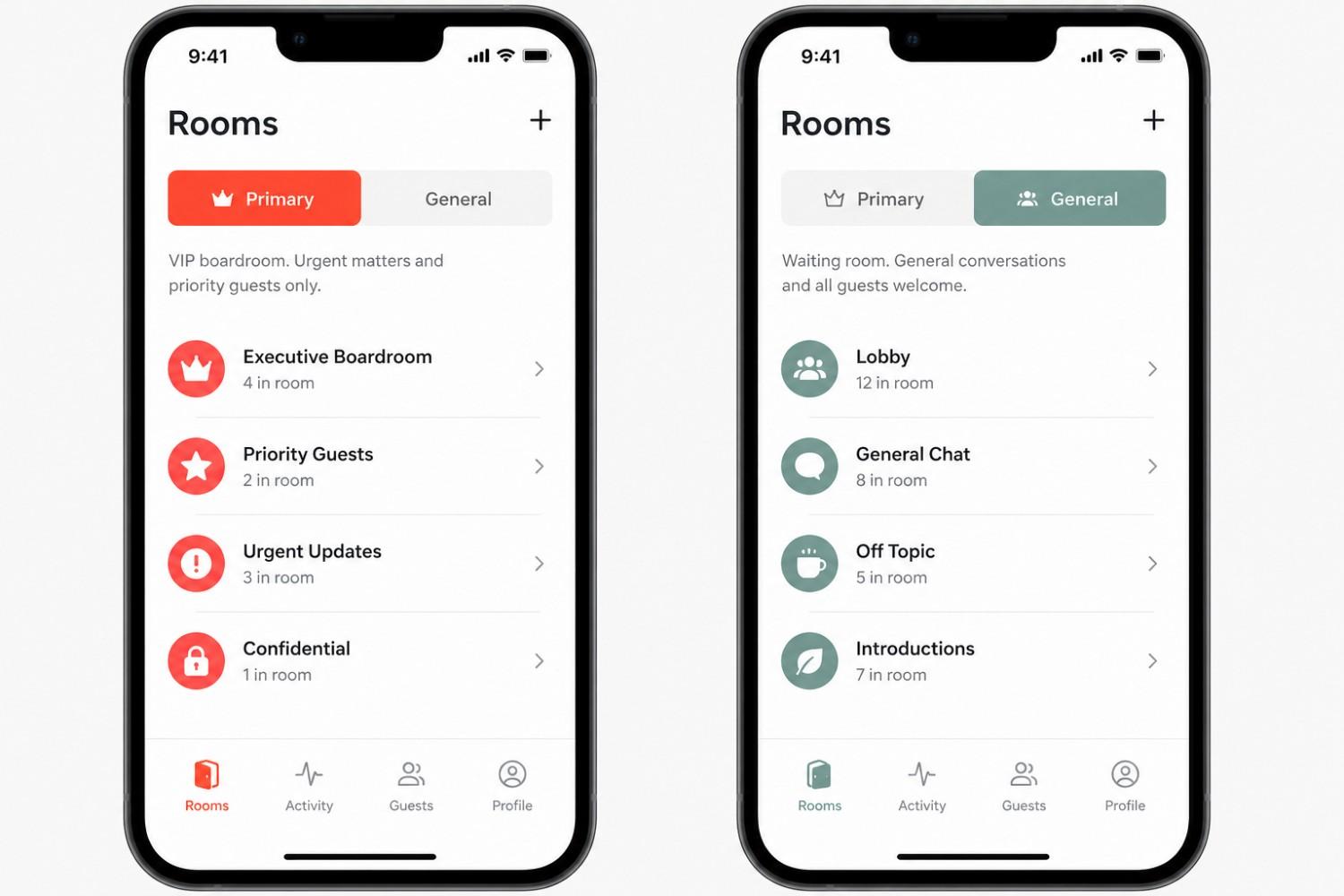
Instagram actually gives professional accounts (both Creator and Business profiles) a built-in triage system. However, a shocking number of business owners completely ignore it, leaving everything in one massive, anxiety-inducing list. Splitting your inbox into "Primary" and "General" tabs is the absolute first step in regaining your sanity.
The Primary Tab Strategy: The VIP Lounge
Think of your Primary tab as the executive boardroom. This space should be aggressively protected. If a message is sitting in the Primary tab, it means it requires your immediate, undivided attention.
Who belongs in the Primary tab?
- Active Buyers: Anyone currently in the process of negotiating a price, asking a final pre-purchase question, or figuring out how to book your services.
- Current Clients: People who have already paid you. Their access to you should be prioritized over cold leads.
- High-Tier Collaborators: Influencers, brand partners, or vendors you are actively working with on time-sensitive projects.
- Urgent Support Tickets: Customers dealing with a broken product, a missing link, or a payment issue.
The Golden Rule for Primary: You must have push notifications turned on for your Primary tab. Treat these messages like text messages from your family. They get handled quickly.
The General Tab Strategy: The Holding Pen
The General tab is your waiting room. It is for messages that are nice to have, but absolutely do not require an immediate, drop-everything-and-reply response.
Who belongs in the General tab?
- Cold Pitches: People asking if you want to buy their SEO services or hire them as a video editor.
- Casual Reactions: Followers sending simple reactions or laughing at a meme you posted on your story.
- Broad Networking: "Hey, love your content! Let's connect." messages.
- Automated Vendor Outreach: Newsletter confirmations, welcome messages from other brands, etc.
The Golden Rule for General: Turn push notifications off for the General tab. Do not let these messages interrupt your deep work or your dinner. Instead, time-block this. Dedicate 15 to 20 minutes at the very end of your workday, or while you are drinking your morning coffee, to bulk-reply to the General tab in one sitting.
By strictly enforcing this boundary, you instantly reduce the noise and ensure that the people who actually need you get your attention first.
This video details two advanced strategies for running Instagram DM ads in 2026, focusing on how to maintain lead quality and scale effectively using the "Post-Andromeda" algorithm.
3. Setting Up Instagram Quick Replies
A step-by-step walkthrough on creating keyboard shortcuts for your most frequently asked questions to save hours of manual typing.
If you find yourself typing out the exact same explanation of your shipping policy, your coaching rates, or your return process more than twice a week, you are wasting incredibly valuable time.
Instagram’s Quick Replies feature (sometimes labeled as "Saved Replies" depending on your app version) acts as a personal text expander built directly into the chat interface. It allows you to map entire paragraphs of text to a single shortcut word.
How to Create Your Quick Reply Arsenal
Setting these up takes maybe ten minutes, but it will save you hundreds of hours over the course of a year.
- Open your Instagram app and go to your profile.
- Tap the three lines in the top right corner to access your Settings.
- Navigate to "Business" or "Creator" tools.
- Tap on "Saved Replies."
- Tap the "+" button to draft a new template.
- The Shortcut: Choose a short, memorable word that you wouldn't normally type in a sentence by itself. Good examples include "qrshipping", "qrrates", or "qrcollab".
- The Message: Type out the full, detailed response.
5 Must-Have Quick Reply Templates
Do not Make your quick replies sound like a robot wrote them. The goal is efficiency, not sounding like a corporate drone. Keep your brand voice intact.
Template 1: The Pricing Inquiry
Shortcut: qrprice
Message: "Hey there! Thanks so much for reaching out about the program. I'd love to see if it's a good fit for you. Our current packages start at [Price] and include [Feature 1] and [Feature 2]. You can check out the full breakdown and everything involved right here: [Link]. Let me know if you have any specific questions after taking a look!"
Template 2: The Shipping Question
Shortcut: qrship
Message: "Hi! Thanks for checking in. Our standard shipping usually takes about 3-5 business days depending on your location. If you have an order number handy, drop it below and I can pull up the exact tracking info for you!"
Template 3: The Out of Stock Notice
Shortcut: qroos
Message: "Hey! You've got great taste—that item has been incredibly popular and we are currently sold out. The good news is we are restocking on [Date]. If you want, you can jump on the email waitlist here [Link] and you'll be the first to know the second it goes live!"
Template 4: The Polite Decline (Collaborations)
Shortcut: qrno
Message: "Hey! Just wanted to circle back here. I know we chatted about the [Program/Product] a few days ago, and I wanted to see if you had any lingering questions I could clear up for you? We only have a few spots left at this current price tier, and I want to make sure you have all the information you need to make the best decision. Let me know!"
Template 5: The "Where are you located?"
Shortcut: qrloc
Message: "Hey! We are currently operating exclusively online, so we don't have a physical storefront right now. But the bright side is we ship everywhere! You can browse the whole collection here: [Link]."
Using these templates means you can handle a massive influx of repetitive questions while sitting at a red light, instead of having to sit down at a laptop and compose essays.
4. Handling Customer Support via DMs
Best practices for resolving order issues, managing refunds, and answering detailed product queries directly within the Instagram app.
Consumers have fundamentally changed. They no longer want to hunt down a "Contact Us" page on a website, fill out a clunky web form, and wait for an email response. They want to DM the brand directly and get human assistance immediately. Your Instagram inbox is now the absolute front line of your customer service operations.
Handling support in the DMs requires a different skill set than traditional email support. It is faster, more intimate, and prone to rapid escalation if handled poorly.
The A-R-R De-escalation Framework
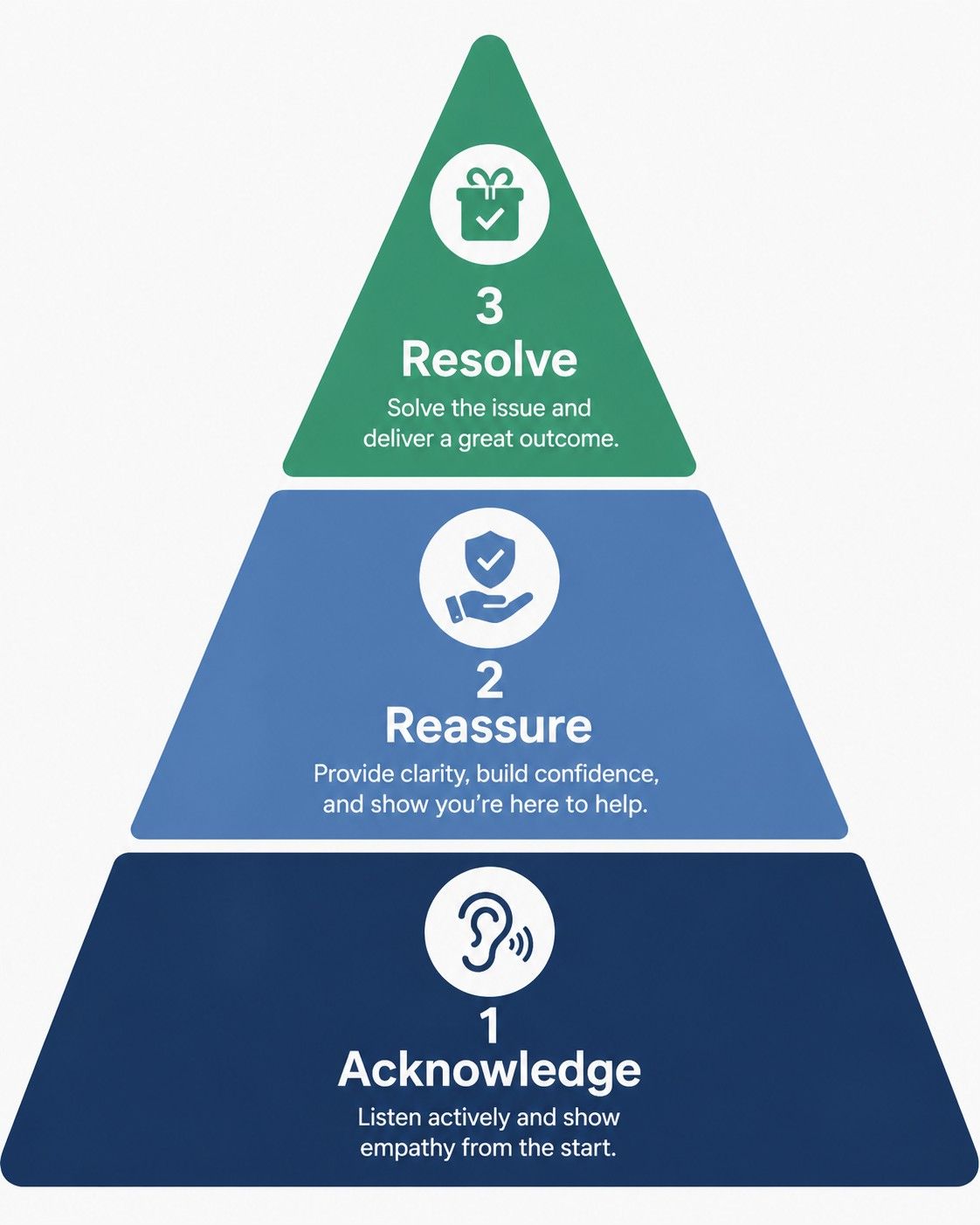
When a frustrated customer slides into your DMs—maybe their package arrived broken, or their software login isn't working—the first rule is to inject empathy immediately. Do not get defensive, and do not make excuses about the post office or your tech team. Use the A-R-R method:
- Acknowledge: Validate their frustration right away. People just want to be heard.
- Example: "Oh no, I am so sorry to see that the mug arrived chipped. I completely understand why you're frustrated, especially since it was meant as a gift."
- Reassure: Tell them you are taking ownership of the problem immediately.
- Example: "Don't worry, I am going to look into this right now and get it completely sorted out for you."
- Resolve: Offer the concrete solution without making them jump through hoops.
- Example: "I've just put in a request for a replacement to be shipped out via priority mail tomorrow morning. Here is the new tracking number. I'm also tossing in a 15% discount code for your next order to make up for the headache."
Keep the Conversation in the App
One of the biggest mistakes brands make is telling a customer in the DMs to "Please email support@brand.com so we can create a ticket."
Do not do this. You are forcing a frustrated customer to do more work. If they reached out on Instagram, resolve the issue on Instagram. If you need their email address to locate an order, simply ask for it in the chat. "Hey, I can absolutely help with that! Can you drop the email address you used at checkout right here so I can pull up your file?"
Handling these situations gracefully and quickly in the DMs often turns an angry, potential one-star reviewer into a vocal brand advocate who tells their friends how amazing your customer service is.
5. The Power of the Welcome Message
Why sending a personalized greeting to new followers sets the stage for long-term loyalty, and how to structure the perfect introductory text.
First impressions matter immensely in the digital space. When someone actively hits the "Follow" button on your profile, they are raising their hand and signaling direct interest in your brand. You have a very narrow window of time to capitalize on that attention before they keep scrolling, close the app, and forget you exist.
Why Welcome Messages Work
A welcome message isn't about throwing a hard sales pitch at someone five seconds after they meet you. That is the equivalent of asking someone to marry you on a first date. It feels spammy, aggressive, and usually results in an immediate unfollow.
Instead, a welcome message is about opening a dialogue. It humanizes your brand. It tells the algorithm that you have a real connection with this new user, which means Instagram is going to start pushing your Reels and Stories higher up in their feed.
Structuring the Perfect Introductory Text
The anatomy of a great welcome DM relies on being casual, providing immediate value, and asking a low-friction question.
- The Casual Hook: Drop the corporate speak. Talk like a normal person.
- "Hey [Name]! Thanks so much for joining the community, stoked to have you here."
- The Value Drop: Give them something useful right away without asking for a credit card.
- "Since you're new around here, I wanted to pass along a quick link to our free video guide on [Topic]. A lot of people find it super helpful when they are just starting out."
- The Soft Question: End with a question that is incredibly easy to answer. You want to trigger a reply.
- "I'd love to know, what are you currently struggling with the most right now when it comes to [Your Niche]?" OR "Just curious, where are you tuning in from?"
When they reply to that question, you have successfully initiated a two-way conversation. They are no longer just a passive follower; they are an active participant in your brand's ecosystem.

6. Managing Story Mentions and Reactions
How to capture the momentum of story interactions to foster community engagement and start organic conversations.
Instagram Stories are arguably the most intimate and authentic part of the platform. Unlike the curated perfection of the main feed, Stories are raw, behind-the-scenes, and highly interactive. When a user takes the time to tag you in their own story, or sends a quick reaction to yours, they are actively inviting you to engage with them.
Never Leave a Mention Hanging
If a customer posts a video of themselves unboxing your product and tags you, resharing it to your own story is a great first step. It provides you with free user-generated content. But you cannot stop there.
You must slide into their DMs privately to acknowledge the effort. A simple message saying, "Oh my gosh, this video is amazing! Thank you so much for the love, it seriously means the world to our small team. How are you liking it so far?" builds an incredibly deep connection. That customer will remember that interaction forever.
The Power of Micro-Interactions
Similarly, if someone reacts to your story, do not just leave it on read.
Double-tap their message to "heart" it. Or better yet, fire back a quick, two-word text like "Right?!" or "So true."
These micro-interactions might seem trivial, but they play a massive role in the backend of the platform. They signal to the Instagram algorithm that you have a close, two-way relationship with that specific user. The algorithm rewards this behavior by ensuring your future posts show up at the very top of their feed the next time they open the app. It is the cheapest, easiest way to hack your own engagement rate.
You can automate your Instagram sales and engagement by using official Meta API-compliant tools like InstantDM to set up "Comment-to-DM" triggers, personalized AI-powered conversation flows, and automated follow-up sequences that turn followers into qualified leads 24/7.
7. Filtering Out Spam to Protect Your Sales Pipeline
Actionable tips to secure your inbox, utilize Instagram’s hidden words feature, and ensure that your time is spent strictly on high-intent buyers rather than deleting junk.
As your account grows and you start getting more visibility, you are going to attract the dark side of Instagram. Your inbox will start filling up with fake account warnings, bot networks promising followers, and weird investment pitches.
While most business owners view spam as a mere annoyance, the real danger is financial. Your inbox is a sales pipeline. When a legitimate customer messages you with credit card in hand, but their message gets sandwiched between five fake bot pitches, there is a high probability you will miss the real buyer or delay your response time. Every minute you spend manually acting as an inbox janitor—deleting junk and blocking bots—is a minute you are not spending closing a warm lead.
Securing Your Inbox with Hidden Words
Think of Instagram's filtering tools as an automated bouncer for your sales funnel. You want to ensure only qualified conversations make it to your screen. Thankfully, Instagram has built a robust tool to keep this trash out of your sightline.
- Open your Instagram app and go to Settings & Privacy.
- Scroll down to the "How others can interact with you" section and tap on Hidden Words.
- First, toggle on "Hide Message Requests." This uses Instagram's AI to automatically filter messages that contain universally common spam triggers.
- Next, and more importantly, scroll down to "Manage Custom Words and Phrases."
- This is where you build your custom shield. Add phrases that you constantly see in junk messages. Common examples include:
- "Promote it on"
- "Send pic to"
- "Crypto"
- "Forex"
- "Invest"
- "Copyright infringement"
Once you add these phrases, any message containing those words will be automatically routed straight to a hidden folder. By aggressively filtering these phrases, you guarantee that almost every notification you actually receive represents a real human being with potential buying intent. You stop wasting time cleaning your inbox and spend 100 percent of your app time acting as a closer.
8. Moving the Conversation: From Public Comments to Private DMs
Strategies for smoothly transitioning public post interactions into private, one-on-one sales discussions.
Some of the most lucrative sales conversations you will ever have will start out in the public comment section of your Reels or carousel posts. Someone will watch a video of you explaining a concept and comment, "This is exactly what I need! How much does the 3-month coaching package cost?" or "Do you offer payment plans on this?"
Here is the cardinal rule of social media sales: Never negotiate pricing, discuss specific personal needs, or share ugly payment links in a public comment section.
The public comment section is a stage. Everyone is watching. People act differently when they know an audience is reading their words. They are less likely to admit their pain points, and they are more defensive about price. You need to move them into the private sanctuary of the DMs to actually close the deal.
The "Public Acknowledge, Private Transition" Strategy
When that comment comes in asking about price, the strategy is simple.
Step 1: "Like" their comment to acknowledge you saw it.
Step 2: Reply publicly, but do not give the answer away. Write: "Hey! So glad this resonated with you. I just sent you a DM with the full breakdown of the packages and a special link so we can chat more about what you need!"
Step 3: Immediately send them a DM referencing the comment. "Hey! Following up on your comment about the coaching packages. I'd love to learn a bit more about where your business is currently at to see which tier makes the most sense. What's your biggest bottleneck right now?"
This dual approach does two critical things. First, it shows the public that you are highly responsive and active, which encourages other people to comment. Second, it moves the prospect into a one-on-one, private environment where you can actually ask diagnostic questions, overcome their specific objections, and close the sale without an audience watching you type.
To transform your social media engagement into consistent revenue, you can follow this guide on how to increase Instagram sales with smart DM automation and implement strategies that turn every comment into a qualified lead.
9. When to Delegate Your Inbox
Identifying the right time to hand off manual DM management to a virtual assistant or a dedicated customer support team.
There comes a breaking point for every successful, growing business where managing the inbox manually is simply no longer a viable use of the founder's time. Your time is the most expensive asset in your business. If you are spending three hours a day acting as a human router—answering basic questions and pasting links—you are bottlenecking your own growth. You should be making content, developing products, and casting vision, not typing out shipping policies.
Spotting the Tipping Point
It is time to delegate when you experience any of the following symptoms:
- You are leaving genuine, warm leads on "read" for more than 24 hours because you simply can't get to them.
- You feel a physical knot of anxiety in your stomach before opening the Instagram app.
- You realize you are literally just copy-pasting the exact same three answers all day long.
- Your customer service response times are starting to result in negative public comments.
At this stage, hiring a Virtual Assistant (VA) or bringing on a dedicated community manager transitions from being a luxury expense to a necessary investment.
How to Delegate Effectively
You cannot simply hand a stranger the password to your brand's account and walk away. That is a recipe for a PR disaster. You need to create a system.
- Build the Playbook: Before you hire anyone, document your brain. Take all of those quick replies you built in Section 3 and expand them into a formal Standard Operating Procedure (SOP) document. Create a spreadsheet with "If customer asks X, reply with Y."
- Establish Brand Voice Guidelines: Give your VA specific instructions on tone. For example, instruct them to sound upbeat, never use overly formal greetings, and address people by their first name.
- Define Escalation Protocols: Give your team permission to handle 80 per cent of the easy stuff like shipping, links, and basic info. But create a strict rule for the other 20 per cent: "If a customer is angry or asking about a high-ticket package, flag it for me to handle personally."
By setting boundaries, you can hand over the keys to the General tab and the basic enquiries, keeping only the high-level, high-use conversations in your Primary tab.
10. The DM Automation Landscape: Evaluating the Market Options
A look at how brands are moving away from manual replies. This section explores popular automation tools like ManyChat and LinkDM, providing a balanced look at their strengths and discussing why their specific features might create friction for growing businesses.
While hiring a team of virtual assistants is one valid way to scale your inbox management, the modern, more cost-effective solution is software automation. The digital marketing landscape has matured significantly, and top-tier brands are rapidly moving away from relying on manual replies in favor of building triggered, 24/7 inbox systems.
However, anyone who has spent time in the marketing tech space knows that not all automation tools are created equal. You need to choose software that actually fits your business model.
For years, legacy automation platforms like ManyChat and LinkDM have dominated the conversation. To be fair, these tools are popular for a reason. ManyChat, for example, is an absolute powerhouse if you are an enterprise brand trying to build massive, omnichannel funnels that connect SMS, email, WhatsApp, and Facebook all at once. LinkDM also does a highly effective job at basic link-in-bio routing.
But as Instagram has evolved, the cracks in these older systems have started to show for the average business owner.
If your primary goal is simply getting your Instagram inbox under control and driving sales from your Reels, logging into a massive omnichannel platform often feels like trying to fly a commercial jet just to go down the street. The learning curve is notoriously brutal. Building a simple reply sequence often requires navigating complex flow charts that confuse beginners.
Furthermore, the pricing models of older tools often actively punish your success. You might start on a cheap tier, but the moment a video goes viral and your interaction volume spikes, your monthly subscription fee skyrockets. Business owners do not want a second job managing complex software; they just want a system that works reliably in the background without hidden costs.
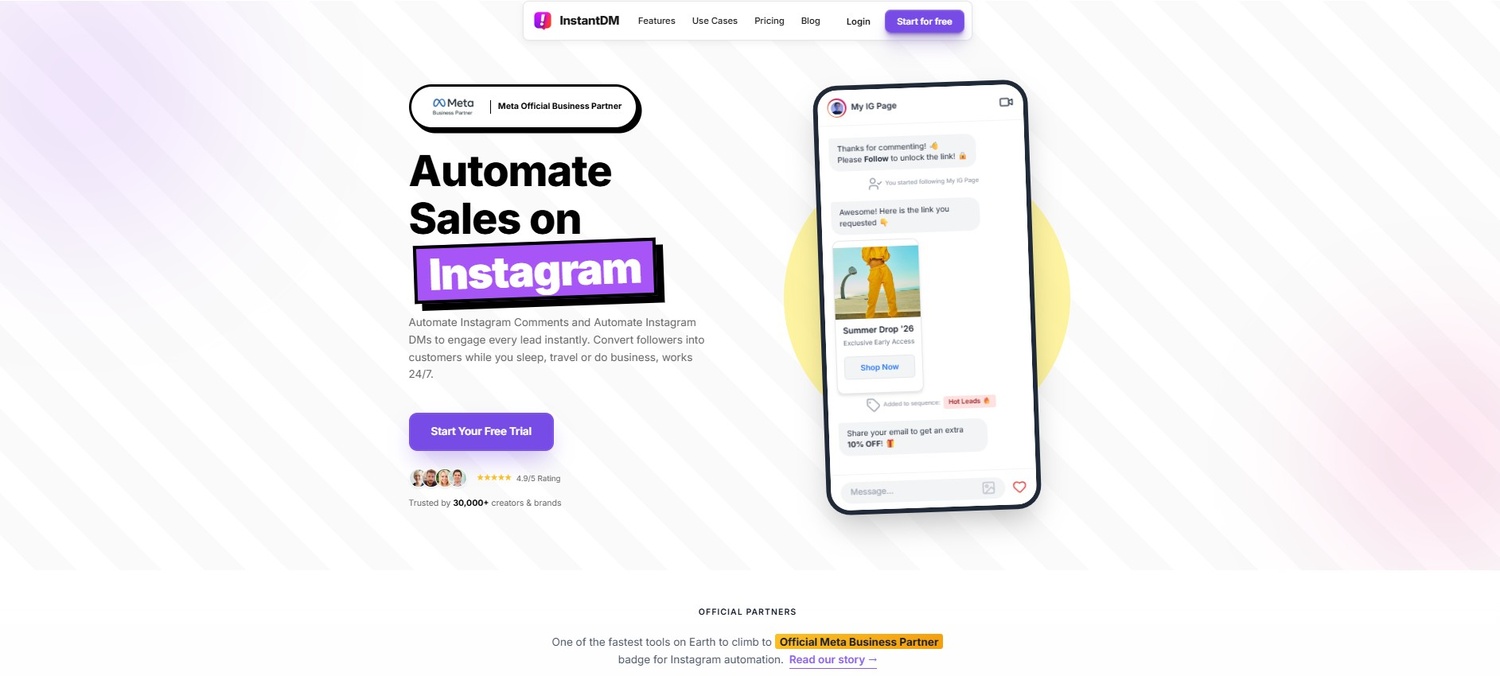
11. Why InstantDM is the Superior Choice for Seamless Automation
Breaking down why InstantDM stands out as the best in class compared to older market options. Built entirely on official Meta APIs, it offers a secure, highly intuitive no-code Flow Editor that lets you automate custom workflows, share product links, and collect emails without sacrificing the personal touch.
Editorial Disclosure: We spend a massive amount of time analyzing digital marketing software, and our team is proudly affiliated with InstantDM. However, this recommendation comes directly from watching countless brand owners struggle with the steep learning curves and account security issues of older platforms.
When you inevitably outgrow the chaos of manual inbox management and find yourself frustrated by the complexities of enterprise-level software, you need a tool that balances raw lead-generating power with extreme ease of use. When evaluating the current landscape of Instagram-specific growth tools, InstantDM clearly stands out as the most practical choice.
The Power of the No-Code Flow Editor
The primary reason InstantDM dominates the modern automation space is its obsessively user-centric design. You do not need to be a software engineer or hire an expensive marketing agency to build your funnels.
InstantDM features a highly intuitive, no-code Flow Editor. Through a visual interface that actually makes sense to a beginner, you can automate multi-step custom workflows in minutes. Whether you want to share a specific Shopify product link, deliver a PDF lead magnet, or natively collect email addresses, InstantDM handles it all directly inside the Instagram chat window. The software allows you to program varied responses so the system doesn't sound like a repetitive robot, seamlessly maintaining your brand’s unique human voice.
Total Security and Meta Compliance
Perhaps most importantly, InstantDM removes the fear of account restrictions. Unlike sketchy third-party apps that ask for your password, InstantDM is built entirely on official Meta APIs. The platform guarantees that your account stays completely compliant with Instagram’s strict terms of service. You never have to worry about shadowbans or waking up to a deleted account because you tried to automate your business.
12. Converting Comments to Sales on Autopilot with InstantDM
Stop losing leads to delayed responses. InstantDM’s precise "Comment-to-DM" automation instantly triggers a personalized direct message whenever a user comments on your Reels or posts with a specific keyword, seamlessly capturing interest the exact moment it happens while using human-like delay controllers to keep your account safe.
The most devastating leak in any digital marketing funnel is the gap between a user showing buying intent and a brand actually responding to that intent. If someone wants to buy, but you make them wait six hours for a link, the sale is gone.
This is where InstantDM transitions from being a simple organization tool into a relentless sales system through its "Comment-to-DM" automation strategy.
The Mechanics of the Comment-to-DM Funnel
Here is exactly how a highly profitable campaign works using this system:
Imagine you are a fitness coach launching a new program. You post a highly engaging Reel showcasing your clients' results. Instead of telling people to click the link in your bio—which requires them to leave the video, go to your page, and navigate a clunky mobile website—you remove all the friction.
In the video, you give a clear instruction: "Comment the word 'VIP' below to get the secret early-bird link."
The moment a user types 'VIP' in the comments, the InstantDM software detects the keyword. Instantly, two things happen:
- The software automatically likes their comment and replies to it publicly, boosting the post's algorithmic engagement.
- It triggers a personalized direct message straight to their inbox containing the exact purchase link.
You capture their buying interest the exact millisecond it peaks. The product is handed directly to them while they are still holding their phone.
Human-Like Delay Controllers
Security is a major concern when a post goes viral. If a video blows up and thousands of people comment in an hour, blasting out identical messages at the exact same millisecond will cause Instagram's security algorithms to flag the account as spam.
To protect your reach, InstantDM utilizes incredibly smart, human-like delay controllers. The software paces the outgoing replies naturally. It might wait a few seconds between messages, simulating the typing speed of an actual human being. This sophisticated throttling allows you to handle massive spikes in viral traffic and generate leads on autopilot without ever triggering a spam filter.
13. Tracking Inbox Metrics and ROI
A breakdown of which analytics matter most—such as click-through rates, conversation volume, and automation trigger success—when evaluating the profitability of your direct message strategy.
You cannot improve what you do not measure. A strategy is only as good as the data that proves it works. Once you have organized your inbox tabs, refined your manual messaging templates, and implemented smart automation tools, you must track your results. You need to ensure your new strategy is actually generating a tangible Return on Investment (ROI).
Do not just stare at your vanity metrics. Having massive follower numbers means absolutely nothing if they aren't interacting with you. You need to look at your inbox data to understand the health of your business.
The Essential Inbox Key Performance Indicators (KPIs)
- Conversation Volume Over Time: Are more individual people messaging you this month compared to last month? A spike in inbound DMs is the clearest indicator that your content's calls-to-action are actually resonating. If your inbox is dead, your content isn't compelling enough.
- Click-Through Rates (CTR) in Chat: This is critical. When you send a link in the DMs—whether you typed it out manually or an automation sent it—how many people actually tap that link? If your CTR is low, it means your messaging is weak. You need to give them a better reason to click.
- Automation Trigger Success Rates: If you are running multiple "Comment-to-DM" campaigns, track which specific keywords perform best. Does asking people to comment "LINK" get more engagement than asking them to comment "INFO"? Split-test your keywords to see what feels most natural to your specific audience.
- Response Time (For Manual Chats): If you have delegated your inbox to a VA, you need to track their speed. Are they resolving issues within 2 hours, or is the average wait time creeping back up to 12 hours?
By treating your Instagram DMs like a proper, measurable marketing funnel and rigorously analyzing the data, you can continuously tweak your copywriting and your offers. This transforms your inbox from a guessing game into a predictable, measurable revenue generator.
Table: The DM Management Evolution
To clearly understand where your business currently sits and where it needs to go, look at this breakdown of how inbox management scales.
| Feature / Business Stage | Manual Inbox Management (The Startup Phase) | Legacy Automation Tools (The Scaling Phase) | Modern Solutions like InstantDM (The Optimization Phase) |
|---|---|---|---|
| Response Speed | Highly variable (Minutes to Hours depending on schedule) | Instant | Instant (with smart, human-like delay pacing) |
| Learning Curve | None (Just typing on a phone) | Very Steep (Complex UI, confusing flow charts) | Extremely Low (Intuitive No-Code visual builders) |
| Cost to Scale | High (Requires hiring, training, and paying staff hourly) | High (Tiered pricing that punishes account growth) | Highly Cost-Effective (Predictable pricing structures) |
| Account Safety | High (It is literally you typing) | Moderate (Aggressive setups can trigger temporary action blocks) | High (Strictly adheres to Meta API compliance rules) |
| Sales Conversion | Low (Lost leads due to human delay and sleep) | High (Catches leads quickly) | Highest (Optimized funnels, native email collection, seamless UI) |
Conclusion
Taking absolute control of your Instagram inbox is no longer an optional task you can push to the bottom of your to-do list; it is a critical, foundational component of your digital marketing strategy. The platform has changed, and consumer expectations have changed with it. By organizing your messages with ruthless efficiency, utilizing built-in tools like quick replies to save your thumbs, and embracing the immense power of smart, modern automation software, you can reclaim hours of your day.
Ultimately, an optimized, fast-acting inbox means happier, more loyal followers, dramatically faster support resolution, and a highly scalable pathway to increased sales. You are leaving money on the table every single day your inbox remains a chaotic mess. Start implementing these strategies right now, step by step, to transform your DMs from a dreaded daily chore into your brand's most profitable, reliable marketing channel.
If your profile optimization is also holding you back, learn how to fix your Instagram bio and highlights to stop losing sales — the companion strategy to inbox management.
How Home Decor Creators Grow on Instagram
How Personal Finance Creators Build Trust on Instagram
Coaches & Consultants: Build an AI Agent That Qualifies Leads in Your Instagram DMs 24/7
Real Estate on Instagram: How Agents Close Deals Through DMs in 2026
2026 E-Commerce FAQ Templates: How to Turn DMs into Sales
How Finance Creators Use Instagram to Build Trust and Book Clients
How Do Dog Accounts Go Viral on Instagram: The Ultimate Guide to Pet Stardom
How Therapists and Mental Health Professionals Connect With Audiences on Instagram
9 DM Campaign Ideas That Generated 10x More Leads Than Email
How Lifestyle Creators Turn Instagram Followers Into Loyal Communities
Instagram Lead Generation on Autopilot: The Complete DM System
Real Estate Agents: Stop Ignoring Instagram DMs — Let AI Handle Lead Qualification for You
How Fitness Coaches Grow on Instagram Without Going Viral
How to Generate Real Estate Leads Automatically from Instagram Comments (Step-by-Step Guide)
How Independent Musicians Grow Their Audience on Instagram
Gary Vee's Instagram Rules + AI Prompts = Digital Product Sales on Autopilot
Amazon Influencers Are Sending Storefront Links on Autopilot — Here's How
The LTK Affiliate Program (2026): Commission Rates, Secret Approval Requirements, & How to Scale
How DJs and Coaches Use Audio DMs to Close Clients on Instagram
Instagram Navigation Metrics: What They Mean and How to Use Them for Sales