TL;DR
- Visuals & Video: Tools like Adobe Lightroom and CapCut remain non-negotiable. If you want high-retention, cinematic content that stops the scroll, you need dedicated editing software, not just native app features.
- Scheduling & Analytics: Later and Metricool dominate the market for getting posts out consistently and measuring true ROI. Stop guessing what works and start tracking your shares and save rates.
- Monetization & Finances: Use platforms like Stan Store for seamless, high-converting bio-links, and tools like Catch or QuickBooks to handle creator taxes so you don't get hit with massive IRS bills.
- DM Automation (The meaningful upgrade): InstantDM absolutely crushes legacy competitors like ManyChat with unlimited flat-rate pricing ($9.99/mo), built-in account safety features to prevent shadowbans, and seamless "Schedule Post with Auto LinkDM" capability.
- Why it matters in 2026: Organic reach requires serious volume, and manual engagement is officially dead. You need a tech stack that works 24/7 to turn passive scrollers into actual revenue while you sleep.
Introduction
Growing an Instagram audience today isn't just about posting great pictures anymore; it’s about operating like a full-scale media business. Think back to a few years ago. You could throw a nice filter on a decent photo, use a few semi-relevant hashtags, and watch your follower count tick up. Those days are completely gone. Today, the algorithm is ruthless, user attention spans are virtually nonexistent, and the competition is treating their personal brand like a Silicon Valley startup.
If you’re spending hours manually editing videos, squinting at confusing analytics metrics, or copy-pasting the same reply to hundreds of direct messages, you’re losing precious time. That is time that should be spent doing the one thing software can't do for you: actually creating original content.
The secret to scaling your brand without suffering a massive creative burnout lies entirely in your tech stack. Just like a solid website needs a strong SEO and backlink strategy to thrive and rank on Google, an Instagram profile needs the right software infrastructure running in the background to capture traffic, hold attention, and convert casual followers into paying customers. This comprehensive guide breaks down the absolute essential apps every serious creator needs in their toolkit right now to streamline their daily operations, protect their mental health, and maximise their revenue. Grab a coffee, because we are diving deep into the ultimate 2026 creator stack.
12 Essential Instagram Tools for Creators
1. Visual Polish: Photo Editing Apps for a Cohesive Grid
Great visuals are still the absolute foundation of Instagram. Despite the massive push toward short-form video, your static grid acts as your digital shopfront. When a potential follower or a brand sponsor clicks over to your profile after seeing a viral Reel, they Make a split-second decision based on your grid's visual harmony. We look at the top mobile and desktop editors that give your images that high-fashion, cinematic edge, ensuring your feed looks professional and consistent.
Why Grid Aesthetics Still Matter
If your grid looks chaotic, poorly lit, or disjointed, people bounce. It’s that simple. A cohesive color palette and professional grading signal to brands that you take your content seriously and understand brand identity. You don't need a $5,000 camera setup; you just need the right software to dial in your contrast, shadows, and colour grading.
The Heavy Hitters in 2026
Adobe Lightroom Mobile remains the undisputed leader in this field. The ability to create, buy, or sell custom presets means you can batch-edit an entire month's worth of photos in about ten minutes. If you want a specific vintage, film-grain, or neo-noir cinematic look without spending hours tweaking the HSL sliders, apps like Tezza or VSCO offer incredible film emulations that feel highly authentic and not overly processed.
Pro-Tip for Creators: Stop using the in-app Instagram filters. They heavily compress your image data. Edit in Lightroom, export at the highest quality settings (usually 1080x1350 for portrait), and upload directly. If you need to remove a trash can from the background or fix a blemish, Retouch and Snapseed are invaluable tools that preserve your image resolution.
To stop guessing what content will work, you can explore this definitive guide to the best Instagram growth tools for creators and find the perfect software to automate your scheduling and trend discovery.
2. Reels That Retain: Video Editors Built for Short-Form
Attention spans are short—we are talking milliseconds. This subtopic covers the best video cutting tools for fast-paced edits, auto-captions, and trending audio syncing to keep your viewers hooked until the last second.
The Anatomy of a High-Retention Reel
In the current landscape, the algorithm rewards one metric above all else: average watch time. If your video doesn't hook the viewer in the first three seconds, it's dead on arrival. High-retention Reels require aggressive jump cuts (removing every single pause or breath), dynamic zoom-ins to reset the viewer's attention, engaging sound effects, and crucially, burnt-in captions. Over 60% of Instagram users scroll with their volume off. If you aren't visually spelling out your hook, they are scrolling right past you. You simply cannot rely on Instagram's buggy native editor to handle this level of precise timeline cutting.
Essential Editing Software
CapCut remains the most powerful mobile and desktop editor for creators. Its auto-captioning feature is remarkably accurate across multiple languages, and the library of trending effects, transitions, and text animations is updated daily to match whatever is going viral on TikTok and Reels.
For creators who want AI to do the heavy lifting—like podcasters or YouTubers looking to repurpose long-form content—tools like Opus Clip or Munch are game-changers. You drop a YouTube link in, and the AI automatically slices it into ten perfectly formatted Reels, identifying the most engaging hooks, cropping your face to the centre, and adding dynamic captions automatically. Splice and InShot are also great alternatives for quick, on-the-go edits that don't require the steep learning curve of Adobe Premiere Pro.
You can skyrocket your Instagram growth and sales by using official Meta API-compliant tools like InstantDM to automate personalized "Comment-to-DM" workflows, AI-powered lead qualification, and multi-day drip campaigns that turn every follower interaction into a 24/7 revenue engine.
3. The Content Machine: Schedulers That Keep You Active
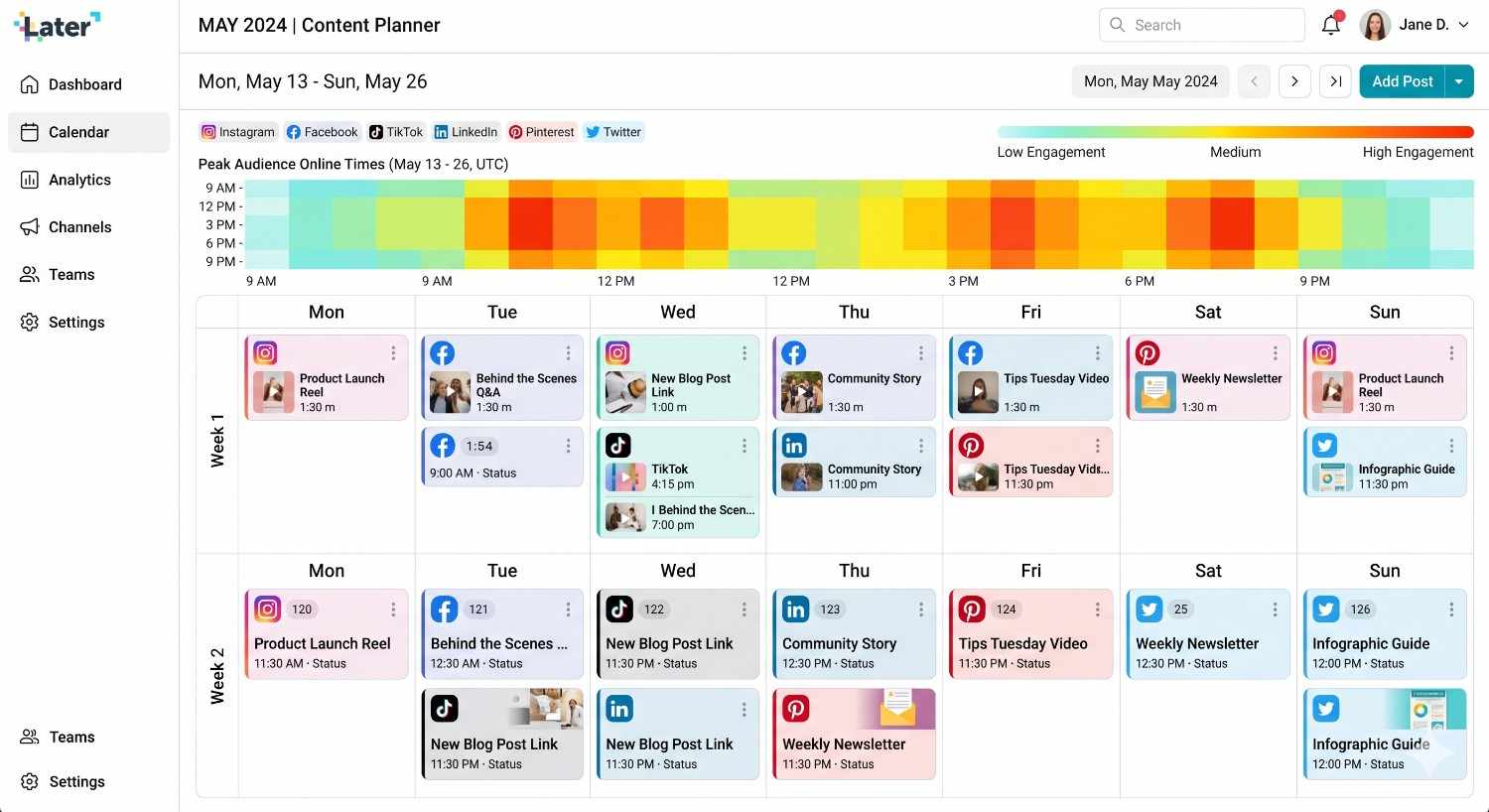
Consistency is everything, but you don't need to be glued to your phone 24/7. We review the top scheduling platforms that auto-publish your carousels and videos at peak times.
Automation Over Manual Posting
Creator burnout is a massive, industry-wide issue. Remembering to post manually at 12:30 PM every day while managing a full-time job, family, or brand negotiations can lead to disastrous consequences. The algorithm penalises erratic posting schedules. By batch-creating your content on a Sunday and scheduling it out for the next two weeks, you free up massive amounts of mental bandwidth. You transition from scrambling to create daily content to acting like a true publisher.
Leading Scheduling Platforms
Later is fantastic for highly visual planners. The drag-and-drop grid preview allows you to visualise your feed's appearance before it goes live, which is essential for lifestyle, fashion, and food creators who prioritise grid aesthetics. Metricool has become a massive favourite recently because it doesn't just schedule; it gives you incredibly detailed, colour-coded heatmaps that show exactly when your specific audience is online and actively scrolling.
Planoly is another strong contender, especially for its intuitive, clean interface. Crucially, these tools now fully support auto-publishing for Reels (with custom cover photos) and multi-slide carousels, meaning you literally don't have to touch your phone to maintain a highly active, daily presence.
4. Decoding the Algorithm: Analytics Trackers That Make Sense
Native insights provide only a partial view of the situation. Here, we break down the third-party analytics dashboards that help you track follower growth rates, audience demographics, and true content ROI.
Moving Beyond Vanity Metrics
While likes and comments may boost your ego, they do not contribute to your financial success or secure brand partnerships. If you want to scale, you need to understand your true conversion metrics: save rates, share rates, profile visits, and link clicks. Instagram's native dashboard gives you a decent 30-day overview, but it severely lacks deep historical data and competitive analysis. You need to know which specific content pillars are driving actual targeted followers versus which ones are just getting empty views from random scrollers.
Best Analytics Dashboards
Dash Hudson is an enterprise-level tool that many top-tier creators and brands use. It features "Vision" AI, which actually analyses the composition of your photos and predicts how they will perform before you even post them. For solo creators looking for something more accessible, HypeAuditor is incredible for auditing your account's health. It tracks your engagement rate against industry benchmarks, identifies fake followers, and ensures your audience demographics align perfectly with the brands you want to pitch to. By comprehending this data, you can focus intensively on what works and eliminate the content formats that are wasting your time.
5. Maximizing Traffic: Link-in-Bio Builders for Creators
You have one link—make it count. This section explores the best micro-landing pages to direct your followers to your digital products, portfolios, or external articles.
The "One Link" Bottleneck
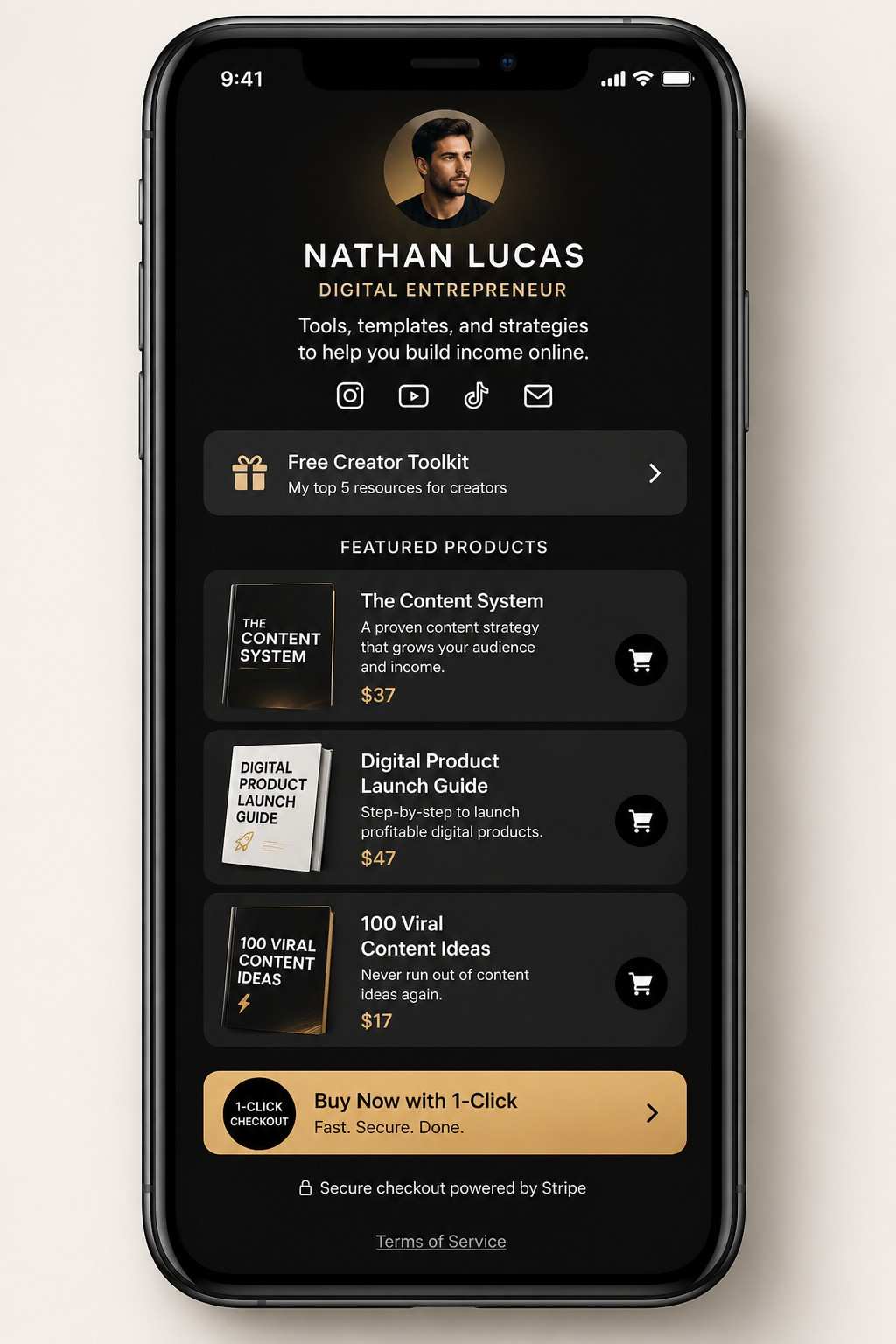
Instagram famously restricts external linking. If you have a YouTube channel, a weekly newsletter, a digital shopfront, and a media kit, a standard raw link simply isn't enough. You need a dedicated, heavily optimised microwebsite that routes your traffic efficiently without causing decision fatigue. A clunky website that takes ten seconds to load will kill your conversion rate before the user even sees what you are offering.
Top Link-in-Bio Solutions
Linktree started the trend and remains a solid, recognisable choice. However, creators are demanding much more functionality now. The Stan Store has absolutely revolutionised this space. It's not just a directory of links; it’s a fully functional e-commerce platform built directly into your bio link. Followers can buy your digital guides, book 1-on-1 consultation calls, or subscribe to your premium content without ever leaving the native Instagram app browser. The frictionless checkout process dramatically increases sales.
Beacons is another phenomenal tool that uses AI to help you build out your page in seconds, complete with built-in email capture forms and highly customisable branding that makes you look like an established agency.
6. SEO for Instagram: Hashtag and Keyword Research Tools
Instagram functions more like a search engine every day. We highlight the tools that help you find the exact keywords and hashtags your target audience is searching for to boost your organic reach.
Instagram is a Search Engine Now
The days of spamming thirty random, generic hashtags (#love, #instagood, #fashion) in your first comment are completely over. Instagram's algorithm now parses the actual text in your captions, the text on screen in your Reels, and your alt-text to categorize your content accurately. If someone searches for "home office setup tips 2026," Instagram looks for posts optimized for those exact keywords. If you aren't writing SEO-optimized captions, you are completely missing out on months of long-term, organic search traffic.
Keyword Discovery Tools
Flick is the absolute gold standard for Instagram hashtag and keyword research. It helps you find low-competition, high-volume tags that an account of your specific size can actually rank for, rather than competing against accounts with ten million followers. It also tracks your ranking over time. Another great strategy is using AnswerThePublic or Google Trends to see what specific questions people are actively typing into search bars in your niche, and then using those exact phrases as the hooks for your Reels and captions.
7. Beating Creator Block: AI Platforms for Idea Generation
Stuck on what to post? We cover how to use AI brainstorming tools to map out a month’s worth of content pillars, write compelling captions, and script out your videos.
Scaling Ideation Without the Headache
Every creator hits a wall eventually. Staring at a blank screen trying to figure out what to film next is incredibly frustrating and kills momentum. The smartest creators treat AI not as a replacement for their unique voice, but as a hyper-competent, tireless brainstorming partner. When you use AI to generate the skeleton and structure of your content, you save your mental energy for the actual on-camera execution and personality injection.
Go-To AI Brainstorming Assistants
ChatGPT (specifically with custom instructions trained on your specific brand voice and target audience) and Claude are indispensable. You can feed them your past successful video scripts and ask them to generate 30 new variations or entirely new content pillars. Notion AI is amazing for organizing these messy ideas into a clean, trackable content calendar. For scripting, tools like Jasper can help you punch up your hooks to make them more aggressive and write persuasive calls-to-action for your captions. The golden rule here: never copy-paste blindly. Use the AI to generate the raw clay, and then mold it yourself so it sounds exactly like you.
To build trust with your audience and streamline your social media operations, you can explore this curated list of the best Instagram marketing tools to boost your engagement and conversion rates.
8. Securing the Bag: Platforms to Find and Manage Brand Deals
Once you have the audience, it's time to monetize. This section reviews creator marketplaces where you can pitch to sponsors, set your rates, and land lucrative partnerships.
From Free Product to Paid Partnerships
Waiting for brands to magically slide into your DMs with a massive budget is a terrible business strategy. You need to be proactive. In the past, this meant cold-emailing hundreds of PR reps, tracking them down on LinkedIn, and praying for a reply. Today, the ecosystem is much more formalized. Brands allocate massive quarterly budgets specifically to influencer marketing, and they use dedicated software platforms to find creators who match their target demographics perfectly.
Creator Marketplaces
Aspire and Grin are massive platforms where major, household-name brands list their upcoming campaigns. You can apply directly, negotiate your rates, submit your drafts for approval, and sign legally binding contracts all within the app. LTK (LikeToKnow.it) remains essential for fashion, beauty, and home decor creators looking to earn passive affiliate commissions on the products they feature daily. For micro-influencers just starting out, UGC (User Generated Content) platforms like Billo or Backstage offer great opportunities to build a portfolio and get paid a flat rate for making short videos for brands to run as ads, even if you only have a few hundred followers.
This video reviews Inflact, an all-in-one Instagram marketing toolkit that provides advanced research and optimization features often hidden or restricted by the native app.

9. Keeping Viewers Hooked: Story Design and Template Apps
Stories are where community building happens. We dive into the design apps offering the best interactive templates and aesthetic layouts to keep your daily viewers engaged.
Fostering Community Through Daily Stories
Your main feed is for discovery; your Stories are for deepening the connection. This is where you actually sell products, where you share messy behind-the-scenes moments, and where you build a loyal, ride-or-die community. But simply posting a shaky, unedited video or a plain text block gets boring fast. Highly engaging stories use polls, quizzes, beautiful layouts, and interactive elements to keep the viewer tapping, voting, and replying. Every interaction signals to the algorithm that your content is valuable.
Top Story Layout Apps
Canva is obviously a heavyweight here, offering thousands of highly customizable templates for everything from "New Post" announcements to complex Q&A graphics. Unfold is the industry standard for elegant, minimalist, editorial-style story layouts. If you want your stories to look like a spread in a high-end magazine, this is the app. Mojo is another incredible tool specifically designed for animated stories; it adds dynamic motion to your still photos and text blocks, which drastically reduces swipe-away rates and keeps eyes glued to your daily updates.
10. Tracking the Cash: Invoicing and Financial Apps for Freelancers
Treat your page like a business. We look at simple accounting and invoicing software tailored for solo creators to manage brand payouts and track project expenses.
The Reality of Creator Finances
If you are making money from Instagram, you are a business owner. Period. Mixing your personal grocery bills with your business expenses is a nightmare come tax season. Chasing down late payments from a brand via passive-aggressive Instagram DMs is incredibly unprofessional and stressful. You need proper financial infrastructure to track your incoming revenue, deduct your expenses (like that new ring light, camera lens, or software subscriptions), and send professional, legally sound invoices.
Creator-Friendly Finance Tools
QuickBooks Self-Employed is a massive staple for tracking expenses automatically and estimating your quarterly taxes so you don't get a massive surprise bill from the government in April. For sending beautiful, trackable invoices, HoneyBook or Bonsai are fantastic because they also handle client contracts—meaning you never do a single brand deal without a signed agreement protecting your intellectual property. Catch is another highly recommended platform built specifically for freelancers; it automatically withholds taxes from your incoming payouts and helps you set up benefits like health insurance and retirement funds, which you obviously don't get when working for yourself.
11. The DM Automation Showdown: Navigating ManyChat, LinkDM, and InstantDM
While platforms like ManyChat and LinkDM helped popularize chat automation, they often frustrate creators with complicated logic trees and pricing that punishes growth. In this breakdown, we explore why InstantDM takes the crown as the superior alternative. It features a streamlined, creator-first interface that lets you turn reel comments into sales on autopilot—instantly sending links when a follower comments a trigger word—without the steep learning curve of its competitors.
The Hidden Costs of Outdated Automation
Automating your Direct Messages is no longer a fun little "hack"; it is the single highest ROI activity you can implement on your Instagram account right now. Think about it. When a Reel finally goes viral, you might get 5,000 comments saying "LINK." Replying manually to 5,000 people is physically impossible. Ignoring them means you are literally burning thousands of dollars in potential sales or thousands of new email subscribers. You know you need an automation tool, but choosing the wrong one can be a massive headache and financially devastating.
Historically, creators turned to ManyChat. While it's a powerful legacy tool, ManyChat has a massive flaw for growing creators: it charges per contact. If your video blows up and you capture 50,000 leads in a weekend, your software bill skyrockets exponentially. You are literally punished for succeeding. LinkDM charges per message, which creates the exact same financial anxiety. Furthermore, these older platforms were built for enterprise marketing teams. They require you to build complex, confusing logic trees that look like a web developer's nightmare just to send a simple product link.
Why InstantDM is the Clear Winner for Creators
This is exactly where InstantDM absolutely disrupts the market. They looked at the exact pain points everyday creators face and eliminated them entirely. First, the pricing is revolutionary. InstantDM operates on a strictly flat-pricing model. Their highly popular Legend Pro plan is just $9.99/month for unlimited automation and unlimited contacts. Whether you get 100 comments a month or 300,000 comments, your bill never changes. You can budget perfectly.
Beyond the pricing, the interface is dead simple. You do not need a three-hour YouTube tutorial to figure out how to use it. With their "Universal Triggers" feature, you can set one keyword (like "SHOP" or "GUIDE") that works seamlessly across your Reels, Stories, and direct messages simultaneously. You set it up once, and it works everywhere.
Moreover, InstantDM features an incredibly powerful "Schedule Post with Auto LinkDM" function. This is a massive first-to-market feature that allows you to schedule your content and attach the DM automation flow at the exact same time within the same dashboard. You don't have to post the video, rush over to the automation software, and hope you connect it fast enough. You set it, forget it, go to sleep, and wake up to a flood of new leads and sales. It is the ultimate tool for turning a passive audience into active revenue.
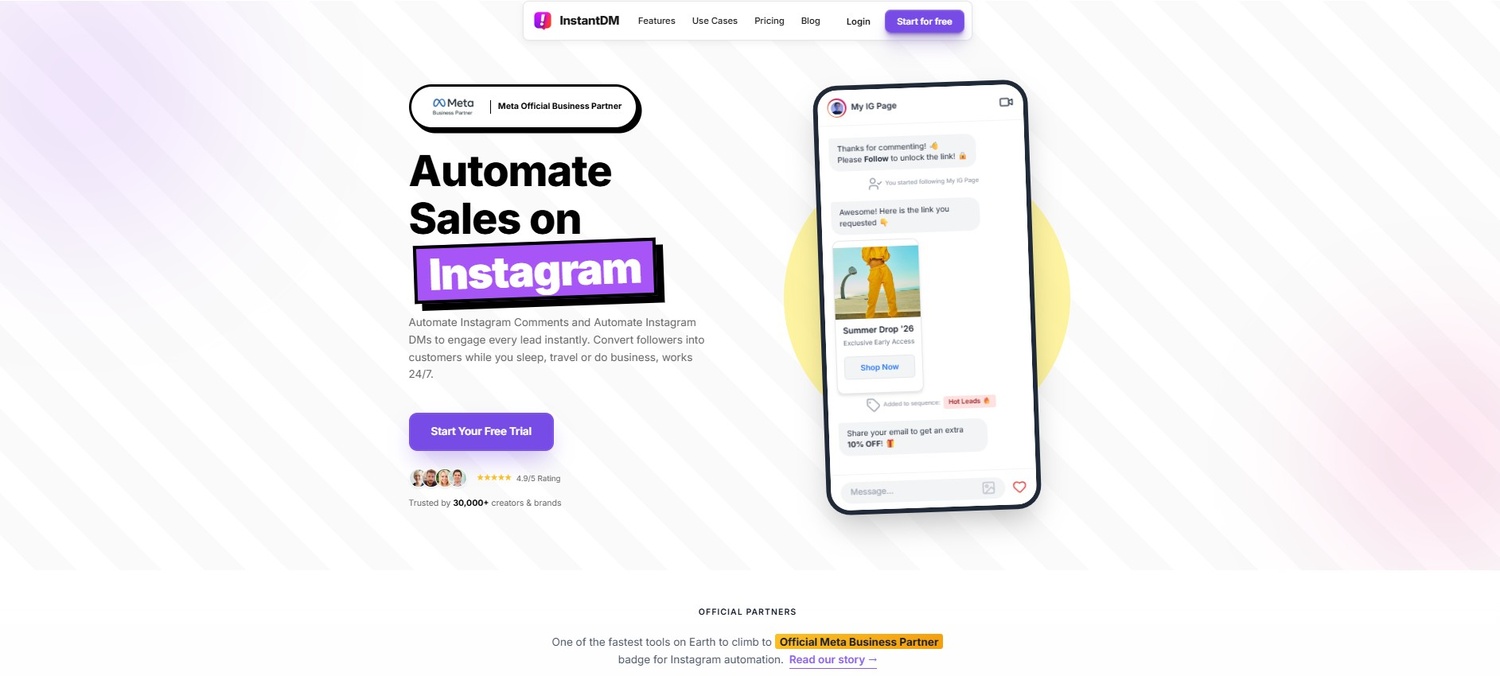
12. Why InstantDM’s Safe Lead Capture Outperforms the Rest
A major drawback of older automation bots is that they can feel robotic or risk flagging your account. Here, we detail how InstantDM solves this by utilizing official Meta APIs and smart, human-like response delays. You'll learn how to build seamless welcome messages and interactive buttons that capture emails directly inside the chat, offering a much safer, faster, and more reliable conversion workflow than anything else on the market.
Staying Safe from Action Blocks and Shadowbans
The single biggest fear creators have when setting up any kind of automation is getting shadowbanned. Instagram's spam filters are incredibly aggressive right now. If an outdated, cheap bot blasts 500 identical messages to users in one single second, your account will instantly be flagged, your algorithmic reach will tank, and you might get temporarily blocked from commenting or posting. It can ruin months of hard work.
InstantDM was engineered specifically to solve this exact problem. As an Official Meta Business Partner, they use a 100% official API integration, meaning Instagram fully approves of their software. But they go a massive step further with their "Advanced Safety Mode" (which is available on their Trendsetter plan at $24.99/month). When a post goes viral and you get a sudden flood of traffic, InstantDM's Viral Mode queue handler kicks in automatically. It intelligently spaces out the automated DMs at human-safe intervals. It mimics natural, manual behavior perfectly, ensuring that every single lead gets their message without ever triggering Instagram's spam alarms. Your account stays totally safe, your engagement rate stays high, and your conversions go through the roof.
Real-Time Lead Qualification and AI Integration
Just sending a link is great, but capturing user data is how you build long-term, sustainable wealth as a creator. Remember, you do not own your Instagram followers; Mark Zuckerberg does. If the app goes down tomorrow or your account gets hacked, you lose your entire business overnight. InstantDM allows you to execute flawless Lead Generation directly inside the Instagram DM.
Instead of forcing users to click a bio link, wait for an external webpage to load, and fill out a clunky form (where data shows up to 60% of people abandon the process out of pure laziness), InstantDM captures their email or phone number right inside the native chat window.
Furthermore, InstantDM has recently integrated a cutting-edge Instagram AI Agent powered by Claude. This completely changes the game. This means the bot doesn't just act like a dumb auto-responder; it can actually have dynamic, conversational, human-like interactions. It can auto-qualify leads based on custom questions, answer FAQs about your products, and automatically tag users in your CRM (e.g., tagging someone as a "Hot Lead" or "Ready to Buy"). It even follows up on abandoned interactions automatically via DM a few hours later. It’s not just a tool; it’s a 24/7 digital sales team working inside your inbox, allowing you to scale your income without ever sacrificing a personal touch.
To build a sustainable presence without risking a shadowban, you can follow this expert guide to the best Instagram growth tools in 2026 and discover safe ways to grow your followers organically through AI-powered targeting.
Top DM Automation Tools in 2026
To make it incredibly clear why your software choices matter, let’s look at how the top automation platforms stack up against each other right now.
| Feature / Platform | InstantDM | ManyChat | LinkDM |
|---|---|---|---|
| Pricing Model | Unlimited Flat-Rate ($9.99/mo) | Per Contact (Extremely expensive at scale) | Per Message (Unpredictable billing) |
| Meta Official Partner | Yes (100% compliant) | Yes | Yes |
| Account Safety Mode | Yes (Viral Queuing & spacing) | Basic rate limits | Basic rate limits |
| Schedule Post + Auto DM | Yes (Built-in simultaneously) | Requires Zapier/Clunky Workarounds | Limited capabilities |
| Conversational AI | Yes (Claude AI Agent integration) | Yes (Requires heavy setup) | No |
| Follow-Gate Links | Yes (Forces user to follow first) | Workarounds required | Yes |
| Learning Curve | Very Low (Creator-focused drag & drop) | High (Complex flow builders) | Medium |
| Support Speed | 24/7 Email & WhatsApp (Trendsetter) | Often slow ticket systems | Email only |
Conclusion
Building a sustainable, highly profitable career as a creator in 2026 means you have to start treating your platform like a well-oiled machine. By integrating the right visual editors, deep analytics, and powerful DM automation into your daily routine, you remove all the friction from your workflow. The objective is not merely to intensify your content creation efforts and exhaust yourself; rather, it is to establish intelligent systems that operate continuously on your behalf. Whether you are batch-editing your vlogs in CapCut, scheduling your carousels in Metricool, or securing five-figure brand deals on Aspire, every single tool serves a distinct, vital purpose.
However, the most significant growth lever at this moment is capturing and converting the organic traffic you already possess. Start by picking one or two tools from this list to fix your biggest operational bottleneck. If you are exhausted from replying to comments, migrating to a platform like InstantDM to stop leaking revenue in the comments section is the easiest win you can get. Set up your systems, protect your time, and watch how much easier community growth and monetisation become when you have the right tech stack backing you up.
How Spiritual Creators Build Loyal Communities Through Instagram DMs
Why Social Media Should Not Be Your Entire Marketing Strategy
Instagram Is Disabling Accounts Without Warning. Here's How to Protect Yours.
How to Send a Link When Someone Comments on your Instagram
Messaging With Instagram Marketing Strategy Actually Works
Quick Guide - How Do You Direct Message Someone on Instagram
How to Turn Your Instagram Scroll Into $1,000+ in Daily Income
Course Creators Are Using AI DM Agents to Fill Programs on Autopilot
8 DM Tips That Boost Reply Rates by 40% (Tested on 50K Messages)
30 Things You Need to Know Before Starting on Instagram in 2026
How to Check Instagram Messages: DMs, Requests, and Hidden Inbox (2026)
How to Organize Instagram DMs: Labels, Filters, and Inbox Zero
Watch: Best Instagram Tools for Creators
- Grow From 0 to 10,000 Instagram Followers | Your 90-Day ✨Ai-
- Instagram Is Hiding These Tools From You — I Tested Them All
- the ONLY way to BEAT the Instagram algorithm in 2026
- How I grew 0-200K on Instagram (and i’m doing it again)