TL;DR: The Quick Guide to Hiding Instagram Likes
If you're short on time and just need to know how to hide your likes on Instagram right now, here they are. To hide likes on a new post, Make your post like you normally would, and then on the last screen before you hit "Publish," scroll down and click "Advanced Settings." Switch the toggle that says "Hide like and view counts."
To hide the likes on a post that is already on your grid, tap the three dots in the top right corner of that post and choose "Hide like count." Lastly, if you're tired of seeing everyone else's numbers and want to hide them from everyone, go to your profile, tap the hamburger menu, and then go to Settings > Privacy > Posts. There, you can turn on "Hide Like and View Counts."
You can focus on building a real, authentic community by hiding vanity metrics. In 2026, automated direct messages, saves, and shares will be the main things that drive the algorithm and overall engagement, not the old, simple double-tap. This is especially important.
Introduction: The New Era of Instagram in 2026
You probably clicked on this post because you want to know how to hide likes on Instagram. The good news is that it's very simple and only takes a few seconds. But as a digital marketer, I can tell you that the why of this feature is much more important than the how.
The double-tap has been the one and only currency on Instagram for years. We've all been there: You post a carefully edited picture, like a great one of you sitting on the porch with your dog, and then you spend the next half hour refreshing the app like crazy. You wait for that confirmation, and if the numbers don't go up quickly enough, you start to panic. As social media changes over the next few years, the pressure to keep a perfectly curated look and get a lot of engagement is stifling creativity. People who make things are getting tired.
Instagram added the option to hide liked counts after seeing this bad change in how people use the app. The platform took a big chance, but it gave users the power to bring the focus back to what really matters: good content, real connections with people, and real business growth.
Hiding your likes is a smart move that can help you protect your mental peace, try out new content styles without being afraid of what other people will think, or shift your brand's focus to deeper metrics that actually make money. In this in-depth, step-by-step guide, we'll show you exactly how to hide likes on your own posts and those of other people. More importantly, we will look at the modern strategies needed to create real engagement that goes beyond just vanity metrics and brings in money.
1. The Psychology Behind Hiding Likes
We need to talk about how the brain works when people use social media to understand why this feature is important. Social media sites were made to be addicting, and the "like" button is what keeps people coming back for more.
When someone likes your post, your brain gets a tiny, almost unnoticeable hit of dopamine. It feels nice. It seems like being accepted by others. But when the likes don't come in as quickly as you want them to, or worse, when a post fails completely, the opposite happens. It can make you feel very inadequate, doubt yourself, and what I call "creative paralysis."
The Anxiety of the Algorithm
Taking a break from the "numbers game" can change the way you plan your content. You stop making content just for a machine algorithm that you can't predict and start making content for yourself and the real people in your community.
Look at it from the point of view of digital marketing. The pressure of how people see things puts many great creators in small boxes. They find one very specific type of post that gets a lot of likes and stick to it no matter what. They are afraid to try anything new because their friends, family, and competitors can see them fail. This fear stops new ideas from coming up. This is why, for a few years, everyone's Instagram grid looked the same. The look was completely the same.
Why Raw Content is Winning Today
Discussing how stepping away from this pressure reduces social anxiety is a conversation we need to have loudly and often. By hiding your likes, you hand yourself the permission to fail gracefully. You can post a weird, niche meme, a raw, unedited photo dump from your weekend, or a deeply personal story without sweating over the public scoreboard.
This encourages raw, authentic content creation. Now that we are navigating the digital landscape of 2026, audiences are aggressively craving authenticity over intense polish. They are tired of the filtered, perfect reality. They want to see the real you, not just the mathematically optimised version of you. When the numbers disappear from public view, the art and the fun finally return to the platform.
If you want to reduce pressure and focus on content quality, you can follow this step-by-step guide on how to hide likes on Instagram for both new and existing posts.
2. How to Hide Likes Before Publishing a New Post
If you're prepared to post your first piece of metric-free content, you'll be pleased to learn that the process is seamlessly integrated into your regular workflow. Instagram integrated this feature directly into the final publishing screen, ensuring you can make a game-time decision on a post-by-post basis.
Step-by-Step Instructions for New Content
Here is a highly detailed, step-by-step tutorial on how you can toggle off like and view counts right before hitting publish on a new photo or Reel.
- Create Your Post: Open the Instagram app and tap the prominent '+' icon at the bottom centre of your screen to initiate a new post or Reel.
- Edit and Filter: Select your chosen media from your camera roll. Apply any necessary filters, adjust the brightness or contrast, and make your edits exactly as you normally would. Tap the 'Next' button in the top right.
- Write Your Caption: This is the final publishing screen. Here, you will add your engaging caption, tag relevant accounts or collaborators, add trending music, and input your location data.
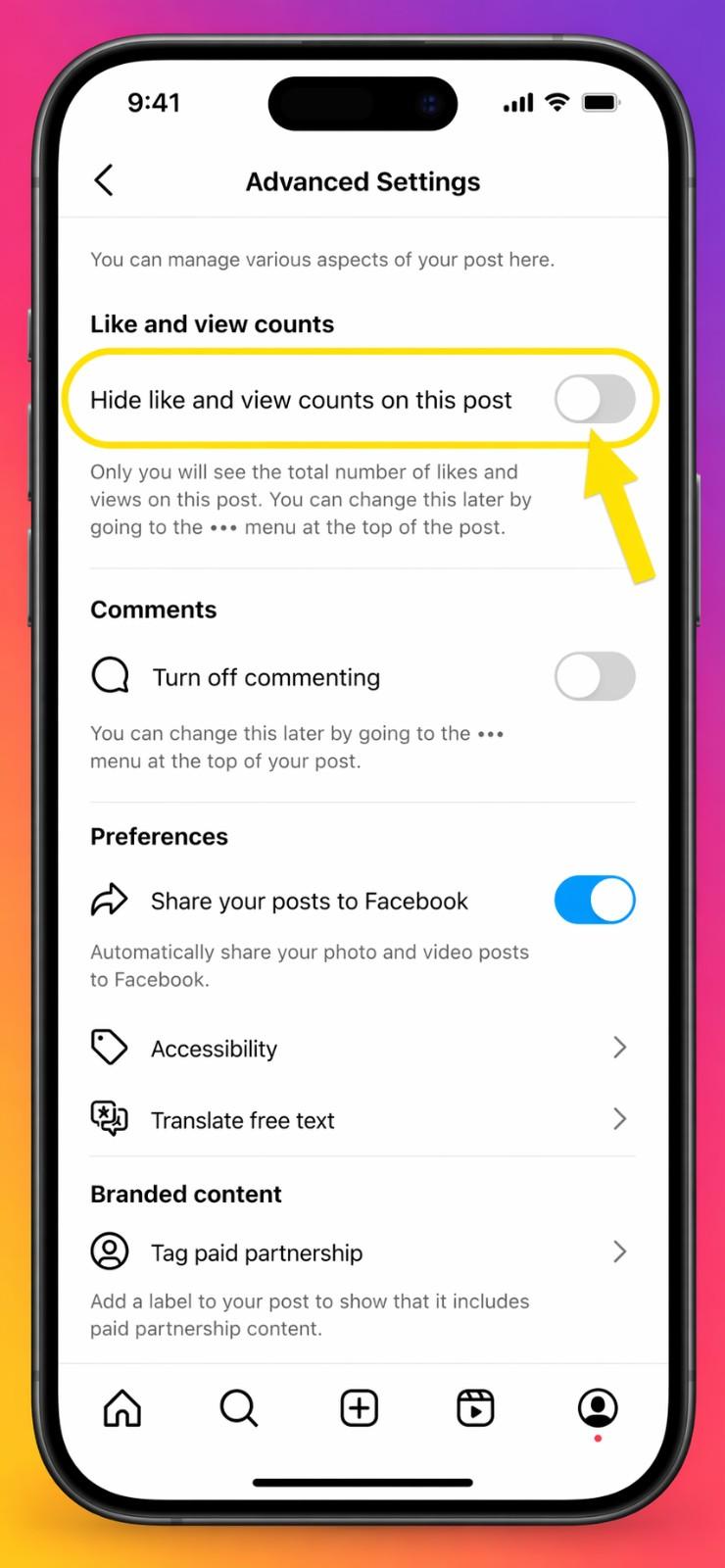
- Locate Advanced Settings: Do not hit publish yet. Scroll to the very bottom of this screen. Just below the options to automatically share your post to Facebook or Threads, you will see small, easily missed text that says "Advanced Settings". Tap on it.
- Toggle the Switch: At the very top of the Advanced Settings menu, you will see a dedicated section labeled "Like and View Counts". Toggle the switch that says, "Hide likes and view counts on this post." When the switch turns blue, the feature is fully active.
- Publish: Hit the back arrow to return to the main publishing screen. Review your caption one last time, ensure your tags are correct, and confidently tap 'Share'.
Troubleshooting Common Publishing Issues
When your post goes live on the feed, it will simply display the text "Liked by [Username] and others" instead of displaying a specific aggregate number.
A common question I hear is, 'Wait, can I still see my own numbers?' Yes, absolutely. You alone will still be able to tap on the word "others" to view the exact like count and scroll through the comprehensive list of who interacted with your post. Your audience, however, will remain completely in the dark, allowing them to judge the content on its actual merit rather than its popularity.
This video provides a practical guide on how to protect your privacy by hiding your liked Reels from your friends on Instagram.
3. Hiding Likes on Your Existing Instagram Grid
Maybe you don't just want to change your strategy moving forward; maybe you are looking to clean up your digital footprint. Hiding likes isn't an exclusive feature reserved for brand new content. You can easily travel back in time and remove the public tally from your older posts.
This is an incredibly useful tactic if you are actively pivoting your brand, executing a massive aesthetic rebrand, or simply want a uniform, metric-free look across your entire profile. When a new potential follower lands on your page, a completely metric-free grid forces them to focus entirely on your visual portfolio and the value of your captions, rather than making snap judgements based on which photo got the most engagement in 2024.
Retroactive Like-Hiding Steps
Let's walk through the exact process of retroactively removing like counts via the options menu on individual photos:
- Navigate to your personal or business Instagram profile by tapping your small profile picture in the bottom right corner of the app.
- Scroll through your grid and select the specific photo, multi-image carousel, or Reel you want to alter. Tap it so it opens in full view.
- Look to the extreme top right corner of the post—you will see three dots (horizontal on iOS, vertical on Android). Tap those dots to open the extended options menu.
- A menu will slide up from the bottom of your screen. Scan through the options until you find the line with an eye icon that has a slash through it, clearly labeled "Hide like Count".
- Tap it. Instantly, without reloading the page, the numbers will vanish from public view.
When Should You Keep Likes Visible?
You can execute this action for as many posts as you like. The absolute beauty of this feature is its reversibility. It is not permanent. If you change your mind tomorrow, or if an older post suddenly goes massively viral and you want to use that social proof for an upcoming brand deal, you can follow the exact same steps. The menu will now say, "Unhide Like Count." One tap, and your numbers are back exactly as they were.
As a general strategy, I recommend hiding likes on posts that underperformed your average while perhaps keeping them visible on cornerstone content that establishes your authority in your niche.
How to Hide Likes Using a Desktop Browser
Most people use the mobile app to browse Instagram, but you can also change these settings from your computer. If you're managing a brand account from a desktop browser, the steps are a little different but just as easy:
- Go to Instagram.com and log into your account.
- Click on your profile picture in the bottom left corner to go to your grid.
- Click on the specific post you want to hide likes for.
- Click the three horizontal dots in the top right corner of the pop-up window.
- Select "Hide like count" from the menu.
4. Turning Off Likes on Other Users' Posts in Your Feed
Sometimes the crippling pressure of social media doesn't stem from your own posts but from being forced to witness the massive, seemingly effortless success of others. It is notoriously difficult not to play the comparison game when you are casually doomscrolling through a feed and seeing influencers, friends, or direct competitors racking up tens of thousands of likes.
It can make your own hard-fought efforts feel incredibly insignificant. You might spend three hours crafting the perfect, value-driven post, only to get 50 likes, while a competitor posts a blurry selfie and gets 5,000. It is frustrating. Thankfully, Meta allows you to customise your incoming viewing experience to protect your headspace.
Curating a Metric-Free Feed
You can dive into your broader account settings to hide the like counts on everyone else's content. This creates a completely metric-free scrolling experience, transforming Instagram from a popularity contest back into a visual inspiration board. Here is how to take back control of your feed:
- Go to your main Instagram profile page.
- Tap the hamburger menu (the three horizontal lines) situated in the top right corner.
- Select "Settings and privacy" to open the main backend hub.
- Scroll down past the account tools until you find the section distinctly titled "What you See.".
- Tap on the option labeled "Like and share counts".
- Toggle the main switch to "Hide like and share counts".
Once this toggle is active, your entire main feed, your personalised Explore page, and your endless Reels tab will be completely stripped of these numerical values.
You will find that without the psychological bias of seeing what is already deemed popular by the masses, your behaviour changes. You start judging content based solely on whether you actually enjoy it. You stop blindly liking things just because a million other people did, and you start engaging much more intentionally with the creators who actually provide you with value, entertainment, or education.

5. Reels vs. Static Posts: Do the Same Rules Apply?
Because Instagram has aggressively, and sometimes controversially, pushed video content over the last several years to compete with other platforms, a major point of confusion arises regarding how these settings apply to different media formats. It is important to clearly map out how the hide-likes feature translates across Instagram Reels versus traditional static image carousels. You need to understand exactly what your audience will and won't see.
The Nuances of Video Content
When you hide likes on a static single-image post or a swipeable carousel, the numerical count disappears entirely from the main feed and your profile grid. It is completely straightforward and functions exactly as you would expect.
When it comes to Reels, the underlying rules are largely the same, but with a highly specific visual difference depending on where the user is actively watching your video.
If someone watches your Reel while scrolling through their main home feed or while looking directly at your main profile grid, the likes are hidden. If they watch it in the dedicated, full-screen, endless-scroll Reels tab, the numbers are also hidden, replaced simply by the word "Like".
However, there is a massive catch that many creators miss: hiding likes on a Reel also hides the view count from the public.
View counts on Reels are almost always exponentially higher than the actual like counts. If you are a creator who relies on showing high view counts as a form of social proof to potential sponsors, event organisers, or new followers, you must think twice before toggling this feature on for your video content. You have to weigh the mental benefit of a clean, metric-free feed against the potential business loss of hiding that specific, highly impressive visual validation.
This video provides a concise tutorial on how to maintain your privacy by hiding your engagement activities from others on Instagram.
6. Does Hiding Likes Hurt Your Reach or Algorithm Standing?
We have reached the most critical section for anyone using Instagram for professional growth, digital marketing, or business revenue. Let's address the most common, panic-inducing fear that creators have: "Will Instagram punish my account for hiding metrics? Will hiding my likes kill my organic reach?" As an SEO and digital marketing specialist, let me give you the short, definitive answer: An absolute no.
How the Algorithm Actually Works in 2026
Let's dive into the complex details of how the Instagram algorithm discreetly evaluates hidden likes. The system does not care if your likes are public or private. The algorithm's primary, overarching goal is singular: to keep users on the app for as long as humanly possible so the platform can serve them more advertisements. To achieve this goal, it measures all engagement metrics in the background, completely out of sight.
Think of it like building backlinks for a website to improve your Google ranking. A regular user might not see the complex network of high-quality backlinks pointing to your site, but the search engine bot absolutely does, and it ranks you higher because of it.
Similarly, the Instagram algorithm instantly registers a user's positive interaction when they double-tap your photo, regardless of whether that number is publicly displayed. Your organic reach is determined by a complex matrix of backend factors, including:
- Watch time and dwell time: How long someone looks at your post, stops their scroll, reads your long-form caption, or watches your video on loop.
- Saves and Shares: The modern, ultimate indicators of high-value content.
- Profile clicks: Did this specific post make them curious enough to click over to your main profile to see more of you?
- Comment velocity: The speed, depth, and length of the conversations happening below the post in the first hour of publishing.
Debunking the Explore Page Myth
Your content will still push to the highly coveted Explore page and the viral Reels algorithm just as effectively with hidden likes.
In fact, some leading social media managers and agency owners argue that hiding likes can actually boost overall engagement. People are compelled to develop their own independent opinions when they are unable to rely on the general consensus. If a post has hidden likes, a user might pause for three extra seconds to evaluate it, read the caption more thoroughly, or leave a comment to voice their thoughts precisely because they aren't influenced by a pre-existing number. That extra dwell time and active, typed engagement signals to the algorithm that the content is highly captivating, pushing it further into the algorithm.
7. Moving from Vanity Metrics to Value Metrics
If we are officially taking likes off the pedestal, what takes their place in our reporting spreadsheets? With likes out of the picture, we need to completely revamp how we analyse success. We need to look at what marketers call "supermetrics".
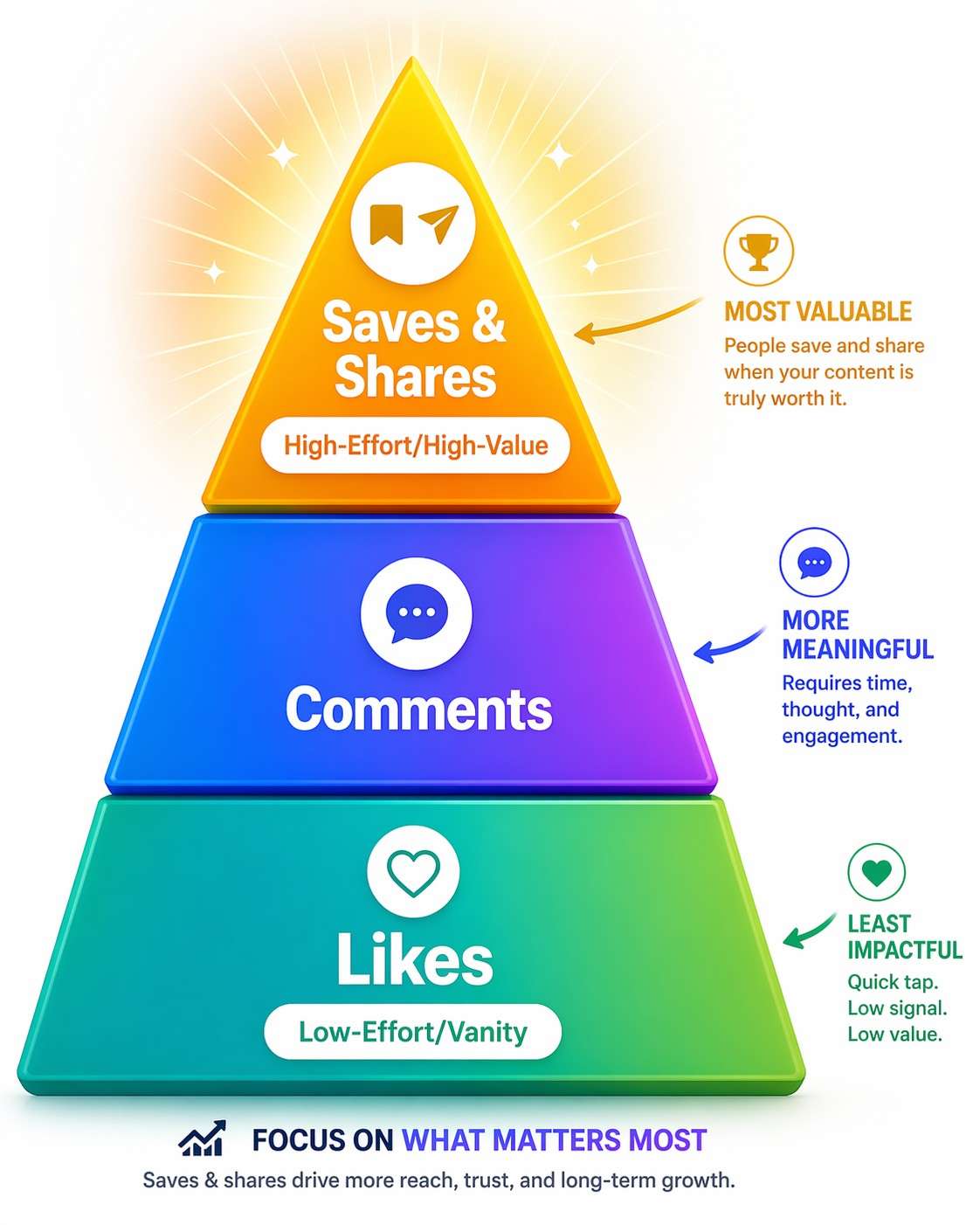
A 'like' takes a fraction of a second and requires zero brainpower. It is the ultimate "vanity metric"—it looks fantastic on the surface, but it often lacks real substance, intent, or purchasing power. To truly understand if your content is resonating and building a loyal audience in 2026, you need to shift your focus entirely to "value metrics". These are the specific interactions that require actual, measurable effort from the user.
The Value Metrics Comparison Table
To make this crystal clear, let's look at how different metrics impact your account's authority and algorithmic standing.
| Metric Type | User Effort Level | Algorithmic Weight | What It Tells You About Your Content | How to Optimize for This Metric |
|---|---|---|---|---|
| Likes (Hidden or Public) | Very Low | Low | Passive approval. They saw it, they registered it, they didn't hate it. | Post visually appealing, high-quality, easy-to-consume aesthetic content. |
| Comments | Medium | High | Active interest. You sparked a distinct thought, a debate, or a personal connection. | Ask highly specific, open-ended questions in your captions. Tell relatable, vulnerable stories. |
| Shares (to Stories or DMs) | High | Very High | Extreme relatability. The user wants to associate their personal identity with your content and show it to their friends. | Create highly relatable memes, beautifully designed infographics, or profound, quotable text graphics. |
| Saves (Bookmarks) | Very High | Maximum | Immense, undeniable value. The user wants to return to this information later to learn, execute, or buy. | Post step-by-step educational content, tutorials, local business guides, cheat sheets, and deep-dives. |
When a user saves your post, they are essentially telling the algorithm, "This piece of content is so incredibly good and useful that I need to keep it for my own personal records."
When they share it on their story or DM it privately to a friend, they are actively endorsing your brand throughout their entire network. These are the powerful metrics that drive massive, sustainable organic growth, and they happen completely independently of public like counts.
8. How Brands Evaluate Creators When Likes Are Hidden
If you are an influencer, a UGC (user-generated content) creator, or a small business looking to secure profitable brand deals, you might be panicking at this point in the article. If a brand can't casually click on your page and see your likes, how do they know you actually have influence? How do they know you are worth paying thousands of dollars for a sponsored post?
The Data Brands Actually Want in 2026
Take a deep breath. The days of a lazy brand blindly paying for a shoutout based on front-facing vanity metrics are entirely over. In 2026, influencer marketing is a highly sophisticated, data-driven industry. Professional brands are now legally requesting backend insights and focusing intensely on reach, impressions, and trackable link clicks rather than public-facing like counts.
When you pitch to a brand, or when a marketing agency reaches out to you, they will ask for a professional media kit. More likely, they will ask for direct screenshots of your backend analytics. or they will ask you to connect your account to a third-party API tracking tool. They want to see the real, unmanipulated numbers:
- Organic Reach: How many unique, individual accounts actually saw your content this week?
- Total Impressions: How many total times was your content displayed on screens, including repeat views?
- Story Views & Retention: Are your followers actually paying attention to your daily, unpolished, behind-the-scenes updates, or are they swiping past?
- Link Clicks / Sticker Taps: Most importantly, can you actually drive traffic off the platform to a specific landing page, product page, or email sign-up form?
If your backend numbers are strong and your audience listens to your recommendations, the visibility of your likes is irrelevant. Presenting these deep, actionable metrics makes you look like a much more professional, business-minded creator who understands real marketing value, rather than an amateur simply chasing double-taps.
To create a less-pressurised social environment and prioritise content quality over vanity metrics, you can learn how to hide likes on Instagram for both your own posts and those in your feed.
9. Cultivating a Community Over Chasing Double-Taps
Without the crutch of likes acting as an immediate visual indicator of your success, you have to work a little bit harder to prove to new visitors that your account is active, thriving, and worth following. You do this by deliberately and methodically fostering a real community in your comment section.
Let's discuss some highly actionable tips on writing compelling, question-based captions that literally encourage followers to stop mindlessly scrolling and start talking to you.
Actionable Caption Strategies
The difference between a bad caption and a great caption is intent.
If you run a food blog and you post a picture of a massive plate of food—let's say a gorgeous, steaming plate of authentic local biryani—with the simple caption "Dinner vibes", you are merely asking for a passive like.
If you post that exact same picture with the caption, "I just found the absolute best hidden spot for authentic biryani in the city, but their spicy chicken side dish completely caught me off guard," what is your absolute favourite comfort food when you eat out? Let me know in the comments below! "You are explicitly asking for a conversation.
- Use the 'Hook, Story, Call to Action' Framework: Grab their attention in the very first line of the caption (before the "read more" cutoff). Tell a brief, engaging story in the middle, and end with a clear, direct instruction (e.g., "Drop a comment if you agree!").
- Reply to Every Single Comment: In the first hour of posting, do not close the app. When someone takes the time to comment, reply back to them immediately with another question to keep the thread going. The algorithm loves highly active comment sections and will reward you with more reach.
- use Stories for Polls: Move your audience from your static grid to your Stories, where you can use interactive polls, question boxes, and sliders. This trains your audience to constantly interact with you, building a daily habit of engagement.
10. The Power of Direct Conversations in a Like-Free Feed
As we continue to strip away the public metrics and vanity numbers, it becomes glaringly obvious that direct messages and comment threads are the new gold standard for Instagram engagement.
A like is a quick nod to someone across a crowded room. A comment is a public handshake. But a direct message? A direct message is pulling someone aside into a quiet room for a private, highly focused cup of coffee. It serves as the ultimate bridge between a casual, passing follower and a fiercely loyal brand advocate.
Why DMs are the New Gold Standard
The Instagram algorithm places immense, unparalleled weight on DMs. The platform categorizes relationships. If you frequently message a specific user back and forth, Instagram's machine learning assumes you have a close, personal relationship in real life.
Consequently, it will prioritize your content for them indefinitely. It will push your daily Stories to the absolute front of their feed and ensure your grid posts always show up at the very top of their scroll when they open the app in the morning.
Therefore, your ultimate marketing goal should always be to move people from public scrolling to private messaging. Getting someone into your DMs builds trust, creates intimacy, and establishes a level of brand loyalty that a simple double-tap could never possibly achieve. It is the most direct, unfiltered line of communication you have with your target demographic.
11. Pro-Tip: Scaling Your Direct Conversations with Automation
Because likes are hidden, comments and direct messages are the best ways to get people to interact with you. But let's be honest: answering hundreds of comments by hand or trying to get people into your DMs one by one is tiring, time-consuming, and impossible for a business that is growing.
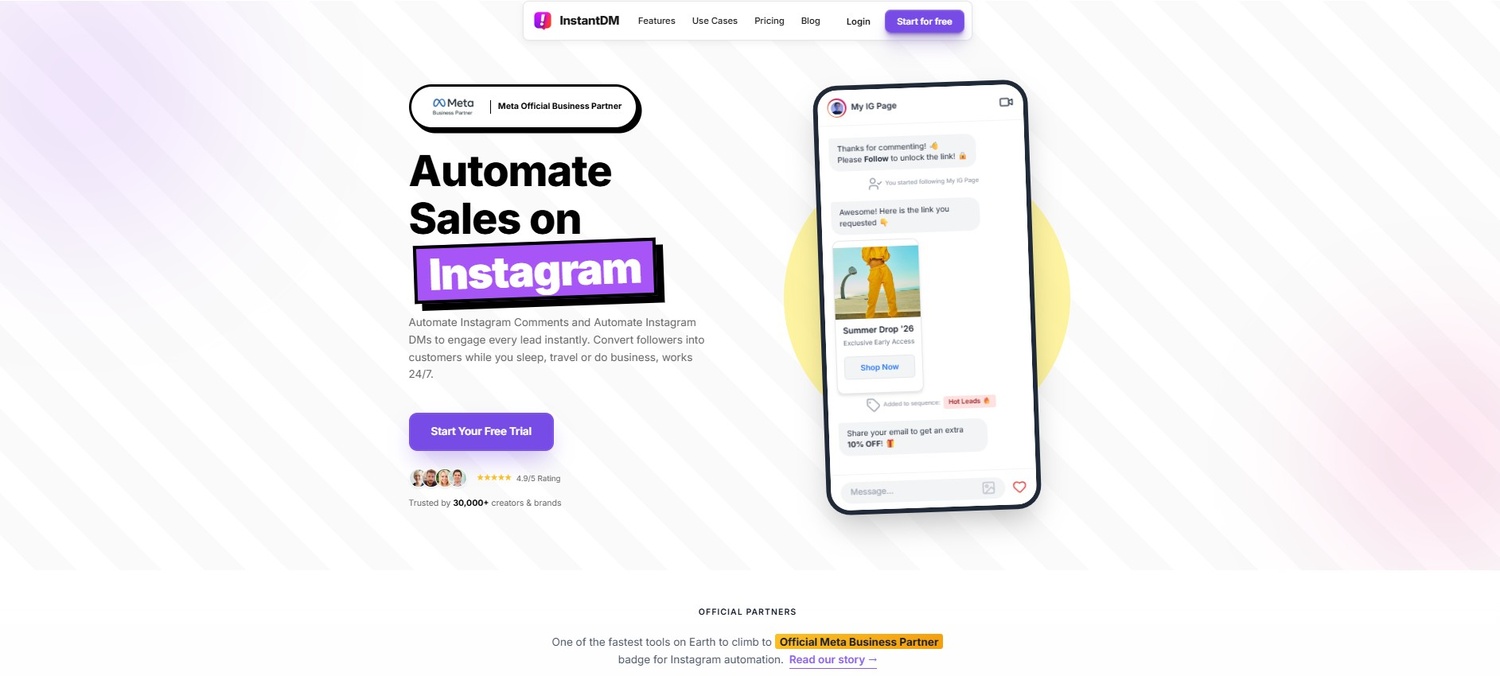
If you're a creator, SEO expert, or eCommerce brand that wants to make money off of this change in 2026, the next step is to add marketing automation. This is when tools like InstantDM are very useful.
You can easily set up "Keyword Triggers" with the software. You could end a caption with a strong call to action, for example: "Comment the exact word 'SOFTWARE' below, and I'll DM you the link to the tool I use." When someone comments on a post with a trigger word, InstantDM automatically sends them a direct message with your link in it. This has a huge effect on your account over time:
- Algorithmic Explosion: Your post gets a lot of public comments, which Automating Instagram DMs with AI: A Practical Guide Using Claude tells the algorithm that people are really interested in it and pushes it to the Explore page.
- Instant Lead Capture: It automatically starts a private, high-value DM thread with a warm lead who asked for your content.
- No Manual Labour: It gets leads and traffic 24/7 without you having to sit by your phone all day copying and pasting links.
You are sending the exact product link directly to their private inbox as soon as they show interest, instead of using the "link in bio" strategy, which is very bad and doesn't work. It's very easy to turn a profile that doesn't get many likes into an automated sales funnel for just $8 a month on their unlimited plan (you can see the full list of features at instantdm.com). You can stop relying on passive likes and start making real money by focusing on these automated, private conversations.
12. Final Verdict: To Hide or Not to Hide?
We've talked about a lot of things in this guide. We have talked about the deep psychological and mental health benefits of getting rid of numbers, the complex effects on algorithms, and finally, how to use direct messaging and value metrics to keep your profits up and even grow them.
Here's a full list of the pros and cons to help you make a final decision about whether or not hiding likes fits with your personal or business goals for the rest of the year.
The Pros of Hiding Likes:
- Mental Clarity: It significantly reduces social anxiety and the toxic comparison culture that plagues social media.
- Creative Freedom: It actively encourages creative experimentation, allowing you to test out new post formats, video styles, and aesthetic directions without the paralyzing fear of public failure.
- Quality Over Quantity: It forces you (and your audience) to focus intensely on the actual quality, visual appeal, and written value of the content, rather than blindly following the crowd.
- Strategic Pivot: It pushes your overarching marketing strategy toward higher-value metrics like comments, saves, and direct messages that actually drive tangible business results and audience loyalty.
The Cons of Hiding Likes:
- Loss of Immediate Social Proof: It removes a rapid layer of visual "social proof" that some casual scrollers look for when deciding whether to trust or validate a new account they just stumbled upon.
- Strategic Adjustment: If you heavily rely on immediate numerical feedback to validate your entire content strategy, it can be a challenging adjustment period.
- More Analytics Work: It requires you to be much more disciplined about manually checking your analytics backend on a weekly basis to gauge your true performance and growth rate.
In the end, the choice is yours. There is no harm in trying it out because it is a simple toggle switch that can be turned on and off in your settings. Turn them off for a whole month. Keep a close eye on your backend analytics, check in on your own mental health and stress levels when you post, and see if the change fits with your brand identity.
13. Final Verdict: To Hide or Not to Hide?
We have covered a massive amount of ground in this guide. We have looked at the deeply psychological and mental health benefits of removing numbers, the nuanced algorithmic impacts of doing so, and finally, how to use DM automation and value metrics to maintain and actually increase your profitability.
To help you synthesize all this information, here is a comprehensive pros-and-cons breakdown to help you definitively decide if hiding likes aligns with your personal or business goals for the remainder of the year.
Pros and Cons Breakdown
The Pros of Hiding Likes:
- Mental Clarity: It significantly reduces social anxiety and the toxic comparison culture that plagues social media.
- Creative Freedom: It actively encourages creative experimentation, allowing you to test out new post formats, video styles, and aesthetic directions without the paralyzing fear of public failure.
- Quality Over Quantity: It forces you (and your audience) to focus intensely on the actual quality, visual appeal, and written value of the content, rather than blindly following the crowd.
- Strategic Pivot: It pushes your overarching marketing strategy toward higher-value metrics like comments, saves, and automated DM conversions that actually drive tangible business results and audience loyalty.
The Cons of Hiding Likes:
- Loss of Immediate Social Proof: It removes a very quick layer of visual "social proof" that some casual scrollers look for when deciding whether to trust or validate a new account they just stumbled upon.
- Strategic Adjustment: It can be a difficult adjustment period if you are deeply used to validating your entire content strategy via immediate numerical feedback.
- More Analytics Work: It requires you to be much more disciplined about manually checking your own analytics backend on a weekly basis to gauge your true performance and growth rate.
Ultimately, the decision is entirely yours. Because it is a simple, reversible toggle switch located natively in your settings, there is absolutely zero harm in experimenting with it. Turn them off for one full month. Measure your backend analytics closely, monitor your own mental health and stress levels regarding posting, and see if the shift works for your specific brand identity.
Conclusion
Hiding your likes on Instagram is so much more than just flipping a technical switch in your advanced settings; it is a conscious, strategic, and often liberating decision to completely redefine how you measure success on the platform. By actively removing the public scoreboard, you free yourself to post what you genuinely love. You invite your audience to engage with your core message, your visual art, and your personality, rather than simply reacting to your perceived popularity.
While the numerical likes might be hidden from public view, your true community is actually louder and more engaged than ever before. By leveraging the right modern strategies—focusing heavily on educational saves and relatable shares, writing deeply conversational captions, and utilizing powerful automation tools to seamlessly turn public comments into private, profitable conversations—you can turn a visually quieter feed into a highly engaged, wildly successful space. Take a week to test out a metric-free feed. You might just find it is exactly the refresh and realignment your digital strategy desperately needed for 2026 and beyond.