TL;DR: What is Instagram Blend (2026)
- What It Is: Instagram Blend is a feature that creates a private, shared Reels feed inside a 1:1 or group DM. Instead of manually forwarding videos, Instagram’s algorithm automatically generates a daily-refreshing feed based on the combined interests and viewing habits of everyone in the chat. How It Works:Setup: Tap the overlapping-faces icon in a DM to send an invite. Everyone in the chat must actively opt in to activate the feed.
- Privacy: There is no incognito mode. Browsing the feed sends a "Visited the blend" notification to other participants.
- Management: You can leave a Blend anytime via chat settings. In group chats, you cannot selectively remove others—you can only leave entirely.
Why It Matters for Creators: Blend shifts distribution from broad broadcasting to intimate "trust networks." When a Reel hits a Blend, it acts as a warm recommendation from a friend. To capitalize on this, creators should produce highly relatable, under-30-second videos with strong hooks. Note: As of 2026, Instagram does not offer specific creator analytics for Blend reach.
What Is Instagram Blend?
 Instagram Blend is a feature that creates a shared, personalized Reels feed inside a Direct Message (DM) conversation — either between two friends or inside a group chat.
Instead of scrolling Reels alone and then forwarding videos one by one, Blend automatically generates a living feed of content that reflects the combined interests of everyone in the chat.
Think of it as your personal For You page colliding with your best friend's. The result is a curated stream of Reels you'd both probably love — served right inside your DM thread, refreshed daily.
Instagram's CEO Adam Mosseri announced the feature with a simple goal: making Instagram a place where people connect over creativity. Blend is Instagram's most direct bet yet on turning private DMs into a social content experience — not just a messaging tool.
The feature was officially launched in April 2025 after more than a year of internal development and testing.
Why Instagram Built Blend (And Why It Matters)
For years, Instagram had a pattern problem: people would watch a Reel, laugh, screenshot it, forward it to three friends, then repeat the process for the next one. It was the most popular thing happening in DMs - and it was completely manual.
Blend automates that entire loop. Instead of you playing curator, the algorithm reads the shared taste between you and your friends and delivers content you'd likely share anyway.
But there's a bigger picture here too. Instagram has been watching TikTok's group-watch behavior — where people send each other videos, react in real time, and bond over content. Blend is Instagram's answer: private, opt-in, social content discovery that keeps the interaction warm and friend-circle-sized instead of broadcasting it to a public comment thread.
For creators, this is significant. Blend is a new distribution channel that runs inside private conversations, meaning your Reels can surface to audiences who never followed you through a trusted friend's recommendation. That's one of the warmest possible introductions to a new viewer.
The feature was first spotted in development in March 2024 by reverse engineer Alessandro Paluzzi, a full year before its public release.
Social Media Today's launch coverage confirms Blend is also Instagram's direct answer to TikTok — a differentiator that doesn't exist on its rival platform.
How Instagram Blend Works: The Full Breakdown
The Algorithm Behind Blend
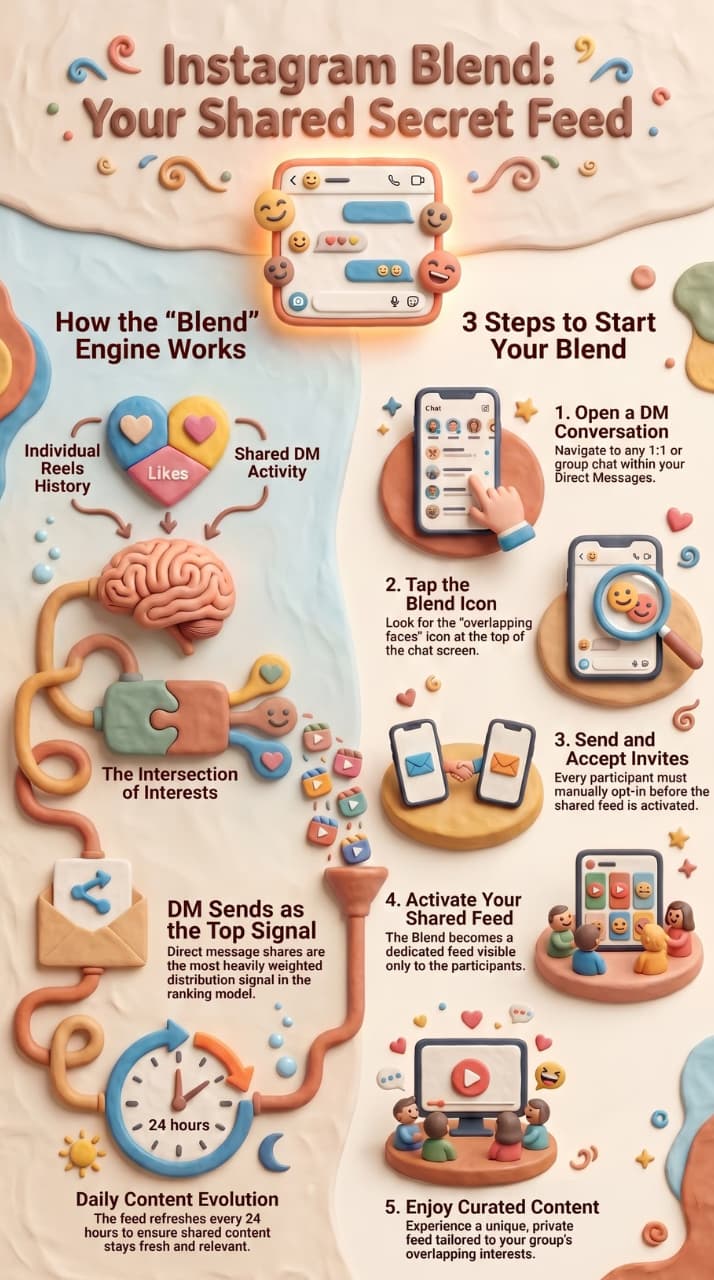
Blend doesn't just pick random Reels — it builds its feed from the intersection of multiple signals:
To understand Blend fully, it helps to know how Instagram's multiple algorithm systems work across Feed, Reels, Explore, and DMs — each surface uses distinct AI ranking models with different priorities.
As MacRumors confirmed at launch, Blend feeds refresh with new content every day, so the shared feed evolves continuously rather than becoming stale.
- What you individually watch and engage with on Instagram (your Reels history, likes, saves, and shares)
- What the other person in the chat watches and engages with
- What you've already shared with each other in that specific DM thread
- This is no coincidence — SocialPilot's breakdown of the Reels algorithm confirms that DM sends are Instagram's most heavily weighted distribution signal. Blend formalizes the behavior Instagram already rewards.
- Overlapping interest categories that the algorithm infers from both users' behavior
The more you interact with Blend — watching videos, reacting, commenting — the smarter it gets at identifying your shared taste. It refreshes daily, so the feed evolves as both people's interests shift.
What Blend Looks Like Inside DMs
Once Blend is active, a dedicated feed or tab appears inside the DM thread. It's separate from your regular message history. Both participants can scroll through the Blend feed independently, react to videos, and comment — and those interactions trigger notifications for the other person, naturally sparking conversation.
It's essentially a micro-social feed that exists only for that chat.
How to Start Instagram Blend: Step-by-Step
- Open the Instagram app and go to your Direct Messages (the paper plane icon, top right).
- Open a conversation with a friend — either a 1:1 DM or a group chat.
- Look for the Blend icon at the top of the chat screen. It looks like two faces partially overlapping.
- Tap the Blend icon and send an invite to the other person (or everyone in the group).
- The other participant(s) must accept the invite to activate the Blend. Everyone must opt in — Blend cannot be forced on anyone.
- Once all parties accept, a shared Blend feed appears in the conversation.
(Visual Learner? Watch this quick 1-minute video walkthrough by Review Information on how to set up, use, and exit an Instagram Blend feed.
Note: If you don't see the Blend icon, your app may need updating or the feature may not have rolled out to your account yet (more on this below).
How to Leave, End, or Remove Instagram Blend
 How to Leave a Blend
- Open the DM conversation where the Blend is active.
- Tap the Blend icon or the chat name at the top.
- Find Blend settings or Manage Blend.
- Tap "Leave Blend" and confirm.
The shared feed stops immediately for you. The other person receives a notification that you left. In a 1:1 DM, leaving ends the Blend for both people entirely.
How to End a Blend You Started
There's no separate "creator control" in Blend. The person who started it cannot end it for others without leaving themselves. Simply follow the Leave Blend steps — this ends the Blend for the whole conversation in a 1:1 chat.
How to Remove Someone from a Blend
Instagram does not currently offer a selective removal option. You cannot stay in a Blend while removing one specific person. Your only option is to leave the Blend entirely, which ends it for everyone.
How to Cancel a Pending Blend Invitation
If you've sent a Blend invite but the other person hasn't accepted yet, open the conversation, tap the Blend icon, and withdraw the pending invitation before they accept.
How to Mute Blend Without Leaving It
If you want to keep the Blend active but stop receiving constant notifications, go to Settings → Notifications → Direct Messages and adjust your DM notification preferences. This silences the alerts without ending the shared feed.
Important: You Cannot Disable Blend Globally. There's no single toggle to turn off Blend across all conversations at once. Each Blend is managed individually inside its specific DM thread.
"Visited the Blend" — What Does This Notification Mean?
This trips up a lot of users. Here's what each notification actually means:
- "Visited the blend" / "visited your blend" — The other person opened the shared Reels feed and browsed it. Instagram logs this and sends a notification, similar to how story views work. It is not anonymous — both participants can see when the other has been active in the Blend.
- "You joined the blend" — Confirmation that your opt-in was accepted and the Blend is now active.
- "[Name] invited you to join a blend" — Someone in your DMs has sent you a Blend request waiting for your acceptance.
- "Someone viewed your blend" — Same as "visited the blend." Instagram uses slightly different wording across app versions, but both mean the same thing: the other person browsed the feed.
Can You Visit a Blend Without Notifying the Other Person?
No. There is no stealth or incognito mode for Blend. Browsing the shared feed notifies the other participant. If you want to avoid triggering notifications, don't open the Blend tab.
How to Turn Off "Visited" Notifications
Go to Settings → Notifications → Direct Messages and reduce DM activity alerts. This controls what you receive — but it does not prevent the other person from seeing that you visited on their end. That notification is generated for them, not controlled by you.
Instagram Blend Not Showing or Not Available: How to Fix It
 If you can't find the Blend icon anywhere in your DMs, here are the most common causes and solutions:
- Your app is outdated. Blend requires a recent version of Instagram. Go to the App Store or Google Play, search Instagram, and update if an update is available. Then force-close and reopen the app.
- The feature hasn't reached your account yet. Instagram releases features in staged rollouts by region and account group. If your app is fully updated and Blend still isn't visible, your account is in a later rollout batch. There is no workaround — it will appear automatically when Instagram enables it for you.
- The other person hasn't accepted. You may see the invite option but the Blend won't activate until all participants opt in. Check whether a pending invite is waiting.
- The chat isn't eligible. Message request threads, automated notification chats, or very old DM threads may not support Blend. Try in a recent, active conversation with someone you regularly message.
- You previously declined or left a Blend in this chat. If you opted out before, you'll need to be re-invited by the other participant to start a new one.
Instagram Blend: Pros, Cons, and Limitations
Blend was among Instagram's most significant 2025 feature releases, arriving alongside creator monetization tools and collaborative Reels updates that collectively signal a major platform shift.
Blend Pros
- It turns DMs into a discovery engine. Content that would take ten manual forwards now flows automatically between friends. That's a genuine quality-of-life improvement for how people already use Instagram.
- It's private and consensual. Unlike public comment sections or Explore, Blend lives in a closed conversation between people who chose each other. That changes the social dynamic — people are more likely to react, comment, and engage when it's just them and a friend.
- It strengthens relationships. Shared taste is a social bond. When Blend surfaces a video that makes both of you laugh, it creates a moment — and those moments accumulate.
- For creators, it's warm reach. Your Reel appearing in someone's Blend means a trusted friend's algorithm recommended it. That's a warmer introduction to a new viewer than cold algorithmic push.
What's Missing or Limited
- No creator analytics (yet). Creators cannot currently see how often their Reels surface inside Blends, how many people view them through Blend, or any engagement metrics specific to Blend distribution. This data gap is significant for anyone trying to measure content performance.
- Mandatory opt-in can slow adoption. Everyone in the chat must actively accept before Blend activates. In group chats especially, getting full participation can be a friction point.
- No selective removal. You can't remove one person from a Blend while keeping others — it's all or nothing.
- Feed mismatch in larger groups. The more people in a group chat, the harder it is for the algorithm to find a Reels overlap that satisfies everyone. Blend works best in 1:1 or small, close-knit chats.
- Notification overload. If you're in multiple Blends across multiple chats, the activity notifications can stack up quickly.
How to Use Instagram Blend as a Creator or Marketer
 Blend isn't just a consumer feature — it's a quiet distribution channel. Here's how to think about it strategically:
Make "Blend-Worthy" Reels
The content that naturally circulates through Blends has a few things in common:
- Strong emotional hook in the first two seconds — curiosity, humor, surprise, or recognition
- Understanding how the Instagram Reels algorithm evaluates engagement quality — particularly watch time, replays, and saves — explains why Blend-worthy Reels need to be short, immediate, and emotionally strong.
- Relatable, not niche — content that one person would specifically think of another person while watching it ("This is so you")
- Conversation-starter energy — a POV, a question, a reaction-worthy moment that makes the viewer want to send it somewhere
- Short and re-watchable — under 30 seconds, something you'd watch twice before moving on
- The same fundamentals that drive organic virality on Instagram — hooks, relatability, trend alignment — also determine what surfaces inside Blends. Sprout Social's guide on how to go viral on Instagram covers the full playbook if you want to go deeper.
Encourage Followers to Blend Your Content
Add a CTA in your Reels or Stories that invites close friends to start a Blend: "Try Blend with someone who gets your vibe — drop your handle in the comments." It sounds organic because it is — you're just nudging the behavior that already exists.
The same Instagram Reels best practices that drive broad algorithmic reach — captions, hooks, accessibility, consistency — also make content more likely to travel inside Blends.
Think of DMs as the New Algorithm
The traditional Instagram algorithm pushes content outward through Explore and the home feed. Blend pushes content inward, through relationships. For creators trying to build a loyal, engaged audience rather than raw reach, inward distribution is more valuable. A viewer who found you through their friend's Blend is already pre-qualified — someone they trust found you worth surfacing.
Later confirms that sends-per-reach is now Instagram's strongest ranking signal — every DM share of your Reel outweighs a like or comment in algorithmic weight. Blend multiplies that signal automatically.
1. The Algorithm's Best Friend: The "Double Exposure" Effect
When your Reel lands on a user’s standard feed, it gets one set of eyes. But when your content matches the overlapping interests of two friends or a group chat, it gets pulled into their shared Blend feed.
This triggers a geometric leap in organic reach. Because the Blend algorithm tags recommendations with the user’s name ("Suggested for Sarah"), it acts as an immediate, algorithmic stamp of approval. Your content gets exposed to tight-knit friend circles, instantly expanding your reach to lookalike audiences who already share your core demographic's exact tastes.
Furthermore, Blend alters how content lifespan is calculated. On the public feed, a Reel's velocity typically slows down after 48 to 72 hours. However, inside a Blend feed, interest is self-perpetuating. As group members interact, react, and leave comments on a video inside their DM thread, those engagement signals feed back into the main algorithm. This constantly rejuvenates the video, pushing it out to entirely new, unrelated Blend networks across the platform.
Stop sending Reels manually and see how the algorithm automates the process; watch this full video tutorial to launch your first shared Blend feed instantly.
2. Built-In Word of Mouth Marketing
The biggest hurdle in social media marketing is moving a user from passive consumption to active sharing. Blend completely eliminates this friction by shifting the viewing experience from a solitary scroll to a collaborative activity.
When a group scrolls through their Blend feed and reacts or comments on your Reel, an instant notification pops up right inside their main DM conversation thread. This sparks authentic, peer-to-peer discussions like: "Hey, did you see this clip in our Blend? We need to try this hack." This level of social proof is something standard algorithmic optimization simply cannot buy. It transforms your content from a brief distraction into a conversational centerpiece, driving deeper brand recall and trust. The 2026 Shift: Blend transitions your optimization strategy from "How do I make a video go viral on the Explore page?" to "How do I make a video high-context enough that two friends will talk about it in their DMs?"
How Creators Can Optimize for Blend FeedsTo make sure your Reels are constantly selected by Instagram's algorithm to populate user Blends, you need to adjust your content angles:
Create "Shared Appeal" Content:Shift away from ultra-isolated, individualistic niches and focus on highly shareable topics that bridge connections. Focus on relatable industry humor, life hacks, debate-provoking questions, or highly actionable "did you know?" tutorials. The goal is to create content that serves as social currency between people.
Optimize for Watch Time and Retention Hooks:The Blend algorithm relies heavily on predictive data. If a user regularly watches your videos to completion, the system flags your content as a prime candidate for their shared feeds. Use strong 3-second visual or textual hooks, fast-paced editing, and micro-tables-of-content to keep viewers locked in until the last second.
Add a DM-Centric Call to Action (CTA):Instead of the generic "Save this Reel" or "Tag a friend," use your caption or on-screen text to nudge behavior naturally: "Drop this into your friend Blend to see if they agree!" or "Invite your business partner to a Blend and save this strategy."
Leverage the Power of Automated Funnels:Because Blend discovery happens entirely inside the DM inbox, users are already in "chat mode." If your Reel uses a Comment-to-DM keyword trigger, anyone who comments from inside their Blend feed will instantly receive your resource link or offer directly in their personal chat. It turns passive group consumption into immediate, private lead generation without removing the user from their conversational loop.
Capture the Engagement Blend Generates

When someone sees your Reel inside a Blend and then visits your profile, comments, or DMs you, they're showing high-intent engagement. The most effective way to capitalize on this is having an automated workflow ready to trigger the exact second they interact.
Instead of trying to handle these manually, you can use an Instagram DM automation tool like InstantDM to instantly deliver your links, resources, or Shopify product pages directly to their inbox when they comment a specific keyword. Because Blend handles the relational discovery, a viewer who comments is already primed to convert—InstantDM just cuts out the traditional "link-in-bio" friction and ensures you never miss a warm lead while you sleep.
Use Blend for Content Research (Teams and Agencies)
Social media managers and content teams can use a Blend with colleagues or clients to run a shared Reels feed of trending content, competitor posts, and creative inspiration. Instead of someone forwarding links individually in Slack, Blend keeps a living feed of mutual discoveries inside a shared DM.
Instagram Blend vs. Other Features: How It Fits In
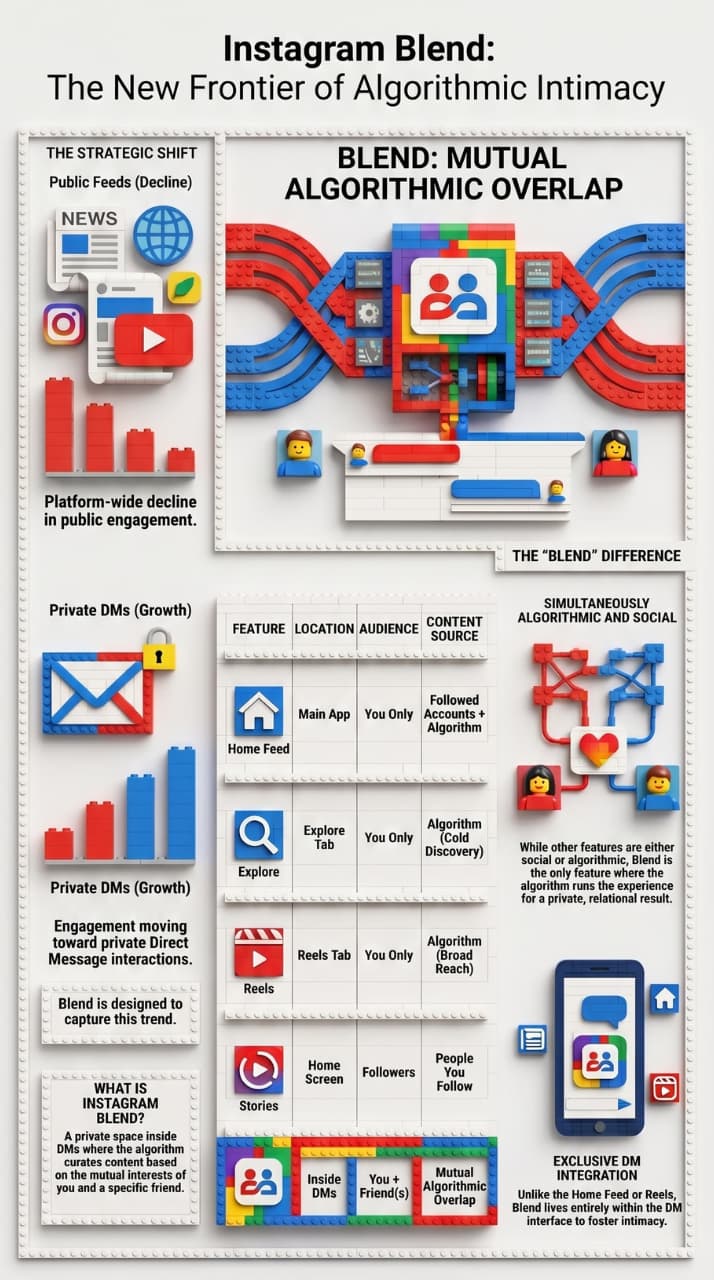
Buffer's Instagram statistics report confirms a platform-wide shift from public feed engagement toward private DM interactions — a behavioral trend that Blend was directly designed to capitalize on.
Blend is the only Instagram surface that is simultaneously algorithmic and social — the algorithm runs it, but the result is private and relational. No other feature does this.
Change to "Instagram Blend in 2026: Should You Start Using It?”
Instagram Reels generate around 140 billion views every day, and Blend creates a new pathway for that content to reach people through personal relationships rather than cold algorithmic push.
Instagram Blend is one of the most meaningful changes to how Instagram functions in years — not because it's technically complex, but because it rewires where content discovery happens. Instead of shouting into the algorithm and hoping to reach strangers, Blend lets your content travel through trust networks: friend recommending to friend, privately, inside conversations.
For casual users, it's a better way to share what you love with people who get it. For creators, it's an emerging distribution channel that rewards relatability and conversational content over pure production value. And for marketers, it's a signal that the future of Instagram reach may be less about broadcasting and more about belonging.
The feature is still rolling out, the analytics are still sparse, and the best practices are still being figured out. Which means right now is exactly the right time to start paying attention to it.