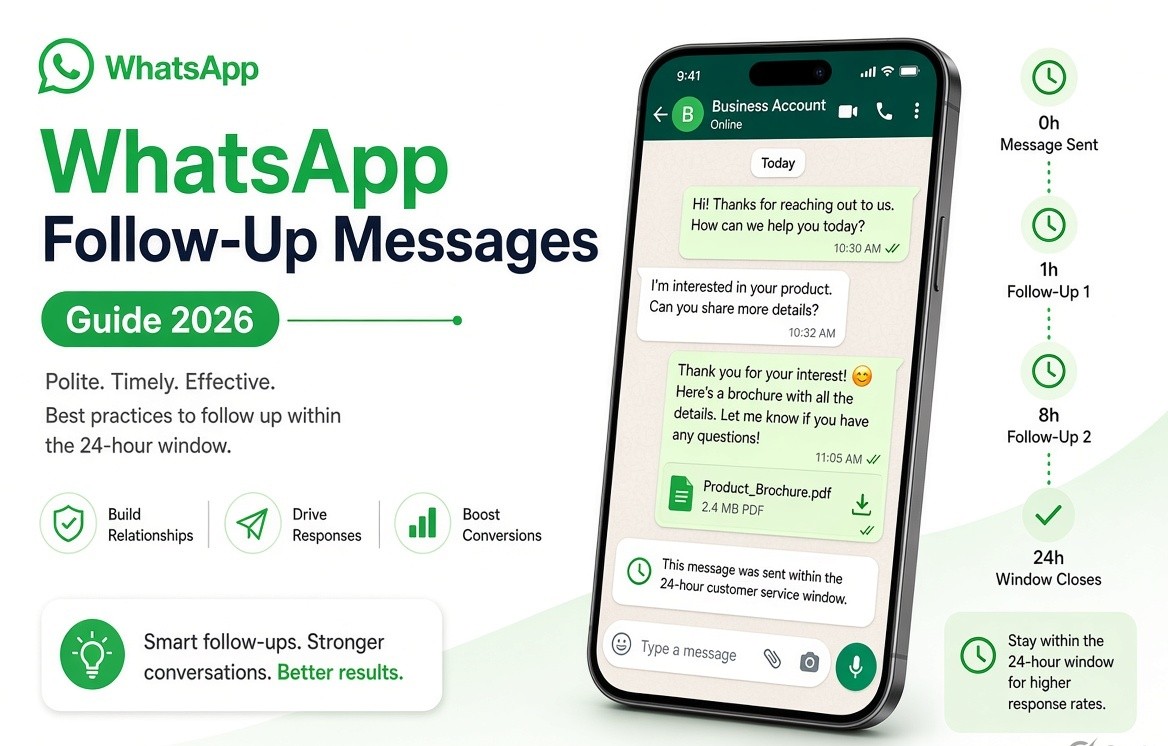
A WhatsApp follow-up is a timed second (or third) message you send after a lead or customer goes quiet. The first follow-up that works for most sales chats is sent 24 to 48 hours later, adds one new piece of value, and asks one easy question. On the official WhatsApp Business API, once the 24-hour customer service window closes you must use an approved template. On the WhatsApp Business app you can still type a free-form follow-up, but blasting the same line to a list is how numbers get restricted.
If you only need a message to paste today:
Hi [Name] — circling back on [product/quote] I sent yesterday. If timing is the issue I can hold this and check in next week. Want me to keep it open, or close it for now?
Wait 24–48 hours after your last message. Do not send that line 20 minutes later.
This guide covers how to follow up on WhatsApp, WhatsApp follow-up messages after no reply, how long to wait, how many messages to send, what the 24-hour window allows, how to follow up after 24 hours, copy-ready WhatsApp follow up templates, how to automate follow-ups, and how to do it without being annoying.
What a WhatsApp follow-up actually is
A WhatsApp follow-up is not a broadcast and it is not a cold pitch. It is a continuation of a conversation the other person already started — an enquiry, a quote request, a demo, a cart, a booking, or a purchase.
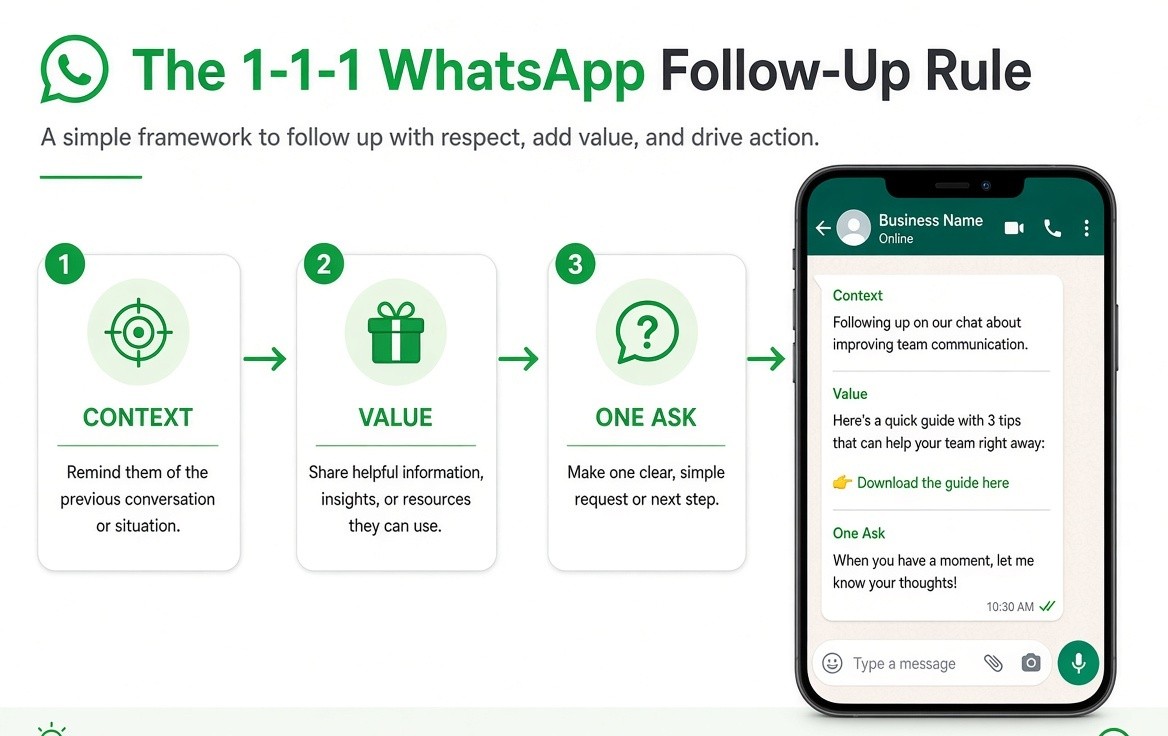
The best WhatsApp follow-up messages have three parts:
- Context — remind them what this is about in one line.
- Value — give them a reason this message exists now (a recap, a new option, a real deadline, a simple choice).
- One ask — a reply they can send in two seconds: yes / no, A or B, keep open or close.
That is the 1-1-1 Follow-Up Rule. If a draft does not have all three parts, it is a “just checking in” note, and those get ignored.
WhatsApp follow-up messages get read more often than email. That only helps if the message earns a reply. A high open rate on a generic nudge is still a dead lead.
How to follow up on WhatsApp
Do this, in order.
- Reply while the window is open.When a customer messages you, a 24-hour customer service window opens. Inside it, send a real reply first — not a follow-up. Qualify, send the quote, book the slot. Follow-ups exist because the next message never came. For the full setup path, see how to get the WhatsApp Business API.
- Decide the job of the next touch.
- They asked a question and vanished → remind + one clarifying question.
- They got a quote and went quiet → “did you see it?” plus an offer to walk through it.
- They said “I’ll think about it” → remove one objection. Do not ask “did you decide?”
- They abandoned a cart → recover it in 30–60 minutes, not two days later.
- They booked and might no-show → utility reminder, not a sales pitch.
- Time the first follow-up.Sales chats: 24–48 hours.Abandoned carts: 30–60 minutes.Appointments: 24 hours before, plus a same-morning ping if no-shows are common.High-ticket B2B: first nudge at 24 hours, next at day 3.
- Cap the sequence.Send 2 to 4 follow-ups after the original message, then one last note.
Touch | When | Job |
Touch 0 | Same conversation | Answer, send the asset, ask one question |
Touch 23h | Before the 24-hour window dies | Free-form nudge while it is still allowed on API |
Touch 3 | Day 3 | New value (option, recap, social proof) |
Touch 7 | Day 7 | Low-pressure check: still relevant? |
Touch Last | Day 14 | Permission to close. Then stop. |
- Stop the moment they reply.Automation that keeps firing after “thanks, not now” burns the number and the relationship. Learn what is allowed in WhatsApp automation: how it works and what’s legal.
That is how to follow up on WhatsApp without turning a warm chat into spam.
What is the WhatsApp 24-hour window?
The WhatsApp 24-hour window (the customer service window) opens when a customer sends your business a message. Inside it you can send free-form text, images, PDFs, voice notes, and buttons. The clock starts from the customer’s last inbound message, not from your last outbound message. Every new customer reply resets it for another 24 hours. Meta’s official explanation is in the customer service window and service messages documentation.
When 24 hours pass with no customer message, the window closes.
Situation | Window | What you can send |
Customer messaged 2 hours ago | Open | Free-form anything |
Customer messaged 23 hours ago | Open, ~1 hour left | Free-form — this is Touch 23h |
Customer messaged 26 hours ago, no reply | Closed | Approved template only on the official API |
You send a template, they reply | Re-opened | Free-form for the next 24 hours |
You saved their number but they never wrote you | Never opened | No free-form sales chat on API. You need opt-in + an approved template |
Saving a number does not open the window. Your reply does not extend it. Only a new message from the customer does.
On the WhatsApp Business Platform, “I’ll just text them tomorrow” fails unless tomorrow’s line already lives inside an approved template. For how chatbots handle this, see the WhatsApp chatbot guide.
Can I follow up on WhatsApp after 24 hours?
On the official WhatsApp Business API: not with a free-form message. After the window closes you must send a pre-approved template. If the customer replies to that template, a new 24-hour window opens and you can talk normally again. Template rules are covered in Meta’s message templates documentation.
On the WhatsApp Business app: you can still type a follow-up by hand in an existing chat. That is why some teams think the 24-hour rule is a myth. It is not a myth on the API. The app is more flexible and easier to restrict if you start looking like a bulk sender. Compare the two in the WhatsApp auto reply setup guide.
How to follow up on WhatsApp after 24 hours
- Get a follow-up template approved before you need it.
- Pick the right category. A quote check-in that only asks if they have questions can be framed as utility. A discount, launch, or “buy now” line is marketing. Marketing templates are paid, watched more closely, and the wrong category gets rejected. Current rates are listed on Meta’s WhatsApp Business Platform pricing page.
- Personalise with variables: name, product, date of enquiry.
- Put an opt-out on marketing templates (Reply STOP to unsubscribe).
- The job of the template is to earn a reply so the window re-opens — not to close the deal in one blast.
Example API-style follow-up template:
Hi ['['[']']['['[']']1[']'][']'], following up on the ['['[']']['['[']']2[']'][']'] we shared on ['['[']']['['[']']3[']'][']']. If you still want it, reply YES and we’ll continue here. Reply STOP to opt out.
Do not put a marketing offer inside a utility template. That is a fast way to get the template rejected and your quality rating marked yellow or red. Policy enforcement details are in Meta’s WhatsApp Business Platform policy and spam enforcement documentation.
How long should I wait before following up on WhatsApp?
Match wait time to the job.
Trigger | First follow-up | Why |
New enquiry, silent after your answer | 24–48 hours | Context is still alive, you are not hovering |
Abandoned cart / incomplete form | 30–60 minutes | Intent dies fast |
Quote or proposal sent | 24 hours | They asked for a number. One day is fair |
After a demo or call | 2–4 hours, then 24 hours | Recap while the meeting is fresh |
“I’ll think about it” | 48–72 hours | They asked for time. Give it |
Appointment | 24 hours before, optional same morning | Utility reminder, not a chase |
Cold lead, 7+ days quiet | Day 7, then a last note at day 14 | New angle, not “did you see my message?” |
A follow-up 10 minutes after your own file looks anxious. A follow-up 10 days later looks like you forgot them. For sales, 24 to 48 hours is the default. For carts, do not wait 24 hours.
Cadence matters more than clock time, but weekday late morning and late afternoon (about 10:00–12:00 and 16:00–18:00 in the customer’s timezone) get more replies than late-night dumps. Skip Friday evening for B2B.
How many follow-up messages should I send on WhatsApp?
Send two to four follow-ups after the original message, then one last message. Then stop.
A usable default after Touch 0 is 24 hours, day 3, day 7, and day 14. That is not five copies of “any update?” Each touch needs a new job.
Most people who will reply do so by the third or fourth attempt. Extra messages with no new value raise blocks and opt-outs. On the official API, extra marketing templates cost money and can pull down Meta quality rating. WhatsApp sits next to family chats — three ignored pings already feel like a campaign.
If they said no, stop. If they said “not this month,” park a reminder. If four well-spaced messages got silence, they are not waiting for a fifth adjective.
Best time to send a WhatsApp follow-up: the 24h / 3d / 7d cadence
Use this unless the trigger table says otherwise.
Hour 0 — Touch 0.
They wrote you. Answer fully. Send the PDF, the price, the link. Ask one question so the next silence has a shape.
Hour 23 — Touch 23h.
If they have not replied and the window is about to close, send a short free-form nudge before you are forced onto a paid template. Example: “Want me to send the two options side by side, or is this on pause?”
Day 3 — Touch 3.
New value. Not “bumping this.” A recap, a second option, a real deadline, or a one-line proof point.
Day 7 — Touch 7.
Low friction. “Still looking at this, or should I close the file?” Many replies happen here because you gave an exit.
Day 14 — Touch Last.
Final note. Leave the door open. Stop. This message often gets a reply because it is the last one.
That 24h / 3d / 7d spine is the best time pattern for most WhatsApp follow-up sequences. Tighten it for carts and appointments. Stretch it for long-cycle real estate or B2B.
The 1-1-1 Follow-Up Rule
Every WhatsApp follow-up message does three jobs:
1 context. “Following up on the kitchen quote from Tuesday.”
1 value. “I trimmed the mid-range option to stay under 1.8L.”
1 ask. “Want the revised PDF, or should I close this?”
Broken messages skip a part:
- Context only → “Just following up.” They do not remember you.
- Value only → a brochure with no question. They file it.
- Ask only → “Are you interested??” That is a poke.
Write the three parts, then cut words until it looks like a text from a competent human.
Before:
Hi! Just checking in to see if you had a chance to look at my previous message. Please let me know if you have any questions. Looking forward to hearing from you!
After:
Hi Meera — follow-up on the 2BHK viewing notes I sent Tuesday. A similar 2nd-floor unit opened at 4k less. Want the PDF, or should I leave it?
WhatsApp follow-up message after no reply
Wait 24 to 48 hours, then send a short message that assumes they are busy, not rude.
First follow-up after no reply (24–48 hours):
Hi [Name], I know things get buried. Quick follow-up on [product/service] — still useful if I send a 4-line summary, or should I close this for now?
Day 3, still silent:
Hi [Name] — adding one thing since Tuesday: [new option / proof / likely objection]. If this is not a priority I can drop it. Reply “later” and I’ll park it.
Day 7:
Hi [Name], I’ll keep this short. Are you still looking at [topic], or should I mark this closed?
Day 14 — last follow-up:
Hi [Name], I’ll stop here so I’m not adding noise. If [topic] comes back up, this chat is open. Wishing you a clean week.
Do not send “Did you see my message?” That puts the shame on them. Change the angle each time: summary → new value → close-or-continue → goodbye.
If blue ticks show they read it and said nothing, wait the full gap anyway. A read receipt is not consent to chase hourly.
WhatsApp follow-up templates you can copy
Free-form versions first (WhatsApp Business app). API-shaped versions sit under the ones you will send after the window closes. Keep the 1-1-1 shape.
- After a new enquiryHi [Name], thanks for writing in about [product]. To send the right option: are you looking at [A] or [B]? Either works — I’ll match from there.API: Hi ['['[']']['['[']']1[']'][']'], thanks for your enquiry about ['['[']']['['[']']2[']'][']']. Are you looking at ['['[']']['['[']']3[']'][']'] or ['['[']']['['[']']4[']'][']']? Reply with A or B and we’ll continue.
- After no reply (sales)Hi [Name] — circling back on [topic] from yesterday. Want a short recap here, or should I check in next week?
- After sending a quote or proposalHi [Name], the quote for [item] is in this chat. Happy to walk through it line by line if that’s faster than reading. Want a 10-minute pass today or tomorrow?API: Hi ['['[']']['['[']']1[']'][']'], following up on quote ['['[']']['['[']']2[']'][']'] sent on ['['[']']['['[']']3[']'][']']. Reply YES if you’d like a walkthrough, or STOP to opt out.
- After a demo or callHi [Name], thanks for the time earlier. Recap: [benefit 1], [benefit 2], next step is [exact action]. Want me to send the one-pager, or book [day]?
- They said “I’ll think about it”Hi [Name], giving you the space you asked for. The usual snag is [price / timing / fit]. If one of those is in the way, tell me which and I’ll simplify it.
- Abandoned cart WhatsApp follow-upHi [Name], your [item] is still in the cart — size [X], colour [Y]. Want me to hold it for 24 hours, or drop a smaller size option?First cart ping at 30–60 minutes. Second at 24 hours. Third at 72 hours. Then stop.
- Appointment reminder (utility)Hi [Name], reminder: [service] tomorrow [day] at [time] at [place]. Reply CONFIRM to keep it or RESCHEDULE and we’ll move it.
- Cold lead revival (7+ days)Hi [Name], it’s been a couple of weeks since you asked about [topic]. If plans changed that’s fine — reply CLOSE and I’ll take you off this thread. If it’s still live, I can send the updated options today.
- Payment or invoiceHi [Name], invoice [number] for [amount] is still open. Easiest is [UPI / link]. Want me to resend it here?
- Post-purchase check-inHi [Name], has [product] arrived in good shape? If anything is off, reply here and we’ll fix it today.
- Win-backHi [Name], it’s been [N] days since your last [order/visit]. If you want the usual [item], reply YES and we’ll set it up. If not, no action needed.
- Last follow-up / breakup messageHi [Name], this is my last note on [topic] so I don’t keep pinging you. Door’s open if you want to restart. Take care.
Twelve templates cover the stalls that actually kill deals. You do not need fifty near-duplicate lines.
Three ready WhatsApp follow-up sequences
A follow-up sequence is not a WhatsApp broadcast. A broadcast is one message to many people at once. A WhatsApp follow-up sequence is several messages to one person, timed, and killed when they reply. A drip campaign is the same idea with a fixed calendar.
Sequence A — New lead (enquiry went quiet)
- Touch 0: Answer + one qualifying question.
- +24h: Recap + “keep open or close?”
- Day 3: New value (second option, proof, FAQ).
- Day 7: Direct close-or-release.
- Day 14: Last message.Stop on any reply. If they say “later,” park a reminder. Do not let Day 3 and Day 7 keep firing.
Sequence B — After a quote
- +24h: “Quote is in the chat. Walk through it or leave it?”
- Day 3: Handle the likely objection (price, delivery, scope).
- Day 7: “Still in play? I can revise or close the file.”
- Day 14: Last message.Do not invent “price goes up Friday” unless Friday is real.
Sequence C — Cold revival
- Day 0: New information, not a guilt trip.
- +3 days: One proof point or a smaller offer.
- +7 days: Last message + STOP.Revival is for people who already spoke to you. It is not a licence to message a scraped list.
How to automate WhatsApp follow-ups
Automation is allowed. Mindless automation is what gets numbers hurt.
Build four settings in any tool — CRM, API inbox, scheduler, or a reminder list:
- Trigger. “No reply 24 hours after quote sent,” not “sometimes follow up.”
- Delay. 24h → 3d → 7d for sales. 30–60 min → 24h → 72h for carts.
- Stop-on-reply. Cancel the next step when they write anything, including “ok” and “not now.”
- Cap. Maximum 3–4 automated follows, then a last template, then silence.
Also set business hours only. Keep separate tracks for hot, warm, and cold. Do not drip a discount onto someone who just booked a demo. Put opt-out language on marketing templates. Hand off to a human the moment the reply contains buying language or anger.
WhatsApp has no native send-later button that runs a full sales sequence. That is why teams use the Business Platform, a CRM bot, or a scheduler. The tool is not the strategy. Trigger, delay, stop, cap is the strategy.
Never send the next automated follow-up after they have already answered.
How to follow up on WhatsApp without being annoying
Annoying follow-ups are early, empty, and endless.
Time it. 24–48 hours for sales. Not 11 minutes.
Add something they did not have yesterday. A recap, a choice, a real constraint, a smaller plan. “Any update?” is not value.
Ask one thing. Two questions plus a brochure plus a calendar link is three jobs. They will do none.
Give an exit. “Reply CLOSE and I’ll drop it” lowers rage and often raises replies.
Hard stop. After Touch Last, the sequence is over. A real customer can go on a 30–90 day win-back. A silent lead should not get a daily bot.
Write like a person with a job. Short. Specific. No “hope this finds you well.” No fake urgency.
A good WhatsApp follow-up is a continuation of the last chat, not a reminder that you exist.
Utility vs marketing templates
If you send follow-ups on the official API, category decides whether the message sends, what it costs, and whether quality rating stays green. See the latest rates in the WhatsApp Business API pricing guide.
Intent | Likely category | Example |
“Did you get the quote? I can explain it.” | Utility, if it is only service | Quote follow-up |
Appointment tomorrow at 4 | Utility | Reminder |
Order shipped, here is the tracker | Utility | Transaction |
10% off if you buy tonight | Marketing | Promo follow-up |
New batch starting, book now | Marketing | Re-engagement with a sell |
“We miss you, here’s 20%” | Marketing | Win-back |
When you are unsure, write the first outbound as a service check-in and put the offer after they reply. That re-opens the free-form window.
Always include an opt-out on marketing. Always use variables for name and object. Never paste a different sales pitch into an approved template body.
What gets ignored, blocked, or restricted
- Following up 20 minutes after you sent the brochure.
- Five messages in seven days with the same meaning.
- “Did you see my message?” as the whole strategy.
- Fake countdown timers.
- Marketing copy inside a utility template.
- No STOP on broadcast-style follow-ups.
- Chasing after they said no.
- A fresh API number blasting thousands of contacts on day one.
- Unofficial bulk tools bolted onto WhatsApp Web.
- Ignoring quality rating. Yellow and red ratings shrink who even receives you.
If a tactic would get you blocked in a personal chat, it will get you reported in a business chat.
How this looks in different businesses
Real estate.
Same-day site visit: send the unit PDF. +24h: similar listing or price change. Day 3: viewing slot. Day 7: “still in market?” Do not dump every new listing they never asked for.
Coaching and courses.
Enquiry: syllabus in minute one + “2026 or 2027 batch?” +24h: one result. Day 3: live class invite. Day 7: close-or-later. Match the language they used first, including Hinglish if that is how they wrote.
Ecommerce.
Cart at 45 minutes, 24 hours, 72 hours. Post-purchase day 1 (“arrived okay?”) is support, not a cross-sell dump. Reorder when the product actually runs out.
Local services.
Booking confirmation immediately. Reminder 24 hours before. After-visit care note the next day. Ask for a review only after they said it went well.
B2B / agencies.
Quote +24h walkthrough. Day 3 case in their category. Day 7 “revise or close.” Longer cycles can add a day-21 value note, not a daily drip.
What to measure
Track four numbers per sequence.
Metric | What “healthy” looks like at the start | If it is worse |
Reply rate on Touch 1 (24–48h) | Often 20–40% on warm leads | No ask, or you waited too long |
Reply rate on Touch 3 / 7 | Lower, 10–25% | Same line again; change the angle |
Conversion on followed-up leads vs ignored leads | Should be clearly higher | You are chasing the wrong stage |
Opt-out / block rate | Stay low; watch spikes | Too many marketing templates, no exit, bad timing |
Leads followed up within 48 hours convert far more often than leads nobody touched again. Exact percentages differ by niche. The direction does not.
Do not celebrate messages sent. Celebrate replies and closed loops.
Start with one sequence this week
Do not build twelve automations on day one.
Pick the leak that costs the most money — usually “quote sent, nobody followed up” or “enquiry answered, chat died.” Write four messages with the 1-1-1 rule. Set the 24h / 3d / 7d / last cadence. Turn the sequence off when they reply. Measure reply rate for two weeks before you add a second track.
WhatsApp follow-up is a small system: wait the right amount of time, say one new useful thing, ask one question, and know when to stop. Teams that run that system close conversations other teams only opened.