TL;DR
- What is Meta Business Agent? Meta’s own customer-facing AI. It replies inside Messenger, WhatsApp, Instagram DMs, click-to-message ads, and a website plugin. It is not Instant Reply, not comment-to-message, and not the WhatsApp Business API.
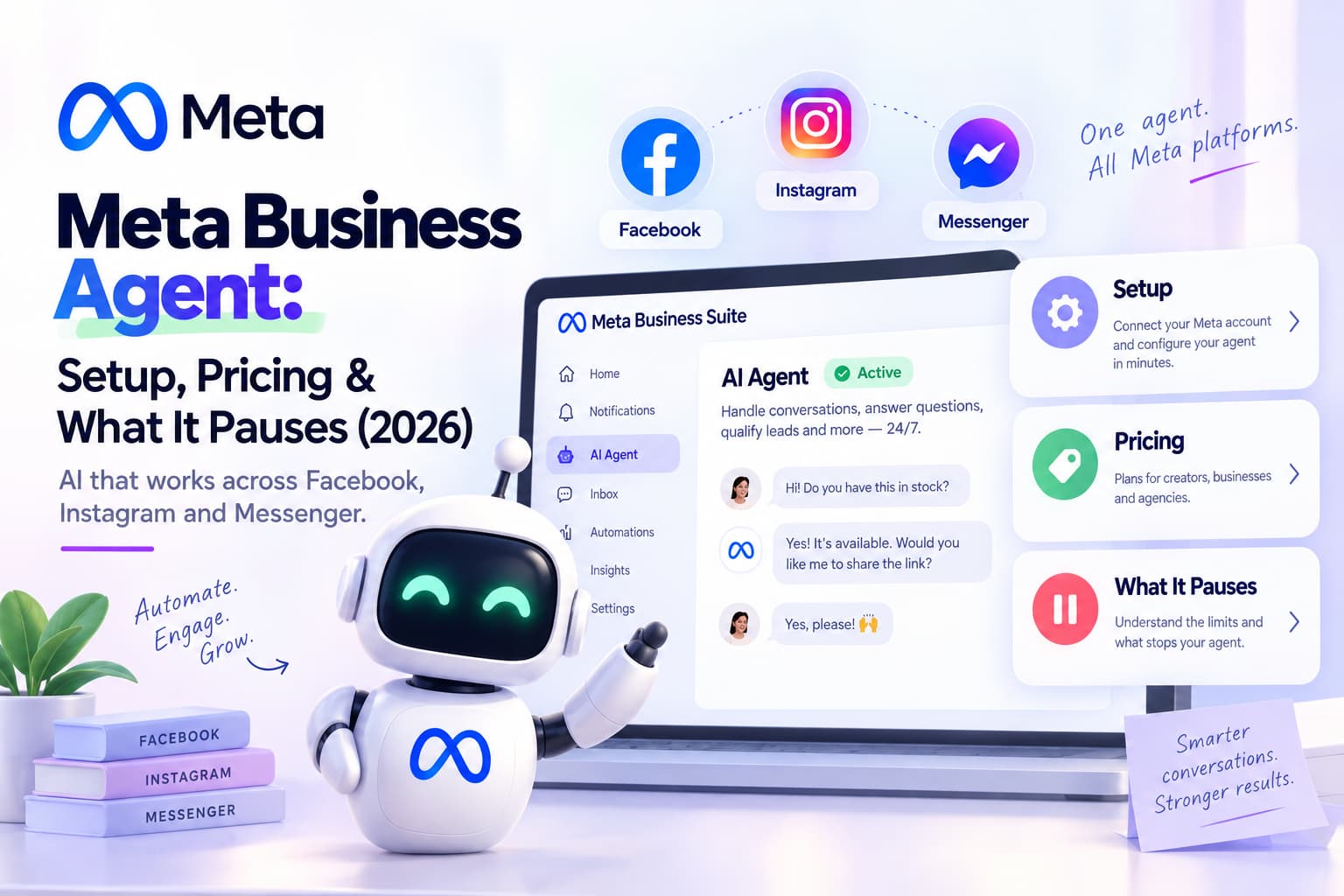
- How do you set it up on a Facebook Page? Meta Business Suite → All tools → Meta Business Agent. Add Page info, a catalog or price list, and a handoff rule. Test from a personal profile before you go live.
- Is it free? It starts free with a monthly conversation cap on Messenger. On that Messenger subscription path, chats that start from click-to-message ads are free and do not use the cap. Extra volume is a paid Meta plan. The enterprise Platform path is a different bill: token billing, and those agent messages are still charged even inside a free entry-point window.
- Does it work on Facebook, Instagram, and WhatsApp? Yes. A Facebook Page uses Business Suite and Messenger. Instagram DMs and the WhatsApp Business app are other surfaces of the same product.
- Does it replace your automations? No. On Business Suite, turning it on pauses Inbox automations. It does not send a Private Reply because someone commented, and it does not run broadcasts.
- What can it do? FAQs, catalog recommendations, lead capture, basic booking, human handoff. What it cannot do: team inbox, outbound campaigns, keyword comment-to-message, or a model you choose yourself.
One operational fact: Meta Business Agent and Meta Business Suite Inbox automations are an either-or choice, not a stack.
What is Meta Business Agent?
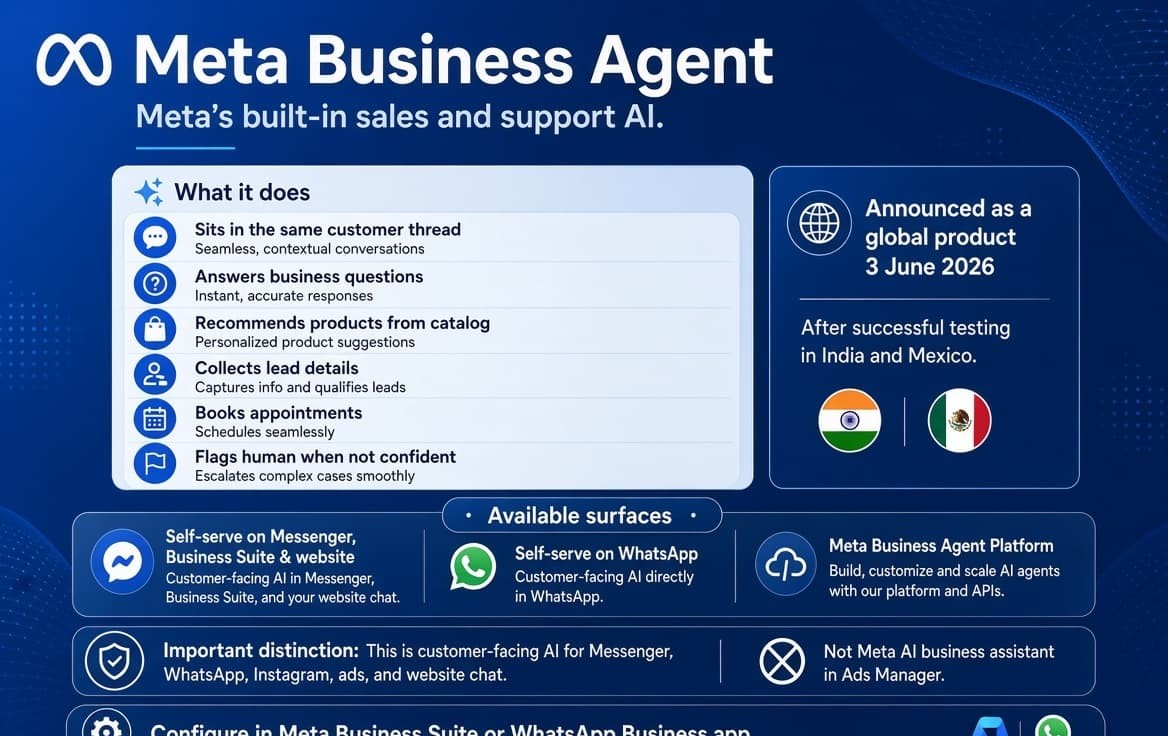
Meta Business Agent is Meta’s built-in sales and support AI. It sits in the same thread a customer already opened. It answers questions about the business, recommends products from a catalog, collects lead details, books simple appointments, and flags a person when it is not confident.
Meta announced the global product on 3 June 2026, after about two years of tests in markets that included India and Mexico. Meta’s newsroom said more than one million businesses were already using an earlier version on WhatsApp and Messenger, against more than one billion daily business threads across WhatsApp, Messenger, and Instagram.
The same name covers three surfaces:
| Surface | Where it lives | Who it is for | What you get |
| Self-serve on Messenger, Business Suite, website | Meta Business Suite, Page inbox, website plugin | Page owners and small teams | No-code setup, inbound AI, handoff |
| Self-serve on WhatsApp | WhatsApp Business app | Phone-based businesses | Same inbound AI, no Cloud API |
| Meta Business Agent Platform | WhatsApp Business API / Cloud API | Teams already on the API | Custom knowledge, connectors such as Shopify, Zendesk, Shopee, token billing |
A Facebook Page almost always meets the first row. That is the version to set up if the question is whether to turn this on for Messenger.
It is also not Meta’s other AI. Meta AI business assistant lives in Ads Manager and helps you with campaigns. Meta Business Agent talks to customers.
Meta Business Agent is Meta’s customer-facing AI for Messenger, WhatsApp, Instagram, ads, and website chat. You configure it in Meta Business Suite or the WhatsApp Business app. It is not a third-party chatbot and it is not the Messenger Platform API.
Where customers meet it
A Page can put the agent in front of people in five places. Two of them matter on a normal Facebook week.
- Messenger from the Page. Someone taps Send Message on the Page, or writes the Page from Search. The agent replies in that thread if it thinks it can.
- Click-to-message ads. Someone taps a Messenger or WhatsApp destination on a Meta ad. On the Messenger subscription path, Meta’s help pages treat those agent conversations as free and outside the organic Messenger quota. On the WhatsApp Platform path, token charges still apply. Ad creative itself still has to follow Meta’s advertising standards.
- Website plugin. Business Suite can attach the same agent to a site. It is inbound FAQ and product help, trained on the site and catalog. It is not the same job as pasting an m.me link on a webpage.
- Instagram DMs. The agent answers inbound Instagram DMs. It is not comment-to-DM, not a Story-reply flow, and not a keyword on a Reel.
- WhatsApp Business app. Tools → Meta Business Agent (some builds say AI agent), authenticate, add catalog. Inbound only. No broadcasts. No shared team inbox.
For a Facebook Page, start with Messenger and ads. Treat Instagram and WhatsApp as the same product on other switches.
What Meta Business Agent can do
Meta’s list has stayed stable since launch, and the About Meta Business Agent page is the product description:
- Answer questions specific to the business (hours, location, policy, product details you taught it)
- Recommend products from a catalog or a price list
- Qualify an inbound lead
- Book a simple appointment when that path is configured
- Hand off to a person and keep the thread.
- Run inside the hours and audience rules you set
On Messenger it behaves like a conversational FAQ, not a flow builder. Instant Reply cannot do that. Custom keywords cannot either. Those match exact phrases, case-sensitive, five per automation, often after a delay. The first-line templates are covered in the Messenger autoresponder guide if you only need that canned opening.
The agent is useful when the inbox is “what are your hours,” “do you deliver to X,” and “how much is the starter pack.” It is the wrong tool when the Page converts because someone commented PRICE on a Reel and needs a private message with a link.
What Meta Business Agent cannot do
It pauses Inbox automations.
Turning Meta Business Agent on pauses existing Business Suite automations. Meta’s Help Center says it directly: if you turn on Meta Business Agent, any existing automations (such as away messages or instant replies) will be paused, on both About Automated Responses and Set up Inbox Automations. Instant Reply that stops is expected. Custom keywords that stop firing are expected. Comment-to-message that goes quiet is the same switch.
It is inbound.
The customer has to write first, or tap an ad. There is no broadcast list and no “message everyone who commented last week.”
It is not comment-to-message.
A comment on a Page post or Reel is a different surface. Native comment-to-message is a Suite template with its own rules: one Private Reply per comment, inside seven days. That setup lives in Facebook comment automation. The agent does not run that job.
Self-serve has no shared team inbox.
One Page inbox. No routing, no SLA, no agent assignment.
You do not pick the model.
Self-serve runs on Meta’s stack. You cannot point it at Claude or GPT.
CRM write-back is not the Suite toggle.
The Platform tier talks about Shopify, Zendesk, Shopee. The Business Suite switch does not fill HubSpot fields. Writing back to another system is the enterprise job Deloitte on AI-assisted customer service describes, and it is not this toggle.
Data stays in Meta’s product.
Past chats can train the agent if you allow it. Transcripts do not land in your own CRM unless you are on an API path.
Eligibility is uneven.
Help Center pages still say the feature may not be available. Language on WhatsApp follows the business number. Some verticals are blocked on the Platform path, including finance, government, health, alcohol, gambling, OTC drugs, and matrimony. If the tile is missing in Suite, the Page is not in the rollout or not eligible.
Meta Business Agent cannot keep Suite keyword automations running at the same time, cannot send a Private Reply because someone commented, cannot broadcast, and cannot run a multi-agent inbox on the self-serve tier.
How to set up Meta Business Agent on a Facebook Page
Before you start:
- Messaging is on for the Page.
- Use Meta Business Suite on desktop. Mobile can start the flow from Inbox. Desktop is reliable for products and price lists.
- Have a business description, hours, and either a catalog or a price list. Thin knowledge produces thin answers.
- Decide what happens to Instant Reply, Away Message, custom keywords, and comment-to-message. If those rules still convert, do not flip the agent on as a live test.
Steps in Meta Business Suite:
- Open Meta Business Suite on desktop.
- Go to All tools.
- Open Meta Business Agent.
- Confirm the Page and accept the terms if asked.
- Under Your info, add the business description, hours, location, and any extra documents or links.
- Add products. Upload items one by one or add a price list. Review anything the agent extracted from an image. Wrong prices in the source become confident wrong answers in chat.
- Set tone and boundaries: what it must not answer, when a human takes over.
- Set who it replies to (all new chats, ad chats, or a tighter audience) and when.
- Test from a personal profile. Ask hours, a product price, something not in the catalog, and “I want to talk to a person.”
- Only then turn it on for customers.
The agent replies when it can answer. If it cannot, you get a handoff flag. An empty Your info tab looks like a broken product. It is under-taught.
WhatsApp Business app:
- Update the WhatsApp Business app.
- Open Tools → Meta Business Agent (or AI agent).
- Authenticate and confirm.
- Choose whether past chats can train it. Add website and catalog if offered.
- Under AI replies, pick the audience: all new 1-1 chats, chats except contacts, or chats from ads.
- Test from a second number.
If the tile is missing, the account is not in that country or language rollout. WhatsApp’s setup FAQ still points to a waitlist.
How to pause or turn it off:
On WhatsApp: Tools → Meta Business Agent → Response settings → Disconnect AI → pause or delete. A manual reply in a thread pauses the agent in that thread until you unmute it.
On Business Suite: open Meta Business Agent and switch replies off. Then open Inbox → Automations and confirm Instant Reply and comment-to-message are on again. Do not assume they return in the state you left them.
To set up Meta Business Agent for a Facebook Page: Meta Business Suite → All tools → Meta Business Agent → add business info and products → set handoff → test from a personal profile.
Meta Business Agent pricing in 2026
“Is it free?” depends on which surface you use.
Self-serve on Messenger and Business Suite
Meta starts you on a free monthly allowance. When you hit the cap you wait for the reset or you subscribe. Subscription plans and billing for Meta Business Agent on Messenger publishes these web tiers. App-store prices are higher because stores take a cut.
| Plan | AI conversations / month | Web price |
| Free allowance | Limited; resets monthly | $0 |
| Tier 1 | 500 | $10 / month |
| Tier 2 | 2,000 | $30 / month |
| Tier 3 | 20,000 | $225 / month |
An AI conversation is the 24-hour block that starts when the customer first messages the agent, not each bubble.
On this Messenger path, click-to-message ad conversations are free and do not eat the quota. That free-ad rule does not carry over to the WhatsApp Platform path below.
When the quota is gone, the agent stops. It starts again when the cycle resets or when you upgrade. Meta says it warns at 80% and 95%.
Treat the dollar figures as a Help Center snapshot. Meta has also layered Meta One plans on the same product family.
Meta One
Meta One business plans (Essential about $14.99, Advanced about $49.99, Expert $149, Max $499, per profile) include more Meta Business Agent responses as you go up, plus unrelated perks such as verification and scheduling. Meta One is not the WhatsApp Business API. It is a subscription around Meta’s apps.
Meta Business Agent Platform
On the Cloud API path, Meta moved to token billing. The WhatsApp Business Platform docs, and the Cloud API overview, are the product surface. The figure that has stayed consistent across partner write-ups since 1 August 2026 is $2.00 per 1 million tokens. That path is a different product: eligibility checks, connectors, and a billing relationship with Meta. On this path, Business Agent messages are still charged for tokens even inside the free entry-point window that makes ordinary click-to-WhatsApp replies free.
1 October 2026 is a separate calendar event on WhatsApp: service messages inside the 24-hour window start being charged again after a long free period, with a monthly free bundle per number. That is not “MBA is free on Facebook.” Keep the two bills apart.
Meta Business Agent is free to start on a Page, free on Messenger click-to-message ads, and paid when you exceed the organic conversation cap or when you run the enterprise Platform on tokens.
What happens to existing automations when you turn it on
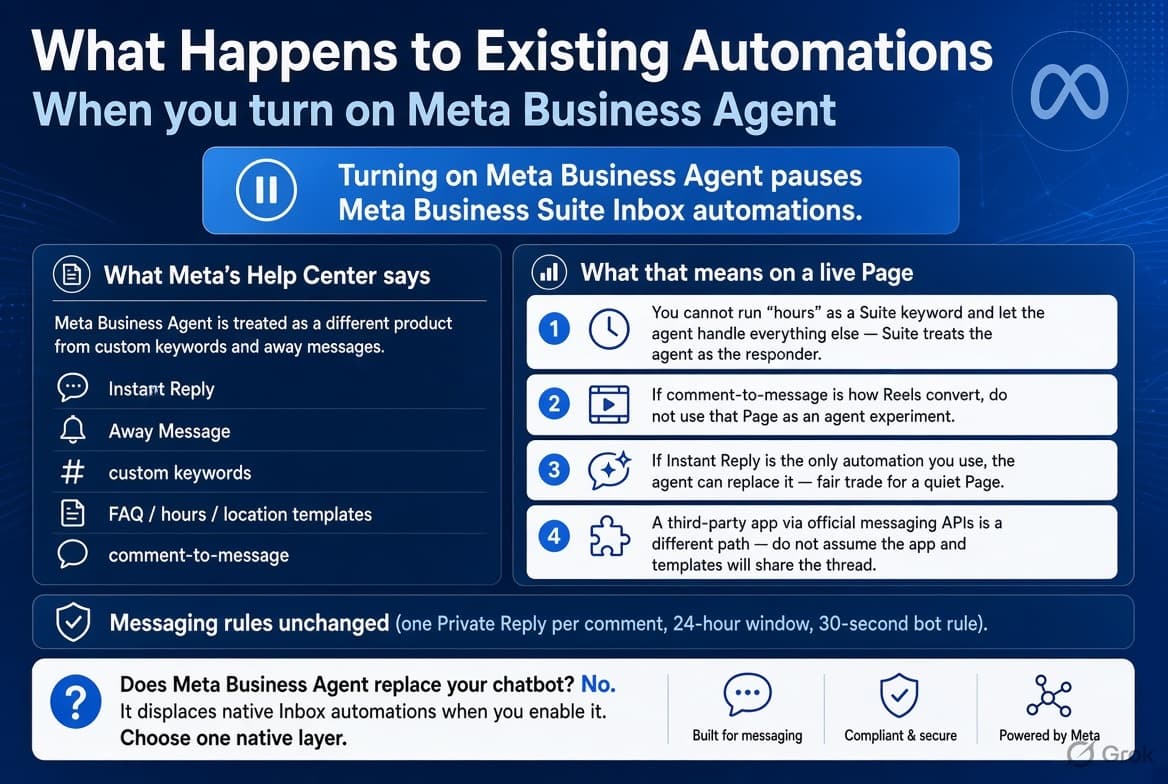
Turning on Meta Business Agent pauses Meta Business Suite Inbox automations.
Meta’s Help Center treats the agent as a different product from custom keywords and away messages. That includes Instant Reply, Away Message, custom keywords, FAQ / hours / location templates, and comment-to-message.
What that means on a live Page:
- You cannot run “hours” as a Suite keyword and let the agent handle everything else. Suite treats the agent as the responder.
- If comment-to-message is how Reels convert, do not use that Page as an agent experiment.
- If Instant Reply is the only automation you use, the agent can replace it. That is a fair trade for a quiet Page.
- A third-party app connected through Meta’s official messaging APIs is a different path from Suite templates. Do not turn the native agent on and assume the app and the templates will share the thread. That app path is the Messenger Platform.
The rules for what a Page may send in Messenger — one Private Reply per comment, the 24-hour window, the 30-second bot rule — are unchanged. Those limits are in Facebook DM automation.
Does Meta Business Agent replace your chatbot? No. It displaces native Inbox automations when you enable it. Choose one native layer. Forrester’s conversational AI platforms landscape is the wider version of that choice: the platform, not the announcement, is what decides the job.
| Job on the Page | Suite templates | Meta Business Agent | Page app on Messenger Platform |
| First courtesy line while you are available | Instant Reply | Overkill | Only if you need a richer first line |
| Hours, address, three canned FAQs | Templates | Fine, if you accept pausing the rest | Not needed |
| Open questions the templates miss | Templates cannot | This is the agent’s job | Useful if you want a model you choose |
| Comment on a Reel → private Messenger link | Comment-to-message | No | Yes |
| Ad tap → first reply in chat | Weak native | Yes, and those Messenger chats are free | Yes, if you already run ad reply flows |
| Multi-step booking or a payment link | No | Weak | Yes |
| Broadcast or sequence | No | No | Different product |
A Messenger chatbot in the flow-builder sense is a separate category from this agent. If you are comparing flow bots and AI agents as product types, use the Facebook Messenger chatbot breakdown instead of stretching this page into a tools list.
Does Meta Business Agent work on Instagram?
Yes. Meta expanded it to Instagram DMs. Setup is the same family: teach it the profile, catalog, and handoff, then let it answer inbound chats.
What most Instagram accounts actually want is still a keyword on a Reel, a Story reply that starts a sequence, or an ad comment that opens a thread with a link. The agent does not do those three jobs. It answers people who are already in DMs.
WhatsApp, briefly
The WhatsApp Business app agent is free-to-start inbound AI. Broadcast lists stay capped. Linked devices stay capped. There is no API.
The WhatsApp API is a different pipe: shared inbox, templates, CRM, scale. Meta Business Agent Platform can sit on that pipe for larger accounts. It does not delete the API.
Does the agent replace a WhatsApp chatbot built on the API? No. Different infrastructure.
If WhatsApp is the channel you sell on, you are choosing an API setup, not flipping a Suite tile.
Meta Business Agent vs Meta AI business assistant
| Meta Business Agent | Meta AI business assistant | |
| Audience | Your customers | You, inside Ads Manager |
| Job | Reply in Messenger, WhatsApp, Instagram, or on the site | Campaign insights and account help |
| Setup | Business Suite or WhatsApp Business app | Ad account |
If the question is “Meta’s AI for my inbox,” it is the agent. If the question is “Meta’s AI for my ads,” it is the assistant.
Who should turn it on
Turn it on when:
- The Page inbox is the same questions after hours. After-hours coverage is the case Accenture on customer service keeps coming back to.
- You do not rely on Suite keywords or comment-to-message
- You run click-to-message ads and want a native first reply that does not burn the organic Messenger cap
- You will fill Your info and a price list, then re-test after catalog changes
Leave it off when:
- Comment-to-Messenger is how the Page sells
- Instant Reply plus five keywords already cover most chats
- Someone on the team needs assignment and SLAs
- You need the model, the prompt, and the transcript in your own system
- You want to “just try it” on the same Page that is running a live Reel campaign
The wider map of comment replies, inbox rules, ads, and AI on a Page is the Facebook automation hub. Use that page when the question is what you can automate, not what Meta’s agent is.
How to teach it so the answers hold up
Most bad threads are empty knowledge bases, not a bad model. That is the early failure McKinsey on gen AI in customer care keeps finding: the knowledge and the handoff, not the toggle.
- Write a two-sentence description a stranger could use.
- Put prices in the catalog or the price list, not only on a graphic in a post.
- Add the questions you already answer by hand. If half the inbox is “do you ship to Coimbatore,” that sentence belongs in Your info.
- Set a hard handoff for refunds, legal, and anything you must not automate.
- Re-test after every catalog change. An old festive price list will be quoted with confidence.
- Correct wrong replies. The loop is: agent answers → you fix it → the next similar chat improves. If nobody corrects it, the error stays.
The toggle takes minutes. A catalog that does not lie takes longer. BCG on AI agents in customer experience makes the same point: the gain depends on the data you give it.
What to do this week
- If Suite keywords and comment-to-message are converting, leave the agent off on that Page.
- If the inbox is unstructured questions and those templates do almost nothing, fill Your info, add a price list, and test from a personal profile for two days.
- If Reels and ads need a comment to become a Messenger thread with a link, use comment-to-message — native or a Page app — and leave Meta Business Agent off.
- After any test, open Inbox → Automations and check what is actually still on. The pause is the surprise, not the AI copy.
Meta built a real inbound agent. It answers people who already wrote to you, in Meta’s product, until the cap or the handoff. That is the job on the box. Running the rest of the Page is still a different job.
About the author
Aravindh Kumar is an ecommerce and Instagram growth expert with 8+ years of experience in online selling. He has worked with 500+ brands - including Forbes-listed companies - He has helped 200+ Instagram businesses grow their online presence.