TL;DR
Facebook DM automation is software that answers Messenger conversations on a Facebook Page without a person typing each reply: a private reply to a comment, a keyword reply to an inbound message, an away message at 2 a.m. Meta allows it inside three limits: one private reply per comment within 7 days, promotional messages only inside a 24-hour window, and a 30-second response requirement for bots.
- Private Replies: one message per comment, sent within 7 days. The 24-hour window opens only if the person writes back.
- The 24-hour window: promotional content is allowed inside it. Outside it, message tags cover non-promotional updates, and the Human Agent tag covers manual replies for up to 7 days.
- Meta Business Suite Inbox automates eight templates for free. Custom keywords are desktop only, five per automation, case-sensitive, and sent after 15 minutes unless you answer first.
- A tool such as InstantDM adds comment-to-Messenger on Page posts and Reels, replies with buttons and images, and the Flow Editor. It does not cover Facebook stories, Groups, or personal profiles, and ad comments are not listed on its feature page.
- No official API messages someone who never contacted your Page. Tools that claim to are the ones that get accounts disabled.
This post is the Messenger half of our Facebook automation hub. The comment-side setup lives in the sibling post on Facebook comment automation.
Full disclosure: this is InstantDM's blog. InstantDM is an official Meta Business Partner. That is a partnership-program status, not an endorsement of this article or any tactic in it.
Meta's rules and the Business Suite interface change. Everything below is accurate as of August 2026, with a link to the Meta page each number comes from.
What is Facebook DM automation?
Facebook DM automation is a rule that sends a Messenger message from your Facebook Page when a person does something first. The person comments on a Page post, sends the Page a message, clicks a Send Message button, or taps a Messenger ad. The rule fires, and the reply arrives in seconds instead of whenever you next open the inbox.
Meta's Messenger Platform policy lists the actions that open a conversation: the person sends a message to the Page, clicks a call-to-action button, clicks a Click-to-Messenger ad, uses a Messenger plugin on a website, clicks an m.me link, or reacts to a message. Comments on a Page post are the seventh route, handled by a separate feature called Private Replies. Every legitimate form of Facebook Messenger automation starts from one of those seven actions.
That list also draws the boundary. Cold outreach sits outside it: there is no official API for messaging a person who never contacted your Page, none for your friends list, and none for sending from a personal profile. The Messenger Platform is built for Pages. Private Replies cannot even target another Page's comment; Meta's docs state that a Page cannot send a private reply to another Facebook Page.
A lot of "Facebook auto DM" search results are browser extensions that log in as you and message everyone in a group or friends list. Meta does not count those as automation. They are unauthorized access to your own account, and the account is what pays for it.
An m.me link is the cheapest trigger of all: a URL that opens a Messenger thread with your Page, so every click from a website, QR code, or email signature opens the 24-hour window. Our Facebook Messenger link generator builds one with a prefilled reference so your automation knows where the person came from.
Does Facebook allow DM automation?
Yes. Meta publishes the rules for it in the Messenger Platform policy, reviews the apps that use it through App Review and the Business Partner program, and ships its own automations inside Meta Business Suite. The only question is which of four rules a given message has to satisfy.
- A private reply to a comment: one message, within 7 days of the comment. Source: Private Replies.
- A reply inside a conversation: within 24 hours of the person's last action, and it may contain promotional content. Source: policy overview.
- A message after the window: only with a message tag for an approved non-promotional use, or the Human Agent tag for a manual reply within 7 days. Same source.
- Any bot reply: within 30 seconds of the person's input. Same source.
That is the whole rulebook. Business Suite's Instant reply, ManyChat, and InstantDM all send through the same Messenger Platform, so all of them inherit the same limits. A vendor that claims to have removed one of them is describing a tool that is not on the platform.
The Instagram side of the same question, including what Meta bans there, is in is Instagram automation allowed. The rules are close and most of the numbers match, but Instagram has extra triggers that Facebook does not. The comparison table further down shows which.
How do Private Replies work on Facebook?
Private Replies let a Page send exactly one Messenger message to a person who commented on a Page post, within 7 days of the comment. Meta's developer documentation puts it in three sentences: "Private Replies allows a business to send a single message to a person who published a post on your business' Facebook Page or who commented on a post." "The message must be sent within 7 days from when the post or comment was created." "Only one message can be sent to the person who commented."
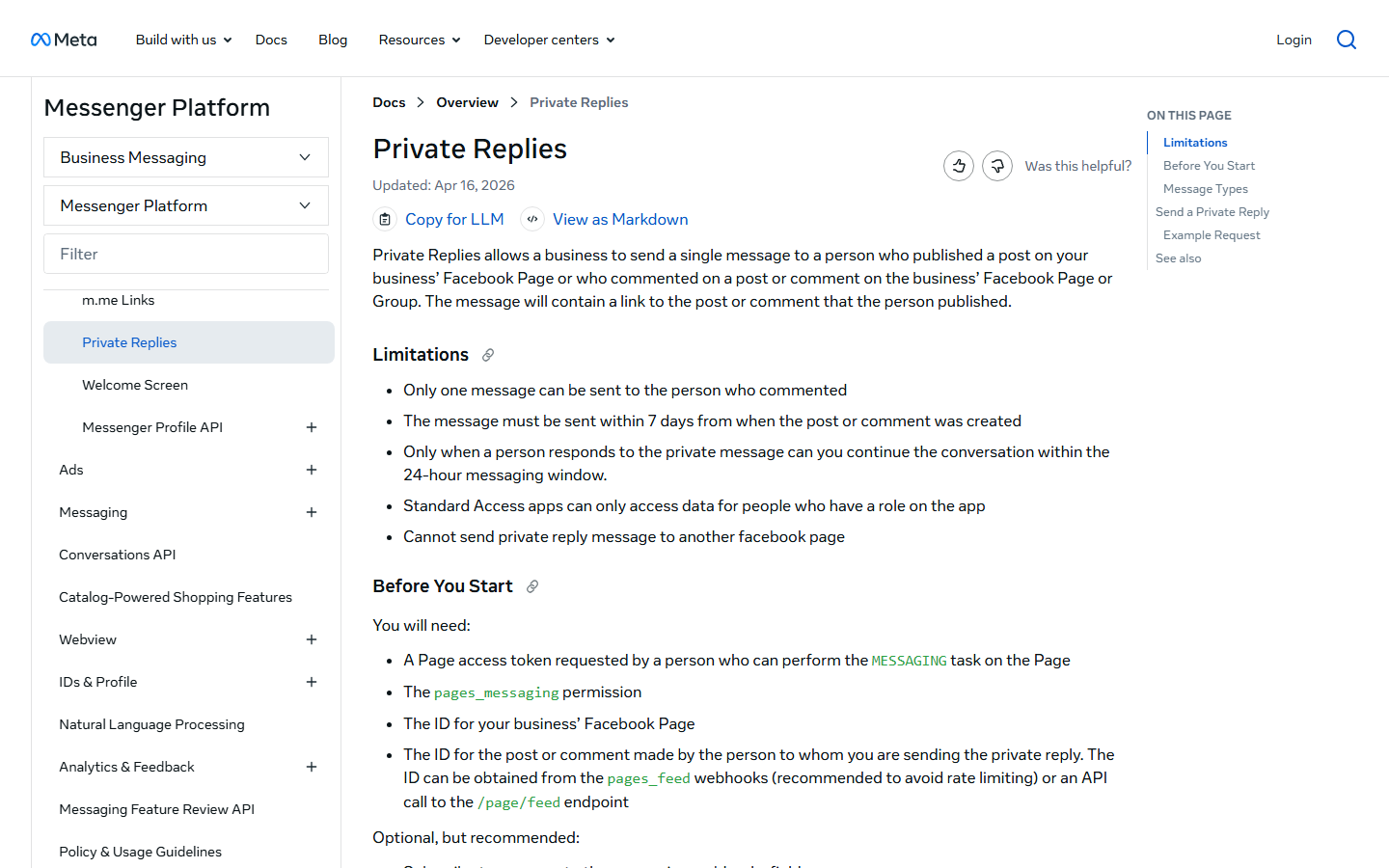
The fourth sentence is the one that shapes every comment-to-Messenger campaign: "Only when a person responds to the private message can you continue the conversation within the 24-hour messaging window." Your one message has to earn a reply. If the person reads it and closes Messenger, the thread is over until they comment or message again. That is why a good private reply ends with a question or a button rather than a bare link. The link can be in the message; the invitation to answer is what keeps the thread alive.
Say someone comments "PRICE" on your Page post on Monday at 10:00. Your Page has until the following Monday at 10:00 to send the one private reply. The reply goes out Monday at 10:00:04. If the person taps "Yes, send it" on Tuesday at 09:00, a fresh 24-hour window runs until Wednesday at 09:00, and inside it your automation may send the price list, a follow-up, and a promotional offer. If the person never taps anything, you sent one message, and that was the campaign.
Two mechanical points matter when you choose a tool. Private Replies require the pages_messaging permission on a Page access token, which is why a legitimate tool asks for that permission on Meta's own login screen instead of asking for your Facebook password. And the rule is enforced on Meta's side, so a second private reply to the same comment fails at the API regardless of what the tool's interface lets you configure.
What is the Facebook 24-hour messaging window?
The 24-hour messaging window is the period after a person's last action in which your Page may send any message, including promotional ones. Meta's policy overview states it directly: "Businesses have up to 24 hours to respond to a user. Messages sent within the 24-hour window may contain promotional content."
The window opens on any of the actions listed above: a message to the Page, a call-to-action button, a Click-to-Messenger ad, a plugin, an m.me link, or a reaction. It resets every time the person acts again, so a conversation that keeps going keeps its window open. It closes 24 hours after the person's last action, not after your last message. Sending five messages does not extend it. One reply from the person does.
After the window closes, three things are still allowed:
- Message tags. The policy says tags "enable sending important and personally relevant updates to users outside the 24-hour standard messaging window, for a set of approved use cases", such as account and post-purchase updates. Tagged messages cannot be promotional. Meta's example for the news use case bans "subscription offers, deals, coupons, discounts". The full tag list is in Meta's Send API documentation.
- The Human Agent tag. Meta writes that it "allows businesses to manually respond to user messages within a 7-day period". It is for a person at a keyboard, not for a bot, and it exists so a support question asked on Friday can be answered on Monday.
- A new private reply, if the person comments again. Comments are their own trigger with their own 7-day clock.
One more line from the same policy page applies to every automated flow: "Automated bots must respond to user input within 30 seconds." Tools on the platform respond in single-digit seconds. Business Suite's own keyword automation deliberately waits 15 minutes to give you a chance to answer in person, which Meta treats as a template rather than a bot.
The window is why Messenger marketing looks different from email. You cannot broadcast a promotion to everyone who ever messaged the Page; you can reply, within 24 hours, to everyone who acted today. Click-to-Messenger ads create that action at scale; the mechanics are in Facebook Messenger advertising and chat tools.
Can you automate Facebook Messenger for free?
Yes. Meta Business Suite Inbox includes automations at no cost, and for a Page whose messaging is mostly hours, location, and "is this still available", they are enough. Meta's Business Help Center page on automated responses lists the templates, and the companion page on setting up Inbox automations on desktop holds the rules. As rendered on 28 August 2026, the templates are:
- Instant reply, sent to anyone who messages the Page for the first time.
- Away message, sent during hours you mark as away.
- Frequently asked questions, tappable questions with prewritten answers.
- Location, Contact information, and Hours, each a one-tap answer with your Page details.
- Custom keywords, a reply triggered by words in an inbound message. Desktop only.
- Comment to message, described as "Reply to a comment that contains specific hashtags". Desktop only.
- Identify unanswered messages, plus conversation assignment for teams.
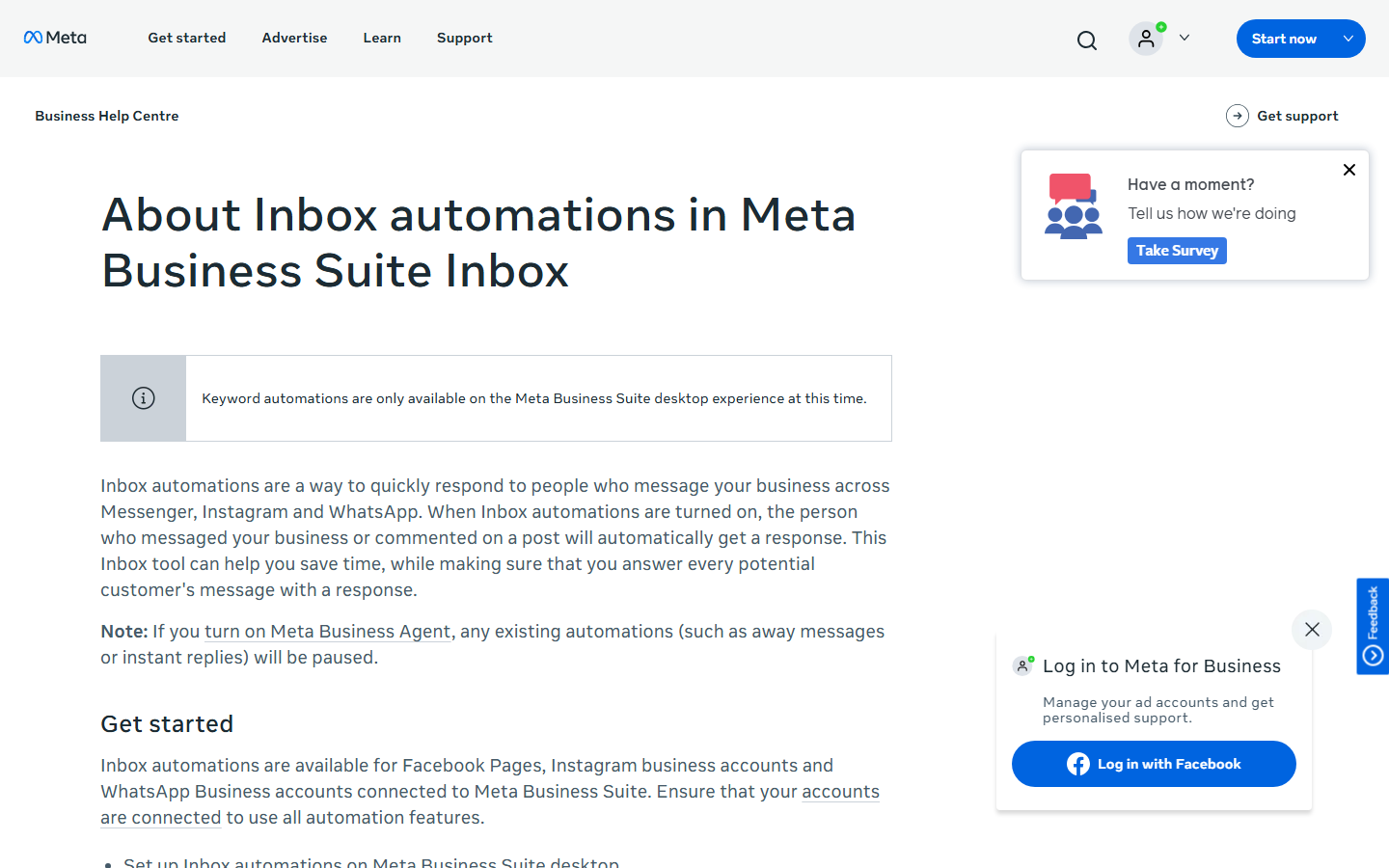
Custom keyword automations carry the rules that catch people out. Straight from Meta's page: you can add "up to five specific keywords or phrases" per automation; "keywords are case-sensitive" and "an automated message will not be sent unless the keywords match exactly"; "the same keyword or phrase can only be used in one keyword automated response"; and the reply is sent "after 15 minutes unless you personally respond before then". Template automations such as Instant reply and Away message take priority over custom keyword ones, so a first-time messager who types your keyword gets the instant reply, not the keyword reply.
Now hold those rules up against a real inbox. A person who types "link" gets nothing if your keyword is "LINK". A person who types "send me the link please" gets nothing unless that phrase is one of the five. And whatever they typed, they wait 15 minutes. For a Page that answers a few dozen messages a day, that is fine. For a Reel that pulls 400 comments in an evening, it is not the tool.
A few more notes from the same pages. Comment to message is the native cousin of comment-to-Messenger, and Meta describes its trigger as hashtags rather than plain keywords. Turning on Meta Business Agent, Meta's AI assistant for the inbox, pauses your existing automations. And the page carries a regional notice: some organic messaging features are unavailable for businesses, and for ads, delivered to and from Europe and Japan. If your Page is in either region, test the template before you promise it to anyone.
What does a Facebook DM automation tool add over Meta Business Suite?
A tool adds more keywords per post, replies in seconds instead of 15 minutes, buttons and images in the reply, per-post triggers on Reels, and a branching flow after the first message. Those five gaps are the reason paid Messenger automation exists on top of a free native product.
- Keywords. Business Suite matches five case-sensitive phrases exactly, Page-wide. InstantDM's trigger words are set per post, several at a time, so LINK, Link, and link can all be listed on the post that needs them.
- Timing. Native keyword replies wait 15 minutes. A platform tool replies within seconds, which matters on a post that is moving.
- Format. Native replies are text. InstantDM's Messenger replies carry text, buttons, and images, so the private reply can end with a "Send me the guide" button that earns the response Private Replies require.
- Triggers per post. Business Suite's comment automation is one Page-wide hashtag rule. A tool lets each Page post or Reel carry its own trigger words and its own message.
- Flows. Native automation is one message. A Flow Editor branches on what the person taps, asks for an email inside the thread, and hands off to a person when the question is not one you scripted.
Where Business Suite still wins: it is free, and the away message, hours, and location templates need nothing else. If that is your whole list, stop here and set them up on desktop. The tool comparison for everything past that point is in the best Facebook auto reply tools, which puts Business Suite first for exactly this reason.
How does comment-to-Messenger differ from inbound keyword replies?
Comment-to-Messenger starts from a public comment on a Page post and runs under the Private Replies rule: one message, 7 days. An inbound keyword reply starts from a message the person already sent to the Page and runs under the standard 24-hour window: as many messages as the conversation needs, promotional content allowed, until 24 hours pass without the person acting. Same inbox, two rule sets, and the difference decides what the first message should do.
| Question | Comment-to-Messenger | Inbound keyword reply |
|---|---|---|
| What triggers it | A comment on a Page post or Reel | A message sent to the Page |
| Meta rule that governs it | Private Replies (one message, within 7 days) | Standard messaging (24-hour window) |
| Messages you may send | One, until the person replies | As many as needed inside the 24-hour window |
| Promotional content | Allowed once the person replies | Allowed inside the window |
| What opens the 24-hour window | The person's reply to the private message | The person's original message |
| Native option in Business Suite | Comment to message (hashtag trigger, desktop only) | Custom keywords (five, case-sensitive, 15-minute delay) |
| Where you set it up in InstantDM | Facebook DM, then a post or Reel | Facebook DM, Messenger inbox automation |
In practice, a comment-to-Messenger message is a door and a keyword reply is a room. The door message has one job, which is to get tapped. The room can hold a sequence: the price list, then a question about size, then the checkout link. Building the door well is the subject of the Facebook comment automation post. Building the room is the how-to on Facebook Messenger automation.
How is Facebook DM automation different from Instagram DM automation?
Both run on Meta's messaging APIs with the same 24-hour window and the same one-private-reply-per-comment rule, but Instagram has three triggers Facebook lacks: story replies, the post-shared-to-DM event, and comments on boosted Reels. On Facebook, InstantDM automates Page posts and Reels comments, Messenger keyword replies, welcome messages, and flows. The table is InstantDM's own coverage, as of August 2026.
| Capability | Instagram (InstantDM) | Facebook (InstantDM) |
|---|---|---|
| Messaging API | Instagram Messaging API | Messenger Platform (Pages only) |
| Comment automation surfaces | Posts, Reels, boosted Reels | Page posts and Reels |
| Story automation | Yes | No |
| Post-shared-to-DM trigger | Yes | No |
| Boosted content / ad comments | Boosted Reels | No |
| Keyword replies to inbound DMs | Yes | Yes (text, buttons, images) |
| Welcome message | Yes | Yes |
| Flow Editor | Full | Full |
| Account type | Professional account | Facebook Page (no profiles, no Groups) |
| Copy an automation across | Source | One click, Copy from Instagram |
The gaps in the Facebook column come from Meta's API rather than from InstantDM's roadmap. Facebook stories do not expose a reply trigger to the Messenger Platform the way Instagram stories do. There is no post-shared-to-DM event on Facebook. And comment automation on Facebook ads is not listed on InstantDM's feature page, although the pricing page FAQ says ad campaigns are covered, so confirm with support before you plan a Facebook ad-comment campaign around it. InstantDM's boosted-content automation is Instagram Reels only.
The one structural requirement on the Facebook side surprises people: InstantDM automates the Facebook Page linked to your Instagram professional account, from the same dashboard, under a sidebar item called Facebook DM. If the Page is not linked, nothing shows up. Linking takes about two minutes and is covered in how to connect a Facebook Page to Instagram.
How do you set up Facebook DM automation with InstantDM?
Five steps, about 15 minutes end to end, and the first one is the one most people skip. The detailed comment walkthrough with screenshots is in the sibling post; this is the short version.
- Link the Facebook Page to your Instagram professional account (2 minutes). Do this in Meta's settings, not in InstantDM. The Page must be one you administer. Personal profiles and Groups will not appear, because the Messenger Platform does not cover them.
- Connect InstantDM through Facebook login (1 minute). Meta's own permission screen asks for the Page messaging permissions. No password is typed into InstantDM at any point.
- Open Facebook DM in the sidebar and pick the surface (1 minute). Choose a Page post or Reel for comment-to-Messenger, or the Messenger inbox automation for keyword replies to inbound messages. If you already run the same campaign on Instagram, click Copy from Instagram and edit the wording for the Facebook audience.
- Write the trigger words and both replies (5 minutes). For a post: the trigger words, the public comment reply, and the private Messenger message. For the inbox: the keyword and the reply. Give the Messenger message a button or a question at the end, because under Private Replies that one message has to earn a response before anything else can be sent.
- Toggle the automation on and test it from a second account (3 minutes). Comment the trigger word, watch for the public reply and the Messenger message, tap the button, and confirm the follow-up arrives. Then check the same post a day later to see the 24-hour window close on its own.
Keep your Page safe while you do this: send automated Messenger messages only as replies to actions people take on your Page, never as blasts to a list. Stay inside the 24-hour window and Meta's Messenger policy; a tool on the official platform is there to keep you inside those lines. On a post that is picking up comments fast, pace the sends. Meta's systems flag a sudden burst of identical messages no matter who sent them.
What gets a Facebook Page restricted for messaging?
Behavior gets a Page restricted, and the tool you picked has little to do with it. Meta does not publish the thresholds, but the same four patterns sit behind messaging restrictions every time, and each is a rule from the sections above being broken at volume.
- Messaging outside the window without a valid tag, or using a tag for promotional content. Meta's policy is explicit that tagged messages cannot carry offers, coupons, or discounts.
- Cold outreach. There is no API for it, so the tools that do it log in with your password and drive Facebook like a person would. Meta can see that login pattern, and enforcement lands on the Page and the personal account that administers it.
- Spam reports. Identical link-heavy messages sent to everyone who commented, with no way to reply to a human, are what people report. Reports weigh more than any signal you control.
- Velocity. A Page that has sent 20 messages a week and suddenly sends 2,000 in an hour trips the same systems whether a bot or an intern did it. Pace the queue.
Two caveats. Meta's enforcement is a ladder, from a notice in your Page's status to a messaging restriction to a disabled Page, and it is not strictly sequential; enough reports skip rungs. And no vendor, InstantDM included, can promise a Page will never be restricted. What a platform tool can do is make the rules hard to break by accident: it cannot send a second private reply, cannot message outside the window without a tag, and cannot reach anyone who did not act first, because the API refuses.
What does Facebook DM automation cost in 2026?
Meta Business Suite automations are free. InstantDM includes Facebook automation with its plans, with no separate Facebook add-on: the free plan covers 500 automations a month, Legend Pro is $9.99 a month, and Trendsetter is $24.99 a month, as of August 2026. ManyChat, the largest tool in the category, moved to contact-based pricing in March 2026, with a free plan of 25 active contacts across two channels, Instagram and Messenger.
Pricing and plan limits below are as of August 2026, from each vendor's public pricing page or, where noted, a dated third-party tracker. Vendors change plans without notice, so check the current page before deciding.
| Option | Free tier | Paid, as of Aug 2026 | Facebook coverage |
|---|---|---|---|
| Meta Business Suite Inbox | All templates, free | None | Instant reply, away, FAQs, hours, custom keywords, comment to message |
| InstantDM | Free plan, 500 automations a month | Legend Pro $9.99/mo; Trendsetter $24.99/mo (instantdm.com/pricing) | Page posts and Reels comment-to-Messenger, inbox keyword replies, welcome message, Flow Editor |
| ManyChat | 25 active contacts, 2 channels | Contact-based tiers from March 2026; Essential is the entry tier, reported at $14 to $17/mo depending on billing term (flowgent.ai tracker, July 2026; SetSmart, August 2026). Verify at manychat.com/pricing | Messenger, comments, plus WhatsApp, SMS, TikTok |
The InstantDM number that matters for Facebook is the automation count, not a contact count. An automation is one triggered reply; a Page that answers 400 comments on one Reel has used 400 of the month's 500 on the free plan. Legend Pro removes that ceiling.
Other tools win some lanes outright. If you need WhatsApp, or a single inbox across Messenger, WhatsApp, SMS, and web chat, ManyChat, Chatfuel, and SleekFlow are the right shortlist, and InstantDM is not on it, because InstantDM does not run WhatsApp at all. The same applies to Facebook ad-comment automation. Pick InstantDM when the job is Instagram plus the linked Facebook Page, run from one dashboard, at a flat price. The full tool-by-tool table is in the best Facebook auto reply tools for 2026.
Which Facebook DM automation setup should you pick?
Pick Meta Business Suite if your automations are an away message, hours, location, and a couple of keywords, and a 15-minute delay is acceptable. It is free and it is Meta's own. Pick a platform tool when a post can pull hundreds of comments, when the private reply needs a button to earn its response, or when the conversation has more than one step.
InstantDM runs the second case for Pages that already run Instagram: comment-to-Messenger on Page posts and Reels, keyword replies with buttons and images in the Messenger inbox, a welcome message, and the same Flow Editor you use on Instagram, copied across with one click. It sends through the Messenger Platform as an official Meta Business Partner, so the 7-day, one-message, 24-hour, and 30-second rules above are enforced for you. Facebook is included with InstantDM plans, with no separate add-on: the free plan covers 500 automations a month, Legend Pro is $9.99 a month, and Trendsetter is $24.99 a month, as of August 2026.
The feature detail, including the tutorial video, is on the Facebook comment-to-Messenger automation page, and you can start on the free plan with the Page you already have linked.
Facebook, Messenger, Meta, ManyChat, Chatfuel, and SleekFlow are trademarks of their owners. InstantDM is not affiliated with those companies beyond the named partner program.