Last updated: 31 October 2026
Muse AI for solopreneurs is Meta’s owner-facing agent layer, Muse for Small Business, used as a back-office drafter for a one-person shop. You give it a goal. It reads the Instagram, ads, Shopify or books tools you connected. It keeps working after you close the app. Nothing publishes, sends or spends until you approve it. It is not a staff replacement, not a public inbox, and not Instagram’s Muse Image AI.
I checked Meta’s Muse for Small Business page and the September 29 Newsroom post again on November 1, 2026. The business page still says US and Canada, 18 and over. I did not run Muse on a live one-person shop for 30 days. I compared Meta’s own copy with independent posts that already try to own this job, then I threw out use cases those pages could not glue to a named connector or an official prompt.
TL;DR
- Muse AI for solopreneurs is a back-office agent for a one-person shop, not a staff replacement.
- It fits a US or Canada owner whose work already sits in Instagram, Facebook, Meta ads and a shop tool such as Shopify, Stripe or QuickBooks.
- Hand it standing jobs you can check: a Monday brief, a draft campaign, a client-prep pack, a product-page rewrite. Keep send, spend and the public inbox on you.
How I checked these use cases
I treated every use case as either official, a combination of official features, or unverified. Independent blogs mix those three and then sound certain.
- Primary source. Meta’s product page and Newsroom post, read November 1, 2026.
- Official starter prompts. Meta published four. I use those as the floor, not as the whole page.
- Named connectors only. Meta lists 15 partner tools plus Facebook, Instagram and Meta ads. If a roundup needed HubSpot to make the story work, I skipped the story.
- What I skipped. I did not copy consumer errands (flight refunds, outfit ideas) into a business outline.
- What I did not test. I did not sit in a bakery, a coaching inbox or a Shopify admin with Muse for a month. Where I did not test, I say so.
For the product definition, start with What Is Muse for Small Business? Meta's AI Agent Explained (2026).
Verified: 31 October 2026 against Meta’s product page.
What can a solopreneur actually hand Muse in 2026?
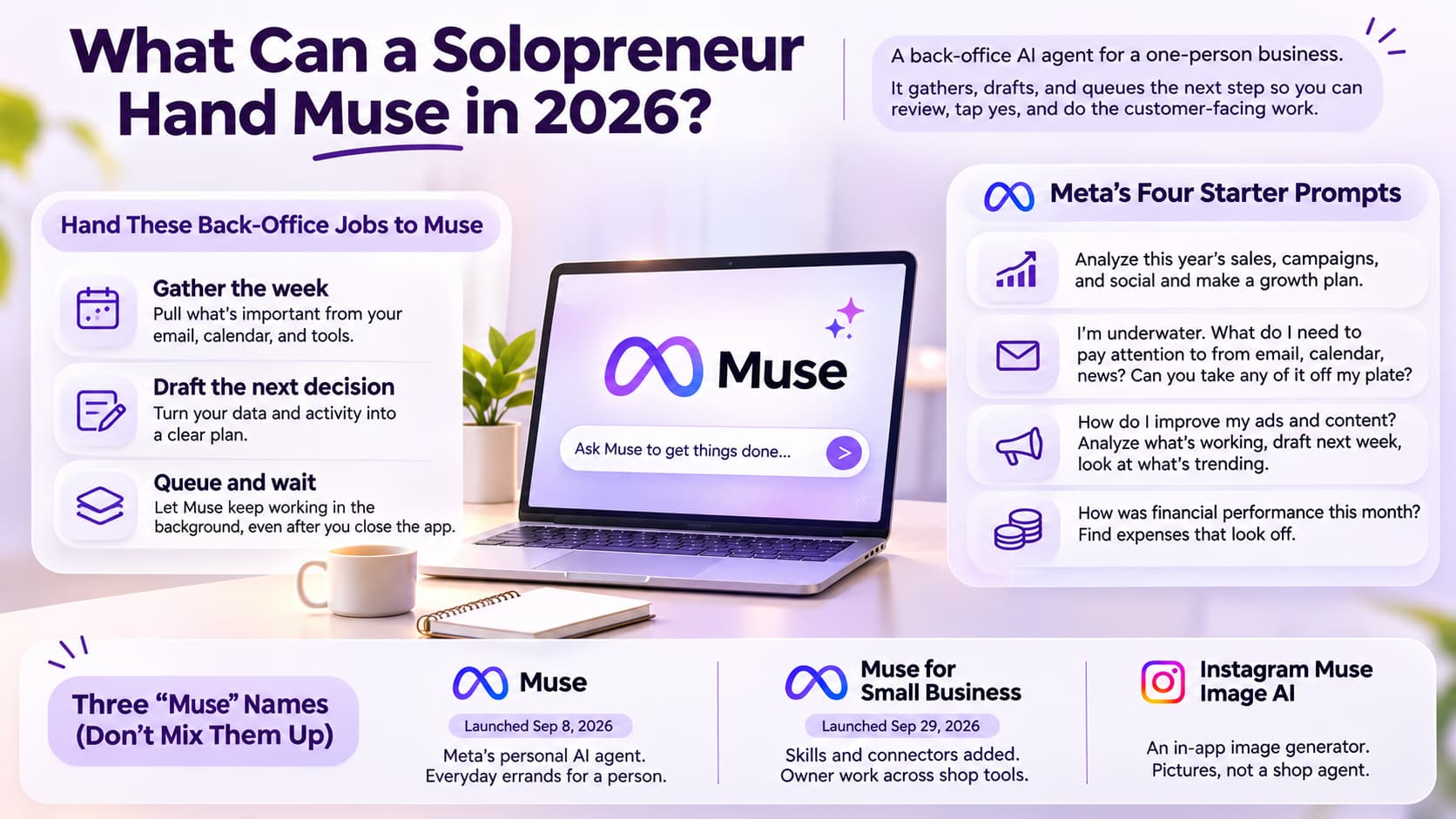
A solopreneur can hand Muse standing back-office jobs: gather the week, draft the next decision, and wait. You still tap yes. You still do the work a customer will see.
That is the whole product, said in owner language. Meta’s own line is that talking to it “works just like messaging another person,” in the Muse app or in WhatsApp. For longer jobs it keeps going after you close the app. A chatbot answers the question you typed. An agent owns the next step. If you want that split in full, read AI Agent vs Chatbot: Key Differences, Benefits & Which One Should You Choose?.
Muse AI for solopreneurs is a back-office agent for a one-person shop, not a staff replacement. I keep repeating that because the launch posts read like you hired someone. You did not. You hired a drafter with a queue.
Official (Meta’s four starter prompts, copied as Meta wrote them)
- Analyze this year’s sales, campaigns, and social and make a growth plan.
- I’m underwater. What do I need to pay attention to from email, calendar, news? Can you take any of it off my plate?
- How do I improve my ads and content? Analyze what’s working, draft next week, look at what’s trending.
- How was financial performance this month? Find expenses that look off.
Those four are the product. If a “25 ways” list cannot show a connector or one of those jobs, treat it as a prompt someone hopes will work.
Unverified until you see it in your account: auto-publishing a Facebook Page post, filling a CRM Muse does not name, answering Instagram comments while you sleep, or “running the business” with send turned on.
Three names still get mixed in search. I'm splitting them so the rest of this page stays on one product.
Muse — Meta’s personal AI agent, launched September 8, 2026. Everyday errands for a person.
Muse for Small Business — Skills and connectors added September 29, 2026. Owner work across shop tools.
Instagram Muse Image AI — In-app image generator. Pictures, not a shop agent. If you landed here because of the image tool, read Instagram's Muse Image AI: What Are the Real Privacy Risks?.
Which one-person businesses fit Muse AI?
Muse fits a US or Canada owner-operator whose numbers already live in Meta and a shop tool, and who can check a queue every day. It does not fit a public inbox, a team helpdesk, or a shop outside that map.
Meta’s own examples are owner-operators, not 50-person marketing teams. Bennett Orchards is on the business page. Mulholland Grocery is in the Newsroom post. Tom Mulholland’s line is the one I trust: he works about 65 hours a week and needs time back for the work that makes money. That is a one-person shape even if a spouse or a part-timer exists.
Coach or consultant, US/CA, calendar plus Instagram — Hand Muse a client-prep pack, a weekly brief, draft follow-ups. Skip it as the live booking inbox.
Shopify solo, Instagram + ads — Hand Muse a Monday sales-and-ads review and a product-page draft. Keep theme edits, shipping and Shopify Inbox in Shopify.
Freelancer who invoices and writes proposals — Hand Muse an overdue-invoice draft and meeting notes turned into actions. Do not hand it the only copy of client files if those files live on a laptop.
Creator with a shop or a paid offer — Hand Muse a month of content as drafts and a “what worked” note from Insights. Do not hand it comment-to-DM while you sleep.
India, UK or EU owner — Nothing, today. Do not build a process around a US Apple ID.
Agency with 20 ad accounts — Maybe one client at a time. Meta did not describe an admin console.
I would not pick Muse because a YouTube thumbnail said it will mint millionaires. I would pick it because the stack already matches.
If the stack is Gmail and Docs, or a folder on a Mac, pick from Muse vs ChatGPT for Small Business: Claude and Gemini Compared (2026) instead.
How do coaches and consultants use Muse AI?
Coaches and consultants use Muse as a prep and triage drafter: meeting packs, “what needs a human today,” and follow-up copy you still send yourself.
I have been the person who spent Sunday night rebuilding the same client brief from three inboxes. That is the job. It is not “let Muse take the sales call.”
Client-prep pack (combination of official features)
Connect calendar plus whatever notes tool you actually use if it is on Meta’s list (Notion is named). Ask for a one-page brief: who you are seeing, what they paid, what is open, what you promised last time. Read it. Correct it. Walk into the call with that page, not with Muse on speaker.
Label: combination of official features. I did not sit in a coaching account and time this.
Underwater triage (official)
This is Meta’s second starter prompt, rewritten for a practice: “I’m underwater. From email and calendar, what needs me today? Draft, do not send.” Coaches drown in “quick questions” that are not quick. Muse can sort. You still decide who gets a yes.
Inquiry follow-up you still send (official on draft, unverified on send)
Meta says it can draft a customer reply or a client pitch. For a solopreneur coach that is a gold inquiry sitting in email, not a chatbot on the sales page. Keep send on ask-first. If you grant send on day one, you will spend Tuesday apologizing.
What I would not hand it: diagnosing a client, rewriting a contract, or sitting in the public Instagram comments as the brand. Drafting a reply is not the same as being the inbox.
How does a Shopify solo shop use Muse?
A Shopify solo shop uses Muse to pull sales, ads and Instagram into one Monday review, then draft the next campaign or product page. The catalog, the theme and the Inbox stay in Shopify.
Shopify is one of the 15 partner tools Meta names. Connect it so sales sit next to Instagram professional account analytics and Meta ad accounts. Muse does not replace the Facebook and Instagram sales channel. It does not replace Shopify admin.
Monday sales-and-ads review (official)
This is Meta’s first and third prompts glued together. “Analyze last week’s sales, campaigns and social. Tell me what moved. Draft one campaign for next week. Do not publish. Do not spend.” You check the numbers in Shopify and Ads Manager before you believe the story.
I have asked an AI for a growth plan with only Instagram connected. You get vibes. You do not get a plan. Connect the shop first.
Product-page draft (official as a draft)
Meta says it can draft a new product page. Useful when you already photographed the thing and you need words. Not useful when the SKU is wrong in Shopify. Keep publish off. Paste into Shopify yourself until you trust the voice.
Inventory and cash (official only if QuickBooks or Stripe is connected)
Meta’s fourth prompt needs books. QuickBooks and Stripe are on the named list. If those two are off, skip “how was financial performance.” An agent that invents expenses from Insights is worse than no agent.
Unverified: Muse reordering stock, Muse talking to a supplier, Muse running Shopify Inbox overnight. I have not seen Meta promise those as unattended jobs.
How do freelancers use Muse for client work?
Freelancers use Muse for the admin around the craft: a weekly brief, meeting notes into actions, a draft invoice reminder. The craft itself still happens in the tool you already charge for.
If your “business” is a folder of invoices, a Numbers sheet and a pile of PDFs on one Mac, Claude is still the better file agent. Muse wins when the client work is tangled up with Instagram, ads or a Shopify store you also run.
Weekly business brief (combination of official features)
“From email, calendar and the connected shop, what slipped, what is due, what can wait.” That is Meta’s underwater prompt with a freelancer label on it. Run it Sunday night. Do not let it mail the client.
Meeting notes into an action list (combination)
Granola is on Meta’s partner list. Notion is too. If you already dump notes there, asking Muse to turn yesterday’s call into three actions is a fair try. If your notes live in a Google Doc and you never connected anything, you will paste context forever. That is a ChatGPT job.
Overdue invoice reminder as a draft (combination, send stays off)
Stripe is named. “Find open invoices. Draft a reminder in my voice. Do not send.” You hit send in Stripe or in Gmail. I would not give an agent the only path to a client’s inbox in week one.
What I would not hand it: the only copy of the contract, legal markup, or “go collect.” Collection is a human mess. Drafting the reminder is admin.
How do creators use Muse without confusing it with Image AI?
Creators use Muse for Small Business to draft a content month and a “what worked” note from professional Insights. They do not use it to generate pictures inside Instagram, and they do not use it as the public comment inbox.
Wrong Muse is the mix-up I see most. Instagram’s Muse Image AI makes pictures in the app. This page is the owner agent.
A month of content as drafts (official)
Meta says it can plan a month of content, then check back with progress. For a one-person creator that is a calendar of ideas and captions, not 30 finished Reels. Independent marketing posts are right on this: analysis and a first draft live here. Daily short-form production does not. If your bottleneck is “I have no video,” Muse will not shoot it.
What worked on Facebook and Instagram (official)
Connect professional analytics. Ask what got saves, comments, profile visits. Ask it to draft next week around one offer. You still look at the native Insights screen. I have watched dashboards lie when the date range is wrong. So will an agent.
Mining your own comments for ad angles (unverified as a standing job)
Some independent posts tell a one-person shop to mine DMs and comments for ad copy. The honest version: you can paste a week of comments and ask for themes. Connecting analytics is not the same as reading every comment in real time. I would not call that a live social inbox.
Creators who only needed the comment to fire a payment link are on the wrong page. Muse drafts. It does not sit in that thread.
What should a one-person business connect first?
Connect the Meta bundle first (Facebook Pages, Instagram professional analytics, Meta ads), then one commerce source and one books source if you have them. Leave extra apps for week two.
This is the first bundle for a person with no team. Extra connectors create extra ways to send.
Week-one bundle
- Confirm US/Canada and 18+. Region gate. Don't fake it.
- Facebook Pages, Instagram professional analytics, Meta ads. The bundle Meta already understands.
- Shopify or Stripe. Sales, not vibes.
- QuickBooks, if you actually use it. The books prompt is useless without books.
- One notes or tasks app you already live in (Notion, Asana), only if the brief job needs it.
Leave Canva, Slack, Zoom, Figma and custom connectors until a Monday review looks sane. I would deny a broad Gmail or WhatsApp send on day one. Read for a week. Meta’s FAQ is the reason: nothing publishes, sends or spends without your approval, and you can undo it. That only helps if you did not grant send in a hurry.
Can Muse run a one-person business?
No. Muse cannot run a one-person business. It can draft, queue and wait. You still approve, you still sell, you still show up.
Can Muse run a one-person business? Not as a staff replacement. Yes as a back-office agent for a US or Canada owner who will check the queue. Nothing publishes, sends or spends until you tap yes. That is Meta’s rule, not mine.
If you meant a quiet operator who works after you close the laptop — Partial. It keeps working. It still needs your yes.
If you meant replace a VA, a bookkeeper and a community manager — No.
If you meant replace the public Instagram inbox — No.
If you meant draft Monday so you spend the day on the work that bills — That is the fit.
If you meant let it spend ad budget overnight — No. Approval is the product.
I did not need a horror story to land here. Meta already wrote the limit. Independent posts that say “do not use Muse for business” are arguing with the acting layer: an agent that can use a browser is a different risk than a chatbot. Fair. The fix is permissions, not avoiding the tool. Start with read-only jobs. Keep customer-facing sends on ask-first. If a draft looks off, you still have a shop.
Muse AI for solopreneurs is a back-office agent for a one-person shop, not a staff replacement. If someone promised you a business that runs itself, they were selling a thumbnail.
Where does Muse stop for a solo operator?
Muse stops at approval, at the US/Canada map on Meta’s business page, at the named connectors, and at work a customer never sees until you send it.
- It will not publish, send or spend without you. Feature. Also why it cannot cover the 2 a.m. comment.
- It is not a public inbox. Drafting a customer reply is not sitting in Instagram, Shopify Inbox or WhatsApp as the brand.
- It is not Instagram Muse Image AI. Different product.
- It is not a second Shopify admin. Catalog, shipping, refunds stay there.
- It is not a bookkeeper. QuickBooks in, story out, you still sign the return.
- It is not a short-form studio. Drafts captions. You still shoot.
- It is not HubSpot or Salesforce unless you build a custom connector and you can revoke it.
- Meta’s business page, November 1, 2026, still says US and Canada, 18+. Other blogs mention Japan or Singapore for consumer Muse. I am not treating those as small-business availability until Meta’s business page says so.
- Meta still does not print a dollar price on the business page. I will not invent Power or Maximum from a third-party slide.
Connecting analytics is not comment-to-DM. For that inbox job, a dedicated Instagram DM automation tool such as InstantDM at $9.99/mo sits next to Muse. It does not replace Muse, and Muse does not replace it. InstantDM sends a payment link when someone comments. Muse drafts the week.
What should the first 7 days look like?
Day one is connect and deny send. Days two to four are one official prompt, read-only. Days five to seven are one standing job on a schedule you still review.
This is how a person with no team avoids a weird public reply.
Day 1. Confirm region. Open Muse. Connect the Meta bundle. Connect Shopify or Stripe if you have it. Deny send and spend. Name the agent if you want. I don't care what you name it. I care that send is off.
Day 2. Run Meta’s underwater prompt. Read the list. Cross it with your own inbox. Approve nothing.
Day 3. Run the ads-and-content prompt if ads exist. If they don't, skip it. A shop with no ads does not need a fake campaign.
Day 4. One persona job from above. Coach: client-prep pack. Shopify: Monday review even if it is Thursday. Freelancer: invoice draft. Creator: “what worked” from Insights.
Day 5. Compare the draft with the source screen (Shopify, Ads Manager, Insights, Stripe). If the numbers don't match, the agent is guessing. Fix connectors. Do not write a growth plan on top of a guess.
Day 6. Turn one good draft into a standing weekly job. Same prompt. Same day. Still no send.
Day 7. Tighten permissions. Add Canva or Notion only if a real job needs it. Still no “take this off my plate” with send on.
If the free allowance cuts you off mid-week, open the paywall in the app. Do not trust a screenshot from early October. Caps move. Meta’s public sentence is still “free for most of what people need,” with unnamed subscription plans if you want more.
What mistakes waste a solopreneur's week?
The mistakes that waste a week are connecting every app on day one, treating drafts as live customer replies, and asking Muse to run a shop it cannot see.
- Granting send + spend on the first login. Read for a week.
- Asking for a growth plan with only Instagram connected. Vibes, not a plan.
- Expecting it to answer comments at 2 a.m. That is an inbox job, not this agent.
- Googling Muse and opening the image-AI post. Wrong Muse.
- Copying a 25-use-case list that is actually flight refunds and outfit ideas. Consumer Muse. Not your P&L.
- Building a US Apple ID from another country. Policy mess. Also mixes the shop into an account that is not yours.
- Pasting $20 / $100 Muse prices into a client deck. Meta did not print those dollars on the business page on November 1, 2026.
- Handing it the only customer channel. If Muse is the inbox, you do not have an inbox. You have a queue you forgot to check.
- Skipping the Monday numbers check. If you will not open Shopify, do not ask an agent to “be the operator.”
I still see people treat approval as a nuisance. Approval is the product. A one-person shop is the entire risk surface. There is no manager down the hall.
What do early testers keep repeating?
Early testers keep repeating three things: it is easy to start, you should not grant send on day one, and a lot of “use cases” are personal errands wearing a business hat.
I can't paste a Reddit thread as gospel. I can match the pattern to Meta’s own FAQ. Consumer Muse stories (Marketplace messages, broad permissions, “it was too eager”) are the reason the business page hammers approval. If a founder says it helped with everyday operations, that matches the launch. If someone says it posted without asking, that contradicts Meta’s FAQ. Treat that as a permissions bug or a user who granted send, then check the audit trail before you blame the model.
Lists of 20-plus use cases are fun to read. Count how many are “hold music,” “flight credit,” “find a bar.” Those are real for a person. They are not Muse AI for solopreneurs. This page is the shop jobs. Keep the errands in the consumer app if you want them. Don't build a content calendar out of them.
Don't pay a three-figure monthly plan because a launch-week blog named a Maximum tier. Open the app.
Should a solopreneur use Muse in 2026?
Yes if you are in the US or Canada, you already live in Instagram plus a shop tool, and you will check a queue. No if you needed a public DM agent, a video studio, or a tool that works in India or Europe today.
I'd try the free allowance with three connectors and one official prompt. If the draft is useful, keep it. If you needed someone to reply while you cut steaks, you still need an inbox product next to it. Muse drafts the work. You still run the shop.
About the Author
Aravindh Kumar is an ecommerce and Instagram growth expert with 8+ years of experience in online selling. He has worked with 500+ brands, including Forbes-listed companies, helping them build profitable Instagram sales channels. He has helped 200+ Instagram businesses grow their online presence.