Last updated: October 23, 2026
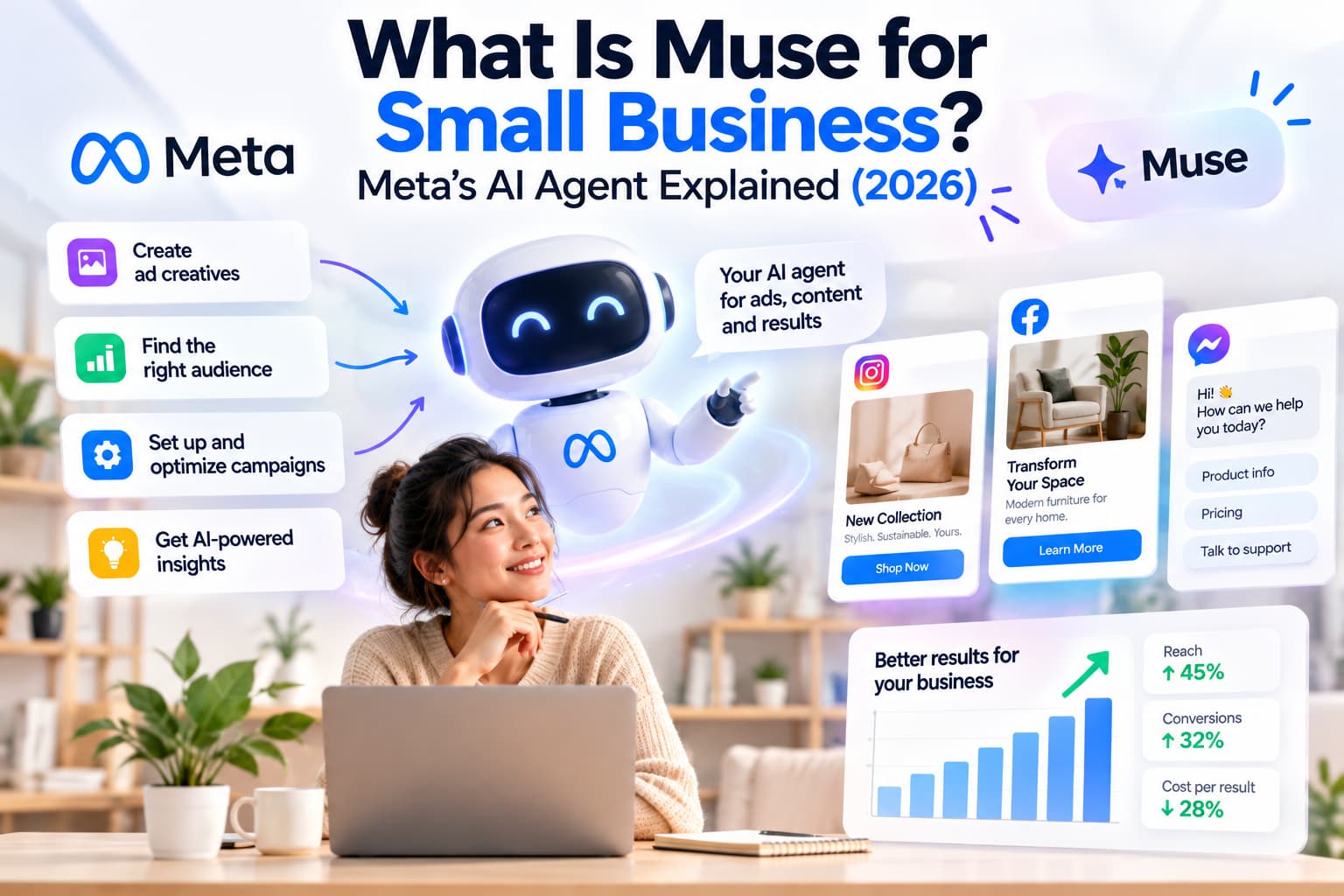
What is Muse for Small Business? It is Meta’s September 29, 2026 add-on inside Muse, the personal AI agent, that connects Instagram, Facebook Pages, Meta ads, Shopify, QuickBooks, Stripe and 12 other work apps so an owner can plan, draft and queue work while nothing publishes, sends or spends until they approve it.
I read Meta’s product page and the September 29 Newsroom post on October 23, 2026. The page isn't a new app. It's a set of skills and connectors on the same Muse agent Meta launched for consumers on September 8, 2026. It also isn't Instagram’s Muse Image AI, the in-app image generator.
TL;DR
- Muse for Small Business is Meta’s owner-facing AI agent layer, launched September 29, 2026, not a chatbot and not a separate product.
- Meta lists 15 partner tools plus Facebook, Instagram and Meta ads. Nothing publishes, sends or spends without your approval.
- It is free for most of what people need, with unnamed subscription plans for heavier use, and it is available in the US and Canada for people 18 and over.
How I checked this
I didn't run Muse on a live shop for a month. I compared Meta’s own copy with independent posts that already cover this topic.
- Primary source. I checked Muse for Small Business and Meta’s September 29 Newsroom post on October 23, 2026.
- Launch date. Newsroom JSON-LD lists datePublished 2026-09-29 and dateModified 2026-10-08.
- Price rule. If Meta’s page doesn't print a dollar amount, I don't invent one from a blog table.
- Independent explainers. I read posts that answer what it is, what it costs, which apps it connects, setup and limits. Vendor homepages that sell a different tool get one caveat, not the outline.
- What I skipped. I didn't rebuild Instagram comment-to-DM setup, Meta Ads Manager login, or Instagram Muse Image AI privacy. Those jobs already have their own URLs.
Verified October 23, 2026 against Meta’s product page.
What is Muse for Small Business, in one block
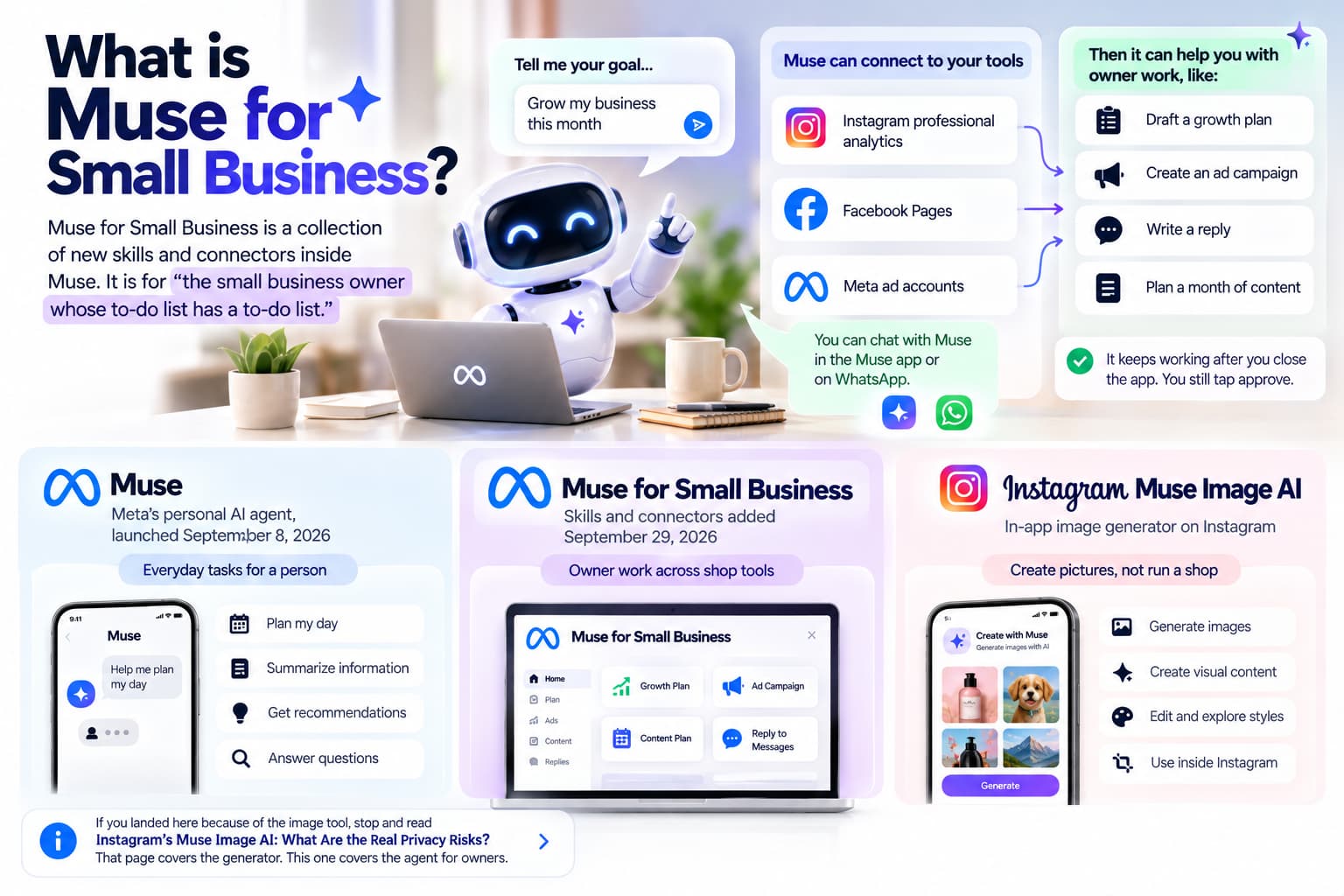
Muse for Small Business is a collection of new skills and connectors inside Muse. Meta’s own sentence is the one I trust: it is for “the small business owner whose to-do list has a to-do list.”
You tell it a goal in the Muse app or in WhatsApp. It keeps working after you close the app. It can read connected Instagram professional analytics, Facebook Pages and Meta ad accounts, then draft a growth plan, a campaign, a reply or a month of content. You still tap approve.
Three names get mixed up in search. I'm splitting them here so the rest of the page stays on one product.
Product | What it is | Job |
Muse | Meta’s personal AI agent, launched September 8, 2026 | Everyday tasks for a person |
Muse for Small Business | Skills and connectors added September 29, 2026 | Owner work across shop tools |
Instagram Muse Image AI | In-app image generator on Instagram | Create pictures, not run a shop |
If you landed here because of the image tool, stop and read Instagram's Muse Image AI: What Are the Real Privacy Risks?. That page covers the generator. This one covers the agent for owners.
How does Muse for Small Business work?
Muse for Small Business works like this: you give it a goal, it builds a plan from the apps you connected, it drafts the work in the background, and it waits for approval before anything goes out.
Meta says talking to it “works just like messaging another person,” in the Muse app or in WhatsApp. For longer jobs it keeps going after you close the app and comes back when something changes or when it needs a yes.
That's the agent vs chatbot split. A chatbot answers the question you typed. An agent owns the next step. If you want the full split, read AI Agent vs Chatbot: Key Differences, Benefits & Which One Should You Choose?. The one-line version for this product: Muse reads your shop data, prepares the work and acts on it only after you approve.
What Meta actually claims
From Meta’s product page, October 23, 2026:
- It does the work, it does not only chat.
- It learns your voice, spots what is working, and helps you improve ads and content.
- It can plan a month of content, then check back with progress and the next decision.
- It can draft customer replies, a client pitch or a new product page.
- Cash flow and inventory sit in the background examples, not as a promise that it replaces your bookkeeper.
From the Newsroom post, Meta also published starter prompts. I copied them as Meta wrote them, because most roundups paraphrase them into mush.
- “Analyze this year’s sales, campaigns, and social and make me a growth plan to meet my business goals for next year.”
- “I'm underwater. What do I need to pay attention to from my email, calendar, news, etc? Can you take any of it off my plate?”
- “How do I improve my ads and content? Can you analyze what's working or not, and draft a campaign for next week? Make sure to look at what's trending.”
- “How was my business's financial performance this month? Find any expenses that look off.”
Those four prompts are the product. If a page cannot show them, it is summarizing a press release.
What apps does Muse for Small Business connect to?
Muse for Small Business connects to 15 named partner tools plus Facebook, Instagram and Meta ads. Meta lists the 15 on its product page: Asana, Box, Canva, Dropbox, Figma, Granola, HighLevel, Intuit QuickBooks, Klaviyo, Lovable, Notion, Shopify, Slack, Stripe and Zoom.
The Newsroom post also says Muse can connect Instagram professional account analytics, Facebook Pages and Meta ad accounts in a few clicks, “and it already understands your business: what you sell, what your brand sounds like, and what customers keep asking you about.” The full connector list lives in Muse app settings. Custom connectors exist for tools Meta does not list yet. Partners can apply through Muse platform settings.
I grouped the named 15 by the job I would actually hand them, not by the vendor’s marketing category.
Category | Tools |
Commerce and money | Shopify, Stripe, Intuit QuickBooks |
Email and CRM-ish | Klaviyo, HighLevel |
Design | Canva, Figma, Lovable |
Files | Box, Dropbox |
Work chat and tasks | Slack, Asana, Notion, Zoom |
Notes / meeting catch-up | Granola |
Meta surfaces | Facebook Pages, Instagram professional analytics, Meta ads |
HubSpot and Salesforce aren't on that list. If your stack is those two, Muse won't magically grow a connector because a blog said “dozens of tools.” Meta’s page says “and more,” then points you to settings.
Shopify is the connector every merchant asks about. Meta’s copy is that Muse starts out understanding the business once the store, ads and Instagram sit in the same agent. It does not say Muse replaces the Facebook and Instagram sales channel, the Shopify Inbox, or your theme. Keep product data current in Shopify. Treat Muse as a reader and drafter on top of that, not as a second catalog.
How much does Muse for Small Business cost?
Muse for Small Business uses the same Muse plans. Meta’s own answer on its product page is: “Muse is free for most of what people need… For those who want more, we're offering subscription plans.”
That is the whole official price sentence. On October 23, 2026 the public business page does not print $20, $100, token caps or a weekly free allowance. Independent blogs often list a Free plan, a $20 plan and a $100 plan. Those numbers are not on Meta’s public business page, so they stay out of the verified price table.
What Meta prints | What Meta does not print |
Free for most of what people need | A dollar amount for Power, Maximum or any named paid tier |
Subscription plans for people who want more | Weekly token caps |
Same Muse app, not a new SKU | A separate small-business price |
If you are choosing a plan, open the Muse app and read the live paywall. Do not trust a screenshot from the first week of October. Usage limits on free tiers move.
For most owners I would start on free, connect Instagram + Shopify + ads, run one of Meta’s four prompts, and only pay if the weekly cap cuts you off mid-month.
Where is Muse for Small Business available?
Muse for Small Business is available in the US and Canada for people 18 and over. Meta says it is working to bring Muse to more markets, taking a measured approach, and it has no extra timing to share.
That answers the India and Europe questions in one line. If you're in India, the UK or the EU, you can't treat Muse as a live tool today. Other agents show up in those searches because they don't share this region lock. Don't create a US Apple ID to “get around it” for a client shop. That's a policy mess, not a growth hack.
The original Muse consumer agent, launched September 8, 2026, had the same US and Canada gate. The small-business layer did not widen the map.
Can Muse post to Instagram or spend ad budget without asking?
No. Nothing publishes, sends or spends without your approval, and you can undo it. That sentence is on Meta’s product page as a FAQ.
Meta repeats the control model in three places:
- Approve actions before they happen, including emails and purchases.
- See an audit trail of what the agent did and what it plans to do.
- Conversations are not shared with Meta’s ad systems.
Shopping uses a one-time card number so the agent and the merchant do not see your real card. Eligible purchases can use Link purchase protections. Logins go into a credential store Muse cannot see, with 1Password “coming soon” as of the October 23, 2026 page.
I still wouldn't grant “send to customers” on day one. Let it read Instagram analytics and Shopify for a week. Keep anything a customer will see on ask-first. The Marketplace stories from the consumer Muse launch are the reason. An agent that can act is useful. An agent that can act with a broad send permission is how you get a weird public reply at 2 a.m.
Muse vs a chatbot vs Meta AI vs a customer-facing agent
Muse for Small Business is an owner’s back-office agent. It is not Meta AI in the search box, and it is not the thing that should sit in your public inbox as the brand.
Tool | Who it helps | What it does | What it does not do |
Muse (Sept 8, 2026) | A person | Tasks, travel, email, grocery lists from a saved Reel | Run your P&L |
Muse for Small Business (Sept 29, 2026) | An owner | Plans, drafts, flags work across shop tools | Publish, send or spend without a tap |
Meta AI | Anyone in Meta apps | Chat answers | Own a multi-step business goal |
A customer-facing inbox agent | Your buyers | Replies in DMs, comments, WhatsApp, chat widgets | Read QuickBooks and draft next week’s ads |
I keep seeing coverage that treats “drafts customer replies” as “it answers your customers.” Drafting a reply in your Muse thread isn't the same as auto-replying on Instagram when 200 people comment PRICE. Different queue, different API, different risk.
If you want examples of agents that sit in real workflows, use AI Agent Use Cases: 20 Real-World Examples and Prompts for 2026. If the job is chatbot campaigns for a small shop, use Chatbot Marketing Strategies for Small Businesses (2026).
What can a small business actually hand Muse first?
Hand Muse the jobs Meta already demoed: a growth plan from last year’s numbers, a “I am underwater” triage of email and calendar, an ads-and-content draft for next week, and a monthly expense check.
I wouldn't start with “run the brand.” I'd start with one connected trio: Instagram professional analytics, Meta ads, Shopify (or Stripe if you're not on Shopify). Then paste one official prompt. Read the draft. Approve nothing on the first pass.
Growth plan
This is the prompt Meta put on video. It only works if sales, campaigns and social are actually connected. If Instagram is connected and Shopify isn't, you get a social recap dressed up as a business plan. I've seen that movie with every analytics AI.
Underwater triage
This is the 65-hour-week prompt. Tom Mulholland of Mulholland Grocery in Malvern, Iowa, is the owner Meta quoted: he works about 65 hours a week and needs time back for the work that makes money. Muse is supposed to take a few of the other roles. Fair. Still make it show you the email it wants to send before it sends it.
Ads and content draft
Muse can look at what worked and draft next week. It can't shoot 30 Reels. Independent marketing posts are right on this: analysis and a first draft live here, daily short-form production doesn't. If your bottleneck is “I have no video,” Muse won't fix it.
Monthly books
QuickBooks plus Stripe is the honest version of “how was financial performance.” If those two are off, skip this prompt. An agent that invents expenses from Instagram insights is worse than no agent.
I've been the person who asked an AI for a P&L with only ads connected. You get a story. You don't get books.
For a longer list of agent jobs that aren't Muse-specific, the use-cases page above is the next read.
Where Muse for Small Business stops
Muse for Small Business stops at approval, at the US/Canada map, at the named connectors, and at work a customer never sees until you send it.
Here is the list I wish the launch posts had printed.
- It will not publish, send or spend without you. That is a feature. It is also why it cannot replace a 24/7 public inbox by itself.
- It is not Instagram Muse Image AI. Different product, different risk page.
- It is not a comment-to-DM automation layer. Connecting Instagram analytics is not the same as sending a payment link when someone comments. For that inbox job, a dedicated Instagram DM automation tool such as InstantDM at $9.99/mo sits next to Muse. It does not replace Muse, and Muse does not replace it.
- It is not HubSpot or Salesforce unless you build a custom connector.
- It is not live in India, the UK or the EU as of Meta’s October 2026 copy.
- It is not a short-form studio. It can draft. You still make the Reel.
- It is not a second Shopify admin. Catalog, shipping and Inbox stay in Shopify.
- Meta does not publish a dollar price on the business page. Budget the unknown paid tier, or stay on free until the app shows you a number. [1:31 AM] If the actual job is an Instagram AI agent that talks in DMs, start with Instagram AI Agents Explained: Automate DMs with ChatGPT and Automate, Engage, Convert: The AI Agent Playbook for Instagram DM Marketing in 2026.
A definition of the Instagram-only agent lives at What Is an Instagram AI Agent? Complete Guide for 2026.
How do you set up Muse for Small Business?
You set up Muse for Small Business by creating a Muse account in the US or Canada, connecting Facebook, Instagram and Meta ads in one step, then adding the shop tools you already pay for, starting with Shopify or Stripe and QuickBooks.
Meta’s setup copy is short: a few clicks, then “Muse will start out already understanding your business.” I would still do it in this order so you do not grant send on day one.
- Confirm you are 18+ and in the US or Canada.
- Open Muse (app or web). Do not skip the region gate.
- Connect Facebook Pages, Instagram professional analytics and Meta ads. That is the Meta bundle.
- Connect one commerce source (Shopify or Stripe) and one books source (QuickBooks) if you have them.
- Leave Canva, Slack and Asana for week two. Extra connectors create extra ways to send.
- Run one official prompt. Read the draft. Approve nothing.
- Tighten permissions so customer-facing sends stay on ask-first.
- Add custom connectors only if a named tool is missing and you can revoke it.
If the app asks for a broad Gmail or WhatsApp send right away, deny it until the read-only jobs look sane.
Who should use Muse for Small Business in 2026?
Use Muse for Small Business if you are an owner-operator in the US or Canada, you already live in Instagram + Meta ads + Shopify (or Stripe), and you want a drafter that knows those numbers. Skip it if you need a public inbox bot, you are outside US/Canada, or your stack is HubSpot/Salesforce with no time to build a custom connector.
Scenario | Use Muse? | Why |
US/Canada shop, Instagram + Shopify, 65-hour weeks | Yes, on free first | This is the persona Meta quoted |
Creator who only needs comment-to-DM links | No as the main tool | Muse doesn't send the comment link |
Agency running 20 ad accounts | Maybe, one client at a time | No admin console in the public copy |
India, UK, EU owner | Not today | Region lock |
Team that needs a helpdesk in Zendesk | No | Muse isn't a ticket inbox |
Bennett Orchards is the grower Meta put on the business page. Mulholland Grocery is the Iowa shop in the Newsroom post. Both are owner-operators, not 50-person marketing teams. Match that shape or you will hate the permissions model.
What Reddit and early testers keep repeating
Early testers keep repeating the same three points: it is easy to start, it is US/Canada only, and you should not give it send permission on day one.
I can't paste a Reddit thread as gospel. I can match it to Meta’s own FAQ. The “too eager” reviews of consumer Muse (Marketplace messages, broad permissions) are the reason the business page hammers approval. If a founder on r/aicuriosity says it helps with everyday operations, that matches the launch. If someone says it posted without asking, that contradicts Meta’s FAQ. Treat that as a permissions bug or a user who granted send, then check the audit trail before you blame the model.
Don't pay a three-figure monthly plan because a launch-week blog named a Maximum tier. Open the app.
Common mistakes I would avoid
The mistakes that waste a week are connecting every app on day one, treating drafts as live customer replies, and confusing this agent with Instagram’s image generator.
- Granting send + spend on the first login. Read for a week. [1:31 AM]
- Asking for a growth plan with only Instagram connected. You will get vibes, not a plan.
- Expecting it to answer comments at 2 a.m. That is an inbox product.
- Googling Muse and opening the image-AI privacy post. Wrong Muse.
- Building a workaround Apple ID from another country. You'll lose the account later.
- Putting HubSpot in the connector table because a roundup said “dozens.” Name the 15 Meta named.
- Copying a $20 / $100 slide into a client deck as “Meta pricing.” Meta didn't print those dollars on the business page on October 23, 2026.
Should you use Muse for Small Business?
Yes if you're in the US or Canada and you want a back-office drafter on Instagram, ads and Shopify. No if you needed a public DM agent, a video studio, or a tool that works in India or Europe today.
I'd try the free allowance with three connectors and one official prompt. If the draft is useful, keep it. If you needed the inbox to reply while you cut steaks, you still need an Instagram DM tool next to it. InstantDM is one option at $9.99/mo for comment-to-DM payment links. Muse drafts the work. The DM tool sends the payment link when someone comments.
About the Author
Aravindh Kumar is an ecommerce and Instagram growth expert with 8+ years of experience in online selling. He has worked with 500+ brands, including Forbes-listed companies, helping them build profitable Instagram sales channels. He has helped 200+ Instagram businesses grow their online presence.