TL;DR
Instagram hashtags still work in 2026, but only as labels. They help Instagram file a post under a topic and show it in search. They don't add reach, as Instagram's head has said. The limit is now five per post or Reel, down from 30, so pick three to five specific ones and put them in the caption.
- The cap is five. Instagram's @creators account announced it on December 18, 2025.
- Nobody can follow a hashtag any more. Instagram removed that on December 13, 2024.
- Instagram's search guidance says hashtags belong in the caption, not the comments.
- A hashtag in a comment still counts toward the five.
- Keywords in your caption, bio and name do more for search than hashtags do.
- Instagram does not publish a list of banned hashtags. You check one by searching for it.
The guides that rank for this question don't agree with each other. When I searched in October 2026, some still said 30, one said three to eight, and one gave separate numbers for feed posts, Reels and Stories. I checked everything below against Instagram's Help Center and public statements that month.
Do Instagram hashtags still work in 2026?
Yes for search and context, no for reach. Instagram has said the same thing for a couple of years now.
On the search side, Instagram's explanation of how search works says it matches what you type against "relevant usernames, bios, captions, hashtags and places". Hashtags are on that list. A post tagged #sourdoughstarter can come up when someone searches for sourdough starter, and it sits on the #sourdoughstarter page for anyone who taps the tag.
On the reach side, Adam Mosseri, who runs Instagram, has been blunt. In a video with the YouTuber MKBHD posted on May 31, 2024, he said hashtags don't meaningfully increase how many people see a post, and described them as a way to show what a post is about. He has repeated the point in Q&A sessions since, and a line widely reported from one in 2025 was "Contrary to popular belief, hashtags are not a way to get more reach."
So the popular advice ("use the right hashtags to go viral") and the official position disagree. I'd side with the person who runs the ranking systems. Reach depends on whether people watch the post, like it and send it to someone, and our Instagram algorithm guide covers those signals.
How many hashtags can you use on Instagram now?
Five per post or Reel. The @creators account announced it on December 18, 2025: "Starting today, Instagram will allow up to 5 hashtags in a reel or post." The previous limit was 30.
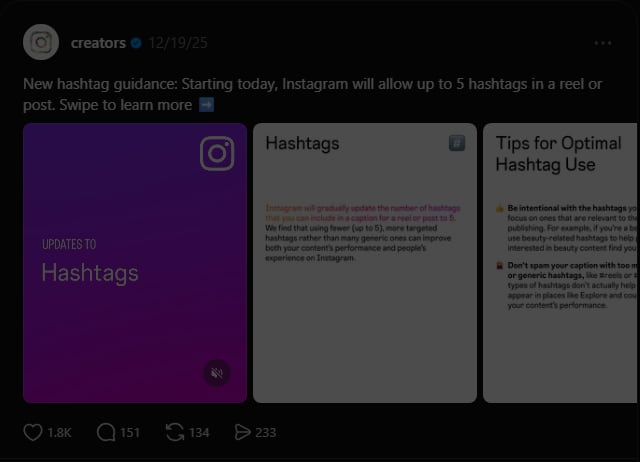
Instagram's @creators account announcing the five-hashtag limit on Threads. Screenshot taken October 9, 2026.
Instagram's Help Center page on using hashtags now says the same thing: "You can use up to 5 tags on a post. If you include more than 5 tags on a single photo/video, your comment won't post."
If a guide tells you the limit is 30, or that feed posts get ten and Reels get seven, it's repeating advice from before the change. Instagram's own page says five, with no separate number for any format.
People trip on a few details:
- The limit is per post. The Help Center counts tags "on a single photo/video", so five in the caption plus five in a comment is ten, and ten is over.
- Feed posts, carousels and Reels all get the same five.
- The rollout was gradual, and Social Media Today reported that some accounts had been held to three hashtags in an earlier test. If your app behaved differently in early 2026, that's probably why.
Why am I only allowed 5 hashtags on Instagram?
Because the limit changed for everyone. It isn't a restriction on your account, and switching between a personal, creator or business profile won't lift it.
Instagram's reasoning, as reported when the change was announced, was that a few targeted hashtags do more for a post than a long list of generic ones. Spam is the other half. Thirty slots let spammers attach unrelated posts to every popular tag, which is the reason Instagram gave a year earlier when it stopped letting people follow hashtags.
If you paste an old block of 20 or 30 tags, the Help Center says the comment won't post. Creators also report the app asking them to remove tags, or showing an error with no explanation. Whichever you get, cut the list to five and try again.
Check your scheduling tool too. A saved "first comment" set with 25 tags from last year will now probably fail after the post goes live, and you won't be told. If you schedule to several platforms, Social by InstantDM is our sister product for that.
Can you still follow hashtags on Instagram?
No. Instagram removed the option on December 13, 2024. It confirmed the change to Social Media Today a few weeks earlier with a short statement that began, "We're removing the ability to follow a hashtag on Instagram," and said the aim was to reduce spam.
As of October 2026 the Help Center's hashtag section has articles on using a hashtag, reporting one and why some can't be searched. It has nothing on following one.
I think this change matters more than the five-tag limit, and fewer people noticed it. Following was the only way a hashtag pushed posts into the feed of someone who didn't follow the account. A person who followed #vanlife saw top #vanlife posts between their friends' photos. Now a hashtag only reaches someone who goes looking, by searching or by tapping the tag on another post. Older advice about choosing hashtags "with engaged followers" was written for a feature that no longer exists.
Did Instagram get rid of hashtags?
No. You can still type a hashtag, tap one, search for one and open its page. Two things went away: following a hashtag (December 2024) and the 30-tag allowance (December 2025).
That's why "hashtags are dead" and "hashtags still work" both get said. A hashtag can do very little now to put a post in front of strangers, and it's as good a search label as it ever was.
How does Instagram hashtag search work now?
When someone types into the search bar, Instagram looks for matching text in usernames, profile names, bios, captions, hashtags and places, then ranks what it finds for that person.
Meta's Transparency Center page on Instagram Search ranking (last updated June 23, 2026) lists the signals it uses to decide which hashtags to suggest. They include how similar the words in your search are to the words in the hashtag, and how often people running the same search in your country tapped it.
Once you're on a hashtag's page, the Help Center says the order of posts depends on factors that may include when the post was shared, how others engage with it, and whether it meets the Recommendation Guidelines. A post that falls short of those guidelines can be left out even though it breaks no rule.
You also don't need the # to be found any more. Typing "pottery class austin" returns posts and Reels on that topic whether or not they carry a hashtag. Our Instagram keywords guide goes through where to put the words.
And Google can read your posts. The Help Center says Instagram allows search engines to index photos and videos from public posts and Reels shared since January 1, 2020, when the account is public, professional and belongs to someone over 18. A caption in plain language can show up outside the app, which we covered in Google Search Console's Instagram reporting.
Do hashtags in Instagram comments work?
Not for search, according to Instagram. Its search guidance says it in one line: "For a post to be found in Search, put keywords and hashtags in the caption, not the comments."
The "hide your hashtags in the first comment" tip has been passed around for years, mostly because it keeps the caption tidy. The Help Center does say you can add hashtags "in the caption or comments of your post", and a tag in your own comment still links to its page. But Instagram has never said a comment hashtag helps a post get found, and Mosseri's post says the opposite. I'd go with the caption.
A hashtag in a comment also can't tag someone else's post. The Help Center says "you can only tag your own posts", so commenting #foodie under a restaurant's photo doesn't add that photo to the #foodie page.
Do Reels and Stories need hashtags?
Reels don't need them, and Stories get close to nothing from them.
Reels
A Reel with no hashtags can reach as many people as one with five. Recommendations in the Reels tab and Explore are chosen from how viewers respond, and the Help Center's description of how Explore picks posts lists the accounts you follow, what you've engaged with and your connections. Hashtags aren't mentioned.
Add a couple anyway, for search. Two or three topical tags and a caption that says what the Reel shows give Instagram text to match against. Skip #reels, #explore, #viral and #fyp. They apply to every video on the platform, and coverage of the five-tag announcement reported Instagram itself saying generic tags like these don't help. The same goes for trial Reels.
Stories
Instagram's hashtag documentation only covers posts, meaning the caption and the comments. Years ago a hashtagged Story could appear on that hashtag's page. I can't find a current official page that says it still does, so I'd assume it doesn't.
A campaign tag typed on a Story still gives viewers something to tap.
How many hashtags should you use?
Three to five, and fewer is fine if you can't think of five that fit. Zero won't hurt you.
Don't fill slots for the sake of it. Each hashtag says the post belongs on that page. If someone taps #austinpottery and finds your unrelated Reel, they scroll past, and Instagram reads that.
My test for each tag is whether a stranger searching it would be glad to see this exact post. If I'm adding it because the tag is big, I leave it off.
I'd take no hashtags over wrong ones. A post without hashtags is still described by its caption, while a tag that doesn't fit puts the post on a page where nobody wants it. The same goes for #followforfollow and #like4like. Anyone who taps those wants a follow back and has no interest in what you posted.
How do you pick hashtags: niche or broad?
Go niche, with at most one broad tag for category. A broad hashtag such as #pottery has a page that moves so fast your post is buried in minutes, and the people browsing it want a hundred different things. A niche hashtag has a slower page and a visitor who is looking for what you made.
Say you run a small pottery studio in Austin that sells mugs and teaches wheel-throwing classes, and today's post is a Reel of a student pulling their first cylinder. Each of the five slots can answer a different question about that post:
- What is it? #wheelthrowing
- Who is it for? #potteryforbeginners
- Where is it? #austinpottery
- What can they do next? #potteryclassaustin
- Whose is it? Your studio's own tag
Compare that with what the same studio would have posted in 2023: #pottery #ceramics #handmade #art #artist #clay #smallbusiness #supportlocal #reels #explore, and twenty more. Almost none of those would bring in a person who could book a class in Austin.
I picked those tags to illustrate the idea and haven't vetted them, so check your own. Open search, type the tag, and see whether it exists, roughly how many posts it has, and whether the top posts look like yours. For a small account I'd look for a few thousand up to a few hundred thousand posts, where the page is active but your post isn't buried in a minute. That range is my rule of thumb. Instagram hasn't published one.
Local businesses get the most from this, because someone searching a place name usually wants to go there. Add the location to the post as well. For a service business, how fitness coaches grow without going viral applies the same thinking.
How do you find hashtags for your niche?
Start in Instagram's own search, which is free.
- Write down what this one post is about in plain words, the way you'd describe it to a friend. "Beginner deadlift form check" is a better starting point than "fitness".
- Tap the magnifying glass and type those words with a # in front. Instagram lists matching hashtags as you type, and the longer suggestions are usually the more specific ones.
- Open each candidate and look at the top posts. If they're the same kind of post as yours, from accounts roughly your size, keep the tag.
- Look at a few accounts in your niche that are a little bigger than you. Note the tags they use on posts like yours, then check each one yourself.
Pick again for each post. If you publish the same few kinds of post every week, keep a saved set for each kind in your notes app and change a tag or two each time. When the same five go on everything, some of them soon stop describing what you published.
Instagram hashtag sets by niche: 18 examples to copy and adapt
Here are 18 sets of five or fewer, each built for one specific post. Copy one as a starting point and swap in your own city, product or brand tag. I wrote them to show the pattern (what it is, who it's for, where it is) and haven't vetted them, so they come with no post counts and no promise that each tag is active or unrestricted today. Search every tag before you use it.
| Niche | The post | An example set |
|---|---|---|
| Fitness coach | Reel correcting a beginner's deadlift | #deadliftform #strengthtrainingforbeginners #gymtipsforbeginners #onlinefitnesscoach, plus your own tag |
| Food creator | Carousel recipe for a weeknight vegan curry | #vegancurry #weeknightdinnerideas #easyveganmeals #30minutemeals #plantbasedrecipes |
| Skincare | Routine for acne-prone skin using drugstore products | #acneproneskin #drugstoreskincare #skinbarrierrepair #fragrancefreeskincare #skincareroutinesteps |
| Travel | Three-day Lisbon itinerary | #lisbontravelguide #portugalitinerary #lisbonfoodguide #3daysinlisbon #budgettraveleurope |
| Real estate agent | Walkthrough of a starter home in Denver | #denverrealtor #denverhomesforsale #firsttimehomebuyertips #movingtodenver, plus your own tag |
| Handmade shop | New batch of soy candles for autumn | #soycandles #handpouredcandles #fallcandles #smallbatchcandles #candlegiftideas |
| Fashion | Carousel of a capsule wardrobe for autumn | #capsulewardrobe #falloutfitideas #workweekoutfits #thriftedstyle #outfitformulas |
| Wedding photographer | Gallery from a barn wedding in Vermont | #vermontweddingphotographer #barnwedding #rusticweddingideas #newenglandwedding, plus your own tag |
| Portrait photographer | Street portraits shot at golden hour | #streetportraits #goldenhourphotography #naturallightportraits #portraitphotographytips |
| Dog trainer | Reel teaching a puppy to walk on a loose lead | #puppytrainingtips #looseleashwalking #newpuppyowner #dogtrainingadvice |
| Interior design | Before and after of a small rental living room | #smalllivingroomideas #rentalfriendlydecor #apartmentmakeover #budgethomedecor #beforeandafterhome |
| Parenting | Carousel of toddler lunchbox ideas | #toddlerlunchideas #lunchboxinspiration #toddlermealideas #pickyeatertips |
| Cafe or restaurant | New autumn menu at a Chicago cafe | #chicagocafe #chicagobrunch #chicagofoodguide #fallmenu, plus your own tag |
| Marketing consultant | Carousel on writing a cold email | #coldemailtips #b2bmarketingtips #leadgenerationtips #smallbusinessmarketingtips |
| Musician | Acoustic cover filmed in one take | #acousticcover #singersongwriter #indiefolkmusic #onetakevideo |
| Crafts | Crochet pattern for a first blanket | #crochetforbeginners #crochetblanketpattern #crochettutorial #beginnercrochetproject |
| Gaming | Clip of a speedrun personal best | #speedrunning #retrogamingcommunity #gamingclips #indiegames |
| Coding teacher | Reel explaining Python loops | #pythonforbeginners #learntocode #codingtips #programmingbasics |
What are the most popular Instagram hashtags?
Instagram doesn't publish a ranking. The lists that circulate nearly always open with the same names, such as #love, #instagood, #photooftheday and #fashion. I've left post counts out because any figure I gave would be copied from one of those lists. Search a tag in the app if you want its current count.
I'd leave them off your posts anyway. When you had 30 slots, #love cost nothing. Now it uses one of your five labels and tells search nothing about the post, and its page moves too fast for anyone to find you there.
Where should you put hashtags in a post?
In the caption, which is where Instagram tells you to put them if you want the post found in search. Instagram hasn't said that position within the caption matters.
I write the caption first, in normal sentences that include the words people would search, then add the hashtags on a final line. One mid-sentence is fine ("first week of #wheelthrowing class"), but a caption where every third word is blue is hard to read.
To add hashtags when you post:
- Create the post or Reel as usual and get to the screen with the caption box.
- Tap Write a caption... and type your caption.
- Type # followed by the word, with no spaces. Instagram suggests matching tags as you type; tap one or keep typing.
- Tap Share.
To fix hashtags on a post that's already live:
- Open the post and tap the three dots above it.
- Tap Edit.
- Change the caption, then tap Done.
The labels are the same on iPhone, Android and desktop, give or take an icon.
Formatting rules from the Help Center: numbers are allowed, but spaces and special characters such as $ or % won't work. #summer2026 is one tag. #summer 2026 is the tag #summer followed by a loose number.
For the caption itself, our guide to writing Instagram captions covers length, line breaks and the first line.
What are banned or restricted hashtags, and how do you check one?
A restricted hashtag is one Instagram has made unsearchable. The Help Center explains that a hashtag may not be searchable if "the text or the content associated with the hashtag consistently do not follow" the Terms of Use or Community Standards. It adds that hashtags are reviewed periodically and can become searchable again.
So a tag can be restricted because of what other people posted under it, even when the word itself is harmless. The status also changes, which is why Instagram doesn't publish a list and why the "banned hashtags 2026" lists going around are out of date soon after they're written.
To check a hashtag before you use it:
- Tap the magnifying glass to open search.
- Type the hashtag with the # in front.
- Look for it in the results (there's a Tags filter in most versions of the app).
- If it shows up, tap it and check that the page has recent, normal-looking posts.
If the tag doesn't appear in search at all, or its page is empty apart from a notice about hidden posts, don't use it. Nobody can reach that page.
Instagram hasn't said that one restricted hashtag damages the rest of the post or your account. Creators report reach dropping after using one, but those are reports. What Instagram documents is that the tag is unsearchable and, separately, that content falling short of the Recommendation Guidelines isn't recommended to people who don't follow you.
Why aren't my hashtags working?
If the complaint is "my hashtags don't bring reach", they're working as designed. If your post isn't showing on a hashtag page or in search at all, go through this list.
- Your account is private. The Help Center says that when a private account adds a hashtag, the post won't appear on the hashtag page. Only approved followers see it.
- You used more than five. The post or comment may not have published the way you think it did. Open it and count.
- The tags are in a comment. Instagram's search guidance says to put them in the caption. Move them.
- There's a space or symbol inside the tag. #self-care becomes #self. #R&B becomes #R.
- The hashtag is restricted. Search for it as described above.
- The page is huge. On a tag with millions of posts yours is there, just buried under everything posted since.
- The post isn't eligible for recommendations. Mosseri's search post says Instagram avoids showing posts that go against the Recommendation Guidelines in search results.
- You're checking from your own account. Search results are personalised. Ask someone who doesn't follow you to search the tag.
If your reach has dropped across every post, hashtags are rarely the cause. Start with the content mistakes that cut reach and the metrics the algorithm weighs, and use our Instagram Insights guide to read your numbers.
How do you measure whether your hashtags are working?
You can't measure it per hashtag. Instagram doesn't show a number for each tag, and the one figure that came close has gone from most accounts.
Post insights used to show a "From hashtags" line. Creators report it's no longer there, and Instagram hasn't documented a replacement, so I don't know of a reliable way to count hashtag views today. Guides that tell you to "check which hashtags drove reach in Insights" are describing a screen most people no longer have.
What you can still do:
- Tap View insights under the post or Reel. The Help Center's page on post insights covers what's there. The numbers are for the whole post, so use them to compare posts with each other.
- An hour after posting, ask someone who doesn't follow you to open each hashtag and look for your post. If it's missing from a small tag's page, work through the list above.
- Have the same person search the main phrase from your caption without the #.
I wouldn't run a long test of one hashtag set against another. The topic, the opening seconds and the time of posting change from post to post, and each of them moves the numbers more than a tag does.
Hashtags vs keywords vs alt text: which does what?
Keywords in the caption and profile do most of the search work. Hashtags are a second, smaller label. Alt text is for accessibility, and Instagram has never said it affects search inside the app.
Most guides get the alt text part wrong and call it an SEO field. The Help Center page on editing alt text says the description "will only be read if someone is using a screen reader to access Instagram". Write it so blind and low-vision people know what's in your photo. Nobody at Instagram has promised it does anything for search.
| Hashtags | Caption keywords | Alt text | |
|---|---|---|---|
| What it's for | Labelling the topic; linking to a hashtag page | Telling people and search what the post is about | Describing a photo for screen readers |
| Limit | 5 per post or Reel | Whatever fits in the caption | One description per photo |
| Read by Instagram search? | Yes, documented | Yes, documented | Not documented |
| Increases reach? | No, per Mosseri | Not directly; helps you get found by searchers | No |
| Visible to viewers? | Yes, as a tappable link | Yes | Only through a screen reader |
| Where it goes | Caption | Caption, plus your name and bio for the account | Accessibility, on the caption screen or under Edit |
Mosseri's search post gives three tips for showing up: use a fitting handle and profile name, put relevant keywords and locations in your bio, and use relevant keywords and hashtags in captions. If you only have time for one fix, start with the name and bio. The bio formula post and the Instagram SEO guide go deeper on both.
Are branded and campaign hashtags still worth it?
Yes. They never depended on reach, so they've lost less than discovery hashtags have. A branded hashtag collects posts about your business or event on one page that you can link to and customers can browse.
The cost has gone up, though. With 30 slots your brand tag was free, and with five it takes one slot in five. I'd spend it on posts where you want customer content gathered in one place and skip it on routine ones.
If you set one up:
- Make it unique. Search it first. If strangers already use it for something else, your page will be a mix.
- Make it short and hard to misspell. People type it from memory.
- Tell people about it in the caption, on packaging, at the event. Nobody guesses a brand tag.
- Don't use it as a contest entry mechanism without a backup. Posts from private accounts never appear on the hashtag page, so you'll miss entries. A comment-based entry is easier to count, and our walkthrough on running giveaways through DMs shows one way to do it.
A tag can be restricted because of what others post under it, so report spam on yours when you see it.
Are hashtag generators still useful?
For ideas, yes. A generator is a quick way to see niche variations you wouldn't have thought of, and you now need five that fit where you used to need 30 of anything.
Full disclosure: this is InstantDM's blog, and we make two free ones. The Instagram hashtag generator gives you a set of tags for a niche you pick, sorted from broad to micro. The trending hashtags library is a hand-curated list by niche with a section of tags to avoid; it isn't live data. Both were built around the old 30-tag limit and still hand you more than five as of October 2026, so use them the way you'd use any other generator.
Treat the output as a shortlist:
- Throw out anything generic (#love, #instagood, #reels).
- Search each remaining tag in the app to confirm it exists and isn't restricted.
- Look at the top posts. If they don't resemble yours, drop the tag.
- Keep five at most.
Skip anything sold as a list of "viral hashtags". A trending tag helps when your post is about the trend. On an unrelated post it's the spam the five-tag limit was brought in to stop.
A hashtag brought someone to your post. What happens next?
Usually nothing. A stranger who found you through search doesn't know your account. They look, maybe like the post, and leave.
They're more likely to stay if the caption gives them one small thing to do. On Instagram that's often a comment keyword. The caption says "comment MUG and I'll send you the link", they comment, and a DM arrives with the link. It runs on a feature of Instagram's official API called a private reply, which lets a professional account answer a public comment with a direct message. It only goes to people who commented first, which is why it's permitted. See is Instagram automation allowed for the rules.
InstantDM is one of the tools that does this. It has quick automations and a flow builder in one tool, with phone apps. It's an official Meta Business Partner and connects through Instagram or Facebook login, never a password. The setup is covered in the comment-to-DM guide, and if you only need the keyword part, see how to configure keyword triggers.
None of this makes your hashtags perform better. Hashtags help a few more of the right people find the post, and the keyword only matters once they're there.
Give the people who find you a reason to comment
Pick your five hashtags, write a caption someone could search for, and add one keyword for anyone who wants the link or the price. If you'd like the reply sent for you, try InstantDM. Current plans are on the pricing page.
Instagram and Meta are trademarks of their owners. InstantDM is not affiliated with them beyond the named partner program.