Quick answer
A reply to someone's Instagram note is not public. It goes to that person as a direct message and opens a chat between the two of you, and nobody else who can see the note sees your reply. Notes themselves are 60-character status updates that sit at the top of the inbox for 24 hours.
- Replies and likes on a note are visible only to the person who posted it. A note has no public reply thread and no like count.
- A note reaches one of two audiences: followers you follow back, or your Close Friends list.
- You can have one note at a time. Posting a new one replaces the old one.
- Besides text, a note can carry a song, a 2-second looping video or a mention. Music notes are not available in every country.
- Notes on feed posts and Reels were switched off in March 2025. Guides that still list them are out of date.
- Notes have no viewer list. You only learn about the people who liked or replied.
Instagram keeps changing this feature. We checked everything below against its help pages and Meta's announcements in October 2026, and we say so where something is undocumented.
If you came for things to write, skip to the Instagram Notes ideas further down.
If you reply to someone's note on Instagram, is it public or private?
Private. Instagram's Help Center page on sharing a note says that when someone replies to your note, the reply starts a chat between you and them only. In other words the reply is a DM that happens to start from the bubble above someone's profile photo.
The row of bubbles at the top of the inbox looks like a shared space, so it's easy to assume that typing under a note adds to a thread everyone can read. No such thread exists. Each person who replies gets a separate conversation with the note's author.
It has worked this way from the start. Meta's announcement of Notes on December 13, 2022 said replies to notes arrive as DMs in your inbox.
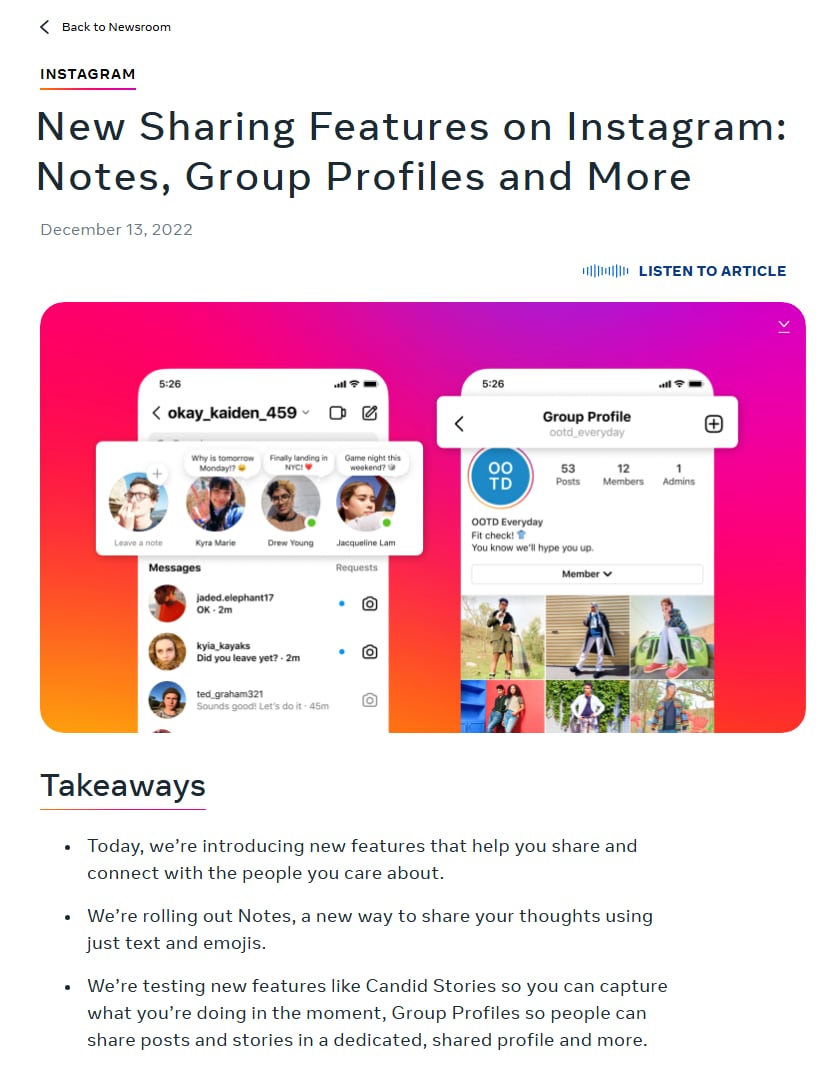
Meta's launch announcement for Notes, showing where notes sit in the inbox. Screenshot of about.fb.com taken October 9, 2026.
Story replies follow the same rule, which we cover in whether Instagram story replies are private.
Who sees your reply to a note, and can everyone see it?
One person sees it: whoever posted the note. Mutual friends who can see the same note don't get your reply, and neither do your followers or theirs.
The same Help Center page says only the person who shared a note can see who liked it or replied to it. So:
- The note shows no reply count, so nobody can tell that anyone answered.
- The author sees your message in their chat list, with the note you answered quoted above it.
- If the note went to Close Friends, the other people on that list still see nothing of your reply.
The reply isn't anonymous, though. It arrives from your account like any other message, and the author can screenshot it or forward it. Instagram keeps it between the two of you, but it can't stop the other person from sharing it.
It also outlives the note. The note vanishes after 24 hours, while your message stays in the chat until one of you deletes it. If you replied to the wrong note, open the chat, press and hold your message and tap Unsend. The rest of the message menu is in our guide to replying to Instagram DMs.
What are Instagram Notes?
Notes are short status updates that appear as speech bubbles above profile photos at the top of the Instagram inbox. They work like the away message on an old chat app: one line about what you're up to, visible to a small group for a day.
They launched in December 2022 as text and emoji only. Since then Instagram has added music, short video, likes and mentions, and it now shows your current note on your profile as well as in the inbox.
What sets a note apart is how few people get it. A Reel can reach strangers and a Story reaches your followers. A note reaches only the people you have a two-way follow with, or a list you picked by hand. Instagram built it for friends, which limits what a creator or a shop can do with it.
Not sure where the inbox is? How to check messages on Instagram shows it on every device. The notes row sits at the very top of that screen.
How to see notes on Instagram
Open your inbox and look at the row of profile photos above your chats. Any photo with a speech bubble over it has a note up, and you tap the bubble to open it. Instagram's help pages say a note also sits above the person's profile picture on their profile, so you can read it there too.
You only get notes from people who put you in their audience. An empty row usually means none of your mutuals has posted one in the last 24 hours.
What does "shared a note" mean on Instagram?
It means that person posted a note and you're in the audience they chose. It wasn't sent to you. Everyone else in their mutuals or on their Close Friends list got the same bubble, and they aren't told when you open it.
Share is Instagram's own word for posting a note. The button in the composer says Share, and the help article is about how to share a note with others. What Instagram doesn't document is when, or whether, it alerts you about a friend's new note. Some guides say nobody is ever notified, and we couldn't confirm that from Instagram's pages either way. We also found no notes switch described there. If one person's notes keep catching your eye, you can mute them.
How do you post a note on Instagram?
You post a note from the top of your inbox or from your own profile. The steps are the same on iPhone and Android.
- Open Instagram and go to your inbox. Depending on your layout, the messages icon is at the top right of the feed or in the bottom bar.
- At the top of the inbox, tap your own profile photo, the one with the "Note..." bubble above it. The same bubble sits above your photo on your profile. If you already have a note up, tap it and choose Leave a new note.
- Type your note. You get 60 characters.
- Optional: tap the music icon to attach a song, or record a 2-second video if your composer offers it.
- Under the note, choose who it goes to: Followers you follow back, or Close Friends.
- Tap Share.
The note appears straight away at the top of the inbox for everyone in the audience you chose, and on your profile above your photo.
You aren't limited to the phone app for this. As of October 2026 the same help article has computer and mobile browser versions, with Click where the app says Tap. Replying and liking are app only, though. Instagram's page on interacting with notes says that feature isn't available on computers.
What is the Instagram Notes character limit, and how long does a note last?
A note can be up to 60 characters and stays up for up to 24 hours. Both figures are in Instagram's Help Center and match the 2022 launch announcement.
Sixty characters is less than it sounds. "New drop Friday 6pm. Reply DROP for early access" is 48. Emoji and spaces count, and a note can't hold a clickable link.
You also get one note at a time. Share a second note and it replaces the first, even if the first had 20 hours left.
Who can see your Instagram note?
Only the audience you pick when you share it, and as of October 2026 you have two choices: Followers you follow back, or Close Friends. "All followers" and "public" aren't on the menu.
"Followers you follow back" means mutuals. Someone who follows you but whom you don't follow will never see your note.
Creators feel this most. Take a made-up account with 40,000 followers that follows 600 people, 450 of whom follow it back. A note from that account can reach 450 people at most, about 1.1% of its followers. The other 39,550 can't see it. A Story from the same account is available to all 40,000.
Close Friends works the other way round. You build the list by hand. If you already keep customers or members on it, a note becomes a small announcement slot for exactly those people. Our post on whether a Close Friends post can be made public explains how that list behaves across Stories, posts and Reels.
A public account doesn't make your notes public, and mentioning someone doesn't add them to the audience. The note on your profile follows the same setting, so a visitor outside your chosen audience sees your profile without the bubble.
Instagram Notes ideas: what to write in 60 characters
A good note fits in one line and makes sense on its own. The 73 below are ours, written for this post, and every one is 50 characters or fewer so you have room for an emoji or a name.
We left out song lyrics and famous quotes on purpose. If a song says it better, attach the song as a music note and let it play.
Everyday status notes
- Coffee first, opinions later
- Gym done. Personality restored.
- Studying. Send snacks, not memes.
- Out of office, in the sun
- Cooking something ambitious. Pray for the pan.
- Airport mode: on
- Monday is behaving suspiciously well
- Phone at 4%, living dangerously
- Three tabs open, all of them snacks
Funny Instagram notes
- My plants are thriving out of spite
- Running late is my cardio
- Pretending my inbox doesn't exist
- "Five more minutes" was forty minutes ago
- My sleep schedule is a rumour
- Wrote a to-do list. That's one thing done.
- Ate the leftovers I was saving for tomorrow
- The group chat knows too much
- Walked into the room, forgot why, left with crisps
Short Instagram notes (one to three words)
- Offline soon
- Low battery
- Snack break
- Brb, living
- Weekend, finally
- Do not disturb-ish
- Mentally elsewhere
- Nap pending
- Ask me later
Questions for friends
- Tea or coffee? Choose carefully.
- Best thing you ate this week?
- Need a show to binge. Go.
- Beach or mountains, and defend it
- Who's free Saturday?
- Cereal first or milk first? Be honest.
- Rate your day out of 10
- Tell me one good thing from today
- What should I try this month?
Music and watchlist notes
- This song on repeat until further notice
- Fourth rewatch. No regrets.
- Road trip playlist needed. Send three songs.
- Headphones on, world muted
- Finale tonight. No spoilers, please.
- Shower concert sold out
- Found my song of the summer in October
- Recommend a sad song that isn't too sad
- This album still holds up
Quiet and moody notes
- Quiet day. Not sad, just quiet.
- Taking the long way home tonight
- Rain on the window, phone on silent
- Missing a place more than a person
- Low energy, high standards
- Recharging. Back when I'm back.
- Some days are just for getting through
- Slow morning, no apologies
- Sunset is doing most of the work today
Motivation notes that don't sound like a poster
- One page today is still one page
- Showing up tired still counts
- Small steps, same direction
- Day 12 of the thing I said I'd start
- Posted it before I could overthink it
- Future me had better appreciate this
- Early alarm, no snooze, mild regret
- Bad first draft, on purpose
- Rest day is part of the plan
Notes for creators and businesses that prompt a reply
These only work if the right people can see them, so they suit accounts that follow customers back or keep buyers on a Close Friends list. Each one asks for a reply, and the reply arrives as a DM that the other person started, which means you're free to answer it with what they asked for. The offers, times and reply words are placeholders. Swap in your own.
- Filming a Q&A tonight. Reply with your question
- Two cover options. Reply A or B
- 3 coaching spots open for November. Reply SPOT
- Small restock is live. Reply SIZE for the list
- Next tutorial: your pick. Reply with a topic
- Free checklist is ready. Reply LIST and I'll DM it
- Live at 7pm. Reply REMIND for a nudge
- Close Friends only: early access today. Reply IN
- Booking December shoots now. Reply DATES
- Tried the new recipe? Reply with your verdict
How to write a note people answer
Instagram's own tips page for Notes suggests ending a note with a question or a call to action so that friends DM you. The reply notes above all do that.
Keep it to one ask. "Reply A or B" gets answered, and a note with a question, an offer and a time in it mostly gets skipped. Say something true about today, because a note that was accurate on Tuesday looks stale by Wednesday lunch, and you can replace it whenever you like. And write for the people who will see it. Your mutuals already know you, so you can skip the introduction a caption would need.
Do Instagram Notes affect the algorithm or your reach?
Instagram hasn't said that they do. Neither its Notes help pages nor its tips page mentions ranking, and as of October 2026 we haven't found a statement from Instagram that posting notes changes how your posts or Reels are distributed.
What a note can't do is clearer. It doesn't appear in the feed, in Reels or on Explore, and the only people who get it already follow you and are followed back, or sit on your Close Friends list. So it won't put you in front of anyone new.
The most a note does is get a few people who know you to open a chat. Guides that promise a reach lift from posting notes daily are guessing.
What kinds of notes can you post in October 2026?
Text, music, short video and mentions are documented on Instagram's own help pages as of October 2026. A few other variants are limited to some places or only reported by users, and one well known type has been removed.
Music notes
Tap the music icon in the composer and pick a song. Instagram's help page says music notes are not available in all countries.
You can also link Spotify. Per Instagram's page on sharing music from Spotify as a note, the note then updates in real time with whatever you're playing, for up to 24 hours or until 30 minutes after you stop listening. Handy for musicians and DJs. Also an easy way to broadcast your guilty pleasures by accident.
Video notes
Instagram's help page lets you add a 2-second video to a note, which loops where your profile photo normally sits. The 60-character text limit doesn't change.
Mentions
Type @ and a username to mention someone in a note. Instagram's help page adds a condition: it works only if the other person's settings allow mentions.
Prompts
Prompt notes, a question template that friends can answer, were reported as rolling out on May 30, 2024, alongside likes and mentions (Social Media Today covered it that day). Instagram's current help page for sharing a note doesn't list a prompt option, so we can't confirm every account has it. A plain question typed as your note does much the same job, and the answers arrive privately.
Notes on the Instagram map and on reposts
When Meta launched the Instagram map and reposts on August 6, 2025, it said notes from people you mutually follow can appear on the map for 24 hours, and that you can type a short thought into the bubble when you repost a Reel or post. Location sharing is off unless you opt in, and Meta said the map was starting in the US with more countries to follow. The repost bubble is covered in our guide to the Instagram repost feature.
Notes on feed posts and Reels: removed
A lot of guides still describe this one. In July 2024 Instagram let you leave a note on someone's post or Reel that your mutuals could see for three days. Adam Mosseri announced in late March 2025 that the feature was being switched off because, in his words, it "just wasn't adopted by that many people". Notes in the inbox stayed. Any article that tells you to tap the share icon on a Reel and choose "Add note" is describing a button that no longer exists.
Variants we could not confirm
You'll see claims about GIF notes, location notes and coloured note bubbles. As of October 2026 none of them appears in Instagram's Help Center, so treat them as tests that may never reach your account.
How do you reply to or like someone's note?
Tap the note. A sheet slides up with the note text, a message field and a heart. Instagram documents both actions on its page about interacting with notes you see.
- Open your inbox and tap the note you want to answer.
- To reply, type in the message field and tap Send.
- To like it, tap the heart in the same sheet, or double-tap the note.
Likes are as private as replies. The Help Center says only the person who posted the note can see who liked or replied. They tap their own note to open the list of likes, and each name has a Messages button for starting a chat.
A like gives the author a notification and your name on that list, with no message attached. It's the lower pressure option when you only want them to know you saw it, much like the quick reactions in our guide on how to react to an Instagram Story.
How do you delete a note or mute someone else's notes?
To delete your own note, tap it at the top of your inbox and tap Delete note. It disappears for everyone immediately. Replies you already received stay in your chats, because they are ordinary messages.
Muting is for other people's notes. Instagram has a help page on muting or unmuting notes from someone, and in the app as of October 2026 it works like this:
- In your inbox, press and hold the note from the person you want to mute.
- Tap Mute notes, then confirm.
To undo it, open that person's profile, tap Following, tap Mute and switch Notes off. The other person isn't told, and you still follow each other.
Instagram has no master switch that removes the notes row from your inbox. Muting is one person at a time.
Hiding your own notes from one specific person is harder. Share to Close Friends and leave them off the list, or stop following them back, which takes them out of the mutuals audience.
Can you see who viewed your Instagram note?
No. Notes have no viewer list. Instagram's help pages give a note's author two signals, likes and replies.
A Story shows you every account that watched. With a note, 300 people might read it and you'd see nothing unless one of them taps the heart or types something.
It works the same in reverse: when you read someone else's note, they aren't told. Instagram's help pages describe no screenshot alert for notes either, so assume yours can be captured without you knowing.
Apps and websites that promise to show "who viewed your notes" can't do it, because Instagram doesn't give that data to anyone. Most of them want your login. Don't hand it over.
Can business and creator accounts use Instagram Notes?
Usually yes, though Instagram doesn't publish a rule by account type. Its Help Center says only that Notes aren't available to everyone, without saying who is excluded. Plenty of creator and business accounts do have the notes row.
Music is the gap people report most. Business account owners often say the music icon in notes is missing or offers fewer songs. Instagram hasn't documented that for notes, so we can't call it a rule, but it's the first thing to suspect if you run a business account and the icon isn't there.
Whether notes are worth a brand's time comes back to the audience sum above. Professional accounts tend to follow few people back, so the mutuals audience is small, and Close Friends is the route with some use. If you're deciding between account types, our walkthrough on creating a professional Instagram account covers what changes when you switch.
Why don't you have Notes on Instagram?
Usually because the app is out of date, the row is hidden by a glitch, or your account or country hasn't been given the feature. Work through these in order.
- Update Instagram from the App Store or Play Store. An old build can simply lack the row.
- Look in the right place. Notes sit at the top of the inbox, above your chat list, on the main tab.
- Log out and back in, then force-close the app.
- Check on a second device. If notes show there, the problem is the first phone, and reinstalling the app usually fixes it.
- If none of that works, your account may not have Notes. Instagram says the feature isn't available to everyone or in every country, and it doesn't offer a way to request it.
Sometimes you can see other people's notes but can't find music or video in your own composer. Those extras roll out separately from Notes, and music has its own country limits.
If your whole inbox looks wrong, with missing chats as well as missing notes, the cause is probably wider than notes. The fixes in Instagram messages not showing are the better place to start.
Why won't your Instagram note post?
When Share does nothing or the note fails, look at what's in the note first, then at your connection and your account.
- Too long. Pasted text can run past 60 characters. Shorten it and retype any emoji.
- A song that's unavailable where you are. Remove the music and try the text alone. If that posts, the track was the problem.
- A mention that isn't allowed. Instagram only permits a mention if the other person's settings allow it, so take the @ out and try again.
- Weak connection. Switch between Wi-Fi and mobile data and try again.
- An account restriction. If Instagram has limited your account, sharing features can be paused. Check Account Status in settings.
If none of those fits, wait an hour and try again before you reinstall anything. Short outages happen, and they clear up on their own.
Why can't you see someone's note?
Most often because you aren't in the audience. Check these before deciding something is broken.
- You don't follow each other. A note shared with "Followers you follow back" needs the follow to go both ways.
- It went to Close Friends and you aren't on the list. You can't tell from your side.
- It expired. Notes last up to 24 hours.
- They replaced or deleted it.
- You muted their notes at some point. Check their profile under Following, then Mute.
- One of you has blocked or restricted the other.
- Your app is behind. Update it and pull down to refresh the inbox.
A missing note says very little about the friendship, by the way. Usually it expired, or you were never in the mutuals group to begin with.
Instagram Notes vs Stories vs broadcast channels vs DMs
These four get confused because all of them live in or near the inbox. To tell them apart, ask who sees the thing you post and where the answers go.
| Notes | Stories | Broadcast channels | DMs | |
|---|---|---|---|---|
| Who sees it | Followers you follow back, or Close Friends | Your followers, or Close Friends (anyone, if your account is public) | Anyone can view; followers who join get the updates | Only the people in the chat |
| How long it stays | Up to 24 hours | 24 hours, unless saved to a Highlight | Until the creator deletes it | Until someone deletes or unsends it |
| Where replies go | Private DM to the author | Private DM to the author (public Story comments are a separate option) | Inside the channel, visible to members, if the creator allows replies | The same chat |
| Can you see who viewed | No, only likes and replies | Yes, a viewer list | The creator sees how many members joined | Read receipts, if both sides have them on |
The broadcast channel column comes from Instagram's broadcast channels page for creators: only the creator and invited collaborators post, and members react, vote in polls and reply when the creator has switched replies on.
If you're a creator, a Story gets you reach and a viewer list. A broadcast channel messages everyone who opted in (read our guide to Instagram DM broadcasts before you send anything at volume). A note is a low effort nudge to people who already know you, and anything personal belongs in a DM.
Can DM automation answer the replies your note gets?
Possibly, but nobody can promise it. A note like "Reply GUIDE and I'll send it" produces inbound DMs, and inbound DMs are what messaging automation is built for. The problem is that Meta's developer documentation never mentions notes, so a dedicated "note reply" trigger doesn't exist.
Tools on Instagram's official API are told each time someone messages a professional account. Meta's webhook reference documents a specific marker for replies to a Story, and separate events for comments. Notes get neither. The word doesn't appear on that page or in the content publishing guide, which lists photos, videos, Reels, carousels and Stories as the things an app can post.
As of October 2026, that leaves you here:
- No tool can post a note for you through the official API. You post it by hand.
- A tool has no documented way to know that a message was a reply to a note, or which note. We couldn't confirm from Meta's documentation that note replies reach connected apps at all.
- A general keyword rule on inbound DMs matches the text of whatever message arrives. If a note reply reaches your tool as a normal text message, a rule for GUIDE should fire on it. That's our inference, and Meta doesn't state it.
So test it before you build a campaign around it. Post a note, reply to it from a second account with your keyword, and watch whether the automation responds. If it stays silent, change the note to "DM me GUIDE" so people open a normal chat, which is the documented path.
The usual messaging rules apply either way. Meta's messaging API documentation says a conversation begins only when the Instagram user messages you, and that an app has 24 hours to respond to it. Send what the person asked for, and don't treat one reply as permission to keep messaging them. The wider rules are in is Instagram automation allowed.
InstantDM does the keyword part. It's quick automations and a flow builder in one tool, with phone apps. It's an official Meta Business Partner and connects through Instagram or Facebook login, never a password. Keyword replies run on inbound DMs, next to comment-to-DM and story-reply automation, and a flow can ask for an email or phone number in the chat. It has no notes trigger, for the reason above. Keyword setup is in how to configure Instagram keyword triggers.
Honestly, a note is rarely the best place for a keyword prompt, given how small the mutuals audience is for most professional accounts. The same line in a Story or a Reel caption is open to far more people, and those triggers are documented. If you plan those posts ahead of time, Social by InstantDM is our scheduling tool for that.
Answer the DMs your notes, Stories and comments start
A note reply is one more message waiting in your inbox. If answering them by hand is eating your evenings, try InstantDM for keyword replies to DMs, comment-to-DM and story replies on Instagram's official API. Plans are on the pricing page.
Instagram and Meta are trademarks of their owners.