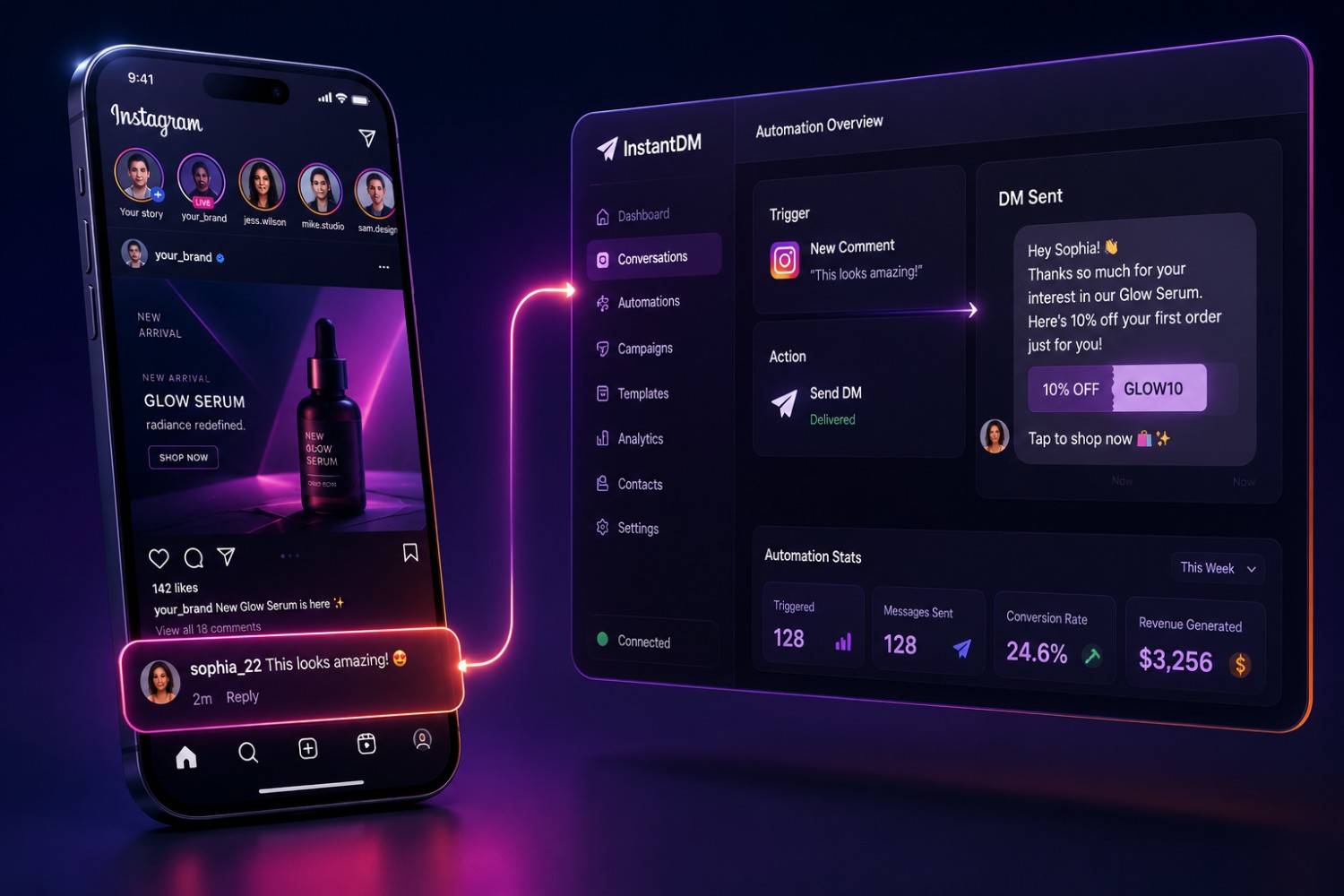
Instagram auto reply lets you respond to comments and DMs automatically using Meta's official Messaging API. The best tools are InstantDM ($9.99/mo, unlimited DMs, Meta Business Partner), ManyChat ($15-65+/mo, per-contact billing), and ReplyRush ($10/mo, 1,500 DMs). Instagram allows auto replies through official API tools — ban risk is ~0.4% per quarter. Verified July 2026.
TL;DR
Instagram auto-reply in 2026 means automatically sending a DM the moment someone comments on your post, replies to your story, or messages you. When you use Meta's official API — not a third-party bot — it is completely allowed and safe. The key rules: use keyword triggers, stay within the 24-hour messaging window for customer-initiated conversations, never spam, and always deliver genuine value in your messages. Tools like InstantDM Make it possible to set up a compliant auto-reply in under five minutes, with features including comment-to-DM, story reply automation, follow-up sequences, email collection, and live comment automation. This blog covers everything from how it technically works to what Instagram's policies actually say, to the best practices that separate high-converting accounts from banned ones
Instagram Auto Reply: How It Works, What's Allowed, and Best Practices in 2026
If you have spent any time managing an active Instagram account in 2026, you already know the problem: the comments never stop, the DMs pile up, and every unanswered message is a missed conversation — or a missed sale. Instagram auto reply is the solution more and more creators, brands, and businesses are turning to, and for good reason. Done correctly, it means every person who comments on your post or replies to your story gets an instant, personalised response — whether you are online or not.
But there is a lot of confusion around what 'auto reply' actually means on Instagram. Some people think of it as bots scraping engagement. Others imagine it as the clunky, generic 'Thanks for your comment!' responses that make brands look robotic. Neither is what we are talking about here. In 2026, Instagram auto reply — built through Meta's official API — is a sophisticated, compliant, and genuinely effective tool that some of the fastest-growing accounts on the platform are using every single day.
This guide covers everything: how auto reply technically works, what Instagram's policies actually permit, where the grey areas are, and the specific best practices that make the difference between automation that converts and automation that gets your account flagged. We will also look at how the right tools bring all of this together without requiring any technical knowledge or putting your account at risk.
1. What is Instagram Auto Reply & Why is it Important in 2026
An Instagram auto reply is exactly what it sounds like, an automated system that sends a pre-set message when it detects a certain trigger, such as a comment, a reply to a story, a keyword in a DM, or a reaction to content. Instead of you having to sit at your phone watching for every notification and typing out responses manually, the system does it for you in real time.
The reason it matters more in 2026 than ever before is three-fold: volume, speed, and competition. Instagram feeds are more crowded than ever, attention spans are shorter and the window between someone expressing interest and scrolling past to a competitor has shrunk to seconds. The data is clear. Respond to a lead within five minutes, and you’re exponentially more likely to convert them into a customer. That expectation simply can’t be met at any meaningful scale with manual response.
For creators, auto reply means sending content, links and discount codes to thousands of followers at once during a campaign – without being tethered to your phone. For e-commerce brands, that means every buying-intent comment gets a direct, personalised path to purchase. For service businesses, that means leads are qualified and answered 24/7, in every time zone, even while the team sleeps.
The Difference Between a Bot and API-Based Automation
This distinction is critical and something many people misunderstand. A bot, in the context of Instagram, refers to an unauthorised tool that accesses Instagram without permission — usually by logging in with your credentials and mimicking human behaviour to bypass Instagram's systems. These are against Instagram's terms of service and carry a real risk of account suspension or permanent banning.
API-based automation is completely different. Meta provides an official Business API that allows approved applications to interact with Instagram on behalf of business and creator accounts. When you connect an automation tool through this API, you authorise it through Instagram's own login flow — no password sharing, no credential exposure. Everything happens through channels Meta explicitly built for this purpose.
Every legitimate auto reply tool in 2026 that is worth using operates through the official API. Any tool that asks for your Instagram password is not API-compliant and should not be trusted with your account.
Who Is Using Instagram Auto Reply Right Now
The range of accounts using auto reply in 2026 is wider than most people expect. It is not just big brands with marketing teams. Some of the most active users of auto reply automation include solo content creators using keyword triggers to deliver free resources and build email lists; fitness coaches automating booking confirmations when followers reply to their story; Shopify store owners sending product links to everyone who comments on product posts; real estate agents qualifying buyer leads from Instagram ads automatically; and course creators sending enrollment links the moment someone comments a keyword on a launch post.
The technology has gotten so good that setup can be measured in minutes, not hours, and the results—both in time saved and revenue generated—are immediate and measurable.
Graphic titled 'How to reply to a DM on Instagram' representing strategies for manual and automated Instagram direct messages.

2. Instagram Auto Reply Technicalities
Understanding the technical mechanics helps in setting up better automation and makes it easier to troubleshoot problems when they come up. Also it helps you to know why some things are possible and some are not.
The Trigger-Action Model
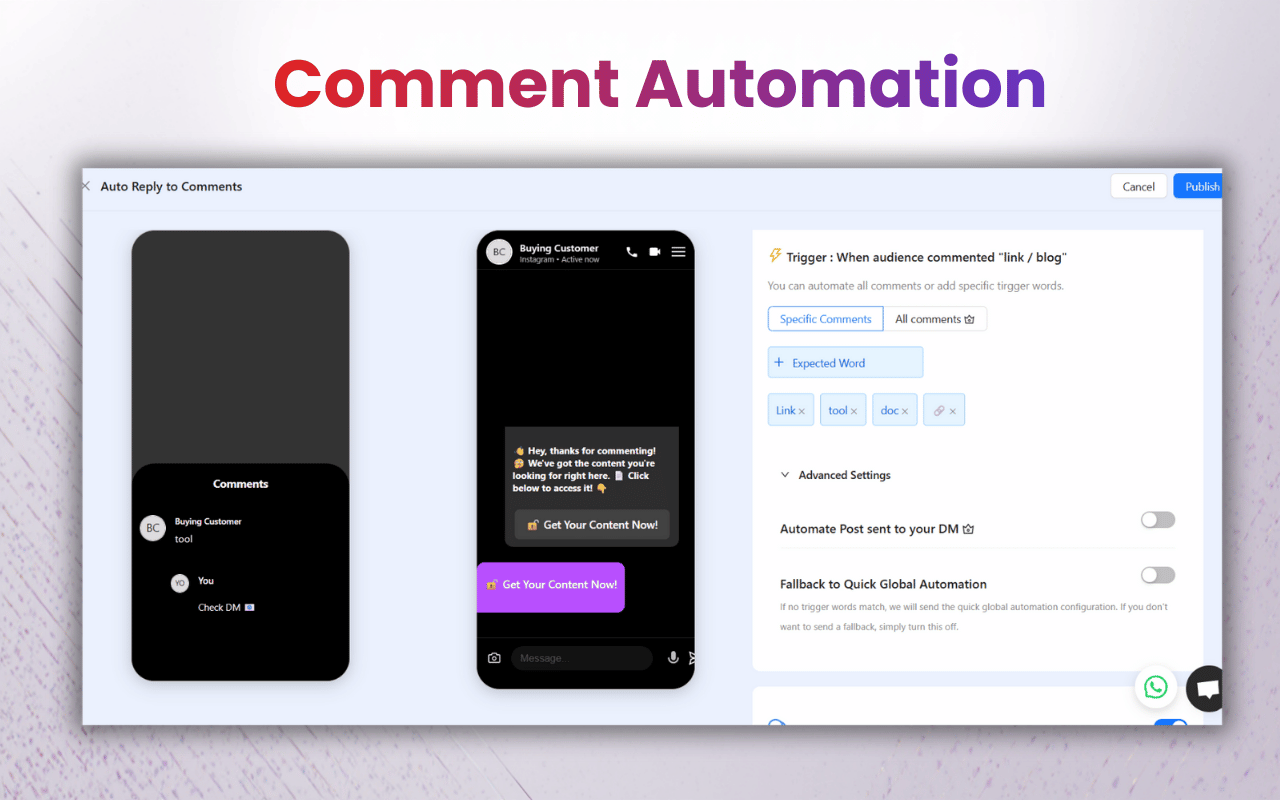
Every Instagram auto reply system is built on a trigger-action model. A trigger is the event that starts the automation — someone comments a specific keyword, replies to a story, sends a DM containing a certain phrase, or reacts to a post. An action is what happens in response — a DM is sent, a follow-up sequence is queued, a contact is tagged, an email is collected.
The sophistication of modern tools comes from how complex you can make this trigger-action chain. A simple setup might be: trigger = comment 'LINK', action = send DM with product URL. A more advanced setup might be: trigger = comment 'SHOP', action = send DM asking if they are interested in the full collection or a specific item, then branch based on their reply — one path sends them to the full catalogue, another sends them to the specific product, both collect their email and trigger a follow-up reminder 12 hours later if they have not clicked.
All of this runs through Meta's Messaging API, which processes events in real time and delivers the automated response within seconds of the trigger.
The 24-Hour Messaging Window
One of the biggest technical limitations to Instagram’s API is the 24-hour messaging window. Once a user messages you – whether that's via a comment, story reply or DM – you have 24 hours to send them automated messages. Within this window, automation can send multiple messages, follow-up reminders and nurture sequences.
Unsolicited automated DMs outside the 24-hour window are not allowed. This protects users from brands they interacted with once and then forgot about, who would otherwise spam them. That’s one of the big differences between the API for Instagram and email marketing where you can send to an opted in list any time.
Smart marketers do a work around and collect emails within the DM flow. When you ask the user for their email in the first 24 hour conversation, you move the relationship onto a different channel where the timing rules are different and where you can continue to nurture them with your existing email automation.
Keyword Triggers versus Open Triggers
There are two basic trigger types for auto reply systems. Keyword triggers only go off when someone comments or sends a specific word or phrase you have set up – ‘LINK,’ ‘PRICE,’ ‘INFO,’ the name of your product or any custom word. Open will shoot at any comment or message, no matter what the content of the message is.
Keyword triggers are more specific and usually produce better quality leads. The person commenting a specific word is displaying clear intent. Open triggers capture more volume, but they also have more irrelevant or casual engagement. Most lead gen and ecommerce use cases perform better with keyword triggers. Open triggers can be good for community building and general engagement.
3. What Instagram Actually Allows: The Official Policies, 2026
There is a lot of misinformation about what Instagram permits when it comes to automation. Let us go through what Meta's actual policies say, as of 2026, so you can build your auto reply strategy on solid ground.
Platform Policy Basics
The Meta platform policy for the Messaging API is clear on the guiding principles. Automation is permitted when it is used to send messages that a user has expressly initiated or requested. The policy expressly prohibits sending unsolicited bulk messages, using automation to deceive users into thinking they are interacting with a human and using automation for spam, harassment or deception.
What this means in practice: if someone comments on your post and your automation sends them the link they implicitly asked for, that is permitted. If your automation sends a DM to random users who have never interacted with your content, that is not permitted. The user's action — the comment, the story reply, the message — is what makes the automated response compliant.
What Is Explicitly Allowed
Based on Meta's published API policies and the verified practices of Meta Business Partner tools, the following are clearly permitted:
- Automated DMs triggered by a user commenting on your post
- Automated responses to story replies and story reactions
- Automated responses to direct messages containing specific keywords
- Follow-up messages sent within the 24-hour window after user-initiated contact
- Collecting email addresses or phone numbers within DM conversations, with user consent
- Sending links, images, product cards, and buttons in automated DMs
- Automated responses to comments on Instagram ads and boosted posts
- Automated DMs to users who comment on Live streams
What Is Not Allowed
These practices violate Meta's policies and can result in account restriction or banning:
- Sending DMs to users who have not interacted with your content or consented to contact
- Using automation tools that access Instagram without the official API (credential-based bots)
- Claiming to be a human when a user directly asks if they are talking to a bot
- Sending the same automated message in bulk to users who have not triggered it
- Using automation to artificially inflate engagement metrics
- Spam, deceptive or illegal content
The Grey Area: Click For Link
One feature that sometimes raises questions is the 'follow-gated' or 'follow for link' mechanism, where a user must follow your account before they receive the promised content via DM. This is a widely used growth tactic and is permitted under Meta's policies because the user is the one initiating the sequence by commenting, and the follow requirement is a disclosed condition of receiving the content — not a deceptive practice. The key is transparency: the post caption makes clear that following is required, and the user makes an informed choice.
4. Allowed and Not Allowed: An Easy Reference Chart
Here is a summary of common auto reply scenarios and their compliance status under Meta’s 2026 policies:
Auto Reply Scenario | Allowed? | Notes |
DM triggered by post comment | Yes | Core permitted use case |
DM triggered by story reply | Yes | Fully compliant via API |
DM triggered by Live comment keyword | Yes | Needs official API tool |
DM triggered by ad comment | Yes | Works on organic & paid |
Follow-up within 24hr window | Yes | User must have initiated |
Follow-gated DM (follow for link) | Yes | Must be disclosed in caption |
Collab post automation | Yes | First offered by InstantDM |
Bulk DMs to non-engaged users | No | Violates messaging policy |
Using password-based bots | No | Violates ToS; ban risk |
Claiming to be human when asked | No | Transparency required |
DMs outside 24hr window (unsolicited) | No | Use email instead |
Auto Reply Tool Comparison (July 2026)
Tool | Starting Price | Comment-to-DM | Story Reply Automation | Follow-up Sequences | AI Agent | Meta Business Partner |
|---|---|---|---|---|---|---|
InstantDM | $9.99/mo | ✅ | ✅ | ✅ | ✅ (Claude AI) | ✅ |
ManyChat | $15–65+/mo | ✅ | ✅ | ✅ | ❌ | ✅ |
ReplyRush | $10/mo | ✅ | ❌ | ❌ | ❌ | ✅ |
LinkDM | $19/mo | ✅ | ❌ | ❌ | ❌ | ✅ |
Meta Business Suite (Manual) | Free | ❌ | ❌ | ❌ | ❌ | ✅ |
Verified: July 2026
Summary: InstantDM is the only tool in this comparison that includes Comment-to-DM, Story Reply Automation, Follow-up Sequences, an AI Agent (Claude), and Meta Business Partner support for a flat $9.99/month.
Independent Reviews (July 2026)
Tool | G2 Rating | Trustpilot Rating |
|---|---|---|
InstantDM | 4.3/5 (3 reviews) | 4.2/5 (26 reviews) |
ManyChat | 4.5/5 (163 reviews) | 2.2/5 (273 reviews) |
ReplyRush | 4.5/5 (2 reviews) | 4.3/5 (15 reviews) |
Source: Independent review platforms (G2 and Trustpilot), verified July 2026.
Key takeaway: InstantDM maintains 4+ ratings on both G2 and Trustpilot, while ManyChat has the largest number of G2 reviews but the lowest Trustpilot rating among the tools compared.
5. Different Types of Instagram Auto Reply and When to Use Them
Not all autoreply is created equal. Each type has a different purpose and works best in certain situations. Knowing the difference lets you pick the right trigger for each campaign.
Comment to DM Auto-Reply
This is the most commonly used and highest-converting form of auto reply. When someone comments a keyword on your post or Reel, they immediately receive a DM with whatever you have set up — a link, a discount code, a question, a lead magnet, or the beginning of a conversation flow.
Best for: product launches, link delivery, discount code delivery, content upgrades, giveaways and anything where the post is designed to drive a specific action. The comment is directed by the caption and the automation handles the rest.
Story Reply Automation
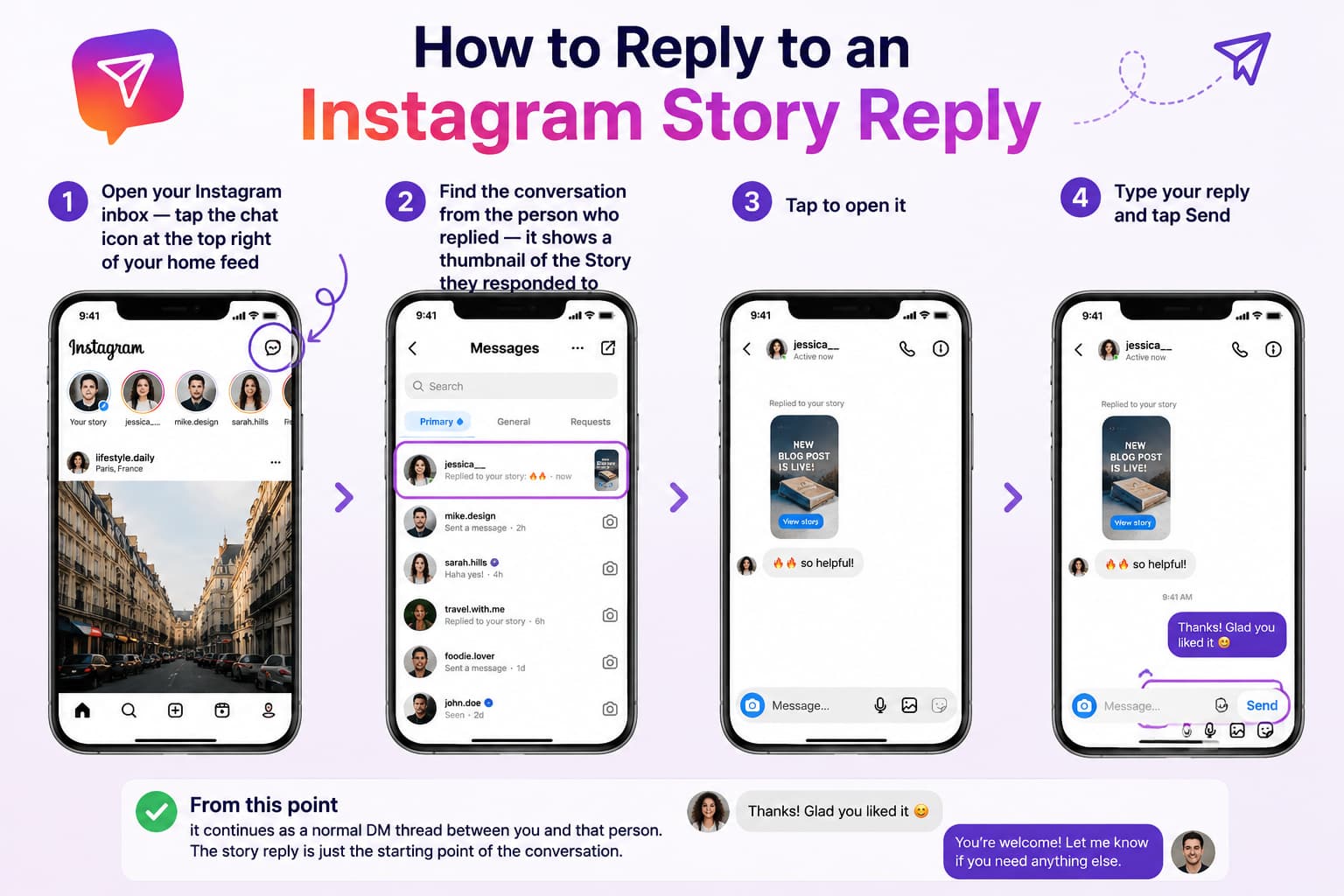
So when someone replies to your Instagram story or reacts to it, the automation kicks in and sends a DM. This is especially powerful, as story replies feel personal already, with someone taking the time to reply to something you posted. An automated response that follows up on that conversation feels like a continuation of a real conversation.
Ideal for: Backstage content where you anticipate viewer questions, product teasers, polls that include a CTA to “reply for more info,” and any story where you want to capture leads from high engagement moments.
DM Keyword Automation
If a person sends you a DM with that keyword, the automation will send a reply. It works for self-serve information systems — “DM us PRICE for a quote,” “Message BOOKING to see our calendar,” “Send GUIDE for the free download”
Best for: Service businesses that receive lots of similar questions. Brands with lots of different product lines. Any case where you want to build a keyword driven menu of information without requiring a human to be online.
Live Comment Auto-Reply
During an Instagram Live, viewers comment specific keywords and receive a DM instantly with the link or information they are asking for. This is powerful during product launches or demonstrations where viewers want to buy or learn more without leaving the live stream.
Best for: product demos, flash sales, Q&A’s where you have a resource to deliver, live shopping events, launches where you want to capture buyer intent at its absolute peak they are asking for. This is powerful when viewers are in a buying or learning mood at the time of a product launch or demonstration and they don’t want to leave the live stream.
Auto reply can be configured to reply to comments on Instagram ads and boosted posts as well as organic content. This is particularly beneficial because ad commenter intent is often high — they responded to paid content, meaning they’ve seen your targeting and interacted with it even though it’s an ad.
Best for: Lead gen campaigns, product ads with a ‘comment for details’ CTA and any ad where you want to capture and follow up on commenters instead of just relying on link clicks.
6. Best Practices for Instagram Auto Reply in 2026
Knowing what is allowed is one thing. Knowing how to do it well is another. These are the practices that separate accounts that get strong results from automation and accounts that get complaints, low engagement, and potential restrictions.
Write Messages That Sound Human
The biggest mistake people make with auto-replies is using template language that screams automation. 'Thank you for your comment! 'The phrase 'Here is your link' is technically functional, but it signals to the recipient that they are receiving a mass response. It undercuts the trust you have built through your content.
Write your automated messages. the way you would write a text to a friend who asked you the same question. Use your brand's actual voice. Include an emoji if that is natural to you. Reference the specific context — 'Hey! Glad you asked about the summer drop — here is the link straight to it' performs significantly better than a generic template.
Match the Keyword to the Intent
The keyword you choose for your trigger shapes who comments and why. 'LINK' is neutral and functional. 'SHOP' signals buying intent. 'GUIDE' signals educational intent. 'BOOK' signals that someone wants to make an appointment. Choosing a keyword that matches the intent you want to attract helps ensure your automation flow serves people who are genuinely interested in what you are offering, rather than people who commented out of mild curiosity.
In your caption, be explicit: 'Comment SHOP below and I will send you the link straight to your DMs.' This sets expectations, ensures the people who comment are doing so with purpose, and tends to produce a higher click-through rate on the links you send.
Create a Multi-Step Flow, Not a Single Message
One auto reply message is no reply at all. One message is dramatically worse than a multi-step flow. The first DM gets the instant payoff – the link, the code, the download. The follow-up messages, at 30 minutes, a few hours, and 24 hours later, are directed at the people who received your link but didn’t do anything about it.
Those follow-ups don't have to be aggressive. Just checking. Did you get a chance to look at the link I sent? Happy to answer any questions!” can bring back a meaningful percentage of people who were interested but got distracted. The incremental revenue from auto reply is mostly in this kind of nurture sequence running on auto pilot.
Always deliver on your promises.
If your post says 'comment LINK to get 20% off,' the DM better have a working discount code and direct link. When the link fails, the code is broken, or the DM asks them to do something else before they get what you promised, you create friction that erodes trust. Before you publish the post, make sure each automation flow works, each link opens, and each code runs.
Use Follow-Gating Strategically, Not Defensively
The follow-for-a-link tactic — users must follow you before getting the content — is a legitimate growth tactic, but it works best when it feels like a fair exchange, not a barrier. Use it only when the content you’re delivering is of real value to the person – a free guide, exclusive access, early sale links or content people would reasonably want to follow an account to receive. It feels like gaming to use it for trivial content, and people respond to that.
Remain in Your Niche and Context
The auto reply works best when the conversation it generates is natural to the context. A Reel about running shoes triggers an automation asking 'Would you like to see the full colour range? ' is correct in context. It feels disjointed when the same automation is triggered by a Reel about fitness nutrition. The more your automation feels like a natural continuation of what someone has just engaged with, the higher your response and conversion rates will be.
Header image for Ocoya's guide on how to set up and use Instagram auto-replies to save time and boost engagement.

7. What Makes Auto Reply Go Wrong: Common Mistakes to Avoid
For every account using auto reply effectively, there are others who set it up incorrectly and wonder why it is not working — or worse, why their engagement dropped or account got flagged. Here are the mistakes worth avoiding.
Using Non-API Tools
This is the single most dangerous mistake. If a tool asks for your Instagram username and password to 'log in on your behalf,' it is not using the official API. It is a credential-based bot that mimics human behaviour to bypass Instagram's systems. Instagram actively detects and bans these tools, and when they do, the ban falls on your account — not the tool's. The only safe auto reply tools in 2026 are those that connect via OAuth through Instagram's own login screen, never asking for your password.
Triggering on Every Single Comment
Setting your auto reply to trigger on any comment, regardless of content, creates a volume problem very quickly. A post with 500 comments — some of which are other creators tagging friends, people responding to each other in threads, or spam — will generate 500 DMs, many of them to people who had no buying intent whatsoever. This is both a waste of your automation and a source of negative experiences for people who received a DM they did not ask for. Keyword triggers solve this by ensuring only people with explicit intent get the DM.
Generic, Robotic Message Copy
We mentioned this in best practices, but it is worth reinforcing here because it is the most common reason auto reply produces disappointing results. Messages that sound automated produce lower click rates, fewer replies, and higher block rates. Spend time on your copy — it is one of the highest-use things you can do to improve auto reply performance.
No Follow-Up Sequence
Sending one DM and then nothing is leaving a significant portion of your potential conversions on the table. Most people need more than one touch to act. If you are not following up with people who received your initial DM but did not click or respond, you are doing half the job that auto reply is capable of doing.
Ignoring the 24-Hour Window
Some brands set up extensive multi-day follow-up sequences without realising that Instagram's API restricts automated messaging to the 24-hour window after user-initiated contact. Attempting to send automated messages beyond this window either fails silently or, with non-compliant tools, risks policy violations. The fix is straightforward: collect the user's email in the DM flow and continue nurturing via email after the 24-hour window closes.
8. How to Set Up Instagram Auto Reply – A Practical Guide
The process for setting up auto reply varies slightly by tool, but the core steps are consistent across any API-compliant platform. Here is a general walkthrough that applies whether you are setting up your first automation or rebuilding an existing one.
Step 1: Verify your account type
To use Instagram auto reply via the official API, you need to have a Business or Creator account connected to a Facebook Page. If you’re still on a personal account, switch to a Professional account in Instagram’s settings before you continue. It will take about 30 seconds and won't affect your content or followers.
Step 2: Select Your Tool and Link
Select an API-compliant auto reply tool and connect your Instagram account through the OAuth login flow — you will be redirected to Instagram's own login screen, confirm the permissions, and return to the tool's dashboard with your account connected. You will never enter your password directly into the tool.
Step 3: Choose your content and set your trigger
Choose the post, Reel, story, or ad you want to activate the automation on. Set your keyword trigger — the specific word or phrase that will fire the DM. Write the instruction in your caption so followers know what to comment.
Step 4: Create Your Message Flow
Write your first DM — the one with the promised value. Then craft your follow-up sequence: what gets sent if they don’t click in an hour? What is sent at the 12 hour mark? If your tool has the ability to collect emails, add the email request to the flow so that you can continue nurturing past the 24 hour window.
Step 5: Test Before You Publish
Test the automation on yourself before posting it. Comment the keyword from your own (or a test) account and confirm the DM arrives in seconds, the links work, the copy looks right and the follow up sequence is queued correctly. This 5-minute test will help you avoid sending thousands of broken DMs to actual followers.
Step 6: Monitor & Optimise
Once the automation is live, check the analytics: How many comments triggered the DM, what % of the people that received the DM clicked the link, how many follow-up messages were sent, and what the overall conversion rate was. Use this data to fine-tune your keyword, improve your copy, and adjust your follow-up timing for the next campaign.
Two Ways to Set Up Instagram Auto Reply
Category | Path 1: Meta Business Suite (Free) | Path 2: InstantDM (Full Automation) |
|---|---|---|
Setup Process | 1. Open Meta Business Suite → Inbox → Automation2. Configure a basic keyword auto-reply | 1. Sign up at InstantDM (Free plan includes 500 DMs/month)2. Connect your Instagram account via Meta's official OAuth3. Create comment-to-DM, story reply, and keyword automations4. Enable follow-up sequences and email capture |
Comment-to-DM | ❌ Not supported | ✅ Supported |
Story Reply Automation | ❌ Not supported | ✅ Supported |
Keyword Triggers | ✅ Basic | ✅ Advanced |
Follow-up Sequences | ❌ Not available | ✅ Included |
Email Collection | ❌ Not available | ✅ Included |
AI Agent | ❌ Not available | ✅ Included |
Viral Mode | ❌ Not available | ✅ Included |
Pricing | Free | Free (500 DMs/month) or $9.99/month (Unlimited) |
Best For | Small accounts with low message volume | Creators, businesses, and agencies looking to scale Instagram automation |
Key Takeaway
- Meta Business Suite is a free, native solution for basic Instagram DM auto replies but does not support comment-to-DM automation, story replies, follow-up sequences, or lead capture.
- InstantDM provides a complete Instagram automation platform. Even the free plan includes comment-to-DM, story reply automation, AI agent, email collection, follow-up sequences, and Viral Mode, with an unlimited plan available for $9.99/month.
9. Auto Reply For Different Types of Instagram Accounts
Your account type and business model should dictate what you do with auto reply. This is how different types of accounts typically do it.
Influencers & Content Creators
The primary use cases for creators are delivering lead magnets (free guides, templates, presets), sharing affiliate links when asked "where is this from?", growing their email list via DM email collection, and delivering exclusive content to followers who comment a keyword. Even creators with only a few thousand followers can achieve significant email list growth and affiliate revenue with well designed auto reply flows on their best performing content.
Shopify Brands & Ecommerce
Auto reply is a sales channel for eCommerce brands that send product links to commenters that show purchase intent, recover abandoned carts with follow-up DMs, and run flash sale campaigns where a comment keyword unlocks the sale price. For eCommerce brands on Instagram, the most impactful thing you can do right now is the direct path from comment to product link to checkout, with no link-in-bio friction.
Service Businesses & Coaches
Coaches, consultants, fitness trainers and service businesses use auto reply to qualify leads, send booking links and share pricing information without spending hours in their DMs answering the same questions over and over again. A well-built keyword flow can handle 90% of the initial lead qualification that previously consumed a team member’s time, while delivering a faster and more consistent experience to potential clients.
Agencies Managing Multiple Accounts
Social media managers need auto reply tools that enable them to manage multiple accounts and copy automation flows between accounts with a click. The ability to set up a one-time campaign and push it out to 15 client accounts in minutes instead of 15 manual setups is the type of efficiency that directly impacts agency profitability.
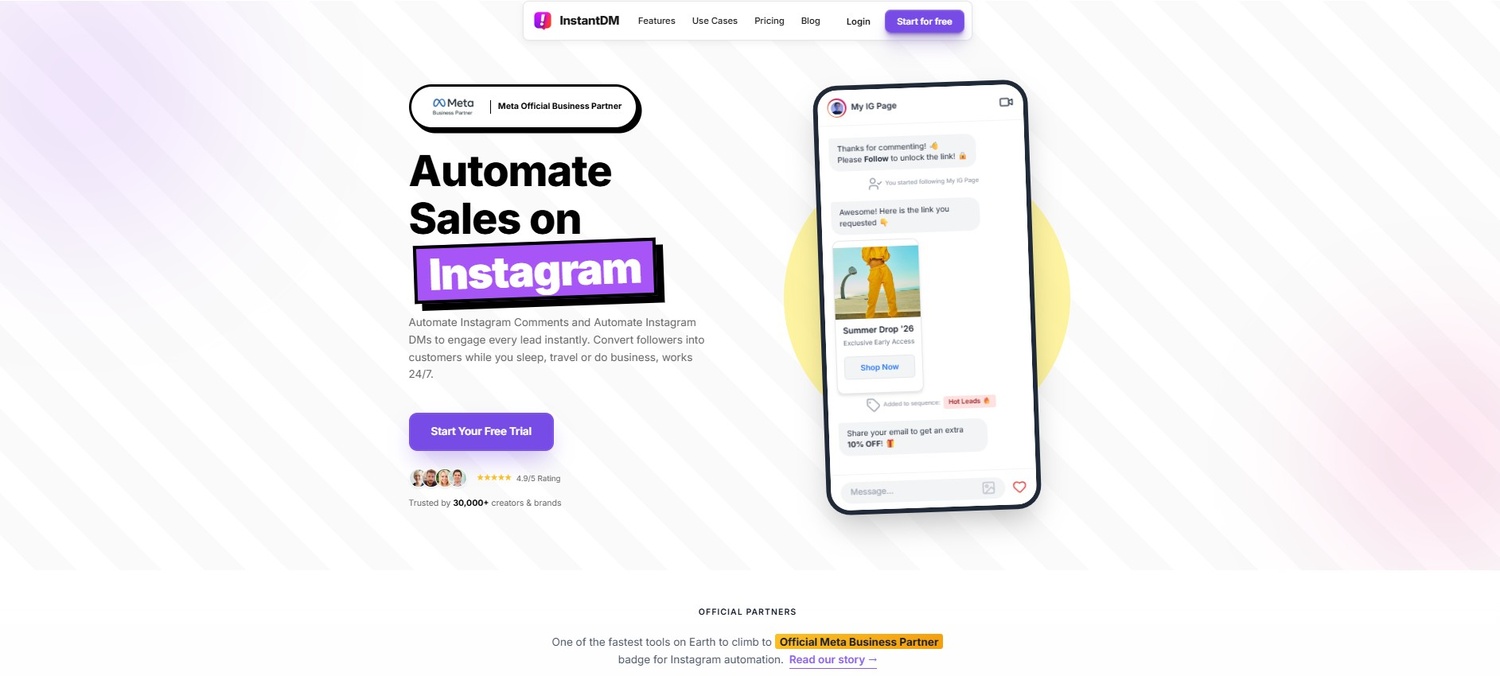
10. InstantDM - Best Auto Reply Tool for Instagram ($9.99/mo, unlimited DMs, Meta Business Partner)
We've talked about Instagram auto reply in general, how it works and what are the best practices. Let’s now look at what this looks like in a specific tool, InstantDM, which is worth looking at as an example of what a well-built auto reply platform provides and a practical option for anyone looking to implement what this blog covers.
InstantDM is an official Meta Business Partner and Shopify Partner, with more than 30,000 creators and brands. It only works via the official Meta API so there is no worry about account safety. Here’s how it plays out in practice with its feature set.
AutoDM comment
The main feature. Add a keyword to any post, Reel, story or ad. Anyone that comments that keyword gets a DM within a second. In DM you can send text, images, product cards, buttons and links. The flow builder is a visual drag & drop builder, no coding or technical knowledge required. Most users build their first automation in under five minutes.
Story Reply Automation
Automatically respond to story replies and reactions. When someone replies to your story, the automation fires and sends a DM — making every story an active lead capture or conversion tool rather than a passive piece of content.
Follow-up Messages
Available on the Trendsetter plan ($24.99/month), this feature sends timed follow-up DMs to anyone who received your initial message but did not take action. You set the timing — one hour, six hours, 24 hours — and the copy for each follow-up. This is the feature that recovers leads who were interested but distracted, and it runs entirely on autopilot.
Email Collection in DM
The automation asks for and validates email addresses directly within the DM conversation. Collected emails sync automatically to Klaviyo, Mailchimp, ActiveCampaign, or Google Sheets via Make.com. This feature effectively turns every auto reply flow into a simultaneous list-building campaign.
Schedule Post with AutoDM
A feature InstantDM was first to market with: schedule your Instagram post AND the automation trigger in a single workflow. When the post goes live, the automation is already active — no manual setup after publishing. Agencies managing multiple accounts described this as eliminating hours of repetitive work every week.
Live Comment Automation
Auto-DM viewers who comment a keyword during your Instagram Live. The system handles high-volume simultaneous comments during broadcasts without slowing down or missing anyone. Turn every live session into a direct sales or lead generation event.
Safety Queue
When a post goes viral and comment volume spikes suddenly, InstantDM's Safety Queue automatically detects the spike and spaces out DM delivery at human-safe intervals — protecting your account from action blocks while ensuring every commenter still receives their message. This is the feature that makes it safe to run campaigns on content with viral potential.
Universal Triggers
Configure one keyword trigger that works simultaneously across posts, stories, and DMs. Change it once, and it updates everywhere — no need to rebuild automation for each content format. Particularly useful for ongoing campaigns that span multiple content types.
Instagram AI Agent
InstantDM's newest capability: a Claude-powered AI agent that handles full DM conversations rather than just template responses. The AI qualifies leads, answers product questions, handles objections, sends links, tags contacts based on their responses, and escalates to a human when needed — all autonomously. This represents the next generation of auto reply: not just triggered messages, but genuine, contextual conversations at scale.
InstantDM Pricing
Legend Pro: $9.99/month — Unlimited automations, email collection, DM automation, comment-to-DM, story reply, email support, free plan available (500 DMs/month). Trendsetter: $24.99/month — Everything in Legend plus follow-up messages, advanced safety mode, API access, and WhatsApp support. 7-day free trial, no credit card required.
Pros:
$9.99/mo flat rate, unlimited DMs, official Meta Business Partner, comment-to-DM, story reply, follow-up sequences, email collection, Viral Mode, AI agent, iOS/Android apps.
Cons:
One account per plan, no WhatsApp/SMS, newer brand than ManyChat.
11. Measuring the Performance of Your Auto Reply: Metrics That Matter
Running auto reply without tracking performance is like running ads without looking at ROAS. These are the numbers worth monitoring and what they tell you.
Trigger Rate
How many people who saw your post actually commented the keyword? A low trigger rate usually means the call to action in your caption needs work — it is either buried, not clear enough, or not compelling enough. Test different CTA phrasings and positions in your caption.
DM Open Rate
Instagram DMs have dramatically higher open rates than email — typically 80 to 90% — because they arrive in a channel people actively monitor. If your DM open rate is significantly below this, it may indicate that your account's DMs are going to the 'Requests' folder rather than the primary inbox, which can happen if you are sending from a relatively new or low-engagement account.
Link Click-Through Rate
Of the people who received your DM and opened it, what percentage clicked the link? This metric tells you how compelling your message and offer are. If your click-through rate is low, test different message copy, make the link more prominent, or add a stronger reason-to-click to the message.
Email Capture Rate
If your flow includes email collection, what percentage of DM recipients share their email? Above 25 to 30% is generally strong. Below this suggests either the incentive is not compelling enough or the email request is coming too early in the conversation before sufficient trust has been established.
Follow-up Conversion Lift
Compare conversion rates between people who only received the initial DM and people who received the initial DM plus at least one follow-up. The difference is your follow-up conversion lift — typically a meaningful improvement, which makes the case for always having a follow-up sequence in place.
12. The Future of Instagram Auto Reply: Where This Is Going
Auto reply as a category is evolving fast. The current state—keyword triggers sending templated DMs— is already a significant improvement over manual responses. But the direction the technology is moving in is toward genuinely conversational AI, and Instagram is one of the platforms where this is happening fastest.
Meta's continued investment in business messaging infrastructure, combined with the arrival of powerful language models capable of holding natural conversations, means the distinction between 'automated reply' and 'human reply' will continue to blur. Tools like InstantDM's AI Agent — which uses Claude to hold full, contextual DM conversations — are the early version of what will become standard for customer-facing businesses on Instagram within a few years.
For creators and brands thinking about where to invest in 2026, building the infrastructure for auto reply now — the flows, the keyword strategies, the email collection systems — puts you ahead of the curve. When AI-powered conversation tools become mainstream, the accounts that already have a tested auto reply foundation will be the ones that adopt the next generation of tools most effectively.
The other major direction is cross-channel automation. The best auto-reply setups in 2026 are already connected — an Instagram comment triggers a DM, the DM collects an email, the email flows into Klaviyo, Klaviyo handles long-term nurture, and the whole system is visible in a single dashboard. The siloed version — just Instagram, just email — is being replaced by unified customer journey automation, which occurs on the channel that the customer is using.
Conclusion
Instagram auto reply in 2026 is not a loophole or a shortcut. It is a legitimate, Meta-approved, and increasingly essential part of running a serious Instagram presence. When someone expresses interest in your content, your product, or your service — through a comment, a story reply, or a DM — the window for capturing that interest is narrow. Auto reply keeps that window open 24 hours a day, every day, without requiring you to be glued to your phone.
The rules are clear: use the official API, trigger messages from user actions, stay within the 24-hour messaging window for automated sequences, and always deliver genuine value in every message you send. Do those things, and auto reply is a completely safe and highly effective tool. Ignore them, and you are taking risks with an account you have spent years building.
The best practices are not complicated: write like a human, match your keyword to your intent, build a follow-up sequence, collect emails so you can nurture beyond Instagram, and test everything before it goes live. These habits, applied consistently across your campaigns, compound into a meaningfully better conversion rate over time.
If you are ready to start, instantdm.com offers a free plan with 500 DMs per month — enough to test your first automation flow on a real campaign and see the results for yourself before committing to a paid plan. Set it up once, watch it work, and then decide how far you want to take it.